










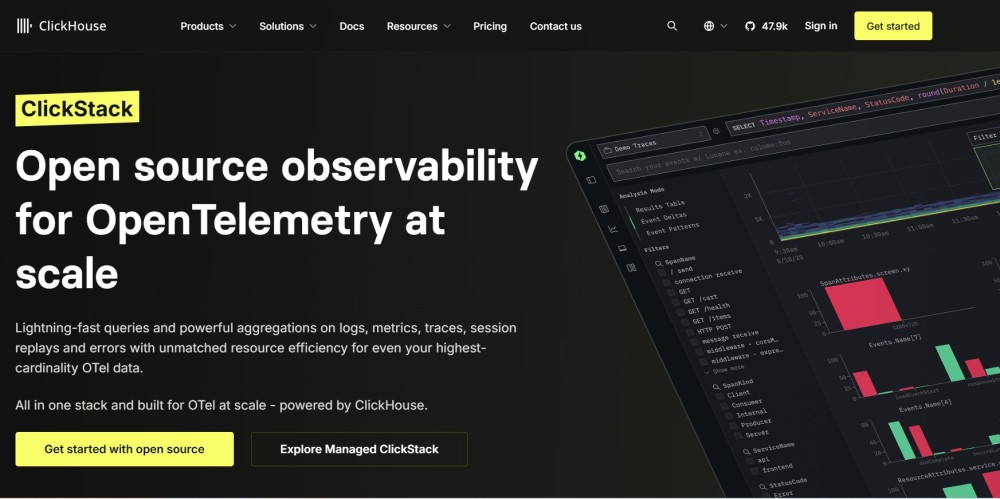
ClickStack is an open-source observability platform built by ClickHouse Inc. It combines three components into one coherent stack: a pre-configured OpenTelemetry Collector for ingestion, ClickHouse as the storage and query engine, and the HyperDX UI as the frontend. The result is a unified platform for logs, traces, metrics, and session replays that stores all four signal types in one ClickHouse instance and lets you query everything with SQL.
ClickStack launched in May 2025 following ClickHouse’s acquisition of HyperDX in March 2025. It is positioned as a self-hosted, open-source alternative to Datadog and similar SaaS observability platforms. In February 2026, ClickHouse released a managed cloud version called Managed ClickStack, currently in beta.
Key Takeaways
- ClickStack bundles ClickHouse, an OpenTelemetry Collector, and the HyperDX UI into one open-source observability stack.
- It handles logs, traces, metrics, and session replays in a single ClickHouse backend, eliminating the need for separate tools like Loki, Tempo, and Prometheus.
- The self-hosted open-source version is free to run. Managed ClickStack on ClickHouse Cloud is in beta at under $0.03 per GB per month for storage.
- ClickStack requires a minimum of 4 GB RAM and 2 CPU cores for testing; the Docker quickstart gets a fully functional instance running in under 15 minutes.
- Session replay is the feature that most clearly differentiates ClickStack from other open-source observability stacks, allowing frontend user sessions to be correlated directly with backend traces.
- ClickStack is schema-agnostic and works on top of any existing ClickHouse instance with minimal configuration.
What problem does ClickStack solve?
Traditional observability requires separate, specialized tools for each signal type: Prometheus for metrics, Loki or Elasticsearch for logs, Jaeger or Tempo for traces, and a separate session recording tool for frontend monitoring. Each stores data differently, so correlating a slow database query with the exact user session that triggered it requires manually joining timestamps and IDs across multiple systems.
ClickStack eliminates that complexity. Because all four signal types land in ClickHouse tables, cross-signal correlation happens at the database level using trace IDs and session IDs. Engineers can go from a user-reported frontend error directly to the correlated backend span without switching tools or writing join queries by hand.
What are the components of ClickStack?
ClickStack is not a single binary. It is three components designed to work together.
- OpenTelemetry Collector: The ingestion layer. It receives telemetry data from your applications over OTLP on port 4317 (gRPC) and 4318 (HTTP). ClickStack ships a pre-configured collector, so you do not need to write a collector config from scratch.
- ClickHouse: The storage and query engine. ClickHouse‘s column-oriented architecture, ZSTD compression (typically 8x to 12x for observability data), and vectorized query execution engine handle sub-second aggregations across large time ranges. Each signal type gets its own optimized schema and a default TTL: logs at 14 days, traces at 30 days, metrics at 90 days, and session replays at 7 days.
- HyperDX UI: The frontend for exploring all four signal types in one interface. It provides full-text log search, trace flamegraphs, metric charts, session replay playback, and alerting. HyperDX generates efficient ClickHouse SQL queries for routine observability tasks without requiring you to write SQL by hand, though full SQL access is available for advanced queries.
What data types does ClickStack support?
| Signal type | Storage table | Default TTL | Notes |
| Logs | otel_logs | 14 days | Full-text indexed via tokenbf_v1; correlated to traces via trace_id |
| Traces | otel_traces | 30 days | Delta and ZSTD compression; nested event structures |
| Metrics | otel_metrics_* | 90 days | Native time-series support; optimized for high-cardinality metric names |
| Session replays | hyperdx_sessions | 7 days | Mirrors otel_logs schema; linked to traces via rum.sessionId |
Session replay is the feature that most clearly sets ClickStack apart from other open-source observability stacks. It captures browser user interactions and stores them alongside backend telemetry, so you can click a timestamp in a replay and jump directly to the correlated server-side traces without a full table scan.
How do you install ClickStack?
ClickStack supports three primary deployment paths.
- Docker (quickstart): A single command starts a fully functional instance:
docker run -p 8080:8080 -p 4317:4317 -p 4318:4318 docker.hyperdx.io/hyperdx/hyperdx-all-in-oneAfter running this, the HyperDX UI is available at http://localhost:8080. Minimum requirements for testing are 4 GB RAM and 2 CPU cores. The quickstart bundles ClickHouse, HyperDX, and the OpenTelemetry Collector together. If your server is behind a firewall, you need to open ports 8080 (UI), 8000 (API), and 4318 (OTel Collector).
- Helm on Kubernetes: ClickStack ships official Helm charts for teams running Kubernetes. The install path takes roughly the same time as the Docker quickstart and is the recommended approach for team-shared test environments.
- Production Kubernetes with external ClickHouse: For production at scale, you can point ClickStack at an existing ClickHouse instance. ClickStack is schema-agnostic and works on top of your existing ClickHouse tables, including schemas already in use for analytics workloads.
What are the key features of ClickStack?
- Unified signal correlation: Logs, traces, metrics, and session replays share trace_id and session_id references, so you can navigate from any signal to any correlated signal in a single click.
- Natural language querying: The HyperDX UI supports natural language search across log and trace data, reducing the SQL knowledge required for routine debugging. Full SQL access is always available.
- Intuitive search syntax: ClickStack supports a Lucene-style search syntax alongside SQL (for example, level:err), so you can filter without writing queries for common lookups.
- Alerting: Built-in alerting inside the HyperDX UI covers log patterns, metric thresholds, and trace error rates. No separate alerting system is required.
- Dashboard import and export: Introduced in September 2025, dashboards can be exported and imported between ClickStack instances for sharing standard views across teams.
- Custom aggregations: Also added in September 2025, the UI supports custom aggregation functions, useful for percentile charts and cardinality-heavy dashboards.
- Materialized Views optimization: December 2025 introduced smarter use of Materialized Views throughout HyperDX, a significant performance improvement for high-scale deployments.
- ClickHouse Cloud integration: ClickStack is available inside ClickHouse Cloud with compute and storage scaling independently, and the Managed ClickStack beta launched in February 2026.
- SQL access: Advanced users retain direct SQL access to the underlying ClickHouse tables, with no ceiling on query expressiveness or customization.
What is ClickStack’s pricing?
ClickStack has two deployment modes with different cost structures.
| Option | Cost model | Who manages infrastructure |
| ClickStack Open Source | Free; you pay for your own servers | You |
| Managed ClickStack (ClickHouse Cloud, beta) | Under $0.03/GB/month for storage; compute billed separately | ClickHouse Inc. |
- Open source: The open-source version is free to download and run. Your costs are the underlying infrastructure: servers, storage, bandwidth, and engineering time. A minimal production deployment for high availability requires at least two ClickHouse nodes, a ZooKeeper implementation, and a load balancer. There are no per-user, per-host, or per-series fees.
- Managed ClickStack: Announced in beta in February 2026, Managed ClickStack runs on ClickHouse Cloud and is priced on infrastructure rather than events. Storage costs under $0.03 per GB per month. Compute is billed separately and scales independently from storage. New users receive a $300 credit on ClickHouse Cloud, which the ClickHouse team estimates covers approximately 10 TB of observability data. There is no sampling and no retention limit enforced by the pricing model.
- One important caveat: storage costs are transparent and predictable, but query compute costs depend on usage patterns and are not a fixed published number. Teams with heavy query workloads should account for this variable when estimating total cost of ownership.
What is ClickStack’s license?
ClickHouse and the OpenTelemetry Collector components are licensed under Apache 2.0. The HyperDX UI uses the MIT license. Both are permissive licenses with no copyleft restrictions, meaning you can use, modify, and deploy ClickStack in commercial environments without restrictions.
What is the origin of ClickStack?
ClickHouse was already a common backend for observability platforms before ClickStack existed. Companies such as Sentry and Dash0 built their own observability products on top of ClickHouse’s columnar engine. Netflix and eBay used ClickHouse directly for large-scale observability workloads.
HyperDX was an independent open-source observability platform purpose-built on ClickHouse. When HyperDX open-sourced its v2 UI in late 2024, ClickHouse tested it internally and moved to acquire HyperDX in March 2025. Mike Shi, co-founder of HyperDX, became Head of Observability at ClickHouse Inc. and co-created ClickStack.
ClickStack launched publicly in May 2025, combining ClickHouse’s existing OpenTelemetry exporter, the HyperDX UI, and ClickHouse itself into an officially supported, opinionated stack.
How does ClickStack compare to similar tools?
| Feature | ClickStack | Grafana LGTM stack | SigNoz | CubeAPM |
| License | Apache 2.0 / MIT | AGPLv3 | MIT Expat | Proprietary |
| Session replay | Yes | No | No | No |
| Backend | ClickHouse (single store) | Loki + Tempo + Mimir + Prometheus | ClickHouse | ClickHouse |
| OpenTelemetry native | Yes | Partial | Yes | Yes |
| Self-hosted | Yes | Yes | Yes | Yes |
| Managed cloud option | Yes (beta) | Yes | Yes | Yes |
| Storage pricing (managed) | Under $0.03/GB/month | Pay-as-you-go | $49/month | $0.15/GB ingested |
| Per-user or per-host fees | No | No (self-hosted) | No | No |
| SQL access | Yes | No (LogQL/PromQL) | Limited | Yes |
Note on Grafana: the self-hosted stack components, including Loki, Tempo, and Mimir are licensed under AGPLv3, not Apache 2.0. This matters for teams that redistribute or integrate the software in commercial products.
Who is ClickStack best suited for?
ClickStack works well for engineering teams that want to replace multiple observability tools (Loki, Prometheus, Jaeger, a session recorder) with a single self-hosted stack, are already running ClickHouse for analytics and want to co-locate observability data alongside it, need frontend session replay correlated with backend traces without adding a separate SaaS tool, or want OpenTelemetry-native ingestion with no vendor lock-in on data format.
It is a less obvious fit for small teams with no existing ClickHouse experience who want a fully managed, zero-ops platform with a fixed monthly bill. The operational burden of self-hosting ClickHouse at production scale is real, and Managed ClickStack’s variable compute billing makes total cost less predictable than flat-rate alternatives.
CubeAPM and ClickStack: complementary tools for OpenTelemetry teams
ClickStack is purpose-built around the storage and exploration layer. It gives you a powerful, SQL-accessible backend for all four signal types, including session replay that most open-source stacks do not offer. What it is not is an application performance monitoring platform with opinionated service health views, latency distributions, error tracking, and alert workflows built around your services rather than your raw telemetry tables.

That is where CubeAPM fits alongside it. CubeAPM is a self-hosted, OpenTelemetry-native APM platform built for teams that want service-level performance visibility without the per-host pricing model that makes Datadog and New Relic expensive at scale. Pricing is $0.15 per GB ingested, with no per-user, per-host, or per-series fees. Because CubeAPM is also OpenTelemetry-native, it receives the same OTLP telemetry your applications already send, with no re-instrumentation required.
For teams adopting ClickStack, CubeAPM addresses the gap between raw telemetry exploration and actionable service performance monitoring. You get ClickStack’s depth for ad hoc SQL queries and session replay correlation, and CubeAPM’s structured APM workflows for day-to-day service health, latency tracking, and incident response.
Summary
ClickStack is a genuinely compelling option if your team is ready to invest in a ClickHouse-based observability foundation. The unified backend eliminates the integration complexity of running Loki, Tempo, Prometheus, and a session recorder as separate systems. The Apache 2.0 and MIT licensing mean no copyleft constraints. The Managed ClickStack beta brings storage costs below $0.03 per GB per month, which changes the economics of long-term telemetry retention compared to most managed platforms. The tradeoffs are real: self-hosting ClickHouse at scale is an operational commitment, compute costs on the managed path are variable, and ClickStack does not replace a purpose-built APM tool for service-level performance monitoring.
For teams building on OpenTelemetry and looking to pair deep telemetry storage with structured APM visibility, CubeAPM works alongside ClickStack without duplication. Get started with CubeAPM to add flat-rate, self-hosted APM to your observability stack.
Disclaimer: ClickStack is an actively developed project with monthly releases. Pricing, feature availability, and managed cloud status described here reflect publicly available information as of June 2026. Verify current details at clickhouse.com/clickstack before making infrastructure decisions. CubeAPM is referenced as a complementary tool; evaluate all platforms against your own requirements.
Also read:
What Are the Best Open Source Nginx Monitoring Tools in 2026