










A CNCF survey published in January 2026 found that 82% work in organizations running Kubernetes in production. Deploying Kubernetes is the easy part in 2026. Keeping visibility across it is where engineering teams quietly struggle. The control plane, the nodes, the workloads, and the applications inside those workloads – each fails differently, each emits different signals, and each requires a different instrumentation approach.
Now multiply that across environments. AWS EKS, GKE, and on-prem Kubernetes share the same orchestration primitives but differ in control plane access, authentication models, and native telemetry exposure. A monitoring strategy built for one environment rarely transfers cleanly to another. Teams end up with three separate observability setups, inconsistent alerting, and no reliable way to correlate signals across environments during an incident.
This guide covers EKS monitoring, GKE monitoring, and on-prem Kubernetes monitoring with OpenTelemetry for SREs, platform engineers, and DevOps teams managing clusters across multiple environments.
What Kubernetes Monitoring Actually Covers
Most teams start Kubernetes monitoring by installing Prometheus and calling it done. That covers resource utilization. It does not cover why a deployment is stuck, why a specific request was slow, or why pods started evicting on a node that showed normal CPU and memory five minutes ago.
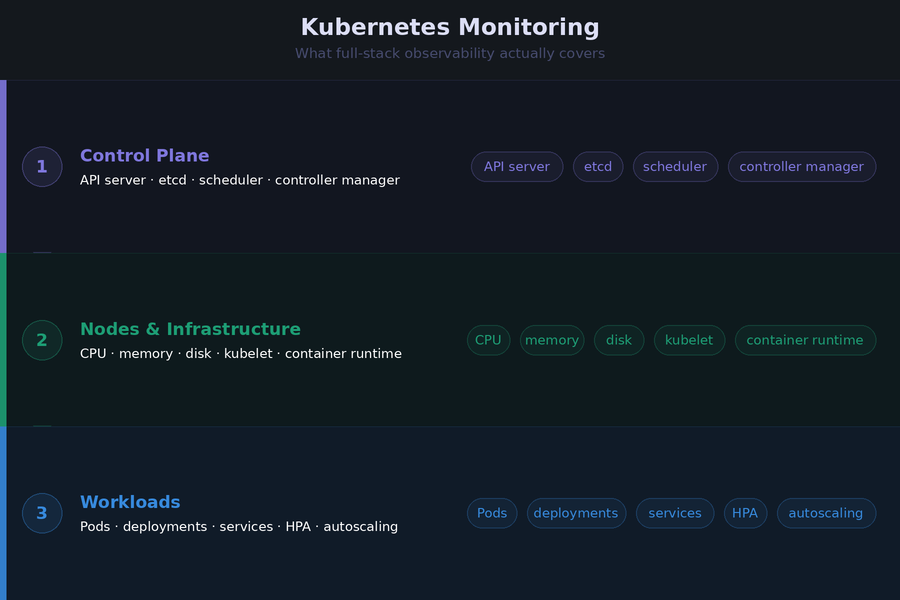
Kubernetes monitoring has three distinct layers. Each requires a different approach.
The Control Plane
The control plane runs the API server, scheduler, controller manager, and etcd. It is the brain of the cluster. When it struggles, everything downstream struggles, often in ways that look like application problems rather than infrastructure problems.
Control plane metrics tell you whether Kubernetes itself is healthy. API server request latency, etcd disk write latency, scheduler queue depth, and controller manager work queue length are the signals that warn you before workloads start failing.
On managed services like EKS and GKE, the cloud provider operates the control plane. Direct scraping is restricted. On on-prem clusters, you own it entirely and can instrument it directly.
Nodes and Infrastructure
Nodes are the compute layer. Each runs a kubelet, a container runtime, and the pods scheduled onto it. The signals that matter here are not just raw utilization numbers. They are conditions: MemoryPressure, DiskPressure, PIDPressure, and NotReady. A node that enters MemoryPressure starts evicting pods. A node that flips to NotReady triggers rescheduling across the cluster. Both create downstream latency and availability impact before a single application metric fires an alert.
Workloads and Applications
Workloads are the pods, deployments, StatefulSets, and jobs running on the nodes. Monitoring at this layer covers pod lifecycle events like CrashLoopBackOff and OOMKilled, resource requests versus actual consumption, replica availability, and autoscaler behavior.
Application-level monitoring sits above all of this. It covers distributed traces, custom business metrics, and structured logs from the code running inside containers. This layer connects cluster behavior to actual user-facing request performance, and it is the layer that tells you not just that something is wrong, but exactly where in the request path it went wrong.
All three layers need to work together. Metrics alone tell you something is wrong. Traces tell you where. Logs tell you why. A monitoring setup that covers only one or two of these layers will leave gaps precisely when you need the full picture most.
The OpenTelemetry Architecture That Works Across All Three Environments
The core challenge with multi-environment Kubernetes monitoring is consistency. OpenTelemetry solves this by separating instrumentation from the destination. Instrument once using standard receivers and SDKs, route through the Collector, and send to any OTLP-compatible backend. The collection architecture stays identical across EKS, GKE, and on-prem. Only the authentication configuration and a handful of environment-specific settings change.
The DaemonSet and Deployment Collector Pattern
The OpenTelemetry project recommends two Collector installations for complete Kubernetes coverage. Both are deployed using the official OTel Helm chart.
The DaemonSet Collector runs on every node. It handles:
- Node, pod, and container resource metrics via kubeletstatsreceiver
- Host-level CPU, memory, disk, and network metrics via hostmetricsreceiver
- Container and application logs via filelogreceiver
- Application traces, metrics, and logs via otlpreceiver
The Deployment Collector runs as a single instance or small replica set. It handles:
- Cluster-level metrics and entity events via k8sclusterreceiver
- Kubernetes object events like pod scheduling failures and OOMKill events via k8sobjectsreceiver
These two roles are distinct. Running both in a single instance is a common mistake that creates a single point of failure and makes scaling harder as cluster size grows.
Getting Attribute Enrichment Right from Day One
The k8sattributesprocessor is the most important processor in a Kubernetes Collector configuration. It enriches every span, metric, and log record with Kubernetes metadata: pod name, namespace, node name, deployment name, and container name. This enrichment is what makes cross-service and cross-cluster correlation possible in the backend.
Set these resource attributes consistently across every cluster from the start:
- k8s.cluster.name
- deployment.environment
- cloud.region
- service.name
Retrofitting attribute consistency across a running multi-cluster fleet is one of the more painful operational tasks in observability.
Installing with Helm
helm repo add open-telemetry https://open-telemetry.github.io/opentelemetry-helm-charts

helm repo update open-telemetry

helm install otel-collector-daemonset open-telemetry/opentelemetry-collector \

  -f otel-collector-daemonset.yaml

helm install otel-collector-deployment open-telemetry/opentelemetry-collector \

-f otel-collector-deployment.yamlA minimal DaemonSet values file enabling the core presets:
mode: daemonset

presets:

  kubernetesAttributes:

    enabled: true

  hostMetrics:

    enabled: true

  kubeletMetrics:

    enabled: true

  logsCollection:

enabled: trueThe Helm chart handles RBAC, volume mounts, host ports, and Kubernetes-specific configuration automatically. The one thing it does not do by default is configure an exporter. Add your backend OTLP endpoint to the exporters section before deploying.
Monitoring AWS EKS
EKS is a managed Kubernetes service. AWS operates the control plane across multiple availability zones. You manage the data plane, unless you use Fargate, where AWS manages that too. That division of responsibility directly shapes what you can monitor and how.
EKS Control Plane Monitoring
AWS does not expose EKS control plane metrics directly for scraping. Instead, control plane components write logs to CloudWatch Logs when you enable control plane logging in the EKS console. Five log types are available: API server, audit, authenticator, controller manager, and scheduler.
Enable all five. The cost is low and the diagnostic value during an incident is high. Teams that skip audit logging in particular tend to regret it the first time they need to trace an unexpected resource modification back to its source.
Once logs are in CloudWatch, use CloudWatch Logs Insights to query them. For scheduler backlog, this query surfaces pods that could not be scheduled:
fields @timestamp, @message
| filter @logStream like “scheduler”
| filter @message like “Unable to schedule pod”
| sort @timestamp desc
For API server throttling, filter on “client-side throttling” in the API server log stream. Persistent throttling from a controller usually means a custom controller is making too many API calls and needs rate limiting tuned.
Node and Workload Monitoring on EKS (EC2)
For EKS clusters using EC2 node groups, deploy the OTel Collector as a DaemonSet. This is the standard and most reliable pattern. Each Collector instance runs on one node and collects from that node’s kubelet and file system.
The Collector service account needs IAM permissions to query the Kubernetes API and, if routing to AWS-native backends, AWS API access. Use IAM Roles for Service Accounts (IRSA) to bind the Collector’s Kubernetes service account to an IAM role. Avoid static credentials in the Collector configuration.
Install kube-state-metrics alongside the Collector. The k8sclusterreceiver in the OTel Collector covers much of the same ground, but kube-state-metrics exposes a broader set of Kubernetes object metrics in Prometheus format that some teams and backends still rely on.
Key metrics to alert on for EKS EC2 nodes:
- Node NotReady condition persisting more than 2 minutes
- Container CPU throttling rate above 25% for more than 5 minutes
- Pod restart count exceeding 5 in a 10-minute window per deployment
- Pending pod count above 0 for more than 5 minutes
EKS Fargate: The DaemonSet Constraint
Fargate is where the standard DaemonSet pattern breaks down. AWS runs each Fargate pod in an isolated compute environment. There is no persistent node to run a DaemonSet on, no host file system to mount, and no kubelet endpoint to scrape from outside the pod boundary.
The correct pattern on Fargate is a sidecar Collector running inside each pod. The sidecar collects application telemetry via OTLP and forwards it to a centralized Collector gateway running as a Deployment elsewhere in the cluster.
For cluster-level metrics and Kubernetes events on Fargate, the Deployment Collector with the k8sclusterreceiver still works. What you lose compared to EC2 nodes is host-level infrastructure metrics. AWS does not expose underlying Fargate host metrics. Pod-level CPU and memory are available via the Kubernetes metrics API, but node-level disk, network, and process metrics are not.
This is a real monitoring gap on Fargate. Teams running latency-sensitive workloads on Fargate need to account for this when designing their alerting strategy.
EKS Autoscaling Observability
Autoscaling introduces a category of monitoring that most EKS guides miss entirely. When a cluster scales, the scaling behavior itself becomes a signal worth tracking.
For Horizontal Pod Autoscaler, monitor the gap between kube_horizontalpodautoscaler_status_current_replicas and kube_horizontalpodautoscaler_status_desired_replicas. A persistent gap means the cluster cannot scale pods fast enough to meet demand, which usually points to node provisioning latency or resource quota limits.
For Karpenter, which replaced the Cluster Autoscaler as the recommended node provisioner for EKS, track node provisioning duration and the rate of node disruption events.
Monitoring Google GKE
GKE is Google Cloud’s managed Kubernetes service. Like EKS, Google operates the control plane. Unlike EKS, GKE has tighter native integration with Google Cloud Observability and introduced a fully managed OpenTelemetry pipeline in early 2026 that changes the setup options available to teams.
GKE runs in two modes:
- Standard: You manage node pools and have full DaemonSet support.
- Autopilot: Google manages nodes entirely, and DaemonSets are restricted, creating the same constraint as EKS Fargate.
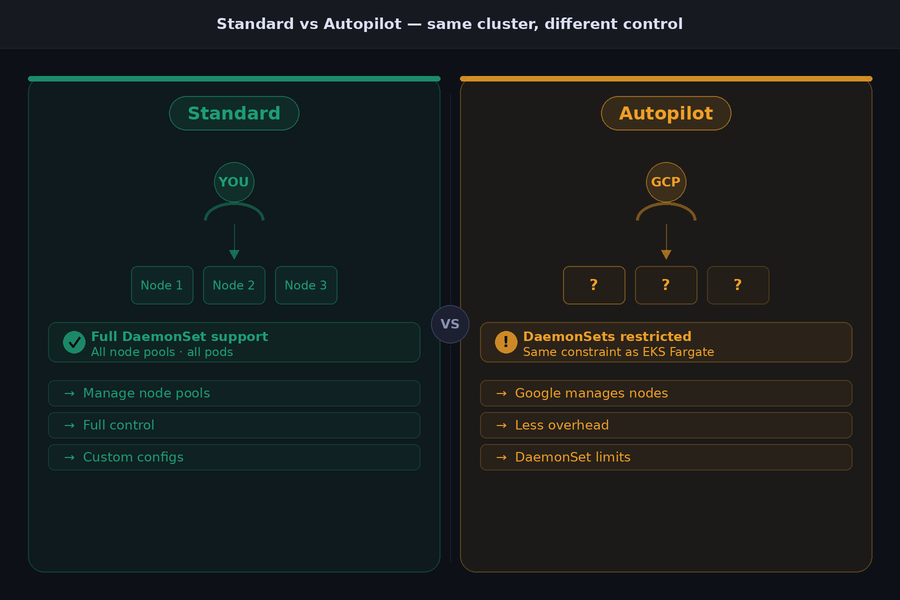
The monitoring approach differs meaningfully between the two.
GKE Managed OpenTelemetry
Google announced Managed OpenTelemetry for GKE in early 2026. It provides a fully managed in-cluster OTLP endpoint. Applications send traces, metrics, and logs to this endpoint without deploying or managing their own Collector infrastructure. Google handles authentication via Workload Identity, upgrades automatically, and routes telemetry to Google Cloud Observability.
This is genuinely useful for teams that want minimal operational overhead and route telemetry exclusively to Google Cloud backends. The trade-off is significant for teams with more complex requirements. Managed OTel for GKE does not support collector-level filtering, tail-based sampling, or routing to non-Google backends. If your team needs any of those, run a self-managed Collector instead.
Self-Managed Collector on GKE: The Two-Tier Pattern
For teams routing telemetry outside Google Cloud or applying custom processing, the recommended pattern is two Collector tiers.
DaemonSet agent Collectors run on every node. They collect local telemetry with minimal processing and forward everything to a central gateway. The gateway Deployment handles batching, filtering, enrichment, and export. This separation keeps agent resource overhead low on each node while concentrating expensive processing in a horizontally scalable gateway.
If the gateway exports to Google Cloud Trace or Cloud Monitoring, it needs IAM permissions. Use GKE Workload Identity to bind the Collector’s Kubernetes service account to a Google Cloud service account. This is the correct authentication pattern on GKE. Avoid mounting service account key files into the Collector pod.
gcloud iam service-accounts create otel-collector \

  --display-name="OpenTelemetry Collector"

gcloud projects add-iam-policy-binding PROJECT_ID \

  --member="serviceAccount:otel-collector@PROJECT_ID.iam.gserviceaccount.com" \

  --role="roles/cloudtrace.agent"

gcloud projects add-iam-policy-binding PROJECT_ID \

  --member="serviceAccount:otel-collector@PROJECT_ID.iam.gserviceaccount.com" \

--role="roles/monitoring.metricWriter"GKE Autopilot Monitoring Considerations
Autopilot restricts DaemonSets, so the node-level Collector pattern does not work. The options are the same as Fargate: use Managed OTel for GKE if Google Cloud backends meet your needs, or run a sidecar Collector in each pod for application telemetry combined with a Deployment Collector for cluster-level signals.
What Autopilot does provide that Fargate does not is pod-level resource metrics through the Google Cloud Ops agent, which runs transparently in the background. Teams on Autopilot still lose host-level disk and network metrics for the underlying nodes, since Google abstracts that infrastructure entirely.
GKE-Specific Metrics Worth Tracking
Beyond the standard cluster metrics that apply everywhere, GKE environments benefit from tracking:
- Node pool autoscaling events, specifically scale-up latency when pods are pending
- Pod eviction events triggered by the GKE autoscaler during node scale-down
- Persistent volume claim binding failures, which surface differently on GKE than on-prem due to the GCE Persistent Disk provisioner behavior
- Workload Identity token refresh failures, which can silently break Collector authentication without generating obvious application errors.
Monitoring On-Premises Kubernetes
On-prem Kubernetes gives teams something EKS and GKE cannot: full control plane access. Every component, the API server, scheduler, controller manager, and etcd, exposes Prometheus-format metrics endpoints that you can scrape directly. No cloud provider abstraction, no restricted access, no waiting for a managed log export to arrive in CloudWatch.
That access comes with full operational responsibility. You run the control plane, which means you monitor it too. Teams that move from managed Kubernetes to on-prem consistently underestimate how much the managed services were quietly doing for them until it is gone.
Control Plane Monitoring On-Prem
Each control plane component exposes a /metrics endpoint. Use the OTel Collector’s prometheusreceiver to scrape all four:
- API server: port 6443
- Controller manager: port 10257
- Scheduler: port 10259
- etcd: port 2381
The scrape configuration needs TLS certificates and service account tokens for authentication. Store these as Kubernetes secrets and mount them into the Collector pod rather than embedding them in the configuration file.
etcd deserves particular attention on-prem. It is the most operationally sensitive component in the control plane, and it fails quietly. The four metrics that matter most:
- etcd_disk_wal_fsync_duration_seconds: Write-ahead log fsync latency. p99 should stay under 10ms. Values above 100ms indicate disk I/O pressure that will cascade into API server timeouts.
- etcd_disk_backend_commit_duration_seconds: Backend commit latency. p99 should stay under 25ms.
- etcd_server_leader_changes_seen_total: Frequent leader changes indicate network instability or resource pressure on etcd nodes.
- etcd_mvcc_db_total_size_in_bytes: Database size. etcd performance degrades as the database grows. Compact and defragment regularly when this approaches 2GB.
API server request latency thresholds come from the upstream Kubernetes SLO definitions. Mutating calls (POST, PUT, DELETE, PATCH) should complete at p99 under 1 second. Non-streaming read calls should complete at p99 under 30 seconds. Sustained violations of these thresholds indicate control plane pressure that will start affecting workload scheduling and pod lifecycle operations.
Node Monitoring On-Prem
The DaemonSet Collector pattern is identical to EKS EC2 node groups. Deploy the OTel Collector as a DaemonSet with kubeletstatsreceiver, hostmetricsreceiver, and filelogreceiver enabled.
One important difference from cloud environments: on-prem nodes have fixed storage. Cloud nodes can expand EBS volumes or GCE persistent disks. On-prem nodes cannot. Set disk pressure alerts at a tighter threshold than you would in the cloud. Alerting at 75% disk utilization rather than 85% gives the operations team time to act before Kubernetes triggers pod evictions due to DiskPressure.
Multi-Cluster On-Prem Management
65% of organizations run Kubernetes in multiple environments for portability. On-prem deployments almost always involve multiple clusters across data centers, availability zones, or edge locations. Managing OTel Collector deployments consistently across all of them manually does not scale.
Use a GitOps tool, Argo CD or Flux, to manage Collector Helm releases from a central repository. Each cluster’s Collector configuration lives in version control. Changes deploy through a pull request workflow rather than manual helm upgrade commands on individual clusters.
Each cluster’s Collector should inject k8s.cluster.name, deployment.environment, and cloud.region as resource attributes. For on-prem clusters without a cloud region, use a consistent naming convention like datacenter.location as a custom attribute. This keeps telemetry from different clusters separated and filterable in the backend without ambiguity.
EKS vs GKE vs On-Prem: Monitoring Differences at a Glance
Every environment shares the same underlying Kubernetes primitives. The differences that matter for monitoring come down to access, authentication, and constraints. This table captures the decisions that change depending on which environment you are working in.
| AWS EKS | Google GKE | On-Premises | |
| Control plane access | Logs via CloudWatch only | Logs via Google Cloud Logging only | Direct /metrics scraping on all components |
| DaemonSet support | Yes (EC2), No (Fargate) | Yes (Standard), Restricted (Autopilot) | Yes, full support |
| Auth mechanism for Collector | IRSA (IAM Roles for Service Accounts) | Workload Identity | ServiceAccount tokens or kubeconfig |
| Managed OTel option | ADOT (AWS Distro for OTel) | Managed OTel for GKE (2026) | None, self-managed only |
| Native monitoring tool | CloudWatch Container Insights | Google Cloud Ops / Cloud Monitoring | Prometheus + Grafana |
| etcd metrics access | No direct access | No direct access | Full direct access |
| Node-level host metrics | Yes (EC2), No (Fargate) | Yes (Standard), No (Autopilot) | Yes, full access |
| Multi-cluster support | EKS Connector, AWS Observability Accelerator | Fleet management via GKE Hub | Manual or GitOps via Argo CD / Flux |
Three practical takeaways from this table that most teams discover the hard way:
- Fargate and GKE Autopilot share the same monitoring constraint: Both abstract the underlying node, so DaemonSet-based collection does not work. Migrating workloads from EC2 node groups to Fargate requires explicitly redesigning the Collector deployment pattern, not just redeploying the same Helm chart.
- etcd visibility is an on-prem exclusive: On EKS and GKE, etcd is invisible. Monitor its health indirectly through API server request latency, since etcd degradation always surfaces there first.
- Authentication: Every environment uses a different mechanism. A Collector configuration that works on EKS with IRSA will fail silently on GKE without Workload Identity, and fail differently again on on-prem without the correct ServiceAccount RBAC bindings. Verify authentication as part of every Collector deployment.
Key Metrics Reference: What to Monitor on Every Kubernetes Cluster
The list of metrics Kubernetes exposes runs into the thousands. Most of them are noise in a production monitoring context. What follows are the metrics that consistently surface real problems across EKS, GKE, and on-prem environments, organized by layer.
Control Plane Metrics
These apply directly on on-prem clusters. On EKS and GKE, monitor equivalent signals through control plane logs where direct scraping is unavailable.
apiserver_request_duration_seconds: API server request latency by verb and resource. p99 above 1 second for mutating calls indicates control plane pressure.apiserver_request_total with code=~"5..": API server error rate. A climbing 5xx rate from the API server affects every component in the cluster simultaneously.scheduler_pending_pods: Pods waiting to be scheduled. A non-zero value that persists beyond 2 minutes signals node capacity or affinity constraint issues.workqueue_depth on controller manager: Work queue backlog. Sustained depth above zero means the controller manager is falling behind reconciliation, which delays pod starts and service updates.
Node Metrics
kube_node_status_condition: Track MemoryPressure, DiskPressure, PIDPressure, and NotReady conditions. Any of these flipping to true is an eviction or rescheduling event waiting to happen.container_cpu_cfs_throttled_seconds_total: CPU throttling per container. High throttling means CPU limits are set too low relative to actual usage. The workload is being artificially slowed without appearing in error metrics.node_memory_MemAvailable_bytes: Available memory on each node. More useful than utilization percentage because it accounts for cache and buffer memory that the kernel can reclaim.node_disk_io_time_seconds_total: Disk I/O saturation. On on-prem nodes with fixed storage, sustained I/O saturation is a leading indicator of etcd degradation and kubelet slowness.
Workload and Pod Metrics
kube_pod_container_status_restarts_total: Restart count per container by namespace and deployment. The metric itself is a counter. Alert on the rate of increase, not the raw value.kube_pod_container_status_waiting_reason: Why a container is in waiting state. The three values that demand immediate attention are CrashLoopBackOff, OOMKilled, and ImagePullBackOff.kube_deployment_status_replicas_unavailable: Unavailable replicas per deployment. Non-zero values that persist beyond a rolling update window indicate a deployment failure or resource constraint.kube_horizontalpodautoscaler_status_desired_replicas minus current_replicas: HPA scale lag. A persistent gap means the cluster cannot provision capacity fast enough to match demand.
Application Metrics
Application metrics come from OTel SDK instrumentation inside the workload code, not from Kubernetes infrastructure receivers. These three are the minimum for meaningful service health visibility:
- HTTP request error rate by
service.nameandhttp.status_code - Request latency at p50, p95, and p99 by
service.name - Downstream dependency latency: database query duration and message queue consumer lag, captured as span attributes in traces
The connection between workload metrics and application metrics is where most monitoring setups break down. A pod restart count climbing in kube_pod_container_status_restarts_total should be correlatable to a specific trace showing an OOMKill mid-request. That correlation requires consistent service.name and k8s.pod.name attributes propagated through both the infrastructure and application telemetry pipelines.
A Real-World Scenario: Diagnosing a Cross-Environment Incident
Consider a fintech company running three Kubernetes clusters: a payments API on EKS, a fraud detection pipeline on GKE, and a compliance reporting service on an on-prem cluster in their own data center. All three use the same OTel Collector architecture described in this guide, with consistent k8s.cluster.name, deployment.environment, and cloud.region attributes propagated across every Collector instance.
On a Wednesday afternoon, the on-call engineer receives a p99 latency alert on the payments API. The service itself looks healthy. Pod restart counts are normal. Error rate is flat. CPU and memory utilization on EKS nodes are well within limits.
The Investigation
The engineer filters telemetry in the observability backend by service.name=payments-api and pulls the slow traces. The trace for a high-latency request shows the payments API span completing normally, but a downstream span calling the fraud detection service on GKE is taking 4.2 seconds instead of the usual 180ms.
They switch the filter to k8s.cluster.name=gke-fraud-detection. Two things are immediately visible. First, the GKE node pool autoscaler fired 11 minutes ago and added two new nodes. Second, during the scale-up window, several fraud detection pods were in Pending state for 6 minutes because the new nodes had not finished initializing and existing nodes were at capacity.
During those 6 minutes, the remaining fraud detection pods handled the full traffic load. Container CPU throttling on those pods climbed to 68%, well above the 25% alert threshold. The throttling alert had fired, but it went to the platform team’s Slack channel rather than the payments team’s on-call rotation. The connection between GKE throttling and EKS latency was invisible until the trace made it explicit.
What the Trace Revealed That Metrics Alone Could Not
The metrics told the engineer that GKE nodes scaled up, that pods were pending, and that CPU was throttled. What the metrics could not tell them was which upstream service was being affected and by how much. The trace answered that directly. The span attribute service.name=fraud-detection with a duration of 4.2 seconds, linked to a k8s.pod.name that corresponded to one of the throttled pods, closed the loop in under 3 minutes.
What the Team Fixed
The immediate fix was straightforward: adjust the HPA minimum replica count on the fraud detection service so existing pods could absorb traffic spikes while new nodes initialize. The longer-term fix was to route GKE throttling alerts to a shared on-call channel visible to both the platform team and the payments team, and to add an HPA scale lag alert on the fraud detection deployment specifically.
Three things made this investigation fast rather than slow:
- Consistent k8s.cluster.name attributes meant filtering across EKS and GKE in a single backend took seconds
- Trace context propagated from the payments API into the fraud detection service meant the slow span was immediately identifiable
- Container CPU throttling metrics were already being collected, so the root cause was in the data, not missing from it
Without cross-environment telemetry using consistent OTel attributes, this investigation would have required manual log pulling across two cloud accounts, two separate monitoring consoles, and a significant amount of guesswork about which downstream service was responsible.
Alerting: Thresholds That Actually Work in Production
Most Kubernetes alerting advice stops at “alert on high CPU” or “alert when pods restart.” That level of guidance produces alert fatigue in week one and gets ignored by week two. Useful alerting in Kubernetes requires specificity: the right metric, the right condition, the right time window, and a threshold that reflects actual failure behavior rather than arbitrary percentages.
The thresholds below come from production Kubernetes environments. They are starting points. Adjust them based on observed baseline behavior in your specific clusters after the first 30 days of data.
Node Condition Alerts
Node conditions are binary. Either the condition is true or it is not. Alert on the condition directly, not on the underlying resource utilization that caused it.
MemoryPressure=truefor more than 2 minutes: Node is actively evicting pods. Immediate investigation required.DiskPressure=truefor more than 2 minutes: Node will begin evicting pods based on disk reclaim thresholds. On on-prem clusters with fixed storage, this escalates faster than cloud environments.NotReady=truefor more than 3 minutes: Node is not participating in scheduling. All pods on the node are candidates for rescheduling to other nodes, which can cascade into resource pressure elsewhere in the cluster.
Pod and Workload Alerts
- Pod restart rate above 5 restarts in a 10-minute window per container: Indicates a crash loop. The rate-based alert avoids firing on the first restart, which is often transient, while catching genuine crash loops quickly.
kube_deployment_status_replicas_unavailableabove 0 for more than 5 minutes outside a deployment window: A deployment that completed but left unavailable replicas is a silent partial failure that basic health checks will not catch.- Pending pods above 0 for more than 5 minutes: Pods stuck in Pending state indicate scheduling pressure, resource quota exhaustion, or affinity rule conflicts. This alert catches capacity problems before they surface as user-facing errors.
- Container CPU throttling rate above 25% sustained for 10 minutes: Throttling is a silent performance problem. The workload appears healthy in error rate dashboards while users experience elevated latency. This is one of the most underused alerts in Kubernetes monitoring.
Control Plane Alerts
- API server request latency p99 above 1 second for mutating calls sustained for 5 minutes: Early indicator of control plane pressure. By the time this fires, something is already consuming excess API server capacity, usually a poorly written controller or a runaway operator.
- Scheduler pending pod queue depth above 0 for more than 5 minutes: Catches node provisioning failures and resource exhaustion before workload SLOs are breached.
Autoscaling Alerts
- HPA desired replicas exceeding current replicas for more than 3 minutes: The cluster is failing to scale fast enough. On EKS, this often points to Karpenter node provisioning latency. On GKE, it may indicate node pool quota limits.
- Karpenter node provisioning duration above 3 minutes: On EKS clusters using Karpenter, slow node provisioning directly delays pod scheduling during traffic spikes. Alert on this before users notice the latency.
One Alert Teams Consistently Miss
Consumer lag on message queues is a Kubernetes workload alert, not just an infrastructure alert. A Kafka consumer group or SQS queue growing in depth while pods appear healthy means downstream processing is falling behind. By the time this shows up in error rates or latency metrics, the queue may be hours deep. Monitor consumer lag directly and alert when it grows for more than 5 consecutive minutes.
How CubeAPM Fits into Kubernetes Monitoring
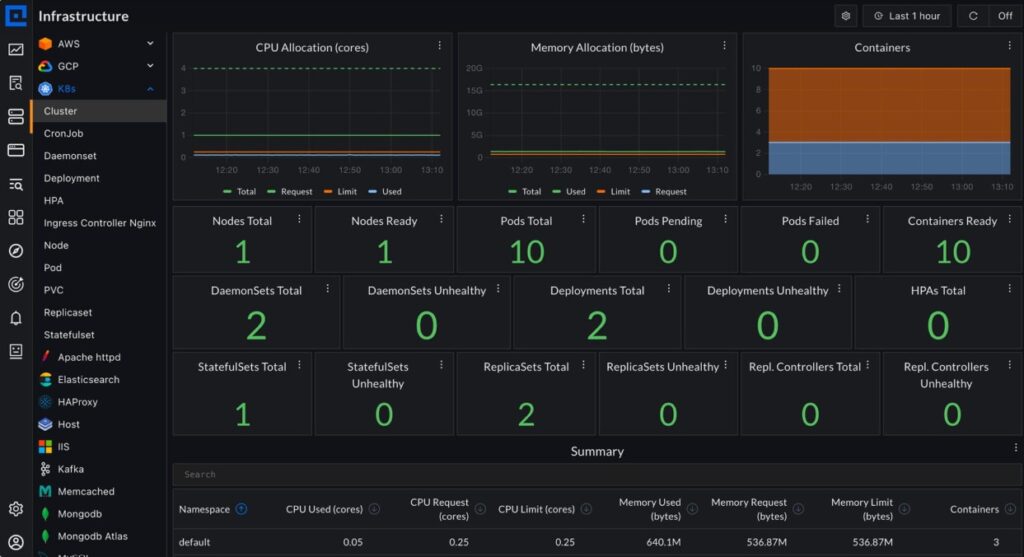
Teams working through this guide need a backend that receives the telemetry the OTel Collectors produce. CubeAPM is an OpenTelemetry-native observability platform that runs inside the customer’s own cloud account or on-prem environment. Telemetry never leaves the customer’s infrastructure.
For Kubernetes specifically, CubeAPM’s setup follows exactly the DaemonSet plus Deployment Collector pattern described in this guide. There is no proprietary agent to install. The standard OTel Helm chart deploys both Collector instances, configured to send metrics, logs, and traces to CubeAPM’s OTLP endpoint.
Deploy both Collectors using the same Helm commands from the architecture section above, pointed at CubeAPM’s OTLP endpoint.
helm install otel-collector-daemonset open-telemetry/opentelemetry-collector \

  -f otel-collector-daemonset.yaml


helm install otel-collector-deployment open-telemetry/opentelemetry-collector \

-f otel-collector-deployment.yamlFor multi-environment setups spanning EKS, GKE, and on-prem clusters, CubeAPM supports environment-scoped ingestion. Each cluster sends telemetry to the same endpoint with different deployment.environment and k8s.cluster.name attributes. This keeps clusters separated in dashboards and alerts without requiring separate CubeAPM instances per environment.
Teams migrating from vendor agents do not need to re-instrument workloads. CubeAPM accepts telemetry from existing Datadog, Elastic, and New Relic agents alongside native OTel SDKs. On large on-prem fleets where re-instrumentation across hundreds of running pods is not operationally feasible, this matters.
Pricing is $0.15 per GB of ingested data. In Kubernetes environments where EKS node groups autoscale, GKE node pools expand, and on-prem clusters run variable workloads, per-host billing produces unpredictable cost spikes. A per-GB model scales with actual telemetry volume rather than instance count, which makes cost forecasting consistent across all three environments.
Conclusion
Kubernetes monitoring works when it is built around a consistent instrumentation architecture, not environment-specific workarounds stitched together over time. The same OpenTelemetry pattern, a DaemonSet Collector for node and workload telemetry plus a Deployment Collector for cluster-level metrics and events, works on EKS, GKE, and on-prem.
Platform differences show up in authentication models, control plane access, and deployment constraints like Fargate and GKE Autopilot. Those differences are manageable once the core architecture is in place and resource attributes are standardized from day one.
Disclaimer: The information in this guide reflects the state of Kubernetes monitoring tooling and OpenTelemetry specifications as of May 2026. Cloud provider features, API configurations, and pricing change frequently. Always verify against official documentation before implementing in production. Alerting thresholds are starting points and should be adjusted to your specific cluster behavior.
Frequently Asked Questions (FAQs)
1. What is the difference between monitoring EKS, GKE, and on-prem Kubernetes?
The collection architecture is the same across all three. The differences are control plane access and authentication. EKS and GKE restrict direct control plane scraping, routing it through CloudWatch Logs and Google Cloud Logging, respectively. On-prem gives full direct access to all control plane components. Authentication uses IRSA on EKS, Workload Identity on GKE, and ServiceAccount tokens on on-prem.
2. Does OpenTelemetry work on EKS Fargate and GKE Autopilot?
Yes, with a modified pattern. Neither supports DaemonSets. Use a sidecar Collector inside each pod for application telemetry, combined with a Deployment Collector for cluster-level signals. Neither environment exposes host-level node metrics since the underlying infrastructure is fully managed and abstracted.
3. What is the best Kubernetes monitoring tool?
The answer depends on your environment and requirements. A vendor-neutral OTel Collector pipeline handles collection consistently across EKS, GKE, and on-prem. For the backend, self-hosted platforms like CubeAPM suit teams with data residency or cost concerns, while managed SaaS options suit teams that want no backend operational responsibility.
4. What is kube-state-metrics and do I still need it with OpenTelemetry?
kube-state-metrics generates Prometheus-format metrics about cluster object state. The OTel Collector’s k8sclusterreceiver covers much of the same ground natively. If your backend supports OTLP and the k8sclusterreceiver meets your requirements, kube-state-metrics becomes optional. Running both is safe and common in production.
5. What are the most important Kubernetes metrics to alert on?
Start with node conditions: MemoryPressure=true for more than 2 minutes, NotReady=true for more than 3 minutes. Add pod restart rate above 5 in a 10-minute window and pending pods above 0 for more than 5 minutes. Container CPU throttling above 25% sustained for 10 minutes is the most commonly missed alert and catches silent performance degradation before it surfaces in error rates.
6. How do you monitor multiple Kubernetes clusters from a single backend?
Standardize resource attributes across every cluster: k8s.cluster.name, deployment.environment, and cloud.region on all telemetry. Use a GitOps tool like Argo CD or Flux to manage Collector Helm releases from a central repository. Manual per-cluster Collector management does not scale beyond three or four clusters reliably.