










Checkly is a developer-first synthetic monitoring platform for teams that want to monitor APIs, websites, and user journeys using code. Its main idea is Monitoring as Code, where teams define checks in JavaScript, TypeScript, Terraform, or Pulumi and manage them through Git and CI/CD instead of only using a click-based dashboard. Checkly says teams can write, test, and version monitors as JS/TS, Terraform, or Pulumi, and run them from 20+ global locations.
Checkly is strongest for synthetic monitoring, API checks, browser checks, uptime monitoring, status pages, and alerting. Its pricing is mainly based on check run volume, with separate modules for Detect, Communicate, Resolve, and Platform. The Detect Starter plan starts at $24/month when billed annually, while the Team plan starts at $64/month. Enterprise is custom priced.
This review explains Checkly pricing, what counts as a check run, where overages appear, what real monthly costs may look like, what users like and dislike, and which alternatives make sense depending on your monitoring needs.
What Is Checkly?
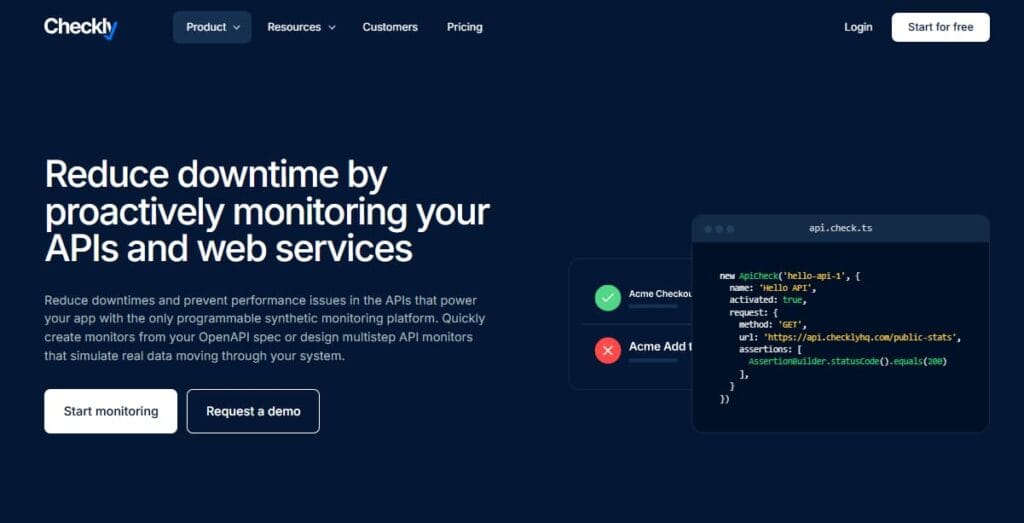
Checkly is a synthetic monitoring and uptime monitoring platform built for engineering, DevOps, QA, and SRE teams. It lets teams monitor APIs, websites, scheduled jobs, and critical browser flows from public locations around the world. Checkly’s official site describes the platform around three areas: Detect, Communicate, and Resolve. Detect covers uptime and synthetic monitoring, Communicate covers alerting and status pages, and Resolve adds AI-assisted root cause analysis and traces-related workflows.
The product is built around code-first monitoring. Teams can create API checks, browser checks, Playwright Check Suites, heartbeat checks, TCP checks, DNS checks, ICMP checks, and HTTPS checks. Checkly’s pricing page confirms support for HTTPS, TCP, DNS, ICMP, and Heartbeat checks under uptime monitoring.
Supported Languages and Frameworks
Checkly is most developer-native for JavaScript and TypeScript teams because browser checks and Monitoring as Code workflows are centered around Node.js, Playwright, and the Checkly CLI. Browser checks use Node.js scripts with Playwright, while API checks can send HTTP requests with assertions for status, response body, and performance. Checkly’s own pricing FAQ describes browser checks as monitors based on Node.js scripts using Playwright.
That does not mean Checkly can only monitor JavaScript applications. Since it performs external checks against URLs, APIs, TCP endpoints, DNS records, and scheduled heartbeat pings, it can monitor applications written in Python, Go, Java, PHP, Ruby, Node.js, .NET, or any other stack.
Checkly also supports Infrastructure as Code workflows through Terraform and Pulumi, and its pricing page lists the Checkly CLI, Terraform provider, and Pulumi provider under platform integrations.
Key Features of Checkly
Checkly browser checks use Playwright to simulate real user flows like login, signup, checkout, search, and dashboard navigation. These checks are useful when you need to know whether a full customer journey works, not just whether an endpoint returns a 200 status code.
Checkly’s pricing FAQ says browser checks use an actual browser to execute navigation, fill out forms, and validate results. For billing, each executed browser script counts as a check run, and browser check runs have a 4-minute timeout threshold.
API checks monitor HTTP endpoints and can validate status codes, response bodies, headers, and performance. Checkly also supports multistep checks, which are useful when one API call depends on another, such as authentication followed by a protected request. Checkly’s pricing page describes API and multistep checks as HTTP checks that can chain multiple API calls together.
Checkly supports uptime monitoring for HTTPS, TCP, DNS, ICMP, and Heartbeat checks. Uptime monitors are counted separately from API and browser check runs. This matters because a team may hit its browser or API run limit while still staying within its uptime monitor count.
Heartbeat checks are useful for cron jobs, scheduled workers, ETL jobs, background tasks, and batch processes. Instead of checking a public URL, Checkly expects a task to send a signal within a defined time window.
The Communicate module adds public status pages, subscriber notifications, dashboards, and incident communication features. Checkly’s pricing page lists status page services, subscribers, custom domains, dashboards, and incident management features under Communicate.
Alerting supports common engineering workflows such as email, Slack, webhooks, SMS, phone alerts, PagerDuty, Opsgenie, Incident.io, Rootly, and related incident tools. SMS and phone alert credits vary by plan.
The Resolve module adds AI-powered root cause analysis. Checkly lists 10 AI RCA invocations on Hobby, 50 on Starter, 150 on Team, and custom limits on Enterprise. Automated RCA is listed separately from manual invocations and is aimed at helping teams diagnose failed checks faster.
Monitoring as Code is Checkly’s main differentiator. Instead of creating every check manually in a UI, teams can define checks in code, store them in Git, review them in pull requests, and deploy them through CI/CD. This is a strong fit for teams that already treat infrastructure, tests, and deployment workflows as code.
G2 reviewers also call out this workflow as one of Checkly’s strengths, especially for teams using Playwright and CI/CD pipelines. Reviewers mention JavaScript/TypeScript checks, Git-based workflows, Playwright artifacts, Slack/email/webhook alerts, and deployment confidence as major positives.
What Does Checkly Monitor?
Checkly’s product coverage can be grouped into three areas.
Detect
- Uptime monitoring: HTTPS, TCP, DNS, ICMP, and Heartbeat checks
- Synthetic monitoring: Browser checks, API checks, multistep checks, and Playwright Check Suites
- Testing: Rocky AI analyzes every failure, groups errors, gives you fast root cause analysis, and helps you fix the problem.
Communicate
- Status pages: Public status pages with services, subscribers, custom domains, and advanced branding depending on plan
- Dashboards: One dashboard on Hobby and Starter, 10 dashboards on Team, custom on Enterprise
- Alerting: Email, Slack, webhooks, SMS, phone alerts, and incident management integrations
Resolve
- AI RCA: Manual and automated root cause analysis depending on plan
- Traces: Checkly’s pricing FAQ says traces are available on Enterprise as add-ons and are not officially available on other plans yet.
Checkly Pricing in 2026
Checkly pricing is modular. Most teams start with Detect because it includes uptime and synthetic monitoring. Communicate and Resolve are separate modules. Platform limits, such as users, data retention, integrations, and enterprise security features, also matter when comparing plans.
All prices below are annual-billing prices from Checkly’s public pricing page. Monthly billing may cost more, and Enterprise pricing requires a custom quote.
Detect Pricing: Uptime and Synthetic Monitoring
| Plan | Monthly price, billed annually | Uptime monitors | Browser runs/month | API runs/month | Users | Locations |
| Hobby | $0 | 10 | 1,000 | 10,000 | 1 | 6 |
| Starter | $24 | 50 | 3,000 | 25,000 | 3 | 6 |
| Team | $64 | 75 | 12,000 | 100,000 | 10 | 22 |
| Enterprise | Custom | Custom | Custom | Custom | Custom | 22 |
Communicate Pricing: Status Pages and Dashboards
| Plan | Monthly price, billed annually | Status page services | Subscribers | Dashboards |
| Hobby | $0 | 20 | 250 | 1 |
| Starter | $9 | 25 | 500 | 1 |
| Team | $30 | 50 | 1,000 | 10 |
| Enterprise | Custom | 100 | 2,000 | Custom |
Resolve Pricing: AI Root Cause Analysis
| Plan | Monthly price, billed annually | AI RCA invocations/month | Automated RCA |
| Hobby | $0 | 10 | Limited / not the main plan fit |
| Starter | $12 | 50 | No |
| Team | $39 | 150 | Yes |
| Enterprise | Custom | Custom | Yes |
Checkly lists Resolve Starter at $12/month and Resolve Team at $39/month when billed annually. AI RCA invocation limits are 10, 50, 150, and custom across Hobby, Starter, Team, and Enterprise.
What Counts as a Check Run?
A check run is one scheduled execution of a check from a location. This is the most important billing unit in Checkly.
API check run: One execution of an API or multistep check.
Browser check run: One execution of a Playwright-based browser script.
Playwright Check Suite run: Billed like browser checks, but based on runtime. Checkly says a Playwright Check Suite is equal to a browser check running for 30 seconds, and each additional 30 seconds consumes another run. For example, a 45-second Playwright Check Suite consumes 2 runs.
Uptime monitor: Counted by monitor quantity, not against browser or API run limits.
Simple monthly formula:
Monthly runs = number of checks × runs per hour × locations × 720 hours
Examples:
| Example | Formula | Monthly runs |
| 1 API check every 5 minutes from 1 location | 12 × 1 × 720 | 8,640 |
| 1 API check every 1 minute from 3 locations | 60 × 3 × 720 | 129,600 |
| 1 browser check every 10 minutes from 1 location | 6 × 1 × 720 | 4,320 |
| 1 browser check every 5 minutes from 2 locations | 12 × 2 × 720 | 17,280 |
Checkly Add-Ons and Overage Rates
Checkly has two ways to go beyond included run limits on Starter and Team plans: pre-purchased add-ons and automatic overages.
Pre-Purchased Add-Ons
| Add-on | Starter | Team |
| Additional browser / Playwright Check Suite runs | $4.00 per 1,000 | $4.00 per 1,000 |
| Additional API check runs | $1.80 per 10,000 | $1.80 per 10,000 |
| Additional uptime monitors | $8 per 25 | $8 per 25 |
Checkly’s pricing page lists additional browser runs at $4 per 1,000, additional API check runs at $1.80 per 10,000, and additional uptime monitors at $8 per 25 on Starter and Team.
Automatic Overages
| Overage type | Starter | Team |
| Browser / Playwright Check Suite overages | $6.50 per 1,000 | $6.25 per 1,000 |
| API check overages | $2.60 per 10,000 | $2.50 per 10,000 |
Automatic overages are more expensive than pre-purchased add-ons. Checkly lists browser overages at $6.50 per 1,000 on Starter and $6.25 per 1,000 on Team. API overages are $2.60 per 10,000 on Starter and $2.50 per 10,000 on Team.
What Is Included in All Plans?
The Checkly CLI, Terraform provider, and Pulumi provider are listed under platform integrations. The Prometheus endpoint is not available on Hobby or Starter and is shown for higher tiers. Raw data retention is 7 days on Hobby and Starter, 30 days on Team, and 180 days on Enterprise. Aggregated data retention is 30 days on Hobby and Starter, 1 year on Team, and 25 months on Enterprise.
| Feature area | Hobby | Starter | Team | Enterprise |
| Checkly CLI | Yes | Yes | Yes | Yes |
| Terraform provider | Yes | Yes | Yes | Yes |
| Pulumi provider | Yes | Yes | Yes | Yes |
| Prometheus endpoint | No | No | Yes | Yes |
| Private locations | No | No | Yes | Yes |
| Visual regression testing | No | No | Yes | Yes |
| Raw data retention | 7 days | 7 days | 30 days | 180 days |
| Aggregated data retention | 30 days | 30 days | 1 year | 25 months |
| SAML/SSO | No | No | No | Enterprise |
| 99.9% uptime SLA | No | No | No | Enterprise |
What Does Checkly Really Cost?
⚠️ Disclaimer
The scenarios below are directional editorial estimates based on Checkly’s public pricing page as of June 2026. They are not official Checkly quotes.
Checkly pricing is mainly based on synthetic monitoring usage. For this section, we are not using hosts, GB ingested, logs, traces, metrics, or RUM sessions because those are not Checkly’s main billing units. Checkly prices synthetic monitoring through API check runs, browser / Playwright check runs, uptime monitor limits, and optional modules such as Communicate and Resolve.
Checkly’s public pricing page lists Detect Starter at $24/month and Detect Team at $64/month when billed annually. Starter includes 25,000 API check runs and 3,000 browser / Playwright check runs per month. Team includes 100,000 API check runs and 12,000 browser / Playwright check runs per month. Extra API runs cost $1.80 per 10,000 when bought as add-ons, while extra browser / Playwright runs cost $4.00 per 1,000. Automatic overages are higher.
Actual costs can change based on check frequency, number of locations, browser check volume, API check volume, add-on purchases, overages, billing cycle, private locations, status pages, AI RCA usage, and Enterprise terms. Buyers should verify the final number on Checkly’s pricing page or directly with Checkly before purchase.
Pricing Assumptions
Checkly’s Detect module is the core pricing module for uptime and synthetic monitoring. These estimates use Detect as the base plan because the modeled usage is based on API test runs and browser / Playwright test runs.
| Plan | Monthly price, billed annually | Included API runs/month | Included browser runs/month |
| Starter | $24/month | 25,000 | 3,000 |
| Team | $64/month | 100,000 | 12,000 |
| Enterprise | Custom | Custom | Custom |
Checkly also lists add-on and overage rates under the Detect plan details. Pre-purchased add-ons are cheaper than automatic overages, so these scenarios use add-on rates where possible.
| Run type | Add-on rate | Overage rate |
| API check runs | $1.80 per 10,000 | $2.60 per 10,000 on Starter; $2.50 per 10,000 on Team |
| Browser / Playwright check runs | $4.00 per 1,000 | $6.50 per 1,000 on Starter; $6.25 per 1,000 on Team |
The working formula:
| Formula item | Value |
| Extra API runs | Actual API runs – included API runs |
| Extra browser runs | Actual browser runs – included browser runs |
| API add-on cost | Extra API runs rounded up to 10k blocks × $1.80 |
| Browser add-on cost | Extra browser runs rounded up to 1k blocks × $4.00 |
This means Checkly’s real cost is shaped mainly by how often checks run, how many locations they run from, and how many browser journeys are monitored. API checks are cheaper per run, but high-frequency API checks across multiple locations can still create large monthly run volumes. Browser checks cost more per unit and usually become the bigger cost driver when teams monitor full user journeys.
Workload Assumptions
The usage estimates below are mapped specifically to Checkly’s pricing model. We are using API check runs and browser / Playwright check runs only. Hosts, telemetry GB, logs, traces, metrics, and RUM sessions are excluded because Checkly does not price its synthetic monitoring plans that way.
| Team size | API test runs/month | Browser test runs/month | Base plan used |
| Small team | 500,000 | 25,000 | Detect Starter |
| Growing team | 2,000,000 | 85,000 | Detect Team |
| Mid-market team | 6,000,000 | 230,000 | Detect Team shown; Enterprise quote recommended |
Scenario 1: Small Team, ~500,000 API Runs/Month + ~25,000 Browser Runs/Month
Situation
A small engineering team monitors production APIs and important browser flows such as login, signup, checkout, password reset, and account access. The team may not need a full enterprise synthetic monitoring setup, but it wants regular checks for critical user paths and important endpoints.
Why teams choose Checkly at this stage
Teams at this stage may consider Checkly because the Starter plan gives them API checks, browser checks, uptime monitoring, alerting, and a code-first workflow without billing by host or telemetry GB. However, once checks run frequently across multiple endpoints, the included Starter limits can be exceeded quickly.
Estimated monthly cost
Disclaimer: This is a directional editorial estimate based on Checkly public pricing. It is not an official quote.
| Component | Calculation | Monthly cost |
| Detect Starter | Base plan | $24.00 |
| API check runs | 500,000 used – 25,000 included = 475,000 extra; 48 × 10k blocks × $1.80 | $86.40 |
| Browser check runs | 25,000 used – 3,000 included = 22,000 extra; 22 × 1k blocks × $4.00 | $88.00 |
| Communicate / status pages | Not included in this base scenario | $0 |
| Resolve / AI RCA | Not included in this base scenario | $0 |
| Total estimated cost | $24 + $86.40 + $88.00 | ~$198/month |
At small-team scale, Checkly can stay under $200/month if the team mainly uses Detect and keeps browser flows controlled. The base Starter plan is only $24/month, but the real cost comes from check runs above the included limits. If the team also wants a public status page, adding Communicate Starter would add $9/month, bringing the estimate to about $207/month.
Scenario 2: Growing Team, ~2M API Runs/Month + ~85,000 Browser Runs/Month
Situation
A growing SaaS team monitors more production APIs, customer-facing workflows, partner endpoints, background service URLs, and release-critical journeys. The team may run checks more frequently because downtime, failed APIs, or broken user flows now have a stronger business impact.
Why teams choose Checkly at this stage
Teams at this stage may consider Checkly because the Team plan unlocks more included runs, more users, all public locations, private locations, visual regression testing, Prometheus export, and longer raw data retention. However, run volume now becomes the main part of the bill.
Estimated Cost
Disclaimer: This is a directional editorial estimate based on Checkly public pricing. It is not an official quote.
| Component | Calculation | Monthly cost |
| Detect Team | Base plan | $64.00 |
| API check runs | 2,000,000 used – 100,000 included = 1,900,000 extra; 190 × 10k blocks × $1.80 | $342.00 |
| Browser check runs | 85,000 used – 12,000 included = 73,000 extra; 73 × 1k blocks × $4.00 | $292.00 |
| Communicate / status pages | Not included in this base scenario | $0 |
| Resolve / AI RCA | Not included in this base scenario | $0 |
| Total estimated cost | $64 + $342 + $292 | ~$698/month |
At growing-team scale, Checkly’s cost is driven more by add-on runs than by the base plan. The Detect Team plan is $64/month, but API and browser add-ons add about $634/month in this model. If the team also adds Communicate Team and Resolve Team, add $30/month and $39/month, bringing the estimate to about $767/month.
Scenario 3: Mid-Market Team, ~6M API Runs/Month + ~230,000 Browser Runs/Month
Situation
A mid-market engineering team monitors a larger distributed application with many customer-facing APIs, internal service endpoints, partner integrations, checkout flows, login flows, dashboards, and other revenue-critical journeys. The team may also run checks across more locations to catch regional issues faster.
Why teams choose Checkly at this stage
Teams at this stage may still consider Checkly because Monitoring as Code makes it easier to manage many checks through Git, CI/CD, Terraform, Pulumi, and Playwright-based workflows. However, this usage level is far above the standard Team plan’s included run allowance, so buyers should model the bill carefully and speak with Checkly about Enterprise pricing.
Estimated Cost
Disclaimer: This is a directional editorial estimate based on Checkly public pricing. It is not an official quote.
| Component | Calculation | Monthly cost |
| Detect Team | Base plan | $64.00 |
| API check runs | 6,000,000 used – 100,000 included = 5,900,000 extra; 590 × 10k blocks × $1.80 | $1,062.00 |
| Browser check runs | 230,000 used – 12,000 included = 218,000 extra; 218 × 1k blocks × $4.00 | $872.00 |
| Communicate / status pages | Not included in this base scenario | $0 |
| Resolve / AI RCA | Not included in this base scenario | $0 |
| Total estimated cost | $64 + $1,062 + $872 | ~$1,998/month |
At mid-market scale, Checkly’s cost is shaped almost entirely by synthetic run volume. The base Detect Team plan is only $64/month, but add-on runs create most of the estimated monthly cost. If the team also adds Communicate Team and Resolve Team, the estimate becomes about $2,067/month.
For this level of usage, an Enterprise quote is recommended. Checkly lists Enterprise pricing as custom, and Enterprise may be more relevant for teams needing custom run limits, SAML/SSO, longer retention, private locations, custom contracts, or better volume terms.
Summary: Estimated Checkly Monthly Cost by Team Size
| Team profile | API runs/month | Browser runs/month | Base plan used | Estimated monthly cost |
| Small team | 500,000 | 25,000 | Detect Starter | ~$198/month |
| Growing team | 2,000,000 | 85,000 | Detect Team | ~$698/month |
| Mid-market team | 6,000,000 | 230,000 | Detect Team shown; Enterprise recommended | ~$1,998/month |
These estimates only cover Checkly’s synthetic monitoring cost using API and browser / Playwright check runs. They do not include RUM, logs, traces, metrics, APM, infrastructure monitoring, or telemetry ingestion because those are not Checkly’s main pricing units. For teams that also need full internal observability, Checkly may need to be paired with an APM or OpenTelemetry-native observability platform.
What Drives Checkly Costs?
Frequency is the biggest multiplier. A check running every minute costs five times more than the same check running every five minutes. Teams should reserve high-frequency checks for critical paths and reduce frequency on lower-priority endpoints.
Each location multiplies check runs. A browser check running from three locations costs three times more than the same browser check running from one location. Starter includes 6 public locations, while Team and Enterprise unlock all 22 public locations.
Browser checks are more expensive than API checks because browser runs are priced per 1,000 runs, while API checks are priced per 10,000 runs. Browser checks are best for critical user journeys, while API checks are better for lightweight endpoint validation.
Pre-purchased add-ons are cheaper than automatic overages. For example, browser add-ons cost $4 per 1,000 runs, while browser overages cost $6.50 per 1,000 on Starter and $6.25 per 1,000 on Team.
Checkly user limits can force plan upgrades. Hobby includes 1 user, Starter includes 3 users, Team includes 10 users, and Enterprise is custom.
Starter and Hobby include 7 days of raw data retention. Team increases raw retention to 30 days, while Enterprise increases it to 180 days. Teams that need longer troubleshooting windows may need Team or Enterprise.
Checkly User Reviews
Checkly has a 4.6/5 rating on G2 from 34 verified reviews. G2 reviewers commonly praise Monitoring as Code, Playwright support, CI/CD integration, alerting, and ease of setup for technical teams.
What Users Like
Reviewers like that Checkly lets developers write checks in code, manage them in Git, and run them through CI/CD. This makes monitoring feel closer to the development workflow rather than a separate operations task.
Users often mention the Playwright integration as a major benefit. It helps teams run browser-based user journey checks and debug failures with artifacts such as screenshots, traces, console logs, and network details.
Reviewers mention Slack, email, webhooks, SMS, PagerDuty-style workflows, and CI/CD integrations as useful parts of the platform. Checkly’s own pricing page also lists alerting channels and incident management integrations.
Teams using Checkly for deployment checks say it helps validate critical flows before or after production releases. This is especially useful for teams with frequent deployments.
What Users Dislike
Several reviewers say pricing can feel rigid or expensive when teams fall between plan limits or scale check volume. This matches the cost model because frequency, browser runs, and locations can increase monthly usage quickly.
Checkly is developer-first. That is a strength for engineering teams, but it can be harder for non-technical users or teams not comfortable with JavaScript, TypeScript, or Playwright.
Some users say advanced setup, custom integrations, and alerting logic may require trial and error. This is not unusual for code-first tools, but it matters for smaller teams without dedicated SRE support.
Some G2 reviewers mention wanting more control over data storage regions. Teams with strict residency requirements should verify current Checkly data residency options directly before purchase
Checkly Review Summary
| Review source | Rating / signal | Notes |
| G2 | 4.6/5 from 34 reviews | Strongest public review signal |
| Capterra | Small review base | Useful but limited sample |
| User sentiment | Positive overall | Strong for MaC, Playwright, alerts |
| Common concerns | Pricing, learning curve, docs depth | More visible at scale |
Checkly Alternatives: How it compares with competitors
Checkly is not a full replacement for APM, logs, infrastructure monitoring, or a full observability backend. It is mainly a synthetic monitoring and uptime monitoring platform. The best alternative depends on what you are trying to replace.
Checkly vs CubeAPM
CubeAPM and Checkly solve different observability problems. Checkly validates systems from the outside by simulating API calls and browser journeys. CubeAPM observes systems from the inside using application telemetry, infrastructure signals, logs, traces, metrics, RUM, synthetics, and error tracking.
CubeAPM is OpenTelemetry-native, self-hosted inside the customer environment, and priced from $0.15/GB on its public pricing page.
| Category | Checkly | CubeAPM |
| Deployment | SaaS | Self-hosted, vendor-managed |
| Main use case | External synthetic monitoring | Full-stack observability and APM |
| Pricing model | Check runs and modules | Usage-based per GB |
| Data control | Data stored in Checkly cloud | Data stays in customer infrastructure |
| OpenTelemetry | Traces available as Enterprise add-on / OTel journey | OpenTelemetry-native |
| Best for | API, browser, uptime, MaC | APM, logs, traces, metrics, infra, RUM, synthetics |
These tools can also work together. A team may use Checkly for external synthetic checks and CubeAPM for internal application, infrastructure, logs, and trace visibility.
Checkly vs Datadog Synthetics
Datadog Synthetics is a better fit for teams that already use Datadog for logs, APM, infrastructure, RUM, and security. Checkly is a better fit for teams that want a more code-first synthetic monitoring workflow with Playwright and Monitoring as Code at the center.
| Category | Checkly | Datadog Synthetics |
| Main focus | Synthetic monitoring + MaC | Synthetics inside a larger observability suite |
| Pricing model | Check runs + modules | Test runs plus broader Datadog billing |
| Browser testing | Playwright-based | Browser tests |
| Best for | Developer-first synthetic monitoring | Enterprise observability consolidation |
| Cost risk | Frequency and locations | Multiple Datadog product modules |
Checkly vs New Relic Synthetics
New Relic Synthetics makes sense for teams already using New Relic as their main observability platform. Checkly makes more sense when synthetic monitoring itself is the main need and the team wants checks managed as code.
| Category | Checkly | New Relic Synthetics |
| Main focus | Synthetic monitoring | Synthetics inside full-stack observability |
| Pricing model | Check run volume | Data ingest + users |
| Code-first workflow | Core product idea | Supported, but not the main product identity |
| Best for | Dev/SRE teams focused on synthetics | Teams already standardized on New Relic |
Checkly vs Pingdom
Pingdom is simpler and more traditional. It works well for uptime checks and basic transaction monitoring. Checkly is more advanced for engineering teams that want Playwright, API checks, Monitoring as Code, CI/CD integration, and richer debugging context.
| Category | Checkly | Pingdom |
| Main focus | Code-first synthetic monitoring | Uptime and web performance monitoring |
| Monitoring as Code | Yes | No |
| Browser checks | Playwright-based | Transaction monitoring |
| Best for | Developer teams | Simpler uptime monitoring needs |
Is Checkly the Right Choice?
Checkly Works Best For
Checkly is a strong fit for teams that want monitoring to live in the same workflow as code. If your team already uses Git, CI/CD, JavaScript, TypeScript, Terraform, Pulumi, or Playwright, Checkly will feel natural.
Checkly is best when the main goal is to verify that APIs, websites, and user journeys work from outside the system. It is especially useful for login, checkout, signup, payment, dashboard, and business-critical paths.
If your team releases frequently, Checkly can help validate important flows before and after deployments. G2 reviewers specifically mention release validation and CI/CD integration as strengths.
Checkly’s Communicate module is useful for teams that want monitoring, incident communication, public status pages, dashboards, and alerting in one workflow.
Checkly May Not Be the Right Fit For
Checkly is not a full APM platform for distributed tracing, application internals, logs, infrastructure metrics, profiling, and service maps. Traces are listed as Enterprise add-ons and are not officially available on other plans yet.
Checkly is SaaS-based. Private locations let teams run checks from inside their infrastructure, but the platform itself is still hosted by Checkly.
High-frequency checks across many locations can become expensive, especially for browser checks. Teams at this scale should model usage carefully and talk to Checkly about Enterprise pricing.
Some reviewers mention limited data residency control. Buyers with strict legal or compliance needs should confirm current data residency and retention options directly with Checkly.
Checkly can be used from a UI, but its biggest value comes from code-first workflows. Teams that do not want to write or maintain checks in code may prefer simpler uptime monitoring tools.
Conclusion
Checkly is a strong synthetic monitoring platform for engineering teams that want API checks, Playwright browser checks, uptime monitoring, status pages, alerting, and Monitoring as Code. Its biggest advantage is the developer workflow: checks can be written as code, versioned in Git, reviewed in pull requests, and deployed through CI/CD.
The pricing is transparent, but teams must model usage carefully. The Detect Starter plan starts at $24/month when billed annually, but real costs depend on check frequency, number of locations, API run volume, browser run volume, add-ons, and overages. Browser checks are usually the largest cost driver because they are priced per 1,000 runs.
Overall, Checkly is a good fit for external reliability monitoring and synthetic testing. Teams that need full internal observability, OpenTelemetry-native APM, logs, metrics, traces, RUM, and infrastructure monitoring should compare it with broader platforms such as CubeAPM, Datadog, New Relic, Dynatrace, and other full-stack observability tools.
Disclaimer: Pricing, features, plan limits, and technical capabilities can change over time. The estimates in this review are based on publicly available information at the time of writing and should be verified on Checkly’s official pricing page or with the Checkly team before making a purchase decision.
FAQs
1. What is Checkly’s starting price?
Checkly has a free Hobby plan. The paid Detect Starter plan starts at $24/month when billed annually. Communicate Starter is $9/month, and Resolve Starter is $12/month.
2. How does Checkly pricing work?
Checkly pricing is based on modules and usage. Detect covers uptime and synthetic monitoring, Communicate covers status pages and dashboards, Resolve covers AI root cause analysis, and Platform limits cover users, retention, integrations, and security features.
3. What counts as a browser check run?
A browser check run is one execution of a Playwright-based browser script. Checkly says browser checks use an actual browser and each executed script counts as a check run. Browser checks have a 4-minute timeout threshold.
4. What counts as a Playwright Check Suite run?
A Playwright Check Suite is billed like a browser check, but by 30-second runtime blocks. A 45-second Playwright Check Suite consumes 2 runs.
5. Does Checkly charge overages?
Yes. Starter and Team plans have automatic overage rates if usage exceeds purchased runs. Browser overages are $6.50 per 1,000 on Starter and $6.25 per 1,000 on Team. API overages are $2.60 per 10,000 on Starter and $2.50 per 10,000 on Team.
6. Is Checkly good for APM?
Checkly is not a full APM platform. It is mainly for uptime monitoring, API monitoring, synthetic browser checks, status pages, and alerting. Traces are listed as Enterprise add-ons and are not officially available on other plans yet.
7. What are the best Checkly alternatives?
Common Checkly alternatives include Datadog Synthetics, New Relic Synthetics, Pingdom, Better Stack, and Grafana-based monitoring setups. For full-stack observability and APM, CubeAPM is also a strong option because it covers logs, metrics, traces, APM, infrastructure monitoring, RUM, synthetics, and error tracking in a self-hosted model.