










An application can look fine in a monitoring tool and still feel broken to users. The site may be up, the servers may look stable, and no major alert may be firing. But someone trying to check out on a mobile phone might see a slow page, a user in another region might hit errors, and an older device might freeze during a session.
That gap between system health and real user experience is where synthetic monitoring and Real User Monitoring (RUM) are useful. Both help teams understand application performance, but they approach the problem in different ways.
This guide explains what synthetic monitoring is, how it compares with RUM, and when to use each one. By the end, you will have a clear way to decide how each fits into a complete monitoring strategy.
What Is Synthetic Monitoring?
Synthetic monitoring, also known as active monitoring or synthetic testing, uses automated scripts to simulate user interactions with a website, application, or API from controlled environments. Tests run on a fixed schedule regardless of whether any real user is present. The variables such as geography, browser, device, network conditions, and cache state are all predetermined.
How synthetic monitoring works
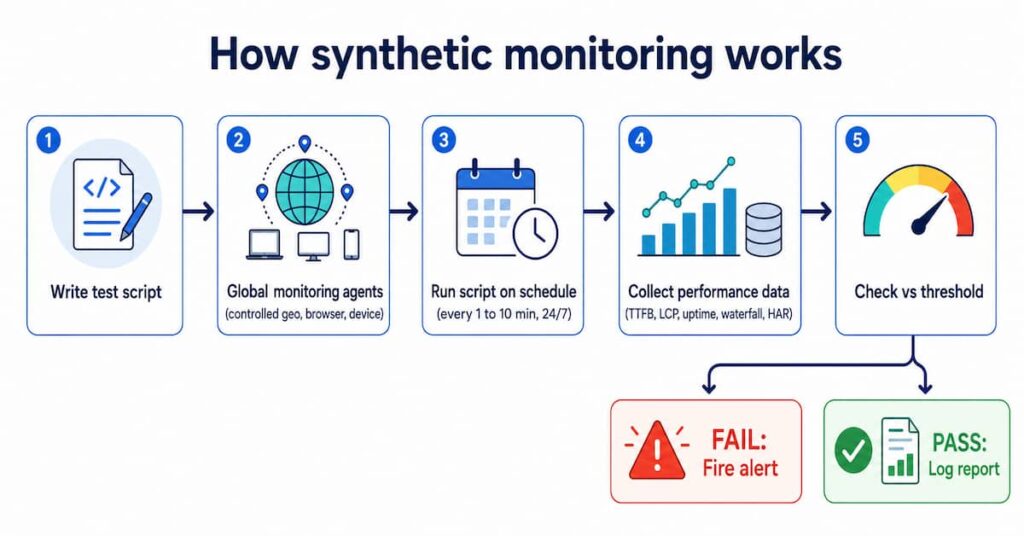
Engineers write scripts that replicate user behaviors: navigating to a homepage, logging in, adding items to a cart, completing a transaction. Those scripts deploy to a global network of monitoring agents. After each run, the tool collects performance metrics and compares them to baseline thresholds. If a metric breaches a threshold, an alert fires immediately via email, Slack, PagerDuty, or another channel.
Key benefits of synthetic monitoring
- Proactive 24/7 detection: Problems get caught before your users ever notice them. Outages and slowdowns show up in your dashboard, not in a flood of support tickets.
- Pre-production testing: You can run these checks inside staging environments and CI/CD pipelines, so broken code doesn’t quietly slip into production.
- SLA and uptime tracking: Because synthetic tests run from controlled, external environments, the uptime data they produce stays objective and enables informed actions.
- Competitor benchmarking: No need to touch a competitor’s codebase. Point your existing tests at any URL and you’ve got an accurate performance comparison.
- Baseline consistency: Controlled conditions strip out the random noise that makes real-user data messy. When something changes in your code, you’ll actually be able to tell.
Limitations of synthetic monitoring
- It can’t truly mirror real-world usage; different devices, ISPs, and the unpredictable ways people actually behave online are hard to fake.
- The test scripts also need ongoing maintenance; as your app changes, they need to change with it.
- A passing synthetic test does not guarantee a smooth experience for all real users.
What Is Real User Monitoring (RUM)?
Rather than simulating traffic, RUM just watches. It collects performance data directly from the browsers and devices of people who are actually using your app. Whatever is happening out there, RUM sees it in real time.
It works by dropping a lightweight JavaScript snippet or SDK into your pages. The moment someone lands, it starts quietly gathering data throughout their session; how fast things load, when requests fire, how they move through the app. RUM captures navigation timing, speed index metrics, and full session click paths, giving you a ground-level view of the real user experience rather than an idealized version of it.
How RUM works
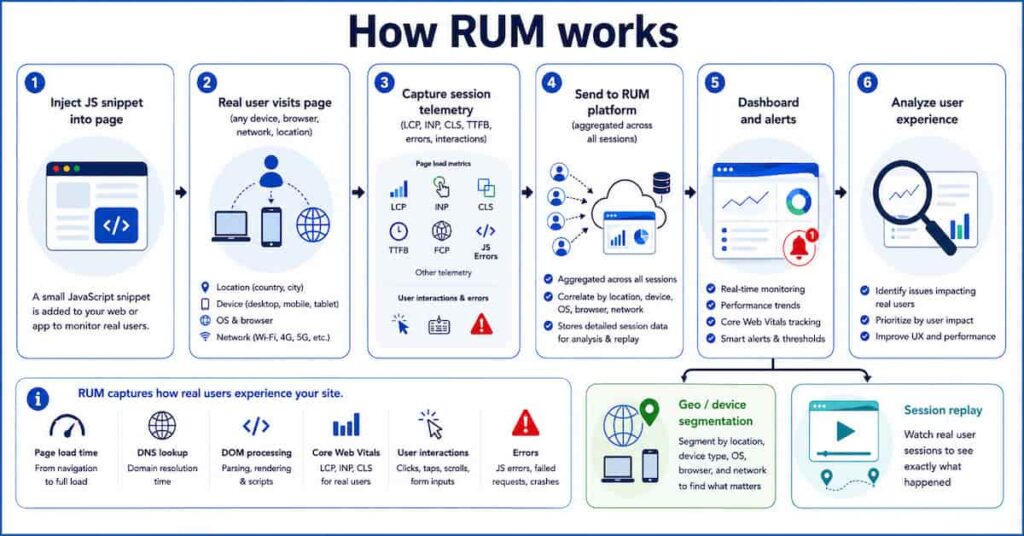
When a user visits an instrumented page, the embedded script captures page load time, TTFB, DNS duration, DOM processing time, and Core Web Vitals including Interaction to Next Paint (INP), Largest Contentful Paint (LCP), and Cumulative Layout Shift (CLS). These are the same metrics that feed Google’s Chrome User Experience Report (CrUX) and influence search rankings.
All that data gets pulled together across your entire user base and surfaced through dashboards. You can search the data by location, device type, OS, browser, ISP. Some platforms even let you watch session replays, so if a user ran into a problem, you can literally see the path they took before things went sideways.
Key benefits of RUM
- Authentic field data: Reflects real device capabilities, real network conditions, and real user behavior.
- Core Web Vitals at p75: Captures field LCP, INP, and CLS from real sessions, the data Google’s ranking systems evaluate.
- Broad automatic coverage: Every page, user flow, and device is covered without writing a single test script.
- There’s also a direct line between what RUM surfaces and what it means for the business. A drop in performance shows up alongside a drop in conversions.
- Granular segmentation: Identifies that checkout is slow only for Android users in Southeast Asia, for example.
Limitations of RUM
- It’s reactive by nature; you only find out something went wrong after real users already ran into it.
- It also goes quiet during off-hours, pre-production, and low-traffic periods, since there’s no user activity to measure.
- At scale, high-traffic apps generate enormous amounts of data, which means you’ll need a solid sampling strategy and a close eye on GDPR compliance.
Synthetic Monitoring vs Real User Monitoring: Key Differences at a Glance
The table below covers ten critical dimensions. Use it as a quick reference when deciding which approach fits a specific use case.
| Dimension | Synthetic Monitoring | Real User Monitoring (RUM) |
|---|---|---|
| Nature | Active (scripted, scheduled tests) | Passive (collects real session data) |
| Environment | Controlled: fixed browser, device, network, geo | Live: real devices, networks, locations |
| Traffic dependency | None. Runs whether you have 10 visitors or zero. | Requires actual user traffic |
| Best for | Uptime, SLA, regression, pre-production | Core Web Vitals, UX trends, geo/device analysis |
| Alerting | Proactive: alerts on failure or threshold breach | Reactive: triggered when user metrics degrade |
| Core Web Vitals | Lab-based LCP, CLS, INP baselines | Field CWV at p75: INP, LCP, CLS (feeds CrUX) |
| Data depth | Waterfall charts, filmstrips, HAR files | Session replays, geo/browser/ISP segmentation |
| Privacy risk | Low (robot traffic, no PII) | Needs PII masking, consent, GDPR compliance |
| Cost model | Per check or test run (predictable) | Per session or page view (scales with traffic) |
| Key limitation | Misses real-world user variability | No data during off-hours or low-traffic periods |
When to Use Each: Five Real-World Scenarios
When to use synthetic monitoring vs when not to
Use this table before choosing synthetic monitoring. If your goal is in the right column, RUM is usually the better fit.
| Use synthetic monitoring when… | Do not use synthetic monitoring when |
| You need 24/7 uptime checks, even when there is no user traffic. | You want to understand real user experience by device, browser, or region. |
| You need SLA reports with controlled, repeatable test data. | You need real Core Web Vitals data for CrUX or SEO analysis. |
| You want to test critical flows before or after deployment. | You want to measure actual conversion or revenue impact. |
| You need API health checks or endpoint contract testing. | You need to track unexpected user journeys in production. |
| You want to benchmark your own site or competitors from fixed locations. | You need session replay or real user behavior analytics. |
When to use RUM vs when not to
RUM is best when you need answers from real user sessions. If your goal is in the right column, synthetic monitoring is usually the better fit.
| Use RUM when… | Do not use RUM when |
| You need real Core Web Vitals data like LCP, INP, and CLS. | You need uptime checks during zero-traffic periods. |
| You want to segment performance by device, browser, ISP, geo, or OS. | You need pre-production or staging tests. |
| You want to connect page speed with conversions or revenue. | You need controlled SLA reporting. |
| You need to find bugs that only happen in real user environments. | You need repeatable regression tests before deployment. |
| You want session replay or real-user journey analysis. | You want competitor benchmarking or pre-launch monitoring. |
The right monitoring tool depends on what question you need answered. Here are five scenarios:
Scenario 1: Launching a new feature or page
Start with synthetic. Before a new checkout flow or UI redesign goes anywhere near production, run it through your CI/CD pipeline and let synthetic tests catch any performance regressions while conditions are still controlled.
Once the feature ships, turn on RUM straight away. Real users show up with third-party scripts you didn’t account for, CDN edge variance, network conditions no staging environment comes close to replicating. RUM is what tells you whether the gains you saw in testing actually held up once real people got involved.
Scenario 2: Regional or device-specific complaints
This is a RUM-only situation. Synthetic monitors run from well-connected data center nodes and will not show the experience of a user on a mid-range Android device over congested 3G.
RUM is the only way to see that a checkout script fails on low-end phones in South America while desktop users in the US are completely unaffected. Once RUM identifies the segment, configure a targeted synthetic test to reproduce and monitor it.
Scenario 3: Uptime monitoring and SLA enforcement
Synthetic monitoring is the clear choice. It runs on a schedule from multiple global locations, alerting you the moment a site or API goes down, even when traffic is zero. Synthetic monitoring has evolved from availability monitoring and remains best suited for SLA compliance.
RUM cannot tell you the site is down if nobody is visiting. For 24/7 coverage and auditable SLA reporting, synthetic is the foundation.
Scenario 4: Optimizing Core Web Vitals for search rankings
RUM is the primary tool here. Google’s search ranking systems evaluate Core Web Vitals using field data from the Chrome User Experience Report, which is built from real user sessions, not lab tests. Use RUM to troubleshoot Core Web Vitals based on real user experiences.
If your goal is to improve your CWV scores as Google measures them, you must track p75 LCP, INP, and CLS through RUM. The Google Search Console Core Web Vitals report is itself derived from field data.
Scenario 5: Investigating backend or API slowdowns
Use both. Synthetic tests confirm whether APIs respond within SLOs and whether critical flows complete successfully. This gives you a clean, repeatable baseline.
RUM is where you see what slowdown actually meant for people using the product. With distributed tracing through OpenTelemetry, you can connect a sluggish backend API span to a degraded LCP event inside a real user session. That’s the link between an infrastructure problem and the moment a real person felt it.
How to Combine Synthetic Monitoring and RUM
The strongest monitoring strategies use both approaches as complementary layers of an observability stack. Both tools provide insight into every step within the application delivery chain and life cycle, and together they create a feedback loop more powerful than either alone.
Correlating business metrics with technical performance
Synthetic generates consistent technical data from controlled conditions, isolating the impact of a code change or third-party script. RUM connects that data to real business outcomes such as conversion rate drops.
If a synthetic test shows a payment widget adds 800ms to checkout load time, RUM quantifies the actual conversion drop across your real user population. This closes the loop between engineering work and revenue impact.
Catching problems before users arrive
Synthetic monitoring’s 24/7 availability detects configuration problems introduced during overnight maintenance windows before users log on the next morning.
A database restart, CDN misconfiguration, or failed deployment at 2 AM will be caught by a synthetic check within minutes. RUM would have nothing to report because no users are active yet.
Using RUM data to improve synthetic coverage
RUM reveals the actual paths real users take through your application, including journeys engineers never anticipated when writing test scripts.
If RUM shows a significant segment of users navigating through a rarely tested secondary checkout path, that is a direct signal to add a synthetic test covering that journey. RUM data continuously improves the relevance of your synthetic test suite.
Accelerating root cause diagnosis during outages
When a synthetic alert fires because a transaction is failing, RUM data immediately shows the blast radius: how many users are affected, from which regions, on which devices.
What to Look for in Synthetic and RUM Tools
Synthetic monitoring tool checklist
- Global network of agents across diverse geographic regions and ISPs.
- Browser-based transaction monitoring (not just HTTP pings) for real user journey simulation.
- CI/CD pipeline integration for pre-deployment performance gates.
- Detailed waterfall charts and filmstrip renderings for root cause analysis.
- Alerting integrations: Slack, PagerDuty, OpsGenie, and incident management tools.
- Ability to simulate specific devices, network throttling, and cache states.
RUM tool checklist
- Capture of Core Web Vitals (LCP, INP, CLS) in real field conditions.
- Segmentation by geography, device, browser, OS, and ISP.
- Session replay for individual user investigation.
- Connects performance to revenue and conversions.
- It should run on a lightweight JS snippet that doesn’t itself slow the page down, and
- Handles data responsibly, including GDPR compliance, PII masking, and consent management.
How CubeAPM Brings Synthetic Monitoring and RUM Together
Most teams run synthetic and RUM as separate tools and waste time connecting the dots manually. CubeAPM puts both in one place, synthetic checks across 50+ global locations and RUM tracking live users, all in the same dashboards.
When a synthetic alert fires, you don’t need to switch tools to see the impact. The RUM data is right there: which regions got hit, what devices, how many active users were affected at that moment.
The RUM side tracks page loads, AJAX calls, JavaScript errors, and Core Web Vitals from real sessions. Practo went from a Lighthouse score of 68 to 92. Mamaearth moved conversions 12% after cutting checkout load time. Delhivery cut user-reported errors by 50% in a month. Vitals are measured at p75 field level, what Google ranking actually uses, not a lab average.
Pricing is $0.15/GB ingested. No tiers, no seat fees. Synthetic Monitoring is bundled in, no extra charge.
Synthetic monitoring shows whether planned journeys are working. RUM shows what real users are actually experiencing. CubeAPM brings both views together with logs, metrics, and traces so teams can connect user-facing issues to backend problems faster.
Explore CubeAPM synthetic monitoring →Conclusion
Synthetic monitoring and RUM are not competing tools. They are complementary layers that answer fundamentally different questions. Synthetic asks: is the application available and performing as expected? RUM asks: is it actually working well for real users?
Start with synthetic monitoring to establish 24/7 uptime coverage and a consistent performance baseline. Add RUM once you have production traffic to understand what real users experience across every device, browser, and region. Use the insights from each to continuously sharpen the other.
Teams that run both approaches close the gap between what their dashboards report and what their users feel. Synthetic monitoring gives you the early warning system. RUM gives you ground truth. Together, they give you complete application performance observability.
FAQs
1. What is synthetic monitoring in simple terms?
Synthetic monitoring sends automated scripts to test your website or API on a fixed schedule from controlled environments, with no real user required. It is the equivalent of sending a robot to test your site every few minutes and reporting what it finds.
2. What is the main difference between synthetic monitoring and RUM?
Synthetic monitoring is proactive and controlled: it generates artificial traffic and detects issues before users encounter them. RUM is passive and authentic: it collects data from real users across real conditions and reveals what is actually happening. The core trade-off is control versus authenticity.
3. Can synthetic monitoring replace RUM?
No. Synthetic tests cannot replicate the infinite variability of real-world conditions. A bug that only appears on a specific Android version over congested LTE, or slow loads caused by a CDN misconfiguration in a particular region, will not appear in synthetic results. RUM is required to discover these issues.
4. Can RUM replace synthetic monitoring?
No. RUM produces no data when there are no users. An outage at 3 AM, a regression from an overnight deployment, or a configuration problem in a staging environment will go undetected by RUM until users arrive. Synthetic monitoring provides 24/7 coverage and pre-production testing that RUM cannot.
5. How does synthetic monitoring relate to Core Web Vitals?
Synthetic tools measure LCP, CLS, and INP under lab conditions, which is useful for catching regressions during development. However, Google’s search ranking systems use field data from the Chrome User Experience Report (CrUX), which is built from real user sessions. To improve your CWV scores as Google measures them, you must track p75 field performance with RUM.