









ClickHouse distributed tracing has two meanings in production observability. The first is using ClickHouse as a backend to store and query distributed trace data from your applications. The second is tracing ClickHouse’s own query execution across a distributed cluster to understand internal query performance. Both matter, but they solve different problems.
This guide covers both: how to instrument ClickHouse itself to emit OpenTelemetry traces for internal visibility, and how to use ClickHouse as a high-performance trace storage backend for application observability. According to the CNCF Annual Survey 2024, OpenTelemetry adoption among CNCF users grew to 47% in 2024, making ClickHouse an increasingly relevant choice for teams standardizing on OpenTelemetry but looking for cost-efficient alternatives to proprietary trace backends.
What Is Distributed Tracing and Why ClickHouse?
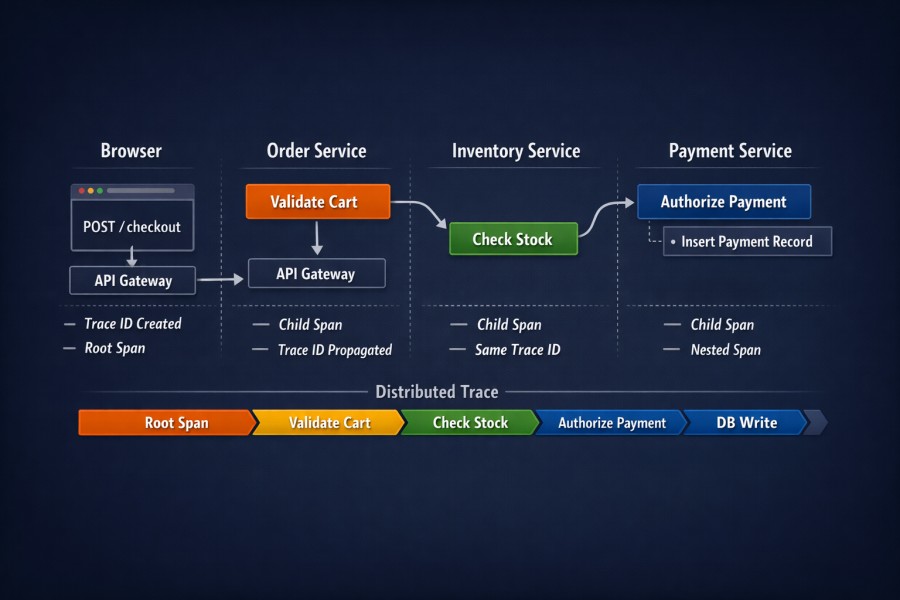
Distributed tracing tracks requests as they flow through microservice architectures, serverless functions, and distributed systems. A single trace contains multiple spans, each representing a unit of work. These spans are organized hierarchically, forming a tree that shows the path a request took, the time spent in each service, and where errors or latency bottlenecks occurred.
Traditional trace storage systems like Jaeger and Tempo were built specifically for traces. ClickHouse is a general-purpose analytical database that can store traces, metrics, and logs together in one system. This means correlating a slow trace with a resource spike or error log becomes a SQL query, not a vendor specific integration.
ClickHouse’s columnar storage and high compression ratios make it cost effective at scale. A production deployment storing 300 million spans per day documented 92% compression on trace data, compressing 3.40 TiB of raw trace data down to 275 GiB on disk. Query performance stays fast because ClickHouse is built for high cardinality analytics. Filtering spans by tenant ID, service name, or custom tags remains performant even across billions of rows.
The tradeoff is operational complexity. Unlike managed SaaS trace backends, ClickHouse requires you to design the schema, tune compression settings, manage retention, and optimize queries. For teams already running ClickHouse for logs or metrics, adding traces to the same cluster reduces operational overhead. For teams starting fresh, the setup cost is higher than deploying Jaeger or using a managed trace backend.
How Distributed Tracing Works in ClickHouse
Distributed tracing in ClickHouse follows the same data flow as any OpenTelemetry backend. Applications instrumented with OpenTelemetry SDKs emit trace spans. The OpenTelemetry Collector receives these spans over gRPC or HTTP using the OTLP protocol, processes them through pipelines, and exports them to ClickHouse using the ClickHouse exporter.
The ClickHouse exporter in the OpenTelemetry Collector contrib repository is in alpha status but has been used in production for months without major issues. It writes spans to a ClickHouse table, typically named otel_traces, with columns for trace ID, span ID, parent span ID, operation name, start time, duration, attributes, and resource metadata.
ClickHouse stores each span as a row. The schema is denormalized to avoid joins. Attributes and resource labels are stored as parallel arrays, one array for keys and one for values. This allows querying arbitrary span attributes without schema migrations, but requires ARRAY JOIN or specialized ClickHouse functions to filter or extract specific attributes efficiently.
Compression is critical. ClickHouse applies codec compression on a per column basis. String columns like service name and operation name compress extremely well because they have low cardinality. Trace IDs and span IDs compress less but are small. Duration and timestamp columns compress well with Delta encoding. The result is compression ratios above 90% for trace data.
Retention is managed with TTL expressions on the table. A common pattern is to keep full fidelity traces for 7 days, downsample or aggregate older data, and drop traces after 30 or 90 days depending on compliance requirements. ClickHouse supports tiered storage, moving older partitions to S3 or other object storage while keeping recent data on local SSD for fast queries.
Tracing ClickHouse Itself with OpenTelemetry
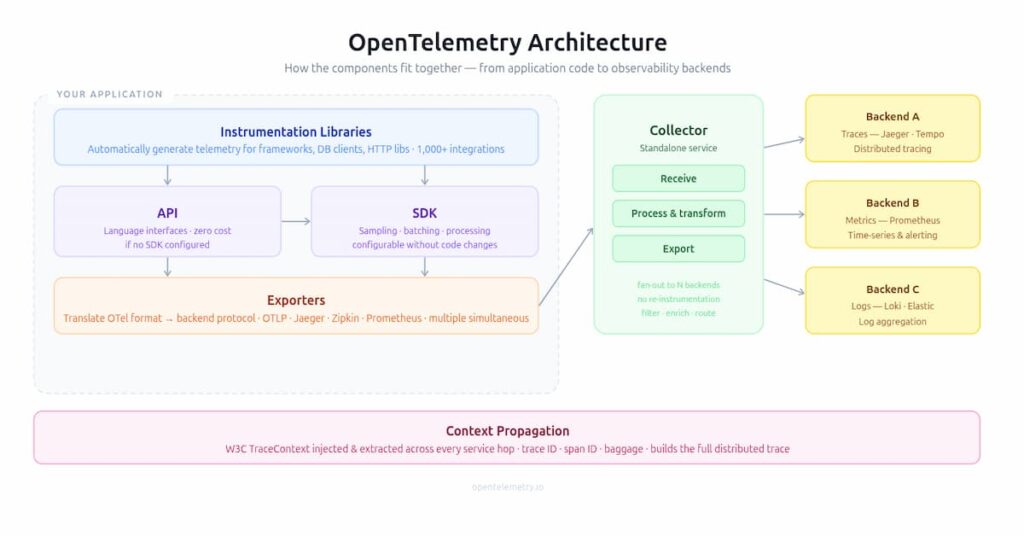
ClickHouse can emit its own OpenTelemetry traces to monitor internal query execution. This is useful when running ClickHouse in a distributed cluster and you need visibility into how queries are executed across nodes, how long each stage takes, and where bottlenecks occur.
ClickHouse accepts trace context over HTTP headers following the W3C Trace Context recommendation or over the native protocol used between ClickHouse servers. When a query arrives with a trace context, ClickHouse propagates that context through the query execution pipeline and emits spans for each stage of processing.
Spans include query planning, distributed query execution, data reads from storage, and network communication between nodes. This visibility is critical when debugging slow queries in distributed ClickHouse clusters where a query might fan out to dozens of nodes and aggregate results back to the coordinator.
To enable tracing for ClickHouse itself, configure the opentelemetry_start_trace_probability setting. This controls the probability that ClickHouse will start a new trace for a query that does not already have a parent trace context. Set it to 1.0 to trace every query, or a lower value like 0.01 to sample 1% of queries.
ClickHouse writes trace spans to the system.opentelemetry_span_log table. This table must be enabled in the server configuration by setting the opentelemetry_span_log element in config.xml. Once enabled, ClickHouse writes spans to this table automatically. You can query the table directly or export spans to an external trace backend for visualization.
A materialized view can push spans from system.opentelemetry_span_log to an external collector. For example, a materialized view with a URL engine can send spans to a Zipkin or Jaeger compatible endpoint in JSON format. This allows you to visualize ClickHouse query traces in Grafana or another trace UI.
ClickHouse Keeper, the ZooKeeper compatible coordination service, also supports distributed tracing. When pass_opentelemetry_tracing_context is enabled in the ZooKeeper client configuration, ClickHouse propagates trace context to Keeper requests. Keeper emits spans for client side operations like create, get, set, remove, and list, as well as server side spans for request queuing, Raft commit, and response handling. Sampling is dynamic, adjusting between 1/10,000 and 1/10 based on request size to manage overhead.
Schema Design for Storing Traces in ClickHouse
The schema for storing traces in ClickHouse is straightforward but critical to query performance. The most common schema uses a single table with one row per span. Each span includes trace ID, span ID, parent span ID, operation name, start time, duration, service name, span kind, status code, and attributes.
- Attributes are stored as two parallel arrays:
attribute.namesandattribute.values. This avoids schema migrations when new attributes are added. To query a specific attribute, useindexOfto find the position of the attribute name in the names array, then retrieve the corresponding value from the values array. Materialized columns can be added for frequently queried attributes like tenant ID, user ID, or endpoint name to avoid repeated array lookups. - Partition by day or hour depending on retention and query patterns. Daily partitions are common for retention policies like “drop data older than 30 days.” Hourly partitions make sense for high volume systems where queries typically filter to recent time windows and you want faster query pruning.
- Order by trace ID, then timestamp. This keeps all spans from the same trace colocated on disk, making trace reconstruction queries fast. Some teams order by service name and timestamp to optimize queries that filter by service first, but this spreads spans from the same trace across the table, slowing down trace detail queries.
- Use LowCardinality type for columns with low cardinality like service name, operation name, and span kind. LowCardinality dramatically improves compression and query performance on string columns that repeat frequently. For example, a service name column that contains only 50 unique values across millions of rows compresses nearly 100% and filters faster because ClickHouse can use dictionary encoding.
- Add materialized columns for high value attributes. If your queries frequently filter by tenant ID, user ID, or endpoint path, create a materialized column that extracts that value from the attributes array at insert time. This avoids the cost of ARRAY JOIN or indexOf on every query. Materialized columns do not affect storage significantly if the attribute already exists in the attributes array, because ClickHouse deduplicates the data internally.
- Enable compression codecs. Use ZSTD for general purpose compression on most columns. Use Delta encoding for timestamps and durations because these values are sequential and Delta encoding compresses sequential integers efficiently. Do not over optimize compression settings until you have real data. Default ZSTD compression already achieves 90%+ compression on trace data in most cases.
Querying Traces in ClickHouse
Querying traces in ClickHouse is SQL. This is both the advantage and the challenge. You can write any query you want, join traces with logs or metrics, and use ClickHouse’s full analytical function library. But you also have to write the query yourself, and poorly written queries can be slow or expensive.
Common query patterns include finding traces by trace ID, searching spans by attribute, aggregating span durations by service or operation, and identifying outliers. Each pattern has a SQL idiom in ClickHouse.
To retrieve all spans for a specific trace ID, filter by trace ID and order by start time. This reconstructs the trace in temporal order. ClickHouse returns results in milliseconds even with billions of spans because trace ID is the primary sort key.
SELECT trace_id, span_id, parent_span_id, operation_name, start_time_us, duration_us
FROM otel_traces
WHERE trace_id = '4bf92f3577b34da6a3ce929d0e0e4736'
ORDER BY start_time_us;To search spans by a custom attribute like tenant ID or endpoint path, use indexOf to locate the attribute in the attributes array, then filter on the value. This works but is slower than filtering on a dedicated column. If the query runs often, add a materialized column.
SELECT trace_id, operation_name, start_time_us, duration_us
FROM otel_traces
WHERE attribute.values[indexOf(attribute.names, 'tenant_id')] = 'tenant-123'
AND start_time_us > now() - INTERVAL 1 HOUR;To calculate average and percentile latencies by service and operation, aggregate duration by service name and operation name. Use quantile functions for percentiles. ClickHouse computes percentiles efficiently even on high cardinality dimensions.
SELECT
  service_name,
  operation_name,
  count() AS span_count,
  avg(duration_us / 1000) AS avg_duration_ms,
  quantile(0.9)(duration_us / 1000) AS p90_duration_ms,
  quantile(0.99)(duration_us / 1000) AS p99_duration_ms
FROM otel_traces
WHERE start_time_us > now() - INTERVAL 1 DAY
GROUP BY service_name, operation_name
ORDER BY p99_duration_ms DESC
LIMIT 20;To find slow traces, filter on duration and return the trace IDs. Then query those trace IDs to see the full trace details. This two-step approach is faster than joining spans within the same query when trace reconstruction is expensive.
SELECT DISTINCT trace_id
FROM otel_traces
WHERE duration_us > 5000000  -- traces slower than 5 seconds
  AND start_time_us > now() - INTERVAL 1 HOUR
LIMIT 100;To correlate traces with logs, join on trace ID if your logs table includes trace ID as a column. ClickHouse supports joining across tables but be careful with join cardinality. Joining billions of trace spans with billions of log lines without proper filtering will exhaust memory. Always filter by timestamp and other selective columns before joining.
SELECT
  t.trace_id,
  t.operation_name,
  t.duration_us / 1000 AS duration_ms,
  l.log_level,
  l.message
FROM otel_traces AS t
INNER JOIN logs AS l ON t.trace_id = l.trace_id
WHERE t.start_time_us > now() - INTERVAL 1 HOUR
  AND t.duration_us > 1000000
AND l.log_level = 'ERROR';Always include a timestamp filter. Queries without a timestamp filter scan the entire table. On a table with billions of spans, this is slow and expensive. ClickHouse query progress indicators will show you how many rows are being scanned. If you see billions of rows scanned for a simple query, add a timestamp filter.
ClickHouse vs Jaeger and Tempo for Trace Storage
Jaeger and Tempo are purpose built trace backends. ClickHouse is a general purpose analytical database that can store traces but was not designed specifically for them. Each has tradeoffs.
- Jaeger uses Cassandra, Elasticsearch, or BadgerDB as a storage backend. It is mature, widely deployed, and has a polished UI for trace visualization. Jaeger’s UI is better than anything you will build on top of ClickHouse without significant frontend work. The downside is that Jaeger does not store metrics or logs, so correlating traces with other signals requires separate systems and integrations.
- Tempo is Grafana’s trace backend. It stores traces in object storage like S3, using a columnar format optimized for trace queries. Tempo is cost effective because object storage is cheap, and it integrates natively with Grafana. But Tempo’s query language is limited compared to SQL. You cannot run arbitrary analytical queries on trace data in Tempo the way you can in ClickHouse.
ClickHouse gives you full SQL, the ability to store traces, logs, and metrics in one database, and query performance that scales to billions of rows. The downside is that you have to build the UI, write the queries, and manage the ClickHouse cluster. Tempo and Jaeger abstract that complexity but lock you into their query models and UIs.
Cost is another factor. Tempo on S3 is extremely cheap for storage but query latency increases as data ages and moves to colder storage tiers. ClickHouse on local SSD is more expensive per GB but query latency stays consistent. ClickHouse with tiered storage to S3 splits the difference, keeping recent data fast and older data cheap.
If you are already running ClickHouse for logs or metrics, adding traces to the same cluster is a low friction decision. If you are starting from scratch and only need traces, Tempo or Jaeger are easier to deploy and manage.
OpenTelemetry Collector Configuration for ClickHouse
The OpenTelemetry Collector is the bridge between instrumented applications and ClickHouse. The collector receives OTLP trace data from applications, processes it through pipelines, and exports it to ClickHouse using the ClickHouse exporter.
A minimal collector configuration includes an OTLP receiver, a batch processor, and a ClickHouse exporter. The OTLP receiver listens for traces over gRPC or HTTP. The batch processor batches spans before sending them to ClickHouse to reduce insert overhead. The ClickHouse exporter writes spans to the ClickHouse table.
receivers:
  otlp:
    protocols:
      grpc:
        endpoint: 0.0.0.0:4317
      http:
        endpoint: 0.0.0.0:4318
processors:
  batch:
    timeout: 10s
    send_batch_size: 10000
exporters:
  clickhouse:
    endpoint: tcp://clickhouse.example.com:9000
    database: default
    traces_table_name: otel_traces
    timeout: 10s
service:
  pipelines:
    traces:
      receivers: [otlp]
      processors: [batch]
exporters: [clickhouse]The batch processor is critical. Without batching, the collector sends each span individually to ClickHouse, which creates thousands of small inserts per second. ClickHouse performs poorly with small inserts because each insert triggers a merge operation. Batching groups spans into larger inserts, reducing the number of merge operations and improving throughput.
Timeout settings matter. If the batch timeout is too short, batches are sent before they fill up, reducing batch efficiency. If the timeout is too long, spans sit in memory longer, increasing memory usage and delaying data visibility. A 10 second timeout with a 10,000 span batch size is a reasonable starting point for most deployments.
Add a resource processor if you need to enrich spans with additional metadata like cluster name, region, or environment. The resource processor adds attributes to all spans passing through the pipeline. This is useful for multi tenant or multi region deployments where you want to tag all spans with identifying metadata.
processors:
  resource:
    attributes:
      - key: cluster
        value: production-us-east
action: insertUse the attributes processor to drop or redact sensitive span attributes before writing to ClickHouse. For example, if spans include API keys or personal data in attributes, use the attributes processor to delete those keys.
processors:
  attributes:
    actions:
      - key: http.request.header.authorization
action: deleteBest Practices for ClickHouse Distributed Tracing
Partition by time. Use daily partitions for most deployments. Hourly partitions make sense for very high volume systems where queries almost always filter to recent hours. Monthly partitions are too coarse and slow down retention cleanup.
Order by trace ID first, timestamp second. This keeps all spans from the same trace colocated on disk. Queries that retrieve a full trace by trace ID are the most common trace query, and this ordering makes them fast.
Add materialized columns for high cardinality attributes you query often. If you frequently filter by tenant ID, user ID, or endpoint name, create a materialized column that extracts that value from the attributes array. This avoids the cost of ARRAY JOIN or indexOf on every query.
Use LowCardinality for service name, operation name, and other low cardinality string columns. LowCardinality improves compression and query performance dramatically on columns with fewer than a few thousand unique values.
Enable TTL to drop old data automatically. A common pattern is to keep traces for 30 days, then drop them. Configure TTL on the table to delete partitions older than 30 days. This keeps storage costs predictable and query performance high.
ALTER TABLE otel_traces

MODIFY TTL toDateTime(start_time_us / 1000000) + INTERVAL 30 DAY;Monitor table size and compression ratio. Run SELECT formatReadableSize(sum(bytes)) AS size FROM system.parts WHERE table = 'otel_traces' to see how much disk space the table uses. If compression is lower than expected, check codec settings and column types.
Avoid scanning the entire table. Always include a timestamp filter in queries. Queries without a timestamp filter scan billions of rows and are slow. If a query needs to scan the entire table for a weekly report, run it as a batch job during off-peak hours.
Use sampling for high-volume queries. If a query scans billions of rows to calculate an aggregate, use ClickHouse’s SAMPLE clause to scan a fraction of the data. A 10% sample of a billion rows is still 100 million rows, which is enough for most statistical aggregates.
SELECT
  service_name,
  quantile(0.99)(duration_us / 1000) AS p99_duration_ms
FROM otel_traces SAMPLE 0.1
WHERE start_time_us > now() - INTERVAL 1 DAY
GROUP BY service_name;Monitoring ClickHouse Distributed Tracing with CubeAPM
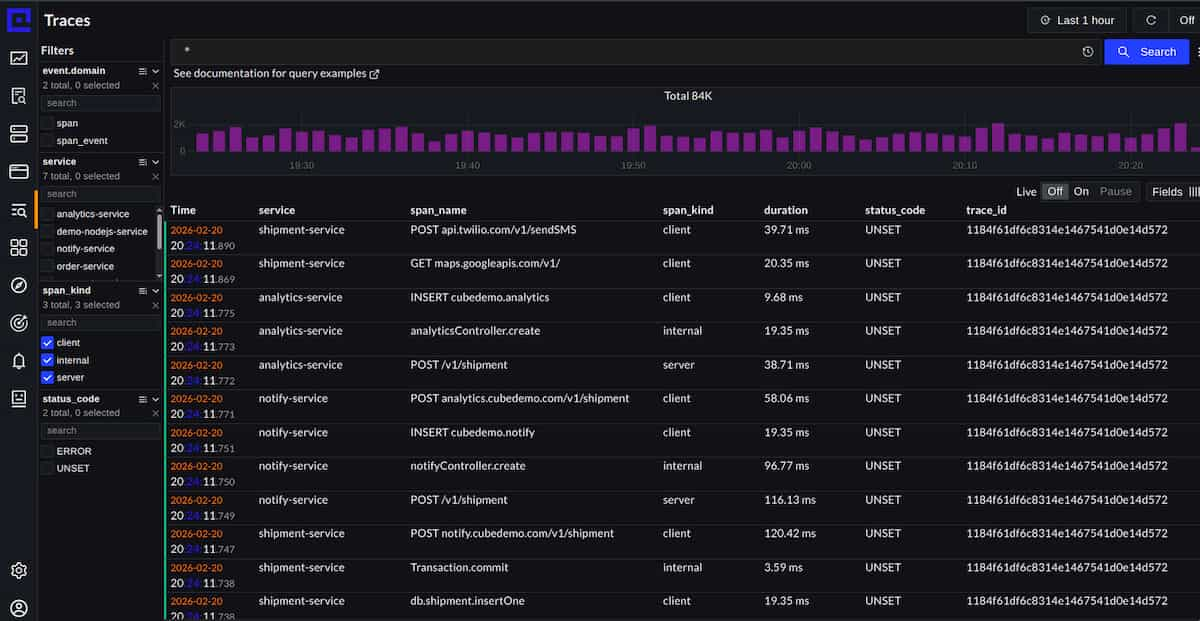
CubeAPM connects to ClickHouse via OpenTelemetry and Prometheus to monitor both ClickHouse query performance and the traces stored inside ClickHouse. This gives teams a unified observability layer over their ClickHouse-based trace storage without building a custom Grafana stack.
CubeAPM surfaces ClickHouse metrics like query duration, insert throughput, merge operations, memory usage, and disk I/O. These metrics correlate directly with trace query performance. For example, if trace queries slow down, CubeAPM can show whether the slowdown is caused by high merge activity, memory pressure, or slow disk reads.
For traces stored in ClickHouse, CubeAPM queries the otel_traces table directly using SQL and presents trace data in a unified APM UI alongside application traces, logs, and infrastructure metrics. This eliminates the need to switch between tools when debugging an issue that spans application code, trace storage, and ClickHouse performance.
CubeAPM’s on-prem deployment model fits teams using ClickHouse for data residency or compliance. All telemetry stays inside your VPC. There is no data egress to a SaaS backend, which is critical for regulated industries storing sensitive trace data.
Pricing is predictable at $0.15/GB for all ingested telemetry, including ClickHouse metrics, application traces, and logs. This avoids the per-host or per-feature pricing that makes other APM tools expensive when monitoring both applications and the databases storing their telemetry.
Tools and Ecosystem for ClickHouse Tracing
Beyond the OpenTelemetry Collector and ClickHouse itself, several tools simplify working with traces in ClickHouse.
- Grafana: Grafana connects to ClickHouse as a data source and can visualize trace data stored in ClickHouse tables. Grafana’s trace panel works with ClickHouse if you format the query results to match Jaeger’s JSON schema. This requires a SQL query that reshapes ClickHouse’s denormalized span rows into Jaeger’s nested JSON structure, but once written, the query can be saved as a Grafana dashboard template.
- ClickStack: ClickStack is an observability stack built on ClickHouse. It includes an OpenTelemetry Collector configuration, ClickHouse schema, and a web UI for visualizing traces, logs, and metrics. ClickStack is not a SaaS product, it is an open source reference architecture you deploy yourself. It simplifies getting started with ClickHouse for observability but still requires you to manage ClickHouse and the collector.
- SigNoz: SigNoz is an open source observability platform that uses ClickHouse as its storage backend. SigNoz provides a full APM UI, query builder, and alerting on top of ClickHouse. If you want a ready to use observability UI and do not want to build your own SQL queries and dashboards, SigNoz is a strong option. The tradeoff is that you are locked into SigNoz’s schema and query model. You cannot run arbitrary SQL on the underlying ClickHouse tables without breaking SigNoz’s assumptions.
- Uptrace: Uptrace is another observability platform that supports ClickHouse as a backend. Like SigNoz, it provides a UI and query builder on top of ClickHouse. Uptrace is smaller and less mature than SigNoz but has a cleaner UI and simpler deployment.
- DataGrip and DBeaver: These are SQL clients that connect to ClickHouse and make it easier to write and debug queries. Both support ClickHouse natively and provide query autocomplete, result formatting, and query execution progress bars. If you are writing custom trace queries in ClickHouse, these tools are more productive than the ClickHouse CLI.
Conclusion
ClickHouse distributed tracing gives teams full SQL query power over trace data, high compression, and the ability to store traces, logs, and metrics in one system. The tradeoff is operational complexity. You design the schema, write the queries, and manage the cluster. For teams already running ClickHouse for logs or metrics, adding traces is a natural extension. For teams starting fresh, the setup cost is higher than deploying Jaeger or using a managed trace backend like Tempo or Honeycomb.
ClickHouse shines at scale. Compression ratios above 90%, fast queries on billions of rows, and the ability to correlate traces with other signals using SQL make ClickHouse a strong choice for high volume observability workloads where cost and flexibility matter more than out of the box UIs.
Disclaimer: The information in this article reflects the latest details available at the time of publication and may change as technologies and products evolve. Features, pricing, and plan limits can change over time. Always verify the latest information directly with the vendor before making purchasing or deployment decisions.
Frequently Asked Questions
What is the difference between tracing and distributed tracing?
Tracing tracks execution within a single process, showing function calls and durations. Distributed tracing tracks requests across multiple services, giving visibility into how a request flows through microservices, databases, and external APIs.
How does distributed tracing work?
Distributed tracing works by propagating a trace context (trace ID and span ID) across service boundaries. Each service adds spans to the trace, recording what it did and how long it took. These spans are sent to a backend where they are assembled into a complete trace tree.
Is ClickHouse distributed?
Yes, ClickHouse supports distributed deployments where data is sharded across multiple nodes. Queries can run on a distributed table and ClickHouse coordinates query execution across all nodes, aggregating results back to the client.
How do I query traces stored in ClickHouse?
Query traces using SQL. Filter by trace ID to retrieve all spans for a specific trace, or aggregate by service and operation name to calculate latency percentiles. Use indexOf to filter on custom span attributes, or add materialized columns for frequently queried attributes.
Can ClickHouse replace Jaeger or Tempo?
ClickHouse can store traces and supports arbitrary SQL queries, but it does not have a built in trace UI like Jaeger. If you need a polished trace visualization UI out of the box, Jaeger or Tempo is easier. If you want full SQL query power and the ability to store traces, logs, and metrics together, ClickHouse is a strong alternative.
What is the OpenTelemetry ClickHouse exporter?
The OpenTelemetry ClickHouse exporter is a component in the OpenTelemetry Collector that writes trace spans to a ClickHouse table. It is in alpha status but has been used in production successfully. The exporter supports batching, retries, and schema customization.
How much does it cost to store traces in ClickHouse?
Cost depends on your ClickHouse deployment model. Self hosted ClickHouse costs infrastructure compute, storage, and network. Managed ClickHouse services charge per compute hour and storage GB. Compression ratios above 90% mean trace storage is cheap compared to uncompressed backends, but query costs depend on how often you scan large datasets.