










Scout Monitoring, now marketed as Scout Monitoring, is a developer-focused APM platform built for code-level traces, error monitoring, log management, app metrics, query analysis, alerting, and N+1 query detection. It is strongest for teams that want to debug slow endpoints, slow queries, memory bloat, and backend performance issues without adopting a heavy enterprise observability platform.
A Scout Monitoring pricing and review guide is significant because Scout uses transaction-based pricing instead of the usual per-host or per-seat model. Buyers need to understand transaction limits, log storage, error add-ons, retention, and what Scout does not cover natively.
In this guide, we verify Scout’s pricing tiers, add-ons, supported languages, user reviews, strengths, limitations, and alternatives. The goal is to help teams see where Scout is a good fit, where costs can rise, and when a broader observability platform may make more sense.
Note on naming: Scout Monitoring has historically been known as Scout APM and is now marketed as Scout Monitoring. This article uses Scout Monitoring throughout for clarity.
What Is Scout Monitoring?
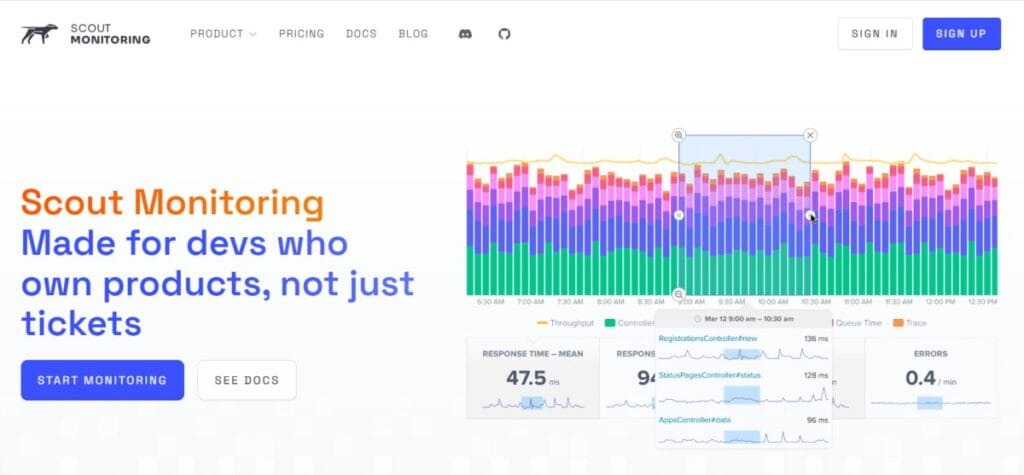
Pinpoint APM, now Scout Monitoring, is a SaaS application monitoring platform built for developers who need to find performance problems inside application code. It combines app traces, error monitoring, log management, app metrics, query analysis, and alerting in one product.
Scout is especially known for helping teams identify slow database queries, N+1 query patterns, memory bloat, slow endpoints, and related application performance issues. G2’s Scout Monitoring profile describes the product as application performance monitoring that helps developers find and fix performance issues before customers see them, with tracing that ties bottlenecks directly to source code.
The platform is cloud-hosted and designed for quick setup. Scout Monitoring profile says Scout helps teams identify memory bloat, N+1 queries, slow database queries, and other performance problems, and says teams can move from deploy to insights in about five minutes.
Scout is also available through major marketplaces. The Scout site lists Heroku, AWS Marketplace, and DigitalOcean under its marketplace options, while Heroku describes Scout as an application performance monitoring add-on for identifying memory leaks, N+1s, slow code, and related issues.
Key Features of Scout Monitoring
Scout’s App Traces product gives code-level request visibility into request paths, execution flows, and bottlenecks. Scout describes App Traces as helping teams pinpoint and fix performance issues directly at the source.
Scout’s Query Analysis feature is designed to identify slow queries and N+1 problems with detailed analysis of query patterns and impact. This is one of the most important Scout features for Rails, Django, Laravel, Phoenix, and similar web applications where ORM-driven database behavior can cause performance problems.
Scout includes integrated error monitoring. Its homepage describes Error Monitoring as simplified debugging with integrated error tracking and APM data in one interface, while the pricing page says error monitoring is included from the free plan.
Scout includes log management. Its homepage describes Log Management as a unified view of logs with performance context and filtering, and its pricing page says log management is included from the free plan.
Scout includes App Metrics for real-time dashboards and application health views. Its homepage describes App Metrics as automatic performance monitoring with real-time visualization of response times, throughput, and resource usage across endpoints.
Scout includes alerting. Its homepage describes alerting as custom notification thresholds that keep teams informed of performance issues through preferred channels.
Memory bloat detection is included across Scout’s public pricing plans. Scout’s pricing page says every plan includes N+1 query detection and memory bloat detection.
Scout includes a CLI and MCP server. Its homepage product navigation lists MCP Server and Scout CLI as product resources, and the homepage also describes an AI-native workflow where teams can connect AI code assistants to Scout’s local MCP to talk to application data.
Scout Monitoring Pricing in 2026
Scout uses transaction-based pricing. The official pricing page says Scout starts at $0/month with 300K transactions, error monitoring, and log management included. Paid plans begin at $19/month. Every plan includes unlimited users, unlimited apps, full API access, N+1 query detection, and memory bloat detection.
Scout’s pricing page also says there are no contracts, no credit card is required, and new accounts start with 14 days of unlimited performance data before choosing a plan. Annual billing saves 10%.
Included Across Public Plans
| Included item | Status |
| Unlimited users | Included |
| Unlimited applications | Included |
| Full API access | Included |
| N+1 query detection | Included |
| Memory bloat detection | Included |
| Error monitoring | Included |
| Log management | Included |
| Month-to-month billing | Available |
| No credit card required to start | Available |
| 14-day unlimited performance data trial | Available |
| Annual billing discount | 10% annual saving |
The included-plan table above is based on Scout’s official pricing page, which states the free and paid tiers include unlimited users, unlimited apps, full API access, N+1 detection, memory bloat detection, error monitoring, and log management.
Headline Scout Plans
| Plan | Starting price | Included usage |
| Free | $0/month | 300K transactions, error monitoring, and log management |
| Startup | $19/month | 600K transactions, 5k errors, 1GB logs |
| Production Ready | $59/month | 1.2M transactions, 50K errors, 30 GB logs |
| Large | $299/month | 9M monthly transactions |
| Enterprise | Custom | Custom transaction volume, log storage, retention, SSO, SLA reporting, support |
Build-Your-Own Transaction Tiers
| Plan | Monthly price | Monthly transactions | Logs included | Errors included | Support |
| Free | $0/month | 300K | 1 GB | 5,000 | Human support |
| Startup | $19/month | 600K | 1 GB | 5,000 | Community / human support |
| Small | $39/month | 1.2M | 1 GB | 5,000 | Priority |
| Medium | $99/month | 3M | 1 GB | 5,000 | Priority |
| Large | $299/month | 9M | 1 GB | 5,000 | Priority |
| Enterprise | Custom | Custom | Custom | Custom | Premier |
Scout Add-On Pricing
Scout’s public pricing includes two main add-ons: more errors and more logs.
| Add-on | Price | Included capacity |
| More Errors | $19/month | 50,000 additional errors |
| More Logs | $40/month | 30 GB additional log storage |
Scout’s pricing page lists the error and log add-on structure. This is why log volume becomes the most important cost variable once a team moves beyond the included log allocation.
Free Trial
Every new Scout account starts with a 14-day trial that includes unlimited performance data. Scout says the purpose is to let teams see exactly what they need before choosing the plan that fits. No credit card is required to start.
What Happens If You Exceed a Scout Transaction Limit?
Scout says monitoring continues when a team exceeds its selected plan’s monthly transaction limit, but new transactions stop being recorded in the dashboard until the team upgrades or the billing period resets. This means there is no automatic surprise overage charge, but teams can lose visibility into new transaction data if they stay above the cap.
What Does Scout Monitoring Really Cost?
⚠️ Disclaimer
The scenarios below are directional editorial estimates, not official Scout quotes. Scout publishes public pricing for transaction tiers, log storage, and error monitoring, but final cost can change based on actual transaction volume, log volume, error volume, Enterprise terms, retention needs, discounts, and contract-specific requirements.
Scout Monitoring is not priced like a host-based infrastructure monitoring tool or a pure ingest-based observability platform. Its public pricing is mainly based on monthly traced transactions, with separate pricing for additional log storage and additional errors. Every public plan includes unlimited users, unlimited apps, full API access, N+1 query detection, and memory bloat detection.
Scout’s public pricing page lists additional log storage at $40/month per 30 GB and additional error capacity at $19/month per 50,000 errors. That means log volume is the main cost variable in these scenarios, while hosts, RUM sessions, synthetic checks, trace GB, and metrics GB are not used in the Scout cost calculation.
CubeAPM uses ingestion-based pricing and is included here as a comparison point for teams that want full-stack observability across logs, metrics, traces, infrastructure monitoring, RUM, synthetics, dashboards, and alerts under one pricing model.
Pricing Assumptions Used in These Scenarios
These scenarios use a more conservative Scout log-storage estimate than the earlier version, so the comparison does not overstate Scout’s cost. Scout is mapped only to its public billing units: transactions, logs, and errors.
| Scenario | Scout pricing anchor | Scout estimate | CubeAPM estimate |
| Small team | ~1.2M transactions + 720 GB logs | ~$999/month | ~$522/month |
| Growing team | ~3M transactions + 2,400 GB logs + 50K extra errors | ~$3,318/month | ~$919/month |
| Mid-market team | ~9M transactions + 12,000 GB logs + 100K extra errors | ~$16,337/month | ~$4,594/month |
These estimates do not include Enterprise discounts, custom retention, SSO, security and compliance review, SLA reporting, premier support, or external tools Scout users may need for RUM, synthetics, infrastructure monitoring, or broader observability.
Workload Assumptions Used for Scout Estimates
| Team size | Scout transaction context | Scout log context | Scout error context | Scout usage assumption | Estimated Scout cost |
| Small team | ~1.2M transactions/month | 720 GB logs | Within 5K included errors | Small tier + log add-ons | ~$999/month |
| Growing team | ~3M transactions/month | 2,400 GB logs | +50K errors | Medium tier + log add-ons + error add-on | ~$3,318/month |
| Mid-market team | ~9M transactions/month | 12,000 GB logs | +100K errors | Large tier + log add-ons + error add-ons | ~$16,337/month |
The transaction count selects the Scout plan. Log storage and error volume are added separately when they exceed the included allowance. Scout’s public tiers include 1 GB of logs and 5,000 errors, additional log storage is listed at $40/month per 30 GB, and additional errors are listed at $19/month per 50,000 errors.
Scenario 1: Small Team
Situation
A small production team records about 1.2M monthly transactions and stores around 720 GB of logs. The team mainly needs code-level APM, N+1 query detection, slow-query analysis, error monitoring, and logs in one SaaS tool.
For Scout, this workload maps to the Small tier because the assumed transaction volume is around 1.2M monthly transactions. The main Scout cost driver is log storage, not hosts, users, traces, metrics, RUM sessions, or synthetic checks. Scout’s public pricing includes 1 GB of logs on build-your-own tiers and charges $40/month per additional 30 GB.
Why teams at this stage consider Scout
Teams at this stage may consider Scout because the transaction-tier APM price is low, and Scout does not charge per user or per application on public plans. The Small tier provides 1.2M monthly transactions with priority support, while logs and errors are added only when usage exceeds the included allowance.
Estimated profile
| Configuration | Detail |
| Monthly transactions | ~1.2M |
| Log storage | 720 GB |
| Error volume | Within 5K included errors |
| Base Scout package | Small |
| Scout pricing basis | Transaction tier + log add-ons |
| CubeAPM workload basis | Full workload ingestion estimate |
Estimated monthly Scout cost
Disclaimer: This estimate uses Scout’s public list pricing. Log add-on math: 720 GB minus 1 GB included, rounded up to 24 blocks of 30 GB at $40 each.
| Component | Assumption | Monthly cost |
| Small tier | 1.2M transactions | $39 |
| Log add-ons | 24 × 30 GB log blocks | $960 |
| Error add-ons | Not needed | $0 |
| Estimated total | Small team workload | ~$999/month |
CubeAPM cost comparison
| Platform | Pricing basis | Estimated monthly cost |
| Scout Monitoring | Small tier + 720 GB logs | ~$999/month |
| CubeAPM | Full workload ingestion estimate | ~$522/month |
| Savings calculation | Detail |
| Estimated savings with CubeAPM | ~$477/month |
| Percentage savings | ~$477 ÷ $999 = ~48% lower |
What this scenario shows
For this workload, Scout’s APM tier is inexpensive, but logs dominate the estimate. The Small tier is only $39/month, while 720 GB of log storage adds about $960/month at public add-on pricing.
CubeAPM is lower in this scenario because it prices the broader workload through ingestion rather than Scout’s separate transaction and log-storage model. It also includes broader observability coverage such as RUM, synthetics, infrastructure monitoring, logs, metrics, and traces under the same pricing model.
Scenario 2: Growing Team
Situation
A growing application records about 3M monthly transactions and stores around 2,400 GB of logs. This is a more conservative log assumption than the earlier 3,600 GB estimate, so the Scout cost lands closer to a realistic planning range instead of overstating log usage.
For Scout, the transaction volume maps to the Medium tier. The 2,400 GB log estimate is still the main cost driver because Scout’s public build-your-own tiers include only 1 GB of logs before add-ons.
Why teams at this stage consider Scout
Teams at this stage may consider Scout because the Medium tier keeps APM pricing simple at $99/month for 3M transactions. This is still predictable for application tracing, but the total cost depends heavily on whether Scout is also used for high-volume log storage.
Estimated profile
| Configuration | Detail |
| Monthly transactions | ~3M |
| Log storage | 2,400 GB |
| Error volume | +50K errors |
| Base Scout package | Medium |
| Scout pricing basis | Transaction tier + log add-ons + error add-on |
| CubeAPM workload basis | Full workload ingestion estimate |
Estimated monthly Scout cost
Disclaimer: This estimate uses Scout’s public list pricing. Log add-on math: 2,400 GB minus 1 GB included, rounded up to 80 blocks of 30 GB at $40 each. Error add-on math: one 50,000-error block at $19.
| Component | Assumption | Monthly cost |
| Medium tier | 3M transactions | $99 |
| Log add-ons | 80 × 30 GB log blocks | $3,200 |
| Error add-on | 1 × 50K additional errors | $19 |
| Estimated total | Growing team workload | ~$3,318/month |
CubeAPM cost comparison
| Platform | Pricing basis | Estimated monthly cost |
| Scout Monitoring | Medium tier + 2,400 GB logs + 50K additional errors | ~$3,318/month |
| CubeAPM | Full workload ingestion estimate | ~$919/month |
| Savings calculation | Detail |
| Estimated savings with CubeAPM | ~$2,399/month |
| Percentage savings | ~$2,399 ÷ $3,318 = ~72% lower |
What this scenario shows
At this size, Scout’s Medium tier is only $99/month, but 2,400 GB of log storage adds about $3,200/month at public add-on pricing. The revised estimate is lower than the earlier version, but logs still remain the main cost driver.
CubeAPM remains lower in this model because it uses one ingestion-based pricing structure across the broader workload. For teams that need APM, logs, traces, metrics, RUM, and synthetics in one pricing model, CubeAPM can be easier to forecast.
Scenario 3: Mid-Market Team
Situation
A mid-market application records about 9M monthly transactions and stores around 12,000 GB of logs. This is a more conservative log assumption than the earlier 18,000 GB estimate, reducing the Scout estimate into a more reasonable $15,000–$17,000 planning range.
For Scout, the transaction volume maps to the Large tier, which is the highest public build-your-own tier. At this scale, the realistic buying path may involve Enterprise pricing, especially if the team needs custom log storage, retention, SSO, SLA reporting, security review, or premier support.
Why teams at this stage consider Scout
Teams at this stage may consider Scout because transaction-based APM pricing remains straightforward even at the top public tier. The Large tier is $299/month for 9M transactions, but the real cost question is whether the team’s log volume should be handled through public add-ons or negotiated Enterprise terms.
Estimated profile
| Configuration | Detail |
| Monthly transactions | ~9M |
| Log storage | 12,000 GB |
| Error volume | +100K errors |
| Base Scout package | Large |
| Scout pricing basis | Transaction tier + log add-ons + error add-ons |
| CubeAPM workload basis | Full workload ingestion estimate |
Estimated monthly Scout cost
Disclaimer: This estimate uses Scout’s public list pricing. Log add-on math: 12,000 GB minus 1 GB included, rounded up to 400 blocks of 30 GB at $40 each. Error add-on math: two 50,000-error blocks at $19 each.
| Component | Assumption | Monthly cost |
| Large tier | 9M transactions | $299 |
| Log add-ons | 400 × 30 GB log blocks | $16,000 |
| Error add-ons | 2 × 50K additional errors | $38 |
| Estimated total | Mid-market workload | ~$16,337/month |
CubeAPM cost comparison
| Platform | Pricing basis | Estimated monthly cost |
| Scout Monitoring | Large tier + 12,000 GB logs + 100K additional errors | ~$16,337/month |
| CubeAPM | Full workload ingestion estimate | ~$4,594/month |
| Savings calculation | Detail |
| Estimated savings with CubeAPM | ~$11,743/month |
| Percentage savings | ~$11,743 ÷ $16,337 = ~72% lower |
What this scenario shows
At mid-market scale, Scout’s transaction tier is still simple, but log storage remains the largest cost driver. The Large tier is $299/month, while 12,000 GB of logs adds about $16,000/month at public add-on pricing.
This revised estimate is less aggressive than the earlier version, but it still shows the key pricing pattern: Scout can be affordable for application tracing, but high log storage can change the total cost quickly. Teams at this scale should ask Scout about Enterprise pricing, custom log storage, and retention terms before making a final cost comparison.
CubeAPM is lower in this model because it charges by ingested telemetry volume instead of Scout-style transaction tiers plus separate log add-ons. That can matter for teams that need full-stack telemetry coverage and want one predictable pricing unit across logs, metrics, traces, RUM, and synthetics.
Summary: Scout vs CubeAPM Estimated Monthly Cost
Disclaimer: These are directional planning estimates, not official quotes. Scout’s final pricing can change with Enterprise terms, discounts, custom retention, security requirements, SLA reporting, support level, and contract-specific limits. CubeAPM’s value is strongest for teams that want full-stack observability without per-host fees, per-user fees, or separate pricing for every signal.
| Team profile | Scout estimate | CubeAPM estimate | Monthly savings with CubeAPM | Percentage savings |
| Small team | ~$999/month | ~$522/month | ~$477/month | ~48% |
| Growing team | ~$3,318/month | ~$919/month | ~$2,399/month | ~72% |
| Mid-market team | ~$16,337/month | ~$4,594/month | ~$11,743/month | ~72% |
Scout’s pricing is strongest when teams mainly need application tracing, N+1 query detection, slow-query analysis, error monitoring, and modest log storage. Costs rise when logs become the main workload because public log add-ons are priced at $40/month per 30 GB. CubeAPM is stronger in these scenarios when the team wants full-stack observability across logs, metrics, traces, infrastructure monitoring, RUM, and synthetics under one ingestion-based pricing model.
What Drives Scout Monitoring Costs?
This is the main pricing driver. Every web request or background job execution that Scout traces counts toward the transaction limit, and higher traffic moves a team from Free to Startup, Small, Medium, Large, or Enterprise. Scout’s public pricing is built around transaction tiers.
Each public tier includes 5,000 errors. More error capacity costs $19/month per additional 50,000 errors.
Each build-your-own public tier includes 1 GB of logs. More log storage costs $40/month per 30 GB. The Production Ready bundle includes 30 GB of log storage.
Annual billing saves 10% compared with monthly billing.
Scout does not charge per user or per application on its public plans. The pricing page says every plan includes unlimited users and unlimited apps.
Additional Costs Buyers Should Plan For
| Cost area | Why it matters |
| Error add-ons | More than 5,000 errors requires additional capacity |
| Log add-ons | High log volume can quickly dominate the bill |
| Transaction spikes | Scout stops recording new transactions after the tier limit is exceeded |
| Annual commitment | Annual billing saves 10%, but requires upfront commitment |
| Enterprise requirements | SSO, custom retention, SLA reporting, security review, and premier support are custom |
| External RUM or synthetics | Scout does not provide native RUM or synthetic monitoring |
The items above are based on Scout’s pricing model and Scout’s FAQ guidance that teams may need separate tools for browser monitoring, RUM, and synthetic monitoring.
Scout Monitoring User Reviews
Scout has strong review scores, although its review volume is much smaller than broad enterprise platforms. G2 lists Scout Monitoring at 4.6/5, while Capterra lists Scout Monitoring at 4.8/5 based on 4 reviews.
| Review source | Rating |
| G2 | 4.6/5 |
| Capterra | 4.8/5 |
G2’s review summary says users praise Scout for intuitive use, fast identification of performance issues, and detailed insights into slow queries and N+1 problems. The same summary notes data retention as a limitation for some users.
What Users Like
Users frequently praise Scout for helping them identify slow queries, N+1 query patterns, and performance bottlenecks. G2’s review summary specifically says detailed insights into slow queries and N+1 problems are valued by users.
Scout’s setup is commonly described as simple. Capterra’s product profile says teams can move from deploy to insights in five minutes, while Scout’s homepage promotes quick setup and a low-config workflow.
Scout is designed for developers who own application performance. G2 describes it as built for developers, by developers, with lightweight instrumentation and a unified view of performance, errors, and logs.
Scout’s public pricing starts at free, paid tiers begin at $19/month, and public plans include unlimited users and unlimited apps. This can make Scout easier to budget for small and mid-sized backend teams than platforms that charge by seat, host, and module.
Scout emphasizes human support on its pricing page, and G2/Capterra review sentiment is generally positive around the product experience. Capterra lists Customer Service at 5.0/5, though this is based on a small sample of four reviews.
What Users Dislike
⚠️ Disclaimer
The points below reflect recurring themes from G2 user-review tags and individual user comments. They should be read as reported user concerns, not as universal limitations of Scout Monitoring.
G2’s AI-generated review summary says some users note data retention as a limitation that can hinder long-term analysis. This is a fair criticism to include because it comes from aggregated user review data, not editorial guesswork.
Scout’s base tiers are predictable, but high transaction volume, heavy log storage, or large error volumes can increase costs. This is especially true for teams planning to send large log volumes into Scout, because public log add-ons are priced at $40 for 30 GB.
G2 also tags “Pricing Issues” and “Expensive” among Scout Monitoring cons. Scout’s base transaction tiers are simple and affordable for many teams, but costs can rise when transaction volume, log storage, or error volume grows. This is especially important for teams planning to use Scout for high-volume log ingestion, since Scout’s public log add-on is priced at $40/month per additional 30 GB. (scoutapm.com)
G2 lists “Compatibility Issues” among Scout Monitoring cons. One visible reviewer specifically mentions JRuby support as a limitation, and Scout’s current public language list is narrower than broad enterprise APM platforms. Scout supports Ruby, Python, PHP, Elixir, and Node.js, but teams centered on Go, Java, .NET, JRuby, or unusual runtime combinations should confirm support before committing.
G2 tags “Filtering Issues” as another reported con. This aligns with reviewer feedback that Scout’s UI and drill-down experience can feel less modern than newer observability tools, especially around fast filtering, time-range manipulation, and interactive exploration. The underlying APM data may still be useful, but teams that depend heavily on advanced exploratory filtering should test the workflow during the trial.
Scout Monitoring Alternatives: How It Compares to Competitors
Scout Monitoring vs CubeAPM
CubeAPM is a self-hosted, OpenTelemetry-native observability platform built for teams that want logs, metrics, traces, infrastructure monitoring, and application monitoring inside their own infrastructure. CubeAPM’s pricing page says it starts at $0.15/GB of data ingestion, while CubeAPM’s G2 profile describes unlimited retention, transparent pricing, and no host-based fees.
| Category | Scout Monitoring | CubeAPM |
| Deployment | SaaS | Self-hosted / managed in customer infrastructure |
| Pricing model | Transaction tiers plus log/error add-ons | Predictable per-GB ingestion pricing |
| Data ownership | Scout-hosted SaaS | Customer-controlled environment |
| Logs | Included with storage limits | Native log ingestion |
| Retention | Plan-dependent | Unlimited retention |
| Best for | Developer teams wanting simple SaaS APM | Teams needing data ownership and predictable ingestion pricing |
CubeAPM is worth evaluating if the team needs self-hosted observability, OpenTelemetry-native ingestion, predictable per-GB pricing, and full control of telemetry data. Scout is easier for teams that want a SaaS APM tool focused on application performance and query-level debugging.
Scout Monitoring vs Datadog
Datadog is a broad observability platform covering infrastructure, APM, logs, synthetics, RUM, network monitoring, security, and many other modules. Datadog’s pricing page shows modular product pricing, while Scout’s pricing page uses simpler transaction tiers with unlimited users and apps.
| Category | Scout Monitoring | Datadog |
| Primary focus | Developer-focused APM, errors, logs | Full-stack observability |
| Pricing model | Transaction tiers | Modular product pricing |
| Users | Unlimited on public plans | Depends on product and plan |
| Language coverage | Ruby, Python, PHP, Elixir, Node.js | Broad multi-language coverage |
| Logs | Included with capacity limits | Native log management |
| Best for | Small to mid-sized app teams wanting focused APM | Larger teams needing broad observability coverage |
Datadog is stronger when a team needs one platform for infrastructure, logs, APM, RUM, synthetics, security, and cloud-native monitoring. Scout is simpler when the main goal is debugging application performance without adopting a large observability suite. Scout’s own comparison page frames this trade-off similarly: Scout focuses on APM, errors, and logs for web applications, while Datadog provides wider stack coverage.
Scout Monitoring vs New Relic
New Relic is a mature full-stack observability platform with data ingest pricing and broad telemetry coverage. New Relic’s pricing page says the Free edition includes 100 GB free data ingest, and Standard pricing lists $0.40/GB for Original Data beyond the free 100 GB limit.
| Category | Scout Monitoring | New Relic |
| Primary focus | App traces, errors, logs, query analysis | Full-stack observability |
| Pricing model | Transaction tiers | Data ingest plus user/edition pricing |
| Free tier | 300K transactions | 100 GB/month data ingest |
| Users | Unlimited on Scout public tiers | User pricing depends on edition |
| RUM and synthetics | Separate tooling needed | Native capabilities available |
| Best for | Developer teams wanting simple APM | Teams wanting broad telemetry coverage |
Scout can be easier to budget for smaller backend teams because the public tiers are based on transactions rather than host count or seat count. New Relic is broader for teams that need application, infrastructure, frontend, mobile, logs, synthetics, and business telemetry in one place.
Scout Monitoring vs Sentry
Sentry is best known for error monitoring and developer debugging workflows, and it has expanded into performance monitoring, session replay, logs, and related capabilities. Sentry’s pricing page describes event-based pricing across errors, traces, replays, and logs, with a free Developer plan and a Business plan starting at $80/month when billed annually with default pre-paid data.
| Category | Scout Monitoring | Sentry |
| Primary focus | APM, traces, errors, logs | Error monitoring and application performance |
| Query analysis | Strong N+1 and slow-query focus | Performance tracing, less database-specific |
| Pricing model | Transaction tiers | Event-based pricing |
| Best for | Teams debugging backend performance | Teams prioritizing error tracking and release debugging |
Sentry is a natural fit when error monitoring is the primary need. Scout is a better fit when code-level APM, database query analysis, and backend performance debugging are the main reasons for buying a tool.
Scout Monitoring vs Netdata
Netdata focuses on high-resolution infrastructure and system metrics, while Scout focuses on application traces, errors, logs, and query analysis. This makes the two tools different in category emphasis rather than direct replacements in every use case.
| Category | Scout Monitoring | Netdata |
| Primary focus | Code-level application monitoring | Infrastructure and system metrics |
| Strength | Slow queries, N+1 detection, app traces | Real-time infrastructure visibility |
| Deployment | SaaS | Cloud and agent-based deployment options |
| Best for | Developers debugging app performance | Teams monitoring servers, systems, and infrastructure |
Scout and Netdata can be complementary. Scout helps developers fix application bottlenecks, while Netdata is stronger for infrastructure-level visibility.
Is Scout Monitoring the Right Choice?
The points below are based on Scout’s public product pages, pricing page, FAQ, and user-review sources. They should be read as fit guidance, not as absolute limitations. Teams should still test Scout with their own stack, traffic, log volume, retention needs, and compliance requirements before committing.
When Scout Monitoring Works Best
Scout is a strong fit for teams using Ruby, Python, PHP, or Elixir, especially when developers want code-level visibility without a heavy enterprise observability setup. Scout’s public materials also reference Node.js support, so Node.js teams should confirm current framework coverage before committing.
Scout works well when the main problems are slow endpoints, N+1 queries, memory bloat, and slow database queries. Its product pages highlight query analysis and memory bloat detection, while G2 reviewers also praise Scout for slow-query and N+1 visibility.
Scout is a good fit for teams that want pricing based on transaction volume rather than per-seat or per-host charges. Its pricing page says every public plan includes unlimited users, unlimited apps, full API access, N+1 query detection, and memory bloat detection.
Scout is useful for lean engineering teams that want to deploy quickly and start seeing performance insights without a long implementation cycle. Capterra describes Scout as a developer-focused monitoring platform and says teams can move from deploy to insights in about five minutes.
Scout fits teams that need application traces, errors, and logs in one SaaS tool, as long as log volume is not the main cost driver. Scout includes 1 GB of logs on public build-your-own tiers and prices additional log storage at $40/month per 30 GB, so teams with modest logs are a better fit than heavy log-ingestion users.
‘
When Scout Monitoring May Not Be the Right Fit
Scout may not be the best fit when your primary stack is Go, Java, .NET, or unusual runtime combinations. Scout’s public positioning is strongest around Ruby, Python, PHP, and Elixir, with newer materials referencing Node.js support, so teams outside those stacks should verify support directly before committing.
Scout is narrower than broad observability suites. Its own comparison content positions Scout around focused APM, errors, and logs, while platforms like Datadog cover infrastructure, Kubernetes, serverless, security, network monitoring, RUM, and synthetics.
Scout is not the best fit if native RUM or synthetic monitoring is a core requirement. Scout’s FAQ says browser monitoring, Real User Monitoring, and synthetic monitoring are areas where dedicated tools may be used, or where teams may keep another product alongside Scout.
Scout’s public pricing can become expensive when log volume reaches hundreds of GB or TB per month. The public log add-on is $40/month per 30 GB, so heavy log users should either negotiate Enterprise terms, keep Scout focused on APM, or compare ingestion-based platforms.
Scout may not fit teams that need long retention on lower-cost plans, self-hosted deployment, or strict data-sovereignty controls. G2’s review summary notes retention as a user concern, and Scout is sold as a SaaS monitoring product rather than a self-hosted observability backend.
Conclusion
Scout Monitoring is a strong developer-first APM tool for teams that want code-level traces, N+1 query detection, slow-query analysis, error monitoring, and logs without adopting a heavy enterprise observability platform. Its public pricing is easy to understand, with a free plan, paid transaction tiers, unlimited users, unlimited apps, and add-ons for logs and errors.
The main trade-off is log volume. Scout can be cost-effective for application tracing and modest logs, but heavy log ingestion can raise costs because public log add-ons are priced at $40/month per 30 GB.
Overall, Scout is best for small and mid-sized teams running supported backend stacks that want simple, developer-friendly APM. It may be less ideal for teams with broad runtime coverage needs, heavy log volumes, self-hosting requirements, or full-stack observability goals.
FAQs
1. How much does Scout Monitoring cost?
Scout Monitoring starts at $0/month for 300K monthly transactions. Paid public plans begin at $19/month, and annual billing saves 10%.
2. Does Scout Monitoring have a free plan?
Yes. Scout offers a free plan with 300K transactions, error monitoring, and log management included. Scout also says no credit card is required to start.
3. How does Scout Monitoring billing work?
Scout bills mainly by monthly traced transactions, with additional costs for more errors and more log storage. Every public plan includes unlimited users and unlimited apps.
4. What is a transaction in Scout Monitoring pricing?
A transaction is a traced web request or background job execution. Scout’s pricing tiers are organized around monthly transaction volume.
5. What happens if I exceed my Scout transaction limit?
Scout says monitoring continues, but new transactions stop being recorded in the dashboard until the team upgrades or the billing period resets.
6. Does Scout charge per host or user?
No. Scout’s public pricing page says every plan includes unlimited users and unlimited apps.
7. What languages does Scout Monitoring support?
Scout’s current site lists Ruby, Python, PHP, Elixir, and Node.js.
8. Does Scout Monitoring include log management?
Yes. Scout’s pricing page says log management is included from the free plan, and Scout’s homepage lists Log Management as a product area.
9. Does Scout Monitoring include error monitoring?
Yes. Scout’s pricing page says error monitoring is included, and Scout’s homepage lists Error Monitoring as a product area.
10. Does Scout Monitoring offer RUM or synthetics?
Scout is focused on backend application monitoring, errors, logs, app metrics, query analysis, and alerting. Scout’s FAQ says teams may need dedicated tools for browser monitoring, RUM, and synthetic monitoring.