










Cloudflare Workers execute at the edge across 330+ cities, which makes traditional server-based monitoring irrelevant. A Worker invocation completes in under 50ms on average, but if that latency spikes to 300ms or a binding call to KV fails, your application degrades silently unless you have observability configured correctly.
This guide covers how to monitor Cloudflare Workers using native Cloudflare tools, custom instrumentation with Analytics Engine, and third-party observability platforms. You will learn what metrics matter at the edge, how to configure structured logging, and how to export telemetry to your existing stack without doubling your monitoring bill.
What Is Cloudflare Workers Monitoring?
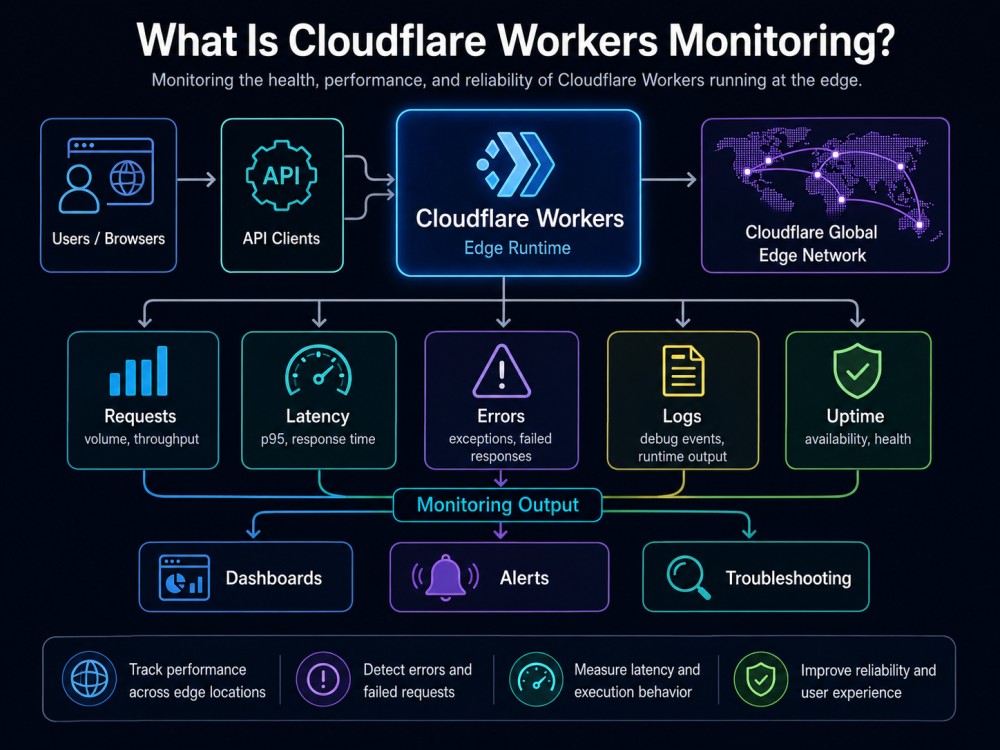
Cloudflare Workers monitoring is the practice of tracking execution behavior, performance, and errors across serverless functions running on Cloudflare’s edge network. Unlike traditional server monitoring, where you track CPU, memory, and disk, Workers monitoring focuses on invocation-level telemetry: how many requests hit each Worker, how long handlers take to execute, which external APIs or bindings are called, and what errors occur during execution.
Workers are ephemeral. They instantiate on-demand across Cloudflare’s global edge, execute code, and terminate. This means you cannot SSH into a server to debug logs, and you cannot install a traditional APM agent. Monitoring must be instrumented at the application layer or pulled from Cloudflare’s platform-level telemetry.
The primary challenges in workers’ monitoring are:
- High-cardinality request patterns: A single Worker can serve millions of unique URLs, user agents, or API endpoints. Monitoring systems must handle high-dimensionality queries without collapsing into averages that hide real issues.
- Cold start visibility: Workers can experience cold starts when instantiating in a new edge location or after inactivity. These cold starts are usually under 10ms, but tracking them requires invocation-level logs.
- Binding performance: Workers frequently call KV, R2, Durable Objects, D1 databases, or external APIs. A slow KV read, or a failing Durable Object call, can silently degrade performance. Monitoring must trace these binding-level operations, not just the handler’s total wall time.
- Cross-region behavior: A Worker that performs well in North America might hit latency issues in Asia if it calls a centrally-hosted origin. Regional breakdowns are essential.
Cloudflare provides built-in observability tools, including Workers Logs, real-time Tail Workers, Workers Logpush, and native OpenTelemetry export. For teams that need deeper analysis or want to unify Workers telemetry with backend services, external observability platforms can ingest Cloudflare’s structured logs and traces.
How Cloudflare Workers Monitoring Works
Cloudflare Workers monitoring operates through three primary telemetry layers: platform-generated metrics, structured invocation logs, and distributed traces. Each layer serves a different observability need.
Platform Metrics: Cloudflare automatically collects aggregate metrics for every Worker script. These include request count, error rate, CPU time, wall time, and subrequest count. Metrics are available in the Cloudflare dashboard under the Workers Analytics tab and via the GraphQL Analytics API.
CPU time measures how much time the Workers runtime spent executing your JavaScript code, excluding I/O wait time. Wall time measures the total elapsed time from invocation start to completion, including CPU time plus all I/O time. A Worker with 5ms CPU time but 200ms wall time is spending 195ms waiting on external calls.
Platform metrics are aggregated and sampled. They give you trends and anomaly detection, but lack the granularity to debug a specific failed request or trace why a particular endpoint is slow.
Invocation Logs: Invocation logs capture detailed metadata for individual Worker executions. When enabled, Cloudflare emits a structured JSON log for every invocation containing request headers, response status, execution duration, outcome (success/exception/exceeded CPU), and binding-level telemetry. These logs are high-cardinality and filterable by URL path, HTTP method, user agent, status code, or custom metadata added via console.log.
Distributed Traces: Cloudflare Workers support OpenTelemetry tracing via automatic instrumentation. When enabled, the Workers runtime generates trace spans for the handler invocation, all fetch calls to external APIs, and all binding operations (KV reads, R2 operations, Durable Object calls). These traces follow the W3C Trace Context standard, so if your backend services also emit OpenTelemetry spans, you get end-to-end request tracing from the edge to your origin. Traces are exported to any OpenTelemetry-compatible backend via OTLP. Cloudflare does not store traces long-term; you must configure an external collector endpoint.
Cloudflare Workers Native Observability Tools
Cloudflare provides four built-in observability features covering real-time debugging, managed log storage, export to external systems, and custom telemetry processing.
Workers Logs
Workers Logs is Cloudflare’s managed log storage for invocation logs. When enabled, Cloudflare automatically collects, stores, indexes, and queries logs for every invocation. On the Workers Paid plan, 20 million log events per month are included free, with additional events at $0.60 per million. Retention is 7 days on the Paid plan and 3 days on the Free plan.
The Query Builder interface lets you construct structured queries with filters, aggregations, and groupings, such as calculating P90 wall time for all 200 OK responses from a specific endpoint, or counting 429 rate-limit errors per region in the last 24 hours.
Enable Workers Logs by adding the following to your wrangler.toml:
[observability]

enabled = true

logs.invocation_logs = true

head_sampling_rate = 1Setting head_sampling_rate to 1 captures 100% of invocations. Reduce it to 0.1 for 10% sampling to lower the log volume and cost.
Real-Time Logs and Tail Workers
Real-time logs stream invocation events to your terminal or browser as they occur, useful during development or when debugging a live production issue.
wrangler tail my-worker --format prettyYou can filter by status code or apply a sampling rate:
wrangler tail my-worker --status error --sampling-rate 0.1Tail Workers are custom Workers that receive invocation events from other Workers, apply filtering or transformation logic, and forward selected events to an external system like Datadog, Elasticsearch, or a webhook. A common use case is capturing only 500-level errors and posting them to a Slack webhook for instant alerting.
Workers Logpush
Logpush exports Workers Trace Event Logs to long-term storage or external logging platforms. Supported destinations include Cloudflare R2, AWS S3, Google Cloud Storage, Azure Blob Storage, and third-party services like Datadog, Splunk, Sumo Logic, and Elastic.
Logpush is available on the Workers Paid plan. Pricing is $0.05 per million requests delivered to your destination, with 10 million requests per month included free. Unlike Workers Logs, which stores data in Cloudflare’s dashboard, Logpush sends data to your own infrastructure or observability platform where you control retention, querying, and cost.
Configure Logpush via the Cloudflare dashboard under Analytics, then Logs, then Add Logpush job, or via the Cloudflare API.
OpenTelemetry Export
Cloudflare Workers natively export OpenTelemetry traces and logs to any OTLP-compatible endpoint. Configure an exporter in your wrangler.toml, and the runtime automatically sends telemetry to your observability backend.
Supported backends include Honeycomb, Grafana Cloud, Axiom, Sentry, Dash0, and any self-hosted OpenTelemetry collector, including CubeAPM.
[observability]

enabled = true

[[observability.exporters]]

name = "honeycomb"

endpoint = "https://api.honeycomb.io/v1/traces"

headers = { "x-honeycomb-team" = "your-api-key" }OpenTelemetry export is free; costs depend on the external backend that receives your traces.
Custom Metrics with Analytics Engine
Analytics Engine is Cloudflare’s managed time-series database for custom metrics. It lets you record arbitrary numeric and string data from your Worker and query it later using SQL.
Typical use cases include tracking business metrics like checkout completion rates or API endpoint usage by customer tier, recording cache hit/miss ratios, or exporting aggregated metrics to internal dashboards.
Add an Analytics Engine binding in wrangler.toml:
[[analytics_engine_datasets]]

binding = "METRICS"

dataset = "worker_metrics"

Then write data points from your Worker code:

env.METRICS.writeDataPoint({

  blobs: [url.pathname, request.method],

  doubles: [response.status, duration],

  indexes: [url.pathname]

});Query your data using the SQL API:
SELECT blob1 as path, COUNT() as requests, AVG(double2) as avg_ms

FROM worker_metrics

WHERE timestamp > NOW() - INTERVAL '1' HOUR

GROUP BY blob1

ORDER BY requests DESCAnalytics Engine is included in the Workers Paid plan with 10 million writes per month free. Additional writes are $0.25 per million.
Best Practices for Cloudflare Workers Monitoring
- Use structured logging: Unstructured logs (console.log(“Error happened”)) are difficult to query. Use structured JSON logging to capture request context, error types, and performance metrics in a queryable format:
console.log(JSON.stringify({

  level: 'error',

  path: url.pathname,

  status: 500,

  error: error.message,

  duration: Date.now() - startTime,

  region: request.cf.colo

}));- Monitor binding-level performance: A Worker that takes 200ms to respond might be spending 5ms in code and 195ms waiting for a KV read. Instrument binding operations separately to isolate which external dependency is causing latency spikes.
- Set alerts on critical metrics: Key thresholds to alert on include error rate above 1% for application-level failures, P99 CPU time approaching the invocation limit, P99 wall time above 500ms suggesting external API or binding latency, and subrequest count above expected thresholds indicating a possible loop or misconfiguration.
- Test Workers across regions: A Worker that performs well in North America might hit latency when calling a US-only origin server from Asia. Use synthetic monitoring tools to test Workers from multiple geographic regions.
- Use Real User Monitoring for client-side performance: If you serve web applications via Workers, integrate Real User Monitoring (RUM) to track client-side metrics like Time to First Byte (TTFB), Largest Contentful Paint (LCP), and Cumulative Layout Shift (CLS). These show how Workers performance translates to actual user experience, which is distinct from server-side execution time.
- Sample deliberately: At high request volumes, capturing 100% of invocations is expensive. Set head_sampling_rate based on your traffic volume and diagnostic needs, and use Tail Workers to capture 100% of error events even when overall sampling is lower.
Tools for Cloudflare Workers Monitoring
Teams monitoring Cloudflare Workers typically combine Cloudflare’s native tools with external observability platforms. The right mix depends on whether you need unified visibility across edge and backend services, how much telemetry volume you generate, and whether you need log retention beyond 7 days.
Cloudflare Native Tools
Cloudflare’s built-in suite is the natural starting point for Workers observability. Workers Logs provides 7-day retention and a structured query interface for invocation logs, all included in the Workers Paid plan. Logpush exports logs to R2, S3, or external platforms for long-term storage and independent querying. OpenTelemetry export sends traces to any OTLP-compatible backend at no additional Cloudflare cost.
The main limitations are that Workers Logs’ Query Builder is less flexible than dedicated observability platforms, there is no built-in anomaly detection or sophisticated alerting beyond basic notifications, and correlation with non-Cloudflare infrastructure requires exporting telemetry to a separate platform. For teams running Workers as their only infrastructure, the native tools are often sufficient. For teams running Workers alongside backend services, databases, or Kubernetes workloads, a unified observability platform adds significant value.
1. CubeAPM
CubeAPM is a self-hosted, OpenTelemetry-native observability platform that correlates Workers traces with backend service traces, database queries, and infrastructure metrics in a single view. It runs inside your own cloud or on-premises environment, meaning all telemetry data stays within your infrastructure boundaries. This is particularly relevant for teams with data residency requirements or compliance constraints that prevent sending edge telemetry to third-party SaaS platforms.
Workers integration works through Cloudflare’s native OpenTelemetry export: configure your Workers to send OTLP traces to your CubeAPM instance endpoint, and CubeAPM ingests, stores, and correlates those spans alongside any backend traces from services your Worker calls. When debugging a slow API response that originates at the edge and hits a backend microservice and database, CubeAPM surfaces the full distributed trace in one view rather than requiring you to correlate across separate tools.
Pricing: Pricing is $0.15/GB of ingested telemetry data with no per-user fees and unlimited retention. A team ingesting 5 TB/month of logs and traces from Workers and backend services pays $750/month.
2. Datadog
Datadog is a cloud-based observability platform with built-in support for Cloudflare Workers via Logpush integration. You configure Logpush to send Workers logs to Datadog’s log intake API, and Datadog parses, indexes, and correlates them with infrastructure and application telemetry from your other services. For teams already using Datadog across AWS, GCP, or Azure workloads, adding Workers visibility through Logpush is straightforward and leverages existing dashboards and alert configurations.
Pricing: Infrastructure monitoring starts at $15/host/month (Pro plan, billed annually). APM, when purchased alongside infrastructure monitoring, is $31/host/month (billed annually). Log ingestion costs $0.10/GB with additional charges for indexing and retention.
A Worker generating 10 TB of logs per month would cost approximately $1,000 for ingestion alone before any indexing or APM fees. Datadog stores all data in its own cloud, which may be a constraint for teams with data sovereignty requirements.
3. Honeycomb

Honeycomb specializes in high-cardinality observability, making it well-suited for Cloudflare Workers where request patterns can have millions of unique dimension combinations. Rather than requiring you to pre-define indexes, Honeycomb’s wide-event model lets you query any field in your telemetry at any time without performance degradation. Workers telemetry integrates via Cloudflare’s native OpenTelemetry export: point your OTLP exporter at Honeycomb’s endpoint and your spans start appearing immediately.
Pricing: Honeycomb prices by event volume rather than data volume in GB. The free tier includes 20 million events per month. The Pro plan starts at $130/month for 100 million events, scaling up to 1.5 billion events per month on Pro tiers, with 60-day retention. Enterprise plans start at 10 billion events per year with custom pricing. Honeycomb is SaaS-only with no self-hosting option.
4. Grafana Cloud
Grafana Cloud provides a unified observability platform that can ingest Cloudflare Workers telemetry via OpenTelemetry export (traces to Grafana Tempo) or Logpush (logs to Grafana Loki). Grafana’s visualization layer is particularly strong for teams that want to build custom dashboards correlating Workers performance metrics with data from other sources. Self-hosted Grafana with Loki, Tempo, and Mimir (or Prometheus) is a popular open-source alternative that avoids SaaS costs entirely, though it requires operational effort to manage.
Pricing: Grafana Cloud logs are priced at $0.40/GB written after a free 50 GB/month allotment. Traces follow the same per-GB model. The free tier includes 14-day retention; paid plans offer 30 days or more. Self-hosted Grafana and Loki are free but require infrastructure provisioning, maintenance, and long-term storage management.
Elastic Stack

Elastic can ingest Cloudflare Workers diagnostic logs through Logpush or Workers Trace Events via OpenTelemetry. Logs are indexed in Elasticsearch and visualized in Kibana, where Elastic APM can correlate Workers calls with backend application traces. Elastic’s full-text search capabilities make it strong for log analysis at scale. The self-hosted Elastic Stack is free but infrastructure-intensive. Elastic Cloud Serverless Observability is consumption-based, starting at approximately $0.105/GB ingested for the Logs Essentials tier.
For teams already running the ELK stack to ingest application or infrastructure logs, adding Cloudflare Workers logs via Logpush extends existing infrastructure without adding a new platform. For teams starting from scratch, the operational complexity of Elasticsearch cluster management is a significant consideration.
OneUptime
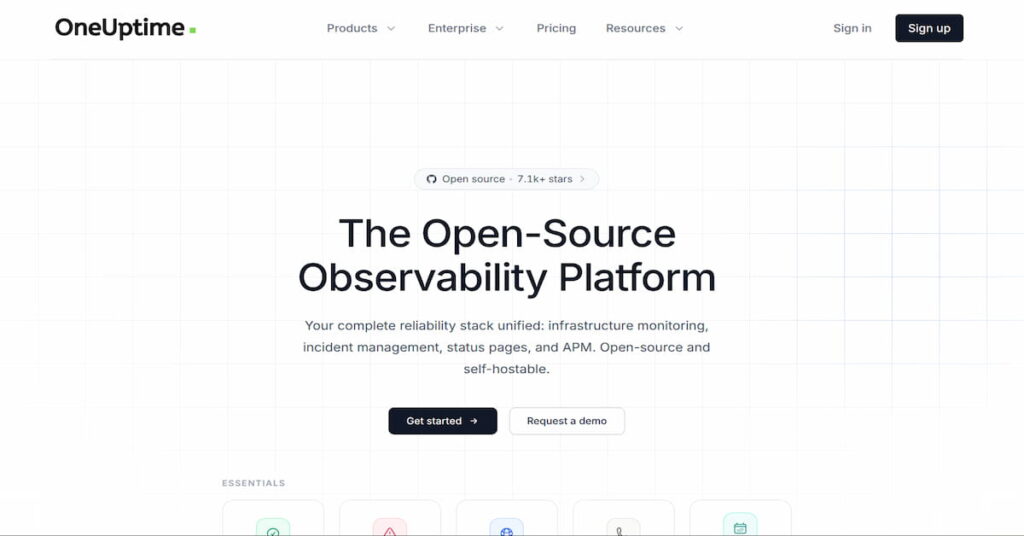
OneUptime is an open-source observability and incident management platform that supports OpenTelemetry ingestion for traces and logs. Configure Workers to export OpenTelemetry data to a self-hosted or managed OneUptime instance and it will receive and store spans alongside any backend telemetry you send. OneUptime also includes status page, uptime monitoring, and on-call management features, which makes it useful for teams who want to consolidate monitoring and incident response in one platform.
OneUptime is open-source and self-hosted at no licensing cost. The managed OneUptime offering uses custom, volume-based pricing. Compared to Datadog or Honeycomb, the integration ecosystem is smaller and the platform is less mature, but it is a viable option for teams prioritizing open-source ownership and tight cost control.
How to Choose the Right Workers Monitoring Approach
Use Cloudflare native tools if
You run Workers as your primary infrastructure, your observability needs are scoped to the edge, and you do not need to correlate Workers telemetry with backend service traces or infrastructure metrics. Workers Logs and Logpush to R2 cover most use cases at minimal cost and with zero external vendor dependencies. This is the right default for small teams or projects where Workers is the entire stack.
Use a commercial SaaS platform (Datadog, Honeycomb) if
You already have investment in a commercial observability platform and want to add Workers visibility through Logpush or OpenTelemetry export without introducing a new tool. Datadog is strong for teams monitoring heterogeneous multi-cloud environments where Workers is one of many signal sources. Honeycomb is the better fit when your Workers generate high-cardinality request patterns and you need to query arbitrary dimensions quickly across millions of unique combinations.
Use CubeAPM or Grafana/Elastic if
You need to unify Workers telemetry with backend service traces and infrastructure metrics in a single platform, have data residency requirements that prevent sending edge telemetry to third-party SaaS, or need retention beyond 7 days at predictable cost. Self-hosted tools give full data control and eliminate per-GB SaaS costs at scale. CubeAPM is purpose-built for teams wanting a managed-feeling platform that runs inside their own infrastructure. See the CubeAPM overview of observability tools for a broader comparison of self-hosted and SaaS approaches.
For teams building OpenTelemetry-native instrumentation across Workers and backend services, the CubeAPM guide to OpenTelemetry and cloud-native monitoring covers how OTel-native platforms handle distributed tracing across edge and origin.
Unified Edge and Backend Observability: CubeAPM
The fundamental limitation of Workers-only monitoring is that Workers rarely operate in isolation. They call backend APIs, read from origin databases, interact with Durable Objects, and serve as the entry point for requests that span multiple services. Debugging a latency spike that originates at the edge but is caused by a slow database query two hops away requires a unified trace, not separate dashboards per layer.
CubeAPM resolves this by ingesting Workers OpenTelemetry spans alongside backend traces and infrastructure metrics in a single platform. When a Workers invocation triggers a slow downstream call, CubeAPM surfaces the full distributed trace from edge to origin without requiring context-switching between Cloudflare’s dashboard and a separate APM tool.
At 5 TB/month of Workers logs, traces, and backend telemetry:
- CubeAPM: $750/month with self-hosted infrastructure costs
- Datadog: $1,000/month in log ingestion alone before APM or indexing fees
- Honeycomb Pro: approximately $4,250/month (at roughly $0.85/GB equivalent across event volume)
All telemetry stays within your infrastructure. GDPR, HIPAA, or data localization requirements are met by design. Onboarding takes under 60 minutes for existing OTel-instrumented Workers.
Conclusion
Cloudflare Workers monitoring requires visibility across three layers: Cloudflare’s platform metrics, structured invocation logs, and distributed traces exported to an observability backend. For most teams, starting with Workers Logs and OpenTelemetry export covers immediate needs. As Workers become part of a larger distributed system, a unified observability platform that correlates edge traces with backend signals reduces mean time to resolution significantly.
Enable diagnostic settings at deployment, not during incident response. Configure structured logging from day one so your logs are queryable when you need them. Ready to evaluate CubeAPM for unified Workers and backend observability? Start with the documentation.
Disclaimer: Pricing data was sourced from official vendor websites and documentation as of June 2026. Vendor pricing changes frequently; verify all figures directly with each vendor before making purchasing decisions. CubeAPM is the platform behind this blog.
FAQs
What metrics should I monitor for Cloudflare Workers?
At minimum: request count, error rate, CPU time, wall time, and subrequest count. CPU time reveals how much compute your code consumes. Wall time shows total latency including I/O waits. Add custom metrics via Analytics Engine for business-critical operations like cache hit rate or specific endpoint usage.
How do I enable structured logging in Cloudflare Workers?
Use console.log with JSON.stringify to output structured logs including request path, method, status code, duration, and region. Structured logs are automatically captured by Workers Logs and can be filtered and aggregated in the Query Builder.
Can I use Datadog agents with Cloudflare Workers?
No. Workers run in an isolated V8 runtime without persistent processes, so traditional APM agents cannot be installed. Use Logpush to send Workers logs to Datadog’s log intake API, or export OpenTelemetry traces to Datadog’s OTLP endpoint.
How much does Cloudflare Workers monitoring cost?
Workers Logs is included in the Workers Paid plan ($5/month) with 20 million log events free per month; additional events cost $0.60 per million. Logpush is also on the Paid plan with 10 million requests/month free, then $0.05/million. Analytics Engine includes 10 million writes/month free, then $0.25/million. OpenTelemetry export is free from Cloudflare; you pay for the external backend that receives traces.
How do I trace requests across Cloudflare Workers and my backend services?
Enable OpenTelemetry tracing in your Worker and configure an OTLP exporter to send traces to a platform like CubeAPM, Honeycomb, or Grafana Tempo. Ensure your backend services also emit OpenTelemetry spans. Cloudflare automatically propagates W3C Trace Context headers, linking edge and origin spans into a single distributed trace.
What is the difference between CPU time and wall time?
CPU time measures how long the Workers runtime executed your JavaScript code. Wall time measures total elapsed time from invocation start to completion, including CPU time plus all I/O waits (KV reads, fetch calls, Durable Object operations). High wall time with low CPU time means the Worker is waiting on external I/O, not compute.
Can I monitor Cloudflare Workers for free?
Yes. The Workers Free plan includes basic metrics in the Cloudflare dashboard and limited Workers Logs (200,000 log events/day, 3-day retention). For structured querying, higher log volumes, Logpush, and long-term retention beyond 7 days, the Workers Paid plan is required. OpenTelemetry export is free, but the external backend receiving traces has its own pricing.