






Azure Virtual Desktop (AVD) cost monitoring is where most organizations discover their cloud desktop bill is far more complex than expected. A 50-user AVD environment can easily run $8,000 to $15,000 per month when you account for compute, storage, networking, and licensing, but the real problem is not the headline number. The real problem is that native Azure tools give you aggregated spend data without explaining why your session hosts are running 24/7, which user profiles are consuming the most storage, or whether your auto-scaling logic is actually working.
This guide compares native Microsoft Azure cost monitoring tools with third-party AVD-specific platforms. Every tool is assessed on cost allocation granularity, user-level visibility, auto-scaling integration, and whether it can actually prevent the budget overruns that happen when session hosts stay powered on during off-peak hours. If you need to model infrastructure monitoring costs before diving into AVD-specific tooling, the infrastructure monitoring guide covers the broader context for tracking cloud resource spend.
Quick Comparison: Native vs Third-Party AVD Cost Monitoring
| Tool | Type | Best For | Cost Allocation | User-Level Visibility | Auto-Scaling Optimization | Pricing |
|---|---|---|---|---|---|---|
| Azure Cost Management | Native | High-level spend tracking | Resource group only | No | No | Free |
| Azure Monitor | Native | Operational telemetry | VM/host pool only | Limited via KQL | No | Free (data ingestion charges apply) |
| Azure Advisor | Native | Generic recommendations | None | No | Basic VM rightsizing | Free |
| Nerdio Manager | Third-party | Auto-scaling + cost control | Host pool level | Yes (per-user session cost) | Yes (native auto-scaling engine) | $4 to $6 per user per month |
| ControlUp | Third-party | Real time session monitoring | VM and user level | Yes (detailed session cost) | Alerts only, no automation | Custom pricing (starts ~$10 per user per month) |
| Turbo360 | Third-party | Azure resource governance | Resource group/subscription | Limited | Basic | ~$500 to $1,000+ per month |
| CubeAPM | Third-party | Infrastructure + application monitoring | Host/service/workload level | Session telemetry via OTel | Alert-driven (not auto-scaling) | $0.20/GB ingestion |
† User-level visibility means the tool can show you cost per user session, not just aggregated VM cost. This is critical for AVD chargeback models.
The Core Problem with AVD Cost Monitoring
AVD cost monitoring is harder than standard Azure VM monitoring because the cost structure is multi-layered and usage patterns are dynamic. A single AVD environment generates cost from at least four independent dimensions: session host VMs (compute), user profile storage (Azure Files or NetApp Files), network egress (data leaving Azure), and Microsoft 365 or Windows licensing.
Native Azure tools were built for infrastructure monitoring, not virtual desktop economics. Azure Cost Management shows you that your AVD resource group spent $12,000 last month, but it cannot tell you which users drove that cost, whether your auto-scaling actually reduced runtime hours, or if your storage tier choice is optimized. That gap is why third-party tools exist.
What Makes AVD Cost Monitoring Different from Standard Azure Monitoring
AVD cost monitoring requires three capabilities that standard cloud cost tools do not provide:
Per-user cost attribution: AVD is a multi-tenant environment where 50 users share 10 session hosts. You need to know which users consumed the most compute hours, which profiles are growing storage costs, and whether power users justify dedicated hosts. Native tools aggregate to the VM level – they cannot break down cost by user session.
Session-aware metrics: A session host running at 40% CPU is not necessarily underutilized if it is serving 15 concurrent users with acceptable performance. AVD monitoring needs to correlate VM utilization with active session count, not just raw CPU percentage. Azure Monitor collects VM metrics but does not natively understand AVD session density.
Auto-scaling cost impact: Most AVD environments use auto-scaling to reduce compute costs during off-peak hours. But native tools do not measure whether your scaling plan is working. You need visibility into how many hours your hosts ran versus how many were needed, and what that delta cost you. Azure Advisor might suggest rightsizing a VM, but it will not tell you that your auto-scaling policy failed to deallocate hosts at 6 PM every Friday for the last three months.
Organizations often discover these gaps after their first full month of production AVD usage, when the bill arrives 30% higher than forecasted, and no native tool can explain the variance.
Native Azure Cost Monitoring Tools: What They Cover and What They Miss
Microsoft provides three native tools for tracking Azure spend: Azure Cost Management + Billing, Azure Monitor with Log Analytics, and Azure Advisor. Each serves a specific function, and all three are included with your Azure subscription at no additional licensing cost. However, none were designed specifically for AVD cost analysis, and each has limitations when applied to virtual desktop environments.
Azure Cost Management + Billing
Azure Cost Management is the primary tool for viewing aggregated Azure spend across subscriptions, resource groups, and individual resources. It provides budget creation, spending alerts, and cost forecasting based on historical usage trends.
What it does well for AVD: You can filter costs by the resource group containing your AVD session hosts, view daily spend trends, and set budget thresholds that trigger email alerts when exceeded. Cost Management also supports cost allocation tags, so if you have tagged your session hosts by department or project, you can break down spend accordingly.
Where it falls short for AVD: Cost Management aggregates at the resource level; it shows you that a specific session host VM cost $450 last month, but it cannot tell you which users were logged into that host, how many hours it ran versus how many it should have run, or whether the cost increase was due to more users or inefficient auto-scaling. There is no concept of cost per user session. You also cannot correlate cost data with operational metrics like session density or user concurrency without exporting data to Log Analytics and writing custom KQL queries.
Pricing: Free with your Azure subscription. Data export and storage in Log Analytics incur standard ingestion and retention charges.
Azure Monitor and Log Analytics
Azure Monitor collects performance metrics and diagnostic logs from Azure resources, including AVD session hosts, host pools, and user sessions. When combined with a Log Analytics workspace, you can query telemetry using Kusto Query Language (KQL) to analyze session performance, host utilization, and user activity.
What it does well for AVD: Azure Monitor captures AVD-specific diagnostics — session connection success rates, user session durations, host pool health, and per-VM CPU/memory/disk metrics. With KQL, you can correlate user session counts with VM uptime to calculate rough cost per session hour. This is the closest native Azure gets to user level cost attribution, but it requires manual query construction and ongoing KQL expertise.
Where it falls short for AVD: Azure Monitor is an operational monitoring tool, not a cost management tool. While you can calculate cost per session hour manually by joining Log Analytics session data with Cost Management export files, there is no built-in workflow for this. You are essentially building your own cost allocation engine on top of raw telemetry. Additionally, Log Analytics ingestion and retention are not free — a busy AVD environment generating 500 GB of logs per month will incur $150 to $250 in Log Analytics costs just for the monitoring data itself.
Pricing: Free for the first 5 GB per month per workspace. Beyond that, ingestion costs $2.30/GB and retention beyond 90 days costs $0.10/GB per month. A production AVD environment typically generates 200 to 500 GB of telemetry per month, making this a hidden cost of native monitoring.
Azure Advisor
Azure Advisor scans your Azure environment and provides best practice recommendations across cost, security, reliability, performance, and operational excellence. For AVD, it focuses primarily on VM rightsizing and idle resource detection.
What it does well for AVD: Advisor will flag session host VMs that are consistently underutilized and suggest downsizing to a smaller SKU. For example, if a Standard_D4s_v5 VM is averaging 15% CPU over 30 days, Advisor might recommend switching to a Standard_D2s_v5 to cut compute cost in half. It also flags unattached disks and unused public IPs, which can accumulate in AVD environments after host pool reconfigurations.
Where it falls short for AVD: Advisor recommendations are generic and VM-centric. It does not understand AVD session density – a host running at 20% CPU might still be appropriately sized if it is serving 12 concurrent users with acceptable latency. Advisor also cannot analyze auto-scaling effectiveness or recommend storage tier optimizations for user profiles. Its recommendations are useful starting points but lack the context needed for confident decision-making in a multi-user virtual desktop environment.
Pricing: Free with your Azure subscription.
Third-Party AVD Cost Monitoring Tools: What They Add
Third-party AVD cost monitoring tools exist because native Azure tools cannot answer the cost questions that matter most to AVD administrators: Which users cost the most? Is our auto-scaling working? Are we paying for storage we do not need? These platforms layer AVD-specific cost intelligence on top of Azure telemetry, often integrating auto-scaling, user session tracking, and storage optimization into a single interface.
Nerdio Manager for AVD
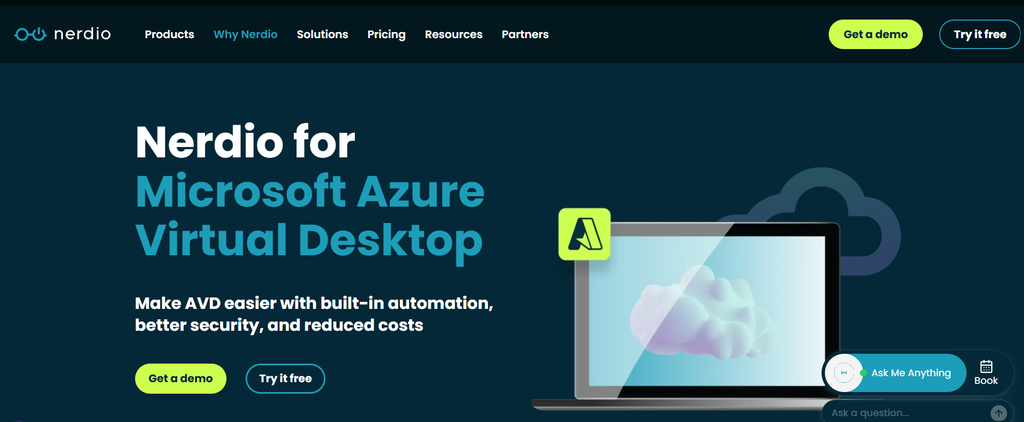
Nerdio Manager is the most widely adopted third-party tool for AVD cost control. It combines auto-scaling, user session management, and cost reporting into a single platform purpose-built for AVD.
What it does well: Nerdio provides per-user cost attribution, showing you exactly how much compute, storage, and networking each user consumed over a given period. Its auto-scaling engine powers session hosts on and off based on user demand, with built-in logic to handle buffer capacity, drain modes, and peak/off-peak schedules. Nerdio also surfaces cost savings opportunities specific to AVD – for example, flagging user profiles that have not been accessed in 90 days and suggesting their archival to cheaper storage tiers.
Where it falls short: Nerdio is a cost control platform, not a full observability tool. It tracks cost and scaling but does not correlate that data with application performance, user experience, or infrastructure health. If users report slow logon times, Nerdio will not tell you whether the bottleneck is a storage latency issue, a host pool scaling delay, or an application problem. You still need Azure Monitor or a third-party APM tool for that layer of visibility. Nerdio also adds a per-user monthly cost ($4 to $6 per user per month depending on licensing tier), which can become significant at scale.
Pricing: Starts at $4 per user per month for core features. Enterprise tier with advanced auto-scaling and multi-tenant management costs $6 per user per month. A 200-user environment pays $800 to $1,200 per month for Nerdio before any Azure infrastructure cost.
ControlUp
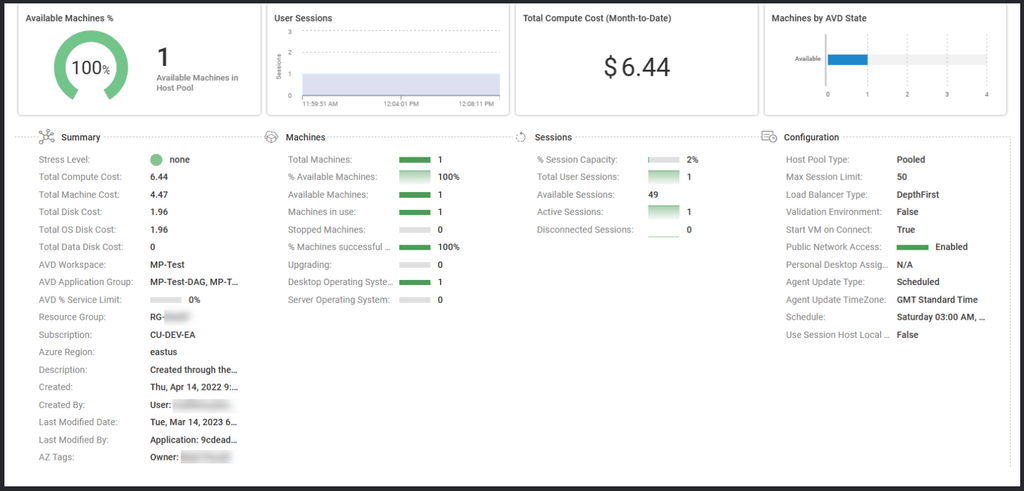
ControlUp is a real-time monitoring and management platform for virtual desktops and cloud workspaces, with deep AVD support. It focuses on user session performance, proactive issue detection, and cost visibility at the user and VM level.
What it does well: ControlUp provides per-session cost tracking, showing you how much each user session costs in compute, storage, and network resources. It correlates session performance metrics (logon time, application launch latency, CPU steal) with cost data, so you can see whether slow sessions are also expensive sessions. ControlUp’s real-time alerting catches AVD issues before users report them — for example, alerting when a session host’s disk queue length spikes or when user profile load times exceed a threshold.
Where it falls short: ControlUp is an observability and troubleshooting tool, not an auto-scaling engine. It will alert you that hosts are idle and costing money, but it will not automatically deallocate them. You need to build that automation separately using Azure Automation, Nerdio, or custom scripts. ControlUp’s pricing is also opaque – most customers pay custom pricing negotiated with their account team, starting around $10 per user per month. At 100+ users, that cost can exceed $1,000 per month before infrastructure spend.
Pricing: Custom pricing, typically $10 to $15 per user per month. Published pricing is not available – contact ControlUp for a quote.
Turbo360
Turbo360 is an Azure governance and cost optimization platform with AVD-specific features. It focuses on resource tagging, policy enforcement, and cost allocation across Azure subscriptions.
What it does well: Turbo360 enforces cost allocation tagging at scale, ensuring that every AVD session host, storage account, and network resource is tagged with the correct department, project, or cost center. It provides dashboards showing AVD spend by tag dimension, making chargeback and showback workflows easier. Turbo360 also automates common AVD admin tasks; for example, scheduling VM start/stop times or enforcing naming conventions for new host pools.
Where it falls short: Turbo360 is a governance tool, not a user session monitoring tool. It cannot show you cost per user or correlate cost with session performance. Its AVD features are narrower than Nerdio or ControlUp; it is best suited for organizations that need centralized Azure resource governance across many subscriptions and want AVD cost tracking as part of that broader mandate.
Pricing: Starts at ~$500 per month for basic governance features. AVD-specific dashboards and automation are included in higher tiers, which can range from $1,000 to $2,500+ per month depending on resource count and feature set.
CubeAPM for AVD Infrastructure and Application Monitoring
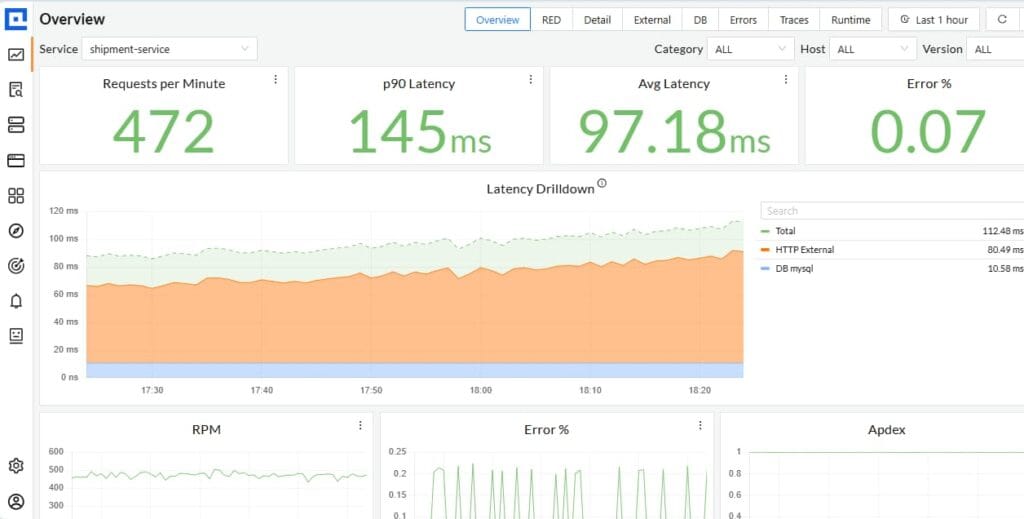
CubeAPM is a self-hosted observability platform that provides full-stack monitoring for AVD session hosts, applications, and infrastructure. It runs inside your Azure environment and collects telemetry via OpenTelemetry, giving you visibility into host performance, user session metrics, and application traces without sending data outside your cloud.
What it does well: CubeAPM correlates AVD session host metrics (CPU, memory, disk, network) with application performance traces and logs, so you can see whether a slow user experience is caused by the host, the application, or the backend service. It supports infrastructure monitoring for the entire AVD stack – session hosts, storage accounts, Azure Files, and networking components. CubeAPM’s flat $0.15/GB ingestion pricing means cost is predictable and scales linearly with telemetry volume, not user count or host count. For teams that want full observability without SaaS data egress, CubeAPM runs entirely inside your VPC or Azure subscription.
Where it falls short: CubeAPM is not an auto-scaling engine or a cost allocation platform. It monitors your AVD infrastructure and applications, but it does not calculate per-user cost or automatically power hosts on and off. You would pair CubeAPM with Nerdio for auto-scaling or build custom cost attribution logic using CubeAPM’s metrics and tags. CubeAPM also requires hosting – you provide the compute and storage in your Azure environment, which adds infrastructure cost on top of the $0.20/GB ingestion fee.
Pricing: $0.20/GB ingested. A 100-user AVD environment generating 500 GB of telemetry per month pays $100/month for CubeAPM. Infrastructure cost (VMs, storage) to run CubeAPM itself adds roughly $200 to $400/month depending on scale.
Cost Scenario: Native Azure Tools vs Third-Party Platforms for a 100-User AVD Environment
The table below models total cost of ownership for monitoring and managing a 100-user AVD environment using native Azure tools versus third-party platforms. The scenario assumes 100 users, 20 session host VMs (Standard_D4s_v5), Azure Files Premium storage, and 500 GB of monitoring telemetry per month.
| Tool | Monthly Cost | What You Get | What You Do Not Get |
|---|---|---|---|
| Azure Cost Management (native) | $0 | Aggregated spend by resource group, budgets, alerts | Per-user cost, session-level visibility, auto-scaling insights |
| Azure Monitor + Log Analytics (native) | $150 to $250 | VM metrics, AVD diagnostics, custom KQL queries | Pre-built AVD dashboards, user-level cost, auto-scaling integration |
| Azure Advisor (native) | $0 | VM rightsizing recommendations, idle resource detection | Session density awareness, auto-scaling analysis, storage optimization |
| Total Native Stack Cost | $150 to $250/month | Basic cost tracking, operational telemetry, generic recommendations | User-level cost, auto-scaling insights, AVD-specific optimization |
| Nerdio Manager | $400 to $600 | Per-user cost, auto-scaling, storage optimization, AVD-specific dashboards | Application performance monitoring, infrastructure health correlation |
| ControlUp | $1,000 to $1,500 | Per-session cost, real-time performance alerts, troubleshooting tools | Auto-scaling automation, cost forecasting |
| Turbo360 | $500 to $1,000 | Cost allocation tagging, governance automation, AVD dashboards | User-level cost, session performance, auto-scaling |
| CubeAPM | $300 to $500 | Full-stack observability, session host + app monitoring, self-hosted | Auto-scaling engine, per-user cost attribution |
This estimate models a 100-user AVD production environment with 20 session hosts and standard telemetry volume. Pricing is based on publicly available rate cards as of April 2026. Enterprise discounts, reserved capacity, and multi-year contracts are not reflected. Verify current pricing on each vendor’s site before committing.
The native Azure stack is free or low cost, but you get only aggregated spend data and raw telemetry – no user-level insights, no auto-scaling analysis, and significant manual work to connect cost with operational metrics. Third-party tools add AVD-specific intelligence but can triple or quadruple your monitoring cost, especially at scale.
How to Choose Between Native and Third-Party AVD Cost Monitoring Tools
The decision between native Azure tools and third-party platforms depends on three factors: your team’s AVD scale, your need for per-user cost attribution, and whether you already have auto-scaling in place.
Use native Azure tools (Cost Management + Monitor + Advisor) if: You have fewer than 50 users, your AVD environment is stable with predictable usage patterns, you do not need per-user cost breakdowns, and you have engineering resources to write KQL queries and build custom dashboards. Native tools are sufficient for small deployments where cost visibility at the resource group level is enough, and you are not running complex auto-scaling.
Add Nerdio Manager if: You need auto-scaling to reduce session host runtime costs, you want per-user cost attribution for chargeback or showback, or you manage multi-tenant AVD environments (MSP or multi-customer scenarios). Nerdio is purpose-built for AVD cost control and is most valuable when your environment scales beyond 50 users or when you need to prove ROI from auto-scaling.
Add ControlUp if: You need real-time user session performance monitoring and proactive alerting, your users report intermittent slowness that you cannot diagnose with Azure Monitor alone, or you need per-session cost visibility correlated with performance metrics. ControlUp is best for environments where user experience issues are frequent, and you need deeper troubleshooting tools than Azure provides.
Use CubeAPM if: You need full-stack observability that correlates AVD session host metrics with application performance and backend service health, you want to keep all telemetry data inside your Azure environment for compliance or data residency reasons, or you want predictable observability costs that scale with data volume rather than user or host count. CubeAPM pairs well with Nerdio for auto-scaling or with native Azure tools for cost tracking, filling the observability gap that neither provides.
Use Turbo360 if: You manage multiple Azure subscriptions with centralized governance requirements, you need to enforce cost allocation tagging at scale, or you want AVD cost visibility as part of a broader Azure optimization platform. Turbo360 is less valuable for single-subscription AVD deployments but scales well for enterprises with complex Azure estates.
Monitoring AVD Infrastructure and Applications with CubeAPM
CubeAPM provides infrastructure monitoring for AVD environments by collecting metrics from session host VMs, storage accounts, networking components, and applications running inside user sessions. It runs entirely inside your Azure subscription, so no telemetry data leaves your cloud – a requirement for teams with data residency policies or HIPAA compliance obligations.
How CubeAPM Monitors AVD Sessions and Hosts
CubeAPM uses OpenTelemetry to collect metrics from AVD session host VMs, including CPU utilization, memory consumption, disk IOPS, and network throughput. These metrics are correlated with AVD-specific signals – active session count, user logon events, and host pool membership – so you can see how resource usage maps to user demand. For example, if a session host consistently runs at 80% CPU during peak hours, CubeAPM shows you how many users were logged in, which applications were active, and whether that load is normal or anomalous.
CubeAPM also monitors the health of Azure Files or NetApp Files volumes used for user profiles, tracking metrics like latency, throughput, and capacity usage. Slow profile loads are a common AVD performance issue, and CubeAPM’s storage monitoring surfaces whether the bottleneck is in the storage tier, the network path, or the session host itself.
Correlating AVD Metrics with Application Performance
Most AVD troubleshooting scenarios require correlating session host metrics with application behavior. A user reports that their ERP application is slow – is it because the session host is overloaded, the application backend is timing out, or the database is under heavy load? CubeAPM’s distributed tracing captures application requests from the user session through to backend services, showing you exactly where latency is introduced. This is the layer of visibility that native Azure Monitor and third-party AVD cost tools do not provide.
Setting Up AVD Monitoring in CubeAPM
CubeAPM integrates with AVD using OpenTelemetry agents installed on session host VMs. The agents collect VM metrics, user session telemetry, and application traces, sending them to CubeAPM’s backend running inside your Azure subscription. You define alert rules for session host CPU, memory, disk queue length, or user session count, and route alerts to Slack, PagerDuty, or email. CubeAPM’s flat $0.15/GB pricing means you pay only for the telemetry volume you ingest, not per user or per host, making it predictable as your AVD environment scales.
Frequently Asked Questions
What is the difference between Azure Cost Management and third-party AVD cost tools?
Azure Cost Management shows aggregated spend by resource or resource group but cannot attribute cost to individual user sessions. Third-party tools like Nerdio or ControlUp layer user-level cost tracking and session performance correlation on top of Azure billing data.
Can Azure Monitor track AVD cost per user?
Not directly. Azure Monitor collects session telemetry and VM metrics, but you must write custom KQL queries to join that data with Cost Management exports and manually calculate cost per user session. Third-party tools do this automatically.
Do I need a third-party tool if I use Azure Advisor?
Azure Advisor provides generic VM rightsizing recommendations but does not understand AVD session density or auto-scaling effectiveness. If you need per-user cost visibility or auto-scaling optimization, a third-party tool is necessary.
How much does Nerdio Manager cost for a 200-user AVD environment?
Nerdio Manager charges $4 to $6 per user per month. For 200 users, that is $800 to $1,200 per month for Nerdio licensing, before any Azure infrastructure cost.
Can CubeAPM replace Azure Monitor for AVD?
CubeAPM provides infrastructure and application monitoring for AVD session hosts, storage, and networking, with better correlation between metrics and traces than Azure Monitor. However, CubeAPM does not provide native AVD diagnostics like session connection success rates — you would pair CubeAPM with Azure Monitor diagnostics or use OpenTelemetry to collect those signals.
What is the biggest cost monitoring gap in native Azure tools?
Native Azure tools aggregate cost at the VM or resource group level. They cannot show you which users drove the most cost, whether your auto-scaling logic is working, or if you are paying for storage you do not need. That visibility requires a third-party tool or significant custom query work.
Disclaimer: The information in this article reflects the latest details available at the time of publication and may change as technologies and products evolve. Features, pricing, and plan limits can change over time. Always verify the latest information directly with the vendor before making purchasing or deployment decisions.