









Monitoring serverless workloads on Google Cloud requires understanding what each platform exposes and how observability tooling connects to it. Cloud Run and Cloud Functions both scale to zero and bill per request, but their monitoring footprints differ significantly. Cloud Run gives you container-level metrics and full control over instrumentation. Cloud Functions abstracts the runtime entirely, exposing function-specific metrics through Cloud Monitoring but limiting what you can customize.
The difference matters most when debugging latency spikes, memory leaks, or cold start patterns. On Cloud Run, you can instrument the container with OpenTelemetry agents and capture distributed traces across service boundaries. On Cloud Functions, you rely on what Google’s runtime surfaces by default, which covers invocation count and duration but often misses deeper application context like database query latency or external API call breakdowns.
This guide compares both platforms on metrics depth, log correlation, trace instrumentation, alerting capabilities, and monitoring tool compatibility. Each section includes real setup examples and cost implications for teams running production workloads at scale.
Quick Comparison: Cloud Run vs Cloud Functions Monitoring at a Glance
| Dimension | Cloud Run | Cloud Functions |
|---|---|---|
| Metrics granularity | Container-level: CPU, memory, request count, latency per revision | Function-level: invocation count, execution time, error rate |
| Custom instrumentation | Full control via OpenTelemetry, Datadog, or Prometheus agents in container | Limited to Cloud Monitoring libraries, runtime-specific SDKs |
| Log structure | Structured JSON logs via stdout/stderr, correlated with traces | Function logs auto-collected, correlated with invocation ID |
| Distributed tracing | Manual setup required, full OpenTelemetry support | Built-in trace correlation for Eventarc triggers, manual for HTTP |
| Cold start visibility | Instance startup time visible in metrics, can track container initialization | Cold start duration included in execution time, less granular |
| Alerting complexity | Define alerts on any custom metric or log-based metric | Limited to default function metrics unless custom logs used |
| Cost model | Pay per vCPU-second and memory, monitoring via Cloud Monitoring API calls | Pay per invocation and compute time, same monitoring API costs |
| Best for | Multi-endpoint services, long-running tasks, high customization needs | Single-purpose functions, event-driven workflows, simplicity over control |
Cloud Run Overview: Monitoring Containerized Services
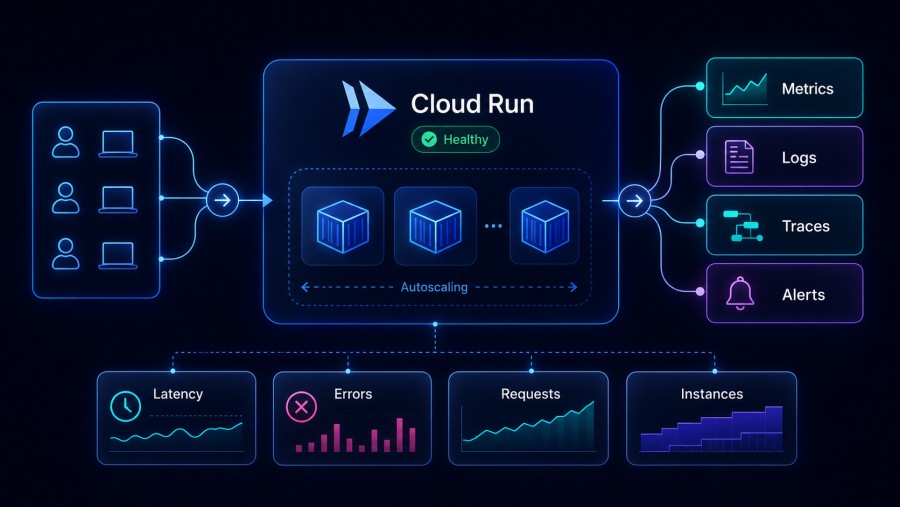
Cloud Run deploys containers that respond to HTTP requests or run as background jobs. Each deployment creates a revision, and Cloud Run auto-scales instances of that revision based on incoming traffic. Monitoring focuses on request latency, instance count, and resource utilization at the revision level.
What Cloud Run exposes by default:
- Request count, latency distribution (p50, p95, p99), and error rate per revision
- Container instance count (active, idle, starting)
- CPU and memory utilization per instance
- Billable container instance time (vCPU-seconds and GiB-seconds)
- Startup latency for new instances (cold start)
Custom instrumentation: Because Cloud Run runs your container, you control the application runtime entirely. You can install OpenTelemetry agents, Datadog tracers, or Prometheus exporters inside the container to capture custom metrics, distributed traces, and deep application context. This is the primary advantage over Cloud Functions for observability; teams that need full trace fidelity across microservices typically choose Cloud Run for this reason.
Log correlation: Cloud Run writes container logs to Cloud Logging automatically. If you emit structured JSON logs to stdout or stderr, Cloud Logging parses them and makes fields queryable. You can correlate logs with specific requests using trace IDs embedded in log entries, assuming your application propagates trace context correctly.
Cold start monitoring: Cloud Run surfaces instance startup latency as a separate metric. You can track how long it takes for a new container to start and begin serving requests. This matters for workloads with strict p99 latency requirements, where cold starts can push response times above acceptable thresholds.
A production Cloud Run service handling 10 million requests per month with an average response time of 200ms and 512 MiB memory allocation costs approximately $24 per month for compute (excluding networking and Cloud Monitoring API calls). Monitoring via Cloud Monitoring adds roughly $0.50 per million API calls, so continuous metric collection can add $5–$10 per month depending on scrape frequency.
Cloud Functions Overview: Monitoring Event-Driven Functions
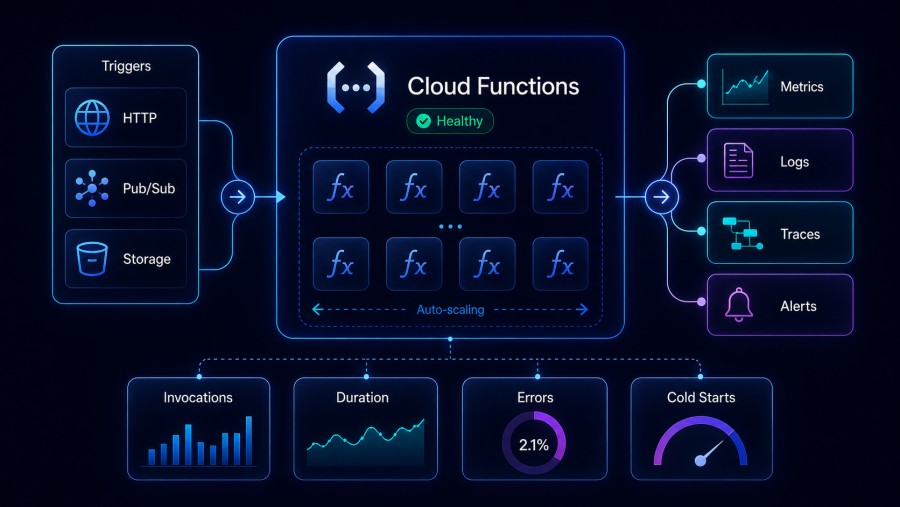
Cloud Functions abstracts the runtime layer entirely. You deploy source code, and Google manages the container, scaling, and lifecycle. Monitoring focuses on function invocation metrics, execution duration, and error rates. You do not see container-level metrics or instance counts because Google hides that layer.
What Cloud Functions exposes by default:
- Function invocation count (total, per minute)
- Execution time (average, p50, p95, p99)
- Active instances (how many function instances are currently running)
- Error count and error rate (invocations that threw exceptions or timed out)
- Memory usage per invocation (max observed during execution)
Custom instrumentation limitations: Cloud Functions (2nd gen) runs on Cloud Run infrastructure but still restricts what you can customize. You cannot install arbitrary agents or exporters. You rely on Cloud Monitoring client libraries or Cloud Trace SDK to emit custom metrics and traces. This works for simple use cases but becomes limiting when you need high-cardinality traces or custom metric dimensions that Cloud Monitoring does not support natively.
Log correlation: Function logs are automatically collected and tagged with execution ID, making it easy to filter logs for a specific invocation. Cloud Functions also auto-correlates logs with traces if you use Cloud Trace SDK. This is smoother than Cloud Run out of the box, but you give up flexibility in how logs are structured or where they are sent.
Cold start visibility: Cloud Functions includes cold start duration in total execution time. You cannot separate cold start latency from warm execution latency in default metrics. To track cold starts specifically, you need to emit custom metrics or analyze logs manually. This makes diagnosing cold start performance problems harder than on Cloud Run, where startup latency is a first-class metric.
A production Cloud Function handling 10 million invocations per month with an average execution time of 200ms and 512 MiB memory allocation costs approximately $18 per month for compute (invocations are billed at $0.40 per million, and compute at $0.0000025 per GiB-second). Monitoring costs are similar to Cloud Run, except $5–$10 per month for metric ingestion depending on metric cardinality and scrape frequency.
Metrics Depth: What Each Platform Surfaces
The biggest monitoring difference between Cloud Run and Cloud Functions is metric granularity. Cloud Run exposes container and revision metrics that let you diagnose infrastructure-level problems. Cloud Functions exposes function-level metrics that show invocation patterns but hide what happens inside the runtime.
Cloud Run metrics:
run.googleapis.com/request_count: Total requests per revision, labeled by response coderun.googleapis.com/request_latencies: Latency distribution (p50, p95, p99) per revisionrun.googleapis.com/container/cpu/utilizations: CPU usage per container instancerun.googleapis.com/container/memory/utilizations: Memory usage per container instancerun.googleapis.com/container/instance_count: Number of active, idle, and starting instancesrun.googleapis.com/container/startup_latency: Time taken for new container instances to start
These metrics are available in Cloud Monitoring and can be queried via MQL (Monitoring Query Language) or exported to third-party tools via Cloud Monitoring API.
Cloud Functions metrics:
cloudfunctions.googleapis.com/function/execution_count: Total invocations, labeled by status (success, error, timeout)cloudfunctions.googleapis.com/function/execution_times: Execution duration distribution (p50, p95, p99)cloudfunctions.googleapis.com/function/active_instances: Current number of function instances runningcloudfunctions.googleapis.com/function/user_memory_bytes: Memory used per invocationcloudfunctions.googleapis.com/function/instance/cpu/utilization: CPU usage per function instance (2nd gen only)
Cloud Functions metrics are coarser. You see invocation-level data but cannot drill into what caused a specific slow invocation without adding custom instrumentation. Cloud Run metrics let you correlate slow requests with high CPU or memory usage at the container level, which shortens root cause analysis time significantly.
Custom metric support: Both platforms let you emit custom metrics to Cloud Monitoring via client libraries. On Cloud Run, you can also run Prometheus exporters or OpenTelemetry collectors inside the container to send metrics to external platforms like infrastructure monitoring tools or self-hosted observability stacks. Cloud Functions does not support this; you are limited to Cloud Monitoring APIs only.
Cloud Run vs Cloud Functions: Log Management and Correlation Differences
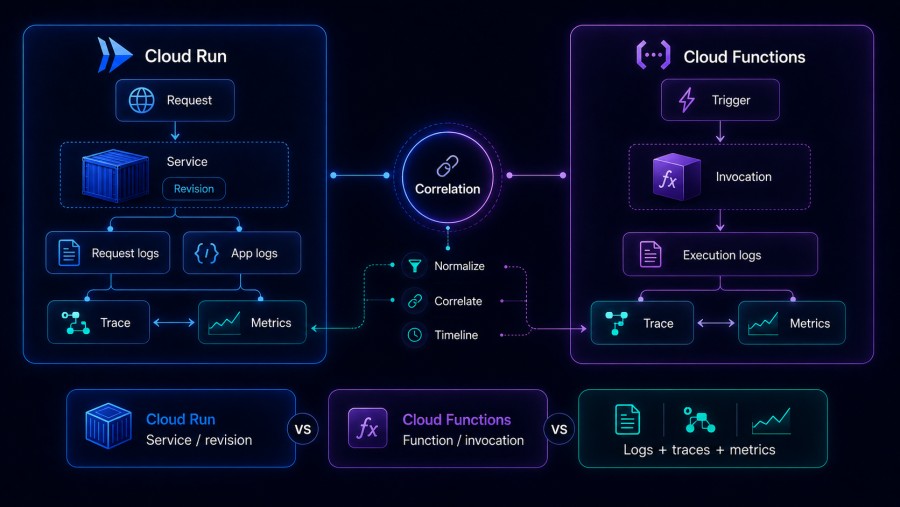
Both platforms send logs to Cloud Logging automatically, but the structure and correlation capabilities differ.
Cloud Run log behavior:
- Container stdout/stderr streams are captured as log entries
- Each log entry is tagged with
resource.type="cloud_run_revision"and labeled with service name, revision ID, and instance ID - If your application emits structured JSON logs, Cloud Logging parses them and makes fields queryable
- Logs are not automatically correlated with traces, you must propagate trace context (trace ID and span ID) in log entries manually using OpenTelemetry or Cloud Trace SDK
- Log-based metrics can be defined to count specific log patterns (e.g., HTTP 5xx errors, slow query warnings)
Cloud Functions log behavior:
- Function execution logs are auto-captured and tagged with
resource.type="cloud_function"and labeled with function name, region, and execution ID - Logs for a specific invocation are grouped by execution ID, making it trivial to view all logs for one function call
- Cloud Functions (2nd gen) auto-correlates logs with traces if you use Cloud Trace SDK, no manual trace ID propagation required
- Structured logging works the same way as Cloud Run, emit JSON to stdout and Cloud Logging parses it
- Log-based metrics are supported identically to Cloud Run
Key difference: Cloud Functions makes log correlation easier by default because execution IDs are baked into every log entry automatically. Cloud Run requires you to add trace IDs to logs yourself, which means more setup but also more control over trace propagation across distributed services.
For teams running microservices that span multiple Cloud Run services, propagating trace context correctly is critical. Tools like Real User Monitoring (RUM) often inject trace IDs at the frontend, which must flow through every backend service to maintain end-to-end visibility. Cloud Run gives you this flexibility. Cloud Functions does not, because each function is an isolated execution context.
Distributed Tracing: Setup and Compatibility
Distributed tracing tracks how requests flow across services, showing latency at each hop and identifying bottlenecks in complex architectures. Cloud Run and Cloud Functions both support tracing, but setup complexity and trace fidelity differ.
Cloud Run tracing setup:
- Manual instrumentation required, no automatic trace generation
- Install OpenTelemetry SDK or Cloud Trace client library in your container
- Propagate trace context (W3C Trace Context headers) across service calls
- Emit spans to Cloud Trace or export to external tracing backends like Jaeger, Tempo, or synthetic monitoring platforms that support trace correlation
- Full control over span attributes, custom tags, and sampling rates
Cloud Functions tracing setup:
- Automatic trace correlation for Eventarc-triggered functions (Pub/Sub, Cloud Storage, Firestore events)
- Manual instrumentation required for HTTP-triggered functions using Cloud Trace SDK
- Trace context propagation across multiple functions requires manual header passing
- Limited span customization compared to OpenTelemetry, you rely on Cloud Trace SDK capabilities
Trace sampling: Cloud Run lets you control sampling rates directly in your instrumentation code. You can sample 100% of traces in development and reduce to 1% in production to manage volume and cost. Cloud Functions uses default Cloud Trace sampling, which is roughly 0.1 requests per second per function, meaning most invocations are not traced unless you explicitly force tracing via HTTP headers or SDK calls.
For high-throughput functions processing millions of requests per day, default sampling may miss rare edge cases that cause latency spikes. Cloud Run’s full sampling control avoids this problem, you can implement head-based sampling (sample decisions made at trace start) or tail-based sampling (sample decisions made after trace completion based on latency or error conditions).
Cross-service tracing: If your architecture includes both Cloud Run services and Cloud Functions, trace context must propagate correctly across both. This requires using the same trace ID format (W3C Trace Context is the standard) and ensuring every service forwards trace headers in outgoing requests. Cloud Run makes this straightforward because you control the HTTP client code entirely. Cloud Functions abstracts some of this, which can break trace continuity if not handled carefully.
Alerting and Incident Response Setup
Both platforms integrate with Cloud Monitoring alerting, but the metrics and conditions you can define differ based on what each platform exposes.
Cloud Run alerting capabilities:
- Alert on request latency (p95, p99), error rate, or total request count per revision
- Alert on container CPU or memory utilization exceeding thresholds
- Alert on instance startup latency (cold start duration) spiking above acceptable limits
- Create log-based alerts for specific error patterns or custom log fields
- Use Cloud Monitoring uptime checks to verify HTTP endpoint availability from multiple regions
- Integrate with PagerDuty, Slack, email, or webhooks for incident routing
Cloud Functions alerting capabilities:
- Alert on execution time (p95, p99), error rate, or invocation count per function
- Alert on active instance count to detect scaling problems
- Alert on memory usage per invocation to catch memory leaks before they cause OOM errors
- Create log-based alerts identically to Cloud Run
- Uptime checks work for HTTP-triggered functions but not event-driven functions
- Same incident routing options as Cloud Run (PagerDuty, Slack, email, webhooks)
Alert complexity difference: Cloud Run alerts can target specific revisions, which is useful during canary deployments or blue-green rollouts. You can alert only on the new revision’s error rate without noise from the stable revision. Cloud Functions does not support revision-level alerting, every alert targets the entire function deployment, which makes gradual rollouts harder to monitor safely.
Anomaly detection: Both platforms support Cloud Monitoring’s anomaly detection policies, which use historical metric data to detect unusual patterns. For example, if function execution time suddenly doubles compared to the past week, an anomaly alert fires even if the absolute value is still below your static threshold. This works better for Cloud Functions than Cloud Run because function behavior is more predictable, container-based services often have legitimate traffic spikes or deployment-related metric changes that trigger false positives.
Cost Implications for Monitoring at Scale
Monitoring costs for both platforms come from two sources: Cloud Monitoring API calls and metric ingestion volume. The cost structure is identical, but metric cardinality (number of unique time series) differs between platforms.
Cloud Monitoring pricing (as of 2026):
- First 150 MiB per month of ingested metric data: free
- Beyond 150 MiB: $0.2580 per MiB (approximately $258 per GiB)
- First 150 MiB per month of ingested log data: free
- Beyond 150 MiB: $0.50 per GiB
- Cloud Monitoring API read calls: $0.01 per 1,000 calls
Pricing based on [Google Cloud’s official monitoring pricing page](https://cloud.google.com/stackdriver/pricing). Enterprise discounts and committed use contracts can reduce these rates. Verify current pricing directly with Google Cloud before budgeting.
Cloud Run metric volume: Each Cloud Run service generates roughly 10–15 time series per revision (request count, latency, CPU, memory, instance count, startup latency). If you deploy 10 services with 3 revisions each actively serving traffic, that is 300–450 time series. At 1-minute scrape intervals, this generates approximately 12–18 MiB per month, well within the free tier for small deployments.
For a mid-sized deployment (50 services, 5 revisions per service, 1-minute scrape interval), metric volume scales to roughly 120–180 MiB per month, costing $0–$8 per month depending on exact cardinality and retention.
Cloud Functions metric volume: Each function generates fewer time series (5–8 per function: invocation count, execution time, error rate, memory usage, active instances). A deployment with 50 functions generates 250–400 time series, similar to Cloud Run. Metric volume at 1-minute intervals is approximately 10–15 MiB per month, also within the free tier for small teams.
The real cost driver is log volume, not metrics. If your Cloud Run service logs every request or your Cloud Function logs verbose debug messages, log ingestion can easily exceed the 150 MiB free tier. A service handling 1 million requests per month with 1 KB logs per request generates 1 GiB of logs, costing $0.50 per month. At 100 million requests per month, that becomes $50 per month just for log storage.
Cost optimization strategies:
- Use structured logging to reduce log verbosity, log only errors and slow requests in production
- Aggregate metrics locally before sending to Cloud Monitoring to reduce time series cardinality
- Use log sampling for high-volume endpoints, log 1% of successful requests and 100% of errors
- Export metrics and logs to cheaper storage (Cloud Storage, BigQuery) for long-term retention
- For teams with strict observability budgets, self-hosted platforms like CubeAPM running inside your own GCP VPC avoid Cloud Monitoring API costs entirely, paying only for compute and storage resources at $0.15/GB for unified ingestion of logs, traces, and metrics
This cost model applies to a mid-market deployment profile: 30 TB/month observability data, 100 hosts, 60-day retention. Actual costs vary by workload, retention policy, and indexing strategy. Always verify costs with vendor pricing calculators before committing to a platform.
Choosing Between Cloud Run and Cloud Functions for Monitoring Needs
The right platform depends on how much observability control you need and whether your workload fits the function abstraction.
Choose Cloud Run if:
- You need full control over instrumentation (OpenTelemetry, Datadog, Prometheus)
- Your workload spans multiple endpoints or services that require distributed tracing
- You need to monitor container-level metrics (CPU, memory, instance startup time)
- You want to export metrics and logs to third-party observability platforms
- Your service has strict p99 latency requirements and needs granular cold start tracking
- You are building a microservices architecture where trace propagation is critical
Choose Cloud Functions if:
- Your workload is event-driven and does not need HTTP endpoint flexibility
- You prefer simplicity over customization and are okay with default metrics
- Your functions are stateless and short-lived (under 60 seconds execution time)
- You do not need high-cardinality custom metrics or external observability integrations
- Auto-correlation of logs and traces via execution IDs is sufficient for your debugging needs
- You want the lowest operational overhead and are okay with limited visibility into runtime internals
Hybrid approach: Many teams run both. Cloud Functions handle event-driven background jobs (Pub/Sub message processing, scheduled tasks, Firestore triggers) where simplicity matters more than observability depth. Cloud Run handles user-facing APIs and long-running services where full tracing and custom metrics are non-negotiable.
If you run both platforms, ensure trace context propagates correctly across them. Use W3C Trace Context headers and a unified trace backend (Cloud Trace, Jaeger, or a self-hosted OpenTelemetry collector) to maintain end-to-end visibility.
Monitoring Tools Compatible with Both Platforms
Several observability platforms integrate with both Cloud Run and Cloud Functions, offering unified dashboards and alerting across both runtimes.
Native Google Cloud tools:
- Cloud Monitoring: Default metrics and alerting for both platforms, free tier covers small deployments, MQL query language for custom dashboards
- Cloud Trace: Distributed tracing backend, auto-correlation for Cloud Functions, manual setup for Cloud Run
- Cloud Logging: Centralized log aggregation, structured logging support, log-based metrics and alerts
Third-party SaaS platforms:
- Datadog: Full support for both platforms via Cloud integration, requires Datadog agent in Cloud Run containers, Cloud Functions monitored via Cloud Monitoring integration, per-host pricing can become expensive at scale
- New Relic: Supports both via Cloud integrations, agent install required for Cloud Run, Cloud Functions use lightweight wrapper library, per-seat or compute-capacity pricing models
- Dynatrace: OneAgent deploys in Cloud Run containers, Cloud Functions monitored via Cloud Monitoring data ingestion, strong root cause analysis features, high cost for enterprise-only deployments
Self-hosted and open-source options:
- Grafana + Prometheus + Tempo: Scrape Cloud Monitoring metrics via API, ingest Cloud Run custom metrics via Prometheus exporters, visualize traces from OpenTelemetry collectors, requires self-managed infrastructure

- CubeAPM: OpenTelemetry-native platform that runs inside your GCP VPC, monitors both Cloud Run and Cloud Functions via Cloud Monitoring integration and direct agent instrumentation, unified logs + traces + metrics at $0.20/GB, no per-host or per-seat fees, handles 30 TB/month workloads for approximately $4,500/month compared to $20,000+ on Datadog or New Relic at equivalent scale
For teams prioritizing cost predictability and data control, self-hosted platforms eliminate the unpredictable per-host or per-seat fees common in SaaS APM tools. They also avoid egress charges when exporting telemetry outside GCP, which can add $0.10/GB to total observability costs on managed platforms.
Migrating Monitoring Setup Between Platforms
If you are moving workloads from Cloud Functions to Cloud Run (common when outgrowing function limitations) or consolidating multiple functions into a single Cloud Run service, monitoring setup changes significantly.
Cloud Functions → Cloud Run migration checklist:
- Replace Cloud Functions event triggers with HTTP endpoints or Eventarc subscriptions in Cloud Run
- Refactor function logging to structured JSON logs emitted to stdout/stderr
- Install OpenTelemetry or Cloud Trace SDK in the Cloud Run container to maintain trace continuity
- Update alerting policies to use Cloud Run metric names instead of Cloud Functions metric names
- Reconfigure dashboards to visualize revision-level metrics instead of function-level metrics
- Test cold start behavior under production load; Cloud Run cold starts differ from function cold starts due to container initialization overhead
Cloud Run → Cloud Functions migration checklist (less common):
- Split multi-endpoint Cloud Run services into discrete Cloud Functions per endpoint
- Simplify instrumentation by removing custom agents and relying on Cloud Monitoring defaults
- Update alerting policies to function-level metrics, remove container-specific alerts
- Consolidate logs using execution ID filtering instead of trace ID correlation
- Accept reduced metric granularity, especially for CPU and memory per request
Most teams migrate from Cloud Functions to Cloud Run as workloads mature, not the reverse. The primary driver is needing more control over observability instrumentation as systems become more complex.
Disclaimer: The information in this article reflects the latest details available at the time of publication and may change as technologies and products evolve. Features, pricing, and plan limits can change over time. Always verify the latest information directly with the vendor before making purchasing or deployment decisions.
Frequently Asked Questions
What is the main monitoring difference between Cloud Run and Cloud Functions?
Cloud Run exposes container-level metrics like CPU, memory, and instance startup time, giving you deeper visibility into runtime behavior. Cloud Functions abstracts the runtime and only exposes function-level metrics like invocation count and execution time, which limits debugging granularity.
Can I use OpenTelemetry with Cloud Functions?
Yes, but only via Cloud Monitoring client libraries, you cannot install arbitrary OpenTelemetry collectors or exporters. Cloud Run supports full OpenTelemetry instrumentation because you control the container runtime.
Which platform has better cold start monitoring?
Cloud Run surfaces cold start latency as a separate metric, making it easier to track and optimize. Cloud Functions includes cold start duration in total execution time, requiring manual log analysis to separate cold starts from warm invocations.
How do I correlate logs with traces in Cloud Run?
You must propagate trace context manually by including trace ID and span ID in log entries using OpenTelemetry or Cloud Trace SDK. Cloud Functions auto-correlates logs with traces via execution ID, requiring no manual setup.
What monitoring tools work best with both platforms?
Cloud Monitoring is the default and works identically for both. Third-party tools like Datadog and New Relic support both via integrations. Self-hosted platforms like CubeAPM offer unified monitoring for both Cloud Run and Cloud Functions at lower cost than SaaS tools.
How much do monitoring API calls cost for Cloud Run and Cloud Functions?
Cloud Monitoring charges $0.01 per 1,000 read API calls. A small deployment with 50 services or functions scraping metrics every minute generates roughly 2–3 million API calls per month, costing $20–$30. Larger deployments can exceed $100 per month in API call costs alone.
Can I monitor both platforms in a single dashboard?
Yes, Cloud Monitoring dashboards can mix Cloud Run and Cloud Functions metrics. Third-party tools like Grafana or CubeAPM also support unified dashboards across both platforms, assuming you configure metric collection correctly for each runtime.