










BigQuery bills unpredictably when query patterns shift. A single unoptimized query scanning 10TB of data costs $50 in on-demand pricing before anyone notices. Slot contention during peak traffic causes queues that degrade latency across every dashboard and report. According to the CNCF Annual Survey 2023, 78% of organizations now use managed services for data analytics, making monitoring and cost control on platforms like BigQuery critical for teams at scale.
This guide covers what BigQuery monitoring is, how query performance and slot utilization work, which metrics matter most, and how to implement monitoring that catches cost spikes and performance issues before they cascade into production incidents.
What Is BigQuery Monitoring?
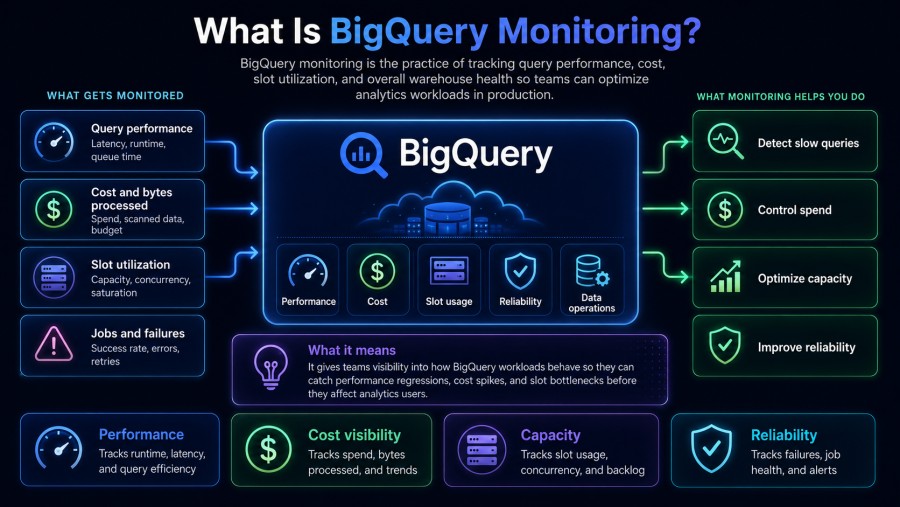
BigQuery monitoring is the practice of tracking query execution, resource consumption, and cost in real time to ensure data pipelines stay fast, reliable, and within budget. It surfaces metrics like slot utilization, bytes scanned, query duration, and concurrent query load so teams can detect bottlenecks, optimize queries, and prevent bill surprises.
Without monitoring, teams discover problems reactively. A marketing dashboard times out during a launch. A scheduled ETL job fails silently. The monthly BigQuery invoice jumps from $4,000 to $19,000 because a developer accidentally removed a partition filter.
BigQuery monitoring gives visibility into three dimensions that determine whether your workload succeeds or fails: query performance (how fast queries execute), cost (how much data processing costs), and slot utilization (whether you have enough compute capacity or are wasting reserved slots).
BigQuery offers three native sources of monitoring data: Cloud Monitoring metrics for high-level trends, INFORMATION_SCHEMA views for granular SQL-queryable metadata, and audit logs for detailed event records. Each source has different latency, granularity, and query cost. Cloud Monitoring updates every 60 seconds but lacks query-level detail. INFORMATION_SCHEMA gives per-query breakdowns but querying it costs money. Audit logs are comprehensive but require log export and storage.
Teams that monitor all three sources can correlate slow dashboards with specific queries, trace cost spikes to individual users or projects, and catch slot exhaustion before it degrades SLAs.
How BigQuery Query Performance Works
BigQuery executes queries using a distributed execution engine that splits work across thousands of worker nodes. When you submit a query, BigQuery’s query planner estimates how many slots (units of compute capacity) the query needs, schedules those slots, scans the required data from Colossus (Google’s distributed file system), processes it in memory, and returns results.
Performance depends on four factors: how much data the query scans, how complex the query plan is, how many slots are available, and whether the query hits cached results.
Query Execution Stages
Every BigQuery query runs through multiple stages: query planning, slot allocation, data scanning, shuffle and join operations, and result materialization. The query planner analyzes your SQL, estimates cost, and generates an execution graph. The scheduler assigns slots based on your pricing model (on-demand gets 2,000 slots burst capacity, flat-rate allocations get your reserved slots). Workers read data from columnar storage in parallel, execute filters and aggregations, shuffle intermediate results across nodes for joins, and write final results to a temporary table.
Query duration is the sum of time spent in each stage. A query that scans 5TB might complete in 8 seconds if it gets 2,000 slots and the data is already cached. The same query might take 90 seconds if it only gets 100 slots because your reservation is saturated.
Slot Allocation and Contention
Slots are BigQuery’s unit of compute capacity. One slot represents the CPU, memory, and network resources needed to execute part of a query. On-demand pricing gives each project up to 2,000 slots with burst capacity to 10,000 during low usage periods. Flat-rate pricing gives you a fixed number of reserved slots (minimum 100 slots for $2,000/month).
Slot contention happens when more queries request slots than are available. BigQuery queues queries in a fair-share model. High-priority queries (interactive queries by default) get scheduled before batch queries. Within each priority tier, queries are scheduled in submission order. A query waiting for slots shows as “pending” in the job metadata.
A team running 50 concurrent dashboards on a 500-slot reservation during business hours will see queries queue if total slot demand exceeds 500. Each dashboard might slow from 3 seconds to 15 seconds because queries spend time waiting for slots to free up. Monitoring slot utilization and queue depth tells you whether you need more slots or whether query optimization would solve the problem without buying more capacity.
Query Plan Optimization
BigQuery’s query planner generates an execution plan based on table statistics, partition filters, and join order. Plans that scan fewer bytes, push filters early, and avoid large shuffles run faster and cost less.
Common plan problems include missing partition filters (scanning entire tables instead of specific date ranges), selecting all columns instead of only needed columns, joining large tables without filters, and using subqueries instead of Common Table Expressions (CTEs) that the planner can optimize better.
Execution plans are visible in the BigQuery console under the “Execution details” tab for each query. Stages that show high slot time or large shuffle bytes are optimization candidates. A query scanning 800GB but only returning 50 rows likely needs better filters. A join that shuffles 2TB of data might need a different join order or denormalization.
Monitoring Query Performance Metrics
Query performance monitoring tracks how fast queries execute, where time is spent, and which queries cause bottlenecks. The key metrics are query duration, slot time consumed, bytes scanned, bytes shuffled, and cache hit rate.
Query Duration and Latency
Query duration is total wall clock time from submission to completion. It includes time spent queuing for slots, scanning data, processing, and returning results. For user-facing dashboards, query duration must stay under 5 seconds to maintain good UX. For batch ETL jobs, duration matters less than throughput and cost.
Latency percentiles matter more than averages. A dashboard with p50 latency of 2 seconds but p95 latency of 30 seconds will frustrate users even though most queries are fast. Monitoring p95 and p99 latency catches the slow queries that degrade experience.
BigQuery’s INFORMATION_SCHEMA.JOBS view exposes total_slot_ms, start_time, and end_time for every query. The difference between end and start time is query duration. Queries with high duration but low slot time were queued waiting for slots. Queries with high slot time but normal duration got slots immediately but did heavy processing.
Slot Time Consumed
Slot time consumed measures total compute work done by a query, calculated as (number of slots used) × (duration in milliseconds). A query that uses 500 slots for 10 seconds consumed 5,000,000 slot-milliseconds (5,000 slot-seconds).
On-demand pricing bills per TB scanned, not slot time, but slot time still matters because it shows whether queries are efficient. A query that scans 1TB in 3 seconds using 2,000 slots consumed 6,000 slot-seconds. A query that scans 1TB in 60 seconds using 100 slots consumed 6,000 slot-seconds. Both did the same work but the first query had better slot allocation.
Flat-rate pricing makes slot time the primary cost driver. If you pay $2,000/month for 100 slots, you get 100 slots × 30 days × 86,400 seconds = 259,200,000 slot-seconds per month. Queries that waste slot time by scanning unnecessary data or doing inefficient joins reduce your effective capacity.
High slot time queries are optimization targets. A query consuming 50,000 slot-seconds might be scanning a full table when it only needs one partition, or doing a cross join that creates billions of intermediate rows.
Bytes Scanned and Processed
Bytes scanned determines cost in on-demand pricing ($6.25 per TB in the US as of early 2026). A query that scans 10TB costs $62.50 even if it only returns 10 rows. Optimizing queries to scan fewer bytes cuts cost directly.
BigQuery scans data at the column level because it stores tables in columnar format. A query selecting 5 columns from a 100 column table scans only those 5 columns. Selecting * scans all columns even if the query only uses a few in WHERE clauses or aggregations.
Partitioning and clustering reduce bytes scanned by pruning data at query planning time. A table partitioned by date with a WHERE clause date = '2026-01-15' scans only that day’s partition, not the entire table. A table clustered by user_id with a WHERE clause user_id = 12345 scans only blocks containing that user, not all blocks.
Monitoring bytes scanned per query identifies cost drivers. A query scanning 2TB daily costs $12.50 per run or $375/month. If that query only needs to scan 50GB after adding partition filters, cost drops to $0.31 per run or $9.30/month, a 97% reduction.
Cache Hit Rate
BigQuery caches query results for 24 hours. If a query runs twice with the same SQL and the underlying tables have not changed, the second query returns cached results instantly at no cost. Cache hits eliminate slot usage, data scanning, and billing.
Cache hit rate is the percentage of queries served from cache. A team with 80% cache hit rate only pays for 20% of query volume. Dashboards that refresh every 5 minutes but only update underlying data every hour should hit cache on most refreshes.
Caching breaks when table data changes, when query SQL changes (even whitespace or comment differences prevent cache hits), or when 24 hours elapse since the cached result was generated. Monitoring cache hit rate shows whether query patterns are cache friendly. Low cache hit rates suggest either highly dynamic data or query patterns that vary slightly on each execution.
Monitoring BigQuery Cost
BigQuery cost monitoring tracks spending across projects, users, and queries to prevent budget overruns and identify optimization opportunities. Cost comes from three sources: query processing (on-demand or flat-rate), storage, and data transfer (egress).
On-Demand vs. Flat-Rate Pricing Models
On-demand pricing charges $6.25 per TB scanned (US multi-region, early 2026). The first 1TB per month is free. A project scanning 10TB/month pays $56.25. A project scanning 100TB/month pays $618.75. Cost scales linearly with data scanned.
Flat-rate pricing charges a fixed monthly fee for reserved slots. The baseline commitment is 100 slots for $2,000/month (annual commitment) or $2,400/month (monthly commitment). Flat-rate makes sense when monthly on-demand costs exceed the flat-rate equivalent. The breakpoint is roughly 320TB/month scanned: 320TB × $6.25/TB = $2,000. If your workload scans more than 320TB/month consistently, flat-rate is cheaper.
Flex slots are a third option: short-term slot commitments (60 seconds minimum) at $0.04 per slot-hour. Flex slots suit bursty workloads that need capacity for a few hours per week but not continuously.
Most teams start on-demand, hit unexpected bills as usage grows, panic-buy flat-rate slots, then realize they are paying for unused capacity because workloads are bursty. Monitoring cost per project and per user identifies who drives spend and whether flat-rate would save money.
Query Cost Attribution
BigQuery logs every query with the bytes scanned, project, user, and timestamp. Aggregating this data shows cost per project, per user, per table, and per hour. Common patterns: one team’s ETL job scans 50TB daily and represents 80% of total cost. Ten users run ad hoc queries that each scan 5TB because they forget partition filters. One dashboard queries a 10TB table every 30 seconds because auto refresh was misconfigured.
Cost attribution requires exporting BigQuery audit logs to BigQuery itself (meta, but effective) or using INFORMATION_SCHEMA.JOBS to query job metadata. A common attribution query:
SELECT
  user_email,
  SUM(total_bytes_processed) / POWER(10, 12) AS tb_scanned,
  SUM(total_bytes_processed) / POWER(10, 12) * 6.25 AS cost_usd
FROM
  `region-us`.INFORMATION_SCHEMA.JOBS
WHERE
  creation_time BETWEEN TIMESTAMP_SUB(CURRENT_TIMESTAMP(), INTERVAL 30 DAY)
    AND CURRENT_TIMESTAMP()
  AND statement_type = 'SELECT'
  AND state = 'DONE'
GROUP BY
  user_email
ORDER BY
  cost_usd DESC
LIMIT 20;This query identifies the top 20 users by cost over the past 30 days. Running it weekly and sharing results with teams creates cost awareness and drives query optimization.
Storage and Egress Costs
BigQuery storage costs $0.02 per GB per month for active storage (tables modified in the past 90 days) and $0.01 per GB per month for long-term storage (tables not modified in 90 days). A 50TB dataset costs $1,000/month in active storage or $500/month in long-term storage.
Storage cost is usually small compared to query cost, but it compounds over time. A team creating 1TB of new tables daily without expiration accumulates 30TB/month. At $0.02/GB, that is $600/month in new storage cost every month.
Data egress charges apply when query results are exported outside Google Cloud. Results returned to the BigQuery console or used within Google Cloud are free. Results exported to S3, Azure, or on-premises incur egress fees: $0.12/GB for the first 10TB, $0.11/GB for 10-150TB, $0.08/GB above 150TB. A report that exports 1TB of results daily to S3 costs $3,600/month in egress alone.
Monitoring storage growth and egress patterns prevents surprise costs. Setting table expiration policies, archiving old data to Cloud Storage, and keeping query results inside Google Cloud all reduce cost.
Monitoring Slot Utilization
Slot utilization monitoring tracks how many slots are in use, whether queries are queuing for slots, and whether reserved slots are going unused. This matters most for flat-rate customers who pay for slots whether they use them or not.
Slot Usage by Project and Reservation
BigQuery’s INFORMATION_SCHEMA.JOBS view includes total_slot_ms, which shows total slot time consumed per query. Aggregating by project shows which projects use the most capacity. A reservation with 500 slots shared across 10 projects might see one project using 400 slots during business hours while others use 10 slots each.
Slot usage patterns vary by time of day. Dashboards spike at 9 am when employees start work. ETL jobs run overnight when interactive usage is low. Monitoring slot usage by hour shows whether your reservation is sized correctly or whether workload shifting would improve utilization.
Slot usage above 80% sustained over hours indicates capacity saturation. Queries start queuing, latency increases, and users complain. Slot usage below 50% sustained over days indicates wasted capacity. Reducing reservation size saves money without impacting performance.
Slot Contention and Query Queuing
Slot contention occurs when query demand exceeds available slots. BigQuery queues queries until slots free up. Queue time is visible in INFORMATION_SCHEMA.JOBS as the difference between creation_time and start_time. A query created at 10:00:00 but started at 10:00:15 spent 15 seconds queued.
Queue depth (number of queries waiting) and queue time (how long queries wait) both matter. A queue depth of 50 queries might be fine if each query waits 2 seconds. A queue depth of 5 queries is a problem if each waits 60 seconds.
Monitoring queue time p95 and p99 catches user-impacting delays. A dashboard with p99 queue time of 30 seconds will frustrate users even if p50 queue time is 1 second.
Causes of slot contention include insufficient reservation size, queries using more slots than expected due to poor optimization, priority misconfigurations (all queries set to high priority so nothing is actually prioritized), and bursty workloads where many users run queries simultaneously.
Slot Efficiency and Waste
Slot efficiency measures how well reserved slots are used. A reservation with 100 slots that averages 80 slots in use during business hours and 10 slots at night has 80% utilization during peak and 10% overnight. Total utilization is (80 × 10 hours + 10 × 14 hours) / (100 × 24 hours) = 39% average utilization. That means 61% of paid capacity goes unused.
Improving slot efficiency requires matching capacity to workload. Options include reducing reservation size and accepting slightly longer query times, shifting batch jobs to off-peak hours, buying flex slots for burst capacity instead of over-provisioning reservations, or using multiple reservations with autoscaling (available in BigQuery Editions).
Monitoring slot waste (reserved slots minus used slots over time) quantifies the opportunity. A 500 slot reservation with 40% average utilization wastes 300 slots. At $20 per slot per month, that is $6,000/month in wasted spend.
Best Practices for BigQuery Monitoring
Effective BigQuery monitoring requires combining multiple data sources, setting alerting thresholds that catch problems early, and creating feedback loops that drive continuous optimization.
Use INFORMATION_SCHEMA for Granular Visibility
Cloud Monitoring gives high-level metrics like slot usage and query count, but lacks query-level detail. INFORMATION_SCHEMA views provide per-query metadata: bytes scanned, slot time, user, tables accessed, error messages, and execution plan. Querying INFORMATION_SCHEMA costs money (you are querying BigQuery to monitor BigQuery), but the cost is small compared to the optimization opportunities it surfaces.
Create scheduled queries that aggregate INFORMATION_SCHEMA data into summary tables: daily cost by user, hourly slot utilization by project, queries that scanned more than 1TB, queries that queued longer than 10 seconds. These summaries cost pennies to generate and provide actionable data.
Set Proactive Alerts for Cost and Performance
Reactive monitoring means discovering problems after users complain. Proactive monitoring catches problems before impact. Alerts should fire on leading indicators: slot utilization above 80% for 10 minutes, query queue time p95 above 5 seconds, daily cost 50% above baseline, or any query scanning more than 5TB.
Alerting on absolute thresholds (“cost exceeded $500 today”) catches budget overruns. Alerting on relative thresholds (“cost up 50% compared to last week”) catches anomalies before they compound.
Cloud Monitoring supports alerting on BigQuery metrics. Sending alerts to Slack or PagerDuty ensures the right team sees them immediately. A cost alert sent to finance at the end of the month is useless. A cost alert sent to the data engineering team when a query scans 10TB enables immediate investigation.
Partition and Cluster Tables for Cost and Performance
Partitioning splits tables into chunks based on a date or timestamp column. Queries with partition filters scan only relevant partitions, not the full table. A 50TB table partitioned by date with a WHERE clause date = '2026-01-15' scans ~150GB (one day of data), not 50TB.
Clustering sorts data within partitions by specified columns. Queries filtering on clustered columns scan only relevant blocks. A table clustered by user_id with a WHERE clause user_id = 12345 scans far fewer bytes than a non-clustered table.
Both optimizations reduce cost (fewer bytes scanned) and improve performance (less data to process). Monitoring queries that scan full tables without partition filters identifies candidates for partitioning. Adding partition filters to queries that already use partitioned tables reduces cost immediately without changing table structure.
Optimize Query Patterns Based on Slot Time
Queries with high slot time but low bytes scanned are CPU bound, not IO bound. Common causes include complex joins, inefficient aggregations, user-defined functions (UDFs) that do not parallelize well, or queries that generate large intermediate results during shuffles.
Analyzing execution plans for high slot time queries shows where time is spent. Stages with high slot time and large shuffle bytes often benefit from denormalization (pre-joining tables) or breaking complex queries into multiple steps that materialize intermediate results.
Queries with high bytes scanned but low slot time are IO bound. They read too much data. Adding partition filters, selecting fewer columns, or pre-aggregating data into summary tables reduces bytes scanned.
Enable Query Caching and Result Reuse
Query caching is free performance. A dashboard that refreshes every 5 minutes but queries data that updates every hour should hit cache on 11 out of 12 refreshes. Monitoring cache hit rate per dashboard or per user identifies opportunities to reduce query frequency or align refresh schedules with data update cadence.
Result reuse is different from caching. BigQuery allows saving query results to a table and querying that table instead of re-running expensive queries. A report that aggregates 10TB daily can run once, write results to a 1GB summary table, and serve all user queries from that summary. Cost drops from $62.50 per report run to $0.006 per query on the summary table.
Tools and Implementation
Monitoring BigQuery requires combining native Google Cloud tools with third-party platforms that unify metrics, logs, and query metadata.
Native Google Cloud Monitoring
Cloud Monitoring provides BigQuery metrics like query/count, slots/allocated, slots/total_available, and storage/stored_bytes. These metrics update every 60 seconds and are free to query. Cloud Monitoring dashboards can visualize slot utilization over time, query volume by project, and storage growth.
Limitations: Cloud Monitoring lacks query-level detail. You can see that slot utilization is 90%, but not which queries or users are consuming slots. You can see query count increased, but not whether those queries are fast or slow, cheap or expensive.
INFORMATION_SCHEMA and Audit Logs
INFORMATION_SCHEMA.JOBS give per-query metadata for queries run in your project. INFORMATION_SCHEMA.JOBS_BY_PROJECT gives metadata for queries across all projects in your organization. Both update within minutes of query completion and are queryable using SQL.
Common queries include identifying expensive queries, tracking cost per user, finding queries that scanned full tables without partition filters, and calculating average query duration by hour of day.
Audit logs provide even more detail: every table access, every query, every permission change. Exporting audit logs to a BigQuery dataset enables SQL-based cost and security analysis. A query that joins audit logs with job metadata can answer “which user accessed which tables yesterday, how much data did they scan, and how much did it cost?”
Unified Observability Platforms
Third-party platforms like Datadog, New Relic, and Grafana ingest BigQuery metrics and logs alongside application traces and infrastructure metrics. This unifies visibility. A slow dashboard might be caused by a slow BigQuery query, a slow API, or high CPU on the web server. Seeing all three signals in one view speeds troubleshooting.
Infrastructure monitoring tools extend beyond database queries to cover the compute and storage systems that support BigQuery. When query performance degrades, correlation with broader infrastructure metrics helps isolate whether the issue originates in BigQuery or upstream services.

CubeAPM provides unified observability for BigQuery alongside application traces, logs, and infrastructure metrics with predictable $0.20/GB pricing. It deploys inside your cloud to keep telemetry data local while providing managed monitoring without DIY overhead. Teams using BigQuery with microservices can correlate slow queries with API latency, trace query duration back to specific services, and alert on cost or performance anomalies across the full stack.
Datadog’s BigQuery integration pulls metrics from Cloud Monitoring and augments them with custom dashboards and anomaly detection. Pricing is per host and per GB ingested. A 50-host deployment ingesting 10TB/month of telemetry costs roughly $8,000/month for infrastructure monitoring, APM, and logs before BigQuery-specific costs.
Grafana connects to BigQuery via the BigQuery data source plugin. This enables building custom dashboards that query INFORMATION_SCHEMA directly. Grafana is open source and free, but requires self-hosting and operational expertise. Grafana Cloud offers hosted Grafana with integrated Prometheus and Loki, priced per active series and per GB of logs.
Setting Up Alerts and Dashboards
Effective monitoring requires dashboards that show current state and alerts that fire on thresholds. A typical BigQuery monitoring dashboard includes slot utilization by reservation, query count and duration by project, bytes scanned per day, cost per day, and queue depth and wait time.
Alerts should fire on thresholds that predict problems: slot utilization above 80% for 10 minutes, daily cost exceeding baseline by 50%, any query scanning more than 5TB, or query p95 duration above 10 seconds. Alert fatigue kills monitoring effectiveness. Start with high thresholds that catch severe problems, then tune based on false positive rate.
Alert routing matters as much as alert logic. Cost alerts go to the data platform team. Performance alerts go to on-call engineers. Urgent alerts (slot capacity exhausted, all queries queuing) go to PagerDuty. Informational alerts (weekly cost summary) go to email or Slack.
Frequently Asked Questions
What is the difference between on-demand and flat-rate BigQuery pricing?
On-demand pricing charges $6.25 per TB scanned. Flat-rate pricing charges a fixed monthly fee for reserved slots, starting at 100 slots for $2,000/month. On-demand suits variable workloads. Flat-rate suits workloads scanning more than 320TB/month consistently.
How do I reduce BigQuery query costs?
Reduce bytes scanned by adding partition filters, selecting only needed columns, clustering tables by filter columns, and caching repeated queries. Optimize query logic to avoid full table scans and reduce shuffle bytes during joins.
What is slot time consumed in BigQuery?
Slot time consumed measures total compute work done by a query, calculated as (slots used) × (query duration). It is the primary cost driver for flat-rate customers and an efficiency indicator for on-demand customers.
How do I monitor slot utilization in BigQuery?
Use Cloud Monitoring metrics like `slots/allocated` and `slots/total_available`, or query `INFORMATION_SCHEMA.JOBS` to calculate slot time consumed per project, user, or hour. Slot utilization above 80% sustained indicates capacity saturation.
What is a good cache hit rate for BigQuery?
Cache hit rate above 70% is good for dashboards and reports that query stable data. Lower rates are expected for queries against frequently updated tables or highly variable queries.
How do I find expensive BigQuery queries?
Query `INFORMATION_SCHEMA.JOBS` and aggregate by `total_bytes_processed`. Sort by cost (bytes processed × $6.25/TB) to identify queries that scan the most data. Focus optimization on the top 10 queries by cost.
What causes BigQuery queries to queue?
Queries queue when demand for slots exceeds available capacity. This happens on flat-rate reservations when too many queries run simultaneously, or on on-demand when burst capacity is exhausted during extreme load.
Disclaimer: The information in this article reflects the latest details available at the time of publication and may change as technologies and products evolve. Features, pricing, and plan limits can change over time. Always verify the latest information directly with the vendor before making purchasing or deployment decisions.