










Vertex AI Pipelines orchestrate ML workflows across data preprocessing, training, deployment, and inference, but without proper monitoring, silent failures can cascade through production systems for hours before anyone notices. A failed preprocessing step can block retraining, stale models can serve predictions on drifted data, and resource bottlenecks can inflate cloud bills without triggering a single alert. According to the 2024 State of MLOps survey by Linux Foundation AI & Data, 63% of ML teams report that model monitoring and drift detection remain their top operational challenge after deployment.
This guide covers what Vertex AI pipeline monitoring is, how it works, what metrics and logs to track, and how to set up alerts that catch issues before they impact model accuracy or availability. You will learn how to monitor pipeline execution health, track model drift, correlate failures with infrastructure signals, and choose the right monitoring strategy for your MLOps workflow.
What Is Vertex AI Pipeline Monitoring?
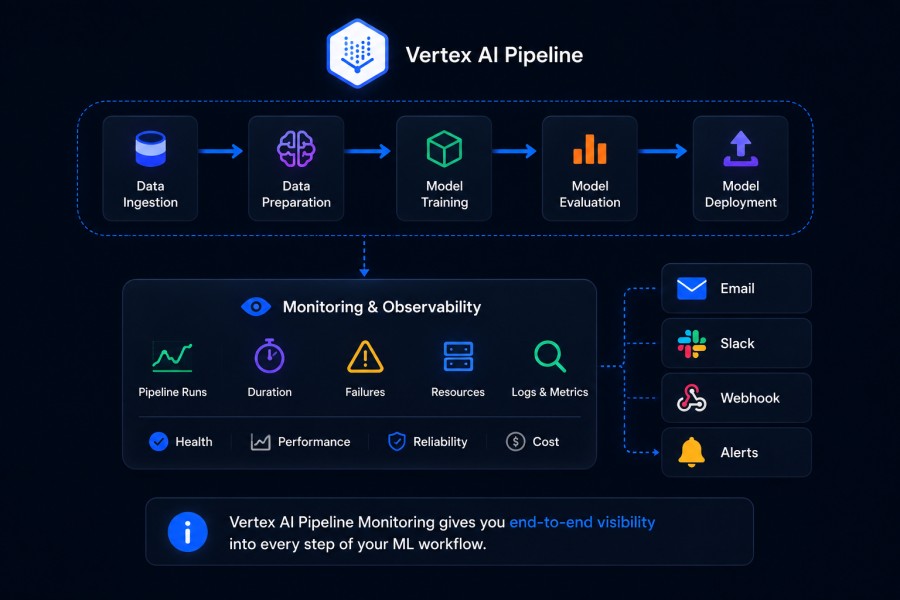
Vertex AI pipeline monitoring is the practice of tracking the health, performance, and outcomes of machine learning workflows orchestrated through Google Cloud’s Vertex AI Pipelines service. It provides visibility into pipeline execution status, component failures, data quality issues, model performance drift, and infrastructure resource consumption across the entire ML lifecycle.
A Vertex AI pipeline is a serverless workflow that automates ML tasks like data validation, feature engineering, model training, hyperparameter tuning, evaluation, and deployment. Each pipeline consists of components (individual steps) that run as containers, pass artifacts between stages, and log execution metadata to Google Cloud Logging and Cloud Monitoring.
Monitoring these pipelines means tracking whether each component completes successfully, how long each step takes, whether input data distributions match training baselines, if model accuracy degrades over time, and whether resource limits are causing bottlenecks or cost overruns. Without monitoring, teams discover issues reactively through user complaints or quarterly model audits rather than proactively through automated alerts.
Vertex AI pipeline monitoring covers three overlapping domains: pipeline execution health (did the workflow succeed?), model performance monitoring (is the deployed model still accurate?), and infrastructure observability (are compute resources adequate and cost-efficient?). All three layers need instrumentation to maintain reliable ML systems in production.
How Vertex AI Pipeline Monitoring Works
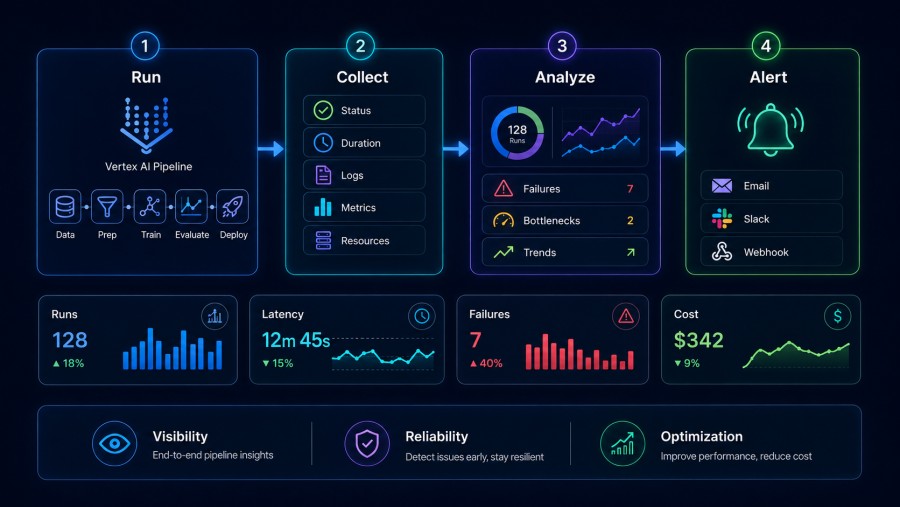
Vertex AI Pipelines automatically emit telemetry to Google Cloud Monitoring and Cloud Logging during execution. Each pipeline run generates logs at the component level, metrics for execution time and resource usage, and status updates that track pipeline state from submission through completion or failure.
Pipeline execution telemetry
When a pipeline starts, Vertex AI creates a PipelineJob resource that tracks the overall workflow state. Each component in the pipeline runs as a Kubernetes pod inside a managed cluster, and Vertex AI logs every pod event, including container start, execution, and termination. These logs capture stdout and stderr from each component, making it possible to debug failures by reading the exact error message that caused a step to fail.
Cloud Monitoring receives metrics for pipeline run duration, component execution time, and resource consumption like CPU and memory usage per step. These metrics are indexed by pipeline name, component name, run ID, and project, allowing teams to query execution patterns over time and identify which components consistently run slow or fail.
Model monitoring with Vertex AI Model Monitoring
Vertex AI provides a separate Model Monitoring service that tracks deployed models for feature drift, prediction drift, and feature attribution changes. After deploying a model to a Vertex AI endpoint, you create a ModelDeploymentMonitoringJob that runs on a schedule or on demand, comparing production inference data against a baseline dataset (typically the training data).
Model Monitoring calculates statistical divergence metrics like Jensen Shannon Divergence for numerical features and L-infinity distance for categorical features. When drift exceeds a threshold you define, it sends alerts via email or Pub/Sub. This monitoring runs independently of pipeline execution but becomes critical when pipelines include automated retraining steps that should trigger based on drift signals.
Logging and trace correlation
Every pipeline component writes logs to Cloud Logging under the aiplatform.googleapis.com service. These logs include execution metadata, artifact URIs (the actual data files passed between steps), and error stack traces when components fail. Logs are structured JSON, making them queryable by pipeline ID, component name, or error type.
For teams running infrastructure monitoring across GCP resources, correlating pipeline logs with GKE cluster metrics, Cloud Storage access patterns, and BigQuery query performance provides full context when diagnosing why a pipeline failed or ran slower than expected.
Key Metrics and Signals to Monitor in Vertex AI Pipelines
Tracking the right metrics determines whether you catch failures early or discover them after they compound. Vertex AI pipelines expose telemetry across execution health, model performance, and cost efficiency.
Pipeline execution metrics
Pipeline success rate measures the percentage of runs that complete without errors over a given time window. A sudden drop signals either code regressions, data quality issues, or infrastructure failures. Monitor this metric at the pipeline level and drill down to component-level success rates to isolate which step is failing.
Component execution time tracks how long each pipeline step takes. Baseline these durations during initial deployment and alert when a component exceeds its p95 latency. A data preprocessing step that normally runs in 10 minutes but suddenly takes 45 minutes often indicates upstream data schema changes or unexpected data volume growth.
Pipeline run frequency and backlog show whether pipelines are running on schedule or falling behind. If a retraining pipeline should run daily but the last successful run was three days ago, production models are serving stale predictions.
Resource utilization per component exposes CPU, memory, and GPU usage for each step. Components that consistently hit memory limits will fail with OOMKilled errors. Monitoring these signals before failure helps right-size resource requests in component definitions.
Model performance metrics
Feature drift (input drift) measures how much the distribution of input features in production deviates from the training data. Vertex AI Model Monitoring calculates this using Jensen-Shannon Divergence for numerical features and L-infinity for categorical features. High drift means the model is making predictions on data it was never trained to handle, which usually degrades accuracy even if the model itself has not changed.
Prediction drift (output drift) tracks whether the distribution of model predictions changes over time. A classification model that predicted 60/40 class distribution during training but now predicts 90/10 in production has likely encountered a data shift that requires investigation.
Feature attribution drift measures whether the importance of individual features to the model’s predictions changes between training and production. Vertex AI Model Monitoring uses SHAP values to detect when a previously critical feature suddenly stops contributing or a previously ignored feature becomes dominant. This often signals that the relationship between features and the target variable has shifted in ways the model cannot adapt to without retraining.
Inference latency and throughput measure how fast the deployed model responds to prediction requests and how many requests per second it handles. Monitoring these separately from pipeline execution metrics ensures that model serving performance does not degrade even when pipelines run successfully.
Cost and efficiency metrics
Total pipeline cost per run aggregates compute, storage, and network costs for a single execution. Vertex AI does not expose this as a single metric, but it can be calculated by querying Cloud Billing data filtered by pipeline run ID. Tracking this over time reveals whether pipeline efficiency is improving or if unnoticed changes are inflating costs.
Cost per model prediction combines inference API costs with the amortized cost of training and pipeline execution. For high-throughput models, inference costs dominate. For models retrained frequently, pipeline execution costs become significant. Monitoring both ensures you optimize the right layer.
Data transfer and storage costs often appear as surprise line items. Pipelines that move large datasets between Cloud Storage buckets in different regions incur egress fees. Monitoring storage bucket sizes and cross-region data transfer volumes helps identify these inefficiencies before they compound.
Setting Up Monitoring and Alerts for Vertex AI Pipelines
Google Cloud Monitoring provides the native integration layer for alerting on Vertex AI pipeline health. Alerts trigger when metrics cross thresholds you define, sending notifications via email, Slack, PagerDuty, or Pub/Sub.
Alerting on pipeline failures
Create a Cloud Monitoring alert policy that tracks the aiplatform.googleapis.com/pipeline_job/run_count metric filtered by state:FAILED. Set the alert condition to trigger when the count of failed runs exceeds zero in a rolling 10 minute window. This catches failures immediately rather than waiting for scheduled checks.
For critical pipelines, configure a second alert on pipeline runs that do not complete within expected time windows. Use the duration metric with a threshold condition like duration > 3600 seconds for a pipeline that normally finishes in 20 minutes. This detects hung pipelines that neither fail nor succeed but consume resources indefinitely.
Configure notification channels to route alerts to the team responsible for maintaining the pipeline. Sending all ML pipeline alerts to a single shared Slack channel ensures visibility but risks alert fatigue if thresholds are too sensitive. Start with high severity failures only, then add latency and resource alerts after establishing baselines.
Alerting on model drift
In Vertex AI Model Monitoring, configure drift thresholds when creating a ModelDeploymentMonitoringJob. For feature drift, set a Jensen Shannon Divergence threshold based on acceptable model degradation. A threshold of 0.1 is conservative and triggers alerts early. A threshold of 0.3 allows more drift before alerting but risks serving inaccurate predictions longer.
Email alerts from Model Monitoring include links to the specific monitoring job run and charts showing which features drifted most. For automated responses, configure alerts to publish to a Pub/Sub topic that triggers a Cloud Function or Cloud Run service. This function can automatically retrain the model, page an on call engineer, or pause inference traffic until the issue is investigated.
For teams using synthetic monitoring to validate API behavior, combine drift alerts with synthetic checks that verify model prediction accuracy on a known test dataset. This catches cases where drift metrics show acceptable values but model accuracy has actually degraded.
Log based alerting
Cloud Logging supports log based metrics that count occurrences of specific log patterns. Create a log based metric that counts ERROR level logs from Vertex AI Pipelines filtered by a specific pipeline name or component. Use this metric in a Cloud Monitoring alert policy to trigger notifications when error counts spike.
For example, a log filter like resource.type="aiplatform.googleapis.com/PipelineJob" AND severity="ERROR" captures all pipeline errors. Refine this to specific components by adding labels.component_name="data-preprocessing" to isolate failures in that step.
Log based alerting works best for catching transient errors that do not cause full pipeline failures but indicate degraded reliability. Repeated warnings about data validation failures or API rate limits often precede hard failures by hours.
Integrating with existing observability stacks
Many teams run unified observability platforms that aggregate telemetry from multiple sources. Cloud Monitoring supports exporting metrics and logs to external systems via Pub/Sub or direct API integrations. Configure a Pub/Sub topic as a sink for Vertex AI logs, then consume those logs in platforms like CubeAPM, Datadog, or Grafana.
CubeAPM monitors Vertex AI pipelines by ingesting Cloud Monitoring metrics and Cloud Logging data via OpenTelemetry collectors. This provides a unified view of ML pipeline health alongside application traces and infrastructure monitoring signals. Teams can correlate a pipeline failure with upstream database query latency or downstream API errors without switching tools.
For self hosted monitoring stacks, export Vertex AI telemetry to Cloud Storage in JSON format, then ingest it into your observability backend. This keeps all ML workflow data inside your own infrastructure and eliminates dependency on Google Cloud Monitoring during incident response.
Best Practices for Vertex AI Pipeline Monitoring
Effective monitoring requires more than setting up alerts. Teams need baseline metrics, runbooks for common failures, and a feedback loop that improves pipeline reliability over time.
Establish baselines before alerting
Before configuring alerts, run pipelines in production for at least two weeks and record normal execution time, resource usage, and success rates for each component. Use these baselines to set alert thresholds at the 95th or 99th percentile rather than guessing values. Alerts based on actual observed behavior reduce false positives and alert fatigue.
For model drift thresholds, calculate divergence metrics on historical production data compared to training data. If typical divergence sits at 0.05, setting the alert threshold at 0.15 gives headroom for natural variation without triggering on noise.
Monitor data quality at pipeline entry points
Most pipeline failures trace back to unexpected input data. Add data validation components at the start of every pipeline that check schema, value ranges, null percentages, and row counts before processing begins. Fail fast on invalid data rather than allowing it to propagate through expensive training steps.
Log validation results to Cloud Logging with structured fields that make them queryable. A validation component that logs data_quality: PASS/FAIL and validation_errors: [list] makes it trivial to build dashboards showing data quality trends over time.
Use pipeline versioning and tagging
Tag every pipeline run with metadata like model version, data snapshot ID, and git commit hash. This makes it possible to correlate a specific model deployment with the exact pipeline configuration and code that produced it. When a model underperforms in production, you can trace back to the pipeline run, inspect logs from that run, and identify what changed.
Vertex AI Pipelines support custom labels on PipelineJob resources. Add labels like environment:production, model_version:v2.3, and team:ml-platform to make filtering and grouping runs trivial in Cloud Monitoring queries.
Correlate pipeline failures with upstream dependencies
Pipelines fail for reasons outside their own code. A BigQuery dataset might be temporarily unavailable, a Cloud Storage bucket might have permission issues, or a third-party API used in feature engineering might be rate limiting requests. Monitor these dependencies separately and correlate their health with pipeline success rates.
For example, if a pipeline fails with a 403 error accessing Cloud Storage, check whether other services in the same project are also reporting permission errors. This isolates infrastructure issues from pipeline bugs.
Automate responses to common failures
Not every pipeline failure requires human intervention. Transient network errors, temporary resource exhaustion, and rate limit errors often resolve themselves on retry. Configure automatic retries for pipeline components using Vertex AI’s built-in retry policies. Set max retry attempts and backoff intervals based on the failure type.
For drift alerts, automate the response where safe. If feature drift exceeds threshold but prediction accuracy on a validation set remains acceptable, log the alert but do not page anyone. If accuracy drops below SLA, automatically trigger a retraining pipeline and notify the team.
Tools and Platforms for Vertex AI Pipeline Monitoring
While Google Cloud Monitoring provides native integration, teams often need more control over data retention, alerting logic, or unified visibility across hybrid cloud environments.
Native Google Cloud tools
Cloud Monitoring and Cloud Logging form the baseline monitoring stack for Vertex AI Pipelines. They require no setup beyond enabling APIs and integrate automatically with all Vertex AI services. Limitations include 30 day default log retention, limited customization of dashboards, and dependency on Google Cloud’s uptime during incidents.
Cloud Monitoring supports alerting via email, SMS, Slack, PagerDuty, and webhooks. These integrations work reliably but lack the context rich notifications that dedicated observability platforms provide. An alert email that says “pipeline failed” is less actionable than one that includes the error message, recent execution history, and a link to the failed component’s logs.
Vertex AI Workbench provides a notebook based interface for querying pipeline runs, inspecting artifacts, and visualizing metrics. This works well for ad hoc debugging but does not replace automated monitoring for production pipelines.
Third-party observability platforms
Datadog, New Relic, and Dynatrace support monitoring GCP resources including Vertex AI through native integrations or OpenTelemetry based collection. These platforms aggregate ML pipeline telemetry with application traces, database metrics, and infrastructure signals, providing a unified view during incidents.
The tradeoff is cost and data residency. Datadog charges separately for log ingestion, custom metrics, and APM traces. A production ML pipeline generating 500 GB of logs monthly plus custom metrics for each component can add $2,000 to $4,000 to monthly observability spend. Additionally, all telemetry data leaves your GCP environment and is stored on the vendor’s infrastructure, which may conflict with data governance policies.
CubeAPM for ML pipeline monitoring

CubeAPM monitors Vertex AI pipelines by ingesting Cloud Monitoring metrics and Cloud Logging data via OpenTelemetry collectors deployed in your GCP project. It provides distributed tracing for ML workflows, correlating pipeline execution with upstream API calls and downstream model serving latency. CubeAPM runs inside your VPC or on-premises infrastructure, keeping all telemetry data under your control.
For teams operating in regulated industries or those with strict data residency requirements, CubeAPM eliminates the compliance risk of sending ML telemetry to external SaaS platforms. Pricing at $0.20/GB for all ingested data (metrics, logs, traces) makes cost predictable regardless of pipeline volume. A 500 GB monthly telemetry load costs $75, compared to $2,000+ on per-feature SaaS platforms.
CubeAPM’s ML-specific features include automatic correlation of pipeline failures with infrastructure monitoring signals, drift alert aggregation across multiple models, and custom dashboards for tracking model retraining frequency and accuracy trends over time. Setup takes under an hour using OpenTelemetry collectors preconfigured for GCP integration.
Open source monitoring stacks
Prometheus and Grafana provide self-hosted monitoring for teams that want full control. Vertex AI does not natively export Prometheus metrics, but Cloud Monitoring metrics can be scraped using the GCP exporter for Prometheus. This introduces a polling delay and requires managing Prometheus storage and retention policies.
Grafana supports Cloud Logging as a data source, but querying logs requires understanding GCP’s log query syntax. Building dashboards that combine pipeline metrics, logs, and traces across multiple data sources takes significant engineering effort compared to using a unified platform.
The main advantage of open source stacks is zero licensing cost and unlimited customization. The main disadvantage is operational overhead. Teams spend time managing monitoring infrastructure instead of improving ML models.
Frequently Asked Questions
How do I monitor Vertex AI pipeline failures in real time?
Use Google Cloud Monitoring to create an alert policy on the `aiplatform.googleapis.com/pipeline_job/run_count` metric filtered by `state:FAILED`. Configure the alert to trigger when failed run count exceeds zero in a 10 minute window and send notifications to Slack or email. For faster detection, reduce the window to 5 minutes and route alerts to a dedicated on call channel.
What is the difference between pipeline monitoring and model monitoring in Vertex AI?
Pipeline monitoring tracks the health and performance of ML workflow execution, including component failures, execution time, and resource usage. Model monitoring tracks the accuracy and behavior of deployed models in production, including feature drift, prediction drift, and inference latency. Both are necessary for reliable ML systems but monitor different layers of the stack.
How do I set up drift detection for models deployed on Vertex AI?
Create a ModelDeploymentMonitoringJob in Vertex AI Model Monitoring after deploying your model to an endpoint. Specify a baseline dataset (typically your training data), select drift detection metrics like Jensen Shannon Divergence, and set threshold values for when to trigger alerts. Schedule the job to run hourly or daily depending on how fast your data distribution changes.
Can I monitor Vertex AI pipelines with tools other than Cloud Monitoring?
Yes, export Vertex AI logs and metrics to external platforms using Cloud Logging sinks and Cloud Monitoring metric exports. Configure a Pub/Sub topic as a sink, then consume telemetry in platforms like CubeAPM, Datadog, or self hosted Prometheus and Grafana stacks. This provides unified visibility across GCP and non GCP infrastructure.
What metrics should I alert on for production ML pipelines?
Alert on pipeline failure rate, component execution time exceeding baseline p95 latency, feature drift above acceptable threshold, prediction accuracy drop on validation set, and inference API error rate. Start with high severity failures only to avoid alert fatigue, then add latency and drift alerts after establishing baselines.
How do I reduce monitoring costs for high volume ML pipelines?
Use sampling for logs, retain only error and warning level logs long term, and archive full logs to Cloud Storage for compliance. Export metrics to self hosted Prometheus to avoid Cloud Monitoring storage costs. For teams with strict cost control, CubeAPM provides predictable $0.15/GB pricing for all telemetry regardless of volume.
How long does it take to set up monitoring for a Vertex AI pipeline?
With Cloud Monitoring, initial setup takes 10 to 20 minutes to create alert policies and configure notification channels. For production grade monitoring with custom dashboards, log analysis, and drift detection, expect 4 to 8 hours to instrument pipelines, establish baselines, and tune alert thresholds. Using platforms like CubeAPM reduces setup time to under an hour with preconfigured GCP integrations.
Disclaimer: The information in this article reflects the latest details available at the time of publication and may change as technologies and products evolve. Features, pricing, and plan limits can change over time. Always verify the latest information directly with the vendor before making purchasing or deployment decisions.