










Your API latency starts creeping up at 2:47 AM. By 3:15 AM, it crosses 500ms and triggers a threshold alert. But the damage is done; the gradual degradation from 200ms to 500ms over 90 minutes went undetected because no static threshold could catch that slope without also firing false positives during normal traffic peaks.
This is the gap between threshold alerting and anomaly detection. Threshold alerting fires when a metric crosses a predefined value. Anomaly-based alerting fires when a metric behaves differently than it historically has, even if it never crosses a static line.
For DevOps and SRE teams managing distributed systems, understanding when to use each approach determines whether you catch issues early or spend weekends firefighting customer-impacting outages. This guide compares both methods, shows how to set up each, and provides a decision framework for when to use which.
Quick Comparison: Threshold vs Anomaly-Based Alerting
| Threshold Alerting | Anomaly-Based Alerting | |
|---|---|---|
| How it works | Fires when metric crosses predefined value | Fires when metric deviates from learned baseline |
| Setup complexity | Low — define trigger value | Medium — requires training period |
| False positive rate | High without constant tuning | Lower after baseline stabilizes |
| Best for | Known failure states, binary conditions | Gradual degradation, seasonal patterns |
| Adapts to change | No — requires manual updates | Yes — retrains automatically |
| Training data needed | None | 3-7 days minimum |
| Example use case | Disk usage > 90%, HTTP 5xx count > 100/min | CPU behaving unusually, latency drift |
| Cost | Free in most tools | May require enterprise tier |
What Is Threshold Alerting?
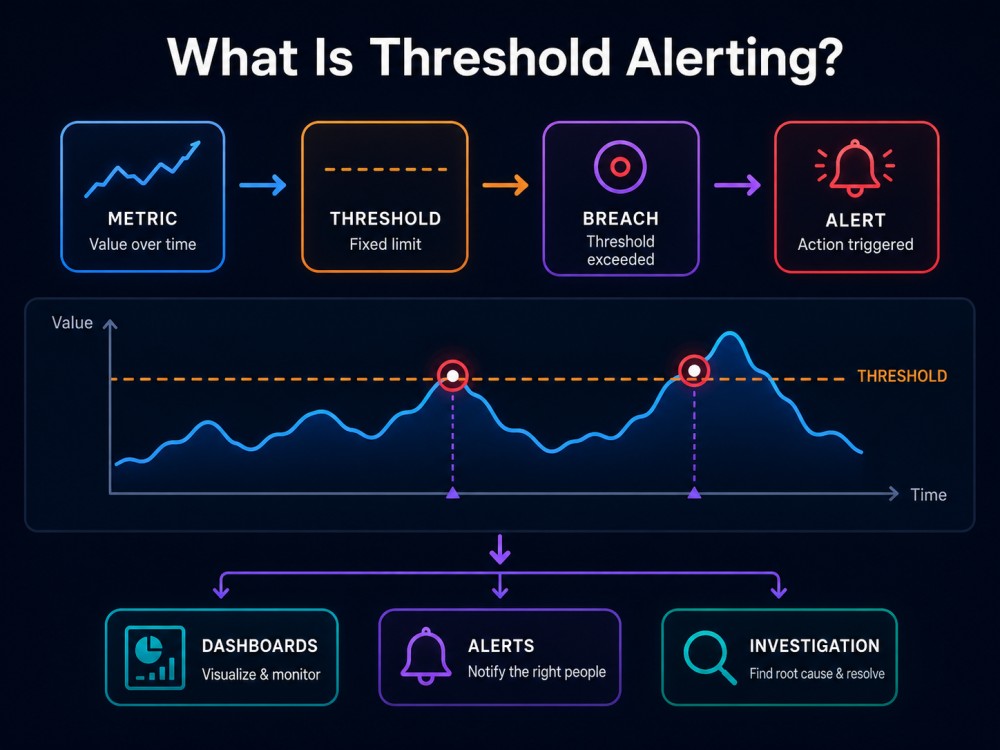
Threshold alerting is the simplest and most common alerting method. You define a specific value: 80% CPU, 500ms latency, 100 errors per minute, and the alert fires when that threshold is breached.
How Threshold Alerting Works
The logic is straightforward:
IF metric_value > threshold_value THEN alertFor example:
- Alert when CPU usage exceeds 80%
- Alert when API response time exceeds 500ms
- Alert when error rate exceeds 100 errors per minute
Pros of Threshold Alerting
- Simple to implement: No machine learning, no training period. Define the number, and the alert is active immediately.
- Predictable behavior: You know exactly when an alert will fire. A threshold of 500ms means 501ms triggers the alert, 499ms does not.
- Good for binary states: Some failure modes are absolute. Disk at 100% is always bad. Service returning HTTP 503 is always a problem.
- Works with any metric: Thresholds work on every type of signal: metrics, logs, trace counts, infrastructure stats.
Cons of Threshold Alerting
- Context blindness: A static threshold does not know that 200 errors during a Monday morning deployment rush is noise while 200 errors at 4 AM Saturday is a critical incident.
- Constant tuning required: Your system evolves. Traffic grows 3× over six months. Deployment frequency doubles. Static thresholds do not adapt; they require manual updates or become obsolete.
- Alert fatigue from false positives: Set the threshold too low and you get alert storms. Set it too high and you miss incidents until customer impact. Finding the right value is trial and error.
- Misses gradual degradation: A slow memory leak that increases usage by 2% per hour never crosses a threshold until the service crashes. By then, the root cause is hours old.
When to Use Threshold Alerting
Threshold alerting works best for:
- Known failure states: Disk usage above 95%, database connection pool exhausted, service returning HTTP 500 errors.
- Binary conditions: Certificate expiration in 7 days, backup job failed, required process not running.
- Infrastructure hard limits: Memory at 90%, file descriptor count approaching system maximum, queue depth exceeding buffer size.
- Compliance or SLA enforcement: API must respond within 200ms, uptime must remain above 99.9%, and no more than 10 failed transactions per hour.
What Is Anomaly-Based Alerting?
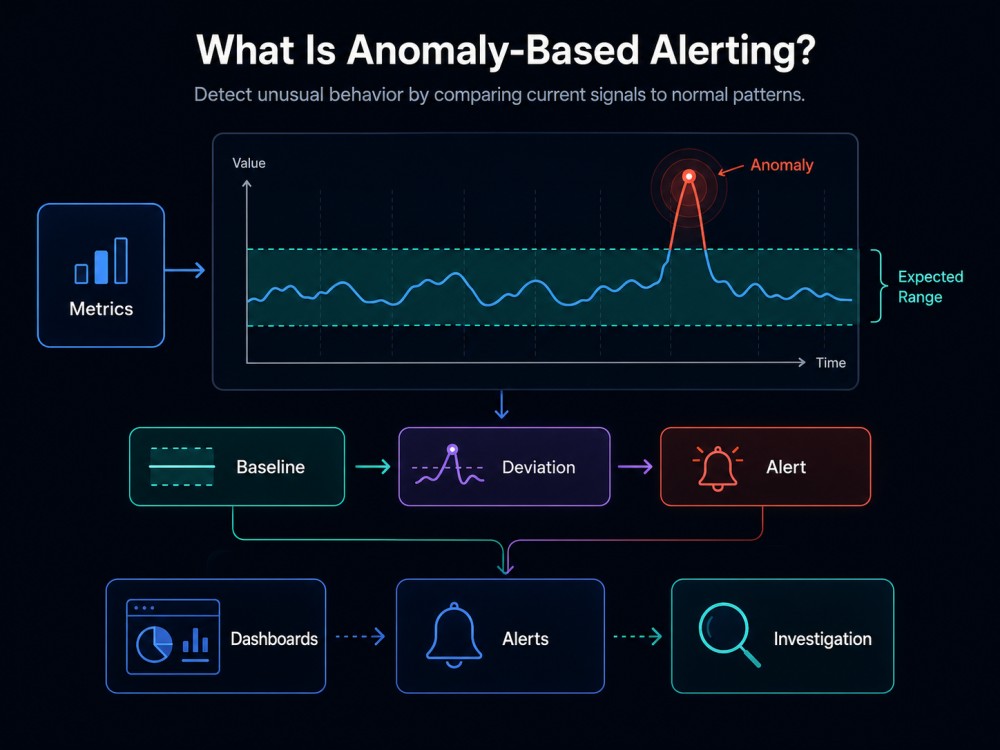
Anomaly-based alerting uses machine learning to learn what normal behavior looks like for each metric, then alerts when a metric deviates from that learned baseline.
How Anomaly-Based Alerting Works
Instead of a static threshold, anomaly detection builds a model of expected behavior from historical data:
1. Training Phase: Learn normal patterns from 7-30 days of data
2. Scoring Phase: Calculate anomaly score for each new data point
3. Alerting Phase: Fire alert if anomaly score exceeds sensitivity threshold
For example, if API latency normally runs 120-180ms during business hours and 80-120ms overnight, anomaly detection learns these patterns. When latency hits 250ms at 3 PM on a Tuesday, even though it is below your static 500ms threshold, the anomaly detector flags it as unusual behavior.
Pros of Anomaly-Based Alerting
- Catches unknown failure modes: You cannot write thresholds for behaviors you have not seen yet. Anomaly detection flags new patterns automatically.
- Adapts to seasonal patterns: It knows that 1,000 errors per minute on Black Friday is normal, while the same number at 4 AM Sunday indicates a crisis.
- Reduces false positives: After the training period stabilizes, anomaly detection fires fewer alerts than static thresholds because it understands normal variance.
- Detects gradual degradation: A slow memory leak or latency drift shows up as anomalous behavior long before it crosses a static threshold.
- No manual tuning for every metric: Once configured, anomaly detection adapts as your system changes without requiring constant threshold updates.
Cons of Anomaly-Based Alerting
- Requires training period: Anomaly detection needs 3-7 days minimum to learn baseline behavior. During this period, alerts may be unreliable or disabled.
- Less predictable: You cannot say exactly when an anomaly alert will fire, the way you can with a 500ms threshold. The alert depends on learned context.
- Can miss sudden spikes if they become normal: If your system consistently has 200 errors every Monday at 9 AM during deployments, anomaly detection learns this as normal and stops alerting on it.
- More expensive: Many SaaS APM tools charge extra for anomaly detection or gate it behind enterprise tiers.
- False negatives during system changes: If you double traffic or deploy a major architecture change, anomaly detection may need retraining or it will flag normal new behavior as anomalous.
When to Use Anomaly-Based Alerting
Anomaly-based alerting works best for:
- Metrics with seasonal or time-of-day patterns: API request rates, user activity, background job volume.
- Gradual performance degradation: Memory usage creeping up, database query times slowly increasing, cache hit rates declining.
- High-cardinality environments: Kubernetes clusters where pod counts auto-scale, microservices with dynamic traffic patterns.
- Reducing alert fatigue: Teams overwhelmed by threshold-based alerts can use anomaly detection to surface only truly unusual events.
How to Set Up Threshold Alerting
Threshold alerting is supported in every monitoring tool. The setup is straightforward.
Step 1: Identify the Metric to Monitor
Choose a specific signal: CPU usage, API latency, error count, memory consumption, disk I/O.
Example: API response time for the /checkout endpoint.
Step 2: Define the Threshold Value
Determine the value that indicates a problem. Base this on:
- Historical performance data
- SLA requirements
- Known failure points from past incidents
Example: Alert when /checkout latency exceeds 500ms.
Step 3: Set the Alert Condition
Decide whether the alert should fire immediately or require sustained breach:
- Immediate: Fires the moment threshold is crossed
- Sustained: Fires only if threshold is breached for X consecutive minutes
Example: Alert if /checkout latency > 500ms for 3 consecutive minutes.
Step 4: Configure Alert Routing
Define where alerts go: Slack, PagerDuty, email, webhooks.
Example: Send critical latency alerts to the on-call engineer via PagerDuty.
Step 5: Test and Tune
After deploying the alert, monitor for false positives. Adjust the threshold or duration as needed.
How to Set Up Anomaly-Based Alerting
Anomaly detection setup varies by tool, but the core steps are consistent.
Step 1: Choose the Metric
Select a metric with enough data volume and variability to train a model. Anomaly detection works poorly on metrics that rarely change.
Example: API request rate across all services.
Step 2: Define the Training Period
Most tools require 7-30 days of historical data. Some allow you to start with less but will be less accurate.
Example: Use 14 days of API request rate data to establish the baseline.
Step 3: Set Sensitivity Level
Sensitivity controls how aggressive the anomaly detector is:
- High sensitivity: Flags smaller deviations, more alerts
- Low sensitivity: Only flags large deviations, fewer alerts
Example: Set sensitivity to medium to balance detection and noise.
Step 4: Enable or Disable Alerts During Training
Some tools let you enable alerts immediately but with lower confidence. Others disable alerts until training completes.
Example: Disable alerts for the first 7 days while the model trains.
Step 5: Monitor and Retrain
As your system evolves, retrain the anomaly model periodically: weekly, monthly, or after major deployments.
Example: Retrain after doubling traffic or deploying a new microservice.
Threshold vs Anomaly Detection: When to Use Which
Most teams need both. The decision framework:
Use threshold alerting when:
- The failure state is absolute and known (disk full, certificate expired, service down)
- You need predictable, immediate alerting on critical conditions
- The metric has no seasonal pattern (binary states, hard limits)
- You are monitoring a new system with no historical data yet
Use anomaly-based alerting when:
- The metric has daily, weekly, or seasonal patterns (user traffic, API requests)
- You want to catch gradual degradation before it crosses a hard threshold
- Static thresholds generate too many false positives
- You are monitoring dynamic infrastructure (auto-scaling Kubernetes, serverless)
Use both together when:
- You want baseline anomaly detection with a safety net threshold for critical failures
- Example: Anomaly detection on API latency + threshold alert if latency exceeds 2000ms (absolute failure state)
CubeAPM: Threshold and Anomaly Alerting in One Platform

CubeAPM supports both threshold-based and anomaly-based alerting inside a single self-hosted observability platform.
Threshold alerts are created using any metric, log, or trace signal with configurable conditions, durations, and routing to Slack, PagerDuty, email, or webhooks.
Anomaly detection is available for infrastructure metrics, APM traces, and log volume with automatic baseline learning and sensitivity tuning.
CubeAPM runs inside your own cloud or on-premises infrastructure, so alert configurations, training data, and telemetry never leave your environment. Pricing is $0.15/GB of data ingested — no per-host fees, no per-alert surcharges, and no separate cost for anomaly detection.
Teams monitoring Kubernetes clusters, microservices, or high-traffic APIs use CubeAPM to combine both alerting methods without managing multiple tools or paying for enterprise-tier add-ons.
Disclaimer: The information in this article reflects the latest details available at the time of publication and may change as technologies and products evolve. Features, pricing, and plan limits can change over time. Always verify the latest information directly with the vendor before making purchasing or deployment decisions.
Frequently Asked Questions
What is the main difference between threshold alerting and anomaly detection?
Threshold alerting fires when a metric crosses a predefined value. Anomaly detection fires when a metric behaves differently than it historically has, even if it never crosses a static threshold.
Can I use both threshold and anomaly-based alerting together?
Yes. Most teams use threshold alerts for known failure states and anomaly detection for metrics with seasonal patterns or gradual degradation. Combining both provides coverage for immediate failures and slow drifts.
How long does anomaly detection take to train?
Most tools require 3 to 7 days of historical data minimum. Some advanced models use 14 to 30 days for better accuracy. During training, alerts may be disabled or have lower confidence.
Does anomaly detection eliminate false positives?
No, but it reduces them significantly after the baseline stabilizes. Anomaly detection still requires tuning sensitivity levels and retraining after major system changes to avoid false positives or negatives.
Which monitoring tools support anomaly-based alerting?
Datadog, Dynatrace, New Relic, and CubeAPM all support anomaly detection. Some tools gate it behind enterprise tiers or charge extra. CubeAPM includes anomaly detection in all plans at $0.15/GB with no additional fees.
When should I retrain my anomaly detection model?
Retrain after major traffic changes, architecture updates, or new service deployments. Most tools retrain automatically on a schedule, but manual retraining is recommended after significant system evolution.
Can anomaly detection work on low-volume metrics?
Anomaly detection works best on metrics with enough data points to establish a pattern. Low-volume metrics or binary states work better with threshold alerting because there is not enough variance to model anomalies.