










Prometheus can’t scrape AWS RDS directly. RDS is a managed service with no node exporter and no /metrics endpoint. To get RDS metrics into Prometheus, you need an exporter that pulls data from the AWS CloudWatch API or RDS API and translates it into the Prometheus exposition format.
There are two main options currently, and which one you choose depends on whether you want AWS CloudWatch metrics re-exposed as Prometheus metrics or a purpose-built RDS exporter with deeper inventory and quota visibility.
Key Takeaways
- RDS has no native Prometheus endpoint – you need an exporter running inside your network to bridge CloudWatch or the RDS API to Prometheus
- YACE (Yet Another CloudWatch Exporter) is the standard choice if you already monitor other AWS services with Prometheus and want a single exporter for all of them
- prometheus-rds-exporter (by Qonto, MIT license, featured on the AWS Open Source Blog in 2025) is purpose-built for RDS and provides quota metrics, storage consumption forecasting, and engine-agnostic instance inventory that YACE does not
- Both exporters require an IAM role or IAM user with specific CloudWatch and RDS read permissions – never use root credentials
- CloudWatch API calls made by the exporter are billed by AWS – set scrape intervals to 60 seconds minimum for RDS metrics to avoid excessive API costs, since RDS metrics are only updated every 60 seconds anyway
- YACE AWS SDK v1 support was removed in late 2025 – if you are running an older YACE version, upgrade to a current release that uses AWS SDK v2
Option 1: YACE (Yet Another CloudWatch Exporter)
YACE is maintained under the prometheus-community GitHub organization and is the most widely deployed CloudWatch-to-Prometheus bridge. It uses the CloudWatch GetMetricData API to batch up to 500 metrics per request, which keeps API costs manageable compared to older single-metric approaches.
When to use YACE:
- You already use Prometheus for EC2, ELB, Lambda, or other AWS services and want unified coverage
- You want tag-based auto-discovery of RDS instances without manual config per instance
- You need metrics from multiple AWS accounts or regions in a single exporter
IAM permissions required:
{

  "Version": "2012-10-17",

  "Statement": [

    {

      "Effect": "Allow",

      "Action": [

        "cloudwatch:GetMetricData",

        "cloudwatch:GetMetricStatistics",

        "cloudwatch:ListMetrics",

        "tag:GetResources",

        "rds:DescribeDBInstances",

        "rds:ListTagsForResource"

      ],

      "Resource": "*"

    }

  ]

}Attach this policy to an IAM role and use IRSA (IAM Roles for Service Accounts) if running in EKS – do not use long-lived IAM user access keys in production.
YACE configuration for RDS metrics:
# yace-config.yaml

apiVersion: v1alpha1

discovery:

  jobs:

    - type: AWS/RDS

      regions:

        - us-east-1

      period: 60

      length: 60

      metrics:

        - name: CPUUtilization

          statistics: [Average]

        - name: FreeableMemory

          statistics: [Average]

        - name: FreeStorageSpace

          statistics: [Average]

        - name: DatabaseConnections

          statistics: [Average]

        - name: ReadLatency

          statistics: [Average]

        - name: WriteLatency

          statistics: [Average]

        - name: ReadIOPS

          statistics: [Average]

        - name: WriteIOPS

          statistics: [Average]

        - name: ReplicaLag

statistics: [Average]Prometheus scrape config for YACE:
# prometheus.yml

scrape_configs:

  - job_name: yace-rds

    scrape_interval: 60s

    scrape_timeout: 55s

    metrics_path: /metrics

    static_configs:

      - targets:

- yace-exporter:5000Important: Set scrape_interval to 60 seconds. RDS metrics in CloudWatch are published every 60 seconds. Scraping more frequently costs more API calls and returns the same data.
How YACE exposes RDS metrics in Prometheus:
YACE translates CloudWatch metric names to Prometheus format using the pattern aws_{namespace}_{metric}_{statistic}. For RDS:
- aws_rds_cpuutilization_average
- aws_rds_freeable_memory_average
- aws_rds_free_storage_space_average
- aws_rds_database_connections_average
- aws_rds_read_latency_average
- aws_rds_write_latency_average
Each metric includes dimension_DBInstanceIdentifier as a label, giving you per-instance filtering.
Note on YACE versions: AWS SDK v1 support was removed from YACE in late 2025. If you are running a version that uses the aws-sdk-v1 feature flag, upgrade immediately – the flag is now a no-op and the underlying SDK v1 code has been removed. All current releases use AWS SDK v2.
Option 2: prometheus-rds-exporter (Qonto, Recommended for RDS-only)
The prometheus-rds-exporter is an open-source, MIT-licensed exporter built by SREs at Qonto and featured on the AWS Open Source Blog in February 2025. It pulls from four AWS APIs simultaneously – CloudWatch, EC2, RDS, and Service Quotas – to provide a richer view than CloudWatch metrics alone.
What it adds over YACE:
- AWS Service Quotas visibility (how close you are to account-level RDS limits)
- Storage consumption rate and forecasting
- Instance settings and configuration inventory
- Engine-agnostic coverage across MySQL, PostgreSQL, MariaDB, SQL Server, and Oracle
- Pre-built Grafana dashboards and 30 production-ready Prometheus alert rules with runbooks
#Step 1: Deploy with Helm on EKS (recommended, using EKS Pod Identity):
# Step 1: Create the IAM policy

IAM_POLICY_NAME=prometheus-rds-exporter

curl --fail --silent \

  https://raw.githubusercontent.com/qonto/prometheus-rds-exporter/main/configs/aws/policy.json \

  -o /tmp/prometheus-rds-exporter.policy.json

aws iam create-policy \

  --policy-name ${IAM_POLICY_NAME} \

  --policy-document file:///tmp/prometheus-rds-exporter.policy.json
# Step 2: Create the IAM role
IAM_ROLE_NAME=prometheus-rds-exporter

curl --fail --silent \

  https://raw.githubusercontent.com/qonto/prometheus-rds-exporter/main/configs/aws/trust-policy.json \

  -o /tmp/prometheus-rds-exporter.trust-policy.json

aws iam create-role \

  --role-name ${IAM_ROLE_NAME} \

  --assume-role-policy-document file:///tmp/prometheus-rds-exporter.trust-policy.json

aws iam attach-role-policy \

  --role-name ${IAM_ROLE_NAME} \

--policy-arn ${IAM_POLICY_ARN}# Step 3: Associate with EKS Pod Identity
EKS_CLUSTER_NAME=your-cluster-name

KUBERNETES_NAMESPACE=monitoring

KUBERNETES_SERVICE_ACCOUNT_NAME=prometheus-rds-exporter

aws eks create-pod-identity-association \

  --cluster-name ${EKS_CLUSTER_NAME} \

  --namespace ${KUBERNETES_NAMESPACE} \

  --service-account ${KUBERNETES_SERVICE_ACCOUNT_NAME} \

--role-arn ${IAM_ROLE_ARN}# Step 4: Deploy with Helm
PROMETHEUS_RDS_EXPORTER_VERSION=0.16.0  # Replace with latest release

helm upgrade prometheus-rds-exporter \

  oci://public.ecr.aws/qonto/prometheus-rds-exporter-chart \

  --version ${PROMETHEUS_RDS_EXPORTER_VERSION} \

  --install \

  --namespace ${KUBERNETES_NAMESPACE} \

--set serviceAccount.name="${KUBERNETES_SERVICE_ACCOUNT_NAME}"Always check the releases page for the latest version before pinning.
Key PromQL Queries for RDS Monitoring
Once metrics are flowing into Prometheus, these queries cover the most common RDS monitoring needs. Examples use YACE metric names – adjust the prefix if using prometheus-rds-exporter.
CPU utilization by instance:
aws_rds_cpuutilization_average{dimension_DBInstanceIdentifier=~".+"}

Free storage space as a percentage (requires knowing allocated storage):

aws_rds_free_storage_space_average /

  aws_rds_allocated_storage_average * 100

Write latency converted from seconds to milliseconds:

aws_rds_write_latency_average * 1000

Alert: Write latency above 20ms for 10 minutes:

avg_over_time(aws_rds_write_latency_average[10m]) * 1000 > 20

Alert: Free storage below 10% of allocated:

(aws_rds_free_storage_space_average /

  aws_rds_allocated_storage_average) * 100 < 10

Alert: CPU above 80% for 15 minutes:

avg_over_time(aws_rds_cpuutilization_average[15m]) > 80Practical Gotchas
- CloudWatch API cost accumulates fast with short scrape intervals: RDS CloudWatch metrics are published once per minute. Scraping every 10 seconds generates 6x the API calls with identical data. Keep scrape intervals at 60 seconds for production.
- FreeableMemory and FreeStorageSpace are in bytes: When writing Prometheus alert rules, compare against byte values – not MB or GB. FreeStorageSpace below 10 GB = threshold of 10737418240.
- YACE decoupled scraping is on by default: YACE fetches from CloudWatch on its own schedule (default every 300 seconds) and serves the cached result to Prometheus on every scrape. This prevents Prometheus scrape intervals from directly driving CloudWatch API call frequency. Do not disable decoupled scraping in production.
- ReplicaLag will not appear unless you have read replicas: If the metric is absent, it is not a configuration issue – it simply means no replicas exist on that instance.
- Tag-based discovery can return stale instances: When an RDS instance is deleted, YACE may continue returning its metrics from the CloudWatch cache until the next discovery cycle. Add staleness handling in your dashboards.
Choosing Between YACE and prometheus-rds-exporter
| Factor | YACE | prometheus-rds-exporter |
| Scope | All AWS services | RDS only |
| RDS metric depth | CloudWatch metrics only | CloudWatch + RDS API + Service Quotas |
| Pre-built alert rules | Community dashboards | 30 curated alerts with runbooks |
| Maintenance | prometheus-community org | Qonto (active, MIT license) |
| Best for | Multi-service Prometheus stacks | Teams focused on RDS at scale |
When Prometheus Metrics Are Not Enough
Prometheus with YACE or prometheus-rds-exporter gives you excellent instance-level visibility: CPU, memory, storage, I/O, and connections per instance, with alerting and long-term retention in your own infrastructure.
What it does not give you is the connection between a firing metric and the application behavior that caused it. When aws_rds_cpuutilization_average spikes, Prometheus tells you the instance is hot. It does not tell you which service sent the query that caused the spike, how frequently that query runs per request, or whether it is a new pattern or a regression from a recent deploy.
Where CubeAPM Fits
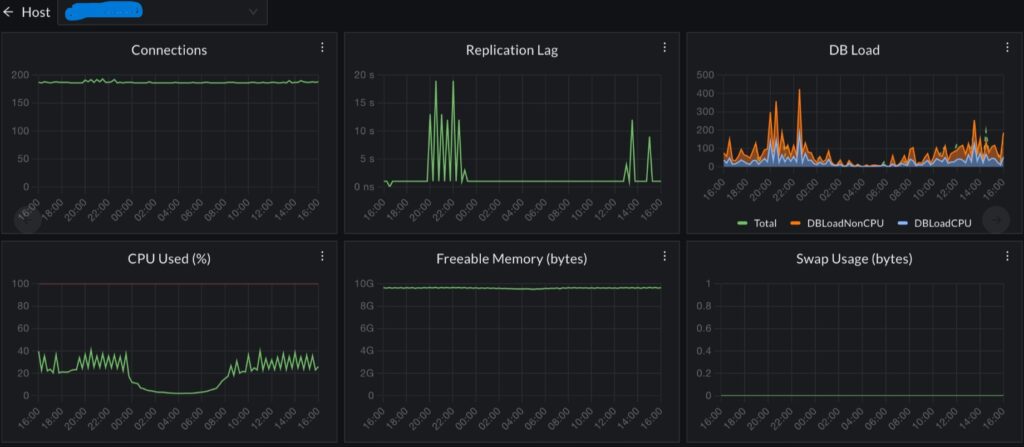
CubeAPM works alongside your existing Prometheus stack rather than replacing it. It instruments your application layer via OpenTelemetry and captures every database call as a distributed trace span – with query text, execution duration, and the upstream service and endpoint that triggered it.
When your RDS CPU alert fires in Prometheus, you switch to CubeAPM and navigate directly from the time of the spike to the specific queries that drove it, from the specific services that generated them. Prometheus covers your infrastructure signal. CubeAPM covers the application-to-database trace. Both run self-hosted inside your own AWS account.
Summary
| Tool | What it provides | Best fit |
| YACE | CloudWatch RDS metrics in Prometheus format, tag-based discovery | Multi-service AWS Prometheus stacks |
| prometheus-rds-exporter | CloudWatch + RDS API + quota metrics, pre-built alerts | Dedicated RDS monitoring at scale |
| PromQL write latency alert | avg_over_time(aws_rds_write_latency_average[10m]) * 1000 > 20 | Standard production alert |
| Scrape interval | 60 seconds minimum | Prevents unnecessary CloudWatch API cost |
Start with YACE if you already have a Prometheus stack covering other AWS services. Switch to or add prometheus-rds-exporter if you need quota visibility, storage forecasting, or the curated 30-alert framework that production RDS teams typically need.
Disclaimer: Configurations, IAM policies, and Helm commands are for guidance only – verify against current YACE documentation and prometheus-rds-exporter documentation before applying to production. IAM permissions and exporter versions change over time. CubeAPM references reflect genuine use cases; evaluate all tools against your own requirements.
Also read:
What Is the Difference Between Lambda Enhanced Monitoring and CloudWatch?