










Nearly three-quarters of organizations are either already using OpenTelemetry or actively planning to adopt it, according to research by Enterprise Management Associates. On AWS, that shift is not theoretical anymore. It changes how engineering teams instrument services, route telemetry, and pick backends.
This AWS service monitoring guide is for DevOps engineers, SREs, and platform teams running workloads on AWS. It covers how OpenTelemetry fits into AWS environments, which instrumentation patterns hold up in production, how to route telemetry to different backends, and where teams get tripped up at scale. The goal is a complete, honest picture, not a vendor pitch.
What Is OpenTelemetry and Why Does It Matter for AWS
OpenTelemetry (OTel) is a CNCF-graduated open-source project. It provides a unified standard for collecting metrics, logs, and traces from distributed systems. At its core, OTel consists of three things:
- Language-specific SDKs for auto- and manual instrumentation
- A vendor-neutral wire protocol called OTLP (OpenTelemetry Protocol)
- The OpenTelemetry Collector, a standalone pipeline component that receives, processes, and exports telemetry
The most important thing to understand is what OpenTelemetry is not. It is not a monitoring backend. It does not store data, draw dashboards, or fire alerts. It is the collection and transport layer. Think of it as the plumbing between your services and whatever system your team uses to analyze the data.
On AWS, the traditional approach uses CloudWatch as both collector and backend, with X-Ray handling distributed tracing. That model works well for purely AWS-native stacks. Teams run into friction when:
- Services span multiple AWS accounts, regions, or clouds
- Engineers need to correlate traces and metrics without jumping between X-Ray and CloudWatch Metrics separately
- The AWS-native cost model with per-metric, per-API call, and per-log GB charges becomes expensive at scale
- Teams want to switch backends without re-instrumenting every service
OpenTelemetry solves all of this by separating instrumentation from the destination. Teams instrument code once with OTel SDKs, route data through the Collector, and send it to any OTLP-compatible backend, such as CubeAPM, or multiple destinations simultaneously.
The OTel Data Model: Metrics, Traces, and Logs
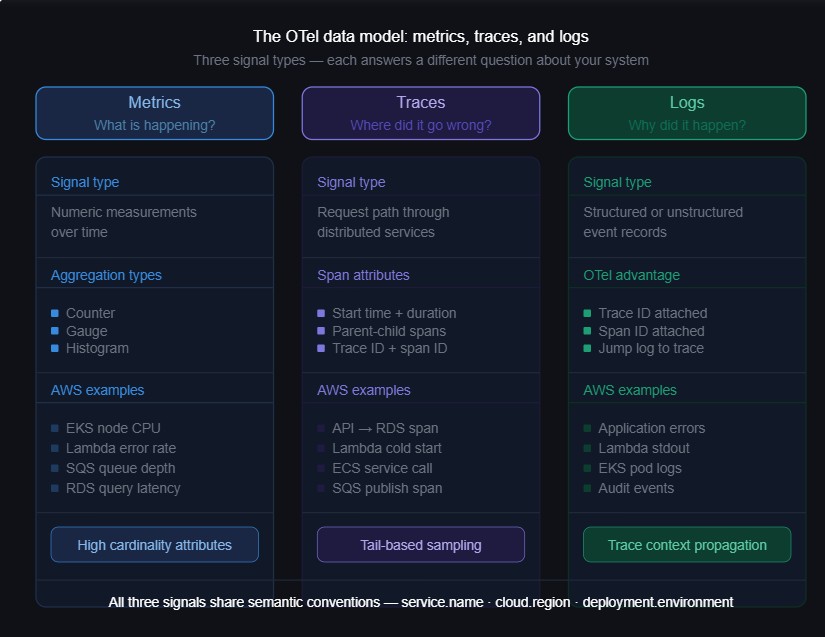
Before setting up pipelines, it helps to understand how OpenTelemetry models telemetry data and how each signal maps to AWS monitoring use cases.
Metrics
Metrics are numeric measurements over time. CPU utilization, request count, error rate, and queue depth. In OpenTelemetry, metrics carry rich semantic labels called attributes and support multiple aggregation types: counters, gauges, and histograms.
Compared to standard CloudWatch metrics, OTel metrics support higher attribute cardinality and finer aggregation control. That matters when filtering simultaneously by service, region, and deployment version.
Traces
A trace represents the path one request takes through a distributed system. It consists of spans. Each span captures a unit of work with a start time, duration, parent-child relationship, and attributes.
Traces are what let teams answer “why was this specific request slow?” rather than “why is p99 latency elevated?” That distinction matters when you are investigating an incident at 2 a.m.
Logs
Logs are structured or unstructured text records emitted by services. OTel’s approach differs from CloudWatch Logs in one important way. OTel attaches trace context, specifically trace ID and span ID, to log records. That makes it possible to jump from a log line directly to the trace that produced it, and back again, without any manual correlation.
The AWS Distro for OpenTelemetry (ADOT)
AWS maintains its own supported distribution of the OTel Collector called the AWS Distro for OpenTelemetry, or ADOT. It is an AWS-tested build of the upstream Collector that includes AWS-specific components pre-packaged and validated.
ADOT includes:
- AWS-specific receivers and exporters for X-Ray, CloudWatch Metrics, and EMF
- Support for AWS authentication via IAM roles and instance profiles
- Pre-built ECS task definitions and EKS add-on configurations
- Integration with CloudWatch Container Insights
ADOT is a sensible starting point for teams beginning with OTel on AWS. The trade-off is that it runs behind the upstream Collector in terms of feature availability. If you need components not bundled in ADOT, you either wait for them to be included or run the upstream contrib Collector instead.
Use ADOT when the stack is AWS-native, CloudWatch is the primary backend, and your team wants AWS-supported tooling. Consider the upstream OTel Collector Contrib when you need flexibility, faster access to new components, or multi-destination routing to non-AWS backends.
How to Monitor AWS Services with OpenTelemetry
Not all AWS services expose telemetry in the same way. The right instrumentation approach depends on whether the service runs on open-source technology or is AWS-proprietary.
Open-Source-Based AWS Services: Direct OTel Collection
Several AWS managed services run on well-known open-source technology that OpenTelemetry already has receivers for. For these, teams can collect metrics directly using OTel receivers, bypassing CloudWatch and its associated streaming costs:
| AWS Service | Underlying Technology | OTel Receiver |
| Amazon EKS | Kubernetes | k8sclusterreceiver, kubeletstatsreceiver |
| Amazon RDS (MySQL, PostgreSQL) | MySQL / PostgreSQL | mysqlreceiver, postgresqlreceiver |
| Amazon ElastiCache | Redis | redisreceiver |
| Amazon MQ | ActiveMQ / RabbitMQ | activemqreceiver, rabbitmqreceiver |
| Amazon MSK | Apache Kafka | kafkametricsreceiver |
| Amazon OpenSearch | OpenSearch / Elasticsearch | elasticsearchreceiver |
| Amazon EMR | Spark / Hadoop | JMX receiver |
Direct collection avoids CloudWatch streaming costs and gives teams higher-cardinality metrics with more control over collection interval and attribute enrichment.
AWS-Proprietary Services: CloudWatch Metric Streams
For services without an open-source equivalent, EC2 at the host level, Lambda, API Gateway, S3, SQS, and DynamoDB, CloudWatch is the primary telemetry source. The OTel-compatible path is CloudWatch Metric Streams paired with an Amazon Data Firehose delivery stream.
The data flows like this:
AWS Services > CloudWatch > Metric Stream > Amazon Data Firehose > OTLP Endpoint
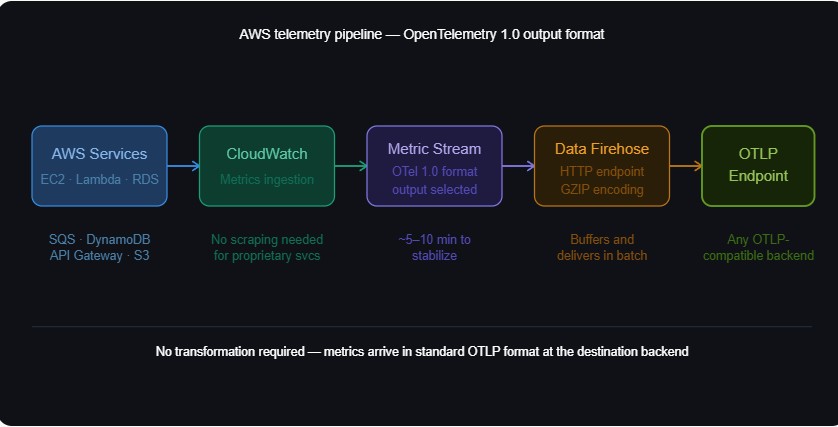
CloudWatch Metric Streams support OpenTelemetry 1.0 as an output format. Metrics arrive at the backend in standard OTLP format without requiring transformation. This eliminates a whole class of mapping problems that plagued earlier CloudWatch integrations.
Here is the high-level setup:
- Create a Firehose delivery stream pointed at your OTLP-compatible backend HTTP endpoint.
- In CloudWatch, create a Metric Stream using “Custom setup with Firehose”.
- Select “OpenTelemetry 1.0” as the output format.
- Choose which AWS namespaces to stream, for example, AWS/EC2, AWS/Lambda, AWS/SQS.
Expect roughly 5 to 10 minutes for streaming to stabilize and data to appear in the backend.
Application-Level Instrumentation with OTel SDKs
For monitoring application code running on AWS rather than the infrastructure itself, teams instrument using OTel language SDKs. Lambda, ECS tasks, EKS pods, and EC2 workloads all support this.
Most major languages have stable SDKs with auto-instrumentation:
- Java: opentelemetry-java-agent for zero-code auto-instrumentation
- Python: opentelemetry-instrument command-line auto-instrumentation
- Node.js: @opentelemetry/auto-instrumentations-node
- Go: Manual instrumentation only (no official auto-instrumentation agent as of May 2026)
- .NET: OpenTelemetry.AutoInstrumentation
Auto-instrumentation captures traces from common frameworks, including HTTP clients, database drivers, and message queues, with minimal code changes. Manual instrumentation is required for custom business logic spans, business-specific attributes, or proprietary internal systems.
Set OTEL_SERVICE_NAME and OTEL_RESOURCE_ATTRIBUTES as environment variables in ECS task definitions or EKS pod specs. This ensures every trace and metric carries a consistent service identity without hardcoding it inside application code.
The OpenTelemetry Collector: Configuration Patterns for AWS
The OTel Collector is the central component in most AWS monitoring pipelines. It runs as a sidecar, DaemonSet, or standalone service. It receives telemetry from SDKs, processes it, and forwards it to one or more backends.
Every Collector configuration has three sections. Receivers define how data comes in. Processors define what happens to it. Exporters define where it goes.
Deployment Patterns on AWS
Sidecar per Pod (EKS)
The Collector runs as a sidecar container in each pod. This gives per-pod resource isolation and fine-grained configuration control. The downside is higher resource overhead since every pod runs its own Collector instance.
DaemonSet (EKS or EC2)
One Collector runs per node. This is the most common production pattern. It works well for infrastructure metrics and log collection. Applications send telemetry to the node-level Collector via localhost.
Standalone Collector Cluster
A dedicated deployment of horizontally scaled Collector instances receives telemetry from all sources. Teams use this pattern in high-volume environments where sampling, filtering, and transformation need separation from collection.
According to the OpenTelemetry Collector Follow-up Survey published in January 2026, 65% of organizations now run more than 10 Collector instances in production. Kubernetes remains the dominant deployment environment at 81%, while VM usage has grown from 33% to 51% year over year.
Key Processors Every AWS Team Should Know
Batch Processor
The batch processor combines spans and metric data points before exporting. It reduces API calls and improves throughput. Use it in almost every pipeline.
processors:

  batch:

    timeout: 5s

send_batch_size: 1000Memory Limiter Processor
This processor prevents the Collector from consuming unbounded memory under high load. It is essential in production.
processors:

  memory_limiter:

    check_interval: 1s

    limit_mib: 512

spike_limit_mib: 128Resource Detection Processor
This processor automatically enriches telemetry with AWS resource attributes by querying the EC2 metadata service and EKS API. It adds EC2 instance type, region, availability zone, EKS cluster name, and more without manual configuration.
processors:

  resourcedetection:

    detectors: [env, ec2, eks, ecs]

timeout: 5sFilter Processor
The filter processor drops metrics or spans matching defined criteria. Teams use it to remove low-value telemetry, such as health check traces, before data reaches a paid backend.
Tail-Based Sampling Processor
This processor makes sampling decisions after a full trace is collected. It lets teams retain 100% of error traces and slow traces regardless of total volume. It requires a stateful Collector deployment because all spans from a trace must arrive at the same Collector instance.
Routing Telemetry: Backend Options for AWS OTel Data
Once the OTel Collector is collecting and processing telemetry, it needs somewhere to send it. Backend selection is one of the more consequential decisions in an OTel deployment, and it is worth thinking through before the pipeline goes to production.
Amazon CloudWatch
CloudWatch is the natural first stop for AWS-native teams. It accepts OTel metrics via Metric Streams and added direct OTLP ingestion for metrics in April 2026, including anomaly detection on OTel metrics without requiring static thresholds. For traces, AWS X-Ray remains the native backend, and ADOT includes X-Ray exporters.
CloudWatch works well for:
- Teams operating entirely within AWS with no multi-cloud requirements
- Organizations already invested in CloudWatch dashboards and alarm workflows
- Teams that want a fully managed backend with no additional infrastructure to run
The friction shows up at scale. Per-metric charges, per-API call fees, and per-GB log ingestion add up faster than most teams expect. Correlating traces in X-Ray with metrics in CloudWatch also means jumping between two separate consoles during an incident, which slows the investigation down. Custom metrics have limited cardinality support compared to OTel-native backends.
Open-Source Backends
Teams that want full control over their observability stack often build around the Prometheus and Grafana ecosystem. Prometheus handles metrics, Loki handles logs, and Tempo handles traces. The OTel Collector exports to each component via standard protocols. Grafana Cloud offers a managed hosted version if running all three components is too much to operate.
This approach gives maximum flexibility and avoids vendor lock-in at both the instrumentation and storage layers. The trade-off is operational complexity. Running and maintaining multiple components, wiring up trace-to-log correlation, and managing retention across separate systems takes real engineering effort. It is a good fit for teams with strong platform engineering capacity who want to own the full stack.
Commercial SaaS APM Platforms
Most commercial APM platforms now accept OTLP ingestion natively. Teams run the OTel Collector to collect and preprocess telemetry, then forward it to the SaaS platform via its OTLP endpoint. This preserves vendor-neutral instrumentation while keeping the managed analytics experience.
This model suits teams that want a fully managed backend with rich dashboards, anomaly detection, and broad integration support, without operating their own infrastructure. It is common in enterprises with existing software contracts already in place.
The cost trade-off is significant at scale. Most SaaS platforms bill per host, per metric, or per data volume across multiple dimensions. In dynamic AWS environments where ECS tasks scale up and down and Lambda concurrency spikes, those bills become hard to predict. Lock-in at the instrumentation layer is reduced since teams use OTel SDKs, but lock-in at the storage and query layer remains.
Self-Hosted OpenTelemetry-Native Backends
A growing category of backends ingests OTLP natively and stores metrics, traces, logs, and events in a single unified data model. These run inside the customer’s own cloud account or VPC. Telemetry never leaves the customer’s environment.
CubeAPM falls into this category. It is built natively on OpenTelemetry and designed specifically for teams that want full-stack observability without sending data to an external SaaS platform. For AWS environments, it supports both CloudWatch Metric Streams for proprietary services and direct OTel collection for open-source-based services like RDS, ElastiCache, and MSK. It accepts telemetry from OTel Collectors, Prometheus exporters, and existing vendor agents, so teams already running proprietary agents can migrate without re-instrumenting application code.
Pricing is per GB of ingestion at a flat rate, which keeps costs predictable as EKS clusters scale, Lambda concurrency grows, and service count increases. Smart sampling retains traces tied to errors and performance anomalies while reducing storage overhead on routine traffic.
Self-hosted OTel-native backends are a good fit for:
- Teams with data residency or compliance requirements that prevent sending telemetry to external systems
- Organizations where SaaS observability costs have become a material budget concern
- Environments that span AWS and non-AWS infrastructure and need consistent telemetry semantics across both
The Multi-Backend Pattern
The OTel Collector supports exporting to multiple destinations simultaneously. Many production teams use this to send telemetry to a full-fidelity backend for investigation while keeping CloudWatch fed for AWS-native alarms and operational dashboards.
exporters:

  otlp/primary:

    endpoint: "your-backend:4317"

  awscloudwatchmetrics:

    namespace: "YourService"

    region: "us-east-1"

service:

  pipelines:

    metrics:

      receivers: [otlp]

      processors: [batch, memory_limiter]

exporters: [otlp/primary, awscloudwatchmetrics]This avoids having to choose between AWS-native alarming and deeper observability tooling. Both can coexist in the same pipeline.
AWS Service-Specific Monitoring Guidance
Amazon EKS
EKS monitoring has three distinct layers, and each needs separate handling.
Control Plane
Enable EKS Control Plane Logging in the AWS console. Use the k8sclusterreceiver to collect Kubernetes object metrics, including pod counts, deployment status, and node conditions.
Nodes
Deploy the OTel Collector as a DaemonSet. Use the hostmetricsreceiver for CPU, memory, disk, and network metrics. Add the kubeletstatsreceiver for container-level metrics.
Applications
Inject OTel SDK instrumentation into application containers. Configure pods to send traces to the node-level Collector:
OTEL_EXPORTER_OTLP_ENDPOINT=http://localhost:4317
Key metrics to track:
- Node CPU and memory pressure
- Pod restart counts
- Container CPU throttling rate
- API server request latency
AWS Lambda
Lambda monitoring with OTel uses either the OTel Lambda layer, which wraps the Lambda runtime, or manual SDK initialization in function code.
The OTel Lambda layer is available as an AWS-managed Lambda Layer ARN. It supports auto-instrumentation for Python, Java, and Node.js. Add the layer and set these environment variables:
AWS_LAMBDA_EXEC_WRAPPER=/opt/otel-handlerOTEL_EXPORTER_OTLP_ENDPOINT=https://your-collector-endpointOTEL_SERVICE_NAME=my-function
OTel instrumentation adds latency to cold starts. For latency-sensitive functions, use the OTel SDK without auto-instrumentation. Manual initialization is lighter and gives more control over what gets traced.
Key metrics to track:
- Duration at average and p99
- Error rate
- Throttle count
- Concurrent executions
- Cold start frequency
Amazon RDS
For RDS instances running MySQL or PostgreSQL, the OTel Collector connects directly to the database endpoint using the mysqlreceiver or postgresqlreceiver. These receivers pull performance schema metrics: query latency, connection counts, buffer pool hit rates, and replication lag.
This requires network connectivity between the Collector and the RDS endpoint, which typically means both are in the same VPC. Store the read-only monitoring user credential in AWS Secrets Manager rather than in the Collector config file.
Key metrics to track:
- Connection count relative to the configured maximum
- Read and write latency
- Slow query count
- Replication lag on read replicas
- Buffer pool hit ratio
Amazon SQS and Amazon MSK (Kafka)
For SQS, use CloudWatch Metric Streams to capture queue depth, messages sent and received, and approximate age of the oldest message. There is no native OTel receiver for SQS as of May 2026.
For MSK (Kafka), the kafkametricsreceiver connects to the cluster and collects broker, topic, and consumer group metrics directly, bypassing CloudWatch costs.
The single most important metric to watch for both services is consumer lag. A growing queue depth on SQS or a growing offset lag on a Kafka consumer group is almost always the first signal that a downstream consumer is falling behind, well before the problem becomes visible in error rates or user-facing metrics.
A Real-World Scenario: Tracing a Latency Problem Across AWS Services
A mid-sized e-commerce company runs its checkout flow on AWS: an EKS-based checkout service, PostgreSQL on RDS, an SQS queue feeding order processing, and a Lambda function handling post-purchase notifications. For the first year, they monitor everything through CloudWatch.
The Problem
On a Saturday afternoon, checkout slows down. P99 latency climbs from 400ms to 2.8 seconds. The team opens CloudWatch and sees EKS CPU is fine, RDS CPU is at 78%, SQS queue depth is normal, and Lambda error rate is zero.
RDS CPU is elevated, but CloudWatch cannot tell them which query is slow, which service called it, or whether the issue is query performance or connection pool exhaustion. The team spends 90 minutes pulling slow query logs manually and cross-referencing application logs. They find a likely culprit but cannot be certain. The incident resolves as traffic drops. Root cause stays uncertain.
What Changes with OpenTelemetry
Two weeks Later: The team instruments the stack:
- Java auto-instrumentation on the checkout service, capturing HTTP and JDBC spans
- A DaemonSet Collector on each EKS node with the postgresqlreceiver for RDS metrics
- CloudWatch Metric Streams via Firehose for SQS and Lambda metrics
- The OTel Lambda layer on the notification function
The resource detection processor automatically attaches service.name, deployment.environment, cloud.region, and EKS cluster name to every span and metric.
Next Saturday: Latency spikes again. This time, the team finds the slow trace within 30 seconds. It shows the full request path through the API handler, the database call, and the SQS publish. The slow span is a PostgreSQL query on the orders table taking 1.9 seconds, with the full query text and execution time in the span attributes.
Cross-referencing the postgresqlreceiver metrics confirms a high sequential scan count. A query filtering by customer_id and status together is running a full table scan because the composite index covering both columns does not exist.
From symptom to root cause: 8 minutes. They add the composite index, latency drops immediately, and they set an alert on sequential scan rate so the pattern triggers a notification before it becomes user-facing next time.
What Made the Difference
CloudWatch showed that the RDS CPU was high. The trace showed which query was slow, in which service, triggered by which user action. One tells you something is wrong. The other tells you exactly what to fix.
A few specifics worth noting from this setup:
- The postgresqlreceiver connected directly to the RDS endpoint from inside the VPC, bypassing CloudWatch streaming costs entirely
- SQS metrics came via CloudWatch Metric Streams since there is no native OTel receiver for SQS
- Lambda used manual SDK initialization rather than full auto-instrumentation to keep cold start overhead under 50ms
- Tail-based sampling retained 100% of slow checkout traces during the spike, while the sampling routine successful requests at 15%
The team did not redesign anything. They added instrumentation to what already existed and gained the ability to see inside requests rather than watching resource metrics from the outside.
Sampling Strategies

Sampling is one of the most consequential decisions in any OTel deployment, and it is where teams most often make expensive mistakes.
At scale, sending 100% of traces to any backend is not sustainable. The challenge is keeping the traces that actually matter, errors, outliers, and slow requests, while discarding routine traffic.
Head-Based Sampling
Head-based sampling makes the keep-or-drop decision at the very start of a request, before any processing happens. It is simple and stateless. The problem is that it sometimes discards traces that turn out to contain errors discovered later in the request lifecycle. Teams find this out after an incident when they go looking for a trace and find nothing.
Tail-Based Sampling
Tail-based sampling makes the decision after a complete trace is assembled. This means teams can always keep error traces and high-latency traces. It requires a stateful Collector deployment. All spans from a given trace must arrive at the same Collector instance for the decision to be accurate. That typically means a standalone Collector cluster rather than a DaemonSet.
Tail-based sampling is the correct default for production systems where missing an error trace is unacceptable.
A practical starting configuration:
- Keep 100% of traces containing errors
- Keep 100% of traces exceeding the p99 latency threshold
- Sample healthy traces at 10 to 20% initially
- Adjust rates per service based on actual traffic volume observed over the first 30 days
Alerting and SLOs with OpenTelemetry Data
OpenTelemetry does not define alerting. That is the backend’s responsibility. But OTel data enables more precise alerting than traditional metric-only approaches.
Metric-Based Alerts
Set a threshold on a metric like error rate, queue depth, or p99 latency. The advantage of OTel metrics is that alerts can filter by service, deployment version, or availability zone using the attribute labels OTel automatically attaches. Achieving the same with most CloudWatch custom metrics requires significant additional configuration.
Trace-Based Alerting
Some backends support alerting when a specific span pattern appears. For example, a database query consistently exceeds 500ms. This catches subtle service degradation before it impacts aggregate metrics, which makes it more useful than metric-based alerting for catching problems early in their lifecycle.
Service Level Objectives
Define SLOs as ratios of good requests to total requests. With OTel traces, good can be defined precisely. For example, HTTP 2xx responses with latency under 300ms measured at the span level. This is more accurate than SLOs built on synthetic checks or CloudWatch-level aggregations that mask individual request behavior.
Cost Management for AWS OTel Pipelines
Telemetry costs on AWS come from two places: AWS-side costs, including CloudWatch streaming and Firehose, and backend-side costs, including storage, query execution, and data retention.
Reducing AWS-Side Costs
- Stream only the CloudWatch namespaces your team actively queries
- For open-source-based services like RDS, ElastiCache, and MSK, use direct OTel collection rather than CloudWatch streaming
- Configure Firehose buffering appropriately to reduce per-request API call volume
Reducing Backend-Side Costs
- Apply filter processors in the Collector to drop low-value metrics, for example, per-minute health check granularity when 5-minute aggregates meet the team’s alerting needs.
- Use tail-based sampling rather than storing every trace
- Set explicit retention policies. Raw trace data does not need 13 months of retention for most teams. Thirty to 90 days of traces with longer metric retention is a common and practical policy.
The OTel Collector is the right place to make cost decisions, not the backend. Filter, sample, and transform data before it reaches storage. Changes made upstream are always cheaper than changes made after the data is already indexed and stored.
Migration Path: Moving from CloudWatch to OTel
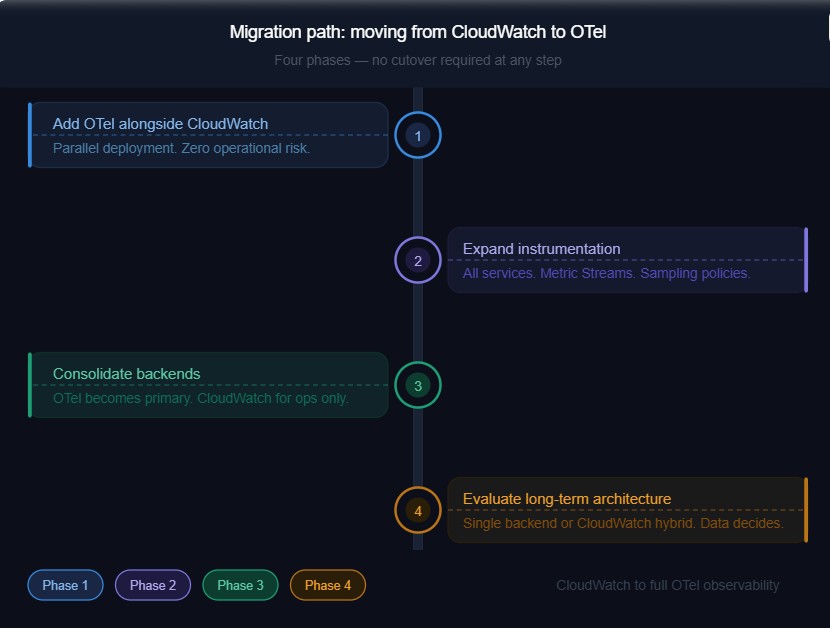
Moving to an OTel-based architecture does not require a big-bang cutover. Most successful migrations follow a phased approach.
Phase 1: Add OTel Alongside CloudWatch
Deploy the OTel Collector in parallel with the existing CloudWatch setup. Instrument one or two services. Route OTel data to a backend. Compare what appears there versus CloudWatch. This builds confidence in the new pipeline without operational risk.
Phase 2: Expand Instrumentation
Instrument remaining services. Add CloudWatch Metric Streams for proprietary AWS services. Set up sampling policies.
Phase 3: Consolidate Backends
Once OTel-sourced data becomes the primary source of truth for alerts and dashboards, reduce CloudWatch dependency to AWS-operational signals only: billing alerts and service health events.
Phase 4: Evaluate Long-Term Architecture
At this point, teams have enough production data to decide whether a single backend meets their needs or whether a CloudWatch plus OTel-backend hybrid is the right long-term model.
The 2025 OTel Collector survey identified the most common production challenges: unreliable health checks, backward compatibility issues during Collector upgrades, and missing receivers for specific platforms. Plan for these in any migration. Stage Collector upgrades and maintains a tested rollback procedure. Those two practices prevent most of the production incidents teams encounter during this transition.
Common Pitfalls and How to Avoid Them
Missing Resource Attributes
Traces and metrics from different services cannot be correlated if they do not share a consistent service.name or deployment.environment. Standardize these attributes before onboarding the first service. Enforce them via the OTel Collector’s resource processor if needed. Retrofitting attribute consistency across a large, running deployment is painful and disruptive.
Collector as a Single Point of Failure
A single Collector instance handling all telemetry is a single point of failure. In production, run at least two Collector instances behind a load balancer for any high-volume pipeline. This is not optional for anything customer-facing.
Over-Instrumentation
Adding spans to every function call produces enormous trace volumes with low diagnostic value. Instrument service boundaries, external calls, database queries, and message queue operations. Internal helper functions do not need spans unless they are suspected problem areas.
Cold Start Overhead in Lambda
OTel SDK initialization adds to the Lambda cold start time. Profile this in staging before deploying to production. It is usually acceptable, but for latency-critical functions, it occasionally is not, and discovering this during a production incident is entirely avoidable.
Static Collector Configuration
Telemetry volume grows as services and traffic scale. Build Collector configuration changes into infrastructure-as-code from day one. A config.yaml committed to a repository and deployed through a pipeline is significantly easier to manage than hand-edited configurations scattered across Collector instances.
How CubeAPM Fits into AWS OpenTelemetry Monitoring
CubeAPM is an observability platform built natively on OpenTelemetry. It runs inside the customer’s own cloud environment, meaning telemetry data stays within the customer’s AWS account or VPC and is never sent to an external SaaS backend. The platform covers the full MELT stack: metrics, events, logs, and traces, all stored under a single unified data model.
In the context of this guide, CubeAPM acts as the backend receiving telemetry from the OTel Collector pipelines described in earlier sections. It supports both ingestion paths: direct OTel collection for open-source-based AWS services like RDS, ElastiCache, and MSK, and CloudWatch Metric Streams via Firehose for AWS-proprietary services like Lambda, SQS, and API Gateway.

No Re-Instrumentation Required
Teams already running Datadog, Elastic, or New Relic agents do not need to re-instrument their applications to evaluate CubeAPM. CubeAPM accepts telemetry directly from all three agent formats, alongside native OTel SDKs. Switching means changing the agent’s destination endpoint, not touching application code.
This is relevant in AWS environments where services have run with proprietary agents for years. Teams can run CubeAPM in parallel, validate coverage, and migrate incrementally.
Pricing in AWS Context
CubeAPM uses a flat per-GB ingestion model at $0.15 per GB, with no per-host, per-container, or per-metric fees. For AWS environments where ECS tasks scale up and down, Lambda concurrency spikes, and EKS nodes autoscale, per-host billing produces unpredictable costs. A per-GB model scales with actual data volume rather than instance count.
Teams ingesting 10 TB of telemetry per month pay approximately $1,500 with CubeAPM, saving almost 50% in cost compared to big vendors in observability.
When CubeAPM Fits
CubeAPM suits AWS teams where:
- Data residency or compliance requirements prevent sending telemetry to an external SaaS backend
- Cost predictability is a priority as EKS clusters, Lambda invocations, and service count grow
- Migration from Datadog or New Relic needs to happen without re-instrumenting services
- Environments span AWS and non-AWS infrastructure and need consistent OTel semantics across both
It is a less natural fit for teams that want a fully managed SaaS experience with no responsibility for operating the observability backend, or teams running purely within the AWS-native toolchain, where CloudWatch and X-Ray already meet their needs.
Key Decisions for AWS OTel Monitoring: A Summary
For teams setting up or revisiting AWS monitoring with OpenTelemetry in 2026, five decisions matter most.
- Direct collection versus CloudWatch Metric Streams: Use direct OTel receivers for services built on open-source technology. Use Metric Streams for proprietary AWS services where CloudWatch is the only available telemetry path.
- ADOT versus the upstream OTel Collector Contrib: Start with ADOT for AWS-native stacks that want AWS-supported tooling. Move to upstream contrib when you need components or flexibility that ADOT does not include.
- Backend selection: CloudWatch fits AWS-only stacks. The Grafana stack or commercial APM platforms fit teams that want managed analytics. Self-hosted OTel-native backends like CubeAPM or SigNoz fit teams with data control requirements or high-volume cost concerns.
- Sampling strategy: Default to tail-based sampling in production. Keep 100% of error and slow traces. Sample healthy traffic at a lower rate.
- Attribute standardization: Define and enforce a resource attribute schema covering service.name, deployment.environment, cloud.region, and cloud.account.id before scaling. This is the kind of decision that feels optional at the start and mandatory six months later.
OpenTelemetry’s position in 2026 is settled. According to the Elastic Landscape of Observability 2026 report, 89% of production OTel users consider full specification compliance at least very important when evaluating observability platforms. The question for AWS teams is no longer whether to adopt it. It is how to do so in a way that matches the architecture, the team’s operational capacity, and the cost constraints in place.
Disclaimer: This guide reflects the state of OpenTelemetry and AWS monitoring tooling as of May 2026. OpenTelemetry specifications and AWS service integrations evolve frequently. Check the official documentation for the most current details.
FAQs
1. What is the difference between AWS Distro for OpenTelemetry (ADOT) and the upstream OpenTelemetry Collector?
ADOT is an AWS-tested build of the upstream Collector with AWS-specific components pre-packaged: X-Ray exporters, CloudWatch EMF support, and IAM authentication. The upstream Collector Contrib is community-maintained and gets new components faster. Use ADOT for AWS-native stacks. Use upstream contrib when you need components ADOT has not bundled yet or when routing to non-AWS backends.
2. Can OpenTelemetry replace AWS CloudWatch entirely?
Not entirely. OTel replaces CloudWatch at the instrumentation and collection layer, but not for AWS-native operational signals like billing alerts, service health events, and EC2 status checks. Most production teams run a hybrid: OTel pipelines feeding a primary observability backend for investigation, with CloudWatch retained for AWS-native alarms.
3. Does OpenTelemetry work with AWS Lambda, and what is the cold start impact?
Yes. The OTel Lambda layer supports auto-instrumentation for Python, Java, and Node.js. Cold start overhead is typically 50 to 200ms, depending on the runtime and libraries loaded. For latency-sensitive functions, use manual SDK initialization instead. Always profile cold start impact in staging before deploying to production.
4. How do you monitor AWS RDS with OpenTelemetry without using CloudWatch?
Use the mysqlreceiver or postgresqlreceiver in the OTel Collector to connect directly to the RDS endpoint and pull performance schema metrics, including query latency, connection counts, and replication lag. Both the Collector and RDS instance need to be in the same VPC. Store monitoring credentials in AWS Secrets Manager. This bypasses CloudWatch streaming costs and gives higher-cardinality metrics with a shorter collection interval.
5. What is the best sampling strategy for OpenTelemetry on AWS at high traffic volume?
Tail-based sampling. It makes the keep-or-drop decision after a full trace is assembled, so error traces and slow traces are always retained regardless of volume. Head-based sampling decides before the request is processed and will sometimes drop traces that contain errors. Start by keeping 100% of error traces and traces exceeding your p99 threshold, then sample healthy traffic at 10 to 20%. Tail-based sampling requires all spans from a trace to arrive at the same Collector instance, so plan for a stateful Collector deployment.