










SessionStack is a session replay, co-browsing, and digital experience analytics tool for teams that want to see how users behave inside a website or web application. It helps product, UX, support, and engineering teams replay user sessions, investigate friction, and understand what happened before a user got stuck or reported an issue.
In this guide, we’ll verify what SessionStack does, what public sources show about pricing, what affects the real cost, what users say in reviews, and how SessionStack compares with alternatives such as LogRocket, Hotjar, Fullstory, Smartlook, Microsoft Clarity, OpenReplay, and CubeAPM.
What Is SessionStack?
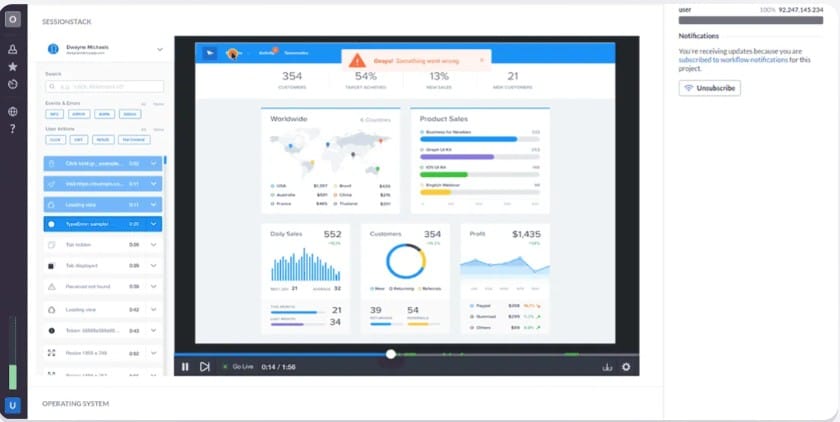
SessionStack is a customer experience and session replay tool that helps teams watch how users interact with a product. Instead of relying only on analytics charts, support tickets, or bug reports, teams can replay sessions and see the clicks, navigation paths, user actions, and errors that led to a problem. Capterra describes SessionStack as a customer support platform with co-browsing, session replay, error notifications, troubleshooting insights, reporting, and analytics.
The product is most relevant for SaaS teams, e-commerce teams, customer support teams, UX researchers, product managers, and engineering teams that need visual context around user behavior. Capterra says the main users are customer support, customer success, and technical support teams that want to reduce back-and-forth and improve time to resolution.
SessionStack is also useful for co-browsing. Co-browsing lets support agents see what a customer is seeing and guide them in real time, without asking for screenshots, long explanations, or screen recordings. Intercom’s app store says SessionStack lets support teams initiate an interactive screensharing session from Intercom, while Zendesk Marketplace says the SessionStack app helps support teams see what happened to users before a ticket was submitted.
Supported Platforms, Integrations, and Data Sources
SessionStack is mainly positioned around web applications and customer-facing digital products. Capterra says it works on any web application framework, across major browsers, with no client-side downloads required.
| Area | Verified SessionStack support |
| Core use case | Session replay, co-browsing, support troubleshooting, product analytics |
| Main users | Support, success, product, UX, engineering, SaaS, and e-commerce teams |
| Replay type | Pixel-perfect session replay is listed in SoftwareSuggest plan details |
| Live support | Co-browsing and live collaboration are listed in SoftwareSuggest and support integrations |
| Developer context | Sentry integration replays user actions that trigger crashes |
| Integrations | Sentry, Intercom, Zendesk, Bugsnag, Rollbar, Google Analytics, Segment, Mixpanel, Drift, Heap, and Raygun are listed across public sources |
| Enterprise features | G2 lists SSO and self-hosted deployment under the Business package |
Key Features of SessionStack
Session replay is SessionStack’s core feature. It lets teams replay customer sessions and understand what happened before a user abandoned a flow, triggered an error, submitted a ticket, or got stuck. SoftwareSuggest lists pixel-perfect session replay across SessionStack’s public plan signals.
SessionStack supports co-browsing and live collaboration. This is especially useful for customer support teams because agents can guide users in real time instead of relying on screenshots or long written explanations. SoftwareSuggest lists co-browsing and live collaboration in the Free plan feature set, while Intercom and Zendesk both list SessionStack apps for support workflows.
SessionStackAI appears to be part of the advanced sales motion. G2 says buyers can try basic SessionStack functionality with the free plan, but should book a demo to see what SessionStackAI can do for their business.
Buyers should confirm whether SessionStackAI is included in their selected plan, sold as part of a Business package, or bundled into a PlaybookUX package.
SoftwareSuggest lists tagless autocapture of client-side data as a SessionStack feature. This helps teams collect user behavior without manually tagging every event upfront.
SoftwareSuggest lists basic filters, advanced filters, user segments, trends, advanced user segments, and instrumentation-free funnels in SessionStack’s public feature list. These features help product and UX teams find user journeys, friction patterns, and drop-off points without watching random recordings manually.
SessionStack can help developers debug issues when connected to error monitoring tools. Sentry’s integration page says SessionStack replays user actions that trigger a crash as a video clip, helping developers recreate and fix errors with more context.
SoftwareSuggest lists sensitive data handling as a SessionStack feature. This is important because session replay tools can capture sensitive user interactions if masking and privacy controls are not configured properly. Buyers in SaaS, finance, healthcare, e-commerce, and other privacy-sensitive sectors should still confirm masking rules, access controls, compliance requirements, and data retention before rollout.
SoftwareSuggest lists REST API data export on the Scale plan. This is useful for teams that want to send replay or behavioral data into internal dashboards, analytics tools, support systems, or data warehouses.
G2 lists single sign-on and self-hosted deployment among SessionStack Business-level capabilities. These features are most relevant for larger teams that need stronger access control, security review, compliance alignment, or more control over customer data.
SessionStack Pricing in 2026
SessionStack does not currently publish a clear official public pricing page with fixed plan prices. That means buyers should not rely on third-party directory prices as final pricing guidance.
Some software directories still show older or directory-maintained pricing signals, while G2 lists SessionStack with sales-led Business pricing. However, because these prices do not come from an official SessionStack pricing page, they should not be presented as verified SessionStack pricing.
Pricing appears to be quote-based or sales-led, especially for buyers evaluating SessionStackAI, higher recorded session volume, co-browsing, advanced analytics, REST API export, SSO, self-hosted deployment, priority support, or enterprise privacy requirements.
Buyers should request a direct quote from SessionStack or PlaybookUX and confirm whether they are buying SessionStack standalone, SessionStackAI, PlaybookUX Session Replays and Intercepts, or a broader UX research package.
| Pricing area | What buyers should confirm |
| Public pricing | No clear official fixed-price rate card found |
| Pricing model | Likely quote-based or sales-led |
| Main cost drivers | Recorded sessions, retention, seats, AI, co-browsing, export, SSO, support |
| Enterprise features | SSO, self-hosting, priority support, data export, privacy controls |
| Buying path | SessionStack, SessionStackAI, PlaybookUX Replays, or broader PlaybookUX package |
SessionStack User Reviews
SessionStack has a strong G2 rating but a smaller review footprint on Capterra. G2 shows 4.8/5 from 67 reviews, while Capterra UK shows 4.2/5 from 10 reviews.
| Review source | Public rating | Review count |
| G2 | 4.8/5 | 67 reviews |
| Capterra UK | 4.2/5 | 10 reviews |
What Users Like
G2’s review summary says users consistently praise SessionStack’s session replay capabilities for detailed analysis of user interactions and faster identification of UX issues.
One G2 reviewer said SessionStack fulfilled their needs for session recording/replay and co-browsing, and also praised responsive support.
Capterra describes SessionStack as helping support teams get context, reduce back-and-forth, and improve customer experience.
A G2 reviewer said SessionStack helped the team understand UX feedback from real users, increase conversion rates, and reduce bounce rates.
Capterra UK shows SessionStack’s value-for-money score as 4.6 from 10 reviews.
What Users Criticize
⚠️ Disclaimer
These points reflect public user-review themes. They are not universal platform limitations.
One G2 reviewer said it felt hard to find specific sessions for users.
One G2 reviewer said the default retention period was 30 days and too short for their use case.
One G2 reviewer said the interface could use a refresh, although they also said the product was functional and worked for their business case.
G2 lists Business pricing as Contact Us, while SoftwareSuggest and Capterra list lower self-serve pricing signals. This makes budget planning harder without a direct quote.
SessionStack Alternatives: How it Compares to Competitors
SessionStack vs CubeAPM
CubeAPM is also not a direct SessionStack replacement. SessionStack focuses on user behavior, session replay, co-browsing, and digital experience troubleshooting. CubeAPM focuses on full-stack observability across logs, traces, metrics, APM, infrastructure monitoring, RUM, synthetics, dashboards, SLOs, and error tracking. CubeAPM’s official pricing page lists $0.15/GB of data ingestion, and its site describes a self-hosted, vendor-managed model where data stays inside the customer environment.
| Category | SessionStack | CubeAPM |
| Best for | Watching user behavior and co-browsing | Full-stack observability with predictable pricing |
| Main users | Product, UX, support teams | Engineering, DevOps, SRE teams |
| Pricing | Not officially published as fixed public pricing | $0.15/GB data ingestion |
| Deployment | Confirm current SessionStack/PlaybookUX packaging | Self-hosted, vendor-managed |
| Best fit | Customer experience troubleshooting | Logs, traces, metrics, APM, infra, RUM, synthetics |
Choose SessionStack when the team wants session replay, co-browsing, and support troubleshooting. Choose CubeAPM when the team needs full-stack technical observability with predictable per-GB pricing and data control.
SessionStack vs LogRocket
LogRocket is one of SessionStack’s strongest alternatives for engineering-focused teams. Both products offer session replay, but LogRocket is stronger for frontend debugging, network logs, console logs, product analytics, and developer workflows. LogRocket’s official pricing page shows session-based plans with 1,000 sessions/month on the free tier and 10,000 to 50,000 sessions/month on paid self-serve tiers.
| Category | SessionStack | LogRocket |
| Best for | Replay, co-browsing, support, UX insights | Frontend debugging, replay, product analytics |
| Pricing | Public signals from $79 to $129/month; Business custom | Official pricing shows session-based tiers |
| Co-browsing | Stronger support focus | Not the main differentiator |
| Developer debugging | Available through integrations | Stronger native focus |
| Best buyer | Support and product teams | Engineering and product teams |
Choose SessionStack if co-browsing and support workflows matter most. Choose LogRocket if frontend debugging and developer reproduction matter more.
SessionStack vs Datadog
Datadog is not a direct SessionStack replacement. Datadog is a full-stack observability and security platform that covers infrastructure monitoring, APM, logs, RUM, synthetics, cloud monitoring, security monitoring, and many other modules. SessionStack is narrower and focuses on session replay, co-browsing, and digital experience troubleshooting. Datadog publishes official pricing by product and billing unit, including infrastructure monitoring billed per host and other modules priced separately.
| Category | SessionStack | Datadog |
| Best for | User session replay and co-browsing | Full-stack observability and security |
| Main users | Support, product, UX teams | DevOps, SRE, platform, security teams |
| Pricing | Not officially published as fixed public pricing | Public modular pricing by product |
| Technical telemetry | Limited compared with observability tools | Strong logs, metrics, traces, infra, APM |
| Best fit | Customer experience troubleshooting | Large-scale technical monitoring |
Choose Datadog if the team needs broad observability across infrastructure, applications, logs, traces, RUM, synthetics, and security. Choose SessionStack if the main problem is understanding user behavior and helping customers inside the app.
SessionStack vs New Relic
New Relic is a full-stack observability platform, not a session replay-first support tool. It is stronger for teams that need telemetry across applications, infrastructure, logs, traces, metrics, errors, RUM, synthetics, and dashboards. New Relic publishes official pricing with 100 GB of free data ingest per month and paid ingest rates beyond the free allowance.
| Category | SessionStack | New Relic |
| Best for | Replay, co-browsing, support troubleshooting | Full-stack observability and telemetry analysis |
| Main users | Support, product, UX teams | Engineering, DevOps, SRE teams |
| Pricing | Not officially published as fixed public pricing | Public ingest-based pricing |
| Data model | Sessions and digital behavior | Logs, metrics, traces, events, APM data |
| Best fit | Customer behavior visibility | Technical reliability monitoring |
Choose New Relic if the team needs observability across application and infrastructure telemetry. Choose SessionStack if the team needs session replay and co-browsing for product and support workflows.
SessionStack vs Dynatrace
Dynatrace is an enterprise observability platform built for application performance monitoring, infrastructure monitoring, logs, cloud-native environments, automation, and AI-assisted root-cause analysis. It is much broader than SessionStack. Dynatrace publishes an official rate card with pricing units such as full-stack monitoring per memory-GiB-hour and infrastructure monitoring per host-hour.
| Category | SessionStack | Dynatrace |
| Best for | Session replay and support troubleshooting | Enterprise observability and automation |
| Main users | Support, product, UX teams | Enterprise DevOps, SRE, platform teams |
| Pricing | Not officially published as fixed public pricing | Public rate-card pricing |
| AI focus | SessionStackAI for experience insights | Davis AI for observability analysis |
| Best fit | Digital behavior and co-browsing | Complex enterprise monitoring |
Choose Dynatrace if the team needs enterprise-grade observability, automated discovery, APM, infrastructure monitoring, logs, and AI-assisted root-cause analysis. Choose SessionStack if the main goal is replaying user sessions and helping customers in real time.
Is SessionStack the Right Choice?
When SessionStack Works Best
SessionStack is a strong fit for:
- SaaS support teams that need to see what users experienced before opening a ticket
- Product and UX teams investigating friction, abandonment, confusing flows, and feature adoption
- E-commerce teams reviewing checkout friction, form issues, navigation problems, and conversion drop-offs
- Teams that need co-browsing for real-time support
- Engineering teams that want replay context around frontend errors through integrations such as Sentry
Sentry’s SessionStack integration supports the developer use case by replaying user actions that trigger crashes as video clips.
When SessionStack May Not Be Enough
SessionStack may not be the best fit for:
- Teams that need heatmaps, surveys, and feedback widgets first
- Teams that need full backend observability, logs, traces, metrics, and infrastructure monitoring
- Buyers that need fully transparent public pricing
- Enterprises that need long retention without custom negotiation
- Teams that want a clear current public rate card instead of directory-listed prices and Business quotes
For teams focused on full-stack technical reliability, tools such as CubeAPM, Datadog, New Relic, OpenReplay, LogRocket, or Sentry may be more relevant depending on the exact use case.
Conclusion
SessionStack is best understood as a session replay and co-browsing tool for teams that need clearer visibility into user behavior. It can help support, product, UX, and engineering teams see what users experienced before a ticket, bug report, or drop-off.
The main caution is pricing clarity. Since SessionStack does not currently publish a clear official public pricing page with fixed plan prices, buyers should avoid relying on third-party directory numbers and request a direct quote instead.
For teams comparing alternatives, the right choice depends on the problem. SessionStack fits user behavior and support workflows, while tools like CubeAPM, LogRocket. Datadog, New Relic, Dynatrace, and CubeAPM are better comparisons when the goal is full-stack technical observability rather than session replay alone.
Disclaimer: Pricing, packaging, plan names, feature limits, retention, support terms, and product ownership can change. The pricing examples in this article are editorial estimates based on publicly available pricing sources as of June 2026. Always confirm final pricing, limits, and contract terms directly with SessionStack or PlaybookUX before purchase.
FAQs
1. What is SessionStack best for?
SessionStack is best for session replay, co-browsing, customer support troubleshooting, user journey analysis, and understanding how users behave inside a web app. Capterra describes it as a customer support platform with co-browsing, session replay, troubleshooting insights, reporting, and analytics.
2. Does SessionStack include co-browsing?
Yes. SoftwareSuggest lists co-browsing and live collaboration, and Intercom’s app store says SessionStack lets support teams initiate interactive screensharing from Intercom.
3. Does SessionStack include AI features?
Yes, but buyers should verify packaging. G2 references SessionStackAI and says buyers can book a demo to see its AI capabilities.
4. Does SessionStack integrate with Sentry?
Yes. Sentry lists a SessionStack integration that replays user actions that trigger a crash as a video clip.