









Cloud Run scales to zero when idle. That design saves infrastructure cost but creates a latency penalty: when a request arrives and no warm instance exists, Cloud Run must pull the container image, start the runtime, and initialize your application before processing the first request. For customer-facing APIs where response time directly affects conversion or retention, a 2-second cold start can mean a lost sale or abandoned workflow.
According to the CNCF Annual Survey 2023, 71% of organizations now run containers in production, and serverless adoption continues to grow. That growth means cold start optimization has moved from edge case to standard production requirement. Most teams realize too late that Cloud Run’s default metrics in Cloud Monitoring show aggregate startup latency but lack the trace-level detail needed to isolate whether the delay is in image pull, runtime init, or application code.
This guide covers what Cloud Run cold starts are, how to monitor them with trace data and metrics, how to measure their real impact on user experience, and how to reduce cold start time through minimum instances, startup CPU boost, and container optimization. It includes a section on alerting, cost trade-offs, and how platforms like infrastructure monitoring tools fit into a full observability strategy.
What Is a Cloud Run Cold Start?
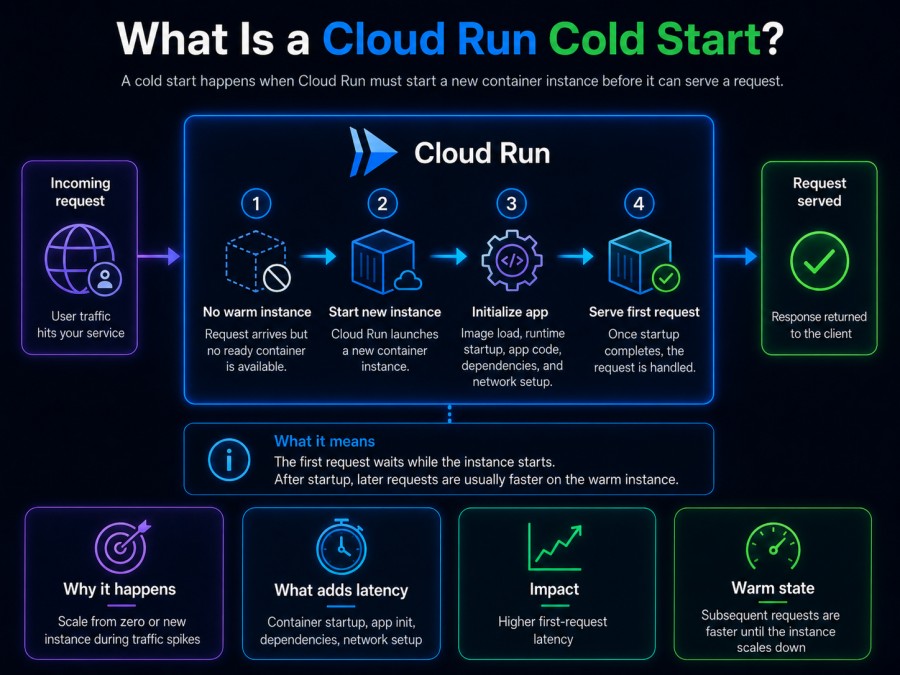
A Cloud Run cold start happens when an incoming request must wait for a new container instance to become ready because no warm instances are available to handle the request. Cold starts occur in three situations: when a service scales from zero after being idle, during scale-up events when existing instances are fully loaded and a new instance is needed, or after a deployment when old instances are replaced with new ones.
The cold start duration includes multiple sequential steps. Cloud Run must first pull the container image from Artifact Registry or Container Registry, using container image streaming to accelerate this step but still requiring network transfer time. Once the image is available locally, Cloud Run starts the container by running the entrypoint command. The container then executes application startup code, loading dependencies, initializing database connections, and preparing the runtime. Finally, the instance must begin listening on the configured port, typically 8080, before Cloud Run marks it ready to receive traffic.
For a typical Node.js or Python application, cold starts range from 500ms to 2 seconds. Java and .NET applications can take 3 to 10 seconds because of JVM or CLR initialization overhead. Languages like Go and Rust have minimal cold starts, often under 200ms, because they compile to native binaries with no runtime startup cost.
Why Cold Starts Matter for Production Services
Cold starts directly affect user-facing latency. An e-commerce checkout API that cold starts for 1.5 seconds during a traffic spike adds 1.5 seconds to every request waiting in the queue until the new instance is ready. That latency compounds during scale-up events, when multiple new instances cold start simultaneously.
Beyond user experience, cold starts create operational blind spots. Without trace-level visibility into startup phases, teams cannot distinguish between a slow image pull, a long runtime init, or expensive application code running at startup. Cloud Monitoring’s default metrics show that startup latency increased but not why. Debugging cold starts without distributed tracing means guessing which optimization will help.
For latency-sensitive services like payment processing, real-time bidding, or user authentication, cold starts are not acceptable at any scale. These services require minimum instances or CPU boost to ensure warm capacity exists before the first request arrives.
How Cloud Run Cold Starts Work: Container Lifecycle and Startup Phases
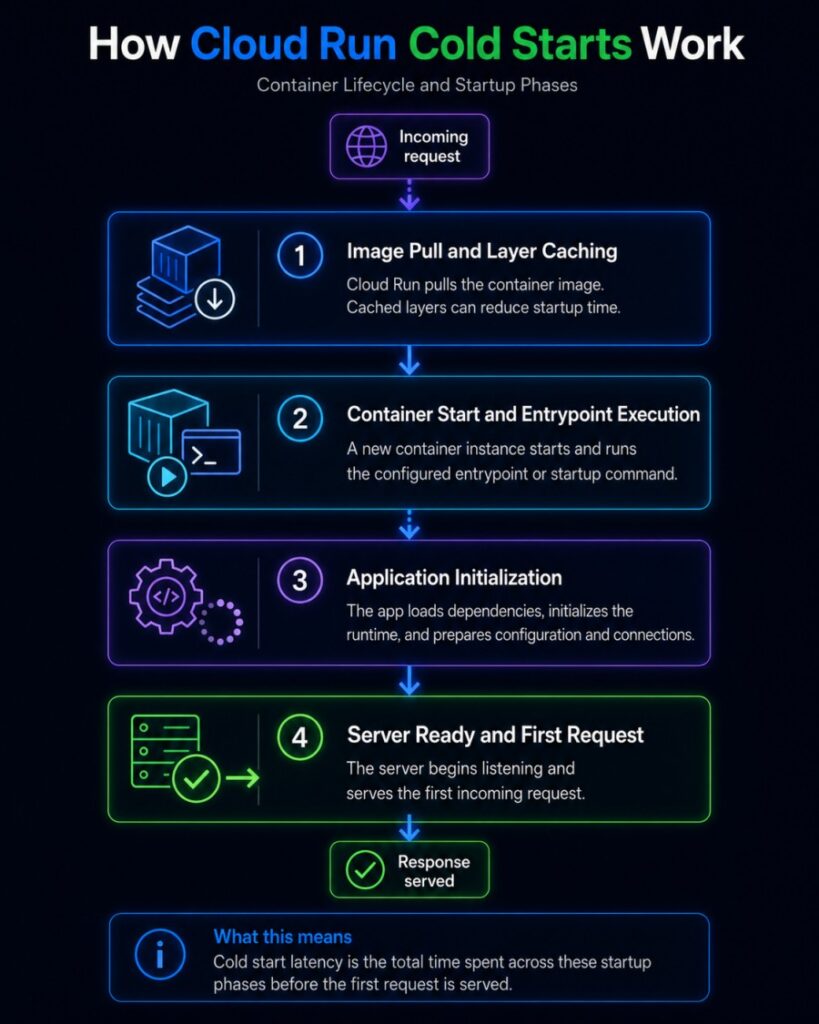
Understanding how Cloud Run initializes a container instance helps identify where cold start time is spent and what can be optimized. Every cold start follows the same sequence.
Step 1: Image Pull and Layer Caching
When Cloud Run receives a request and no warm instance exists, it must pull the container image from your configured registry. Cloud Run uses container image streaming, which starts the container before the full image is downloaded by streaming only the layers needed to begin execution. Subsequent layers download in the background.
Even with streaming, large images add latency. A 2GB Python image with development tools and unused dependencies takes longer to stream than a 50MB distroless Go binary. Image pull time depends on image size, layer structure, and whether layers are already cached on the Cloud Run node from a previous deployment or another service using the same base image.
Step 2: Container Start and Entrypoint Execution
Once enough image layers are available, Cloud Run starts the container by executing the entrypoint command defined in your Dockerfile or Cloud Run configuration. For most applications, this is a shell script or a direct binary invocation like python app.py or ./server.
Container start time depends on what the entrypoint does. If it installs packages, runs migrations, or performs expensive initialization before starting the HTTP server, those operations add directly to cold start latency. A common mistake: running pip install or npm install at container start instead of baking dependencies into the image at build time.
Step 3: Application Initialization
After the entrypoint runs, your application code begins executing. For most frameworks, this includes loading configuration from environment variables, establishing database connection pools, initializing HTTP server middleware, and loading machine learning models or large data files into memory.
Application init time is where most optimization happens. Lazy loading heavy resources on first request instead of at startup, reducing the number of dependencies imported at boot, and deferring expensive operations until after the server is listening all reduce cold start time.
Step 4: Server Ready and First Request
Cloud Run considers an instance ready when it successfully responds to HTTP requests on the configured port. Until that point, incoming requests remain queued. Once ready, the instance receives its first request and begins normal request processing.
Cold start time is measured from the moment Cloud Run decides to create a new instance to the moment that instance completes its first HTTP response. This duration is visible in Cloud Run’s startup_latencies metric and in distributed traces as the time between request arrival and the first span in your service.
Monitoring Cloud Run Cold Starts: Metrics, Traces, and Logs
Effective cold start monitoring requires three signal types: aggregate metrics to detect trends and set alerts, distributed traces to isolate which startup phase is slow, and logs to capture initialization errors or unexpected behavior during startup.
Cloud Monitoring Metrics for Cold Start Tracking
Cloud Run exposes startup latency through the run.googleapis.com/container/startup_latencies metric. This metric reports the distribution of cold start times across all instances in a service, aggregated by percentile. Tracking the 50th, 95th, and 99th percentiles over time shows whether cold starts are consistently fast or if occasional outliers degrade user experience.
Query this metric in Cloud Monitoring with the following MQL filter:
fetch cloud_run_revision
| metric 'run.googleapis.com/container/startup_latencies'
| filter resource.service_name == 'your-service-name'
| group_by 1h, [percentile(value, 50), percentile(value, 95), percentile(value, 99)]Monitor the 95th and 99th percentiles closely. If your median cold start is 800ms but the 99th percentile is 5 seconds, a small percentage of users experience severe degradation. Percentile tracking also helps evaluate whether optimizations like startup CPU boost or minimum instances reduce tail latency.
The run.googleapis.com/container/instance_count metric shows how many instances are running over time. Correlating instance count with request volume reveals whether your service is scaling appropriately or if aggressive scale-to-zero settings are forcing unnecessary cold starts.
Distributed Tracing for Cold Start Root Cause Analysis
Metrics tell you that cold starts are happening and how long they take. Traces tell you why. A distributed trace for a cold start request shows the full request path from the moment it arrives at Cloud Run through container startup and into your application code.
OpenTelemetry instrumentation in your application exports trace spans covering image pull if instrumented at the platform level, container start, application init, and the first HTTP handler invocation. Platforms like Google Cloud monitoring tools aggregate these spans and surface the startup bottleneck directly.
A trace-based cold start investigation looks like this: if a trace shows 1.8 seconds of total cold start time, and 1.5 seconds is spent in a span labeled initialize_ml_model, the root cause is clear. Lazy load the model on first request instead of at startup, and cold start time drops by 1.5 seconds.
Without traces, teams guess. With traces, they know.
Logging Startup Events for Debugging
Application logs during startup capture errors, warnings, and timing information that metrics and traces cannot. Logging when a database connection pool is initialized, when configuration is loaded, and when the HTTP server begins listening gives precise timing breakdowns for each startup phase.
A simple startup logging pattern in Python:
import time
import logging
logging.basicConfig(level=logging.INFO)
logger = logging.getLogger(__name__)
startup_start = time.time()
logger.info("Loading configuration")
load_config()
logger.info(f"Config loaded in {time.time() - startup_start:.2f}s")
logger.info("Connecting to database")
db_pool = create_db_pool()
logger.info(f"Database connected in {time.time() - startup_start:.2f}s")
logger.info("Starting HTTP server")
app.run(host='0.0.0.0', port=8080)
logger.info(f"Server ready in {time.time() - startup_start:.2f}s")Logs export to Cloud Logging automatically. Querying logs for cold start events filters by the first log entry after instance creation. Correlating logs with trace IDs links log statements to the specific request that triggered the cold start.
How to Reduce Cloud Run Cold Starts
Reducing cold start latency requires optimizing three areas: container image size and layer structure, application startup logic, and Cloud Run configuration settings like minimum instances and startup CPU boost.
Use Minimum Instances to Eliminate Cold Starts
The most direct way to eliminate cold starts is to configure minimum instances. Setting --min-instances=1 keeps one instance warm at all times, even when the service is idle. Requests to that instance never experience a cold start. Setting --min-instances=3 ensures three instances are always ready, handling up to 240 concurrent requests if concurrency is set to 80 without any cold start delay.
Configure minimum instances with gcloud:
gcloud run services update your-service \
  --region=us-central1 \
  --min-instances=3 \
--max-instances=50Minimum instances have a cost trade-off. Idle instances on Cloud Run’s default request-based billing model are billed at a reduced rate: approximately $0.0090 per hour for CPU and $0.0045 per hour for 512Mi of memory. That totals about $10 per month per idle instance. For production services where cold starts degrade user experience, this cost is justified.
If your service normally processes 50 requests per second and each instance handles 80 concurrent requests, one minimum instance absorbs baseline traffic without cold starts. During traffic spikes, new instances still cold start as Cloud Run scales up, but the warm minimum instances continue serving traffic while the new instances initialize.
Enable Startup CPU Boost
Cloud Run’s startup CPU boost temporarily increases CPU allocation during instance startup, reducing the time required to pull the image, start the container, and initialize the application. Startup CPU boost is enabled with the --cpu-boost flag and applies only during the startup phase, not during normal request processing.
gcloud run services update your-service \
  --region=us-central1 \
--cpu-boostStartup CPU boost is most effective for CPU-bound initialization tasks like decompressing large files, initializing machine learning models, or compiling just-in-time code. It has minimal impact if cold start time is dominated by network operations like pulling a large image over a slow connection.
Benchmarking with and without CPU boost shows whether it reduces cold start time for your specific application. Enable it in staging, measure startup latencies with Cloud Monitoring, and compare to production baseline metrics.
Optimize Container Image Size
Smaller images pull faster. A 2GB image with development dependencies, unused system libraries, and multiple Python versions increases cold start time compared to a 200MB image containing only runtime dependencies and your application binary.
Use a minimal base image. For Python applications, replace python:3.12 with python:3.12-slim to cut image size by 60%. For Go and Rust applications, use distroless or scratch base images to produce images under 20MB.
Example Dockerfile optimization for a Python Flask app:
# Bad: large base image with unnecessary tools
FROM python:3.12
COPY requirements.txt .
RUN pip install -r requirements.txt
COPY . .
CMD ["python", "app.py"]
# Good: slim base image, smaller size
FROM python:3.12-slim
COPY requirements.txt .
RUN pip install --no-cache-dir -r requirements.txt
COPY . .
CMD ["python", "app.py"]Multi-stage builds reduce image size further by separating build-time dependencies from runtime dependencies. Build your application in a full-featured build stage, then copy only the compiled binary or runtime files into a minimal final stage.
Lazy Load Heavy Resources
Loading large files, machine learning models, or expensive SDKs during application startup adds directly to cold start time. Lazy loading defers these operations until the first request that requires them, reducing startup latency at the cost of a slower first request.
Example: lazy load a machine learning model in Python with functools.lru_cache:
import functools
@functools.lru_cache(maxsize=1)
def get_ml_model():
    """Load ML model lazily on first request instead of at startup."""
    import tensorflow as tf
    return tf.saved_model.load('/models/my_model')
@app.route('/predict', methods=['POST'])
def predict():
    model = get_ml_model()  # Loads on first call, cached afterward
return model.predict(request.json)This pattern keeps container startup fast. The first request to /predict is slower because it loads the model, but subsequent requests use the cached model. If the service scales from zero, only the first user pays the model loading cost, not every user waiting for a cold start.
Alerting on Cloud Run Cold Starts
Cold start monitoring is incomplete without alerts. Without alerts, teams discover cold start degradation only after users report slow response times or after reviewing metrics during a post-mortem.
Set Alerts on 95th Percentile Startup Latency
Create a Cloud Monitoring alert policy that triggers when the 95th percentile startup latency exceeds a defined threshold for example, 2 seconds for 5 consecutive minutes. This catches sustained cold start degradation caused by image size increases, dependency changes, or infrastructure issues.
Example alert policy in Terraform:
resource "google_monitoring_alert_policy" "cold_start_latency" {
  display_name = "Cloud Run Cold Start Latency High"
  combiner     = "OR"
  conditions {
    display_name = "Startup latency p95 > 2s"
    condition_threshold {
      filter          = "resource.type=\"cloud_run_revision\" AND metric.type=\"run.googleapis.com/container/startup_latencies\" AND resource.label.service_name=\"your-service\""
      duration        = "300s"
      comparison      = "COMPARISON_GT"
      threshold_value = 2000
      aggregations {
        alignment_period   = "60s"
        per_series_aligner = "ALIGN_DELTA"
        cross_series_reducer = "REDUCE_PERCENTILE_95"
      }
    }
  }
  notification_channels = [google_monitoring_notification_channel.slack.id]
}This alert fires if the 95th percentile cold start time exceeds 2 seconds for 5 minutes, sending a notification to Slack, PagerDuty, or email. Adjust the threshold based on your service’s latency SLO. If your target p95 response time is 500ms, a 2-second cold start violates that SLO by 4x.
Alert on Instance Count Drops to Zero
If your service should never scale to zero because it handles always-on background tasks or serves traffic 24/7, alert when instance count drops to zero. This indicates a configuration issue or unexpected idle period that will cause the next request to cold start.
resource "google_monitoring_alert_policy" "instance_count_zero" {
  display_name = "Cloud Run Instance Count Dropped to Zero"
  combiner     = "OR"
  conditions {
    display_name = "Instance count == 0"
    condition_threshold {
      filter          = "resource.type=\"cloud_run_revision\" AND metric.type=\"run.googleapis.com/container/instance_count\" AND resource.label.service_name=\"your-service\""
      duration        = "60s"
      comparison      = "COMPARISON_LT"
      threshold_value = 1
      aggregations {
        alignment_period   = "60s"
        per_series_aligner = "ALIGN_MEAN"
      }
    }
  }
  notification_channels = [google_monitoring_notification_channel.pagerduty.id]
}This alert fires if instance count stays below 1 for 60 seconds, giving you immediate visibility into unexpected scale-to-zero events.
Monitoring Cloud Run Cold Starts with CubeAPM
CubeAPM provides full-stack observability for Cloud Run services with distributed tracing, logs, and infrastructure metrics in a single platform. It runs on premises or in your own VPC, keeping all telemetry data under your control with no SaaS egress cost.
For Cloud Run cold start monitoring, CubeAPM correlates startup latency metrics with distributed traces automatically. When a cold start happens, CubeAPM’s trace view shows the exact time spent in image pull, container start, and application init as individual spans. Clicking a slow trace surfaces the root cause without switching tools or querying multiple data sources.
CubeAPM supports OpenTelemetry natively, making it compatible with Cloud Run’s OpenTelemetry instrumentation libraries for Node.js, Python, Go, and Java. Export traces and metrics to CubeAPM with a single environment variable, and cold start traces appear in the UI within seconds.
Unlike SaaS APM platforms that charge per GB ingested and per host monitored, CubeAPM uses predictable pricing of $0.15 per GB with unlimited retention. For a Cloud Run service generating 500GB of trace data monthly, CubeAPM costs $75 per month with no per-instance or per-user fees. Comparable SaaS platforms charge $200 to $400 per month for the same workload once host-based fees and retention costs are included.
CubeAPM also integrates with synthetic monitoring to test Cloud Run cold starts proactively. Configure a synthetic check that calls your Cloud Run service every 5 minutes from multiple regions. If cold start latency exceeds your threshold, CubeAPM alerts immediately with the trace showing which startup phase was slow.
Best Practices for Cloud Run Cold Start Monitoring
Effective cold start monitoring goes beyond tracking metrics. These practices help teams detect, investigate, and resolve cold start issues systematically.
Track Cold Starts by Service and Region
If you run the same Cloud Run service in multiple regions, track cold start latency separately for each region. Latency in us-central1 may be consistently low while asia-southeast1 experiences high cold starts due to network congestion or regional infrastructure differences. Region-specific alerts catch these issues before they affect a large user base.
Correlate Cold Starts with Deployments
Cold start latency often increases after a deployment if the new image is larger or application init logic changes. Correlate startup latency spikes with deployment timestamps to identify whether a recent release introduced the regression. Cloud Monitoring’s dashboard supports annotations that mark deployment times on latency charts.
Monitor Cold Starts in Staging Before Production
Run cold start benchmarks in a staging environment before promoting a release to production. Deploy the new revision with minimum instances set to zero, send synthetic traffic to force cold starts, and measure startup latency with Cloud Monitoring or traces. If cold start time increased compared to the previous revision, investigate before deploying to production.
Test Cold Starts Under Load
Cold starts behave differently under load. When 10 requests arrive simultaneously and all trigger cold starts, Cloud Run creates 10 instances in parallel. Each instance competes for image pull bandwidth, node CPU, and network resources. Load testing with tools like Apache Bench or k6 reveals whether cold starts degrade under concurrent load.
Example load test to simulate 50 concurrent cold starts:
ab -n 50 -c 50 https://your-service-url.run.app/Monitor startup latency during the test to see if cold start time increases when multiple instances initialize simultaneously.
Cost Trade-Offs: Cold Start Latency vs. Idle Instance Cost
Eliminating cold starts with minimum instances has a cost. Understanding the trade-off helps teams decide whether to optimize for latency or cost.
Cost Breakdown for Minimum Instances
A single minimum instance on Cloud Run with 1 vCPU and 512Mi memory costs approximately $10 per month when idle. That cost covers CPU and memory allocation during periods with no traffic. During active request processing, the instance is billed at the full request-based rate.
For a service with 3 minimum instances, idle cost is $30 per month. For a production API serving thousands of requests per hour, this cost is negligible compared to the revenue lost from slow response times or user abandonment caused by cold starts.
Cost scales linearly with minimum instance count. Setting minimum instances to 10 costs $100 per month in idle fees. For high-traffic services where every millisecond of latency affects conversion, this cost is justified. For low-traffic services where occasional cold starts are acceptable, minimum instances may not be worth the expense.
When to Use Minimum Instances
Use minimum instances when cold starts directly degrade user experience or violate SLOs. Payment processing APIs, user authentication services, and real-time bidding platforms require sub-100ms response times. A 1-second cold start makes these services unusable. Minimum instances ensure warm capacity exists before traffic arrives.
Skip minimum instances for batch processing services, background jobs, or internal tools where latency is not critical. These workloads tolerate cold starts because users do not wait for responses.
Frequently Asked Questions
What is a Cloud Run cold start?
A Cloud Run cold start occurs when an incoming request must wait for a new container instance to start because no warm instances are available. Cold start time includes pulling the container image, starting the container, initializing the application, and beginning to listen on the configured port.
How do I monitor cold starts in Cloud Run?
Monitor cold starts using Cloud Monitoring’s `startup_latencies` metric to track aggregate startup time by percentile, distributed tracing to see which startup phase is slow, and application logs to capture timing breakdowns and errors during initialization.
What causes slow cold starts in Cloud Run?
Slow cold starts are caused by large container images, expensive application initialization logic, runtime overhead in languages like Java or .NET, or network latency pulling images from Artifact Registry. Optimizing image size, lazy loading heavy resources, and using startup CPU boost reduce cold start time.
How do minimum instances eliminate cold starts?
Minimum instances keep a specified number of container instances warm and ready to handle requests even when the service is idle. Requests to warm instances do not experience cold starts. Setting minimum instances to 3 ensures up to 240 concurrent requests are handled without cold start delay if concurrency is 80.
What is startup CPU boost in Cloud Run?
Startup CPU boost temporarily increases CPU allocation during instance startup, reducing the time required to pull the image, start the container, and initialize the application. It is enabled with the `–cpu-boost` flag and applies only during startup, not during normal request processing.
How much do minimum instances cost?
A single minimum instance with 1 vCPU and 512Mi memory costs approximately $10 per month when idle. During active request processing, it is billed at the full request-based rate. Idle cost scales linearly with the number of minimum instances configured.
Can I test cold starts before deploying to production?
Yes. Deploy the new revision to a staging environment with minimum instances set to zero, send synthetic traffic to force cold starts, and measure startup latency with Cloud Monitoring or distributed tracing. Compare startup time to the previous revision before promoting to production.
Disclaimer: The information in this article reflects the latest details available at the time of publication and may change as technologies and products evolve. Features, pricing, and plan limits can change over time. Always verify the latest information directly with the vendor before making purchasing or deployment decisions.