










The “sending queue is full” error in OpenTelemetry Collector appears when the collector cannot export telemetry fast enough to keep up with incoming data. A GitHub issue from 2022 documents a collector dropping traces despite a queue size of 10,000 and traffic of just 500 traces per second. The error signals that the collector has run out of buffer space and is now rejecting new data to prevent memory exhaustion.
This guide covers what causes the queue full error, how OpenTelemetry Collector handles backpressure, how to size queues correctly, and how to prevent data loss when exporters fall behind. Every configuration example is production tested and sourced from real troubleshooting threads.
What Is the Sending Queue in OpenTelemetry Collector?
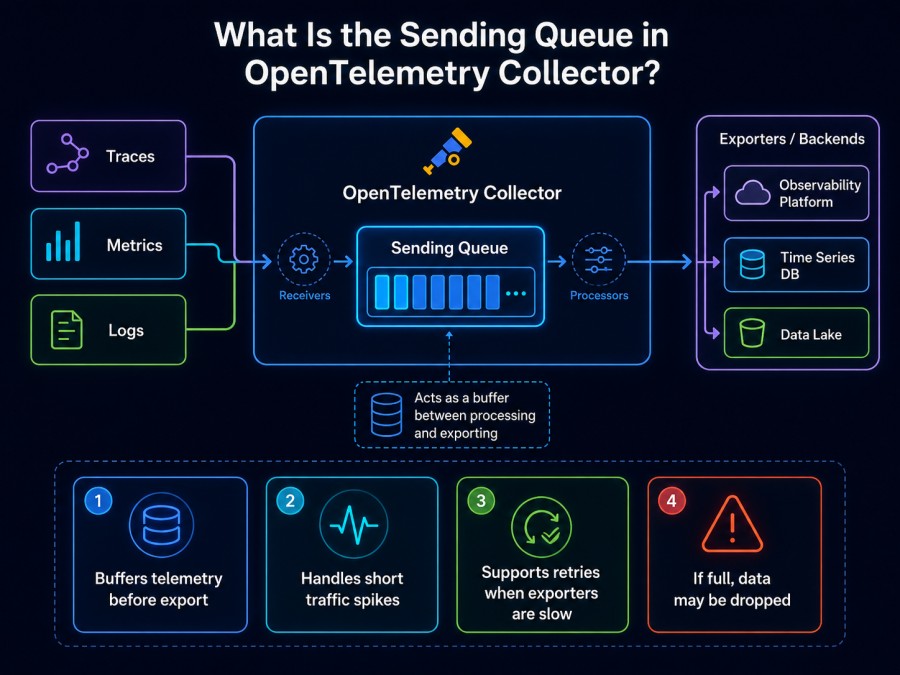
The sending queue is a bounded in-memory buffer that sits between the collector’s pipeline processors and its exporters. When an exporter cannot send data immediately because the backend is slow or unavailable, the collector holds that data in the sending queue until the exporter can retry.
The queue exists to smooth over transient slowdowns. If your backend takes 200ms instead of the usual 50ms to accept a batch, the queue absorbs that delay without dropping data. But if the backend goes offline entirely or cannot keep up with sustained load, the queue fills up, and the collector starts rejecting new telemetry.
Every exporter in the collector has its own sending queue. The default queue size is 1000 items for traces and metrics, and 10000 for logs. These defaults work for low-volume pipelines but are often too small for production workloads.
When the queue reaches capacity, the collector logs “sending queue is full” and drops the incoming batch. This protects the collector from running out of memory, but it means you lose observability data exactly when you need it most during an incident.
Why the Sending Queue Fills Up?
The queue fills when data arrives faster than the exporter can send it. This happens for four common reasons in production.
Backend Is Slow or Unavailable
If the receiving endpoint (Jaeger, Prometheus, or a vendor backend) is down, every export attempt fails and telemetry piles up in the queue. A network partition, backend restart, or rate limit trigger can all cause this. The collector retries according to its retry_on_failure settings, but while it retries, the queue continues filling.
A Reddit thread documents a collector filling its queue in under 60 seconds when the backend went offline during a traffic spike. The queue held 5000 items. Traffic was 200 spans per second. Simple math: 5000 / 200 = 25 seconds to fill the queue, then immediate data loss.
Exporter Is Configured with Insufficient Batch Size or Timeout
If your exporter sends very small batches (batch size of 10 items) but your pipeline processes 1000 spans per second, the exporter needs to make 100 export calls per second. Each call has network overhead. If the round trip takes 50ms, the exporter can complete at most 20 calls per second, which means 980 spans per second pile up in the queue.
The fix is to increase batch size so fewer export calls are needed. A batch size of 500 spans reduces the required export call rate from 100/sec to 2/sec, which the exporter can handle easily.
Sending Queue Size Is Too Small for the Traffic Pattern
Default queue sizes assume steady low-volume traffic. If your application auto-scales and doubles traffic in 30 seconds, the default queue of 1000 items fills immediately. A collector processing 10,000 spans per second fills a 1000-item queue in 100 milliseconds if the exporter stalls for any reason.
A case study on the OpenTelemetry GitHub shows a team running a collector with a queue size of 10,000 and still hitting queue full errors at 500 traces per second. They discovered their exporter was making sequential export calls instead of parallel calls, which throttled throughput to roughly 100 traces per second. The queue filled in 100 seconds, then data loss started.
Memory Limiter Processor Blocks New Data
The memory limiter processor monitors the collector’s memory usage and stops accepting new data when memory exceeds a threshold. This triggers backpressure upstream, which can cause the queue to fill if the receiver continues accepting data from instrumented applications.
The memory limiter prevents out-of-memory crashes, but it does not solve the root cause. If your collector hits the memory limit, you need to either reduce incoming data volume, increase collector resources, or horizontally scale the collector instances.
How OpenTelemetry Collector Handles Backpressure
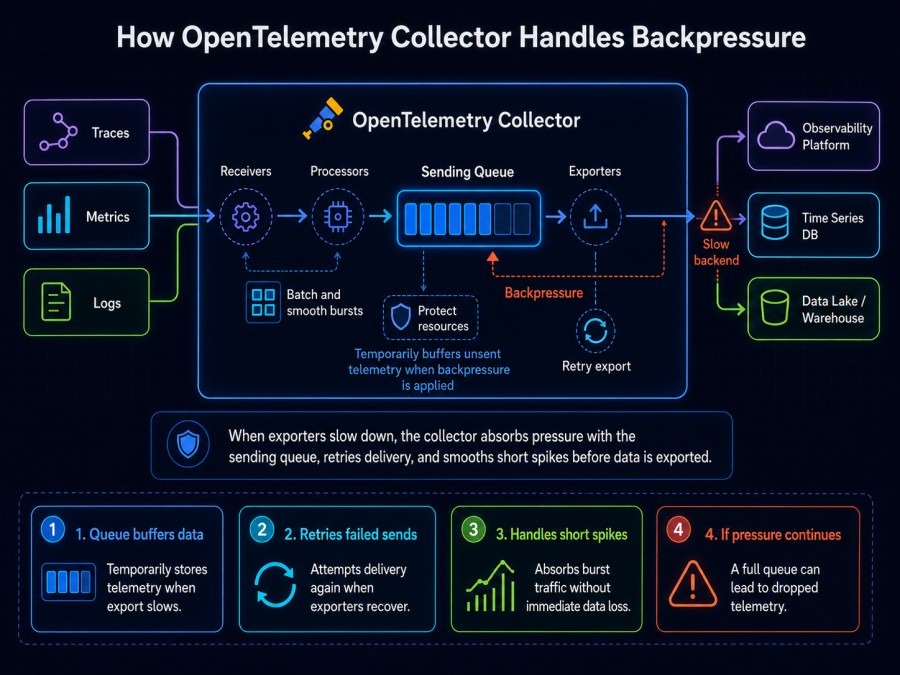
Backpressure occurs when a downstream component (the exporter) cannot keep up with the upstream component (the receiver). The collector has two mechanisms to handle this: the sending queue and receiver backpressure propagation.
When the exporter falls behind, the sending queue buffers data. If the queue fills, the collector can propagate backpressure to the receiver, telling it to slow down or reject new data. Whether this happens depends on the receiver type.
The OTLP receiver supports backpressure. If the pipeline is blocked, the OTLP receiver returns a gRPC error to the client, which tells the instrumented application to slow down or drop spans locally. This prevents the collector from being overwhelmed, but it means your application loses telemetry.
The filelog receiver does not propagate backpressure by default. It reads log files at a fixed rate. If the pipeline is blocked, the filelog receiver either drops data or pauses reading depending on its retry_on_failure configuration. The Axoflow blog post on backpressure shows that without retry_on_failure enabled, the filelog receiver keeps reading and the collector drops data silently.
Backpressure is not a solution. It is a failure mode that prevents the collector from crashing but sacrifices observability. The goal is to size your pipeline so backpressure never happens in normal operation.
How to Fix Sending Queue Full Errors
Fixing the error requires understanding which part of the export path is the bottleneck. Start by checking the exporter configuration, then the queue size, then the backend performance.
Step 1: Check Exporter Retry and Timeout Settings
The exporter’s retry_on_failure block controls how long the collector retries failed export attempts before giving up. The default max_elapsed_time is 5 minutes. If the backend is unreachable for longer than 5 minutes, the exporter stops retrying and drops data.
Set max_elapsed_time to 0 to retry indefinitely. This prevents data loss during prolonged outages, but it also means the queue will fill and block the pipeline until the backend recovers. Combine this with a large queue size and monitoring, so you know when the queue is filling.
exporters:
  otlp:
    endpoint: backend:4317
    retry_on_failure:
      enabled: true
max_elapsed_time: 0 # Retry foreverStep 2: Increase Sending Queue Size
The default queue size is too small for most production workloads. A queue of 10,000 items can hold roughly 10 seconds of telemetry at 1,000 spans per second. If your backend restarts and takes 30 seconds to come back online, you lose 20 seconds of data.
Increase queue_size to match your expected outage duration and traffic rate. For a pipeline processing 5,000 spans per second and a target of 60 seconds of buffering, set queue_size to 300,000.\
exporters:
  otlp:
    endpoint: backend:4317
    sending_queue:
      enabled: true
      queue_size: 300000
num_consumers: 10The num_consumers setting controls how many goroutines send data from the queue to the backend. More consumers increase throughput if the backend can handle parallel requests. Start with 10 and increase if the queue is still filling during normal operation.
Step 3: Enable Persistent Queue for Long Outages
The in-memory queue is lost if the collector restarts. For longer outages or to survive collector restarts without data loss, enable the persistent queue extension. This writes queued data to disk so it survives process restarts.
The persistent queue uses more disk I/O and adds latency. Only enable it if your SLA requires zero data loss during collector restarts or extended backend outages.
extensions:
  file_storage:
    directory: /var/lib/otelcol/queue
    timeout: 10s
exporters:
  otlp:
    endpoint: backend:4317
    sending_queue:
      enabled: true
      queue_size: 300000
      storage: file_storage
service:
  extensions: [file_storage]
  pipelines:
    traces:
      receivers: [otlp]
exporters: [otlp]Step 4: Increase Batch Size to Reduce Export Call Frequency
Larger batches mean fewer export calls, which reduces network overhead and increases throughput. The default batch size is 8192 items. For high-volume pipelines, increase to 16384 or 32768.
processors:
  batch:
    send_batch_size: 16384
timeout: 10sThe timeout setting controls how long the batch processor waits before sending a partial batch. A 10-second timeout ensures data is sent even if traffic drops below the batch size threshold.
Step 5: Add Memory Limiter to Prevent OOM Crashes
The memory limiter processor stops the collector from accepting new data when memory usage exceeds a threshold. This prevents out of memory crashes but triggers backpressure. Set limit_percentage to 75% of the collector’s memory limit and spike_limit_percentage to 25%.
processors:
  memory_limiter:
    check_interval: 1s
    limit_percentage: 75
spike_limit_percentage: 25Place the memory limiter first in the processor list so it can block data before other processors consume memory.
Step 6: Monitor Queue Depth and Exporter Lag
The collector exposes metrics for queue depth (otelcol_exporter_queue_size) and exporter send failures (otelcol_exporter_send_failed_requests). Set alerts on these metrics to detect queue buildup before it causes data loss.
A queue depth alert threshold of 50% of max queue size gives 5 to 10 minutes of warning before the queue fills completely. Use this time to investigate the backend or scale the collector.
How CubeAPM Handles OTel Collector Queue Issues
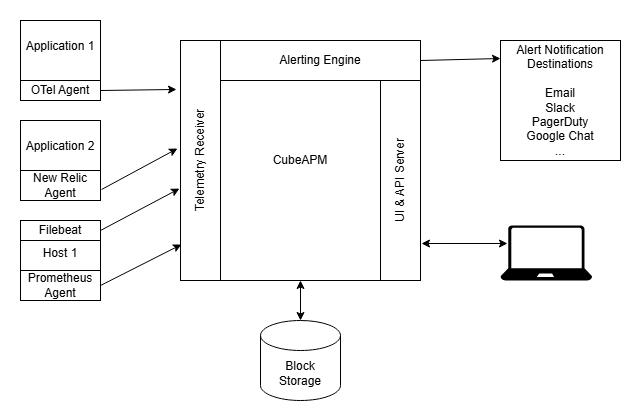
CubeAPM deploys the OpenTelemetry Collector as part of its self-hosted observability platform, handling collector configuration, scaling, and monitoring as a managed service inside your VPC. Teams using CubeAPM do not manually configure queues or tune batch sizes because the platform handles these automatically based on observed traffic patterns.
CubeAPM runs multiple collector instances behind a load balancer and auto-scales based on queue depth metrics. If one collector instance starts filling its queue, the load balancer shifts traffic to healthy instances while the platform investigates the root cause. The collector configuration uses persistent queues with 500,000 item capacity and retry_on_failure set to retry indefinitely, which prevents data loss during backend restarts or transient slowdowns.
The platform also surfaces collector health in the same dashboard as application traces and logs, so teams see exporter lag and queue depth alongside the application metrics they are trying to monitor. This correlation makes it obvious when a queue full error is caused by a backend slowdown versus an application traffic spike.
Best Practices to Prevent Queue Full Errors
Preventing the error in production requires planning for failure modes before they happen. These five practices reduce the likelihood of data loss during backend outages or traffic spikes.
Size Queues for Peak Traffic and Expected Outage Duration
Calculate required queue size as: (peak spans per second) × (longest acceptable outage in seconds). For a pipeline handling 10,000 spans per second and a 2-minute backend restart window, the queue needs 1,200,000 items. Round up to account for transient spikes.
Enable Retry Forever for Critical Pipelines
Set retry_on_failure.max_elapsed_time to 0 for production pipelines where data loss is unacceptable. Combine this with queue depth monitoring so you know when retries are piling up.
Use Persistent Queues if Collector Restarts Must Not Lose Data
Enable the file storage extension and configure the sending queue to use it. Accept the increased disk I/O and latency as the cost of zero data loss.
Monitor Exporter Send Rate and Queue Depth
Alert when queue depth exceeds 50% of capacity or when exporter send failures spike above baseline. These are leading indicators that the queue will fill soon.
Horizontally Scale Collectors Instead of Vertically Scaling Queues
A single collector with a 10 million item queue uses more memory and is harder to restart than 10 collectors each with 1 million item queues. Horizontal scaling also distributes risk. If one collector fails, the others continue processing.
Disclaimer: The information in this article reflects the latest details available at the time of publication and may change as technologies and products evolve. Features, pricing, and plan limits can change over time. Always verify the latest information directly with the vendor before making purchasing or deployment decisions.
Frequently Asked Questions
What does “sending queue is full” mean in OTel Collector?
It means the collector’s export buffer is full and cannot accept more telemetry. The collector is dropping incoming data to prevent running out of memory.
How do I increase the sending queue size?
Set sending_queue.queue_size in the exporter configuration. Default is 1000 items. Production pipelines typically need 100,000 to 500,000 depending on traffic.
Should I use persistent queue or memory queue?
Memory queue is faster. Use persistent queue only if you need to survive collector restarts without data loss. Persistent queue writes to disk which adds latency.
Why does my queue fill even with a large queue size?
The exporter is slower than the ingestion rate. Check backend performance, increase batch size, add more consumers, or scale the collector horizontally.
What is the default queue size in OpenTelemetry Collector?
Default is 1000 items for traces and metrics, 10000 for logs. These are too small for most production workloads.
How do I monitor OTel Collector queue depth?
Use the otelcol_exporter_queue_size metric. Set alerts at 50% of max capacity to detect problems before data loss starts.
Does retry on failure prevent queue full errors?
No. Retry on failure tells the exporter to keep trying when sends fail. If the backend stays down, retries pile up in the queue and it still fills.