










The OpenTelemetry Collector sits at the center of your observability pipeline receiving, processing, and exporting traces, metrics, and logs across distributed systems. When CPU usage spikes to 60%, 80%, or higher, the Collector becomes the bottleneck. Telemetry data queues up, export latency climbs, and in the worst cases, data gets dropped entirely before reaching your backend.
High CPU usage in the Collector is rarely a mystery. It stems from three root causes: ingestion volume overwhelming the pipeline, inefficient processor configuration that burns cycles on every span or log line, or inadequate resource allocation that forces the Collector to throttle under normal load. This guide covers how to profile the Collector’s CPU usage with pprof, which pipeline components cause the highest overhead, and how to optimize batch settings, scale horizontally, and allocate resources to keep CPU usage predictable as telemetry volume grows.
What Is OpenTelemetry Collector CPU Usage?
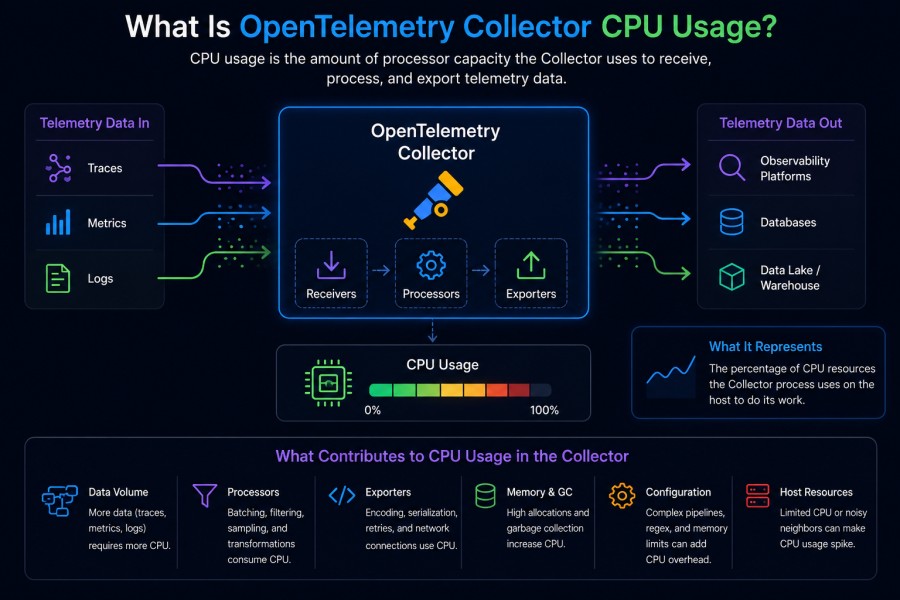
The OpenTelemetry Collector is a vendor neutral agent that receives telemetry data from instrumented applications, processes it through configurable pipelines, and exports it to observability backends like Prometheus, Jaeger, Datadog, or self hosted platforms. CPU usage measures how much processing power the Collector consumes while handling this pipeline work.
Normal CPU usage for a Collector handling moderate telemetry load typically ranges from 10% to 30% of allocated CPU. When usage climbs above 50%, the Collector is under strain. At 70% or higher, the pipeline begins to degrade — export queues fill up, batching becomes less efficient, and the Collector may start refusing data to protect itself from memory exhaustion.
CPU usage in the Collector is driven by three activities: receiving data from instrumented applications via OTLP, gRPC, or HTTP protocols; processing that data through configured processors like batch, memory limiter, or attribute transformation; and exporting the processed telemetry to one or more backends. Each of these stages consumes CPU cycles, and inefficiencies in any stage compound across the pipeline.
For example, a GitHub issue from June 2024 documented a Collector processing 1000 traces in under one second with 60% CPU usage, but taking 2 to 3 minutes to process the same volume of logs or metrics while CPU spiked even higher. The root cause was inefficient batching and a high per item processing overhead for logs and metrics compared to traces.
Understanding what drives CPU usage requires knowing which pipeline components are active, how much data they process, and whether resource limits are correctly tuned for the workload.
How OpenTelemetry Collector Processes Telemetry Data
The Collector operates as a pipeline with three core stages: receivers ingest data, processors transform or filter it, and exporters send it to backends. Each stage runs concurrently, and CPU usage reflects the combined work across all active pipelines.
Receivers
Receivers accept telemetry data from external sources. The OTLP receiver handles native OpenTelemetry protocol data over gRPC or HTTP. The Prometheus receiver scrapes metrics from endpoints. The Jaeger receiver accepts traces in Jaeger format. Each receiver spawns workers to handle incoming connections, deserialize payloads, and push data into the pipeline.
High receiver CPU usage typically occurs when connection volumes are high, payloads are large, or deserialization is expensive. For gRPC receivers, maintaining persistent connections across thousands of clients can drive CPU usage up even when data volume is moderate.
Processors
Processors transform, filter, or enrich telemetry data as it moves through the pipeline. The batch processor groups individual telemetry items into batches before export. The memory limiter processor enforces memory caps and drops data when limits are exceeded. The attributes processor adds, removes, or modifies span or log attributes. The tail sampling processor makes sampling decisions based on trace content.
Processors are the most common source of high CPU usage. Complex processors like tail sampling or attribute transformation run logic on every span, log line, or metric data point. When pipelines process millions of items per minute, even lightweight operations compound into significant CPU load.
The batch processor alone can account for 20% to 40% of total Collector CPU usage in high throughput environments. Batching requires buffering data in memory, checking batch size and timeout conditions on every item, and flushing completed batches to exporters. Tuning batch size and timeout values directly impacts CPU efficiency.
Exporters
Exporters serialize processed telemetry data and send it to backends. The OTLP exporter sends data to OTLP compatible platforms. The Prometheus exporter exposes metrics for scraping. The Jaeger exporter sends traces to Jaeger instances. Each exporter maintains export queues, handles retries, and manages backend connection pools.
Exporter CPU usage spikes when backends are slow to respond, causing export queues to fill and retry logic to activate. Exporters with persistent queues enabled write unsent data to disk during backpressure, adding file IO overhead on top of serialization and network work.
Root Causes of High CPU Usage in OpenTelemetry Collector
High CPU usage in the Collector stems from three primary causes: telemetry volume exceeding pipeline capacity, inefficient processor configuration, and inadequate resource allocation. Each cause manifests differently and requires a different fix.
High Telemetry Volume
When instrumented applications send more telemetry data than the Collector can process, CPU usage climbs as the Collector tries to keep up. This happens during traffic spikes, when new services are added to the pipeline, or when sampling rates are set too high at the application level.
A Collector configured to handle 10,000 spans per second will struggle when load jumps to 50,000 spans per second. CPU usage spikes as receivers work harder to accept incoming data, processors iterate over larger batches, and exporters serialize more items per second.
Volume related CPU spikes are usually temporary if the load returns to normal. But if the higher volume persists, the Collector will eventually exhaust memory limits, trigger the memory limiter processor, and start dropping data. The otelcol_processor_refused_spans metric increments each time data is refused, signaling that the pipeline is over capacity.
Inefficient Processor Configuration
Processors are the most CPU intensive part of the Collector pipeline. Misconfigured processors can burn cycles on work that provides little value or runs redundant logic on every telemetry item.
Common inefficiencies include batch processors with batch size set too low, forcing the Collector to flush small batches frequently and increasing per batch overhead; attribute processors running complex regex operations on every span or log line; and tail sampling processors holding entire traces in memory while waiting for all spans to arrive before making sampling decisions.
One production team reduced Collector CPU usage by 40% by increasing batch size from 512 to 8192 spans per batch and raising the batch timeout from 1 second to 10 seconds. The change reduced the number of export operations per minute by 15x, cutting serialization and network overhead proportionally.
Inadequate Resource Allocation
The Collector is a Go application that benefits from multiple CPU cores. Allocating only one CPU core forces all pipeline stages to time slice on a single core, creating contention and serialization bottlenecks. Allocating insufficient memory triggers the memory limiter processor more frequently, adding CPU overhead as the Collector evaluates memory pressure on every batch.
Kubernetes deployments often under allocate Collector resources by setting CPU requests too low or failing to set limits at all. When the Collector competes for CPU with other pods on the same node, performance degrades unpredictably.
A Collector handling 10 GB of telemetry data per hour typically needs at least 2 CPU cores and 4 GB of memory to maintain stable performance. High cardinality workloads with millions of unique metric series or trace attributes may require 4 to 8 CPU cores to avoid processing bottlenecks.
How to Profile OpenTelemetry Collector CPU Usage
Before optimizing the Collector, you need to know which components are consuming CPU. The Collector exposes CPU profiling via the pprof extension, which generates flamegraphs and CPU profiles that show exactly where processing time is spent.
Enabling pprof in the Collector
Add the pprof extension to your Collector configuration and include it in the service extensions list. The pprof extension listens on a local HTTP endpoint, typically localhost:1777.
extensions:
  pprof:
    endpoint: localhost:1777
service:
  extensions:
- pprofRestart the Collector to activate pprof. The profiling endpoint is now accessible at http://localhost:1777/debug/pprof/.
Capturing a CPU Profile
Use the go tool pprof command to capture a 30 second CPU profile from the running Collector:
go tool pprof http://localhost:1777/debug/pprof/profile?seconds=30This command samples the Collector’s CPU usage for 30 seconds and downloads a profile file. Once the profile is captured, the pprof tool opens an interactive prompt where you can run commands like top to see which functions consumed the most CPU.
Reading the Profile
The top command in the pprof prompt lists the top CPU-consuming functions:
(pprof) top
Showing nodes accounting for 12.5s, 62.5% of 20s total
      flat  flat%   sum%        cum   cum%
     3.2s 16.0% 16.0%      3.2s 16.0%  runtime.mallocgc
     2.8s 14.0% 30.0%      2.8s 14.0%  encoding/json.Marshal
2.1s 10.5% 40.5% 2.1s 10.5% batchprocessor.(*batchProcessor).sendBatchThis output shows that memory allocation (runtime.mallocgc), JSON serialization (encoding/json.Marshal), and batch processor flushing (sendBatch) accounted for 40% of total CPU time during the sampling period.
The web command generates a flamegraph visualization that displays the call stack hierarchy and highlights which code paths are most expensive. Flamegraphs make it easier to trace high CPU functions back to the processors or exporters responsible.
A production example: A team running the Collector in Kubernetes captured a CPU profile and found that 35% of CPU time was spent in the attributes processor running regex substitutions on span attributes. They replaced the regex logic with a simple string prefix match, cutting that processor’s CPU usage by 70%.
Profiling should be repeated after configuration changes to verify that optimizations reduced CPU usage as expected.
Optimizing Batch Processor Configuration
The batch processor is essential for efficient exporting, but its default settings are rarely optimal for production workloads. Tuning batch size and timeout values can reduce CPU usage by 20% to 50% in high-throughput environments.
How the Batch Processor Works
The batch processor buffers telemetry items in memory until one of two conditions is met: the batch reaches a configured size, or a timeout period elapses. Once triggered, the batch is flushed to the exporter.
Frequent small batches increase CPU overhead because the Collector performs serialization, compression, and network transmission on every batch. Larger batches amortize these costs across more items, reducing per-item CPU usage.
Default batch processor settings are conservative:
processors:
  batch:
    timeout: 1s
send_batch_size: 512These defaults work for low to moderate telemetry volumes but become inefficient at large scale.
Tuning Batch Size
Increasing send_batch_size reduces the number of export operations per minute. For example, increasing batch size from 512 to 8192 spans reduces export frequency by 16x, cutting serialization and network overhead proportionally.
A production Collector processing 100,000 spans per minute with a batch size of 512 performs ~195 export operations per minute. Increasing batch size to 8192 reduces export operations to ~12 per minute, freeing CPU cycles for other pipeline work.
The tradeoff is increased memory usage, as larger batches require more buffer space. Monitor the otelcol_processor_batch_batch_size_trigger_send metric to verify that batches are flushing due to size limits, not timeouts.
Tuning Batch Timeout
The timeout setting controls how long the processor waits before flushing a partial batch. Shorter timeouts reduce export latency but increase CPU usage by flushing smaller batches more frequently.
For high throughput pipelines, increasing the timeout from 1 second to 10 seconds allows batches to fill closer to send_batch_size before flushing, reducing the number of partial batch flushes.
processors:
  batch:
    timeout: 10s
send_batch_size: 8192This configuration works well for traces and metrics. For logs, where real-time delivery is often more important, keeping the timeout at 5 seconds or lower may be preferable.
A team handling 50 GB of telemetry data per day reduced Collector CPU usage by 35% by tuning batch size to 16384 and timeout to 15 seconds. The change increased per batch export latency by 10 seconds but had no user-facing impact because telemetry data is not latency sensitive in their environment.
Scaling the Collector Horizontally
When a single Collector instance hits CPU limits, scaling horizontally distributes the load across multiple instances. Horizontal scaling is the most effective way to handle sustained high telemetry volume without increasing per-instance resource allocation.
When to Scale Horizontally
The Collector should be scaled when CPU usage consistently exceeds 60% to 70% under normal load, or when the otelcol_exporter_queue_size metric approaches otelcol_exporter_queue_capacity, indicating that export queues are filling faster than they can drain.
Scaling is also appropriate when adding more CPU or memory to a single instance provides diminishing returns. Beyond 8 CPU cores, a single Collector instance may not efficiently utilize additional cores due to Go runtime limitations and internal synchronization overhead.
Load Balancing Across Collector Instances
Instrumented applications should distribute telemetry data across multiple Collector instances using client-side load balancing or a load balancer that understands gRPC connections.
For OTLP over gRPC, use a load balancer that supports HTTP/2 and distributes requests at the RPC level, not just the connection level. Standard L4 load balancers create persistent connections to a single Collector instance, defeating horizontal scaling.
The OpenTelemetry Collector contrib distribution includes a load balancing exporter that distributes telemetry data across multiple downstream Collectors based on trace ID or service name. This is useful in multi-tier Collector architectures where edge Collectors forward data to a central Collector cluster.
exporters:
  loadbalancing:
    protocol:
      otlp:
        endpoint: collector-cluster:4317
    resolver:
      static:
        hostnames:
          - collector-1:4317
          - collector-2:4317
- collector-3:4317This configuration distributes telemetry data across three Collector instances, spreading CPU load evenly.
Scaling Prometheus Scrapers
For Collectors running the Prometheus receiver to scrape metrics from hundreds of targets, scaling scraping requires sharding the target list across multiple Collector instances. The Prometheus receiver does not automatically distribute scraping work.
Use Kubernetes label selectors or external configuration management to assign each Collector instance a unique subset of scrape targets. This ensures that each target is scraped by exactly one Collector instance, avoiding duplicate metrics.
A production team running 200 Prometheus scrape targets split the workload across four Collector instances, with each instance scraping 50 targets. This reduced per-instance CPU usage from 80% to 35% and eliminated scraping timeouts that occurred when a single instance tried to scrape all targets within the scrape interval.
Monitoring Collector CPU and Performance Metrics
The Collector exposes internal metrics that surface CPU usage, memory consumption, queue depth, and export health. Monitoring these metrics helps detect CPU issues before they cause data loss.
Key Metrics to Monitor
otelcol_process_cpu_seconds_totalTracks cumulative CPU time consumed by the Collector process. Divide by elapsed time to calculate CPU usage percentage. A value of 2.0 over 1 second on a 4-core system means 50% CPU usage.otelcol_processor_refused_spansincrements when the memory limiter processor refuses data due to memory pressure. Rising values indicate that the Collector is over capacity and cannot process incoming telemetry without exceeding memory limits.otelcol_exporter_queue_sizeandotelcol_exporter_queue_capacityshow how full export queues are. When queue size approaches capacity, the Collector is exporting data slower than it is receiving it. This often correlates with high CPU usage as the Collector works harder to process and export backlogged data.otelcol_exporter_send_failed_spanscounts export failures. A rising failure rate suggests that backends are rejecting data, causing the Collector to retry exports and burn additional CPU cycles on retry logic.
Setting Alerts
- Alert when
otelcol_process_cpu_seconds_totalindicates sustained CPU usage above 70% for more than 5 minutes. This gives time to investigate before CPU exhaustion degrades pipeline performance. - Alert when
otelcol_processor_refused_spansincrements. Data refusal means telemetry is being dropped, which is a critical signal that the Collector is under resourced or misconfigured. - Alert when
otelcol_exporter_queue_sizeexceeds 80% ofotelcol_exporter_queue_capacityfor more than 2 minutes. This indicates export backpressure that will eventually lead to data loss if not resolved.
A Kubernetes-deployed Collector should expose these metrics on the /metrics endpoint and integrate with Prometheus or another metrics backend for centralized monitoring. Including these metrics in your existing observability stack ensures that Collector health is visible alongside application performance.
Optimizing OpenTelemetry Collector CPU Usage with CubeAPM
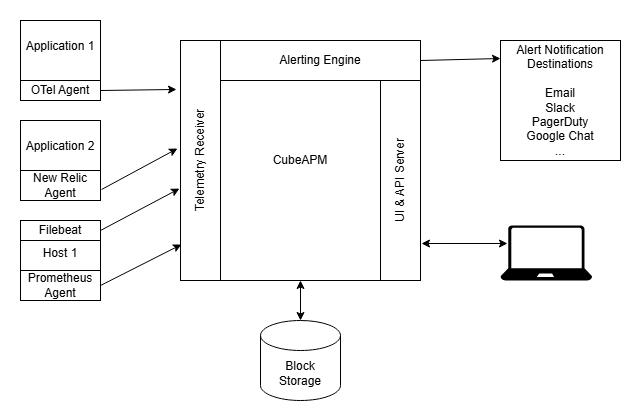
CubeAPM is a self-hosted observability platform that runs inside your cloud and integrates natively with OpenTelemetry Collector deployments. It ingests traces, logs, and metrics from the Collector without requiring proprietary agents or SDKs, making it a natural fit for teams already running the Collector in production.
When monitoring Collector CPU usage with CubeAPM, all telemetry data, including Collector internal metrics, application traces, and infrastructure metrics, stays within your VPC. This eliminates public cloud egress fees that SaaS platforms charge when the Collector exports data externally, often $0.10 per GB or higher depending on cloud provider and region.
CubeAPM stores all ingested telemetry with unlimited retention at a $0.15 per GB rate. This includes Collector metrics, application spans, and logs, with no separate indexing or per-host fees. Teams that replace SaaS APM tools with CubeAPM while keeping the Collector as the telemetry pipeline report 60% to 75% lower total observability costs.
For Collector deployments, CubeAPM provides real-time dashboards showing otelcol_processor_batch_batch_size_trigger_send, otelcol_exporter_queue_size, and otelcol_process_cpu_seconds_total metrics alongside application traces. This unified view makes it faster to correlate Collector CPU spikes with specific application behavior or traffic patterns.
CubeAPM supports OpenTelemetry natively and works with any Collector distribution, including the upstream OpenTelemetry Collector, AWS Distro for OpenTelemetry, and vendor specific Collector builds. Configuration requires only pointing the Collector’s OTLP exporter at the CubeAPM ingestion endpoint running inside your infrastructure.
Frequently Asked Questions
Why is my OpenTelemetry Collector using so much CPU?
High CPU usage typically results from high telemetry volume, inefficient processor configuration, or insufficient resource allocation. Profile the Collector with pprof to identify which components are consuming the most CPU, then optimize batch settings or scale horizontally.
How do I reduce OpenTelemetry Collector CPU usage?
Increase batch processor size and timeout to reduce export frequency, disable or simplify expensive processors like tail sampling or regex based attribute transformations, and allocate more CPU cores if the Collector is CPU bound on a single core.
What is a normal CPU usage for OpenTelemetry Collector?
Normal CPU usage ranges from 10% to 30% under moderate load. Usage above 50% indicates the Collector is working hard, and usage above 70% suggests the pipeline is near capacity and may soon start refusing or dropping data.
How do I profile OpenTelemetry Collector CPU usage?
Enable the pprof extension in the Collector configuration and use `go tool pprof` to capture a CPU profile. The profile shows which functions consume the most CPU time and helps identify inefficient processors or exporters.
Can I scale OpenTelemetry Collector horizontally?
Yes, deploy multiple Collector instances and use client side load balancing or a gRPC aware load balancer to distribute telemetry data across instances. For Prometheus scraping, shard scrape targets across instances manually to avoid duplicate metrics.
What metrics should I monitor to track Collector performance?
Monitor `otelcol_process_cpu_seconds_total` for CPU usage, `otelcol_processor_refused_spans` for data refusal, `otelcol_exporter_queue_size` for export backpressure, and `otelcol_exporter_send_failed_spans` for export failures.
Does increasing batch size always reduce CPU usage?
Increasing batch size reduces export frequency and CPU overhead from serialization and network operations, but it also increases memory usage. Monitor memory consumption and ensure the memory limiter processor is configured to prevent out of memory errors.
Disclaimer: The information in this article reflects the latest details available at the time of publication and may change as technologies and products evolve. Features, pricing, and plan limits can change over time. Always verify the latest information directly with the vendor before making purchasing or deployment decisions.