










Cloud SQL is Google’s managed database service for MySQL, PostgreSQL, and SQL Server. It handles provisioning, patching, and backups so engineering teams can focus on application logic instead of database operations. But managed does not mean invisible. A slow query, a connection leak, or a storage spike can degrade application performance before anyone notices, and without proper monitoring, you will only find out when customers complain.
Cloud SQL monitoring tracks database performance, resource usage, and query behavior in real time. It surfaces metrics like CPU utilization, active connections, storage growth, and query latency so teams can catch issues early, set meaningful alerts, and understand exactly what is happening inside their database layer. According to the CNCF Annual Survey 2023, 76% of organizations use managed databases in production, making database observability a core requirement for most cloud native stacks.
This guide covers what Cloud SQL monitoring is, how it works, what metrics to track, how to set up alerts in Cloud Monitoring, and how to choose between Google’s native tools and third-party observability platforms that offer deeper correlation with application traces and logs.
What Is Cloud SQL Monitoring?
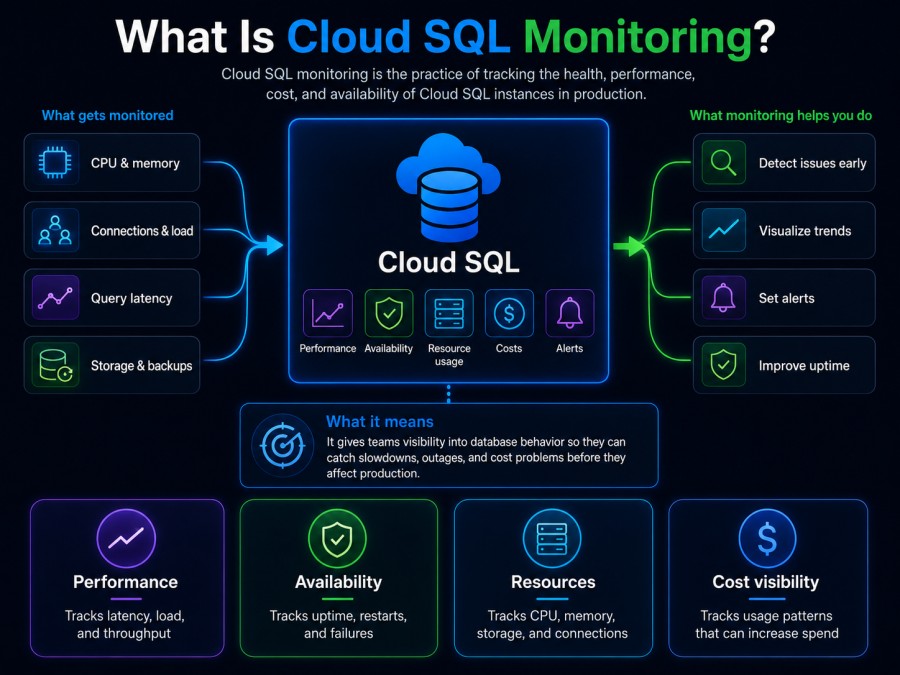
Cloud SQL monitoring is the practice of collecting and analyzing telemetry data from Cloud SQL instances to understand database health, performance, and resource consumption. It includes tracking query performance, connection behavior, storage usage, replication lag, and engine-specific metrics like InnoDB operations for MySQL or write-ahead log activity for PostgreSQL.
Cloud SQL is a fully managed service, which means Google handles the underlying infrastructure. But it does not monitor your workload for you. You still need to know when CPU is maxed out, when storage is nearing capacity, or when a slow query is blocking other connections. Cloud SQL monitoring fills that gap.
The primary monitoring tool for Cloud SQL is Google Cloud Monitoring, which provides predefined dashboards, metrics, and alerting for all Cloud SQL instances. Cloud Monitoring collects metrics automatically from every Cloud SQL instance and makes them available in the Cloud Console or through the Monitoring API.
Beyond Cloud Monitoring, teams often use third-party observability platforms to correlate database metrics with application traces, logs, and infrastructure signals. This is especially useful when debugging cross-service latency issues where the root cause might be a database query, but the symptom shows up in an API endpoint.
How Cloud SQL Monitoring Works
Cloud SQL monitoring works by collecting metrics from the database engine and the underlying infrastructure, then exposing those metrics through Cloud Monitoring. Every Cloud SQL instance automatically emits metrics at regular intervals without requiring any manual instrumentation.
The monitoring pipeline has three components: metric collection, storage, and visualization. Google collects metrics from the database engine itself (query counts, connection states, storage usage) and from the host infrastructure (CPU, memory, disk I/O). These metrics are stored in Cloud Monitoring and are available for querying, charting, and alerting.
Metrics are organized by resource type. For Cloud SQL, the resource type is cloudsql.googleapis.com/database. Each metric is identified by a metric type, like cloudsql.googleapis.com/database/cpu/utilization or cloudsql.googleapis.com/database/mysql/queries. Metrics are collected at one minute intervals by default.
You can view these metrics in three ways: the Cloud SQL instance overview page in the Cloud Console, the Cloud Monitoring dashboard, or by querying the Monitoring API directly. The instance overview page shows a quick summary of key metrics like CPU, memory, and storage. The Cloud Monitoring dashboard offers deeper filtering, aggregation, and comparison across multiple instances.
For teams that need more than Google’s native tools, metrics can be exported to third party platforms using the Cloud Monitoring API or by deploying exporters that translate Cloud SQL metrics into Prometheus format or OpenTelemetry signals. This allows integration with platforms like infrastructure monitoring tools that unify database metrics with APM traces and logs.
Key Cloud SQL Metrics to Track
Cloud SQL exposes dozens of metrics across CPU, memory, storage, connections, and engine specific behavior. Not all metrics matter equally. The ones that matter most depend on your database engine and workload, but a core set applies universally.
CPU utilization
CPU utilization measures how much CPU capacity the instance is using as a percentage of total available CPU. High CPU usage can indicate inefficient queries, missing indexes, or insufficient machine sizing.
Cloud SQL reports CPU utilization as cloudsql.googleapis.com/database/cpu/utilization. A sustained value above 80% means the instance is running hot and may start queueing queries or slowing response times. Spikes to 100% during peak traffic are normal, but if CPU stays pegged, it signals a capacity or query optimization problem.
Example: A production PostgreSQL instance running at 95% CPU during business hours forced a team to scale up from db-n1-standard-2 to db-n1-standard-4, doubling CPU capacity. After migration, CPU dropped to 45% and query latency fell by 60%.
Memory usage
Memory usage shows how much RAM the database is consuming for caching, query execution, and connection state. Databases are memory intensive by design. High memory usage is expected, but running out of memory forces the database to spill operations to disk, which destroys performance.
Cloud SQL reports memory usage as cloudsql.googleapis.com/database/memory/utilization. MySQL uses memory for the InnoDB buffer pool, query cache, and temporary tables. PostgreSQL uses it for shared buffers, work memory, and connection overhead. SQL Server uses memory for buffer cache and query execution.
If memory utilization approaches 100%, the database starts evicting cached data and relying on disk I/O, which can slow queries by 10x or more. The fix is either increasing instance size or tuning memory configuration parameters like innodb_buffer_pool_size for MySQL or shared_buffers for PostgreSQL.
Storage usage and growth rate
Storage usage tracks how much disk space the instance is consuming. Cloud SQL instances have a fixed disk size, and once storage fills up, the database stops accepting writes and enters read only mode. Monitoring storage usage and setting alerts before capacity is reached prevents downtime.
Cloud SQL reports storage usage as cloudsql.googleapis.com/database/disk/bytes_used. Storage includes user data, binary logs or write ahead logs, and temporary files. Binary logs are created automatically for MySQL instances and are deleted when associated automatic backups are deleted, which happens after about 7 days. PostgreSQL write ahead logs are stored in Cloud Storage for instances with point in time recovery enabled, so they do not consume instance disk space on newer instances.
Storage growth rate matters more than absolute size. If storage grows 10 GB per day consistently, you can predict when you will hit capacity and plan storage expansion before it becomes urgent. Cloud SQL supports automatic storage increases, which can prevent emergency scaling but should still be monitored because storage cost scales linearly with size.
Example: A MySQL instance running an e-commerce platform saw storage spike from 80 GB to 150 GB over three days due to binary log buildup after enabling replication. Monitoring flagged the growth, and the team deactivated and re-enabled binary logging to clear old logs, recovering 60 GB.
Active connections
Active connections tracks how many clients are connected to the database at any given time. Each connection consumes memory and CPU overhead. Cloud SQL instances have a maximum connection limit based on instance size. If active connections approach the limit, new connection attempts fail with connection refused errors.
Cloud SQL reports active connections as cloudsql.googleapis.com/database/postgresql/num_backends for PostgreSQL and cloudsql.googleapis.com/database/mysql/connections for MySQL. A sudden spike in connections can indicate a connection leak in application code where connections are opened but not properly closed.
Connection pooling at the application layer using tools like PgBouncer for PostgreSQL or ProxySQL for MySQL can reduce the number of connections reaching the database. Monitoring connection counts helps detect leaks early and size connection pool limits correctly.
Read and write operations
Read and write operations measure the number of I/O operations the database performs against disk. High I/O indicates heavy query activity, large table scans, or insufficient caching.
Cloud SQL reports read operations as cloudsql.googleapis.com/database/disk/read_ops_count and write operations as cloudsql.googleapis.com/database/disk/write_ops_count. A spike in read operations without a corresponding increase in query volume suggests queries are scanning entire tables instead of using indexes. Write spikes can indicate batch inserts, update storms, or checkpoint activity.
Correlating I/O metrics with query logs helps identify the specific queries causing high disk activity. Adding indexes, rewriting queries, or increasing memory to cache more data in RAM can reduce I/O pressure.
Query count and execution time
Query count tracks how many queries the database executes per second. Execution time measures how long individual queries take to complete. These metrics help identify slow queries and understand overall database load.
For MySQL, Cloud SQL reports queries as cloudsql.googleapis.com/database/mysql/queries and questions as cloudsql.googleapis.com/database/mysql/questions. Queries include all statements executed by the server, while questions include only statements sent by clients. For PostgreSQL, transaction count and commit rate serve similar purposes.
High query counts with low latency indicate healthy performance. High query counts with high latency indicate a bottleneck, either from inefficient queries, missing indexes, or insufficient CPU or memory. Slow query logs should be enabled to capture queries exceeding a latency threshold for analysis.
Replication lag for read replicas
Replication lag measures how far behind a read replica is compared to the primary instance. High replication lag means data written to the primary is not yet visible on the replica, which can cause stale reads and data consistency issues for applications routing read traffic to replicas.
Cloud SQL reports replication lag as cloudsql.googleapis.com/database/replication/replica_lag. Replication lag is measured in seconds. A lag of 5 to 10 seconds is acceptable for most workloads. Lag above 60 seconds indicates a problem, either from high write volume on the primary, insufficient replica capacity, or network latency between regions.
Sustained replication lag forces teams to either scale up the replica instance, reduce write load on the primary, or stop routing critical read traffic to replicas until lag recovers.
Setting Up Cloud SQL Monitoring Alerts
Alerts notify teams when metrics cross thresholds that indicate a problem. Without alerts, you rely on manual dashboard checks or customer complaints to discover issues. Cloud Monitoring supports alerting on any Cloud SQL metric.
Creating an alert policy
An alert policy defines the condition that triggers an alert, the notification channels to use, and any documentation to include in the alert. To create an alert policy, navigate to Cloud Monitoring in the Cloud Console, select Alerting, then Create Policy.
Choose a metric to monitor, like CPU utilization or active connections. Define the condition, such as CPU utilization above 80% for 5 minutes. Set the notification channel, which can be email, Slack, PagerDuty, or a webhook. Add documentation explaining what the alert means and what action to take.
Example: Create an alert policy for storage usage that triggers when cloudsql.googleapis.com/database/disk/bytes_used exceeds 85% of total disk size. Route the alert to a Slack channel and include a link to the storage expansion runbook.
Recommended alert thresholds
Different metrics require different thresholds. CPU utilization above 80% sustained for 5 minutes warrants an alert. Memory utilization above 90% for 10 minutes indicates impending capacity issues. Storage usage above 85% gives time to increase disk size before hitting 100%.
Active connections approaching the instance limit by 80% signals a connection leak or undersized connection pool. Replication lag above 60 seconds for read replicas means stale data is being served to users. Query latency above your SLA threshold should trigger an alert immediately.
Avoid setting thresholds too low, which creates alert fatigue. A CPU spike to 90% for 30 seconds during a batch job is normal. A sustained 90% for 10 minutes is not.
Notification channels and escalation
Cloud Monitoring supports notification channels for email, SMS, Slack, PagerDuty, webhooks, and Cloud Pub/Sub. Use multiple channels to ensure alerts reach the right people. Route low-priority alerts to email or Slack. Route high-priority alerts to PagerDuty with escalation rules to wake on-call engineers.
Group related alerts into a single notification to reduce noise. If CPU and memory both spike during a traffic surge, combine them into one alert instead of sending two separate notifications. Include context in alert notifications, like a link to the instance dashboard or recent deployment history.
Cloud SQL Monitoring Tools and Platforms
Google Cloud Monitoring is the default tool for Cloud SQL monitoring, but third-party observability platforms offer deeper correlation with application performance, better querying interfaces, and unified dashboards across multiple cloud providers.
Google Cloud Monitoring
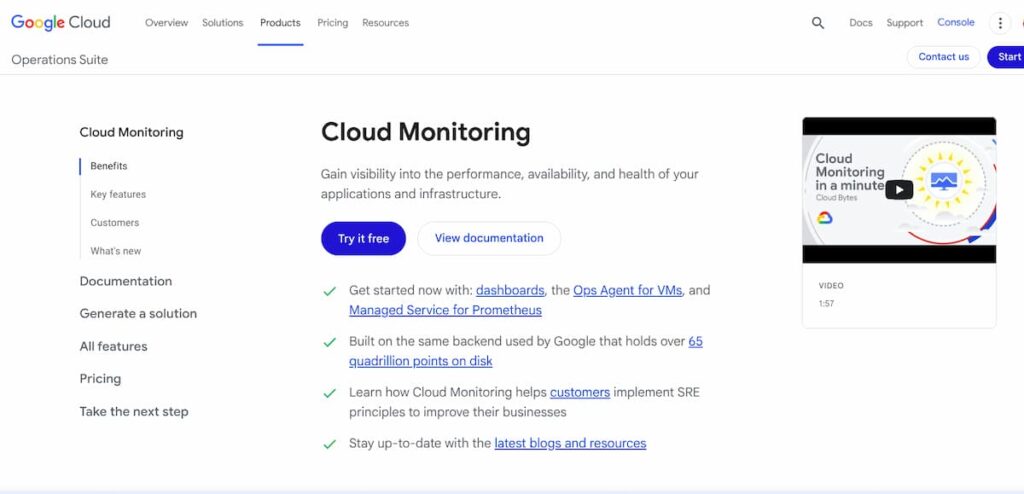
Cloud Monitoring is built into Google Cloud and requires no setup. It automatically collects metrics from every Cloud SQL instance and provides predefined dashboards in the Cloud Console. The Cloud SQL instance overview page shows CPU, memory, storage, and connections at a glance.
Cloud Monitoring supports custom dashboards, alerting, and metrics export. You can query metrics using the Monitoring Query Language (MQL) or export them to BigQuery for deeper analysis. Cloud Monitoring integrates with Cloud Logging to correlate metrics with database logs.
Limitations: Cloud Monitoring does not correlate database metrics with application traces automatically. If a slow query is causing API latency, you need to manually investigate query logs and APM traces separately. The dashboard UI is functional but slower than modern observability platforms.
Third-party observability platforms
Platforms like Datadog, Dynatrace, and New Relic offer Cloud SQL monitoring through integrations that pull metrics from Cloud Monitoring or deploy agents to collect metrics directly. These platforms unify database metrics with APM traces, logs, and infrastructure monitoring in a single interface.

CubeAPM offers full-stack observability for Cloud SQL with OpenTelemetry native support. CubeAPM connects to Cloud SQL instances using the Cloud Monitoring API and correlates database metrics with application traces and logs automatically. For example, if an API endpoint is slow, CubeAPM shows the exact database query causing the latency and the full trace context in one view.
CubeAPM runs inside your VPC or on premises, so no telemetry data leaves your infrastructure. This eliminates data egress costs and ensures compliance with data residency requirements. Pricing is $0.15 per GB of ingested telemetry with unlimited retention, making it predictable compared to per-host or per-user pricing models.
CubeAPM supports MySQL, PostgreSQL, and SQL Server instances on Cloud SQL and integrates with PostgreSQL monitoring tools and MySQL monitoring tools through OpenTelemetry collectors.
Best Practices for Cloud SQL Monitoring
Effective monitoring requires more than just setting up dashboards and alerts. It requires understanding what normal looks like for your workload, monitoring trends over time, and acting on signals before they become incidents.
Monitor storage growth rate, not just absolute usage
Storage usage is not a static number. A database that sits at 70% capacity for months is fine. A database that grows from 50% to 70% in three days is a problem. Monitor the rate of change, not just the current value. Set alerts based on projected time to full capacity, not just percentage used.
Enable slow query logs and analyze them regularly
Slow query logs capture queries that exceed a latency threshold. Enabling slow query logs for MySQL or PostgreSQL lets you identify inefficient queries before they cause production incidents. Analyze slow query logs weekly to find candidates for optimization, indexing, or caching.
Cloud SQL supports slow query logging through database flags. For MySQL, set slow_query_log to on and long_query_time to 1 to capture queries taking longer than one second. For PostgreSQL, set log_min_duration_statement to 1000 to log queries over one second.
Correlate database metrics with application traces
Database latency does not exist in isolation. A slow query affects application performance. Correlating database metrics with application traces helps pinpoint the exact query causing an issue and the code path that triggered it. Platforms like CubeAPM and Datadog surface this correlation automatically.
Without trace correlation, debugging a slow API endpoint requires checking APM traces, then manually searching database logs for queries executed during that time window. With correlation, the slow query appears directly in the trace view with execution time, parameters, and stack trace.
Set up dashboards for each instance and workload type
Create separate dashboards for production and non-production instances. Production dashboards should focus on uptime, latency, and error rate. Non-production dashboards can include deeper diagnostic metrics for troubleshooting.
Group metrics by workload type. A read-heavy reporting database needs different monitoring than a write-heavy transactional database. Reporting databases should monitor query cache hit rate and I/O throughput. Transactional databases should monitor transaction commit rate and lock contention.
Monitor Cloud SQL maintenance windows
Cloud SQL performs automatic maintenance for patching, upgrades, and infrastructure improvements. Maintenance windows can cause brief downtime or performance degradation. Cloud Monitoring logs maintenance events, and you can set alerts to notify teams when maintenance starts.
Plan maintenance windows during low traffic periods and monitor application behavior during and after maintenance. If performance degrades after maintenance, check for configuration changes, engine version updates, or new query patterns.
Common Cloud SQL Monitoring Challenges
Even with Cloud Monitoring enabled, teams run into issues that require deeper investigation or changes to monitoring strategy.
High CPU with no obvious slow queries
High CPU utilization without corresponding slow queries in logs often indicates missing indexes, inefficient joins, or queries that scan large tables. Cloud SQL does not surface query execution plans in metrics, so you need to manually run EXPLAIN on suspect queries to understand what the database is doing.
Another cause is connection churn. Opening and closing connections frequently consumes CPU overhead. Switching to connection pooling can reduce CPU load by reusing connections instead of creating new ones for every request.
Storage filling up faster than expected
Storage growth that outpaces application data growth usually comes from binary logs, write-ahead logs, or temporary files. For MySQL, binary logs accumulate until the associated automatic backup is deleted, which happens after 7 days. For PostgreSQL, write-ahead logs are stored in Cloud Storage on newer instances but consume disk space on older instances.
Check the bytes_used_by_data_type metric to see where storage is being consumed. If archived_wal_log shows high usage, deactivate and re-enable point-in-time recovery to clear old logs. If binary logs are the issue, deactivate and re-enable binary logging.
Replication lag spikes during peak traffic
Replication lag increases when the primary instance writes data faster than the replica can apply changes. This happens during traffic spikes, large batch inserts, or schema migrations. Temporary lag during peak traffic is normal. Sustained lag means the replica is undersized.
Scaling up the replica instance or reducing write load on the primary resolves most lag issues. For read-heavy workloads, adding more read replicas and distributing read traffic across them can reduce load on any single replica.
Alert fatigue from noisy thresholds
Alerts that fire too frequently lose meaning and get ignored. CPU alerts that trigger during every batch job or storage alerts that fire before capacity is actually a problem create noise. Review alert history monthly and adjust thresholds or conditions to reduce false positives.
Group related alerts into a single notification. If CPU and memory both spike during a traffic surge, send one alert instead of two. Use alert documentation to explain what the alert means and what action to take, so teams do not waste time investigating non-issues.
Disclaimer: The information in this article reflects the latest details available at the time of publication and may change as technologies and products evolve. Features, pricing, and plan limits can change over time. Always verify the latest information directly with the vendor before making purchasing or deployment decisions.
Frequently Asked Questions
What is the difference between Cloud SQL and Cloud Monitoring?
Cloud SQL is Google’s managed database service for MySQL, PostgreSQL, and SQL Server. Cloud Monitoring is Google’s observability platform that collects metrics, logs, and traces from Cloud SQL and other Google Cloud services.
How do I monitor Cloud SQL query performance?
Enable slow query logs for MySQL or PostgreSQL through database flags, then analyze logs to identify queries exceeding latency thresholds. Use Cloud Monitoring to track query count and execution time metrics.
Can I monitor Cloud SQL with third party tools?
Yes. Third party platforms like Datadog, CubeAPM, and Dynatrace integrate with Cloud SQL using the Cloud Monitoring API or direct metric collection to provide unified observability across databases, applications, and infrastructure.
What metrics should I alert on for Cloud SQL?
Alert on CPU utilization above 80% for 5 minutes, memory utilization above 90% for 10 minutes, storage usage above 85%, active connections approaching instance limits, and replication lag above 60 seconds for read replicas.
How do I reduce Cloud SQL monitoring costs?
Use Cloud Monitoring for basic metrics and alerts at no cost beyond Cloud SQL instance pricing. For deeper observability, use platforms like CubeAPM with flat ingestion pricing instead of per host or per user models.
Does Cloud SQL automatically send metrics to Cloud Monitoring?
Yes. Every Cloud SQL instance automatically emits metrics to Cloud Monitoring at one minute intervals without requiring any manual setup or configuration.
How do I monitor Cloud SQL replication lag?
Check the replication lag metric in Cloud Monitoring for each read replica. Set alerts when lag exceeds 60 seconds to detect performance issues before they affect application behavior.