










The OpenTelemetry Collector sits at the center of modern observability pipelines, ingesting traces, metrics, and logs from every service in your stack before routing them to backend storage or SaaS platforms. A single misconfigured receiver, a backed-up exporter queue, or memory pressure on a collector node can silently drop telemetry data for minutes before anyone notices. Without proper health monitoring, your observability stack becomes a blind spot in your infrastructure.
According to the CNCF Annual Survey 2024, 43% of organizations now use OpenTelemetry in production, making collector health monitoring a critical operational requirement across cloud native stacks. The collector exposes its own internal telemetry through Prometheus metrics, structured logs, and optional trace exports, but most teams discover after deployment that the default health check endpoint reports “200 OK” even when pipelines are dropping data or exporters are failing.
This guide covers how OpenTelemetry Collector health monitoring actually works in production, what signals matter most, how to configure health check extensions correctly, and how to set up alerts that catch real problems before they cascade into data loss.
What Is OpenTelemetry Collector Health Monitoring?
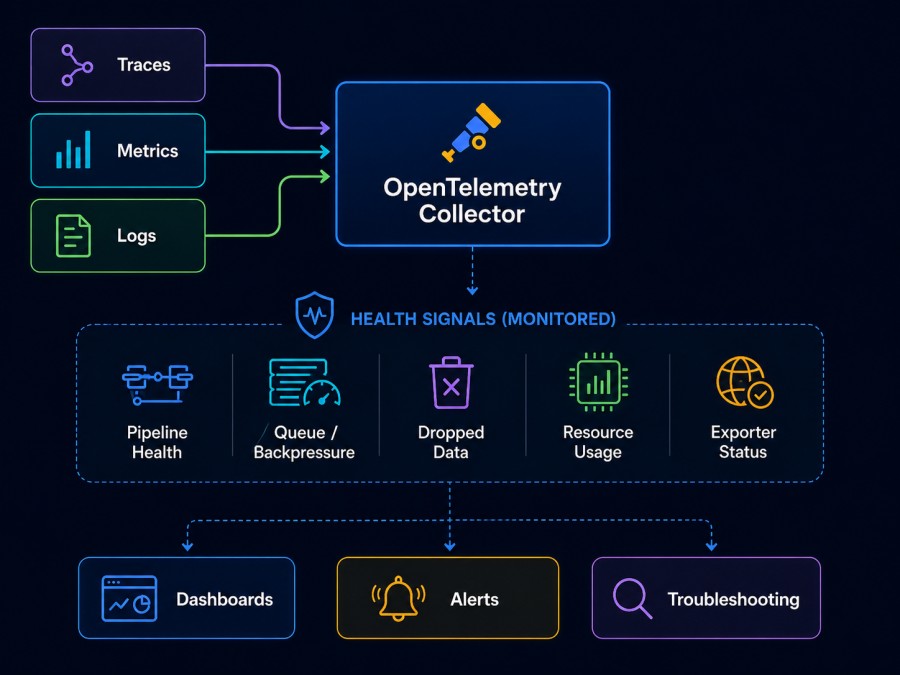
OpenTelemetry Collector health monitoring is the practice of tracking the operational state of collector instances using internal telemetry signals, health check endpoints, and pipeline-specific metrics to detect issues like data drops, exporter failures, memory pressure, and queue saturation before they impact observability coverage.
The collector generates telemetry about itself in three forms. Internal metrics track receiver acceptance rates, processor drop counts, exporter send failures, and queue depths. Logs capture startup state, configuration errors, and component lifecycle events. Optional traces show how telemetry flows through the pipeline and where latency builds up inside the collector itself.
Health monitoring answers four questions that standard uptime checks miss.
Is the collector accepting data from all configured receivers?
Are processors dropping spans, metrics, or logs due to sampling or memory limits?
Are exporters successfully sending data to backends or are retries piling up?
Is the collector approaching memory or CPU limits that will trigger OOMKill or throttling?
The health check extension exposes an HTTP endpoint that orchestration platforms like Kubernetes or load balancers can query to determine collector readiness. By default, this endpoint returns HTTP 200 if the collector service has started and reported ready, but it does not validate that pipelines are healthy or that data is flowing correctly. The legacy check_collector_pipeline option was meant to probe pipeline health, but the OpenTelemetry project explicitly warns it does not work as expected and should not be used.
Understanding what the health check actually validates versus what it misses is the first step to production-ready collector monitoring.
How OpenTelemetry Collector Internal Telemetry Works
The collector is instrumented with the OpenTelemetry SDK and exports its own telemetry just like any other instrumented application. Internal metrics track every stage of the telemetry pipeline from receiver ingestion through processor transformations to exporter delivery. These metrics follow consistent naming conventions and are exposed by default on port 8888 via a Prometheus scrape endpoint.
Every receiver emits acceptance and refusal counters showing how many spans, metric points, or log records were accepted or rejected. Processors emit counters for items processed, dropped, or modified. Exporters track send success, send failure, enqueue failure, and retry counts. Queue components expose current queue size, queue capacity, and whether backpressure is occurring.
The collector also tracks resource consumption through runtime metrics covering memory heap usage, allocated objects, garbage collection pauses, CPU time, and goroutine counts. These runtime signals are critical for detecting memory leaks, goroutine leaks, or CPU saturation that degrades pipeline throughput.
Logs are written to stderr by default and capture lifecycle events like receiver startup, exporter connection success or failure, configuration validation errors, and component shutdown. The logging level can be set to DEBUG to surface detailed pipeline behavior during troubleshooting, though this significantly increases log volume in production.
Optional trace export allows the collector to send traces of its own internal request processing to a backend. This is experimental and not widely used in production, but it surfaces pipeline latency breakdowns and shows which processor or exporter stages introduce delays.
The key architectural point is that internal telemetry flows through the same pipeline as application telemetry unless explicitly configured otherwise. If an exporter fails or a processor drops data, internal metrics documenting that failure may also be lost. Production deployments should export collector metrics to a separate backend or use a dedicated metrics pipeline that bypasses problematic exporters.
Key Metrics for OpenTelemetry Collector Health Monitoring
Not all internal metrics matter equally. Most production issues show up in a handful of critical signals that directly indicate data loss, exporter failures, or resource saturation.
- Receiver accepted and refused counts show whether the collector is successfully ingesting telemetry from instrumented services. A spike in refusals usually means the receiver hit a rate limit, the pipeline is backpressured, or the collector is rejecting malformed data. The metric names follow the pattern
otelcol_receiver_accepted_<signal_type>andotelcol_receiver_refused_<signal_type>where signal type is spans, metric_points, or log_records. - Exporter send failures and enqueue failures indicate backend connectivity problems or capacity issues.
otelcol_exporter_send_failed_<signal_type>increments when the exporter attempts delivery, but the backend rejects it, or the network fails.otelcol_exporter_enqueue_failed_<signal_type>means the internal queue is full and the collector is dropping data before it even attempts delivery. Both metrics should remain near zero in healthy pipelines. - Queue size and capacity metrics show backpressure building inside the collector.
otelcol_exporter_queue_sizetracks how many items are waiting in the exporter queue. When this number approachesotelcol_exporter_queue_capacity, the collector will start dropping new data. Persistent high queue size indicates the exporter cannot keep up with ingestion rate. - Processor dropped counts reveal data loss due to sampling, filtering, or memory limits. The batch processor rarely drops data unless the collector is shutting down, but the memory limiter processor will aggressively drop telemetry when the collector approaches its configured memory threshold.
otelcol_processor_dropped_<signal_type>should be monitored and alerted on. - Runtime memory metrics show whether the collector is approaching OOMKill risk.
otelcol_process_memory_rsstracks resident set size, the actual RAM consumed by the process. In Kubernetes, this should stay well below the pod memory limit to avoid eviction.otelcol_process_cpu_seconds_totalshows cumulative CPU usage and can be rate-calculated to detect CPU saturation.
Scrape these metrics every 10 to 30 seconds and route them to a monitoring backend separate from the collector’s primary export path. If the collector is exporting its own metrics through the same OTLP exporter that sends application traces, a backend outage will make collector health invisible exactly when you need it most.
Configuring the Health Check Extension for Production
The health check extension exposes an HTTP endpoint that returns the collector’s service health status. This endpoint is consumed by Kubernetes liveness and readiness probes, load balancer health checks, and service mesh control planes to route traffic only to healthy collector instances.
Basic configuration requires adding the health check extension to the extensions block and enabling it in the service section. The default endpoint is http://localhost:13133/ which binds only to the loopback interface. Production deployments should bind to all interfaces using 0.0.0.0 so that external health checkers can reach the endpoint.
extensions:
  health_check:
    endpoint: 0.0.0.0:13133
    path: /health
service:
  extensions: [health_check]
  pipelines:
    traces:
      receivers: [otlp]
      processors: [batch]
exporters: [otlp]The health check returns HTTP 200 when the collector service has started, and all enabled extensions have reported ready. It returns HTTP 503 Service Unavailable during startup or shutdown. Critically, it does not validate that receivers are accepting data, exporters are sending successfully, or processors are functioning correctly. A collector with a broken OTLP exporter will still report as healthy as long as the service itself is running.
The legacy check_collector_pipeline option was intended to probe pipeline health, but the OpenTelemetry project documentation explicitly states it does not work as expected and should not be used. Teams that rely solely on the health check endpoint without also monitoring internal metrics will miss most real collector failures.
For Kubernetes deployments, configure both liveness and readiness probes to query the health check endpoint. The liveness probe detects if the collector process has crashed or become unresponsive and triggers a container restart. The readiness probe determines if the collector should receive traffic and removes unhealthy pods from service endpoints.
livenessProbe:
  httpGet:
    path: /health
    port: 13133
  initialDelaySeconds: 10
  periodSeconds: 10
  timeoutSeconds: 5
  failureThreshold: 3
readinessProbe:
  httpGet:
    path: /health
    port: 13133
  initialDelaySeconds: 5
  periodSeconds: 5
  timeoutSeconds: 3
failureThreshold: 3Set the liveness initial delay to account for collector startup time, especially if loading large configuration files or waiting for receivers to bind to ports. Set the readiness initial delay shorter so that new pods enter service quickly once healthy. Adjust failure thresholds based on how aggressively you want Kubernetes to restart or deprovision collectors.
For load balancer integration, configure the load balancer to send periodic GET requests to the health check path and remove backends that return non 200 status codes. Most cloud load balancers support configurable check intervals, timeout values, and healthy threshold counts.
The health check endpoint alone is not sufficient for production collector monitoring. It must be combined with metric-based alerting on exporter failures, queue depth, and data drop rates to catch the issues that bypass the service level health check.
Setting Up Internal Metrics Export
Collector internal metrics should be exported to a separate backend or observability platform independent of the collector’s primary telemetry export path. This ensures metrics remain available even when the main exporter is failing or the backend is unreachable.
The simplest approach is to expose the Prometheus endpoint and configure an external Prometheus server to scrape it. The default configuration exposes metrics at http://localhost:8888/metrics using the OpenTelemetry Go Prometheus exporter. Bind this to all interfaces in production so that external scrapers can reach it.
service:
  telemetry:
    metrics:
      readers:
        - pull:
            exporter:
              prometheus:
                host: 0.0.0.0
port: 8888A more robust approach is to push collector metrics to an OTLP backend using a separate metrics pipeline. This requires configuring a second OTLP exporter dedicated to internal telemetry and ensuring it points to a stable backend that will not create circular dependencies.
service:
  telemetry:
    metrics:
      readers:
        - periodic:
            exporter:
              otlp:
                protocol: http/protobuf
endpoint: https://monitoring-backend.example.com:4318Avoid exporting collector metrics through the same exporter that handles application telemetry. If that exporter fails or the backend becomes unreachable, you lose visibility into the failure exactly when you need it most. Use a dedicated exporter or route collector metrics to a separate backend entirely.
Set the metrics level to detailed for production environments. This emits additional dimensions and views that help diagnose specific pipeline components. The default normal level provides essential service telemetry but omits per receiver and per exporter breakdowns that are critical for troubleshooting.
service:
  telemetry:
    metrics:
level: detailedFor teams running infrastructure monitoring tools that already scrape Prometheus metrics, adding the collector scrape target to existing Prometheus configurations is the fastest path to visibility. For teams using OpenTelemetry native backends, configuring OTLP push avoids running a separate Prometheus server.
Monitoring Collector Health with CubeAPM
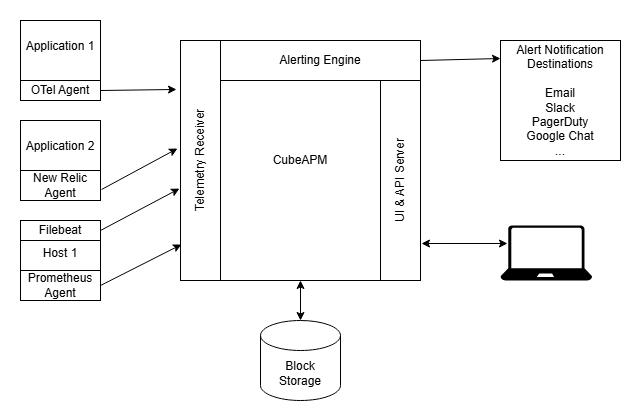
CubeAPM provides native OpenTelemetry Collector health monitoring through its self-hosted observability platform. Since CubeAPM runs inside your VPC or on premises, collector metrics and logs never leave your infrastructure, which simplifies compliance and eliminates public cloud egress costs when sending telemetry to SaaS backends.
CubeAPM ingests collector internal metrics via OTLP or Prometheus scrape endpoints and automatically surfaces key health signals in pre-built dashboards. These dashboards track receiver acceptance rates, exporter success and failure counts, queue depth over time, memory and CPU consumption, and per-pipeline throughput. The platform indexes all metrics by collector instance, receiver type, processor name, and exporter destination so you can drill down to specific pipeline components during incidents.
Alerting in CubeAPM allows you to set thresholds on any collector metric and route notifications to Slack, PagerDuty, email, or webhooks with full trace and log context attached. For example, an alert on otelcol_exporter_send_failed_spans > 100 over a 5-minute window can trigger a Slack notification that includes the failing exporter name, the destination backend, recent error logs from that exporter, and links to the collector instance dashboard.
CubeAPM also correlates collector health with application telemetry so you can identify when missing traces or gaps in metrics correspond to collector pipeline issues. If an exporter starts failing at 14:32 and application trace volume drops at the same time, CubeAPM surfaces that correlation automatically rather than requiring manual log correlation across systems.
Since CubeAPM is deployed alongside your collectors in the same infrastructure, there is no circular dependency where a failed collector prevents you from seeing collector metrics. The platform stores all telemetry locally with unlimited retention at $0.15/GB, meaning you can retain months of collector metrics for capacity planning and incident retrospectives without additional storage costs.
For teams running large collector fleets across multiple Kubernetes clusters or cloud regions, CubeAPM provides unified visibility without requiring separate Prometheus or Grafana stacks per environment. Collector metrics from all regions flow into a single CubeAPM instance with automatic service discovery and tagging by cluster, namespace, and deployment.
Best Practices for Production Collector Health Monitoring
- Deploy collectors in high availability configurations with at least two replicas behind a load balancer. This ensures telemetry ingestion continues even if one collector instance fails. Use Kubernetes Deployments with a replica count of 2 or higher and configure load balancer health checks to remove unhealthy instances automatically.
- Set resource limits and requests on collector pods to prevent one collector from consuming all node resources. Configure memory limits that leave headroom for traffic spikes and set CPU requests that guarantee minimum processing capacity. Use the memory limiter processor to shed load gracefully before hitting the pod memory limit and triggering OOMKill.
- Monitor queue depth as an early warning signal for backpressure. Set alerts when queue size exceeds 70% of capacity for more than 5 minutes. This indicates the exporter cannot keep up with ingestion rate and data loss is imminent. Scale collectors horizontally or optimize exporter batch size and concurrency before queues fill completely.
- Use the batch processor on all pipelines to reduce exporter request overhead. Configure batch size and timeout values that balance latency against backend load. Larger batches reduce per-request overhead but increase memory usage and delay telemetry delivery. A typical starting point is 512 spans per batch with a 10-second timeout.
- Separate collector metrics export from application telemetry export. Send collector internal metrics to a dedicated backend or use a separate metrics pipeline with a different exporter. Never route collector metrics through the same exporter that handles application traces, as exporter failures will blind you to the failure itself.
- Enable structured logging with JSON encoding for easier parsing and correlation. Set log level to INFO in production to capture lifecycle events and errors without overwhelming log volume. Switch to DEBUG only during active troubleshooting and revert after the incident to avoid excessive log ingestion costs.
- Implement graceful shutdown handling to avoid telemetry loss during collector restarts. Configure the collector to flush all in-memory batches and drain exporter queues before terminating. In Kubernetes, this requires setting a preStop hook and giving the collector at least 30 seconds to shut down cleanly.
- Test collector failure scenarios in staging before deploying configuration changes to production. Simulate backend outages, memory pressure, and configuration errors to verify that alerts fire correctly and that the collector degrades gracefully rather than dropping all telemetry.
- Document your collector architecture and pipeline flow so that on-call engineers can quickly identify which collectors handle which services and where telemetry bottlenecks are likely to occur. Include runbooks for common failure modes like exporter timeouts, queue saturation, and memory limit exceeded errors.
Monitoring Collector Health in Kubernetes
Kubernetes adds operational complexity to collector deployments but also provides built-in mechanisms for health monitoring, auto-scaling, and failure recovery. The key is configuring these mechanisms to detect real collector health issues rather than just process liveness.
- Deploy collectors as a Deployment or DaemonSet depending on your telemetry routing model. Use Deployments when collectors run as a centralized gateway receiving telemetry from many services. Use DaemonSets when every node needs a local collector for agent-based collection. For high-throughput environments, StatefulSets can provide stable network identities for persistent exporter connections.
- Configure liveness probes to detect if the collector process has crashed or become unresponsive. Point the liveness probe at the health check extension endpoint and set failure thresholds that balance quick failure detection against false positives from temporary network issues. Three consecutive failures over 30 seconds is a reasonable starting point.
- Configure readiness probes to determine if the collector should receive traffic. The readiness probe should also query the health check endpoint but with a shorter failure threshold so that new pods enter service quickly. If a collector fails readiness checks, Kubernetes removes it from Service endpoints and stops routing traffic to it.
- Set resource requests that guarantee minimum CPU and memory for stable operation. Set resource limits that prevent runaway collectors from consuming all node resources. Monitor actual resource usage in production and adjust requests and limits based on real collector workload rather than guesses.
- Use Horizontal Pod Autoscaling to scale collector replicas based on CPU or memory usage. Configure the autoscaler to add replicas when average CPU exceeds 70% across all collector pods. This prevents individual collectors from becoming bottlenecks as telemetry volume increases.
- Monitor collector pod restarts and OOMKill events as indicators of misconfiguration or insufficient resources. Frequent restarts suggest memory limits are too low or that the collector is leaking memory due to a bug. Zero restarts over weeks indicates a stable configuration.
- Use PodDisruptionBudgets to prevent Kubernetes from evicting too many collector pods simultaneously during node maintenance or cluster upgrades. Set a minimum available of at least one pod to ensure telemetry ingestion continues during planned disruptions.
- Export collector logs to a centralized log management system separate from the collector itself. Do not send collector logs through the same collector instance, as failures that stop telemetry export will also stop log export. Use a dedicated logging sidecar or DaemonSet that ships logs directly to your log backend.
For teams using Kubernetes monitoring platforms, integrating collector health metrics into your existing Kubernetes dashboards provides a unified view of infrastructure and observability pipeline health together.
Common OpenTelemetry Collector Health Issues and How to Detect Them
- Exporter backend timeouts are one of the most common failure modes. The exporter successfully sends data, but the backend takes too long to respond, causing the exporter to time out and retry. This shows up as increasing
otelcol_exporter_send_failed_<signal_type>metrics and growing queue depth. Check exporter timeout configuration and backend processing capacity. - Queue saturation occurs when the exporter cannot keep up with receiver ingestion rate. The queue fills completely, and the collector starts dropping data. This shows up as
otelcol_exporter_enqueue_failed_<signal_type>incrementing andotelcol_exporter_queue_sizeconstantly at or near capacity. Scale collectors horizontally or increase exporter concurrency and batch size. - Memory limit exceeded errors happen when the collector’s memory usage exceeds the configured limit, and the process is killed by the OS or Kubernetes. This shows up as pod restarts with exit code 137 (OOMKilled). Increase pod memory limits or enable the memory limiter processor to shed load before hitting the hard limit.
- Receiver binding failures occur when the collector cannot bind to the configured port, usually because another process is already using it or the port is privileged. This shows up in startup logs as bind errors, and the receiver will not accept any data. Check for port conflicts and ensure the collector has permission to bind to the port.
- Configuration validation errors prevent the collector from starting at all. These show up immediately in logs as YAML parsing errors or unknown component references. Always validate configuration changes in a staging environment before deploying to production.
- Certificate expiration causes TLS connection failures between the collector and backends or between clients and the collector. Exporters will log certificate verification failures, and send metrics will drop to zero. Monitor certificate expiration dates and rotate certificates before they expire.
- Network connectivity issues between the collector and backends cause all exporter traffic to fail. This looks similar to backend timeouts but with immediate connection refused errors rather than slow responses. Verify network policies, firewall rules, and DNS resolution.
- Sampling processor misconfiguration can silently drop large percentages of telemetry if sampling rates are set too aggressively. This does not show up as errors but as unexpectedly low throughput compared to receiver acceptance rates. Audit sampling processor configuration and compare end-to-end trace volume.
Alerting on OpenTelemetry Collector Health
Effective collector health alerting requires balancing early warning signals that catch issues before data loss against alert fatigue from noisy or overly sensitive thresholds. The goal is to alert on conditions that require human intervention, not transient blips that auto recover.
- Alert on exporter send failures when the failure rate exceeds a threshold over a sustained period. A single failed export might be a transient network issue, but 10 consecutive failures over 5 minutes indicates a real backend problem. Set the alert threshold based on your RPO for telemetry data; if you cannot tolerate more than 5 minutes of data loss, alert after 5 minutes of failures.
- Alert on queue depth when it exceeds 70 to 80 percent of capacity for more than 5 minutes. This gives you time to scale collectors or investigate backend capacity issues before the queue fills completely and data starts dropping. Do not alert on brief queue spikes, as these are normal during traffic bursts.
- Alert on enqueue failures immediately, as this indicates the collector is already dropping data. Unlike send failures where data is queued and retried, enqueue failures mean data is lost permanently. Set a low threshold such as 10 enqueue failures in 1 minute.
- Alert on memory usage when it exceeds 80 percent of the pod memory limit. This gives you time to restart the collector gracefully or increase resource limits before the pod is OOMKilled. Combine this with alerts on rising memory trends to catch memory leaks before they cause failures.
- Alert on pod restart frequency when a collector pod restarts more than twice in an hour. Frequent restarts indicate an underlying stability problem such as memory leaks, configuration errors, or resource starvation. Automatic restarts hide the problem temporarily but do not fix the root cause.
- Alert on receiver refusal rates when they exceed expected thresholds. Some refusals are normal if you are using rate limiting or rejecting malformed data, but sudden spikes indicate upstream clients are sending bad data or the collector is backpressured. Set thresholds based on baseline refusal rates in your environment.
- Do not alert on CPU usage alone, as collectors naturally consume more CPU as telemetry volume increases. Alert on CPU throttling or sustained CPU usage at 100 percent with growing queue depth, as this indicates the collector cannot keep up with load.
- Route alerts to the team responsible for observability infrastructure, not application teams. Collector failures are infrastructure issues that require scaling, configuration changes, or backend capacity adjustments, not application code fixes.
- Include relevant context in alert notifications such as the failing exporter name, destination backend, recent error logs, and links to collector dashboards. Generic alerts that only say “collector unhealthy” force responders to manually correlate data across multiple systems before they can even start troubleshooting.
Comparing OpenTelemetry Collector Monitoring Tools
Multiple platforms can ingest and visualize OpenTelemetry Collector internal metrics, but they differ significantly in deployment model, ease of setup, and depth of collector-specific features.
Prometheus plus Grafana is the most common open source approach. Prometheus scrapes the collector’s Prometheus endpoint and stores metrics time series. Grafana dashboards query Prometheus and visualize collector health. This approach requires running and maintaining both Prometheus and Grafana, configuring scrape targets, building dashboards from scratch, and setting up alert rules manually. It provides full control but high operational overhead.
Datadog offers a pre built OpenTelemetry Collector dashboard and can scrape collector metrics via the Datadog agent or OTLP export. The dashboard includes receiver, processor, and exporter health panels with minimal configuration. Pricing is per host plus per metric, and sending collector metrics to Datadog incurs the same egress costs as application telemetry if collectors run in a different cloud than Datadog’s backend.
New Relic supports OpenTelemetry Collector monitoring through OTLP export of collector metrics. New Relic provides automatic dashboards for common collector components but charges based on ingested data volume. Collector metrics count toward the same 100 GB free tier as application data, so high-cardinality collector metrics can consume a significant portion of your free allotment.
Elastic APM can ingest collector metrics through Elasticsearch and visualize them in Kibana. This requires running the full Elastic stack, configuring Metricbeat or OTLP export, and building Kibana dashboards. Elastic provides strong log correlation since collector logs can be ingested alongside metrics, but the operational complexity matches Prometheus plus Grafana.

CubeAPM provides native OpenTelemetry Collector monitoring with automatic dashboards, alerting, and correlation between collector health and application telemetry. Since CubeAPM is self-hosted, collector metrics stay inside your infrastructure with zero egress costs. The platform includes pre-built dashboards for receiver acceptance rates, exporter success and failure, queue depth, and resource usage across all collector instances. Pricing is $0.15/GB for all telemetry, including collector metrics, with unlimited retention.
For teams already running synthetic monitoring tools to test application endpoints, adding collector health check endpoint monitoring extends that coverage to the observability pipeline itself.
Conclusion
OpenTelemetry Collector health monitoring is not optional for production deployments. Collectors handle every trace, metric, and log record in your observability pipeline, and a single misconfigured exporter or resource bottleneck can silently drop telemetry data for hours before anyone notices.
The health check extension provides basic service liveness checks but does not validate pipeline health. Real collector monitoring requires tracking internal metrics for receiver acceptance, exporter failures, queue depth, and resource consumption, combined with structured logs and alerting on conditions that indicate data loss or imminent failure.
Effective collector health monitoring balances early warning signals against alert fatigue, routes metrics to backends separate from the primary telemetry path, and integrates with existing infrastructure monitoring to provide a unified view of observability pipeline health.
Disclaimer: The information in this article reflects the latest details available at the time of publication and may change as technologies and products evolve. Features, pricing, and plan limits can change over time. Always verify the latest information directly with the vendor before making purchasing or deployment decisions.
Frequently Asked Questions
What metrics should I monitor for OpenTelemetry Collector health?
Monitor exporter send failures, enqueue failures, queue depth, receiver acceptance and refusal rates, processor drop counts, and memory usage. These metrics directly indicate data loss, backend connectivity issues, and resource saturation.
Does the health check endpoint validate that pipelines are working?
No. The health check endpoint only reports that the collector service has started and extensions are ready. It does not validate that receivers are accepting data or exporters are sending successfully. Monitor internal metrics for pipeline health.
How do I prevent losing collector metrics when the collector fails?
Export collector metrics to a separate backend or use a dedicated metrics pipeline with a different exporter. Never route collector metrics through the same exporter that handles application telemetry.
What causes OpenTelemetry Collector queue saturation?
Queue saturation occurs when the exporter cannot send data as fast as receivers ingest it. This happens due to slow backends, network issues, insufficient exporter concurrency, or undersized batch configurations. Scale collectors horizontally or tune exporter settings.
Should I use liveness probes or readiness probes for Kubernetes collectors?
Use both. Liveness probes detect crashed or unresponsive collectors and trigger restarts. Readiness probes determine if a collector should receive traffic and remove unhealthy instances from service endpoints.
How do I monitor OpenTelemetry Collector memory usage?
Track the `otelcol_process_memory_rss` metric which shows resident set size in bytes. Alert when memory usage exceeds 80 percent of the pod or container memory limit to avoid OOMKill.
What is the recommended collector deployment model for high availability?
Deploy at least two collector replicas behind a load balancer. Use Kubernetes Deployments with replica count of 2 or higher and configure health check based load balancing to route traffic only to healthy instances.