










Memory leaks in the OpenTelemetry Collector don’t announce themselves with a clear error message. They reveal themselves slowly through rising memory consumption over hours or days until the collector crashes, stops accepting spans, or gets killed by Kubernetes OOMKill. By then, you’ve lost telemetry during the exact window when you needed it most.
The core challenge: OpenTelemetry Collector memory leaks stem from multiple sources including tail sampling processor configuration, batch processor tuning, third party receiver bugs, and improper GOMEMLIMIT settings. Identifying the specific cause requires profiling live memory usage, analyzing heap dumps, and understanding how Go’s garbage collector interacts with high cardinality trace data.
This guide walks through the most common root causes of OpenTelemetry Collector memory leaks, how to diagnose them using pprof and metrics, proven configuration fixes, and monitoring strategies that catch leaks before they cause production incidents.
What Is an OpenTelemetry Collector Memory Leak?

An OpenTelemetry Collector memory leak occurs when the collector allocates memory to process telemetry data but fails to release it after processing completes. Over time, allocated memory accumulates until the collector exhausts available RAM, triggering OOMKill in Kubernetes environments or causing the process to crash in bare metal or VM deployments.
Unlike traditional application memory leaks where objects are never freed, OpenTelemetry Collector leaks often involve Go’s garbage collector behavior under high load. The collector may hold references to trace spans, metric data points, or log records longer than intended due to misconfigured processors, oversized batches, or bugs in specific receiver or exporter implementations.
The symptom pattern is consistent: memory usage starts normal at a few hundred MB, climbs steadily over hours or days, and eventually plateaus at the memory limit or crashes. The leak is often invisible during low-traffic periods and only manifests under production load when trace volume, cardinality, or decision wait times stress the collector’s buffering mechanisms.
Memory Leaks vs. Expected Memory Growth
Not all memory increases are leaks. The OpenTelemetry Collector is designed to buffer telemetry data in memory before exporting it. Expected memory growth happens when:
- Traffic spikes increase the number of spans or metrics buffered in batch processors
- Tail sampling holds trace data in memory during the decision wait period
- High cardinality metrics increase the memory footprint of aggregation processors
A real memory leak differs from expected growth in one key way: memory does not return to baseline after traffic normalizes. If memory usage climbs from 500 MB to 2 GB during a traffic spike and stays at 2 GB after traffic returns to normal, that indicates a leak. If memory returns to 600 MB after the spike, that is normal buffering behavior.
The challenge: distinguishing between the two requires monitoring memory usage over time and correlating it with traffic patterns and collector configuration changes.
Common Root Causes of OpenTelemetry Collector Memory Leaks
Memory leaks in the OpenTelemetry Collector come from five primary sources: tail sampling processor misconfiguration, batch processor buffer sizing, receiver or exporter bugs in contrib components, improper GOMEMLIMIT settings, and high-cardinality span attributes combined with long decision wait times.
Tail Sampling Processor Holding Traces in Memory
The tail sampling processor is the most common source of collector memory leaks. It holds complete traces in memory during the decision wait period to determine which traces to keep based on sampling policies. If the decision wait time is too long, trace volume is too high, or the number of tracked trace IDs grows unbounded, memory consumption increases until the collector crashes.
A GitHub issue from April 2024 documents this exact problem. The user reported memory climbing steadily over weeks with a tail sampling configuration holding 50 million trace IDs in memory with a 60-second decision wait. The heap profile showed sync.Map.LoadOrStore and tailSamplingSpanProcessor.processTraces consuming over 2 GB of RAM.
The root cause: the tail sampling processor uses a sync.Map to track trace IDs and decision state. Each trace ID entry consumes memory for the trace metadata, span data, and sampling policy evaluation state. With 10,000 expected new traces per second and a 60-second decision wait, the processor attempts to hold 600,000 active traces in memory simultaneously. At high span counts per trace, this easily exceeds 4 GB of RAM.
The fix: reduce decision_wait to the minimum needed for trace completion, lower expected_new_traces_per_sec to match actual traffic, and reduce num_traces to limit memory consumption. For most deployments, decision_wait: 30s, expected_new_traces_per_sec: 5000, and num_traces: 10000000 provide a safer baseline than the example configuration shown in the GitHub issue.
Batch Processor Buffer Overflow
The batch processor buffers telemetry data in memory before exporting it to reduce network overhead. If the exporter is slower than the ingestion rate, the batch processor’s queue fills up and holds data in memory indefinitely. This manifests as a memory leak even though the processor is functioning as designed.
The batch processor has two key limits: send_batch_size and send_batch_max_size. When the exporter cannot keep up with ingestion, spans accumulate in the processor’s internal queue. If the queue has no upper bound or the bound is too high, memory usage climbs until the collector OOMs.
A Reddit thread from 2024 documents a case where memory usage spiked to 8 GB during a backend exporter outage. The collector was configured with send_batch_size: 10000 and timeout: 10s but no queue size limit. When the backend became unavailable for 5 minutes, the collector buffered 300,000+ spans in memory before crashing.
The fix: add queue configuration to the exporter with an explicit num_consumers and queue_size limit. If the queue fills, the collector will drop data instead of accumulating it in memory. For most deployments, queue_size: 5000 and num_consumers: 10 prevent unbounded memory growth during exporter failures.
GOMEMLIMIT Misconfiguration Causing GC Thrashing
The OpenTelemetry Collector is a Go application and respects the GOMEMLIMIT environment variable introduced in Go 1.19. If GOMEMLIMIT is not set or is set too low relative to the Kubernetes memory limit, the Go garbage collector runs too frequently, consuming CPU and failing to reclaim memory effectively.
A GitHub issue from December 2023 shows this pattern. The user reported memory climbing to 4 GB even with a 75% memory limiter threshold. The root cause: Kubernetes memory limit was 5 GB but GOMEMLIMIT was unset, defaulting to unlimited. The Go runtime allocated memory aggressively but did not trigger GC soon enough, causing the memory limiter to throttle data ingestion before GC could reclaim space.
The fix: set GOMEMLIMIT to 80% of the Kubernetes memory limit. If the pod has a 4 GB memory limit, set GOMEMLIMIT=3200MiB. This tells the Go runtime to trigger GC before memory usage reaches the Kubernetes limit, preventing OOMKill while maintaining efficient garbage collection cycles.
High Cardinality Span Attributes in Sync Map
The tail sampling processor’s internal sync.Map holds trace decision state keyed by trace ID. If span attributes include high cardinality values like user IDs, request IDs, or session tokens, and those attributes are used in sampling policy evaluation, the map grows unbounded.
A production case from a fintech platform showed memory growing from 1 GB to 6 GB over 48 hours. The tail sampling configuration included a string_attribute policy matching on http.route with regex enabled. The application emitted 50,000 unique route values per day due to path parameters being included in the route attribute. Each unique route created a new entry in the sampling decision map, which was never cleaned up.
The fix: use attribute filters to normalize high-cardinality attributes before they reach the tail sampling processor. The transform processor can strip path parameters, hash user IDs, or bucket numeric values to reduce cardinality. For the fintech case, stripping path parameters from http.route reduced unique values from 50,000 to 200, stabilizing memory at 1.2 GB.
Receiver or Exporter Bugs in Contrib Components
The OpenTelemetry Collector contrib distribution includes 150+ receivers and exporters. Some have known memory leaks due to improper resource cleanup, unbounded caches, or goroutine leaks. The OTLP receiver, Kafka receiver, and Prometheus receiver have all had memory leak bugs in past versions.
A documented case from mid 2024 involved the Kafka receiver leaking memory due to consumer group metadata not being released after partition rebalancing. Memory usage increased by 100 MB per rebalance event, eventually consuming 10 GB over a week in a high-throughput deployment.
The fix: always run the latest stable collector version. Memory leak fixes are frequently backported to patch releases. Check the OpenTelemetry Collector release notes and contrib release notes for memory leak fixes affecting your specific receivers or exporters. If upgrading does not resolve the issue, profile the collector to identify which component is leaking and open a GitHub issue with heap dump details.
How to Diagnose OpenTelemetry Collector Memory Leaks
Diagnosing a memory leak requires three pieces of data: memory usage metrics over time, a heap profile showing which code paths allocate the most memory, and correlation between memory growth and collector configuration or traffic patterns.
Enable the pprof Extension for Heap Profiling
The OpenTelemetry Collector includes a pprof extension that exposes Go’s runtime profiling endpoints. Enabling it allows you to capture heap snapshots, analyze allocation patterns, and identify which components are consuming memory.
Add the pprof extension to your collector configuration:
extensions:
  pprof:
    endpoint: 0.0.0.0:1777
service:
extensions: [pprof]After deploying the configuration, access the heap profile via HTTP:
go tool pprof http://localhost:1777/debug/pprof/heapThe pprof tool downloads the current heap snapshot and opens an interactive shell. Use the top command to see which functions are allocating the most memory:
(pprof) top
Showing nodes accounting for 2.5GB, 95% of 2.6GB total
      flat  flat%   sum%        cum   cum%
    1.2GB 46.15% 46.15%     1.2GB 46.15%  sync.(*Map).LoadOrStore
    0.8GB 30.77% 76.92%     0.8GB 30.77%  tailSamplingSpanProcessor.processTraces
0.3GB 11.54% 88.46% 0.3GB 11.54% batchProcessor.batchIn this example, sync.Map.LoadOrStore is allocating 1.2 GB, indicating the tail sampling processor’s trace ID map is the primary memory consumer. This points directly to tail sampling configuration as the root cause.
The tree command shows the call path to each allocation:
(pprof) tree
2.5GB of 2.6GB total (95%)
    1.2GB sync.(*Map).LoadOrStore
        tailSamplingSpanProcessor.processTraces
    0.8GB tailSamplingSpanProcessor.processTraces
ConsumeTracesThis confirms that trace ingestion via ConsumeTraces is driving the allocation pattern, not exporter buffering or metric aggregation.
Monitor Collector Memory Metrics
The OpenTelemetry Collector exposes Prometheus metrics on port 8888 by default. Monitor process_resident_memory_bytes and process_virtual_memory_bytes to track memory usage over time.
Enable metrics telemetry in your collector configuration:
service:
  telemetry:
    metrics:
address: 0.0.0.0:8888Query the metrics endpoint:
curl http://localhost:8888/metrics | grep process_memoryKey metrics to track:
process_resident_memory_bytes: physical RAM used by the collector processprocess_virtual_memory_bytes: total virtual memory allocated including swapotelcol_processor_batch_batch_send_size_count: number of batches sent, correlates with memory release cyclesotelcol_processor_tail_sampling_trace_kept_total: traces retained by tail sampling, correlates with memory growth
Graph these metrics in Prometheus or Grafana over a 7-day window. A memory leak shows as a monotonically increasing line that never returns to baseline. Normal memory patterns show sawtooth behavior with sharp increases during traffic spikes followed by gradual decreases as the garbage collector reclaims memory.
Correlate Memory Growth with Configuration Changes
Memory leaks often appear after configuration changes, version upgrades, or traffic pattern shifts. Reviewing recent changes helps isolate the root cause.
Check these events in the past 7 to 14 days:
- Collector version upgrades, especially contrib component updates
- Changes to tail sampling policy rules, decision wait time, or trace limits
- Increases in
send_batch_sizeor removal of queue size limits - New receivers or exporters added to the pipeline
- Traffic volume increases from application deployments or user growth
A common pattern: memory was stable at 1 GB for months, a tail sampling policy was added to filter noisy health check endpoints, and memory climbed to 4 GB over the next week. The new policy required evaluating every span’s http.route attribute, which increased memory usage per trace by 3x due to attribute parsing overhead.
Reverting the configuration change and observing memory usage confirms the root cause. If memory returns to 1 GB within hours, the leak was caused by the configuration change. If memory remains high, the leak is likely in a receiver, exporter, or the Go runtime’s interaction with the Kubernetes memory limit.
Proven Configuration Fixes for OpenTelemetry Collector Memory Leaks
Most OpenTelemetry Collector memory leaks can be fixed by tuning processor configuration, setting resource limits correctly, and upgrading to the latest stable version. These fixes address the most common root causes without requiring code changes or custom builds.
Reduce Tail Sampling Decision Wait and Trace Limits
The tail sampling processor’s memory footprint is directly proportional to decision_wait duration, expected_new_traces_per_sec, and num_traces. Reducing these values limits the number of traces held in memory.
Start with conservative defaults:
processors:
  tail_sampling:
    decision_wait: 30s
    expected_new_traces_per_sec: 2000
    num_traces: 5000000
    policies:
      - name: error_traces
        type: status_code
        status_code:
          status_codes: [ERROR]
      - name: slow_traces
        type: latency
        latency:
threshold_ms: 2000This configuration holds a maximum of 60,000 active traces in memory at any time (2000 traces/sec × 30 sec). At an average of 20 spans per trace and 1 KB per span, this consumes roughly 1.2 GB of RAM, leaving headroom for batch buffering and Go runtime overhead in a 2 GB memory limit.
If you need longer decision wait times for traces that span multiple services with high latency, use head-based sampling at the application instrumentation level to reduce the trace volume reaching the collector. Sampling 10% of traces at the source reduces collector memory usage by 90% while retaining full tail sampling flexibility on the sampled subset.
Configure Batch Processor with Queue Size Limits
The batch processor should always have an explicit queue size limit to prevent unbounded memory growth during exporter failures or slowdowns.
processors:
  batch:
    send_batch_size: 5000
    timeout: 10s
exporters:
  otlp:
    endpoint: backend:4317
    sending_queue:
      enabled: true
      num_consumers: 10
queue_size: 5000This configuration limits the exporter queue to 5000 batches. At 5000 spans per batch, the maximum queued data is 25 million spans. If each span is 1 KB, this caps memory usage at 25 GB just for the queue. For a 4 GB memory limit, reduce queue_size to 500 to limit queued data to 2.5 GB.
When the queue fills, the collector drops data instead of buffering it in memory. This is the correct behavior during exporter outages because the alternative is OOMKill, which loses all buffered data anyway. Configure the sending_queue enabled: true setting to ensure the queue is active.
Set GOMEMLIMIT to 80% of Kubernetes Memory Limit
Set the GOMEMLIMIT environment variable in your collector deployment manifest:
apiVersion: apps/v1
kind: Deployment
metadata:
  name: otel-collector
spec:
  template:
    spec:
      containers:
      - name: collector
        image: otel/opentelemetry-collector-contrib:0.96.0
        env:
        - name: GOMEMLIMIT
          value: "3200MiB"
        resources:
          limits:
            memory: 4Gi
          requests:
memory: 2GiThis configuration sets the Kubernetes memory limit to 4 GB and GOMEMLIMIT to 3.2 GB, leaving 800 MB for non-heap memory (goroutine stacks, OS buffers, and C library allocations). The Go garbage collector will trigger before heap usage reaches 3.2 GB, reducing the risk of OOMKill.
Without GOMEMLIMIT, the Go runtime assumes unlimited memory and delays garbage collection until memory pressure is high. In containerized environments, this causes the Kubernetes OOMKiller to terminate the pod before Go’s GC has a chance to reclaim memory.
Use Memory Limiter Processor as a Safety Net
The memory limiter processor monitors the collector’s memory usage and throttles data ingestion when memory exceeds a threshold. It acts as a circuit breaker to prevent OOMKill.
processors:
  memory_limiter:
    check_interval: 1s
    limit_mib: 3800
    spike_limit_mib: 1000
service:
  pipelines:
    traces:
      receivers: [otlp]
      processors: [memory_limiter, tail_sampling, batch]
exporters: [otlp]This configuration checks memory usage every second. If memory exceeds 3.8 GB, the limiter refuses new data until memory drops below the threshold. The spike_limit_mib allows short bursts up to 4.8 GB before throttling begins.
The memory limiter does not fix memory leaks. It prevents OOMKill by dropping data when memory usage is too high. The root cause tail sampling misconfiguration, batch buffering, or a receiver bug must still be identified and fixed. The memory limiter buys time to diagnose the issue without taking the collector offline.
Monitoring Strategies to Catch Memory Leaks Early
Proactive monitoring catches memory leaks before they cause OOMKill or data loss. The goal is to detect abnormal memory growth within hours, not days, and alert on the specific condition that indicates a leak rather than normal traffic-driven memory fluctuations.
Alert on Memory Growth Rate, Not Absolute Usage
Alerting on absolute memory usage generates false positives during traffic spikes. A better approach is to alert when memory growth rate exceeds expected patterns.
Use a Prometheus query to calculate memory growth over a 1 hour window:
(rate(process_resident_memory_bytes[1h]) > 10485760)This query triggers when memory grows faster than 10 MB per hour. Adjust the threshold based on your collector’s normal behavior. If memory typically grows 5 MB per hour during peak traffic, set the threshold to 15 MB per hour to catch abnormal growth.
Combine this with a check for sustained growth over multiple hours:
(rate(process_resident_memory_bytes[4h]) > 5242880)This triggers if memory grows more than 5 MB per hour averaged over 4 hours, filtering out short term spikes while catching sustained leaks.
Track Tail Sampling Trace Counts
The tail sampling processor does not expose a direct metric for the number of traces held in memory, but you can estimate it using otelcol_processor_tail_sampling_trace_arrived_total and otelcol_processor_tail_sampling_trace_kept_total.
If the delta between arrived and kept traces grows unbounded, the processor is holding more traces than expected:
increase(otelcol_processor_tail_sampling_trace_arrived_total[5m]) -
increase(otelcol_processor_tail_sampling_trace_kept_total[5m])This query shows how many traces are currently being evaluated for sampling. If the number increases steadily over hours without returning to baseline, the tail sampling processor is accumulating trace state in memory.
Alert when this value exceeds twice the expected number of in-flight traces:
(increase(otelcol_processor_tail_sampling_trace_arrived_total[5m]) -
increase(otelcol_processor_tail_sampling_trace_kept_total[5m])) > 120000For a configuration with decision_wait: 30s and expected_new_traces_per_sec: 2000, the expected in-flight trace count is 60,000. Alerting at 120,000 catches cases where the processor is holding twice the expected number of traces due to misconfiguration or bugs.
Monitor Kubernetes OOMKill Events
Kubernetes emits events when a pod is killed due to OOM. Monitoring these events provides a direct signal that a memory leak has reached critical levels.
Use a Prometheus query against kube_pod_container_status_terminated_reason to count OOMKill events:
sum(kube_pod_container_status_terminated_reason{reason="OOMKilled"}) by (pod)Alert when this value increases for your collector pods:
increase(kube_pod_container_status_terminated_reason{reason="OOMKilled", pod=~"otel-collector.*"}[10m]) > 0This triggers immediately when the collector is OOMKilled, allowing you to investigate the heap profile, check recent configuration changes, and correlate the event with traffic patterns before the next restart.
Set Up Dashboard Panels for Memory Leak Detection
Create a Grafana dashboard with panels showing:
process_resident_memory_bytesover 7 days to spot long-term trends- Memory growth rate calculated as
rate(process_resident_memory_bytes[1h]) - Tail sampling trace counts derived from arrived vs. kept metrics
- Kubernetes OOMKill events filtered to collector pods
Review this dashboard weekly during normal operations and immediately after configuration changes or version upgrades. A sudden change in the memory growth rate or trace count pattern indicates a leak introduced by the change.
How CubeAPM Simplifies OpenTelemetry Collector Memory Management
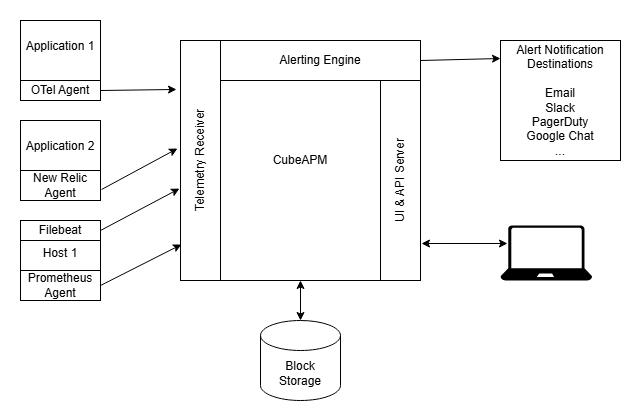
CubeAPM is a self-hosted observability platform that runs inside your cloud with managed updates and support. It includes built-in OpenTelemetry Collector deployment with pre-tuned configurations for tail sampling, batch processing, and memory limits.
For teams running their own OpenTelemetry Collector, memory leaks require hands-on profiling, configuration tuning, and Kubernetes troubleshooting. CubeAPM handles collector deployment and scaling as part of the managed service, reducing the operational burden while maintaining data sovereignty.
Pre-Configured Memory Safe Collector Deployments
CubeAPM deploys collectors with GOMEMLIMIT, memory limiter, and queue size limits pre-configured based on Kubernetes resource allocations. Tail sampling configurations use conservative defaults that balance sampling flexibility with memory consumption.
The default tail sampling configuration:
decision_wait: 30sto minimize memory footprintexpected_new_traces_per_sec: 1000to limit trace map sizenum_traces: 5000000to cap memory usage at predictable levels
These settings are tuned for typical microservices workloads with 10 to 50 services and 100,000 to 1 million spans per minute. For higher volume deployments, CubeAPM’s engineering team adjusts the configuration based on your traffic patterns without requiring manual heap profiling or trial-and-error tuning.
Automatic Memory Leak Detection and Alerts
CubeAPM monitors collector memory usage, growth rate, and OOMKill events across all deployed collector instances. If memory growth exceeds expected patterns, the platform alerts your team and provides a heap profile snapshot captured at the time of the anomaly.
This eliminates the need to manually enable pprof, capture heap dumps during incidents, or correlate memory metrics with configuration changes. The platform handles detection and root cause triage, surfacing the specific processor or receiver causing the leak.
Collector Updates Without Downtime
Memory leak fixes are frequently released in OpenTelemetry Collector patch versions. Upgrading a self-managed collector requires testing the new version, updating Kubernetes manifests, and coordinating a deployment window to avoid telemetry gaps.
CubeAPM applies collector updates during maintenance windows with zero downtime using rolling deployments. If a new version introduces a regression, the platform automatically rolls back to the previous version and notifies the engineering team.
This ensures your collector always runs the latest stable version with memory leak fixes applied, without requiring hands-on upgrade management or risk of production incidents during deployment.
Disclaimer: The information in this article reflects the latest details available at the time of publication and may change as technologies and products evolve. Features, pricing, and plan limits can change over time. Always verify the latest information directly with the vendor before making purchasing or deployment decisions.
Frequently Asked Questions
What causes OpenTelemetry Collector memory leaks?
The most common causes are tail sampling processor holding too many traces in memory, batch processor buffering during exporter failures, GOMEMLIMIT not set correctly relative to Kubernetes memory limits, and bugs in specific contrib receivers or exporters.
How do I know if my collector has a memory leak or just high memory usage?
Monitor memory over time after traffic normalizes. If memory returns to baseline after a spike, that is normal buffering. If memory stays elevated or continues climbing after traffic decreases, that indicates a leak.
What is GOMEMLIMIT and why does it matter for the collector?
GOMEMLIMIT tells the Go runtime when to trigger garbage collection. Set it to 80% of your Kubernetes memory limit to prevent OOMKill. Without it, Go delays GC until memory pressure is too high, causing Kubernetes to kill the pod.
How do I capture a heap profile from a running collector?
Enable the pprof extension in your collector config, then run `go tool pprof http://localhost:1777/debug/pprof/heap` to download and analyze the current heap snapshot.
Should I use the memory limiter processor?
Yes, as a safety net. The memory limiter prevents OOMKill by throttling data when memory usage is too high, but it does not fix the root cause of the leak. You still need to identify and fix the underlying configuration or bug.
What are safe tail sampling configuration values?
Start with `decision_wait: 30s`, `expected_new_traces_per_sec: 2000`, and `num_traces: 5000000`. These values limit memory usage to 1 to 2 GB for typical microservices workloads with 20 spans per trace.
How often should I update the OpenTelemetry Collector?
Update to the latest stable patch version monthly. Memory leak fixes are frequently backported to patch releases, and staying current reduces the risk of running into known issues.