









GlitchTip is an open-source, Sentry-compatible error tracking platform for teams that want a simpler way to monitor application errors, performance issues, uptime checks, and logs. Its biggest strengths are low-cost hosted plans, self-hosting support, Sentry SDK compatibility, and unlimited projects and team members.
Pricing and reviews matter because buyers need to understand how events are counted. Errors, uptime checks, performance transactions, and release storage can all use monthly event quotas, so real cost depends on usage patterns, incident spikes, and whether the team chooses hosted or self-hosted deployment.
In this GlitchTip Pricing and Review guide, we break down hosted plans, self-hosting costs, event limits, key features, public feedback, pros, cons, and alternatives. We also explain when GlitchTip is a good fit and when teams may need a broader observability platform.
What Is GlitchTip?
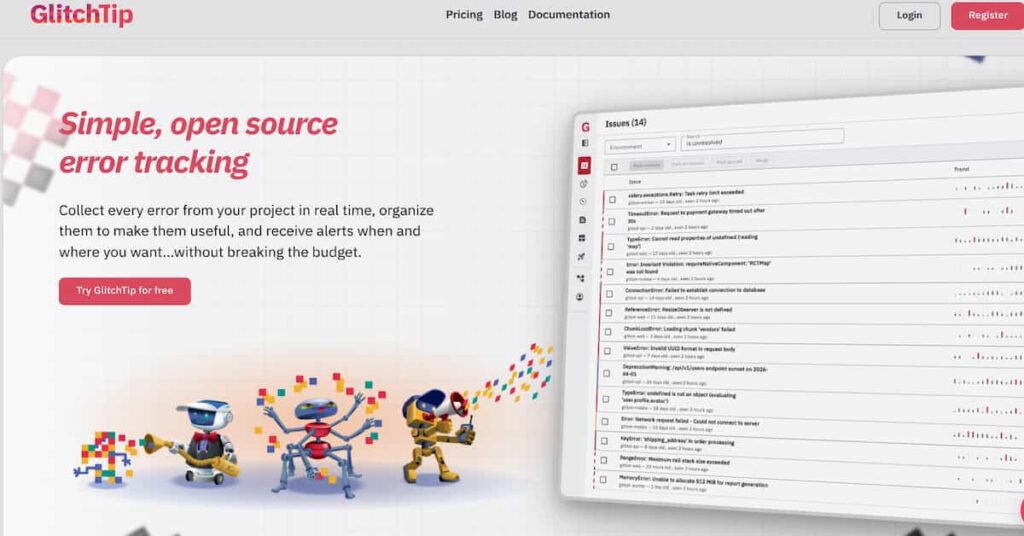
GlitchTip is an open-source error tracking and application monitoring tool built around Sentry-compatible SDK workflows. It lets teams collect application errors, group them into issues, inspect stack traces, monitor performance, check uptime and search logs.
The practical benefit is compatibility. Teams already using Sentry SDKs can often keep the same instrumentation approach and point events to a GlitchTip DSN instead of sentry.io. GlitchTip’s homepage says it can use Sentry’s open-source SDKs to receive error data from applications, while its SDK documentation lists many supported language and framework paths.
GlitchTip is best understood as focused error tracking with lightweight monitoring. It is not a full replacement for every APM, log management, infrastructure monitoring, distributed tracing or real user monitoring platform. It works best when teams want a simpler and more controllable way to capture application errors.
What Does GlitchTip Monitor?
GlitchTip covers four main areas: errors, performance, uptime and logs. Its homepage says teams can track errors, monitor performance, check site uptime, and search/filter logs alongside errors and performance data.
| Monitoring Area | What It Means | Why It Matters |
| Error tracking | Collect exceptions, group issues and inspect stack traces. | Helps developers find and fix production errors faster. |
| Performance monitoring | Capture transactions and spans from Sentry SDK tracing. | Helps identify slow requests, database calls and regressions. |
| Uptime monitoring | Ping a site or receive scheduled check-ins. | Helps detect outages or missing scheduled jobs. |
| Logs | Search and filter application logs. | Gives smaller teams debugging context in one place. |
GlitchTip’s log documentation says log ingestion is enabled by default on the server and that GlitchTip accepts logs through the standard Sentry envelope endpoint when supported by the SDK.
Key Features of GlitchTip
GlitchTip receives error data through Sentry-compatible SDK workflows. This makes it easier for teams already using Sentry SDKs to test GlitchTip without rebuilding instrumentation from scratch.
Similar exceptions are grouped into issues, so developers can avoid being flooded by duplicate events. This makes the error inbox easier to triage during incidents.
GlitchTip can capture transaction and span data when tracing is enabled through supported Sentry SDKs. Its homepage describes performance monitoring as a simple way to find slow web requests, database calls and transactions.
GlitchTip can ping a site and warn when it is not responding. It can also work in reverse when an application sends GlitchTip a request on schedule, and GlitchTip alerts if the request does not arrive.
GlitchTip supports application logs through Sentry-compatible structured log workflows. This is useful for teams that want logs near errors and performance data without adding a separate tool for basic debugging.
The GlitchTip CLI can upload source maps and debug symbols, manage releases and send test events. GlitchTip also documents file storage for uploads such as source maps.
GlitchTip is open source and can be self-hosted. Its homepage says users can view, modify and use the code, run it on their own server, or let GlitchTip host it.
Teams that do not want to manage infrastructure can use hosted GlitchTip through app.glitchtip.com and choose a plan based on monthly events.
GlitchTip Pricing: How Does It Work?
GlitchTip has two main pricing paths: hosted GlitchTip and self-hosted GlitchTip. Hosted GlitchTip is billed by monthly event limits. Self-hosted GlitchTip has no direct software license fee, but teams still pay for infrastructure, storage, backups, email delivery, updates, security and operations work..
GlitchTip Pricing: Hosted vs Self-Hosted
GlitchTip pricing is split into two main paths: the hosted version and the self-hosted version. The hosted version is priced by monthly event volume, while the self-hosted version is priced around support licenses and your own infrastructure costs.
This distinction matters because hosted GlitchTip is easier to estimate. You choose a plan based on monthly events. Self-hosted GlitchTip can start at $0 for personal or open-source use, but business use, support, hosting, storage, updates, backups and internal maintenance can still create real costs.
Hosted GlitchTip Pricing
Hosted GlitchTip is for teams that want GlitchTip to run the platform for them. You sign up at app.glitchtip.com, choose a monthly or annual plan, and pay based on the number of events you send each month.
| Hosted Plan | Monthly Price | Event Limit | Key Details |
| Free | $0/month | Up to 1,000 events/month | Error tracking, unlimited projects and unlimited team members. |
| Small | $15/month | Up to 100,000 events/month | Everything from Free, plus support access. |
| Medium | $50/month | Up to 500,000 events/month | Everything from Small, plus priority email and live chat support. |
| Large | $250/month | Up to 3 million events/month | Everything from Medium, plus development support, prioritization and BAA available on request. |
The hosted version is the simplest option for most teams. The main thing to watch is event usage. GlitchTip events are not only error events. Issues, uptime checks, performance transaction reports and release storage can all count toward the monthly event limit.
Self-Hosted GlitchTip Pricing
Self-hosted GlitchTip is for teams that want to run GlitchTip on their own infrastructure. This can be useful for privacy, data control, compliance, internal security rules or avoiding hosted event limits.
| Self-Hosted Plan | Monthly Price | Key Details |
| Starter Edition | $0/month | Unlimited usage, host on your own infrastructure and unlimited projects. |
| Individual License | $5/month | Everything from Starter, plus support access for 1 user. |
| Commercial License | $15/user/month | Everything from Individual, plus team support access, priority email, live chat and update assistance. |
| Scaled Support | Custom | Everything from Commercial, plus custom branding, SSO and development support. 10-user minimum applies. |
Hosted vs Self-Hosted: Which One Should You Choose?
| Requirement | Better Fit |
| You want the easiest setup | Hosted GlitchTip |
| You do not want to manage servers | Hosted GlitchTip |
| You want full control over data location | Self-hosted GlitchTip |
| You have privacy or compliance requirements | Self-hosted GlitchTip |
| You want predictable event-based pricing | Hosted GlitchTip |
| You already have DevOps capacity | Self-hosted GlitchTip |
| You need business support for self-hosting | Commercial License or Scaled Support |
Hosted GlitchTip is usually better for teams that want a simple managed error tracking service. Self-hosted GlitchTip is better for teams that want more control and are comfortable owning the infrastructure.
What Counts as a GlitchTip Event?
This is the most important pricing detail. GlitchTip says events measure four features: Issues, Uptime, Performance and Releases. One issue occurrence, one uptime status check, one performance transaction report and one megabyte of release file storage can all consume event capacity.
| Event Source | How It Can Consume Monthly Events | Cost Planning Note |
| Issues | Each occurrence of an error reported to GlitchTip. | A single bug can create a burst of repeated events. |
| Uptime | Each status check of an app or endpoint. | Frequent checks across many endpoints can use quota. |
| Performance | Each transaction report for tracked activity. | Tracing can grow quickly if enabled broadly. |
| Releases | Each MB of release file storage. | Large source maps and frequent releases can consume capacity. |
What Does GlitchTip Really Cost?
⚠️ Disclaimer
The scenarios below are directional editorial estimates, not official GlitchTip quotes. GlitchTip publishes public hosted pricing and self-hosted support pricing, but real cost can change based on event volume, uptime check frequency, performance transaction volume, release storage, infrastructure choices, backups, email delivery, support needs, and whether the team chooses hosted or self-hosted deployment.
GlitchTip is not priced by hosts, log GB, trace GB, metrics GB, RUM sessions or full synthetic monitoring volume. Hosted GlitchTip is priced mainly by monthly events. GlitchTip says events cover four areas: issue occurrences, uptime status checks, performance transaction reports and release file storage measured in megabytes.
Because of that, the scenarios below use the broader workload profiles only as environment context. The actual GlitchTip estimate is based on the parts that map to GlitchTip pricing: errors, uptime checks, performance transactions and release storage.
Workload Assumptions Used for GlitchTip Estimates
| Team profile | Environment context | Full telemetry context | GlitchTip pricing assumption |
| Small team | 10 hosts | ~1.1 TB/month total telemetry | Error events, uptime checks, performance transactions and release storage |
| Growing team | 50 hosts | ~5.4 TB/month total telemetry | Higher error, performance and uptime event volume |
| Mid-market team | 250 hosts | ~27 TB/month total telemetry | Event volume may exceed hosted Large plan depending on monitoring scope |
The telemetry volume is included only to describe the size of the environment. For GlitchTip, the pricing calculation depends on monthly events, not GB ingested.
Scenario 1: Small Team
Situation
A small production team runs around 10 hosts and produces about 1.1 TB of monthly telemetry across logs, traces, APM and metrics. The broader environment may also include some frontend traffic and basic uptime checks.
For GlitchTip, most of that usage does not directly affect the hosted bill. The pricing question is not “how many GB does the team ingest?” but “how many issue events, uptime checks, performance transaction reports and release storage events does the team send to GlitchTip?”
Why teams at this stage consider GlitchTip
Teams at this stage usually want low-cost error tracking, Sentry SDK compatibility, basic performance monitoring and uptime checks. GlitchTip is attractive because the hosted plans are simple, and the platform does not charge per host or per user on hosted plans.
Estimated monthly usage
| Component | Assumption | Monthly event estimate |
| Issue/error events | Production errors and repeated issue occurrences | 20,000 |
| Uptime checks | Critical endpoints checked on a controlled schedule | 40,000 |
| Performance transactions | Light transaction monitoring | 60,000 |
| Release storage | Source maps and release files | 5,000 |
| Estimated total events | GlitchTip event estimate | 125,000 |
Estimated monthly cost
Disclaimer: This is a directional estimate based on GlitchTip’s public event-based pricing. Actual cost can change based on issue volume, uptime check frequency, performance transactions, release storage, event spikes, self-hosting costs and support needs.
| Pricing result | Detail |
| Estimated events | ~125,000/month |
| Small plan fit? | No, because Small supports up to 100,000 events/month |
| Recommended hosted plan | Medium |
| Estimated hosted cost | ~$50/month |
What this scenario shows
For a small team, GlitchTip can be very affordable if the team controls performance event volume and keeps uptime checks focused on important endpoints. The main risk is crossing from Small to Medium because uptime checks and performance transactions count toward the same event quota as errors.
Scenario 2: Growing Team
Situation
A growing SaaS team runs around 50 hosts and produces about 5.4 TB of monthly telemetry. The environment has more services, more customers, more deployments and more production workflows.
Again, GlitchTip does not price this environment by hosts or telemetry GB. The bill depends on how many GlitchTip events are created by issue occurrences, uptime checks, performance monitoring and release storage.
Why teams at this stage consider GlitchTip
At this stage, teams may consider GlitchTip because they want to avoid expensive commercial error tracking while still keeping a practical Sentry-compatible workflow. It can work well when the team wants focused error tracking and does not expect GlitchTip to replace a full observability platform.
Estimated monthly usage
| Component | Assumption | Monthly event estimate |
| Issue/error events | Higher issue volume across more services | 100,000 |
| Uptime checks | More endpoints and scheduled checks | 300,000 |
| Performance transactions | Controlled tracing for key workflows | 450,000 |
| Release storage | Source maps and release files | 25,000 |
| Estimated total events | GlitchTip event estimate | 875,000 |
Estimated monthly cost
Disclaimer: This is a directional estimate based on GlitchTip’s public event-based pricing. Actual cost can change based on issue volume, uptime check frequency, performance transactions, release storage, event spikes, self-hosting costs and support needs.
| Pricing result | Detail |
| Estimated events | ~875,000/month |
| Medium plan fit? | No, because Medium supports up to 500,000 events/month |
| Recommended hosted plan | Large |
| Estimated hosted cost | ~$250/month |
What this scenario shows
For a growing team, GlitchTip can still remain inexpensive on hosted pricing. But the Large plan may become necessary once performance transactions and uptime checks grow. The key is event control. If teams enable broad transaction reporting across high-traffic services, performance events can dominate the monthly quota.
Scenario 3: Mid-Market Team
Situation
A mid-market team runs around 250 hosts and produces about 27 TB of monthly telemetry. The environment may include multiple Kubernetes clusters, APIs, backend services, queues, databases and customer-facing applications.
At this scale, the team may still use GlitchTip as a focused error tracking layer. But if it expects GlitchTip to handle large uptime volume, broad performance monitoring and repeated issue bursts, hosted pricing may hit the Large plan limit quickly.
Why teams at this stage consider GlitchTip
Mid-market teams may consider GlitchTip when they want self-hosted error tracking, Sentry SDK compatibility and more control over application error data. It can also be useful when the team wants error tracking separate from a larger observability platform.
Estimated monthly usage
| Component | Assumption | Monthly event estimate |
| Issue/error events | Large production issue volume | 350,000 |
| Uptime checks | Many endpoints and scheduled checks | 1,200,000 |
| Performance transactions | Broader transaction monitoring | 1,700,000 |
| Release storage | Source maps and release files | 75,000 |
| Estimated total events | GlitchTip event estimate | 3,325,000 |
Estimated monthly cost
Disclaimer: This is a directional estimate based on GlitchTip’s public event-based pricing. Actual cost can change based on issue volume, uptime check frequency, performance transactions, release storage, event spikes, self-hosting costs and support needs.
| Pricing result | Detail |
| Estimated events | ~3.33 million/month |
| Large plan fit? | No, because Large supports up to 3 million events/month |
| Recommended path | Reduce event volume, self-host or discuss support/custom options |
| Estimated hosted cost | Above public hosted Large plan |
What this scenario shows
At mid-market scale, GlitchTip’s hosted plan can become limiting if the team sends broad performance transactions and frequent uptime checks. The Large plan is still cheap at $250/month, but it has a 3 million event cap. Above that, the team needs to control event volume, self-host, or talk to GlitchTip about support and scaling options.
Summary: GlitchTip Estimated Monthly Cost
Disclaimer: These are directional planning estimates, not official quotes. They are based on GlitchTip’s public hosted event limits and a practical mapping of errors, uptime checks, performance transactions and release storage into monthly events.
| Team profile | Estimated monthly events | Likely GlitchTip path | Estimated monthly cost |
| Small team | ~125,000 events | Hosted Medium | ~$50/month |
| Growing team | ~875,000 events | Hosted Large | ~$250/month |
| Mid-market team | ~3.33 million events | Self-hosted, volume reduction or custom/support discussion | Above public hosted Large plan |
Final Takeaway
GlitchTip is genuinely inexpensive for focused error tracking. The public hosted plans are low-cost, and even the Large hosted plan is only $250/month for up to 3 million events.
The important caveat is scope. GlitchTip pricing looks cheap because it is not priced to replace a full observability platform. It is best for Sentry-compatible error tracking, basic performance monitoring, uptime checks and logs. It does not directly price or cover the same workload as tools built for full logs, metrics, traces, RUM, synthetics, infrastructure monitoring and APM.
For small and growing teams, hosted GlitchTip can be a very cost-effective choice. For mid-market teams, the decision depends on whether GlitchTip is used as a focused error tracking layer or expected to carry a much broader observability workload.
What Actually Drives GlitchTip Costs?
Event volume is the main hosted pricing driver. Errors, uptime checks, performance transactions and release storage all count.
Error-tracking volume is not always stable. A bad deployment can generate thousands of repeated errors in minutes.
Performance monitoring can become a major event source. If tracing is enabled for every request on a high-traffic app, transaction reports may dominate the monthly quota.
Every uptime status check can count as an event. A team checking many endpoints every minute will consume more quota than a team checking a few critical URLs less often.
Release file storage is counted by megabytes. Frontend teams with large source maps should model release storage carefully.
For self-hosted deployments, cost shifts from subscription to infrastructure. PostgreSQL, Redis or Valkey, workers, object storage, backups, SSL, email, monitoring and operations labor all matter. GlitchTip’s install guide specifically references Valkey for faster or larger instances, PostgreSQL guidance, file storage, email configuration and object-storage options.
Hosted Small includes support access, Medium includes priority email and live chat support, and Large adds development support, prioritization and BAA availability. Self-hosted users without paid support should expect more self-service ownership.
Additional Costs and Operational Overhead Buyers Should Plan For
| Cost or Overhead Area | Why It Matters |
| Event filtering | Reduces noisy events and protects monthly quota. |
| Storage and retention | Self-hosted teams must plan event, log, source map and backup storage. |
| Alert routing | Email and webhook routes should be tested before incidents. |
| Database operations | PostgreSQL needs backups, upgrades and performance care. |
| Queue/cache operations | Redis or Valkey may be needed for larger setups. |
| Security and compliance | Self-hosting gives control, but the team owns patching and access. |
GlitchTip User Reviews and Public Feedback in 2026
GlitchTip does not have the same volume of public review data as larger commercial tools such as Sentry, Rollbar, Bugsnag, Datadog or New Relic. During verification, there was no strong, review-rich GlitchTip profile found on major B2B review platforms like G2 or Capterra.
That does not mean GlitchTip lacks adoption. It means buyers should be careful when interpreting review signals. GlitchTip is more visible in open-source directories, developer discussions, Docker usage, AlternativeTo listings, Product Hunt and third-party software directories than in traditional enterprise review platforms.
Because of this, the review picture is best treated as directional. Public feedback points to a tool that developers like for being open source, Sentry-compatible, easy to self-host and affordable, but buyers should still run a proof of concept before using it in production.
GlitchTip Review Summary
| Platform or Source | Public Signal | What It Means |
| G2 | No verified review-rich GlitchTip product profile found | Do not claim a G2 rating unless a live GlitchTip listing is verified. |
| Capterra | No verified review-rich GlitchTip product profile found | Do not claim a Capterra rating unless a live GlitchTip listing is verified. |
| SaaSworthy | GlitchTip is listed as an unclaimed product profile | Useful product listing, but not a strong review source. |
| Product Hunt | GlitchTip has a product listing with limited social proof | Helpful launch/discovery signal, but not enough for review scoring. |
What Users and Developers Praise
Public comments on AlternativeTo describe GlitchTip as easy to host and simple to set up for error tracking and uptime monitoring. This fits GlitchTip’s positioning as a lighter, easier-to-run alternative to self-hosted Sentry.
Users value that GlitchTip works with Sentry-compatible SDKs. This makes adoption easier because teams can often keep their existing Sentry-style instrumentation and point events to GlitchTip.
GlitchTip is attractive for teams that want to inspect the code, run it on their own infrastructure and avoid sending application error data to a proprietary SaaS vendor.
GlitchTip’s hosted pricing is simple, and the self-hosted option can reduce direct software cost. This is one of the clearest reasons developers compare it with Sentry and other commercial error tracking tools.
GlitchTip is praised as a practical option for teams that mainly need error tracking, stack traces, uptime checks and basic performance visibility without paying for a large observability platform.
What Users Criticize or What Buyers Should Watch
⚠️ Disclaimer
The points below are based on public review signals, developer comments, third-party listings, and GlitchTip’s own product scope. GlitchTip has limited formal review volume on major platforms like G2 and Capterra, so these should be treated as buyer considerations, not universal user complaints.
GlitchTip is lighter than self-hosted Sentry, but it is still infrastructure. Teams need to manage deployment, database storage, updates, backups, alerts and security patches.
GlitchTip covers error tracking, performance, uptime and logs. It does not replace a full observability stack for infrastructure metrics, deep distributed tracing, real user monitoring, synthetic monitoring, service maps and advanced analytics.
Hosted pricing counts issues, uptime checks, performance transaction reports and release storage. Buyers who assume only errors count may underestimate usage.
GlitchTip does not have the same formal review footprint as larger commercial tools. Teams should run a proof of concept before standardizing.
Free and self-hosted users should expect more self-service. Teams that need priority support, HIPAA context or a BAA should evaluate Medium, Large or support options.
GlitchTip Alternatives: How It Compares to Competitors
GlitchTip is best compared with two types of tools. The first group includes focused error tracking tools like Sentry, Rollbar and Bugsnag. The second group includes broader observability platforms like CubeAPM, Datadog, New Relic, Dynatrace and Grafana Cloud.
That distinction matters because GlitchTip is not trying to replace every observability workflow. It is strongest when teams want open-source, Sentry-compatible error tracking with basic performance monitoring, uptime checks and logs. Teams that need deeper APM, infrastructure metrics, distributed tracing, RUM, synthetics and dashboarding may need a broader platform.
GlitchTip vs CubeAPM
GlitchTip and CubeAPM solve different problems. GlitchTip is mainly a Sentry-compatible error tracking tool with lightweight monitoring. CubeAPM is a full-stack observability platform for teams that want logs, metrics, traces, APM, infrastructure monitoring, RUM, synthetics, dashboards and error tracking in one place.
CubeAPM is the better fit when the team wants one platform for root-cause analysis across applications, infrastructure and user experience. GlitchTip is the better fit when the team only needs focused error tracking and wants lower cost or open-source control.
| Category | GlitchTip | CubeAPM |
| Primary role | Error tracking and lightweight monitoring | Full-stack observability and APM |
| Best for | Teams needing low-cost Sentry-compatible error tracking | Teams needing MELT, RUM, synthetics and APM together |
| Pricing model | Hosted event tiers or self-hosted support/infrastructure | Ingestion-based pricing |
| Deployment | Hosted or self-hosted | SaaS or vendor-managed self-hosted |
| Main tradeoff | Narrower platform scope | More platform than needed for basic error tracking |
GlitchTip vs Sentry
Sentry is the closest direct comparison because GlitchTip is built around Sentry-compatible SDK workflows. Sentry is more mature and broader, while GlitchTip is simpler, open source and easier to self-host for teams that want more control.
Sentry is stronger for teams that want a mature commercial product with richer debugging, replay, tracing and workflow features. GlitchTip is stronger for teams that want a lighter Sentry-compatible option with simpler pricing and self-hosting.
| Category | GlitchTip | Sentry |
| Primary role | Open-source Sentry-compatible error tracking | Commercial application monitoring and error tracking |
| SDK support | Uses Sentry-compatible SDKs | Native Sentry SDK ecosystem |
| Pricing model | Hosted event tiers or self-hosted | Event-based pricing across errors, spans, logs and replays |
| Self-hosting | Core strength | Possible, but heavier to operate |
| Best for | Cost-conscious and privacy-focused teams | Teams wanting the most polished Sentry experience |
GlitchTip vs Datadog
Datadog is much broader than GlitchTip. It covers infrastructure monitoring, APM, logs, RUM, synthetics, security monitoring and many other modules. GlitchTip is much simpler and more focused on error tracking.
Datadog is a better fit when a team wants a broad managed observability platform with many integrations. GlitchTip is a better fit when the team mainly wants Sentry-compatible error tracking and does not want a large modular SaaS bill.
| Category | GlitchTip | Datadog |
| Primary role | Error tracking and lightweight monitoring | Enterprise observability and monitoring platform |
| Pricing model | Event tiers or self-hosted cost | Modular pricing by host, GB, sessions, tests and products |
| Coverage | Errors, uptime, performance basics and logs | APM, logs, metrics, RUM, synthetics, infra and security |
| Deployment | Hosted or self-hosted | SaaS |
| Best for | Teams needing focused error tracking | Teams needing broad SaaS observability |
GlitchTip vs New Relic
New Relic is a full observability platform, while GlitchTip is a focused error tracking tool. New Relic pricing is based on data ingest and users, and its platform includes APM, infrastructure monitoring, logs, synthetics, browser monitoring and more.
New Relic is stronger when teams want one platform for many observability signals. GlitchTip is better when the goal is to keep error tracking simple, low-cost and self-hostable.
| Category | GlitchTip | New Relic |
| Primary role | Error tracking and lightweight monitoring | Full-stack observability platform |
| Pricing model | Event-based hosted plans or self-hosted cost | Data ingest plus user-based pricing |
| Coverage | Errors, uptime, logs and basic performance | APM, logs, infra, browser, mobile, synthetics and AI features |
| Deployment | Hosted or self-hosted | SaaS |
| Best for | Teams needing simple error tracking | Teams needing broad observability in one SaaS platform |
GlitchTip vs Dynatrace
Dynatrace is an enterprise-grade observability platform with strong automation, AI-assisted analysis and full-stack monitoring. GlitchTip is much lighter and more developer-focused.
Dynatrace is a stronger fit for large organizations that need automated discovery, root-cause analysis, infrastructure visibility and enterprise operations workflows. GlitchTip is better for teams that only need a practical error-tracking layer.
| Category | GlitchTip | Dynatrace |
| Primary role | Error tracking and lightweight monitoring | AI-powered enterprise observability |
| Pricing model | Hosted event tiers or self-hosted cost | Usage-based and commitment-based pricing |
| Coverage | Errors, uptime, logs and performance basics | Applications, infrastructure, logs, digital experience and security |
| Deployment | Hosted or self-hosted | SaaS and managed options |
| Best for | Small teams wanting control and simplicity | Enterprises with complex distributed systems |
GlitchTip vs Grafana Cloud
Grafana Cloud is built around the LGTM stack: Loki for logs, Grafana for dashboards, Tempo for traces and Mimir/Prometheus for metrics. GlitchTip is not a Grafana replacement because it focuses on error tracking rather than broad observability visualization.
Grafana Cloud is better when teams need dashboards, metrics, logs and traces at scale. GlitchTip is better when the main need is error tracking with Sentry-compatible SDKs.
| Category | GlitchTip | Grafana Cloud |
| Primary role | Error tracking and lightweight monitoring | Metrics, logs, traces, dashboards and observability |
| Pricing model | Event tiers or self-hosted cost | Usage-based pricing across telemetry and users |
| Coverage | Errors, uptime, logs and performance basics | Metrics, logs, traces, profiles, dashboards and alerts |
| Open-source roots | Yes | Yes, built around Grafana Labs OSS projects |
| Best for | Sentry-compatible error tracking | Teams wanting open observability dashboards and telemetry storage |
GlitchTip vs Rollbar
Rollbar is a commercial error monitoring platform. It is closer to GlitchTip than Datadog or New Relic because both focus heavily on production errors. Rollbar is managed SaaS, while GlitchTip gives teams a stronger self-hosting path.
Rollbar is stronger for teams that want a polished managed error monitoring service with session replay. GlitchTip is stronger for teams that want open-source control and lower-cost self-hosting.
| Category | GlitchTip | Rollbar |
| Primary role | Open-source error tracking | Commercial error monitoring |
| Pricing model | Hosted event tiers or self-hosted | Occurrence-based pricing with replay options |
| Self-hosting | Yes | Not the main product model |
| Replay support | Not a main GlitchTip strength | Session replay available |
| Best for | Teams wanting self-hosted control | Teams wanting managed error monitoring SaaS |
GlitchTip vs Bugsnag
Bugsnag is a commercial error and performance monitoring tool. It focuses on application stability, errors, crashes and performance spans. GlitchTip is more open-source and self-hosting-friendly.
Bugsnag is better for teams that want a commercial managed product with vendor support. GlitchTip is better for teams that want open-source flexibility, Sentry SDK compatibility and self-hosted control.
| Category | GlitchTip | Bugsnag |
| Primary role | Sentry-compatible error tracking | Error and performance monitoring |
| Pricing model | Hosted event tiers or self-hosted | Event and span-based commercial pricing |
| Deployment | Hosted or self-hosted | SaaS |
| Support model | Depends on hosted plan or self-hosted license | Commercial vendor support |
| Best for | Teams wanting control and low cost | Teams wanting managed error and stability monitoring |
Is GlitchTip the Right Choice?
GlitchTip is a good fit when teams want focused error tracking, Sentry SDK compatibility, simple pricing and the option to self-host. It may not be the right fit when the team expects it to replace a complete observability platform or when self-hosted operations would become a burden.
When GlitchTip Works Best
GlitchTip works best when:
GlitchTip is compatible with Sentry client SDKs, so teams can often keep their existing Sentry-style instrumentation and point events to GlitchTip.
GlitchTip is open source, which means teams can inspect the code, modify it and run it on their own infrastructure.
GlitchTip covers error tracking, performance monitoring, uptime checks and logs. This makes it useful for teams that want application error visibility without adopting a large observability suite.
Hosted GlitchTip pricing is based on monthly events, and the public plans include Free, Small, Medium and Large tiers. Events include issue occurrences, uptime status checks, performance transaction reports and release storage.
GlitchTip’s hosted pricing lists unlimited projects and unlimited team members, which can make it attractive for small teams that want to avoid per-seat pricing.
GlitchTip can be self-hosted, which is useful for teams that prefer to keep error data, stack traces and application context inside their own infrastructure.
Self-hosting gives more control, but hosted GlitchTip is available for teams that do not want to manage the platform themselves.
When GlitchTip May Not Be the Right Fit
⚠️ Disclaimer
The points below are fit considerations, not negative claims about GlitchTip. They are based on GlitchTip’s documented product scope, pricing model, self-hosting requirements, and public review footprint.
GlitchTip may not be the best fit when:
GlitchTip is mainly built around error tracking, uptime monitoring, performance monitoring and logs. That is useful, but it is not the same as a full observability platform for infrastructure metrics, deep distributed tracing, service maps, RUM analytics, synthetic monitoring, dashboards and long-term telemetry analysis.
GlitchTip supports performance monitoring through Sentry-compatible SDKs, but teams that need deep trace analytics, service dependency maps, Kubernetes service views, database query correlation or advanced root-cause analysis may need a broader APM platform.
GlitchTip can be self-hosted, but production self-hosting still requires infrastructure ownership. Teams need to plan for PostgreSQL, storage, email delivery, backups, upgrades, security patching, monitoring and high availability if they run it themselves.
Hosted GlitchTip pricing is affordable, but events include more than errors. Issues, uptime checks, performance transaction reports and release storage all count toward the monthly quota. Teams with frequent checks, broad performance monitoring or repeated error bursts may outgrow the public hosted Large plan.
GlitchTip can work for serious teams, and its Large plan mentions BAA availability on request. Still, larger organizations may need custom procurement processes, formal SLAs, vendor security reviews, dedicated account support or deeper enterprise contract terms. Those needs should be confirmed before buying.
GlitchTip has public adoption signals and developer visibility, but it does not appear to have the same review depth on platforms like G2 and Capterra as larger commercial vendors. Buyers who depend heavily on large review-platform samples should run a proof of concept and evaluate the product directly.
GlitchTip can be part of a monitoring stack, but it should not be positioned as a direct replacement for broader observability platforms. It is better treated as a focused error-tracking and lightweight monitoring tool.
Practical Buying Advice
Before choosing GlitchTip, answer these questions:
- How many error events do we expect per month in normal conditions?
- How large could an error spike become during a bad release?
- Will uptime checks and performance transactions consume a large part of our event quota?
- How many source map and release file megabytes will we upload each month?
- Do we need hosted GlitchTip, self-hosted GlitchTip or managed third-party hosting?
- Who will own backups, upgrades, database health and security patches if we self-host?
- Do we need US hosting, EU Germany hosting, HIPAA support or a BAA?
- Do we need only error tracking, or do we also need full-stack APM and observability?
Conclusion
GlitchTip is a strong option for teams that want simple, affordable and open-source error tracking without abandoning the Sentry SDK ecosystem. Its hosted pricing is easy to understand: Free for up to 1,000 events, Small at $15/month for 100,000 events, Medium at $50/month for 500,000 events and Large at $250/month for 3 million events.
The main pricing detail to remember is that events are broader than error occurrences. Uptime checks, performance transaction reports and release file storage also count. That makes the platform affordable when usage is planned, but teams should model event spikes and tracing volume before choosing a plan.
For error tracking alone, GlitchTip is a practical and cost-conscious Sentry alternative. For broader observability across logs, metrics, traces, infrastructure, RUM, synthetics and error tracking, teams should compare it with full-stack platforms such as CubeAPM, Datadog, New Relic, Sentry, Grafana or Azure Monitor.
Disclaimer: This is an independent editorial review based on publicly available GlitchTip pricing, product documentation, GitLab/Docker materials, third-party hosting pages and selected competitor pages available at the time of writing. Pricing, features and packaging can change. Buyers should verify current terms directly with each vendor before purchase.
FAQs
1. What is GlitchTip?
GlitchTip is an open-source, Sentry-compatible error tracking platform. It helps teams track errors, monitor performance, check uptime and search logs.
2. How much does GlitchTip cost?
Hosted GlitchTip has a Free plan, Small at $15/month, Medium at $50/month and Large at $250/month. Self-hosted GlitchTip has no direct software license cost, but teams pay for infrastructure and operations.
3. What is included in the GlitchTip Free plan?
The Free hosted plan includes up to 1,000 events per month, error tracking, unlimited projects and unlimited team members.
4. What is an event in GlitchTip pricing?
Events measure four features: issue occurrences, uptime status checks, performance transaction reports and release file storage measured in megabytes.
5. What happens if I exceed my GlitchTip event limit?
GlitchTip says it throttles after quota is full, increases throttling gradually and blocks fully at 2x the quota.
6. Can I self-host GlitchTip?
Yes. GlitchTip is open source and can be self-hosted. Teams are responsible for infrastructure, updates, backups, monitoring and security.
7. Is GlitchTip compatible with Sentry SDKs?
Yes. GlitchTip is compatible with Sentry client SDK workflows and can receive error data through Sentry-compatible instrumentation.