










AWS Lambda monitoring tracks the health, performance, and behavior of serverless functions before problems reach users. Lambda powers 65% of AWS customers – the most widely deployed serverless compute service – yet removing server provisioning does not remove the need for visibility.
Functions fail silently. Cold starts inflate latency without warning. Throttles drop requests without user-facing errors. Async invocations accumulate backlogs that default CloudWatch alerts never catch. And because every invocation is ephemeral, the signals that matter are per-invocation – duration at p99, error type, memory consumed, cold vs warm environment, and whether the event was processed at all. Standard CloudWatch metrics without deliberate instrumentation leave most of these invisible.
This guide covers every layer: CloudWatch metrics, cold start detection, concurrency and throttle management, distributed tracing with OpenTelemetry, structured logging, and async invocation observability. Each section is self-contained.
What Makes AWS Lambda Monitoring Different
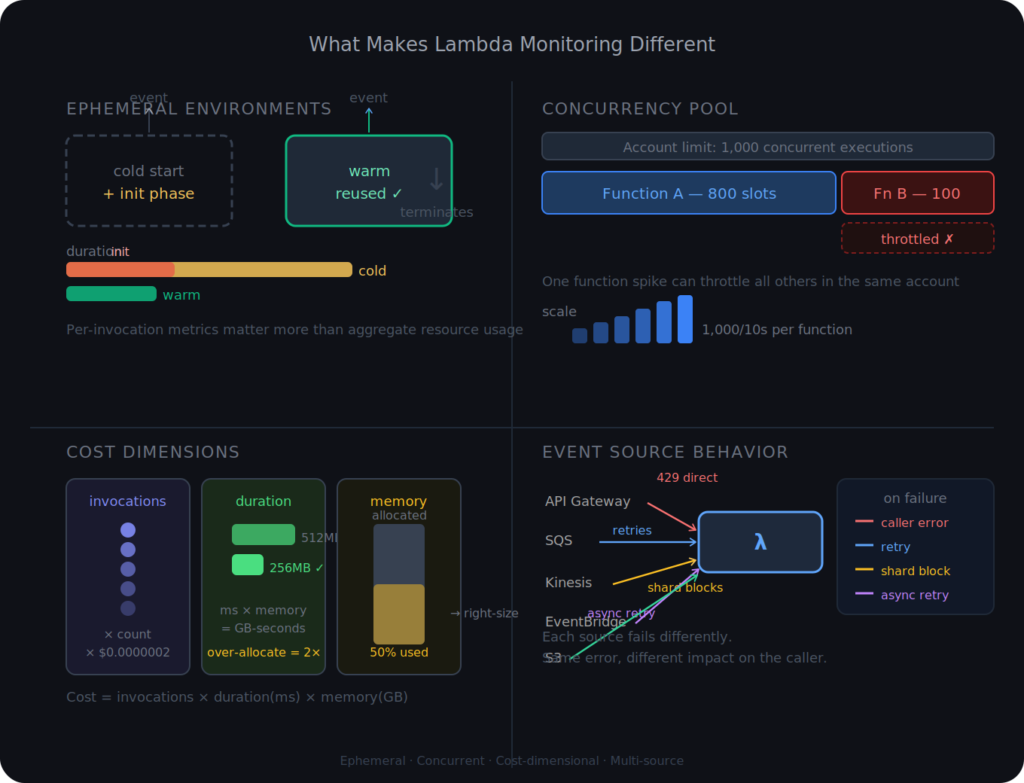
Before diving into specific metrics and tools, it is worth understanding why AWS Lambda monitoring requires a different mental model than traditional server or container monitoring.
Ephemeral Execution Environments
A Lambda function does not run continuously. It runs in response to an event, executes, and terminates. The execution environment may be reused for the next invocation (a warm start) or provisioned fresh (a cold start). This means per-invocation metrics matter far more than aggregate resource utilization. A function that processes 10,000 events per minute but has 2% of them experiencing cold starts is not a “2% problem” if those cold starts affect latency-sensitive user requests.
Statelessness and Scale
Lambda scales horizontally by running concurrent execution environments. Your account has a default concurrency limit of 1,000 concurrent executions per AWS Region, shared across all functions. A traffic spike on one function can starve concurrency from others. Monitoring each function in isolation misses this cross-function risk.
The Cost Dimension
Lambda pricing is based on invocation count and duration rounded to the nearest millisecond, plus memory allocation. A function running at 512MB that you could run at 256MB without performance impact costs twice as much at scale. Monitoring Lambda without watching duration and memory utilization trends means leaving cost optimization invisible.
Event Source Complexity
Lambda functions are triggered by dozens of event sources: API Gateway, SQS, SNS, DynamoDB Streams, Kinesis, EventBridge, S3, and others. Each event source has its own failure behavior. SQS retries on failure. Kinesis blocks the shard on error. API Gateway returns the error directly to the caller. Monitoring without understanding the event source means misinterpreting the metrics you collect.
The Core CloudWatch Metrics Every Lambda Function Should Track
AWS Lambda automatically publishes metrics to CloudWatch under the AWS/Lambda namespace. No additional configuration is required to receive them. These are the signals that form your monitoring baseline.
Invocations
Invocations count the number of times your function code was executed successfully, including executions that result in a function error. It does not count throttled requests, because those never reach the function code.
Track Invocations as a sum over time to understand traffic patterns. A sudden drop in invocations when your upstream traffic is stable usually indicates throttling or event source configuration issues, not reduced demand.
Errors
Errors counts invocations that resulted in a function error. This includes unhandled exceptions, runtime crashes, and timeouts. The Lambda runtime itself can also contribute to errors: a timeout counts as an error even if your code did not throw.
Calculate error rate as Errors / Invocations. This ratio is more meaningful than raw error count because it normalizes for traffic volume. Alert on error rate, not error count, to avoid false alarms during traffic spikes and missed alarms during traffic lulls.
There are two error categories worth distinguishing:
- Function errors: your code threw an exception or returned an error response
- Runtime errors: Lambda killed the execution due to timeout, out-of-memory, or process exit
CloudWatch does not separate these in the default Errors metric. To distinguish them, parse your CloudWatch Logs for Task timed out after, and Runtime exited with error messages, or use structured logging to emit error type as a field.
Duration
Duration measures the elapsed time from when the function code begins execution to when it returns or times out, in milliseconds. CloudWatch provides this as Average, p50, p90, p95, and p99 statistics.
Always alert on p99 Duration, not Average. The average smooths over tail latencies that are the most damaging to user experience. A function with a 50ms average but a 4,500ms p99 will frustrate 1% of users severely.
Duration also directly drives cost. If your function timeout is set to 30 seconds but typical execution completes in 200ms, a hung invocation will run for 30 seconds and be billed accordingly. Keep your timeout set to a small multiple of your expected p99 duration, not the Lambda maximum.
Throttles
Throttles counts invocation requests that Lambda rejected without executing because no concurrency was available. Throttled requests are not counted in Invocations or Errors. They simply disappear from the function’s perspective.
This is the most dangerous metric to miss. A sustained throttle rate means your function is silently dropping work. For synchronous invocations (API Gateway, for example), the caller receives a 429 TooManyRequestsException immediately. For asynchronous invocations (SQS, EventBridge), Lambda retries the event automatically, but the retry window is bounded.
Alert on any non-zero Throttles. A single throttle event is worth investigating. A sustained rate is an emergency.
ConcurrentExecutions
ConcurrentExecutions shows how many function instances are running simultaneously at a given moment. Watch this metric against your account-level concurrency limit (default 1,000 per Region) and any function-level reserved concurrency you have configured.
Alert when ConcurrentExecutions reaches 80% of your account or function limit. At 90%, you have very little headroom before throttling begins. At 100%, every additional invocation is throttled.
DeadLetterErrors
For asynchronous invocations with a Dead Letter Queue (DLQ) or on-failure destination configured, DeadLetterErrors counts the number of times Lambda failed to send a failed event to that destination. A non-zero value means events are being lost permanently with no record.
If you use DLQs as your safety net for async failures, this metric tells you when the safety net itself is broken.
Alert Thresholds for Core Lambda Metrics
| Metric | Warning | Critical |
| Error rate (Errors/Invocations) | >1% | >5% |
| Duration p99 | >80% of timeout setting | >90% of timeout setting |
| Throttles | >0 | Any sustained rate |
| ConcurrentExecutions (% of limit) | >70% | >85% |
| DeadLetterErrors | >0 | Any value |
| Invocations drop (vs baseline) | >20% unexpected decrease | >50% unexpected decrease |
Understanding and Monitoring Cold Starts
Cold starts are the single most misunderstood performance issue in Lambda. They are not a bug, and they are not always a problem. But without proper monitoring, teams either overreact to them or miss the cases where they genuinely matter.
What Actually Happens During a Cold Start
When Lambda receives an invocation for a function with no available warm execution environment, it provisions a new one. This involves several steps:
- Downloading the function’s deployment package or container image from storage
- Starting the runtime (the Node.js, Python, Java, or other runtime process)
- Running initialization code outside the handler (global variables, SDK clients, database connections)
- Running the handler itself
Steps 1 through 3 are the cold start. Step 4 is the warm execution. You pay for all four, but only step 4 executes on every invocation. Steps 1 through 3 happen only when a new environment is provisioned.
The Init Duration field appears in the CloudWatch Logs REPORT line for cold start invocations:
REPORT RequestId: abc123 Duration: 245.32 ms Billed Duration: 246 ms
Memory Size: 512 MB Max Memory Used: 89 MB Init Duration: 1823.41 ms
Init Duration is what you want to track. It is not available as a native CloudWatch metric. You need to create a CloudWatch Metric Filter on your Lambda log group to extract it, or use Lambda Insights, which captures it automatically.
Cold Start Frequency vs. Cold Start Duration
Two separate metrics matter here:
- Cold start frequency is the percentage of invocations that experience a cold start. For frequently invoked functions, this is typically low. For functions invoked infrequently (cron jobs, low-traffic endpoints), it can be 100%.
- Cold start duration is how long initialization takes when it does occur. Python and Node.js functions typically initialize in 100 to 500ms. Java functions without SnapStart can take 3 to 8 seconds depending on framework load. .NET functions fall in a similar range.
Monitor both independently. A function with a 5% cold start rate and a 6-second Init Duration on Java is far more impactful to user experience than a function with a 30% cold start rate and a 150ms Init Duration on Python.
SnapStart: What It Is and How to Monitor It in 2026
AWS announced SnapStart originally for Java in 2022. At re:Invent 2025, AWS extended SnapStart support to Python and .NET runtimes. SnapStart works by initializing the function during deployment, taking a Firecracker microVM snapshot of the fully initialized execution environment, and restoring from that snapshot on cold starts instead of running the initialization phase fresh.
For Java functions, SnapStart reduces cold start times from several seconds to under 200ms in most cases. For Python and .NET functions with heavy initialization (loading large models, connecting to databases at init time), the improvement is significant.
For functions using SnapStart, the monitoring changes slightly. The REPORT log format no longer includes Init Duration in the standard location. Instead, look for Restore Duration and Billed Restore Duration in the REPORT log:
REPORT RequestId: def456 Duration: 180.12 ms Billed Duration: 181 ms
Memory Size: 1024 MB Max Memory Used: 312 MB
Restore Duration: 87.34 ms Billed Restore Duration: 88 ms
Restore Duration is the time Lambda took to restore the snapshot. This is what you alert on for SnapStart functions, not Init Duration. Alert when Restore Duration exceeds 500ms consistently, as this indicates cache pressure or snapshot retrieval issues.
Provisioned Concurrency and Cold Start Elimination
Provisioned Concurrency pre-initializes a set number of execution environments so they are always ready to handle invocations without a cold start. It eliminates cold starts entirely for functions that stay within the provisioned count.
The tradeoff is cost: provisioned concurrency is billed regardless of invocation count. Pre-warming 10 concurrent environments at 1,024MB in us-east-1 costs roughly $80 to $120 per month, even if no invocations occur.
Track ProvisionedConcurrencyInvocations and ProvisionedConcurrencySpilloverInvocations. When spillover invocations occur, it means traffic exceeded your provisioned capacity and Lambda fell back to on-demand scaling, which means cold starts happened. Alert on any non-zero spillover if you are paying for provisioned concurrency specifically to eliminate cold starts.
Concurrency, Throttling, and the Account-Level Trap
Understanding how Lambda concurrency works at the account level is essential for avoiding the most common production incident pattern: one function exhausting the account concurrency pool and causing throttling across unrelated functions.
The Account Concurrency Pool
By default, each AWS Region gives your account 1,000 concurrent executions shared across all Lambda functions. New accounts start with lower limits that AWS automatically increases based on usage history.
The pool works on a first-come, first-served basis for unreserved functions. If a batch processing function spikes to 900 concurrent executions, your payment processing function has only 100 executions to work with. If payment processing needs more than that at the same moment, it throttles.
Reserved Concurrency as a Firewall
Reserved concurrency serves two purposes simultaneously:
- First, it guarantees capacity for critical functions. Setting reserved concurrency to 200 on your payment processing function means those 200 slots are always available to it, even if other functions are consuming the rest of the account pool.
- Second, it caps functions that should not scale unboundedly. A data processing function that accidentally enters an infinite invocation loop can exhaust your entire account concurrency in seconds. Setting a reasonable reserved concurrency limit contains the blast radius.
Monitor UnreservedConcurrentExecutions at the account level. This metric shows remaining concurrency available to all functions without reserved concurrency settings. Alert when it falls below 20% of your total account limit.
Scaling Rate and Burst Behavior
Lambda does not scale from zero to your concurrency limit instantaneously. For on-demand functions, Lambda can add up to 1,000 concurrent execution environments every 10 seconds per function, independently of other functions in your account. This is a significant improvement over the older account-level burst model and means individual functions can scale rapidly without competing for a shared burst pool.
However, if invocations arrive faster than Lambda can provision environments during the initial ramp, requests will be throttled. Traffic patterns that spike instantly rather than ramp gradually are most susceptible. SQS-triggered functions with large backlogs queued up are a common example. Monitor the Throttles metric specifically during traffic spike windows to detect this early.
Distributed Tracing for Lambda: OpenTelemetry in 2026
The biggest observability gap in Lambda-only monitoring is the lack of distributed context. A Lambda function rarely operates in isolation. It is called by API Gateway, calls DynamoDB, publishes to SNS, or invokes another Lambda function. A trace that ends at the Lambda boundary leaves the most important question unanswered: which downstream call caused the slowdown?
The X-Ray to OpenTelemetry Transition
AWS X-Ray has been the native distributed tracing service for Lambda since 2016. In late 2025, AWS announced that the X-Ray SDKs and X-Ray Daemon are entering maintenance mode as of February 2026, with OpenTelemetry now the recommended instrumentation path.
X-Ray will continue to accept traces, and the console remains fully functional. But new instrumentation should use the AWS Distro for OpenTelemetry (ADOT) Lambda Layer, not the X-Ray SDK. ADOT can export traces to X-Ray, CloudWatch, Amazon Managed Prometheus, or any OTLP-compatible backend, giving you the flexibility to use your observability platform of choice.
Instrumenting Lambda with ADOT
The ADOT Lambda Layer provides auto-instrumentation for Python, Node.js, and Java functions without code changes. You attach it as a Lambda Layer and set two environment variables:
AWS_LAMBDA_EXEC_WRAPPER = /opt/otel-instrument
OTEL_EXPORTER_OTLP_ENDPOINT = https://your-otlp-endpoint
With auto-instrumentation active, every AWS SDK call (DynamoDB, S3, SNS, SQS), every outbound HTTP request, and the Lambda invocation itself are captured as trace spans automatically. You get end-to-end visibility from the API Gateway request through every downstream service call without writing instrumentation code.
For business-specific operations that need visibility inside your handler, add manual spans:
from opentelemetry import trace

tracer = trace.get_tracer("order-service")

def handler(event, context):

    with tracer.start_as_current_span("validate-order") as span:

        span.set_attribute("order.id", event["order_id"])

        span.set_attribute("order.item_count", len(event["items"]))

        result = validate(event)

return resultADOT and Cold Start Overhead
One tradeoff worth understanding: the ADOT Lambda Layer adds memory overhead (typically 30 to 80MB, depending on language) and increases cold start duration. For Python and Node.js functions, the cold start addition is usually under 100ms. For Java, it can be more significant depending on the ADOT configuration.
If your function is extremely latency-sensitive and the ADOT overhead is measurable, consider sampling. Set OTEL_TRACES_SAMPLER=parentbased_traceidratio and OTEL_TRACES_SAMPLER_ARG=0.1 to sample 10% of traces, reducing overhead while maintaining statistical visibility.
Correlation IDs Across Asynchronous Boundaries
Distributed tracing propagates context automatically for synchronous calls. For asynchronous invocations (Lambda triggered by SQS or EventBridge), context propagation requires explicit handling.
The pattern: when publishing to SQS or EventBridge, include the current trace context in the message attributes. When the consumer Lambda processes the message, extract and restore the trace context. AWS Powertools for Lambda includes a Tracer utility that handles this pattern with minimal code.
Without this, every async-triggered invocation starts a new disconnected trace, making it impossible to follow a user request through asynchronous processing stages.
Structured Logging: The Foundation of Actionable Lambda Logs
CloudWatch Logs is the default log destination for Lambda. Logs are captured automatically from stdout and stderr. The challenge is not getting logs into CloudWatch; it is getting logs into CloudWatch in a form that can be queried, filtered, and correlated efficiently.
Native JSON Logging
Since 2023, Lambda has supported native JSON log formatting without any library dependency. Enable it under the function’s Configuration tab, Monitoring and operations tools section, Log format: JSON. This works for Node.js 18+, Python 3.8+, and Java 11+.
Native JSON logging wraps your log output in a structured envelope with fields for timestamp, request ID, level, and message. This means CloudWatch Logs Insights can query your logs with SQL-like syntax without parsing free-text strings.
What Every Lambda Log Should Include
Regardless of whether you use native JSON logging or a logging library, every log record from a production Lambda function should include:
- requestId: the Lambda invocation ID (available via context.aws_request_id), which correlates logs to the specific invocation in CloudWatch metrics
- correlationId: a user-request-level identifier passed from upstream services, distinct from the Lambda request ID
- functionName and functionVersion: for multi-function environments
- level: INFO, WARN, ERROR
- durationMs: for timing of operations within the handler
- errorType and errorMessage: on error records, classify the failure precisely
The distinction between requestId and correlationId matters for async architectures. A single user request might trigger three Lambda invocations across a pipeline. The Lambda requestId is unique per invocation. The correlationId is the thread you pull to see all three invocations belonging to one user request.
Querying Logs with CloudWatch Logs Insights
CloudWatch Logs Insights allows SQL-like queries against your log groups. With structured JSON logs, queries become precise:
fields @timestamp, correlationId, durationMs, errorType

| filter level = "ERROR"

| filter errorType != "ValidationError"

| sort @timestamp desc

| limit 50This query finds all non-validation errors in the last time window, with their correlation IDs for cross-service investigation. Without structured logging, this requires regex parsing against unstructured text, which is slower and error-prone.
Log Retention and Cost
CloudWatch Logs charges for ingestion, storage, and queries. Lambda functions in production environments can generate significant log volume, particularly for high-throughput functions.
Set explicit log group retention policies. The default is “Never expire,” meaning you pay indefinitely for logs you will never look at again. For most Lambda functions:
- Error-level logs: 90 days
- Info-level logs: 30 days
- Debug-level logs (development only): 7 days
Never emit debug-level logs in production unless behind a feature flag or sampling mechanism. A function invoked 10 million times per day at 1KB of debug log output per invocation generates 10GB of log data daily, at a cost that compounds quickly.
Lambda Insights: System-Level Metrics CloudWatch Does Not Provide
Standard CloudWatch Lambda metrics give you invocation-level data: how many times, how long, how many errors. What they do not provide is what is happening inside the execution environment: CPU time, memory utilization, disk I/O, and network throughput.
Lambda Insights fills this gap. It is a CloudWatch extension that runs as a Lambda Layer alongside your function code and emits a performance log event per invocation containing:
memory_utilization: percentage of allocated memory actually usedcpu_total_time: total CPU milliseconds consumed during the invocationinit_duration: cold start initialization time (captured automatically)disk_read_bytes and disk_write_bytes: /tmp filesystem I/Orx_bytes and tx_bytes: network I/O
The most actionable metric here is memory_utilization. Lambda allocates CPU proportionally to memory: a function at 1,024MB gets twice the CPU of the same function at 512MB. If Lambda Insights shows your function consistently using only 15% of allocated memory, you are likely over-provisioned, paying for CPU capacity you are not using. Conversely, a function at 95% memory utilization is at risk of out-of-memory errors on the next invocation that processes a slightly larger payload.
Enable Lambda Insights via the console under Monitoring tools, or in IaC:
# AWS SAM

Resources:

  MyFunction:

    Type: AWS::Serverless::Function

    Properties:

      Layers:

- !Sub arn:aws:lambda:${AWS::Region}:580247275435:layer:LambdaInsightsExtension:49Lambda Insights charges for the metrics it emits (8 metrics per function per invocation) and the log data (approximately 1KB per invocation). The cost is proportional to invocation volume, so evaluate it for high-traffic functions before enabling globally.
Async Invocation Monitoring: The Metrics Most Teams Miss
Asynchronous Lambda invocations introduce a layer of complexity that synchronous monitoring misses entirely. When Lambda receives an asynchronous event (from S3, SNS, EventBridge, or as a background task), the caller gets an immediate 200 response confirming the event was accepted. From the caller’s perspective, the operation succeeded. What happens next is invisible to the caller.
AsyncEventAge
AsyncEventAge measures the time between when Lambda successfully queued an asynchronous event and when the function was actually invoked to process it. A rising AsyncEventAge is one of the clearest signals that your asynchronous processing is falling behind.
Causes of rising AsyncEventAge:
- Throttling: the function has no available concurrency, so events queue up waiting for a slot
- Function errors triggering retries: failed invocations are retried with exponential backoff, aging the event
- Backlogs: a burst of events arrived faster than the function can process them
Alert when the maximum AsyncEventAge exceeds 60 seconds for near-real-time processing functions, or 15 minutes for background job functions. The right threshold depends on your workload’s latency tolerance.
DroppedEventCount
DroppedEventCount counts events that Lambda discarded without processing. Events are dropped when they exceed the maximum event age (default 6 hours for asynchronous invocations) or exhaust the maximum retry attempts (default 2 retries).
A non-zero DroppedEventCount means data was permanently lost. If you have a DLQ or on-failure destination configured, dropped events should go there. If you see DroppedEventCount rising without a corresponding rise in your DLQ message count, your DLQ routing is broken.
SQS-Triggered Functions: Batch Behavior
When Lambda processes SQS messages in batches, partial batch failure is a common source of data loss. If your function processes a batch of 10 messages and 3 fail, Lambda retries the entire batch by default, including the 7 that succeeded. This causes duplicate processing of successful messages.
Enable Report Batch Item Failures in your event source mapping to tell Lambda which specific message IDs failed. Lambda retries only the failed messages, not the entire batch. Without this configuration, your Errors metric will not accurately reflect the per-message failure rate.
What CloudWatch Alone Cannot Tell You
CloudWatch is Lambda’s native monitoring layer and a strong starting point. After several years of production serverless operations, most teams hit its limits in predictable ways.
No Cross-Function Correlation
CloudWatch shows metrics per function. It does not show you a request flowing across three Lambda functions, API Gateway, and DynamoDB in a single view. Without distributed tracing, every multi-function incident requires manually correlating timestamps across separate metric graphs and log groups.
No Automated Anomaly Context
CloudWatch Anomaly Detection identifies unusual metric values, but it cannot explain why a metric is anomalous or connect it to a related event in another service. An error rate spike on a Lambda function means something. CloudWatch tells you the spike happened; it does not tell you whether the spike correlates with a deployment, a DynamoDB throttle, or a downstream API timeout.
Metric Resolution Limits
Standard CloudWatch Lambda metrics are available at 1-minute resolution. High-resolution metrics require custom instrumentation via Embedded Metric Format (EMF). For functions with invocation durations under 1 second, 1-minute resolution metrics obscure sub-minute patterns that matter for latency-sensitive workloads.
When Functions Talk to Everything: Observability Across an Event-Driven Pipeline
Most Lambda deployments are not a single function. They are event-driven pipelines where understanding the system requires visibility that spans functions, event sources, and downstream services.
A Real-World Incident Pattern
Consider an order processing system: API Gateway calls a Lambda function that validates the order, writes to DynamoDB, and publishes to SQS. A downstream Lambda processes the SQS message, charges the payment, and calls an external payment API.
Checkout latency starts climbing. A team monitoring only CloudWatch function metrics sees the API Gateway Lambda’s p99 Duration rising. Nothing else looks wrong. The function is not erroring. Concurrency is fine. The DynamoDB write succeeds.
What CloudWatch does not show: the external payment API’s response time tripled. The DynamoDB write completed in 5ms. The payment Lambda is spending 3 seconds waiting on an external HTTP call. Without distributed tracing, the investigation takes 40 minutes to reach that conclusion. With ADOT-instrumented distributed tracing, the trace shows the HTTP span to the payment API as 3,100ms, with a single glance.
This is the monitoring gap that costs the most time in production serverless incidents: the inability to follow a request across boundaries without manually correlating logs by timestamp.
AWS Lambda Monitoring With CubeAPM
CloudWatch gives you the floor of Lambda observability: invocation counts, duration, errors, and throttles out of the box. The ceiling is where it falls short. Cross-function correlation, distributed trace context, structured log search across multiple functions, and a single view that connects a Lambda invocation to the database call it triggered are not things CloudWatch was designed to provide. CubeAPM fills that gap.
How CubeAPM Collects Lambda Telemetry
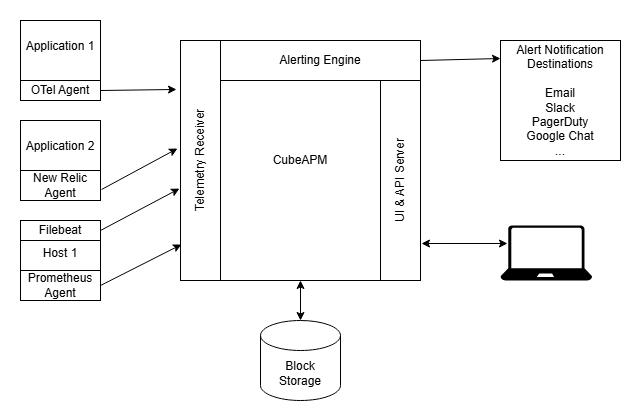
CubeAPM ingests Lambda logs, traces, and metrics through OpenTelemetry, using the open-telemetry-lambda extension layer. The setup involves two steps: adding the OTel collector layer ARN to your function, and setting environment variables to point the collector at CubeAPM’s ingestion endpoint. For functions that need distributed traces, a language-specific instrumentation layer (Node.js, Python, Java, Ruby) is also added.
The collector configuration sends logs to CubeAPM’s log ingestion endpoint, traces to the traces endpoint, and metrics to the metrics endpoint, all over OTLP/HTTP. Lambda continues sending logs to CloudWatch in parallel, since AWS does not provide a native way to disable that stream. If you want to stop the CloudWatch duplication, CubeAPM’s documentation notes the approach of restricting the Lambda execution role’s CloudWatch Logs permissions.
CubeAPM also supports Lambda functions already instrumented with the Datadog or New Relic Lambda layers, by pointing those layers’ output endpoints to CubeAPM instead. This means teams can adopt CubeAPM without re-instrumenting existing functions.
What You See in CubeAPM for AWS Lambda
Once telemetry is flowing, CubeAPM correlates Lambda signals with the rest of your application stack in one interface:
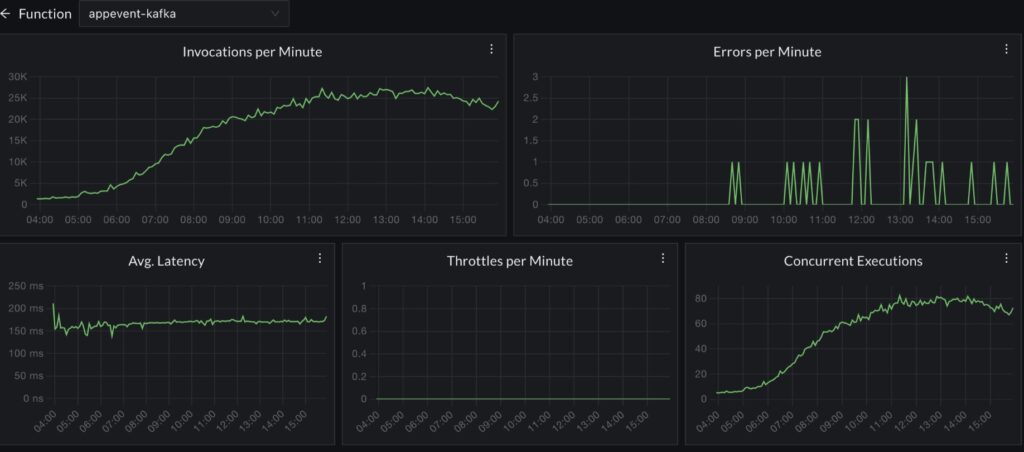
- Lambda invocation rate, error rate, and p50/p95/p99 duration per function, alongside traces from the services that called or were called by each function
- Distributed traces that follow a request from API Gateway through Lambda to downstream databases, queues, and external APIs, without switching tools
- Structured log search across all Lambda functions, queryable by correlation ID, error type, or any field in your JSON log schema
- Infrastructure metrics from hosts, containers, and cloud services in the same view, so a Lambda latency spike can be correlated with a database throttle or a downstream service degradation in seconds
Cost Model
CubeAPM uses per-GB ingestion pricing at $0.15/GB with unlimited retention and runs inside your own VPC. Lambda environments that generate high invocation volumes benefit from a cost model that scales with data volume rather than function count or host count. No traces or log data leave your cloud.
For setup details, see the official CubeAPM documentation.
Conclusion
AWS Lambda monitoring requires watching a different set of signals than server or container monitoring. Duration p99 matters more than average. Throttles matter more than CPU. AsyncEventAge predicts incidents that the error rate misses entirely. Cold start Init Duration determines whether your latency SLO holds under traffic patterns you cannot control.
The teams that operate Lambda reliably in production have instrumentation that answers four questions without manual investigation: which invocations errored and why, which invocations experienced cold starts and how long they lasted, whether throttling is affecting any function in the account, and whether async events are processing in time or accumulating a backlog. If your current setup cannot answer those questions in under five minutes, start with the alert thresholds in this guide and build from there.
Disclaimer: The alert thresholds and metric recommendations in this guide are starting points based on common production patterns. Every Lambda workload is different. Validate all thresholds against your own invocation baselines and traffic patterns before applying them in production.
FAQs
What is AWS Lambda monitoring?
AWS Lambda monitoring is the practice of collecting and analyzing metrics, logs, and traces from Lambda functions to detect performance issues, errors, throttling, and cost inefficiencies before they impact users. It covers invocation count, duration, error rate, cold starts, concurrency utilization, and asynchronous queue health.
What are the most important AWS Lambda metrics to monitor?
The highest-priority metrics are error rate (Errors divided by Invocations), Duration at p99, Throttles, ConcurrentExecutions relative to your account limit, and AsyncEventAge for asynchronous workloads. DeadLetterErrors matters if you use DLQs for async failure handling. Throttles and AsyncEventAge are the most commonly missed.
How do you detect and measure Lambda cold starts?
Cold starts appear as an Init Duration field in the CloudWatch Logs REPORT line. Standard CloudWatch metrics do not expose this as a native metric. Create a CloudWatch Metric Filter to extract Init Duration from logs, or enable Lambda Insights which captures it automatically. For functions using SnapStart, look for Restore Duration instead of Init Duration.
What is SnapStart and which runtimes support it in 2026?
SnapStart is an AWS Lambda feature that snapshots the initialized execution environment after deployment and restores from that snapshot on cold starts, eliminating the initialization phase from subsequent cold starts. As of late 2025, SnapStart supports Java 11, Java 17, Java 21, Python 3.12+, and .NET 8. It is available at no additional cost and requires only enabling a configuration option with no code changes.
Why does Lambda throttling happen and how do you prevent it?
Throttling occurs when Lambda cannot find available concurrency for an invocation. The two common causes are hitting your account-level concurrency limit (default 1,000 per Region) shared across all functions, or hitting a function-level reserved concurrency limit. Prevent it by setting reserved concurrency for critical functions, monitoring UnreservedConcurrentExecutions at the account level, and requesting a concurrency limit increase from AWS before traffic growth makes it urgent.
Should you use AWS X-Ray or OpenTelemetry for Lambda tracing in 2026?
Use OpenTelemetry via the AWS Distro for OpenTelemetry (ADOT) Lambda Layer. AWS placed the X-Ray SDKs and X-Ray Daemon into maintenance mode in February 2026, with OpenTelemetry now the recommended instrumentation path. ADOT can export traces to X-Ray, CloudWatch, or any OTLP-compatible backend, avoiding vendor lock-in while maintaining compatibility with existing X-Ray tooling.
What is AsyncEventAge and why does it matter?
AsyncEventAge measures the time between when Lambda queues an asynchronous event and when the function actually processes it. A rising AsyncEventAge is an early warning signal for throttling, function errors causing retries, or event backlogs accumulating faster than the function can drain them. It predicts incidents before they surface as dropped events or user-facing failures.
How do you control CloudWatch logging costs for high-volume Lambda functions?
Set explicit log group retention policies rather than accepting the default of never-expire. Use structured JSON logging so that log volume is predictable and queryable without generating excessive records. Disable debug-level logging in production or place it behind a sampling mechanism. Route logs directly to S3 via Kinesis Firehose for long-term storage instead of paying CloudWatch storage rates for historical logs you rarely query.