










If you are searching for the difference between SolarWinds Observability and Orion, the short answer is: Orion is the legacy name for what SolarWinds now calls the SolarWinds Platform. SolarWinds Observability is the product family built on top of that platform, available in two deployment models – Self-Hosted and SaaS. They share the same foundational technology. Orion did not go away – it evolved.
This FAQ explains exactly what each product is, how they relate, what changed in the transition, and which version you should be on depending on your environment and requirements.
Key Takeaways
- Orion Platform is now called the SolarWinds Platform. Customers running SolarWinds self-hosted modules on version 2022.2 or later are already on the SolarWinds Platform, which is the evolution of Orion
- Customers on version 2020.2.6 or earlier are still on the original Orion Platform and have not yet migrated
- SolarWinds Observability comes in two forms: Self-Hosted (formerly Hybrid Cloud Observability, built on the SolarWinds Platform) and SaaS (cloud-native, fully managed)
- SolarWinds has stated there is currently no plan to discontinue the Orion Platform or its modules – the transition is available but not forced
- The two deployment options (Self-Hosted and SaaS) can be interconnected via Platform Connect, allowing hybrid approaches without a full rip-and-replace
- SolarWinds Observability SaaS adds capabilities that the self-hosted Orion-based platform does not have: cloud-native APM, distributed tracing, OpenTelemetry support, Kubernetes monitoring, and digital experience monitoring (RUM and synthetics)
Understanding the Full Product Family
Before comparing, it helps to understand the naming clearly. SolarWinds has multiple products that can cause confusion:
Orion Platform: the original on-premises monitoring platform SolarWinds built over more than 20 years. It was a module-based architecture where each capability (network performance, server and application monitoring, network traffic analysis, network configuration management, etc.) was a separately licensed module installed on top of a shared Orion core.
SolarWinds Platform: the evolved version of the Orion Platform. Customers on version 2022.2 or later are on this. Architecturally very similar to Orion – same web console, same alerting engine, same underlying technology – but rebuilt with a unified code and build pipeline, Secure by Design practices, and improved installer.
SolarWinds Observability Self-Hosted: formerly named Hybrid Cloud Observability (HCO). This is SolarWinds’ bundled, subscription-based packaging of the SolarWinds Platform modules. Instead of buying each module separately with perpetual licenses, you get all modules (network, server, virtualization, traffic analysis, configuration management, etc.) activated through a node-based annual subscription. Built on the SolarWinds Platform.
SolarWinds Observability SaaS: formerly named SolarWinds Observability. This is a fully cloud-native, SaaS-delivered product. No on-premises servers to manage. Covers cloud-native applications, microservices, Kubernetes, containers, distributed tracing via OpenTelemetry, digital experience monitoring (RUM and synthetics), and traditional infrastructure monitoring. Connects to Self-Hosted deployments via Platform Connect for a unified hybrid view.
The Orion to SolarWinds Platform Transition
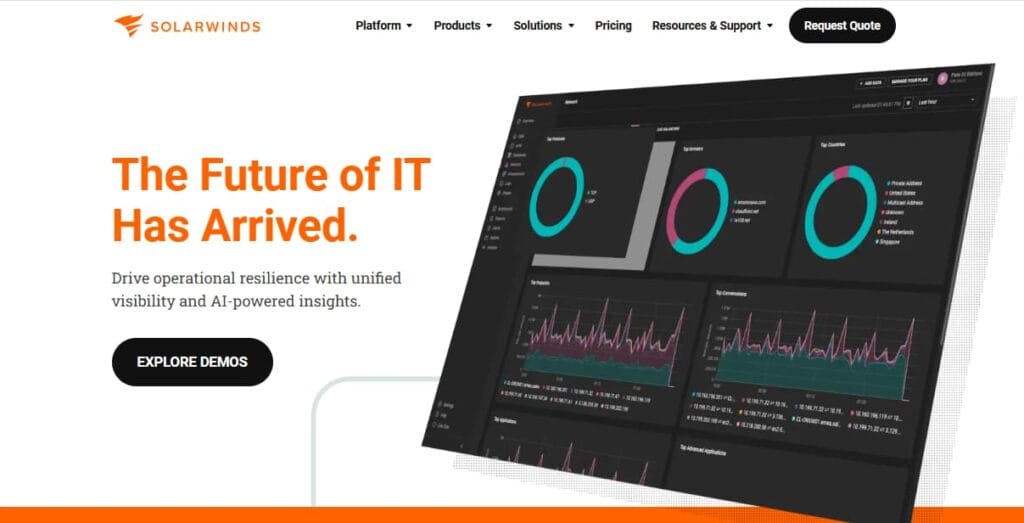
The transition from Orion to the SolarWinds Platform happened gradually, starting in 2022. Here is what SolarWinds states directly about the relationship:
According to SolarWinds’ official documentation: “The Orion Platform was a comprehensive, scalable infrastructure monitoring and management platform designed for the era of network and infrastructure monitoring modules and restricted to self-hosted deployment. Customers running SolarWinds self-hosted Orion modules on 2022.2 or later are utilizing the SolarWinds Platform.”
In plain terms: if you updated your SolarWinds environment to version 2022.2 or later, you are already on the SolarWinds Platform. The Orion name was retired as a branding decision, not a technical one. The underlying technology was evolved and rebuilt with a unified code base, but your dashboards, alerting rules, modules, and workflows were carried forward.
What changed in the SolarWinds Platform vs old Orion
- Single unified build pipeline instead of separate Orion module pipelines – faster updates and better feature collaboration across modules
- Rebuilt with Secure by Design practices, a direct response to the 2020 SUNBURST security incident
- Simplified installation and upgrade process
- Easier evaluation of new versions
- Foundation for integrating with SolarWinds Observability SaaS via Platform Connect
What stayed the same
- Module-based architecture (NPM, SAM, NTA, NCM, VMAN, and others)
- On-premises self-hosted deployment model
- Web console, alerting engine, reporting engine, and APIs
- Familiar dashboards and views, including PerfStack, NetPath, AppStack, and intelligent maps
- SNMP, WMI, ICMP, and agent-based polling
Orion Modules vs Hybrid Cloud Observability vs Observability Self-Hosted
This is the specific comparison most teams need when evaluating their licensing options.
Legacy Orion module licensing: perpetual licenses purchased per module (NPM, SAM, NTA, NCM, VMAN, each purchased and licensed separately), priced per node or per element (interfaces, volumes). Each module required its own license. Customers paying annual maintenance got updates.
SolarWinds Observability Self-Hosted (formerly Hybrid Cloud Observability): a subscription-based bundle that activates multiple modules through a single node-based license. Two main tiers:
- Essentials: Includes the core SolarWinds Platform modules – network performance monitoring (NPM), server and application monitoring (SAM), and related core capabilities
- Advanced: Includes everything in Essentials plus additional modules, including network traffic analysis (NTA), virtualization manager (VMAN), network configuration manager (NCM), and others
With Observability Self-Hosted, you buy nodes and activate capabilities across them with a single SKU rather than purchasing each module separately. Flexible Licensing (introduced in 2022.3) lets you allocate your node pool across multiple SolarWinds Platform instances – useful for organizations with air-gapped networks, branch offices, or separate infrastructure segments.
The practical difference for existing Orion customers: If you are on a perpetual module license with annual maintenance, you are still fully supported. Converting to Observability Self-Hosted gives you the subscription bundling and the path to connect with the SaaS product via Platform Connect. SolarWinds has stated no plan to force this transition.
SolarWinds Observability Self-Hosted vs SaaS: The Deeper Split
This is where the two products diverge most significantly in capability, not just in deployment model.
| Capability | Observability Self-Hosted | Observability SaaS |
| Network monitoring (SNMP, WMI, ICMP) | Yes | Yes |
| Server and application monitoring | Yes | Yes |
| Network traffic analysis | Yes (Advanced) | Yes |
| Network configuration management | Yes (Advanced) | Yes |
| Virtualization monitoring | Yes (Advanced) | Yes |
| Distributed tracing (APM) | No | Yes |
| OpenTelemetry support | No (Self-Hosted does not natively support OTel) | Yes – native OTel Collector, OTLP ingest |
| Kubernetes and container monitoring | Limited | Yes – full K8s entity monitoring |
| Digital experience monitoring (RUM) | No | Yes – website RUM reports |
| Synthetic monitoring | No | Yes – synthetic transactions |
| Cloud-native application monitoring | Limited | Yes |
| Log management | Yes | Yes |
| AIOps and ML-enhanced alerting | Yes | Yes – enhanced ML capabilities |
| Database observability | Yes (via SolarWinds DPA module) | Yes – Database Observability |
| Deployment model | Behind your firewall or self-hosted in AWS, Azure, or GCP | Fully managed SaaS, choice of Americas, Europe, or Asia Pacific regions |
| Interconnection | Via Platform Connect to SaaS | Via Platform Connect to Self-Hosted |
The key insight: SolarWinds Observability SaaS is the product for teams that need modern observability – distributed tracing, OpenTelemetry, Kubernetes visibility, RUM, and synthetic monitoring. The Self-Hosted product (and the Orion heritage it builds on) is the product for teams that primarily need traditional network and infrastructure monitoring behind their firewall.
When to Stay on Orion / SolarWinds Platform (Self-Hosted)
Based on SolarWinds’ own positioning, self-hosted remains the right choice when:
- Your environment is primarily on-premises, with strict requirements about data leaving your network
- You rely heavily on SNMP-based network device monitoring, server polling, traffic flow analysis, and configuration management – the core Orion capabilities
- You have compliance or security requirements that prevent sending telemetry to SaaS infrastructure
- Your IT operations team is optimized around the existing Orion-based workflow and tooling
- You need an air-gapped deployment or deployment across multiple isolated network segments (Flexible Licensing in Observability Self-Hosted helps here)
When to Move to SolarWinds Observability SaaS
SolarWinds Observability SaaS is the right direction when:
- Your environment has significant cloud-native workloads: Kubernetes clusters, containerized microservices, and cloud-hosted applications
- You need distributed tracing and APM for custom applications, not just infrastructure polling
- You want OpenTelemetry-based instrumentation with an OTLP-compatible backend
- You need digital experience monitoring – RUM or synthetic transaction testing
- You want to reduce the operational overhead of managing SolarWinds Platform servers and SQL Server databases
- You want unified visibility across on-premises infrastructure (via Platform Connect from Self-Hosted) and cloud-native applications (via SaaS) in one interface
Platform Connect: The Bridge Between Both
SolarWinds Observability SaaS can ingest data from SolarWinds Observability Self-Hosted deployments through Platform Connect. This means organizations do not have to choose one or the other outright. You can continue running the self-hosted platform for traditional network and infrastructure monitoring while adding SaaS for cloud-native and application observability, with both visible in the same SaaS console.
SolarWinds explicitly positions this as a migration path that avoids rip-and-replace: you can adopt SaaS for new workloads while your self-hosted platform continues managing existing infrastructure, then migrate gradually if and when it makes sense.
The 2020 Security Incident: Context for Evaluation
Any accurate comparison of SolarWinds Orion and its successors must acknowledge the December 2020 SUNBURST supply-chain attack, which SolarWinds disclosed publicly and which affected Orion Platform products. SolarWinds has responded with its Secure by Design initiative, rebuilding its build pipeline and development practices. The SolarWinds Platform and Observability Self-Hosted are built on this new foundation.
For security and procurement teams evaluating SolarWinds products in 2026, SolarWinds maintains a dedicated trust page and Secure by Design documentation. The incident remains a relevant risk consideration for organizations with elevated threat models, and teams should factor their own security assessment into the evaluation alongside SolarWinds’ documented remediation steps.
When SolarWinds Monitoring Stops at the Infrastructure Layer
SolarWinds Observability – both Self-Hosted and SaaS – is built for infrastructure and network monitoring: SNMP device polling, server resource metrics, traffic flow analysis, network configuration management, and Kubernetes workload health. These are the right tools for answering “is the infrastructure healthy?”
What neither product answers is what is happening inside the applications running on that infrastructure. When a SolarWinds alert fires for high CPU on a server or elevated response time on a network node, the next question – which application request is responsible, which service call is slow, which database query is timing out – requires a different layer of visibility.
What Is Causing Application Slowness on My SolarWinds-Monitored Infrastructure?
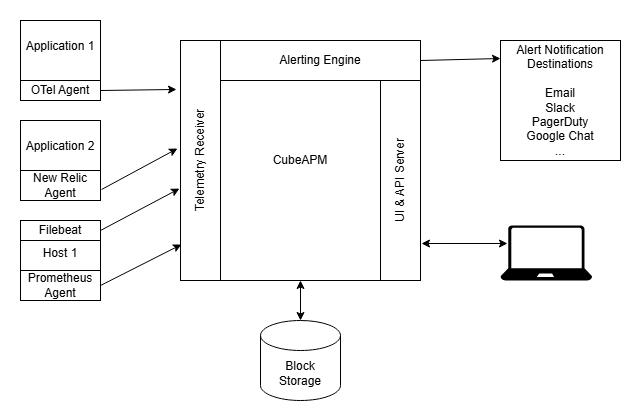
This is the gap CubeAPM addresses for teams running SolarWinds. CubeAPM instruments application services via the OpenTelemetry standard and captures distributed traces – the full path of a request from the user’s browser through every service and database call it makes. When a SolarWinds alert fires on a node, CubeAPM shows you which application endpoint was generating load on that node, how long each downstream call took, and where the bottleneck is in the application code.
CubeAPM is self-hosted inside your own cloud account or on-premises environment – the same data residency model that makes SolarWinds Self-Hosted attractive to regulated industries. The two tools answer different questions from the same incident: SolarWinds tells you the infrastructure is under pressure, CubeAPM tells you which application behavior is causing it.
Summary: Which One Are You Actually On?
| Your situation | What you have | Recommended path |
| SolarWinds version 2022.2 or later | SolarWinds Platform (evolved Orion) | You are currently evaluating Observability Self-Hosted bundling or SaaS for cloud-native needs |
| SolarWinds version 2020.2.6 or earlier | Original Orion Platform | Upgrade to SolarWinds Platform (2022.2+) as a first step |
| Hybrid Cloud Observability | SolarWinds Observability Self-Hosted | You are on the current self-hosted product |
| On-premises only, traditional network/infra | Stay on Self-Hosted | Add SaaS via Platform Connect if cloud-native needs emerge |
| Cloud-native apps, K8s, distributed tracing | SolarWinds Observability SaaS | Start SaaS evaluation; connect to existing Self-Hosted via Platform Connect |
| Mixed hybrid environment | Both via Platform Connect | Self-Hosted for on-prem/infra, SaaS for cloud-native and application observability |
Disclaimer: All SolarWinds product details, naming conventions, feature descriptions, and positioning in this article are sourced directly from SolarWinds’ official product pages, official documentation (documentation.solarwinds.com), and the SolarWinds blog as of May 2026. Product names, features, and licensing structures change – verify current details at solarwinds.com and documentation.solarwinds.com before making decisions. Nothing in this article constitutes professional, legal, compliance, or security advice.
Also read:
How Do I Monitor AWS Kinesis Stream Lag and Throughput?