










Python powers a wide range of production workloads: web APIs in Flask, Django, and FastAPI; data pipelines; background workers; and microservices. Each of these has a different failure profile. A Django API can slow down due to an N+1 query that never shows up in application logs. A Celery worker can silently retry a task 50 times before hitting its limit. A FastAPI endpoint can return 200 with malformed data on every call without the health check catching it.
Observability for Python means having three signal types working together: structured logs that capture what your code reports, metrics that track aggregated behavior over time, and distributed traces that show exactly which code path, database query, or downstream service call caused a specific request to be slow or fail. OpenTelemetry is the standard instrumentation framework for all three. It graduated as a CNCF project in May 2026, is vendor-neutral, and produces telemetry that can be sent to any OTLP-compatible backend without re-instrumenting your code.
This guide covers structured logging in Python, setting up OpenTelemetry metrics and traces, zero-code auto-instrumentation, manual instrumentation for custom spans, and how to send all three signals to CubeAPM.
Key Takeaways
- The core opentelemetry-api and opentelemetry-sdk packages require Python 3.10 or higher as of v1.42.1 (May 2026); opentelemetry-distro supports Python 3.9 and higher.
- The OTel log specification is stable, but the Python SDK log signal is still in beta (opentelemetry-instrumentation-logging 0.63b1 as of May 2026).
- opentelemetry-bootstrap -a install auto-detects installed packages and installs the corresponding instrumentation libraries; run it after installing project dependencies.
- OTEL_PYTHON_LOG_CORRELATION=true automatically injects trace ID and span ID into Python log records, enabling log-to-trace correlation without a custom logging filter.
- Zero-code auto-instrumentation via opentelemetry-instrument covers Flask, Django, FastAPI, SQLAlchemy, requests, Redis, and Celery without code changes.
- Always let exceptions propagate out of handler functions unhandled; catching them silently prevents them from being recorded on the active span and incremented in error metrics.
- OpenTelemetry graduated as a CNCF project on May 21, 2026.
Why All Three Signals Matter for Python
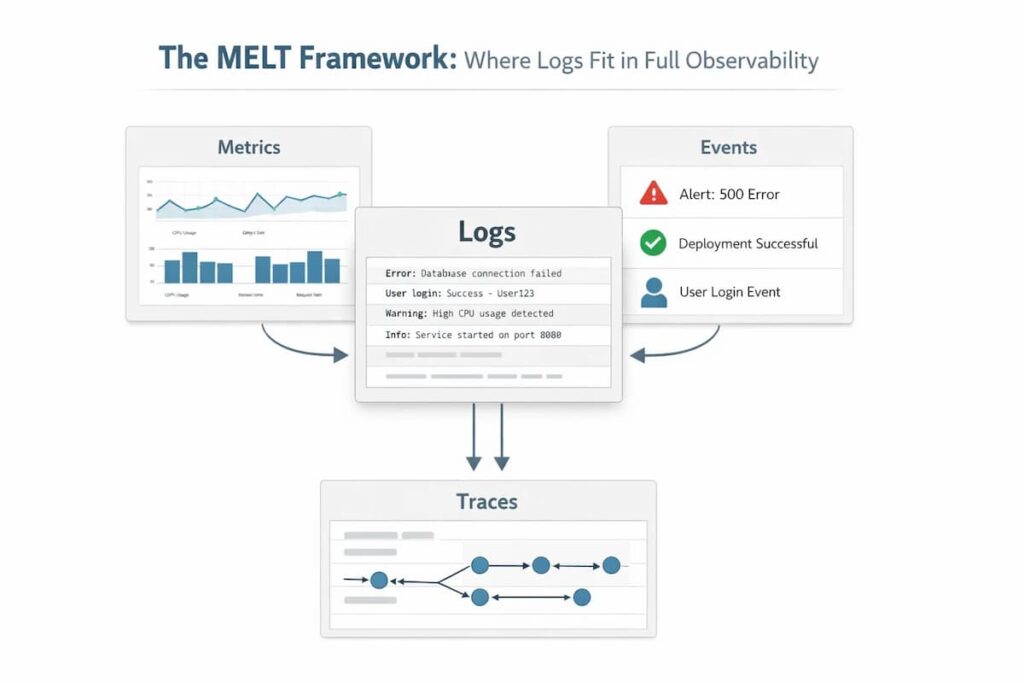
Logs alone miss the context. Python’s standard logging module produces timestamped text lines. When you are investigating a latency spike in a service that handles hundreds of requests per second, searching free-text logs for a specific request is slow and imprecise. Structured JSON logs with a trace ID attached let you jump from a metric alert directly to the specific log events for the affected requests.
Metrics alone miss the cause. A metric showing p99 latency at 8 seconds tells you something is wrong. It does not tell you whether the slowness is in your SQLAlchemy ORM, a Redis call, a downstream HTTP request, or your own code. Distributed traces show you exactly which span in the request is slow and why.
Traces alone miss the trends. A single slow trace tells you one request was slow. Metrics tell you how often requests are slow, whether latency is trending up, and whether the error rate is above your SLO. Metrics and traces together let you detect degradation before it becomes an outage and then investigate the root cause after the alert fires.
Step 1: Structured Logging in Python
Python’s built-in logging module writes unstructured text by default. Replace the default formatter with a JSON formatter so that every log line is a parseable record with consistent fields.
Install a JSON log formatter:
pip install python-json-loggerConfigure structured logging at application startup:
import logging

import sys

from pythonjsonlogger import jsonlogger

def configure_logging(service_name: str, log_level: str = "INFO"):

    logger = logging.getLogger()

    logger.setLevel(getattr(logging, log_level.upper(), logging.INFO))

    handler = logging.StreamHandler(sys.stdout)

    formatter = jsonlogger.JsonFormatter(

        fmt="%(asctime)s %(levelname)s %(name)s %(message)s",

        rename_fields={"asctime": "timestamp", "levelname": "severity"},

    )

    handler.setFormatter(formatter)

    logger.handlers = [handler]

configure_logging(service_name="checkout-service")

Use a module-level logger in each file rather than the root logger directly:

import logging

logger = logging.getLogger(__name__)

def process_order(order_id: str, user_id: str):

    logger.info(

        "processing order",

        extra={"order_id": order_id, "user_id": user_id, "stage": "validate"},

)This produces structured output like:
{

  "timestamp": "2026-06-09T10:22:31.412Z",

  "severity": "INFO",

  "name": "orders.processor",

  "message": "processing order",

  "order_id": "ord_123",

  "user_id": "usr_456",

  "stage": "validate"

}Connecting logs to traces: When OpenTelemetry tracing is configured (Step 3 below), inject the active trace ID and span ID into every log record so you can jump from a log event to the trace that produced it:
from opentelemetry import trace

class TraceContextFilter(logging.Filter):

    def filter(self, record):

        span = trace.get_current_span()

        ctx = span.get_span_context()

        if ctx.is_valid:

            record.trace_id = format(ctx.trace_id, "032x")

            record.span_id = format(ctx.span_id, "016x")

        else:

            record.trace_id = ""

            record.span_id = ""

        return True

# Add to handler

handler.addFilter(TraceContextFilter())Step 2: Install OpenTelemetry Python Packages
The core opentelemetry-api and opentelemetry-sdk packages currently require Python 3.10 or higher (latest stable release: 1.42.1, May 2026). The opentelemetry-distro package (which provides opentelemetry-bootstrap and opentelemetry-instrument) supports Python 3.9 and higher.
Install the core packages:
pip install opentelemetry-api opentelemetry-sdkInstall the OTLP exporter to send telemetry to any OTLP-compatible backend:
pip install opentelemetry-exporter-otlpFor zero-code auto-instrumentation (covers Step 3 below):
pip install opentelemetry-distro

opentelemetry-bootstrap -a installopentelemetry-bootstrap -a install reads your installed packages and automatically installs the corresponding instrumentation libraries. For example, if flask is installed, it installs opentelemetry-instrumentation-flask. Run it after installing your project’s dependencies.
Commonly used instrumentation libraries for manual installation:
pip install opentelemetry-instrumentation-flask

pip install opentelemetry-instrumentation-django

pip install opentelemetry-instrumentation-fastapi

pip install opentelemetry-instrumentation-requests

pip install opentelemetry-instrumentation-sqlalchemy

pip install opentelemetry-instrumentation-psycopg2

pip install opentelemetry-instrumentation-redis

pip install opentelemetry-instrumentation-celeryStep 3: Zero-Code Auto-Instrumentation
OpenTelemetry Python provides a zero-code agent via the opentelemetry-instrument command that instruments your application without modifying source code. It uses monkey-patching to wrap framework and library calls at import time.
Run your application through the agent:
opentelemetry-instrument \

  --traces_exporter otlp \

  --metrics_exporter otlp \

  --logs_exporter otlp \

  --exporter_otlp_endpoint http://your-cubeapm-instance:4317 \

  --exporter_otlp_protocol grpc \

  --service_name my-python-service \

python app.pyOr configure via environment variables, which is cleaner for containerized deployments:
export OTEL_TRACES_EXPORTER=otlp

export OTEL_METRICS_EXPORTER=otlp

export OTEL_LOGS_EXPORTER=otlp

export OTEL_EXPORTER_OTLP_ENDPOINT=http://your-cubeapm-instance:4317

export OTEL_EXPORTER_OTLP_PROTOCOL=grpc

export OTEL_SERVICE_NAME=my-python-service

export OTEL_PYTHON_LOG_CORRELATION=true

opentelemetry-instrument python app.pySetting OTEL_PYTHON_LOG_CORRELATION=true automatically injects trace context (trace ID and span ID) into Python log records, enabling log-to-trace correlation without the manual filter from Step 1.
What auto-instrumentation covers for common Python frameworks:
| Library | What is instrumented |
| Flask | HTTP request spans, response status, route pattern as span name |
| Django | HTTP request spans, database query spans via ORM |
| FastAPI | HTTP request spans, route pattern as span name |
| requests | Outbound HTTP client calls with URL, method, status code |
| SQLAlchemy | SQL query spans with sanitized query text |
| psycopg2 | PostgreSQL query spans |
| Redis | Redis command spans |
| Celery | Task execution spans, task name, queue name |
Step 4: Manual Instrumentation for Custom Spans
Auto-instrumentation covers framework and library calls. It does not cover your business logic. Wrap important business operations in custom spans to get visibility into the work your code does between framework calls.
Initialize a tracer:
from opentelemetry import trace

tracer = trace.get_tracer(__name__)Create a child span for a business operation:
def calculate_discount(user_id: str, order_total: float) -> float:

    with tracer.start_as_current_span("calculate_discount") as span:

        span.set_attribute("user.id", user_id)

        span.set_attribute("order.total", order_total)

        discount = fetch_user_discount_tier(user_id)

        result = order_total * discount

        span.set_attribute("discount.rate", discount)

        span.set_attribute("discount.amount", order_total - result)

return resultRecord an exception within a span:
from opentelemetry.trace import StatusCode

def process_payment(payment_id: str):

    with tracer.start_as_current_span("process_payment") as span:

        span.set_attribute("payment.id", payment_id)

        try:

            result = payment_gateway.charge(payment_id)

            span.set_attribute("payment.status", result.status)

            return result

        except PaymentGatewayError as e:

            span.record_exception(e)

            span.set_status(StatusCode.ERROR, str(e))

raiseStep 5: Custom Metrics
Auto-instrumentation provides request rate, error rate, and latency metrics for instrumented libraries. Add custom metrics for business-level signals that frameworks do not expose automatically.
Initialize a meter:
from opentelemetry import metrics

meter = metrics.get_meter(__name__)

Counter: monotonically increasing count, use rate() to get per-second rate:

python

orders_processed = meter.create_counter(

    name="orders.processed",

    description="Total number of orders processed",

    unit="1",

)

def process_order(order):

    # ... processing logic

orders_processed.add(1, {"order.type": order.type, "region": order.region})Histogram: records a distribution of values, used for latency and size measurements:
import time

order_processing_duration = meter.create_histogram(

    name="orders.processing.duration",

    description="Time to process an order",

    unit="ms",

)

def process_order(order):

    start = time.time()

    # ... processing logic

    duration_ms = (time.time() - start) * 1000

    order_processing_duration.record(

        duration_ms,

        {"order.type": order.type}

)UpDownCounter: can increase and decrease, used for values like queue depth or active connections:
active_jobs = meter.create_up_down_counter(

    name="jobs.active",

    description="Number of jobs currently being processed",

    unit="1",

)

def start_job(job_id: str):

    active_jobs.add(1, {"job.type": "background"})

def finish_job(job_id: str):

active_jobs.add(-1, {"job.type": "background"})Step 6: Set Up the SDK Programmatically
For applications where opentelemetry-instrument is not practical (scripts, workers, custom entry points), configure the OpenTelemetry SDK in code:
from opentelemetry import trace, metrics

from opentelemetry.sdk.trace import TracerProvider

from opentelemetry.sdk.trace.export import BatchSpanProcessor

from opentelemetry.sdk.metrics import MeterProvider

from opentelemetry.sdk.metrics.export import PeriodicExportingMetricReader

from opentelemetry.sdk.resources import Resource, SERVICE_NAME

from opentelemetry.exporter.otlp.proto.grpc.trace_exporter import OTLPSpanExporter

from opentelemetry.exporter.otlp.proto.grpc.metric_exporter import OTLPMetricExporter

from opentelemetry._logs import set_logger_provider

from opentelemetry.sdk._logs import LoggerProvider

from opentelemetry.sdk._logs.export import BatchLogRecordProcessor

from opentelemetry.exporter.otlp.proto.grpc._log_exporter import OTLPLogExporter

OTLP_ENDPOINT = "http://your-cubeapm-instance:4317"

SERVICE = "my-python-service"

def configure_otel():

    resource = Resource(attributes={SERVICE_NAME: SERVICE})

    # Traces

    tracer_provider = TracerProvider(resource=resource)

    tracer_provider.add_span_processor(

        BatchSpanProcessor(OTLPSpanExporter(endpoint=OTLP_ENDPOINT, insecure=True))

    )

    trace.set_tracer_provider(tracer_provider)

    # Metrics

    metric_reader = PeriodicExportingMetricReader(

        OTLPMetricExporter(endpoint=OTLP_ENDPOINT, insecure=True),

        export_interval_millis=30_000,

    )

    meter_provider = MeterProvider(resource=resource, metric_readers=[metric_reader])

    metrics.set_meter_provider(meter_provider)

    # Logs (beta in Python SDK as of June 2026)

    logger_provider = LoggerProvider(resource=resource)

    logger_provider.add_log_record_processor(

        BatchLogRecordProcessor(OTLPLogExporter(endpoint=OTLP_ENDPOINT, insecure=True))

    )

    set_logger_provider(logger_provider)

configure_otel()Note on insecure=True: Use insecure=True only within a private network. For production deployments sending telemetry over the public internet, configure TLS by setting insecure=False and providing the appropriate certificates.
Step 7: Monitor Python Application Health with CubeAPM

CubeAPM receives all three signal types from Python applications via OTLP: traces, metrics, and logs. Setting OTEL_EXPORTER_OTLP_ENDPOINT to your CubeAPM instance is the only configuration change required from the standard OTel setup.
What CubeAPM monitors for Python applications:
- HTTP request rate, error rate, and p99 latency per endpoint (from auto-instrumentation)
- Database query spans with sanitized SQL, duration, and error status (SQLAlchemy, psycopg2)
- Outbound HTTP client call spans with URL, method, and status (requests library)
- Celery task execution spans, task name, queue, duration, and retry count
- Custom business metrics (counters, histograms, up-down counters) from your application code
- Structured JSON logs correlated to traces via trace ID and span ID injection
- Distributed traces across Python microservices with end-to-end flame graphs
Key alerts to configure for Python applications in CubeAPM:
| Alert | Condition | Severity |
| High error rate | HTTP error rate > 1% for 5 min | Warning |
| High p99 latency | p99 request duration > 2,000 ms | Warning |
| Slow database queries | Any DB span duration > 500 ms | Warning |
| Celery task failures | Task error rate > 0 for 5 min | Warning |
| Custom metric threshold | orders.processed rate drops to 0 | Critical |
| High exception rate | Exception spans > 10x baseline | Warning |
Read the docs to configure OTLP ingestion and Python application monitoring.
Summary
Python application observability requires all three signal types. Logs tell you what your code reported. Metrics show aggregate behavior over time. Traces show the exact request path causing a specific latency or error. OpenTelemetry connects all three under one instrumentation framework, and zero-code auto-instrumentation via opentelemetry-instrument covers the most common Python frameworks without code changes.
| Signal | Collection method | Key data |
| Structured logs | python-json-logger + logging module + OTEL_PYTHON_LOG_CORRELATION=true | JSON log lines with trace ID and span ID injected |
| Distributed traces | OTel auto-instrumentation + manual spans | HTTP request spans, DB query spans, custom business spans |
| Metrics | OTel auto-instrumentation + custom meter.create_* instruments | Request rate, error rate, latency histograms, custom counters |
| Zero-code setup | opentelemetry-bootstrap -a install + opentelemetry-instrument | Covers Flask, Django, FastAPI, SQLAlchemy, requests, Redis, Celery |
Disclaimer: All OpenTelemetry Python package names, configuration options, and API calls sourced from the official OpenTelemetry Python documentation at opentelemetry.io/docs/languages/python/ and PyPI, verified June 2026. Current stable release: opentelemetry-api and opentelemetry-sdk 1.42.1 (May 21, 2026). The core opentelemetry-api and opentelemetry-sdk packages require Python 3.10 or higher as of v1.42.1; opentelemetry-distro supports Python 3.9 and higher. The OTel log specification is stable; the Python SDK log signal is still in beta (opentelemetry-instrumentation-logging 0.63b1 as of May 2026; source: github.com/open-telemetry/opentelemetry-python). OpenTelemetry graduated as a CNCF project on May 21, 2026. The insecure=True flag in OTLP exporters disables TLS and should only be used within private networks. CubeAPM: $0.15/GB, no per-service or per-host fees.
Also read:
Observability for Serverless Applications on AWS Lambda: What to Track and How
Observability for Docker Containers: What to Track and How
What Are the Best Grafana Alternatives for Kubernetes Dashboards?