










Setting up a Kafka consumer lag alert with Prometheus requires three components working together: kafka_exporter (by danielqsj) to expose consumer group lag as Prometheus metrics, Prometheus to scrape and evaluate alerting rules, and Alertmanager to route and deliver notifications. This guide covers each step end-to-end.
Key Takeaways
- kafka_exporter is the standard tool for exposing Kafka consumer group lag to Prometheus. It connects directly to Kafka brokers via the Admin API – no JMX configuration required
- kafka_exporter exposes metrics on port 9308 at /metrics by default
- The most important lag metric is kafka_consumergroup_lag – per partition, per consumer group, per topic
- Alert on lag growth rate, not just the absolute lag value. A fixed threshold, like lag > 10000 produces false positives during normal catch-up periods after a consumer restart. A growing-lag alert is more signal, less noise
- Always alert separately on kafka_consumergroup_lag == 0 unless kafka_topic_partition_current_offset == 0 – a consumer group with zero members will show zero lag, masking the fact that no one is processing the topic
- Consumer group metrics are not available from kafka_exporter if no consumer with a consumer group is currently active – the metric simply will not be present
Step 1: Deploy kafka_exporter
kafka_exporter connects to Kafka brokers using the Admin API and exposes consumer group offsets, log-end offsets, and derived lag values in Prometheus format. It does not require JMX access to the brokers.
Docker (quickstart):
docker run -d \

  --name kafka-exporter \

  -p 9308:9308 \

  danielqsj/kafka-exporter:latest \

  --kafka.server=broker-1:9092 \

  --kafka.server=broker-2:9092 \

--kafka.server=broker-3:9092Verify metrics are being served:
curl http://localhost:9308/metrics | grep kafka_consumergroup_lagDocker Compose (with a Kafka cluster):
services:

  kafka-exporter:

    image: danielqsj/kafka-exporter:latest

    command:

      - "--kafka.server=kafka-1:9092"

      - "--kafka.server=kafka-2:9092"

      - "--kafka.server=kafka-3:9092"

      - "--topic.filter=.*"

      - "--group.filter=.*"

    ports:

      - "9308:9308"

restart: unless-stoppedKubernetes Deployment:
apiVersion: apps/v1

kind: Deployment

metadata:

  name: kafka-exporter

  namespace: monitoring

spec:

  replicas: 1

  selector:

    matchLabels:

      app: kafka-exporter

  template:

    metadata:

      labels:

        app: kafka-exporter

      annotations:

        prometheus.io/scrape: "true"

        prometheus.io/port: "9308"

    spec:

      containers:

        - name: kafka-exporter

          image: danielqsj/kafka-exporter:latest

          args:

            - --kafka.server=kafka-0.kafka-headless.kafka.svc.cluster.local:9092

            - --kafka.server=kafka-1.kafka-headless.kafka.svc.cluster.local:9092

            - --kafka.server=kafka-2.kafka-headless.kafka.svc.cluster.local:9092

            - --topic.filter=^[^_].*

            - --group.filter=.*

          ports:

            - containerPort: 9308

              name: metrics

          resources:

            requests:

              memory: "64Mi"

              cpu: "100m"

            limits:

              memory: "128Mi"

              cpu: "200m"

---

apiVersion: v1

kind: Service

metadata:

  name: kafka-exporter

  namespace: monitoring

spec:

  ports:

    - port: 9308

      targetPort: 9308

      name: metrics

  selector:

app: kafka-exporterThe --topic.filter=^[^_].* flag excludes internal Kafka topics (which start with _ such as __consumer_offsets and __transaction_state) from the metrics output. This reduces noise and avoids alerting on internal bookkeeping topics.
Note on consumer group metrics availability: kafka_exporter only exposes consumer group lag metrics when there is an active consumer group. If a consumer group has no active members and no committed offsets, the kafka_consumergroup_lag metric for that group will simply not appear in the output. Design your alerts to handle missing data appropriately.
Step 2: Configure Prometheus to Scrape kafka_exporter
Add a scrape job to your prometheus.yml:
global:

  scrape_interval: 15s

  evaluation_interval: 15s

rule_files:

  - "kafka-alerts.yml"

alerting:

  alertmanagers:

    - static_configs:

        - targets:

            - alertmanager:9093

scrape_configs:

  - job_name: kafka-exporter

    scrape_interval: 30s

    scrape_timeout: 25s

    static_configs:

      - targets:

- kafka-exporter:9308A scrape interval of 30 seconds is recommended for kafka_exporter. Scraping more frequently increases load on the broker’s Admin API without providing more precision for meaningful lag alerting.
For Kubernetes with Prometheus Operator, use a ServiceMonitor instead:
apiVersion: monitoring.coreos.com/v1

kind: ServiceMonitor

metadata:

  name: kafka-exporter

  namespace: monitoring

spec:

  selector:

    matchLabels:

      app: kafka-exporter

  endpoints:

    - port: metrics

      interval: 30s

scrapeTimeout: 25sStep 3: Understand the Key Metrics
Before writing alert rules, confirm these metrics are populating correctly by running PromQL queries in your Prometheus UI:
# All consumer group lag values currently being tracked

kafka_consumergroup_lag

# Log-end offset per partition

kafka_topic_partition_current_offset

# Current committed offset per consumer group

kafka_consumergroup_current_offset

# Total lag per consumer group across all partitions of a topic

sum by (consumergroup, topic) (kafka_consumergroup_lag)Label reference for kafka_consumergroup_lag:
consumergroup– the consumer group IDtopic– the topic namepartition– the partition number (string)
Step 4: Write the Alert Rules
Create kafka-alerts.yml with production-grade rules. The rules below progress from most critical to supporting signals.
groups:

  - name: kafka-consumer-lag

    rules:

      # -------------------------------------------------------

      # CRITICAL: Consumer lag is continuously growing

      # This is more reliable than a fixed threshold because it

      # fires only when lag is genuinely increasing, not during

      # normal catch-up after a consumer restart.

      # -------------------------------------------------------

      - alert: KafkaConsumerLagGrowing

        expr: |

          rate(kafka_consumergroup_lag[10m]) > 0

        for: 15m

        labels:

          severity: warning

        annotations:

          summary: "Kafka consumer lag is growing"

          description: >

            Consumer group {{ $labels.consumergroup }} is falling behind

            on topic {{ $labels.topic }} partition {{ $labels.partition }}.

            Lag is growing at {{ $value | humanize }} records/second.

            Current lag: {{ with query (printf "kafka_consumergroup_lag{consumergroup='%s',topic='%s',partition='%s'}" $labels.consumergroup $labels.topic $labels.partition) }}{{ . | first | value | humanize }}{{ end }} records.

      # -------------------------------------------------------

      # CRITICAL: Lag exceeds absolute threshold

      # Set this to a value meaningful for your SLA.

      # The 'for' duration prevents false positives during

      # normal traffic spikes that briefly exceed the threshold.

      # -------------------------------------------------------

      - alert: KafkaConsumerLagHigh

        expr: |

          kafka_consumergroup_lag > 100000

        for: 5m

        labels:

          severity: critical

        annotations:

          summary: "Kafka consumer lag is critically high"

          description: >

            Consumer group {{ $labels.consumergroup }} has lag of

            {{ $value | humanize }} records on topic {{ $labels.topic }}

            partition {{ $labels.partition }}.

      # -------------------------------------------------------

      # WARNING: No active consumers on a topic partition

      # kafka_consumergroup_lag == 0 can mean either caught up

      # OR no consumers at all. Check offset movement to distinguish.

      # A consumer group that hasn't committed recently on a

      # non-empty topic is likely stalled or absent.

      # -------------------------------------------------------

      - alert: KafkaConsumerGroupStalled

        expr: |

          (

            kafka_consumergroup_lag > 0

          ) and (

            increase(kafka_consumergroup_current_offset[10m]) == 0

          )

        for: 10m

        labels:

          severity: warning

        annotations:

          summary: "Kafka consumer group is not making progress"

          description: >

            Consumer group {{ $labels.consumergroup }} has not committed

            any new offsets in the last 10 minutes on topic

            {{ $labels.topic }} partition {{ $labels.partition }},

            but lag is {{ $value | humanize }} records.

      # -------------------------------------------------------

      # CRITICAL: Topic has messages but no consumer group is

      # tracking it at all. This fires when there are messages

      # in a partition but no consumer group has ever committed

      # an offset for it.

      # -------------------------------------------------------

      - alert: KafkaTopicHasNoConsumers

        expr: |

          kafka_topic_partition_current_offset > 0

          unless on(topic, partition)

          kafka_consumergroup_current_offset

        for: 5m

        labels:

          severity: warning

        annotations:

          summary: "Kafka topic partition has no consumer groups"

          description: >

            Topic {{ $labels.topic }} partition {{ $labels.partition }}

            has messages (offset {{ $value | humanize }}) but no

consumer group is tracking it.Step 5: Configure Alertmanager Routing
Create alertmanager.yml to route Kafka lag alerts to the right channel:
global:

  resolve_timeout: 5m

  slack_api_url: 'https://hooks.slack.com/services/YOUR/SLACK/WEBHOOK'

route:

  group_by: ['alertname', 'topic', 'consumergroup']

  group_wait: 30s

  group_interval: 5m

  repeat_interval: 1h

  receiver: default

  routes:

    - match:

        alertname: KafkaConsumerLagHigh

      receiver: kafka-critical

      repeat_interval: 15m

    - match:

        alertname: KafkaConsumerLagGrowing

      receiver: kafka-warning

receivers:

  - name: default

    slack_configs:

      - channel: '#alerts'

        title: '{{ .GroupLabels.alertname }}'

        text: '{{ range .Alerts }}{{ .Annotations.description }}{{ end }}'

  - name: kafka-critical

    slack_configs:

      - channel: '#kafka-incidents'

        title: ':fire: Kafka Critical: {{ .GroupLabels.alertname }}'

        text: '{{ range .Alerts }}{{ .Annotations.description }}{{ end }}'

        send_resolved: true

    pagerduty_configs:

      - routing_key: 'YOUR_PAGERDUTY_INTEGRATION_KEY'

  - name: kafka-warning

    slack_configs:

      - channel: '#kafka-monitoring'

        title: ':warning: Kafka Warning: {{ .GroupLabels.alertname }}'

text: '{{ range .Alerts }}{{ .Annotations.description }}{{ end }}'Grouping by topic and consumergroup prevents alert storms when many partitions of the same topic are lagging simultaneously – they are grouped into one notification rather than firing individually per partition.
Alert Threshold Guidance
There is no universal lag threshold. The right value depends entirely on your topic’s write rate and your SLA.
- For growing lag alerts: Use rate(kafka_consumergroup_lag[10m]) > 0 for 15m as your baseline. This fires only when lag has been continuously increasing for 15 consecutive minutes – not during normal catch-up periods. Tune the for duration based on how quickly your team can respond.
- For absolute lag alerts: Calculate the threshold from your SLA, not from an arbitrary number:
Threshold = Acceptable delay in seconds × Write rate (records/second)
Example: If you can tolerate 60 seconds of delay and your topic receives 500 records per second, your threshold is 30,000 records. A topic receiving 5 records per second with the same 60-second tolerance gives a threshold of 300 records.
Per-partition vs total lag: kafka_consumergroup_lag is per partition. A lag of 10,000 on a topic with 20 partitions represents 10,000 records on one partition, not 200,000 total. Use sum by (consumergroup, topic) to get the total topic lag.
Grafana Dashboard
After alerts are firing, add a Grafana dashboard to visualize lag trends. Grafana dashboard ID 7589 (“Kafka Exporter Overview”) is the official community dashboard for kafka_exporter. Import it via Dashboards > Import > Enter ID 7589.
Key panels to verify after setup:
- Consumer group lag per partition (time series)
- Lag rate of change (derivative panel)
- Consumer group offset progress (ensures the group is committing)
- Topic partition current offset (log-end, shows producer activity)
Common Setup Problems
- Metrics not appearing for a consumer group:
kafka_exporteronly shows consumer group metrics when the group has active members or committed offsets that Kafka can report. A group that has never connected will not appear. Run a consumer to generate activity, then check again. forduration causing delayed alerts: Theforclause in Prometheus alerting rules requires the condition to be continuously true for the specified duration before the alert fires. A lag spike that recovers within theforwindow will never fire. This is usually desirable – it prevents false positives during consumer restarts. If you need faster alerting, reduce theforduration but expect more noise.- Alert storms from per-partition firing: Without group_by in Alertmanager, a topic with 20 partitions all lagging will generate 20 separate alert notifications. Always group by consumergroup and topic at a minimum.
- kafka_exporter cannot connect to brokers: If running in Kubernetes, ensure the exporter pod can reach the Kafka broker service on port 9092. If TLS is enabled on the brokers, pass the appropriate
--tls.*flags to kafka_exporter.
How Do I Know Which Consumer Is Slow, Not Just That Lag Exists?
kafka_consumergroup_lag fires your alert and tells you which consumer group and topic are affected. It does not tell you which instance of the consumer application is processing slowest, which message type is taking longest to handle, or whether the bottleneck is within the consumer’s own code or a downstream service it is calling.
When a lag alert fires and the Grafana dashboard shows the lag graph climbing, the next question is always: is this a throughput problem (not enough consumer instances), a processing problem (each message takes too long), or a downstream dependency problem (the consumer is waiting on something external)?
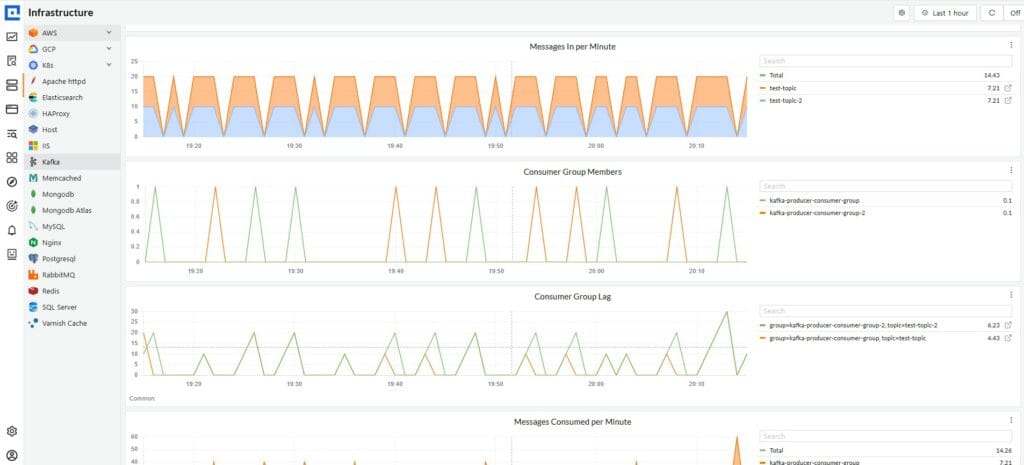
CubeAPM instruments your Kafka consumer application via OpenTelemetry and captures each message processing cycle as a span in the full distributed trace. When a lag alert fires, CubeAPM shows you which consumer instance is slowest, how long each message takes to process end-to-end, which downstream service calls are consuming the most time per message, and whether lag is concentrated on specific message types or is evenly distributed. The Prometheus alert tells you something is wrong. CubeAPM tells you what and where. Self-hosted inside your own infrastructure, no data leaves your environment.
Summary
| Catches stopped consumers with a backlog | What to configure | Key decision |
| Deploy kafka_exporter | Docker, Compose, or Kubernetes | Port 9308, connect to all brokers |
| Configure scraping | Add job to prometheus.yml or ServiceMonitor | 30s scrape interval |
| Write growing-lag alert | rate(kafka_consumergroup_lag[10m]) > 0 for 15m | Most reliable lag signal |
| Write absolute-lag alert | Threshold = SLA in seconds × write rate | Topic-specific, not universal |
| Write stalled consumer alert | lag > 0 AND offset not changing | Catches stopped consumers with backlog |
| Configure Alertmanager | Group by consumergroup and topic | Prevents per-partition alert storms |
Disclaimer: Configurations, metric names, and alert thresholds are for guidance only – verify against the current kafka_exporter documentation and Prometheus alerting documentation before applying to production. kafka_exporter metric names and flags may change between releases. CubeAPM references reflect genuine use cases; evaluate all tools against your own requirements.
Also read:
Consumer Lag vs Offset in Kafka: What Is the Difference?