










Kubernetes health checks are the mechanism that prevents your application from silently degrading in production. Without them, a container that crashes during startup, enters a deadlock, or loses connectivity to its database can sit in a Running state for hours while users see errors or timeouts. With properly configured health checks, Kubernetes detects these failures within seconds and takes corrective action by restarting containers, removing unhealthy pods from load balancers, or delaying traffic until an application finishes initializing.
According to the CNCF 2023 Annual Survey, 96% of organizations use containers in production, with Kubernetes as the orchestration platform for 88% of those deployments. As clusters scale and applications grow more distributed, health checks become the first line of defense against silent failures, cascading outages, and degraded user experience.
This guide covers how Kubernetes health checks work, the three probe types available, how to configure them correctly, and how to avoid the common mistakes that lead to CrashLoopBackOff cycles or traffic sent to unready pods.
What Is a Kubernetes Health Check
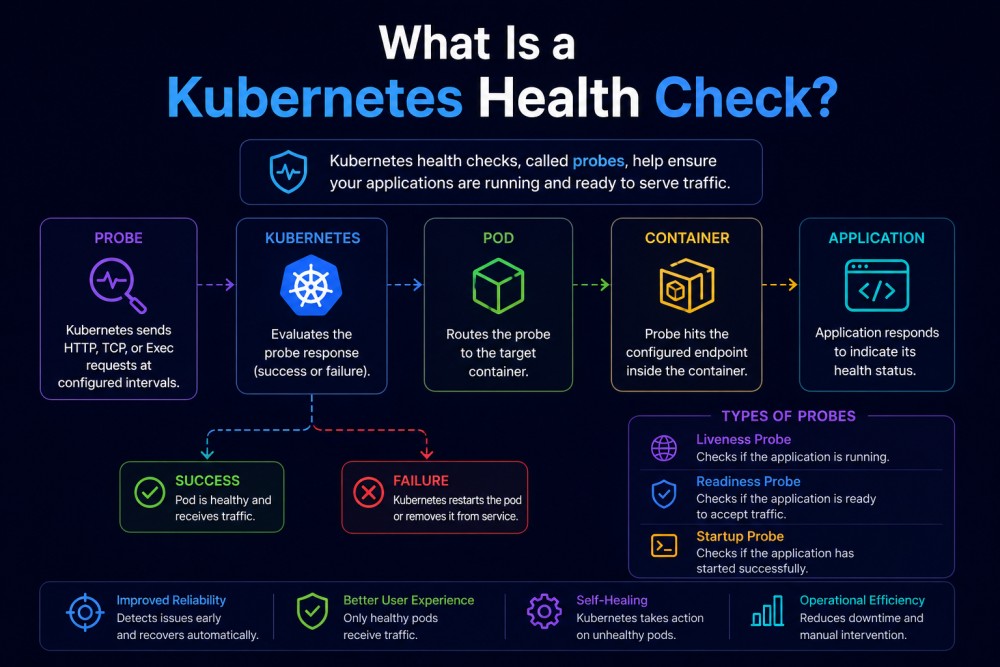
A Kubernetes health check is a diagnostic performed periodically by the kubelet agent running on each node to validate whether a container is alive, ready to serve traffic, or finished initializing. These checks are called probes, and they run throughout the lifecycle of every pod.
Kubernetes offers three distinct probe types, each serving a different purpose:
Liveness probe verifies that the container is still running and has not entered a broken state. If the liveness probe fails repeatedly, Kubernetes restarts the container. This prevents deadlocked or hung processes from staying in a Running state indefinitely.
Readiness probe checks whether the container is ready to accept traffic. If the readiness probe fails, the pod is removed from service endpoints and the load balancer stops sending requests to it. The container stays running but receives no user traffic until the probe succeeds again.
Startup probe is designed for slow starting applications. It delays liveness and readiness checks until the application finishes initializing. This prevents Kubernetes from restarting containers that legitimately need 30 seconds or more to boot.
Without health checks, Kubernetes relies on process state alone. A container that is Running from the OS perspective but serving 500 errors, stuck in a deadlock, or failing to connect to its database appears healthy to Kubernetes. Users see errors while the orchestrator takes no action.
Health checks close that gap by giving Kubernetes application level signals. They let the platform understand not just whether the process exists, but whether the application inside the container is actually working.
How Kubernetes Health Checks Work
Kubernetes health checks are executed by the kubelet agent on each node. The kubelet is responsible for managing pods and their containers, and it runs probes at the interval you define in the pod spec.
Each probe can use one of four mechanisms to check container health:
HTTP probe sends an HTTP GET request to a specified endpoint and port. Any response code between 200 and 399 is considered success. Any other code or a failure to connect is treated as failure. This is the most common probe type for web applications and APIs.
TCP probe attempts to open a TCP connection to a specified port. If the connection succeeds, the probe passes. If it fails, the probe fails. This is useful for services that do not expose HTTP endpoints, such as databases, message queues, or gRPC services.
gRPC probe sends a gRPC health check request using the standard gRPC Health Checking Protocol. This is designed for gRPC services and provides a cleaner probe mechanism than falling back to TCP or HTTP.
Command probe executes a command inside the container. If the command exits with status code 0, the probe succeeds. Any other exit code is treated as failure. This is useful for custom health checks that do not map cleanly to HTTP or TCP.
Each probe is configured with timing parameters that control how aggressively Kubernetes checks health and how quickly it responds to failures:
initialDelaySecondsdefines how long Kubernetes waits after the container starts before running the first probe. This prevents false failures during application startup.periodSecondssets how often the probe runs. The default is 10 seconds. Shorter intervals catch failures faster but increase kubelet overhead.timeoutSecondsdefines how long Kubernetes waits for the probe to respond before treating it as a failure. The default is 1 second.successThresholdsets how many consecutive successful probes are required before a previously failed probe is marked as healthy again. The default is 1. This only applies to readiness probes.failureThresholddefines how many consecutive probe failures trigger action. For liveness probes, the container restarts. For readiness probes, the pod is removed from endpoints. The default is 3.
These parameters interact to define the overall health check behavior. For example, with periodSeconds: 10 and failureThreshold: 3, it takes 30 seconds of consecutive probe failures before Kubernetes restarts a container or removes it from the load balancer. Teams that need faster failure detection reduce the period or threshold, while those with flaky dependencies increase the threshold to avoid unnecessary restarts.
Liveness Probes: Detect and Restart Broken Containers
Liveness probes answer the question: Is this container still working, or has it entered a state where it needs to be restarted?
Common scenarios where liveness probes are critical include applications that enter deadlocks, processes that stop responding but do not exit, memory leaks that degrade performance over time, and services that lose connectivity to critical dependencies and cannot recover without a restart.
Here is an HTTP liveness probe configuration for a web application:
livenessProbe:

httpGet:

path: /healthz

port: 8080

initialDelaySeconds: 30

periodSeconds: 10

timeoutSeconds: 5

failureThreshold: 3In this configuration, Kubernetes waits 30 seconds after the container starts, then sends an HTTP GET request to /healthz on port 8080 every 10 seconds. If the request does not respond within 5 seconds or returns a non-2xx/3xx status code, the probe fails. After 3 consecutive failures, Kubernetes restarts the container.
For non HTTP services, a TCP liveness probe works the same way but only checks whether the port is open:
livenessProbe:

tcpSocket:

port: 5432

initialDelaySeconds: 15

periodSeconds: 20Command based liveness probes are useful when health cannot be determined via HTTP or TCP. For example, checking whether a file exists or a specific process is responsive:
livenessProbe:

exec:

command:

- cat

- /tmp/healthy

initialDelaySeconds: 5

periodSeconds: 5A common mistake with liveness probes is checking dependencies that are outside the container’s control. If the liveness probe fails because an external database is unreachable, Kubernetes restarts the container repeatedly even though the container itself is fine. This creates a CrashLoopBackOff cycle that never resolves until the database comes back. Liveness probes should check the application process, not downstream dependencies.
Readiness Probes: Control Traffic to Pods
Readiness probes answer the question: is this container ready to accept traffic right now?
A container can be alive but not ready. Common scenarios include applications still warming up caches, services waiting for database connections to initialize, or pods that temporarily lose connectivity to required dependencies.
Readiness probes prevent Kubernetes from sending traffic to pods that are not yet ready or have temporarily lost the ability to serve requests. When a readiness probe fails, the pod stays running but is removed from service endpoints. The load balancer stops routing traffic to it. Once the probe starts succeeding again, the pod is added back to the pool.
Here is a readiness probe configuration:
readinessProbe:

httpGet:

path: /ready

port: 8080

initialDelaySeconds: 10

periodSeconds: 5

failureThreshold: 1In this configuration, Kubernetes waits 10 seconds after the container starts, then checks /ready every 5 seconds. A single failure removes the pod from endpoints. A single success adds it back.
The key difference between liveness and readiness is the action Kubernetes takes on failure. Liveness failures restart the container. Readiness failures only remove the pod from load balancing.
This distinction matters during rolling updates. As new pods start, their readiness probes must succeed before Kubernetes routes traffic to them. If readiness probes are missing or misconfigured, traffic hits pods that are not yet ready, causing user facing errors during every deployment.
Readiness probes should check whether the application can handle requests, not just whether it is alive. For example, an application that depends on a database connection should fail readiness checks if the connection is lost. The pod stays running and keeps trying to reconnect, but users are not sent to it until the connection is restored.
Startup Probes: Handle Slow Starting Applications
Startup probes solve a problem that liveness and readiness probes alone cannot handle: applications that take a long time to initialize.
Some applications need 30 seconds, 60 seconds, or even several minutes to fully start. This is common with legacy Java applications, large machine learning models, or services that perform extensive cache warming at startup. If a liveness probe is configured with a 10 second period and a 3 failure threshold, Kubernetes restarts the container after 30 seconds of probe failures. But if the application legitimately needs 45 seconds to start, the liveness probe kills it before it finishes initializing. This creates a CrashLoopBackOff loop where the container never successfully starts.
Startup probes delay liveness and readiness checks until the application finishes starting. Once the startup probe succeeds, Kubernetes switches to running liveness and readiness probes normally.
Here is a startup probe configuration for a slow starting application:
startupProbe:

httpGet:

path: /healthz

port: 8080

initialDelaySeconds: 0

periodSeconds: 10

failureThreshold: 30In this configuration, Kubernetes checks /healthz every 10 seconds and allows up to 30 failures before giving up. That means the application has up to 300 seconds to start successfully. Once the probe succeeds, liveness and readiness probes take over.
Startup probes are only needed for applications with long initialization times. Most modern cloud native applications start in under 10 seconds and do not need them. But for legacy workloads, startup probes are the only way to avoid restart loops during initialization.
Best Practices for Configuring Kubernetes Health Checks
Every containerized application in Kubernetes should have both liveness and readiness probes configured. The absence of either creates operational blind spots that lead to downtime.
Use separate endpoints for liveness and readiness checks. Liveness should verify that the application process is responsive. Readiness should verify that the application can handle traffic. These are different concerns and should not share the same endpoint. For example, /healthz for liveness and /ready for readiness.
Do not check external dependencies in liveness probes. Liveness probes should only verify that the container itself is working. If the probe fails because a database is unreachable, Kubernetes restarts the container even though the container is fine. This creates unnecessary churn and does not fix the underlying issue. Check dependencies in readiness probes instead.
Set appropriate failure thresholds to avoid flapping. A single network hiccup or momentary spike in latency should not trigger a container restart or remove a pod from load balancing. Use failureThreshold: 3 or higher for liveness probes. For readiness probes, failureThreshold: 1 works well because removing a pod from endpoints is low cost and reversible.
Keep probe timeouts short. If a health check endpoint takes more than 1 or 2 seconds to respond, the application is likely already in a degraded state. Use timeoutSeconds: 1 for most workloads. Increase it only if the endpoint legitimately needs more time.
Tune `initialDelaySeconds` to match actual startup time. If an application starts in 5 seconds, set initialDelaySeconds: 5. If it starts in 30 seconds, set it to 30. Setting it too low causes false failures during startup. Setting it too high delays detection of real failures.
Use startup probes for slow starting applications. If an application takes more than 30 seconds to initialize, use a startup probe with a high failureThreshold instead of increasing the liveness probe’s initialDelaySeconds. This keeps liveness checks responsive once the application is running.
Monitor probe success rates. If readiness probes fail frequently, it indicates instability in the application or its dependencies. If liveness probes fail frequently, it indicates the application is crashing or entering broken states. Both are signals that require investigation.
Avoid expensive operations in health check endpoints. Health checks run every few seconds. If the endpoint performs database queries, complex calculations, or network calls to external services, it adds unnecessary load and slows down probe responses. Health check endpoints should be lightweight and return quickly.
Monitoring Kubernetes Health Checks in Production
Configuring health checks is only half the work. Teams also need visibility into whether probes are succeeding, how often they fail, and what happens when failures occur.
Kubernetes events surface probe failures. Running kubectl describe pod <pod-name> shows recent events including liveness and readiness probe failures. But events are ephemeral and disappear after an hour. For production clusters, events need to be collected and stored in a centralized monitoring system.
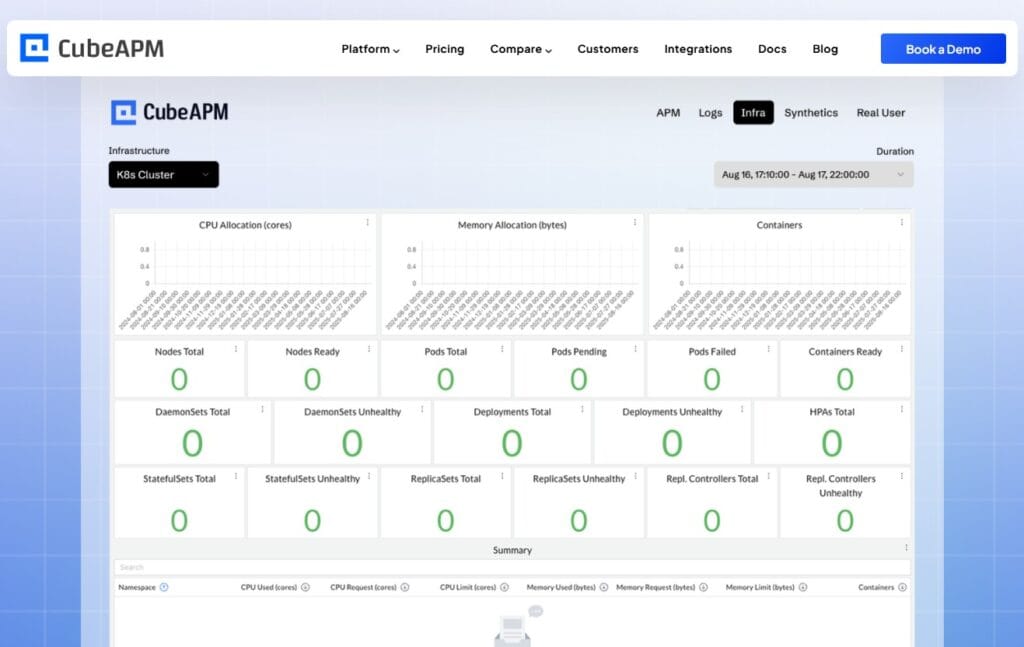
CubeAPM tracks and monitors Kubernetes events, pod restarts, and probe failures alongside application traces and logs. When a pod restart is triggered by a liveness probe failure, CubeAPM correlates the event with the application traces and error logs from the same time window, giving teams full context on what caused the failure. It runs inside your own cloud or data center, keeping all telemetry data within your infrastructure with no external dependencies.
For teams already using Prometheus, the kube_pod_status_ready and kube_pod_container_status_restarts_total metrics track readiness state and restart counts. These can be visualized in Grafana and used to trigger alerts when restart rates or unready pod counts exceed thresholds.
A spike in liveness probe failures followed by container restarts indicates application instability. A spike in readiness probe failures without restarts indicates dependency issues or traffic overload. Both require investigation.
Kubernetes Health Check Tools and Implementation
Kubernetes health checks are configured in the pod spec, but teams need tooling to monitor probe behavior, debug failures, and correlate probe events with application performance.
CubeAPM provides native Kubernetes monitoring with full visibility into node health, pod performance, container restarts, and probe failures. It correlates health check events with distributed traces and logs, giving teams the full context needed to debug why a probe failed. CubeAPM runs inside your own cloud or on premises, keeping Kubernetes telemetry private and compliant. Pricing is $0.15/GB of data ingested with unlimited retention and no per-seat fees.
Prometheus and Grafana track Kubernetes metrics including pod readiness state, container restart counts, and resource usage. Teams already using the Prometheus ecosystem can build dashboards that surface probe failures and correlate them with resource saturation or traffic spikes. This is a powerful option but requires manual setup and ongoing maintenance.
Datadog offers managed Kubernetes monitoring with built in dashboards for pod health, node utilization, and container restarts. It integrates with Datadog APM and logs for full stack visibility. Pricing starts at $15/host/month for infrastructure monitoring, with additional charges for APM and logs. Costs scale quickly in large clusters.
Dynatrace provides AI assisted Kubernetes monitoring with automatic detection of probe failures and their root causes. It correlates health check events with application performance and infrastructure metrics. Pricing is consumption based and typically fits enterprise budgets rather than mid market teams.
For teams that want open source control, kube-state-metrics exposes Kubernetes object state as Prometheus metrics. It surfaces pod conditions, container statuses, and restart counts. Combined with Prometheus and Grafana, this provides full visibility into health check behavior at no cost beyond infrastructure.
Frequently Asked Questions
What is the difference between liveness and readiness probes in Kubernetes?
Liveness probes verify that a container is still running and has not entered a broken state. If a liveness probe fails, Kubernetes restarts the container. Readiness probes check whether a container is ready to accept traffic. If a readiness probe fails, the pod is removed from service endpoints but stays running.
When should I use a startup probe instead of increasing initialDelaySeconds?
Use a startup probe when an application takes more than 30 seconds to initialize. Increasing initialDelaySeconds delays all probes, including the first liveness check after startup completes. A startup probe allows a long initialization window while keeping liveness checks responsive once the application is running.
Should health check endpoints check database connectivity?
Database connectivity should be checked in readiness probes, not liveness probes. If a database is unreachable, the application cannot serve traffic and should be removed from load balancing. But restarting the container does not fix a database outage, so liveness probes should not fail based on external dependency state.
How do I debug a CrashLoopBackOff caused by health check failures?
Run kubectl describe pod <pod-name> to see recent events. Look for liveness probe failure messages. Check whether initialDelaySeconds is set too low for the application’s startup time. Review logs with kubectl logs <pod-name> to see whether the application is responding to probe requests. If the application is slow to start, add a startup probe.
What is the default behavior if no health checks are configured?
If no probes are configured, Kubernetes relies on process state alone. A container is considered healthy as long as the process is running. If the application enters a deadlock, stops responding, or serves errors, Kubernetes takes no action because the process state is still Running.
How often should readiness probes run?
Readiness probes should run frequently enough to detect issues quickly but not so often that they add significant load. A periodSeconds value of 5 to 10 seconds works well for most applications. Shorter intervals are useful for high traffic services where fast failure detection matters. Longer intervals are fine for internal services with lower SLAs.
Can I use the same endpoint for liveness and readiness probes?
Technically yes, but it is not recommended. Liveness checks whether the application process is alive. Readiness checks whether the application can handle traffic. These are different concerns. Using separate endpoints allows each probe to check the appropriate condition without conflicting logic.