










CockroachDB is a distributed SQL database built to survive node failures and scale horizontally across regions. But that resilience comes with a monitoring challenge: a single slow query or under-replicated range can cascade across multiple nodes before anyone notices. According to the CNCF 2023 Annual Survey, 69% of organizations now run stateful workloads like databases in production Kubernetes clusters, making distributed database monitoring a core infrastructure requirement rather than an edge case.
This guide covers what to monitor in CockroachDB clusters, which metrics matter for distributed SQL health, how to collect and visualize telemetry, and how to choose between native tooling and third-party platforms.
What Is CockroachDB Monitoring?
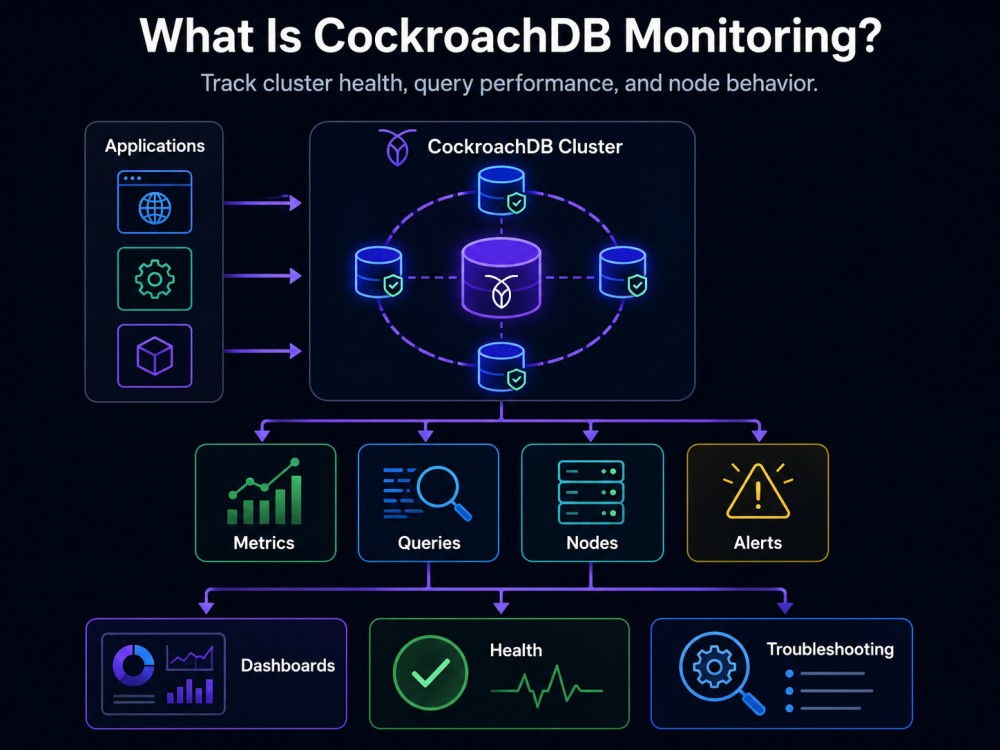
CockroachDB monitoring is the practice of continuously tracking the health, performance, and availability of CockroachDB clusters in production. It covers node uptime, range replication status, SQL query performance, storage capacity, network latency between regions, and the behavior of distributed transactions across a multi-node cluster.
Unlike single-instance databases, where monitoring focuses on one host, CockroachDB requires cluster-level visibility. A healthy three-node cluster can mask a failing node until consensus breaks. A misconfigured zone can send queries across continents instead of staying local. An under-replicated range can leave data vulnerable to loss during the next outage.
CockroachDB monitoring answers three operational questions in real time: Is every node healthy and reachable? Are ranges replicated according to your configured constraints? Is SQL performance meeting SLO targets for latency and throughput?
The platform exposes time series metrics, structured logs, and a web-based DB Console for operators. But as clusters scale beyond a few nodes or support production workloads, most teams adopt external monitoring tools that can aggregate metrics, correlate events, and alert on anomalies without depending on the cluster itself staying online.
How CockroachDB Monitoring Works
CockroachDB generates time series metrics for every node in a cluster. These metrics are exposed in Prometheus format at the /_status/vars endpoint on each node’s HTTP port (default 8080). External tools scrape this endpoint at regular intervals to collect metrics and store them outside the cluster.
The DB Console runs inside the cluster and provides real-time dashboards showing node status, SQL activity, storage usage, and replication health. It queries the cluster’s internal crdb_internal system catalog and the embedded time series database that stores metrics within CockroachDB itself.
For logs, CockroachDB writes structured logs to disk on each node. Logs capture startup events, configuration changes, query execution details, and error conditions. Log aggregation tools like Fluentd or the OpenTelemetry Collector can tail these logs and forward them to centralized log management platforms.
Active Session History (ASH) is a newer observability feature in preview that captures point in time snapshots of what work was executing on the cluster at specific moments. Unlike aggregated SQL metrics, ASH provides granular execution details that help diagnose transient performance issues after they occur.
The separation between in-cluster telemetry (DB Console, internal metrics) and external collection (Prometheus, Grafana, Datadog) is intentional. If the cluster becomes unavailable, the DB Console also goes down. External monitoring continues to function and retains historical data that helps diagnose what led to the outage.
Key CockroachDB Metrics to Monitor
CockroachDB exposes hundreds of metrics. The following are the most critical for production health.
Node health and availability
liveness.livenodes tracks how many nodes in the cluster are currently live and reachable. If this drops below the expected count, one or more nodes have failed or lost network connectivity. CockroachDB tolerates node failures as long as a majority of nodes remain available, but losing multiple nodes can cause range unavailability.
sys.uptime measures how long each node has been running since its last restart. Frequent restarts indicate instability or configuration problems. Nodes that restart during peak traffic can trigger temporary latency spikes as ranges rebalance.
Range replication and availability
ranges.unavailable counts how many ranges currently lack a quorum of replicas. Any non-zero value means data is at risk. Queries hitting unavailable ranges will fail. This metric should alert immediately.
ranges.underreplicated counts ranges that have fewer replicas than the configured replication factor (default 3). Under-replicated ranges are still available but vulnerable. If another node fails before replication completes, data loss can occur.
ranges is the total count of ranges in the cluster. Ranges split automatically as data grows. A sudden spike can indicate a hot key causing excessive splitting, which degrades performance.
SQL query performance
sql.exec.latency tracks the P50, P99, and P99.9 latency of SQL statements across the cluster. Latency spikes often correlate with slow queries, lock contention, or cross-region network delays.
sql.conns measures the current number of active SQL connections. A sudden drop can indicate client failures or network partitions. A spike can signal a connection leak or retry storm.
sql.txn.latency tracks transaction commit latency. High transaction latency often points to contention on hot rows or tables.
Storage and capacity
capacity.available and capacity.used show disk space remaining on each node. CockroachDB stops accepting writes when a node reaches 100% disk usage. Monitoring these metrics with alerts at 80% and 90% thresholds prevents outages.
livenesss.heartbeatlatency measures how long it takes for liveness heartbeats to propagate between nodes. High heartbeat latency indicates network problems or CPU starvation on nodes.
Rebalancing and load distribution
rebalancing.queries and rebalancing.writes track how evenly load is distributed across nodes. Imbalanced load can cause hotspots where one node saturates while others sit idle.
rocksdb.compactions.running counts active RocksDB compactions. High compaction load consumes CPU and disk IO, which can slow down foreground queries. Sustained high compaction activity suggests tuning is needed.
CockroachDB Monitoring Tools
CockroachDB’s built-in DB Console provides real-time visibility into cluster health and SQL activity. It runs inside the cluster at http://<node-ip>:8080 and includes dashboards for runtime metrics, storage health, SQL queries, and replication status. The DB Console is useful for live troubleshooting but becomes unavailable if the cluster goes down, and it retains metrics for only 10 days at 10-second granularity and 90 days at 30-minute granularity.
For production monitoring, most teams export metrics to external platforms that store telemetry outside the cluster and remain accessible during outages. CockroachDB exposes metrics in Prometheus format at the /_status/vars endpoint on each node’s HTTP port. Prometheus scrapes this endpoint at a configurable interval, typically every 10 seconds, and stores the metrics in its own time series database.
Grafana: Grafana is commonly paired with Prometheus to visualize CockroachDB metrics. CockroachDB provides pre-built Grafana dashboards for runtime performance, storage availability, SQL activity, and replication health. These dashboards can be imported directly from the CockroachDB documentation or generated using cockroach gen dashboard --tool=grafana.
Datadog, Dynatrace, and New Relic: These offer managed APM platforms that can ingest CockroachDB metrics via Prometheus remote write or their own agents. These platforms provide broader observability by correlating database metrics with application traces, logs, and infrastructure monitoring across your entire stack. However, they typically charge per host or per GB of data ingested, which can become expensive as clusters scale.
SigNoz and Elastic APM: These are open source alternatives that support OpenTelemetry and Prometheus metrics. SigNoz offers a hosted cloud option or self-hosted deployment. Elastic APM integrates with the ELK stack for teams already using Elasticsearch for logs.

CubeAPM: It is a self-hosted observability platform that runs inside your own cloud or on-premises environment. It ingests CockroachDB metrics via OpenTelemetry or Prometheus remote write, correlates them with application traces and logs, and provides unlimited retention at $0.15/GB. Because CubeAPM runs on your infrastructure, telemetry data never leaves your VPC, which eliminates egress costs and simplifies compliance for teams with data residency requirements.
For a detailed comparison of CockroachDB monitoring platforms, see our guide to the best CockroachDB monitoring tools.
Best Practices for CockroachDB Monitoring
Set alerts on critical metrics
Configure alerts for ranges.unavailable (any value greater than 0), ranges.underreplicated (sustained non-zero values), capacity.available (below 20% on any node), and liveness.livenodes (below expected node count). These metrics directly impact data availability and cluster stability.
Use anomaly detection for sql.exec.latency P99 and sql.txn.latency P99 rather than static thresholds. Latency baselines vary by workload, and a 50ms spike might be normal during peak traffic but alarming at 3 AM.
Monitor replication lag and zone constraints
Track replicas.leaseholder to ensure leaseholders are distributed evenly across nodes. Imbalanced leaseholder distribution causes hotspots where one node handles disproportionate read traffic.
If you use zone configurations to pin data to specific regions, monitor ranges.underreplicated and ranges.unavailable per zone. A misconfigured constraint can leave an entire zone without replicas.
Correlate CockroachDB metrics with application traces
Slow database queries often surface as high sql.exec.latency in CockroachDB metrics and as slow spans in application traces. Correlating the two helps identify whether the root cause is in the query itself, database contention, or network latency between the application and database.
Platforms like CubeAPM and Datadog support automatic correlation between database metrics and application performance monitoring traces. This reduces mean time to resolution by showing the full request path from user action to database query in one view.
Use Active Session History for transient issues
Transient performance problems like a brief lock wait or a sudden CPU spike may not appear in aggregated SQL metrics. Active Session History (ASH) captures execution snapshots that let you investigate what was running on the cluster at a specific point in time, even after the issue has resolved.
ASH is accessible via SQL queries against information_schema.crdb_node_active_session_history and information_schema.crdb_cluster_active_session_history. It complements metrics-based monitoring by providing granular execution context.
Retain metrics outside the cluster
The DB Console stores metrics inside CockroachDB with limited retention (10 days at full granularity, 90 days at reduced granularity). If the cluster fails or undergoes a major incident, you lose the metrics that could explain what happened.
Export metrics to Prometheus, Grafana, or a managed observability platform with longer retention. Some teams retain 30 days of high-resolution metrics and 1 year of downsampled metrics for capacity planning and incident review.
Monitor node-to-node network latency
CockroachDB relies on consensus protocols that are sensitive to network latency between nodes. High inter-node latency increases transaction commit times and can cause liveness issues if heartbeats time out.
Monitor liveness.heartbeatlatency and set alerts if it exceeds 100ms consistently. In multi-region deployments, measure latency between regions using synthetic checks or network monitoring tools to detect routing problems before they impact the cluster.
CockroachDB Monitoring in Multi-Region Deployments
Multi-region CockroachDB clusters add latency and replication complexity. A transaction that touches data in three regions must coordinate across those regions before committing. If one region becomes unreachable, queries that depend on quorum in that region will fail or time out.
Monitor ranges.unavailable and ranges.underreplicated per region to detect regional failures early. If a region goes down, CockroachDB can continue serving traffic from remaining regions, but ranges that were pinned to the unavailable region will become inaccessible until it recovers.
Track sql.exec.latency per region to identify cross-region queries. Queries that read from local replicas complete in milliseconds. Queries that require cross-region reads or writes add 50ms to 200ms depending on geographic distance. If latency spikes in one region but not others, investigate network routing or regional infrastructure problems.
Use synthetic monitoring to test query performance from each region. Run the same query from an application server in each region every minute and measure latency. This catches region-specific issues like routing changes or cloud provider outages before they affect production traffic.
Troubleshooting Common CockroachDB Issues with Monitoring
Slow queries
High sql.exec.latency often points to slow queries. Use the DB Console’s SQL Activity page to identify the slowest queries by execution time. Look for full table scans on large tables, missing indexes, or queries with high row counts.
Correlate slow query spans in application traces with the corresponding SQL statements in CockroachDB. This confirms whether the application is waiting on the database or if the delay is elsewhere in the request path.
Under-replicated ranges
Non-zero ranges.underreplicated means CockroachDB is actively rebalancing replicas. This is normal after adding or removing nodes. If under-replication persists for more than a few minutes, check rebalancing.queries and rebalancing.writes to see if rebalancing is stalled.
Check disk space on all nodes. CockroachDB stops rebalancing to a node if that node is low on disk space. Monitor capacity.available to catch capacity issues before they block replication.
Connection storms
A sudden spike in sql.conns can indicate a connection leak in the application or a retry storm where failing requests are retried in a tight loop. Check application logs for connection pool exhaustion or repeated errors.
Use CockroachDB’s SHOW SESSIONS command to list all active sessions and their originating IP addresses. This helps identify which application instances are opening excessive connections.
Node liveness failures
If liveness.livenodes drops, one or more nodes have failed their liveness heartbeat. Common causes include network partitions, CPU starvation, or disk IO saturation.
Check liveness.heartbeatlatency to see if heartbeats are slow but still succeeding. High heartbeat latency indicates network problems or resource contention on nodes. Check CPU, memory, and disk IO metrics to identify resource bottlenecks.
Conclusion
CockroachDB monitoring ensures that your distributed SQL cluster stays healthy, performant, and available across regions and failure scenarios. The metrics that matter most are node health, range replication status, SQL query latency, storage capacity, and inter-node network latency.
The DB Console provides real-time visibility but stores metrics inside the cluster with limited retention. For production workloads, export metrics to external platforms like Prometheus, Grafana, Datadog, or CubeAPM to retain historical data and maintain monitoring availability during cluster outages.
Effective monitoring requires alerting on critical metrics, correlating database performance with application traces, using Active Session History for transient issues, and retaining metrics outside the cluster for post-incident analysis. Multi-region deployments add complexity, requiring per-region monitoring and synthetic checks to detect regional failures early.
Disclaimer: The information in this article reflects the latest details available at the time of publication and may change as technologies and products evolve. Features, pricing, and plan limits can change over time. Always verify the latest information directly with the vendor before making purchasing or deployment decisions.
Frequently Asked Questions
What is CockroachDB monitoring?
CockroachDB monitoring tracks the health, performance, and availability of distributed SQL clusters by collecting metrics on node status, range replication, query latency, and storage capacity in real time.
What are the most important CockroachDB metrics to monitor?
Monitor ranges unavailable, ranges underreplicated, node liveness, SQL query latency, capacity available, and liveness heartbeat latency to detect failures and performance degradation early.
How do I export CockroachDB metrics to Prometheus?
CockroachDB exposes metrics in Prometheus format at the status vars endpoint on each node. Configure Prometheus to scrape this endpoint at regular intervals to collect and store metrics externally.
Can I monitor CockroachDB with the DB Console alone?
The DB Console works for live troubleshooting but stores metrics inside the cluster with limited retention. For production, export metrics to external tools like Prometheus or Grafana to retain historical data during outages.
How do I monitor CockroachDB in multi-region deployments?
Track ranges unavailable, ranges underreplicated, and SQL latency per region. Use synthetic monitoring to test query performance from each region and detect regional failures or network issues early.
What is Active Session History in CockroachDB?
Active Session History captures point in time snapshots of active execution on the cluster, helping diagnose transient performance issues by showing what work was running at specific moments even after the issue resolves.
Which tools integrate with CockroachDB monitoring?
CockroachDB integrates with Prometheus, Grafana, Datadog, Dynatrace, New Relic, SigNoz, Elastic APM, and CubeAPM for external metric collection, visualization, and alerting.