










ManageEngine Applications Manager is an on-premise application and infrastructure monitoring platform built for teams that want to monitor applications, servers, databases, cloud services, websites, APIs, and end-user experience from one console.
This review explains ManageEngine Applications Manager pricing, what each edition includes, what drives real-world cost, what users like and criticize, and how it compares with alternatives such as CubeAPM, Datadog, Dynatrace, and New Relic.
What Is ManageEngine Applications Manager?
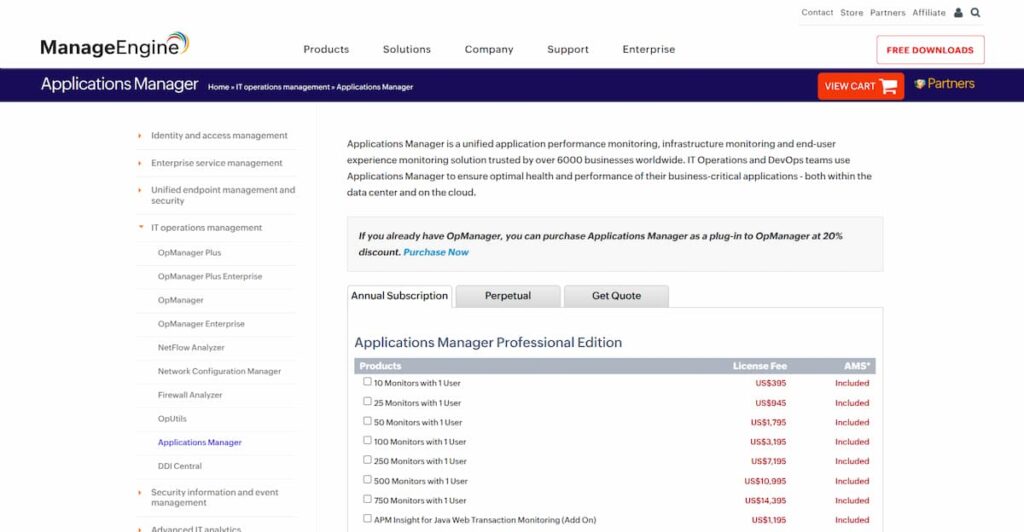
ManageEngine Applications Manager is a performance monitoring platform for applications and IT infrastructure. It helps teams monitor application health, server performance, databases, cloud resources, virtualization platforms, websites, APIs, containers, logs, and user experience.
ManageEngine describes the product as supporting 150+ technologies across infrastructure, cloud, APM, logs, digital experience, and services. The platform is mainly self-hosted/on-premise, which makes it relevant for organizations that want monitoring data to stay inside infrastructure they control.
It also includes APM Insight, an add-on module for code-level application performance monitoring. APM Insight supports Java, .NET, Ruby on Rails, PHP, Node.js, and Python application monitoring.
Supported Languages, Integrations, and Data Sources
ManageEngine Applications Manager supports a broad range of traditional infrastructure, enterprise applications, cloud resources, and application runtimes.
| Area | ManageEngine Applications Manager support |
| APM languages | Java, .NET, .NET Core, PHP, Node.js, Ruby on Rails, Python |
| Infrastructure | Windows, Linux, Unix, virtual servers, physical servers |
| Databases | SQL Server, Oracle, MySQL, PostgreSQL, MongoDB, Cassandra, and others |
| Cloud platforms | AWS, Microsoft Azure, Google Cloud, Oracle Cloud, OpenStack |
| Containers | Docker, Kubernetes, Red Hat OpenShift |
| Digital experience | Real User Monitor, End User Monitoring, URL and synthetic-style checks |
| Logs | AppLogs monitoring add-on |
| Integrations | ManageEngine ecosystem tools, ServiceDesk Plus, OpManager, Site24x7, Slack, ServiceNow, webhooks, and other IT workflows |
The exact scope depends on edition, monitor count, and add-ons. For example, APM Insight, Real User Monitor, End User Monitoring, and AppLogs are priced separately on the public pricing page.
Key Features of ManageEngine Applications Manager
ManageEngine Applications Manager monitors servers, services, URLs, application servers, middleware, databases, virtualization platforms, and cloud resources. ManageEngine defines a monitor as a specific application, server, service, or web URL, and gives examples such as Windows server monitors, Oracle database monitors, Apache monitors, WebLogic monitors, and URL sequence monitors.
This makes the platform useful for IT operations teams that want broad infrastructure visibility without buying a separate SaaS observability product.
APM Insight provides code-level monitoring for supported application runtimes. ManageEngine’s documentation lists Java, .NET, Ruby on Rails, PHP, Node.js, and Python as supported APM Insight platforms.
This is useful for teams that need transaction visibility, application response-time analysis, database call tracking, and application troubleshooting beyond basic server monitoring.
Applications Manager supports database monitoring for common relational and NoSQL systems. Gartner’s product overview describes it as software for monitoring applications, servers, databases, and other IT resources, with alerting, root cause analysis, and reporting for performance troubleshooting.
Real User Monitor is sold as an add-on and is priced by monthly page views. Public pricing starts at $65/year for 100,000 page views/month, rising to $485/year for 1 million page views/month and higher tiers for larger usage.
This matters for teams that want to understand real browser/user experience rather than only backend infrastructure metrics.
End User Monitoring is also listed as an add-on. For Professional Edition, EUM is listed at $1,195/year; for Enterprise Edition, it is listed at $2,395/year.
This is relevant for teams that need synthetic transaction monitoring, user-path monitoring, or external availability checks.
AppLogs monitoring is priced separately by monthly log size. For Professional Edition, public pricing starts at $115/year for 10GB/month, $975/year for 100GB/month, and $4,275/year for 500GB/month. For Enterprise Edition, AppLogs starts at $1,175/year for 100GB/month and reaches $9,275/year for 1TB/month.
This is one reason buyers should not evaluate ManageEngine Applications Manager only from the $395/year entry price. Logs, RUM, APM agents, and EUM can materially change the real cost.
Enterprise Edition is designed for larger environments. ManageEngine says Enterprise Edition supports distributed monitoring architecture and can scale up to 10,000 applications and servers.
ManageEngine also documents failover support for Enterprise Edition, where a secondary or backup server can take over if the primary system is unavailable.
ManageEngine Applications Manager Pricing in 2026
ManageEngine Applications Manager has three main editions: Free, Professional, and Enterprise.
| Edition | Starting price | Included scale | Best for |
| Free | $0 | Up to 5 apps or servers | Testing or very small environments |
| Professional | $395/year | 10 monitors with 1 user | Small and mid-sized teams |
| Enterprise | $3,995/year | 100 monitors with 1 user | Larger environments |
| Enterprise 250 monitors | $9,595/year | 250 monitors with 1 user | Larger distributed deployments |
| Perpetual license | From $995 | 10-monitor Professional license | Teams preferring upfront licensing |
ManageEngine’s official pricing page lists Professional Edition at $395/year for 10 monitors, $945/year for 25 monitors, $1,795/year for 50 monitors, $3,195/year for 100 monitors, and $7,195/year for 250 monitors. It recommends Enterprise Edition for more than 250 monitors because of distributed architecture and failover support.
Enterprise Edition starts at $3,995/year for 100 monitors, then moves to $9,595/year for 250 monitors, $13,195/year for 500 monitors, and higher tiers for larger deployments.
Individual Add-On Pricing
ManageEngine Applications Manager also sells several add-ons.
| Add-on | Professional price | Enterprise price |
| APM Insight Java | $1,195/year | $1,795/year |
| APM Insight .NET / .NET Core | $1,195/year | $1,795/year |
| APM Insight Node.js | $1,195/year | $1,795/year |
| APM Insight PHP | $1,195/year | $1,795/year |
| APM Insight Python | $1,195/year | $1,795/year |
| End User Monitoring | $1,195/year | $2,395/year |
| SAP Monitor | $2,395/year | $2,395/year |
| WebSphere MQ Monitor | $945/year | $1,195/year |
Add-ons are flat fees, but they still operate within the purchased monitor count. ManageEngine gives the example that buying the SAP add-on enables SAP monitoring as long as the monitored SAP servers remain within the overall monitor count.
Is There a Free Tier in ManageEngine Applications Manager?
Yes. ManageEngine Applications Manager has a free edition that supports monitoring up to 5 apps or servers. ManageEngine says users can use it forever for free.
The free edition is useful for testing, small labs, proof-of-concept work, or very small environments. For production use, most teams will likely need Professional or Enterprise because 5 monitored apps or servers is a small limit.
How ManageEngine Measures Monitors
ManageEngine’s pricing is based mainly on monitors and users. A monitor is a specific application, server, service, or web URL. For example, if a team monitors 100 SQL Server installations, ManageEngine counts that as 100 monitors.
ManageEngine also defines users as the people who need access to the product web client. Paid plans include 1 user, and additional users cost extra. For both Professional and Enterprise, the public pricing page lists additional user add-ons such as 1 user for $98/year, 5 users for $238/year, 10 users for $378/year, and unlimited users for $958/year.
There is also a licensing distinction between standard monitors and heartbeat monitors. ManageEngine says 1 standard monitor counts as 1 licensed monitor, while 1 to 25 heartbeat monitors count as 1 licensed monitor.
What Does ManageEngine Applications Manager Really Cost?
⚠️ Disclaimer
The scenarios below are directional editorial estimates, not official ManageEngine quotes. They are based on ManageEngine’s public pricing structure for monitors, users, and add-ons. Final pricing can change based on monitor count, edition, APM Insight agents, Real User Monitor page views, End User Monitoring, AppLogs volume, discounts, support terms, taxes, and contract terms.
ManageEngine Applications Manager is mainly priced by monitors, not by hosts, vCPUs, or total GB ingested. A monitor can represent an application, server, service, database, or URL being monitored.
This means the most relevant cost scenarios should be based on:
| Cost factor | Why it matters |
| Monitor count | Main license driver for Professional and Enterprise editions |
| Edition | Professional is for smaller/mid-sized environments; Enterprise adds distributed monitoring and failover |
| Users | Paid plans include 1 user; extra users cost more |
| APM Insight agents | Code-level monitoring is sold as an add-on by runtime |
| Real User Monitor | Priced by monthly page views |
| End User Monitoring | Separate add-on for synthetic/end-user transaction monitoring |
| AppLogs | Priced by monthly log volume |
Pricing Assumptions Used in These Scenarios
These scenarios use ManageEngine’s pricing model directly. They avoid host-based or ingestion-based assumptions because that is not how ManageEngine Applications Manager’s main license is priced.
| Scenario | Pricing anchor | Estimated annual cost | Estimated monthly equivalent |
| Small team | 25 monitors, Professional, light add-ons | ~$2,320/year | ~$193/month |
| Growing team | 100 monitors, Professional, APM + EUM + RUM + logs | ~$8,478/year | ~$707/month |
| Mid-market team | 250 monitors, Enterprise, multiple add-ons | ~$31,718/year | ~$2,644/month |
These estimates do not include premium support, professional services, custom implementation, taxes, discounts, or contract-specific pricing.
Scenario 1: Small Team, ~25 Monitors
Situation
A small team monitors around 25 resources. This could include a few application servers, databases, APIs, URLs, and supporting infrastructure.
The team needs core application and infrastructure monitoring, one code-level APM agent, light real user monitoring, and a small amount of log monitoring.
Why Teams at This Stage Consider ManageEngine Applications Manager
Teams at this stage may consider ManageEngine because the Professional Edition has a low entry price and supports broad application and infrastructure monitoring from a self-hosted console.
For smaller environments, monitor-based pricing can be attractive because the bill is tied to the number of monitored resources rather than telemetry volume.
Estimated Profile
| Configuration | Detail |
| Monitor count | 25 monitors |
| Edition | Professional |
| Users | 1 included user |
| APM | 1 APM Insight agent |
| RUM | 100,000 page views/month |
| AppLogs | 10GB/month |
| EUM | Not included in this scenario |
Estimated Monthly Cost
| Component | Assumption | Annual cost | Monthly equivalent |
| Professional license | 25 monitors | ~$945 | ~$79 |
| APM Insight | 1 agent | ~$1,195 | ~$100 |
| Real User Monitor | 100,000 page views/month | ~$65 | ~$5 |
| AppLogs | 10GB/month | ~$115 | ~$10 |
| Estimated total | Small production setup | ~$2,320/year | ~$193/month |
What This Scenario Shows
For a small team, ManageEngine Applications Manager can remain inexpensive if the monitor count is low and the team only needs a few add-ons.
The base license is not the only cost to model. Even in a small setup, APM Insight can cost more than the 25-monitor Professional license itself, so teams should check whether they need code-level APM or only infrastructure and application availability monitoring.
Scenario 2: Growing Team, ~100 Monitors
Situation
A growing SaaS or IT team monitors around 100 resources across applications, databases, servers, APIs, cloud services, and web endpoints.
The team needs more complete visibility: infrastructure monitoring, application performance monitoring, real user monitoring, synthetic/end-user monitoring, log monitoring, and access for multiple users.
Why Teams at This Stage Consider ManageEngine Applications Manager
At this stage, teams usually need more than basic uptime checks. ManageEngine becomes attractive because it combines application, infrastructure, database, cloud, and digital experience monitoring in one platform.
The Professional 100-monitor tier can still work here, but add-ons become a bigger part of the total cost.
Estimated Profile
| Configuration | Detail |
| Monitor count | 100 monitors |
| Edition | Professional |
| Users | 5 additional users |
| APM | 2 APM Insight agents |
| EUM | Professional End User Monitoring add-on |
| RUM | 1 million page views/month |
| AppLogs | 100GB/month |
Estimated Monthly Cost
| Component | Assumption | Annual cost | Monthly equivalent |
| Professional license | 100 monitors | ~$3,195 | ~$266 |
| Additional users | 5 users | ~$238 | ~$20 |
| APM Insight | 2 agents | ~$2,390 | ~$199 |
| End User Monitoring | Professional add-on | ~$1,195 | ~$100 |
| Real User Monitor | 1 million page views/month | ~$485 | ~$40 |
| AppLogs | 100GB/month | ~$975 | ~$81 |
| Estimated total | Growing production setup | ~$8,478/year | ~$707/month |
What This Scenario Shows
For a growing team, the total cost is no longer just about monitor count. The 100-monitor Professional license is only one part of the bill.
APM agents, End User Monitoring, AppLogs, RUM, and extra users can collectively exceed the base license cost. This is why buyers should model the exact modules they need instead of assuming the entry price represents the full production cost.
Scenario 3: Mid-Market Team, ~250 Monitors
Situation
A mid-market team monitors around 250 resources across multiple applications, databases, infrastructure layers, cloud services, APIs, and user-facing workflows.
At this scale, the team may need distributed monitoring, failover, multiple APM runtimes, RUM, synthetic/end-user monitoring, log monitoring, and access for more internal users.
Why Teams at This Stage Consider ManageEngine Applications Manager
At 250 monitors, ManageEngine Applications Manager becomes relevant for teams that want a more enterprise-style self-hosted monitoring setup.
Enterprise Edition is the better fit when teams need distributed monitoring architecture and failover for the monitoring platform itself. This matters for larger environments where the monitoring system also needs high availability.
Estimated Profile
| Configuration | Detail |
| Monitor count | 250 monitors |
| Edition | Enterprise |
| Users | 10 additional users |
| APM | 4 APM Insight agents |
| EUM | Enterprise End User Monitoring add-on |
| RUM | 10 million page views/month |
| AppLogs | 500GB/month |
Estimated Monthly Cost
| Component | Assumption | Annual cost | Monthly equivalent |
| Enterprise license | 250 monitors | ~$9,595 | ~$800 |
| Additional users | 10 users | ~$378 | ~$32 |
| APM Insight | 4 Enterprise agents | ~$7,180 | ~$598 |
| End User Monitoring | Enterprise add-on | ~$2,395 | ~$200 |
| Real User Monitor | 10 million page views/month | ~$2,595 | ~$216 |
| AppLogs | 500GB/month | ~$5,375 | ~$448 |
| Estimated total | Mid-market Enterprise setup | ~$31,718/year | ~$2,644/month |
What This Scenario Shows
At mid-market scale, ManageEngine Applications Manager can still be predictable because the base platform is priced by monitor tier. However, the real cost depends heavily on how many advanced modules the team enables.
The Enterprise license is a major line item, but APM Insight and AppLogs can also become significant. Teams should especially model log volume and the number of APM runtimes because those two areas can change the total annual cost quickly.
What Drives ManageEngine Applications Manager Costs?
Monitor count is the main base-license driver. ManageEngine defines a monitor as a specific application, server, service, or web URL. The pricing page lists separate tiers for 10, 25, 50, 100, 250, 500, 750, and larger monitor counts depending on edition.
Professional is designed for small to medium enterprises. Enterprise is recommended for larger environments because it supports distributed architecture and failover. ManageEngine specifically recommends Enterprise for more than 250 monitors.
APM Insight agents are priced separately by supported runtime. Professional APM Insight agents are listed at $1,195/year each for Java, .NET/.NET Core, Node.js, PHP, and Python. Enterprise APM Insight agents are listed at $1,795/year each.
Paid plans include 1 user. Additional users cost extra, with public add-ons for 1, 2, 5, 10, 25, and unlimited users.
Real User Monitor is priced by monthly page views. Public pricing starts at $65/year for 100,000 page views/month and rises as page-view volume increases.
AppLogs monitoring is priced by monthly log size. For Professional, public pricing starts at $115/year for 10GB/month and rises to $4,275/year for 500GB/month. For Enterprise, AppLogs starts at $1,175/year for 100GB/month and goes up to $9,275/year for 1TB/month.
ManageEngine says annual subscription includes maintenance and support, and that annual subscription includes phone support. Perpetual licenses are also available, but buyers should confirm maintenance and support renewal terms before choosing that route.
ManageEngine Applications Manager User Reviews
Capterra lists ManageEngine Applications Manager at 4.6/5 based on 266 reviews and shows strong category scores for ease of use, features, customer service, and likelihood to recommend. Gartner Peer Insights lists it at 4.6/5 from 635 ratings, and G2 lists it at 4.7/5 based on 116 reviews.
ManageEngine Applications Manager has strong ratings across major review platforms.
| Review source | Rating shown publicly | Review / rating count |
| G2 | 4.7/5 | 116 reviews |
| Capterra | 4.6/5 | 266 reviews |
| Gartner Peer Insights | 4.6/5 | 635 ratings |
What Users Like
Users often praise ManageEngine Applications Manager for bringing application, server, database, and infrastructure monitoring into one place. One G2 reviewer specifically highlights centralized monitoring, an easy-to-use dashboard, real-time alerts, and reports for faster issue resolution.
Reviewers also highlight broad support across VMware, AWS, Azure, databases, web servers, and other technologies. This aligns with ManageEngine’s own positioning around 150+ supported technologies.
Real-time monitoring and alerting are common praise points. G2 review text mentions quick issue detection, faster troubleshooting, and proactive monitoring rather than only reactive troubleshooting.
Some reviewers describe the product as cost-effective compared with larger enterprise monitoring tools. This is consistent with the public entry price, especially for smaller monitor counts.
What Users Criticize
⚠️ Disclaimer
The following points reflect public user-review themes from review platforms. They should be treated as user feedback, not universal limitations of ManageEngine Applications Manager.
Some G2 reviewers say the initial setup and configuration can be complex, especially when adding multiple applications and integrations. Others say threshold tuning can take time.
Some users say the interface can feel cluttered or dated when managing many monitors. This does not mean the platform is unusable, but buyers with large teams should test dashboard and navigation workflows during evaluation.
One G2 review mentions multiple alerts that need fine-tuning. This is common in monitoring tools, but it is still important because alert noise can reduce trust in the platform if teams do not tune thresholds properly.
A G2 reviewer mentions needing deeper error trace context in alerts. Teams buying ManageEngine primarily for developer-led APM should validate APM Insight depth, alert payloads, and trace workflows during the trial.
ManageEngine Applications Manager Alternatives: How It Compares to Competitors
ManageEngine Applications Manager vs CubeAPM
ManageEngine Applications Manager is a self-hosted, monitor-based platform. CubeAPM is a self-hosted, vendor-managed observability platform with per-GB pricing. CubeAPM is stronger for teams that want OpenTelemetry-native observability, native logs, traces, metrics, RUM, synthetics, and data ownership inside their own cloud under one pricing model.
| Category | ManageEngine Applications Manager | CubeAPM |
| Deployment | Self-hosted/on-premise | Self-hosted, vendor-managed |
| Pricing model | Per monitor + users + add-ons | $0.15/GB ingestion |
| APM | APM Insight add-ons | Included |
| Logs | AppLogs add-on | Native log management |
| Best for | Monitor-based IT/application monitoring | Full-stack OpenTelemetry observability |
CubeAPM lists pricing at $0.15/GB and includes APM, tracing, log management, infrastructure monitoring, RUM, synthetics, error tracking, dashboards, SLOs, RBAC, SSO, MFA, and audit logs.
ManageEngine Applications Manager vs Datadog
Datadog is a SaaS observability platform with modular pricing across infrastructure, APM, logs, RUM, synthetics, database monitoring, security, and other products. Datadog’s APM billing documentation lists APM Host at $31 per underlying APM host per month, with 1 million indexed spans and 150GB of ingested spans included per APM host.
| Category | ManageEngine Applications Manager | Datadog |
| Deployment | Self-hosted/on-premise | SaaS |
| Pricing model | Per monitor + add-ons | Per host + usage modules |
| APM pricing | APM Insight add-on | Starts at $31/APM host/month |
| Logs | AppLogs add-on | Native log ingestion/indexing |
| Best for | Teams wanting on-premise monitor-based licensing | Teams wanting broad SaaS observability |
Datadog may be a better fit for teams that want a SaaS-native platform with broad integrations and native log workflows. ManageEngine may be better for teams that prefer self-hosted monitoring and annual monitor-based pricing.
ManageEngine Applications Manager vs Dynatrace
Dynatrace is a SaaS-first enterprise observability platform with consumption-based pricing. Dynatrace documentation says Full-Stack Monitoring consumption is based on host memory measured in GiB-hours, and that it includes application performance monitoring, distributed tracing, code-level visibility, CPU profiling, memory profiling, and deep process monitoring.
| Category | ManageEngine Applications Manager | Dynatrace |
| Deployment | Self-hosted/on-premise | SaaS / managed |
| Pricing model | Per monitor + add-ons | Consumption-based |
| APM approach | APM Insight agents | OneAgent and automation |
| Automation | Alerts, dashboards, RCA features | Strong AI-assisted root cause analysis |
| Best for | Self-hosted IT/application monitoring | Large teams needing automation-heavy observability |
Dynatrace is often stronger for enterprise automation and deep root-cause analysis. ManageEngine is more attractive when teams want on-premise deployment and monitor-based licensing.
ManageEngine Applications Manager vs New Relic
New Relic uses a data-ingest and user-based pricing model. Its pricing page lists 100GB of free data ingest per month and $0.40/GB beyond the free 100GB for standard original data ingest.
| Category | ManageEngine Applications Manager | New Relic |
| Deployment | Self-hosted/on-premise | SaaS |
| Pricing model | Per monitor + users + add-ons | Data ingest + users |
| Free tier | 5 apps or servers | 100GB/month free ingest |
| Logs | AppLogs add-on | Native logs |
| Best for | Teams wanting self-hosted monitoring | Teams wanting SaaS observability with ingest pricing |
New Relic may be easier for teams that want SaaS observability and a generous free ingest tier. ManageEngine may be better for teams that want an on-premise monitoring platform and do not want SaaS telemetry storage.
Is ManageEngine Applications Manager the Right Choice?
ManageEngine Applications Manager Works Best For
ManageEngine Applications Manager is a strong fit for organizations that want application and infrastructure monitoring to run on infrastructure they control.
The platform fits IT operations teams monitoring servers, databases, middleware, enterprise applications, cloud resources, and websites from one console.
Organizations already using ManageEngine tools such as OpManager, ServiceDesk Plus, or other Zoho/ManageEngine products may find Applications Manager easier to fit into existing IT workflows.
ManageEngine can be cost-effective when the number of monitored resources is predictable and telemetry volume is high. Unlike ingestion-based platforms, base pricing does not automatically rise just because logs, metrics, and traces grow, although AppLogs and RUM add-ons are usage-linked.
Because the platform supports a broad set of infrastructure, databases, middleware, cloud services, and application runtimes, it can fit hybrid environments that still include legacy systems.
ManageEngine Applications Manager May Not Be the Right Fit For
ManageEngine’s pricing includes monitor tiers, users, APM agents, RUM page views, EUM, AppLogs, and other add-ons. Teams that want one ingestion-based price across logs, metrics, traces, RUM, and synthetics may prefer a tool like CubeAPM.
ManageEngine Applications Manager is more self-hosted/on-premise oriented. Teams that want minimal infrastructure management may prefer SaaS-first platforms such as Datadog, Dynatrace, or New Relic.
Some reviewers mention cluttered UI and setup complexity. Teams with many monitors should test dashboards, alert configuration, and day-to-day navigation before purchase.
Conclusion
ManageEngine Applications Manager is a credible monitoring platform for teams that want self-hosted application and infrastructure monitoring. It covers applications, servers, databases, cloud services, logs, real user monitoring, end-user monitoring, and APM Insight for supported runtimes.
The key pricing correction is important: ManageEngine Applications Manager starts at $395/year for Professional and $3,995/year for Enterprise. The $9,595/year figure applies to the 250-monitor Enterprise tier, not the lowest Enterprise tier. Buyers should also model add-ons such as APM Insight, End User Monitoring, Real User Monitor, AppLogs, and additional users because these can raise the real annual cost.
User reviews are generally positive, with praise for centralized monitoring, broad technology coverage, real-time alerts, and value for money. The recurring criticisms are setup effort, UI complexity, alert tuning, and the need to validate advanced APM workflows during evaluation.
Disclaimer: Pricing, packaging, add-ons, user limits, support terms, and product capabilities can change. The pricing examples in this article are editorial estimates based on publicly available pricing as of July 2026. Always confirm final pricing, discounts, license terms, support, and add-on requirements directly with ManageEngine before purchase.
FAQs
1. How much does ManageEngine Applications Manager cost?
ManageEngine Applications Manager starts at $395/year for the Professional Edition with 10 monitors and 1 user. Enterprise starts at $3,995/year for 100 monitors and 1 user. The $9,595/year Enterprise price applies to the 250-monitor tier.
2. Is ManageEngine Applications Manager priced per host?
No. ManageEngine Applications Manager is priced mainly per monitor, not per host. A monitor can be an application, server, service, or web URL.
3. Does ManageEngine Applications Manager have a free version?
Yes. The free edition supports up to 5 apps or servers and can be used forever for free.
4. What drives ManageEngine Applications Manager cost?
The biggest cost drivers are monitor count, edition, additional users, APM Insight agents, Real User Monitor page views, End User Monitoring, AppLogs volume, and enterprise-scale requirements such as distributed architecture and failover.
5. What is the difference between Professional and Enterprise?
Professional is designed for small to medium enterprises. Enterprise is designed for larger environments and supports distributed monitoring and failover. ManageEngine recommends Enterprise for more than 250 monitors.
6. Does ManageEngine Applications Manager include log monitoring?
Log monitoring is available through the AppLogs monitoring add-on. Public AppLogs pricing is separate from the base Professional and Enterprise monitor licenses.
7. What are the best ManageEngine Applications Manager alternatives?
Strong alternatives include CubeAPM, Datadog, Dynatrace, and New Relic. CubeAPM is best for teams that want self-hosted, OpenTelemetry-native observability with $0.15/GB ingestion pricing. Datadog is best for broad SaaS observability. Dynatrace is best for automation-heavy enterprise observability. New Relic is best for teams that prefer SaaS observability with data-ingest pricing and a 100GB/month free tier.