










Data pipelines move massive volumes of structured and unstructured data across databases, streaming platforms, ETL processes, and data warehouses every second. Without monitoring, a schema drift, a failed job, or a spike in latency can quietly corrupt analytics, break ML models, or trigger compliance violations before anyone notices. According to the CNCF’s 2024 Annual Survey, 87% of organizations use logs, 57% use traces, and companies use an average of eight observability technologies, which confirms that data observability is fragmented and monitoring data pipelines is harder than ever.
Data pipeline monitoring is the continuous tracking and evaluation of data as it flows through every stage of the pipeline. It ensures data quality, detects latency spikes, identifies pipeline failures, and validates that every transformation, load, and aggregation meets business SLAs. This guide covers how data pipeline monitoring works, what metrics matter most, and how to implement it across batch and streaming architectures.
What Is Data Pipeline Monitoring?
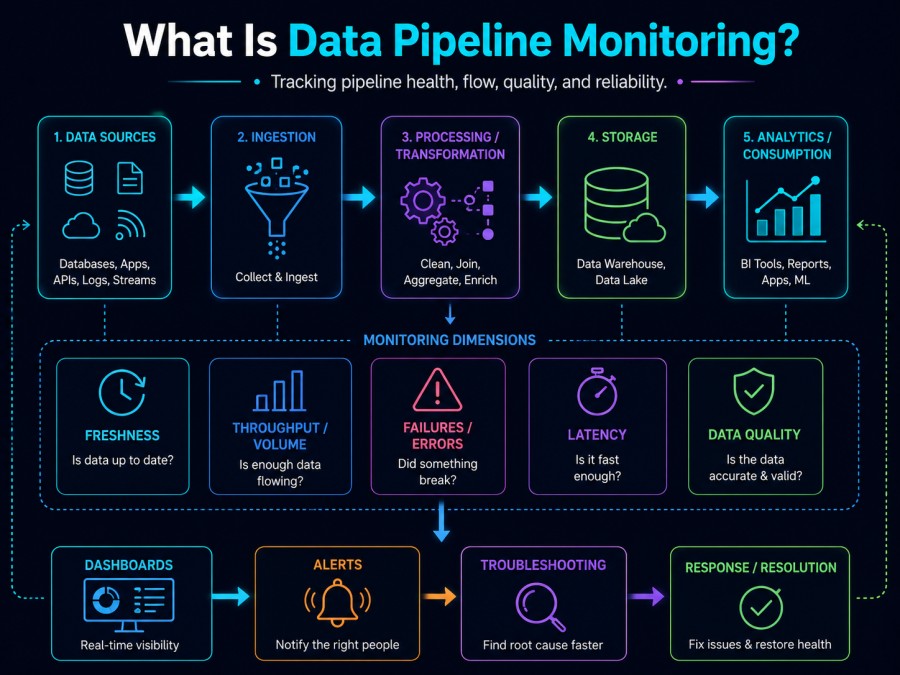
Data pipeline monitoring is the practice of observing and evaluating data as it moves through interconnected systems from ingestion to storage to transformation to final consumption. It tracks data quality, freshness, completeness, pipeline health, job execution status, and end-to-end latency to ensure the data your business relies on is accurate, timely, and trustworthy.
Modern data pipelines are complex. They might include Kafka streams, Airflow DAGs, Spark jobs, dbt transformations, Snowflake warehouses, and BigQuery analytics all connected in a single flow. Each stage introduces risk. A failed Kafka consumer, a missing column in dbt, or a misconfigured Snowflake COPY command can silently corrupt downstream data. Data pipeline monitoring detects these failures in real time so teams can fix them before they cascade.
Data pipeline monitoring differs from application monitoring. Application Performance Monitoring (APM) tracks code execution, API latency, and service health. Data pipeline monitoring tracks data itself, whether records are complete, whether schemas match, whether freshness SLAs are met, and whether transformations produce valid output. Both are essential, but they measure different things.
The goal of data pipeline monitoring is to answer four questions at every stage: Is the data accurate? Is it complete? Is it on time? Is the pipeline healthy?
How Data Pipeline Monitoring Works
Data pipeline monitoring works by instrumenting every stage of the data flow with telemetry that tracks data quality, processing latency, job execution status, and infrastructure health. The telemetry is collected, correlated, and surfaced through dashboards, alerts, and automated checks that trigger when thresholds are breached.
At a high level, data pipeline monitoring involves three layers: data monitoring, operational monitoring, and infrastructure monitoring. Data monitoring tracks the data itself: record counts, schema validation, null rates, freshness timestamps, and data distribution anomalies. Operational monitoring tracks the jobs, workflows, and processing logic, job success rates, execution time, retry counts, and error rates. Infrastructure monitoring tracks the systems that run the pipeline: CPU, memory, disk I/O, Kafka consumer lag, Spark executor health, and database connection pools.
These three layers must be correlated. A spike in null values (data monitoring) might be caused by a failed Kafka consumer (operational monitoring), which might be caused by memory pressure on the host (infrastructure monitoring). Without correlation, you see symptoms but miss root causes.
Modern data pipeline monitoring tools automate this correlation. They ingest logs, metrics, and events from Kafka, Airflow, dbt, Snowflake, Spark, and other components. They build a lineage graph showing how data flows from source to destination. They apply automated data quality checks at every stage: validating schema, checking for nulls, detecting duplicates, and comparing record counts. They alert when SLAs are missed or when anomalies are detected.
The monitoring flow typically works like this: Data is ingested from a source system (MongoDB, PostgreSQL, an API). Kafka or another streaming platform moves the data. An ETL tool (Airflow, dbt, Spark) transforms it. A warehouse (Snowflake, BigQuery, Redshift) stores it. At each stage, the monitoring tool collects metrics, runs validation checks, and logs events. When a check fails- for example, when a dbt model produces 10% fewer rows than expected – the tool fires an alert, links to the affected job, and surfaces the exact transformation that failed.
Effective data pipeline monitoring is proactive, not reactive. It detects issues before they impact downstream consumers.
What Data Pipeline Monitoring Measures: Key Metrics and Checks
Data pipeline monitoring tracks four categories of metrics: data quality, data observability, operational health, and infrastructure performance. Each category answers a different question about the pipeline.
Data Quality Metrics
Data quality metrics validate that the data itself is correct, complete, consistent, and usable. These checks run at every stage of the pipeline and are the first line of defense against bad data.
Record count validation compares the number of records ingested, transformed, and loaded at each stage. If 10,000 records enter Kafka but only 9,500 reach Snowflake, something failed in the ETL layer. This check is simple but catches most silent failures.
Schema validation ensures that column names, data types, and constraints match expectations. If a source table adds a new field or changes a column from INT to STRING, schema validation detects the drift before it breaks downstream transformations. Tools like Great Expectations and dbt tests automate this.
Null rate monitoring tracks the percentage of null values in critical fields. A spike in nulls often signals an upstream failure. For example, if a customer email column goes from 2% null to 30% null, the ingestion pipeline likely broke.
Duplicate detection identifies records that appear more than once based on unique identifiers. Duplicates are common in retry logic, Kafka reprocessing, and ETL jobs that fail mid execution. They corrupt aggregations and analytics.
Referential integrity checks validate relationships between tables. For example, every order record should reference a valid customer ID. If orphaned records appear, a join failed, or a source system sent incomplete data.
Format validation ensures data conforms to expected patterns: email addresses contain @ symbols, phone numbers match regional formats, timestamps are parseable. Format checks prevent garbage data from entering the warehouse.
Data Observability Metrics
Data observability metrics track whether data is fresh, available, and complete at every point in the pipeline. These metrics tell you if the pipeline is delivering data on time and in the expected volume.
Data freshness measures the time since the last update. If a table is updated every 15 minutes but the last load was 2 hours ago, the pipeline stalled. Freshness SLAs are critical for real-time analytics and ML models.
Data volume checks compare current ingestion volume against historical baselines. A sudden 90% drop in event volume might indicate a failed producer, a network partition, or a misconfigured filter.
Processing lag tracks the delay between when an event occurs and when it appears in the warehouse. High lag breaks real-time use cases. For example, a fraud detection model that depends on transaction data needs sub-minute lag. If lag climbs to 10 minutes, fraud goes undetected.
End-to-end latency measures the total time from source ingestion to final warehouse load. If the pipeline SLA is 1 hour but latency is 3 hours, downstream dashboards show stale data.
Operational Health Metrics
Operational health metrics track the jobs, workflows, and transformations that move and process data. These metrics detect failures, retries, and performance degradation in the pipeline logic itself.
Job execution success rate measures the percentage of successful vs. failed jobs. A 5% failure rate might be acceptable for non-critical pipelines, but for revenue-impacting data, every failure needs investigation.
Job execution time tracks how long each job takes to complete. If a transformation that usually runs in 10 minutes suddenly takes 45 minutes, something changed: larger data volume, inefficient query, or resource contention.
Retry counts measure how often jobs fail and retry. High retry counts signal unstable dependencies, transient errors, or bad configuration. Retries can also cause duplicates and lag spikes.
Kafka consumer lag tracks how far behind a Kafka consumer is from the latest offset. Consumer lag is one of the most important streaming metrics. If lag grows unbounded, the consumer cannot keep up with the producer, and real-time pipelines fall behind.
Error rates measure the percentage of records that fail validation, transformation, or load. A spike in error rates often precedes a larger failure.
Infrastructure Performance Metrics
Infrastructure performance metrics track the systems running the pipeline: Kafka brokers, Spark executors, Airflow workers, database connections, and compute resources. Infrastructure failures cascade into data failures.
CPU and memory utilization track resource consumption on pipeline hosts. High CPU or memory pressure slows processing and causes out-of-memory errors.
Disk I/O measures read and write throughput. Slow disk I/O bottlenecks ETL jobs and Kafka writes.
Network latency tracks the time data spends moving between systems. High network latency slows cross-region pipelines and cloud-to-on-prem transfers.
Database connection pool health monitors active connections, wait times, and connection errors. Exhausted connection pools stall ETL jobs and break queries.
Kafka broker health tracks broker availability, partition replication lag, and under-replicated partitions. Broker failures cause message loss and consumer lag spikes.
These metrics must be correlated. A spike in job execution time (operational) might be caused by high CPU (infrastructure). A drop in record count (data quality) might be caused by Kafka consumer lag (operational). Monitoring all three layers together is the only way to find root causes fast.
Types of Data Pipeline Issues and How to Detect Them
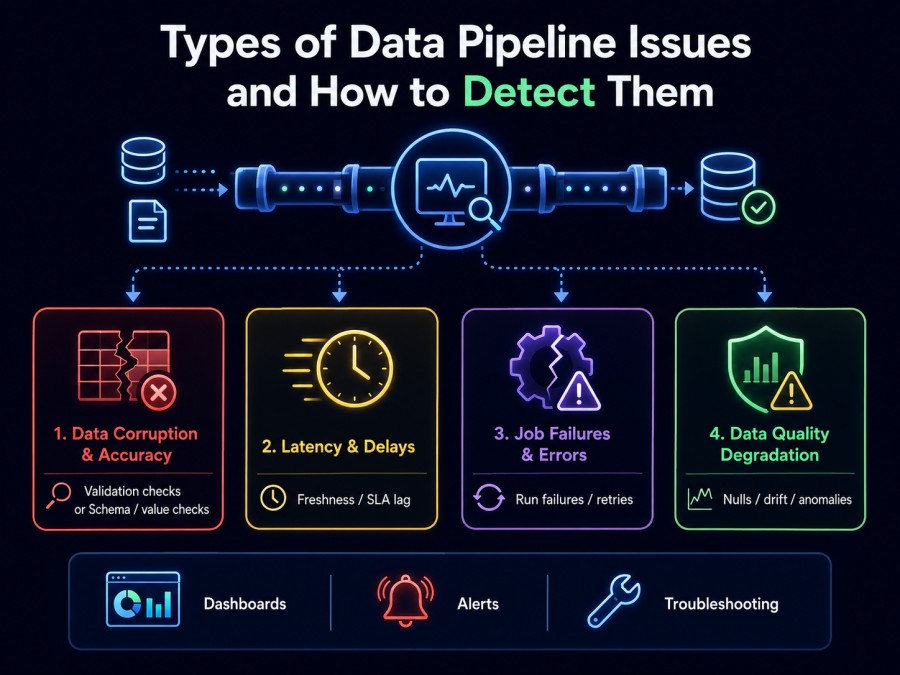
Data pipelines fail in predictable ways. Understanding the failure modes and their detection strategies helps teams build monitoring that catches issues early.
Data Corruption and Accuracy Failures
Data corruption happens when records arrive malformed, incomplete, or inconsistent. This is the hardest failure type to detect because the pipeline might look healthy while silently delivering bad data.
Causes include schema changes, type mismatches, encoding errors, truncation, and incorrect transformations. For example, a source system changes a column from VARCHAR(50) to VARCHAR(100), but the ETL layer still enforces the old constraint and silently truncates values. Or a JSON parser misreads a nested field and writes null instead of the actual value.
Detection strategies include hashing and checksum validation. Generate an MD5 or SHA256 hash for each record at ingestion and compare it post-transformation. If hashes do not match, the record changed unexpectedly. Schema validation tools like Great Expectations and dbt tests automate column type checks, NOT NULL constraints, and foreign key validation. Anomaly detection flags unexpected null spikes, outliers, or distribution shifts. For example, if the average order value jumps from $50 to $5,000 overnight, something broke.
Most data corruption is silent. Monitoring must actively validate data at every stage, not just check that jobs completed successfully.
Latency and Processing Delays
Latency issues occur when data takes too long to move through the pipeline. Real-time SLAs are missed, dashboards show stale data, and ML models train on outdated features.
Causes include slow transformations, inefficient queries, resource contention, network delays, and backpressure from downstream systems. For example, a dbt model runs a full table scan instead of using an index. Or Kafka consumers fall behind because Spark cannot process messages fast enough.
Detection strategies include tracking event timestamps at every stage. Store the event creation time, Kafka ingestion time, ETL processing time, and warehouse load time. Calculate latency at each hop. If Kafka to ETL latency spikes from 30 seconds to 10 minutes, investigate the consumer. Monitor Kafka consumer lag using built-in metrics or tools like Prometheus. If lag grows unbounded, the consumer cannot keep up. Track job execution time against baselines. If a job that usually completes in 15 minutes takes 2 hours, profile the query and check resource utilization.
Latency is cumulative. A 2-minute delay at ingestion, 5 minutes in transformation, and 3 minutes in loading adds up to 10 minutes of end-to-end lag. Monitor every stage.
Pipeline Failures and Job Errors
Pipeline failures are the easiest to detect because the pipeline stops working entirely. A job fails, a Kafka consumer crashes, or a warehouse load times out.
Causes include transient errors (network timeouts, API rate limits), configuration errors (wrong credentials, missing permissions), dependency failures (upstream table does not exist), and resource exhaustion (out of memory, disk full).
Detection strategies include monitoring job success rates and setting alerts for failed runs. Use workflow orchestrators like Airflow or Prefect to track task status and send notifications on failure. Monitor retry counts. If a job retries 10 times in an hour, it is failing repeatedly and needs manual intervention. Track error logs and group errors by type. If 80% of failures are connection timeouts, the issue is network or database availability. Correlate failures with infrastructure metrics. A failed Spark job might be caused by an out-of-memory error on the executor.
Pipeline failures are loud. The challenge is not detection but fast root cause analysis and recovery.
Data Quality Degradation
Data quality degradation is when data becomes less accurate, complete, or consistent over time without outright failure. The pipeline runs, but the output is subtly wrong.
Causes include schema drift, incomplete records, missing joins, stale data, and silent filtering. For example, a source API starts returning incomplete records but does not throw errors. Or a filter condition accidentally excludes 10% of valid records.
Detection strategies include tracking data profiling metrics over time. Monitor record counts, null rates, cardinality, and distribution statistics. If the number of unique customer IDs drops by 15% without explanation, investigate. Use anomaly detection to flag unexpected trends. If daily revenue totals fall outside the 95th percentile of historical values, validate the source data. Run reconciliation checks between stages. Compare source record counts with warehouse record counts. If they do not match, data was lost.
Quality degradation is silent and slow. It requires proactive validation, not reactive alerting.
Best Practices for Data Pipeline Monitoring
Effective data pipeline monitoring requires automation, correlation, and clear ownership. These best practices help teams build monitoring that scales.
Automate data quality checks at every stage. Do not rely on manual validation. Use tools like Great Expectations, dbt tests, or Monte Carlo to automate schema validation, null checks, duplicate detection, and referential integrity. Run these checks after every transformation and load.
Monitor data and operations together. Data quality issues often stem from operational failures. A spike in nulls might be caused by a failed ETL job. A drop in record count might be caused by Kafka consumer lag. Correlate data metrics with job status, execution time, and infrastructure health to find root causes faster.
Set SLAs and alert on violations. Define SLAs for data freshness, latency, and completeness. Alert when SLAs are missed. For example, if a table must update every 15 minutes, alert if the last load is 30 minutes old. Use anomaly detection to catch unexpected changes in volume, distribution, or quality.
Build a data lineage graph. Map how data flows from source to destination. Show which jobs transform which tables and which dashboards depend on which datasets. When a failure occurs, lineage helps you understand blast radius and prioritize fixes.
Track historical baselines. Compare current metrics against historical averages. A 10% drop in record count might be normal during a holiday or catastrophic during peak season. Baselines add context to alerts and reduce false positives.
Use unified dashboards. Avoid switching between Kafka dashboards, Airflow logs, Snowflake query history, and Grafana panels. Use a unified observability platform that correlates metrics, logs, and traces across all pipeline components.
Test monitoring in staging. Validate that your monitoring detects real issues before deploying to production. Inject synthetic failures: drop a column, delay a job, corrupt a record, and confirm that alerts fire correctly.
Assign ownership. Every pipeline should have an owner responsible for monitoring, SLAs, and incident response. Ownership ensures that alerts are acted on, not ignored.
Tools and Implementation: Monitoring Data Pipelines in Production
Data pipeline monitoring requires tools that track data quality, operational health, and infrastructure performance across distributed systems. Most teams use a combination of data observability platforms, workflow orchestrators, and infrastructure monitoring tools.
Data Observability Platforms
Data observability platforms specialize in monitoring data quality, freshness, and lineage. They automate validation checks, detect anomalies, and provide a unified view of data health across pipelines.
Monte Carlo tracks data quality, freshness, volume, and schema changes. It uses ML to detect anomalies and automatically maps data lineage across warehouses, lakes, and BI tools. Monte Carlo integrates with Snowflake, BigQuery, Redshift, Databricks, and dbt.
Great Expectations is an open source data validation framework. It allows teams to define expectations; for example, “column X should never be null” or “column Y should be between 0 and 100” and run those checks at every pipeline stage. Great Expectations integrates with Airflow, dbt, and most ETL tools.
Datafold specializes in data diffing and validation. It compares datasets across environments, detects schema changes, and flags unexpected differences. Datafold is often used during migrations and dbt deployments to ensure transformations produce identical output.
Workflow Orchestration and Job Monitoring
Workflow orchestrators like Airflow, Prefect, and Dagster manage pipeline execution and provide built-in monitoring for job status, execution time, and retries.
Apache Airflow is the most widely used open source orchestrator. It tracks DAG runs, task success rates, execution duration, and retries. Airflow integrates with Prometheus, Grafana, and Datadog for metrics export. Teams use Airflow logs to debug failed tasks and correlate failures with upstream dependencies.
Prefect is a modern orchestrator focused on developer experience. It provides real-time visibility into flow runs, automatic retries, and failure notifications. Prefect Cloud offers a managed monitoring dashboard.
Dagster is an orchestrator built for data pipelines. It tracks asset lineage, monitors data quality checks, and provides a UI for exploring pipeline dependencies. Dagster integrates with Great Expectations and dbt for automated validation.
Infrastructure and Streaming Monitoring
Infrastructure monitoring tools track the health of Kafka brokers, Spark clusters, database connections, and compute resources that run the pipeline.
Prometheus and Grafana are the standard for monitoring Kafka, Spark, and Kubernetes. Prometheus scrapes metrics from exporters, and Grafana visualizes them. Teams use Prometheus to track Kafka consumer lag, Spark executor memory, and database connection pool health.
Datadog provides managed monitoring for infrastructure, logs, and APM. It integrates with Kafka, Snowflake, Airflow, and dbt. Datadog correlates metrics, logs, and traces to help teams debug pipeline failures faster. Pricing is per host and per GB ingested; costs can scale quickly for large pipelines.
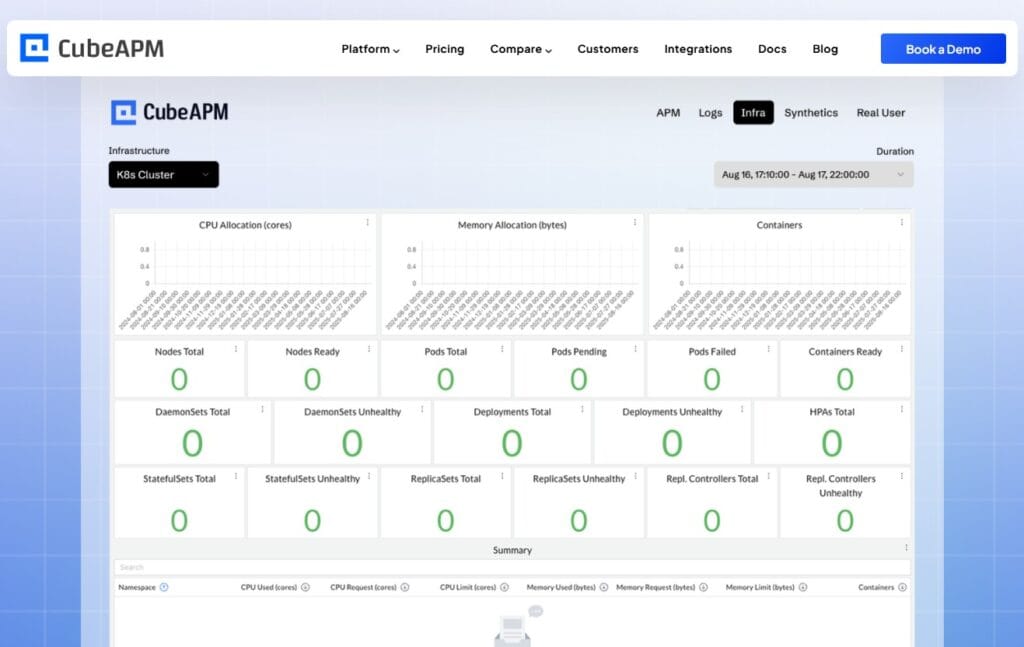
CubeAPM is a self-hosted observability platform that tracks infrastructure, logs, and application performance in a unified interface. It runs inside your cloud or on-prem, so telemetry data stays local. CubeAPM ingests metrics from Kafka, Airflow, Spark, and Snowflake via OpenTelemetry. It provides trace correlation, log search, and alerting at $0.15/GB with unlimited retention. CubeAPM is built for teams that need data residency, predictable pricing, and full-stack visibility without SaaS vendor lock-in. It integrates with infrastructure monitoring tools and supports native Kubernetes, Prometheus, and OpenTelemetry ingestion.
Database and Warehouse Monitoring
Modern data warehouses like Snowflake, BigQuery, and Redshift provide built-in monitoring for query performance, storage usage, and compute utilization.
Snowflake tracks query history, execution time, data transfer volume, and warehouse credit consumption. Teams use Snowflake query profiles to identify slow queries and optimize transformations.
BigQuery provides detailed job execution metrics, slot usage, and query cost breakdowns. BigQuery integrates with Google Cloud Monitoring for alerting and dashboards.
Redshift tracks query performance, vacuum operations, and cluster health. Teams use AWS CloudWatch to monitor Redshift metrics and set alarms for high CPU or disk usage.
Combining data observability platforms, workflow orchestrators, and infrastructure monitoring tools gives teams full visibility into data quality, operational health, and system performance across the entire pipeline.
Conclusion
Data pipeline monitoring is essential for maintaining data quality, meeting SLAs, and preventing silent failures in modern data infrastructure. It tracks data accuracy, freshness, completeness, pipeline health, and infrastructure performance across every stage of the flow. Effective monitoring combines automated validation checks, operational health tracking, and infrastructure observability in a unified system. Teams that implement proactive monitoring detect issues before they corrupt analytics, break ML models, or violate compliance requirements.
Disclaimer: The information in this article reflects the latest details available at the time of publication and may change as technologies and products evolve. Features, pricing, and plan limits can change over time. Always verify the latest information directly with the vendor before making purchasing or deployment decisions.
Frequently Asked Questions
What are the main 3 stages in a data pipeline?
The main three stages in a data pipeline are ingestion (collecting data from sources), transformation (cleaning, enriching, and structuring data), and loading (storing data in a warehouse or database for consumption).
What is a data pipeline and how does it work?
A data pipeline is an automated workflow that moves data from source systems through transformation stages to final storage or consumption. It works by ingesting data, applying ETL or ELT logic, validating quality, and loading results into warehouses or analytics platforms.
What tools are available for monitoring data pipelines?
Tools for monitoring data pipelines include data observability platforms like Monte Carlo and Great Expectations, workflow orchestrators like Airflow and Prefect, and infrastructure monitoring tools like Prometheus, Datadog, and CubeAPM.
How do you detect data quality issues in a pipeline?
Detect data quality issues by running automated validation checks at every stage, tracking schema changes, monitoring null rates and duplicates, comparing record counts across stages, and using anomaly detection to flag unexpected distribution shifts.
What is the difference between data monitoring and operational monitoring?
Data monitoring tracks the data itself — quality, freshness, completeness, and schema — while operational monitoring tracks the jobs, workflows, and infrastructure that move and process the data, including execution status, latency, and resource health.
How do you measure data pipeline latency?
Measure data pipeline latency by tracking timestamps at each stage — ingestion time, transformation time, load time — and calculating the difference between event creation and final availability in the warehouse or analytics platform.
What causes data pipeline failures?
Data pipeline failures are caused by transient errors like network timeouts, configuration errors like wrong credentials, dependency failures like missing upstream tables, resource exhaustion like out of memory errors, and schema changes that break transformations.