









Aerospike is a distributed NoSQL database built for low latency and high throughput at scale. It powers systems that handle millions of operations per second across industries from ad tech to financial services. But without proper monitoring, a latency spike, memory pressure event, or namespace imbalance can degrade application performance long before anyone notices.
Monitoring Aerospike requires tracking cluster health, namespace capacity, read/write latency, and eviction behavior in real time. The Aerospike Prometheus Exporter translates Aerospike’s internal metrics into OpenTelemetry-compatible Prometheus format, making integration with observability platforms straightforward. This guide covers how to set up the exporter, configure Prometheus scraping, identify key metrics to watch, and integrate Aerospike telemetry into platforms like CubeAPM, Grafana, or any OpenTelemetry-compatible backend.
What Is Aerospike Monitoring and Why It Matters
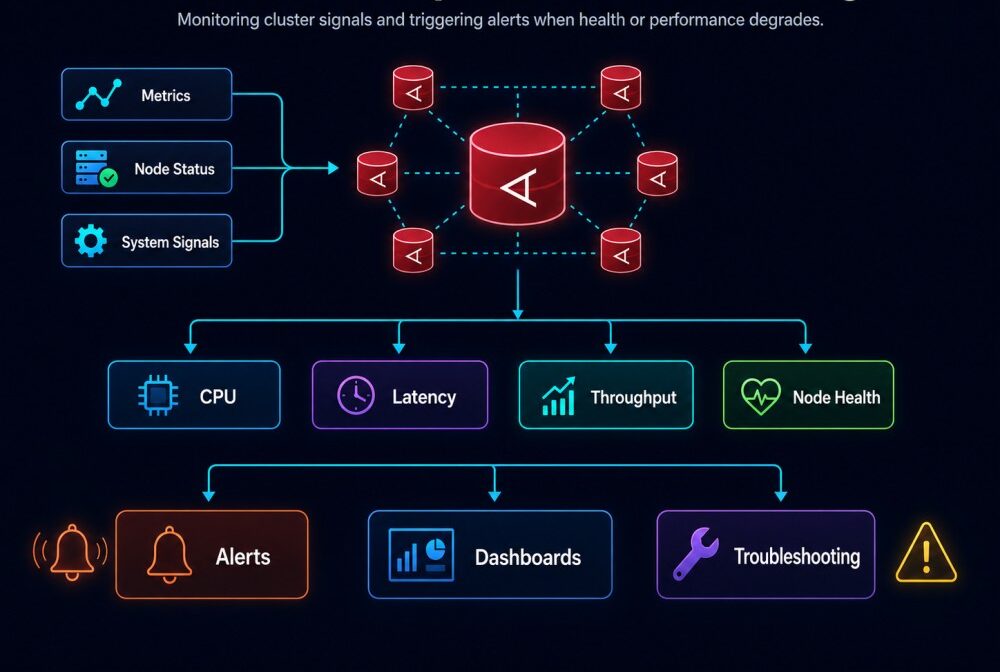
Aerospike monitoring is the practice of continuously tracking database performance, resource utilization, cluster stability, and data distribution to detect issues early and maintain SLAs in production.
Unlike traditional relational databases, Aerospike uses a hybrid memory and storage architecture optimized for sub-millisecond latency. Data is stored in memory for speed and persisted to disk for durability. This design makes certain failure modes unique to Aerospike. A single node running low on memory can trigger stop writes mode across a namespace. A network partition can cause split brain scenarios. A misconfigured eviction policy can silently drop data without alerting anyone.
Aerospike exposes hundreds of metrics through its info protocol covering namespace health, node statistics, set level metrics, and cluster state. The challenge is surfacing these metrics in a format observability tools can ingest and correlate with application traces and logs.
The Aerospike Prometheus Exporter solves this by polling Aerospike nodes via the info protocol and exposing metrics at a /metrics endpoint in Prometheus format. This makes Aerospike telemetry compatible with any tool that scrapes Prometheus endpoints including Prometheus itself, OpenTelemetry Collector, Grafana, Datadog, and CubeAPM.
Without monitoring, common failure scenarios go undetected until customer impact occurs. Memory approaching 100% triggers stop writes but appears fine at the application layer until writes start failing. Client timeouts increase gradually as read latency climbs from 1ms to 15ms, degrading user experience before any alarm fires. Namespace evictions spike during traffic surges, silently removing cached data and increasing database load downstream.
Monitoring surfaces these issues in real time with enough context to diagnose root cause. You see which namespace hit memory limits, which node shows elevated latency, and whether the issue is isolated to a single set or affecting the entire cluster.
How Aerospike Monitoring Works
Aerospike monitoring relies on the Aerospike Prometheus Exporter, a monitoring agent that translates Aerospike’s internal metrics into OpenTelemetry compatible Prometheus format.
- The exporter connects to Aerospike Database nodes via the Aerospike info protocol, which is the same protocol the asadm command line tool uses to query cluster state. The exporter polls Aerospike nodes at a configured interval (default every 30 seconds), issues info commands to retrieve metrics, parses the response, and exposes the data at an HTTP /metrics endpoint.
- Prometheus or an OpenTelemetry Collector scrapes this /metrics endpoint and stores the time series data in its database. From there, metrics flow into dashboards, alerting rules, and correlation with traces and logs in platforms like infrastructure monitoring tools or APM systems.
- The exporter supports multiple deployment models. It can run as a sidecar container alongside each Aerospike node, as a standalone service monitoring multiple clusters, or embedded in Kubernetes as part of the Aerospike Kubernetes Operator deployment.
For security, the exporter supports TLS encryption and authentication. You configure TLS certificates, node TLS names, and Aerospike credentials (user and password) in the exporter’s configuration file. The exporter also supports external authentication modes including LDAP and PKI for enterprise environments.
The exporter exposes three types of metrics: node metrics (CPU, memory, network), namespace metrics (storage capacity, object count, evictions), and set metrics (per-set object counts and tombstones). Some metrics are pseudo metrics, meaning they are derived calculations rather than raw Aerospike stats. For example, the exporter calculates available capacity percentage by combining multiple raw metrics.
Once metrics reach Prometheus, you build dashboards in Grafana or query them directly via PromQL. Alerting rules detect threshold violations like memory above 90%, stop writes triggered, or client read errors spiking. These alerts route to Slack, PagerDuty, or incident management systems.
The entire pipeline from Aerospike node to alert typically completes in under 60 seconds. This makes it feasible to catch issues in real time before they cascade into broader outages.
Key Aerospike Metrics to Monitor
Aerospike exposes hundreds of metrics but most production monitoring focuses on a core set that indicate cluster health, capacity, and performance.
Namespace Capacity Metrics
Aerospike organizes data into namespaces, which are similar to databases in relational systems. Each namespace has a configured memory limit and storage limit. Monitoring these limits prevents stop writes events.
memory_used_bytestracks total memory consumed by a namespace. When this approaches the configuredmemory_size, Aerospike begins evicting data if an eviction policy is set. If no eviction policy exists, the namespace enters stop writes mode and rejects all write requests.storage_engine.file[n].used_bytestracks disk usage per storage file. Aerospike typically uses raw block devices or files on SSD. Running out of disk space triggers stop writes just like running out of memory.stop_writesis a boolean metric (0 or 1). When it flips to 1, the namespace is rejecting writes. This is a critical condition that requires immediate action, either by freeing capacity, adding nodes, or adjusting retention policies.objectscounts the total number of records stored in the namespace. A sudden drop indicates data loss or aggressive evictions. A steady climb without corresponding capacity increases warns of an approaching limit.memory_available_pctandstorage_available_pctshow remaining capacity as percentages. Alert when these drop below 20% to give time to scale the cluster before hitting stop writes.
Read and Write Performance Metrics
Latency directly impacts application experience. Aerospike breaks down latency into multiple histograms covering reads, writes, and different latency buckets.
client_read_successandclient_write_successcount successful operations. These should track closely with application request rates. A drop indicates failures or throttling.client_read_errorandclient_write_errorcount failed operations. Errors can result from timeouts, network issues, or Aerospike rejecting requests due to resource limits.- Aerospike publishes latency histograms like
{ns}_read_histand{ns}_write_histthat break operations into latency buckets (1ms, 8ms, 64ms). Monitoring the 95th and 99th percentile latencies reveals performance degradation before average latency numbers show a problem. - For deeper diagnosis, track
storage-engine.file[n].defrag_qwhich shows how many blocks are queued for defragmentation. High defrag queue depth increases write latency as Aerospike reorganizes storage to reclaim space.
Cluster Health and Replication Metrics
Aerospike replicates data across nodes to maintain availability during failures. Monitoring replication lag and cluster integrity prevents silent data inconsistencies.
cluster_sizereports the number of nodes Aerospike sees in the cluster. A sudden change indicates a node failure, network partition, or configuration issue.replication_factorshows the configured replication factor for a namespace. Verify this matches your intended redundancy level.unavailable_partitionscounts partitions that lack the configured number of replicas. Non-zero values indicate data at risk if another node fails.dead_partitionscounts partitions with zero replicas. This means data loss has already occurred and requires immediate investigation.
Monitoring migrations is critical during cluster changes. When you add or remove nodes, Aerospike rebalances data by migrating partitions. migrate_tx_partitions_remaining shows how many partitions still need to migrate. High migration activity increases latency and resource usage.
Set Level Metrics
Aerospike namespaces contain sets, similar to tables in relational databases. Monitoring set level metrics helps identify hot sets or data skew.
{set}_objectscounts objects in a specific set. Rapid growth in one set can indicate runaway data ingestion or a bug in the application.{set}_tombstonescounts deleted records not yet reclaimed. High tombstone counts increase memory usage without serving data. Running a scan or defrag operation reclaims this space.
Aerospike Prometheus Exporter allows filtering which set metrics to collect. For namespaces with hundreds of sets, collecting all set metrics creates high cardinality. Use the set_metrics_allowlist configuration to collect only critical sets.
System and Node Level Metrics
Beyond Aerospike specific metrics, track underlying system health to catch infrastructure issues early.
system_free_mem_pctshows remaining system memory. Low system memory triggers OS level swapping, which degrades Aerospike performance even if the database itself has not hit limits.system_cpu_user_pctandsystem_cpu_sys_pcttrack CPU utilization. Aerospike is CPU efficient, but sustained high CPU can indicate inefficient queries or excessive defragmentation.network_bytes_recvandnetwork_bytes_transmeasure network throughput. Sudden drops indicate network issues. Sustained highs warn of approaching network capacity limits.
For Kubernetes deployments, correlate Aerospike metrics with pod resource limits, node pressure events, and OOMKill signals. Kubernetes monitoring platforms like CubeAPM automatically link Aerospike metrics to pod and node level context.
Configuring the Aerospike Prometheus Exporter
Setting up Aerospike monitoring starts with deploying and configuring the Aerospike Prometheus Exporter. The exporter is distributed as a binary, Docker image, or Helm chart for Kubernetes.
Installing the Exporter
For standalone servers, download the latest release binary from the Aerospike Prometheus Exporter GitHub repository or install via package manager. Debian and RPM packages are available.
# Install via DEB package
dpkg -i aerospike-prometheus-exporter_*.deb
# Install via RPM package
rpm -Uvh aerospike-prometheus-exporter-*.rpmFor Docker deployments, pull the official image and run it as a container:
docker run -d \
  --name aerospike-exporter \
  -e AS_HOST=172.17.0.2 \
  -e AS_PORT=3000 \
  -p 9145:9145 \
aerospike/aerospike-prometheus-exporter:latestFor Kubernetes, use the Helm chart or include the exporter as a sidecar in your Aerospike StatefulSet. The Aerospike Kubernetes Operator bundles the exporter by default.
Configuring Aerospike Connection
The exporter configuration file (default /etc/aerospike-prometheus-exporter/ape.toml) defines how the exporter connects to Aerospike nodes.
[Aerospike]
db_host = "localhost"
db_port = 3000
timeout = 5
# TLS configuration
root_ca = "file:/path/to/ca.crt"
cert_file = "file:/path/to/client.crt"
key_file = "file:/path/to/client.key"
key_file_passphrase = "env:KEY_PASSPHRASE"
node_tls_name = "aerospike-node"
# Authentication
user = "env:AEROSPIKE_USER"
password = "env:AEROSPIKE_PASSWORD"
auth_mode = "internal"The exporter supports multiple credential formats for security. Use file: to load from a file, env: to read from an environment variable, or env-b64: for base64 encoded secrets. This prevents hardcoding credentials in configuration files.
For multi-node clusters, deploy one exporter instance per node or configure a single exporter to monitor multiple nodes by listing them in the configuration.
Filtering Metrics with Allowlists
Aerospike exposes hundreds of metrics. Collecting every metric creates high cardinality and increases storage costs. Use allowlists to collect only relevant metrics.
[Aerospike]
namespace_metrics_allowlist = [
  "client_read_*",
  "client_write_success",
  "stop_writes",
  "storage-engine.file*",
  "memory_used_*",
  "objects",
  "*_available_pct"
]
set_metrics_allowlist = [
  "objects",
  "tombstones"
]
node_metrics_allowlist = [
  "system_free_mem_pct",
  "cluster_size"
]Wildcards follow standard glob patterns. client_read_* matches all client read metrics. storage-engine.file[*].* matches all file-level storage metrics.
An empty allowlist means collect everything. Commenting out the allowlist disables filtering.
Configuring the Exporter Endpoint
The exporter exposes metrics at an HTTP endpoint that Prometheus scrapes. Configure the bind address and port in the [Agent] section:
[Agent]
bind = ":9145"
labels = { zone = "us-east-1a", platform = "aws", cluster = "production" }
cloud_provider = "aws"
refresh_system_stats = trueLabels add metadata to every metric, making it easier to filter and group metrics by environment, region, or cluster. The exporter automatically detects cloud provider metadata when cloud_provider is set, enriching metrics with region and availability zone information.
The refresh_system_stats option enables the collection of system-level metrics like memory, CPU, and network usage. This adds operational context without requiring a separate node exporter.
Sending Metrics via OpenTelemetry
The Aerospike Prometheus Exporter natively supports the OpenTelemetry format for teams using OTLP ingestion pipelines. Enable OpenTelemetry export in the configuration:
[Agent]
enable_open_telemetry = true
[Agent.OpenTelemetry]
grpc_endpoint = "otel-collector.example.com:4317"
http_endpoint = "https://otel-collector.example.com/v1/metrics"
headers = { "Authorization" = "Bearer env:OTEL_TOKEN" }This sends metrics directly to an OpenTelemetry Collector or compatible backend. The exporter maintains both the /metrics endpoint for Prometheus scraping and the OTLP export, allowing hybrid setups.
For teams using CubeAPM, configure the exporter to send metrics via OpenTelemetry to the CubeAPM OpenTelemetry Collector endpoint. CubeAPM automatically correlates Aerospike metrics with application traces and logs, providing unified visibility without switching tools.
Setting Up Prometheus to Scrape Aerospike Metrics
Once the Aerospike Prometheus Exporter is running, configure Prometheus to scrape the /metrics endpoint and store the time series data.
Adding Aerospike as a Scrape Target
Edit the Prometheus configuration file (prometheus.yml) to add a scrape job for the exporter:
scrape_configs:
  - job_name: 'aerospike'
    scrape_interval: 30s
    static_configs:
      - targets:
          - 'aerospike-exporter-1.example.com:9145'
          - 'aerospike-exporter-2.example.com:9145'
          - 'aerospike-exporter-3.example.com:9145'
    relabel_configs:
      - source_labels: [__address__]
target_label: instanceThe scrape_interval defines how often Prometheus polls the exporter. A 30-second interval balances freshness with storage overhead. For high-throughput clusters experiencing rapid changes, reduce this to 15 seconds.
For dynamic environments like Kubernetes, use Prometheus service discovery instead of static targets:
scrape_configs:
  - job_name: 'aerospike'
    kubernetes_sd_configs:
      - role: pod
        namespaces:
          names:
            - aerospike-production
    relabel_configs:
      - source_labels: [__meta_kubernetes_pod_label_app]
        action: keep
        regex: aerospike-exporter
      - source_labels: [__meta_kubernetes_pod_name]
        target_label: pod
      - source_labels: [__meta_kubernetes_namespace]
target_label: namespaceThis automatically discovers exporter pods labeled app=aerospike-exporter in the aerospike-production namespace and adds them as scrape targets.
Configuring Metric Retention
Aerospike metrics generate significant time series data, especially in large clusters with high cardinality sets. Configure Prometheus retention to balance storage cost and historical analysis needs.
storage:
  tsdb:
    path: /prometheus/data
    retention.time: 30d
retention.size: 500GBA 30-day retention window supports trend analysis and capacity planning without unbounded storage growth. For longer retention, consider remote write to a long-term storage backend like Thanos, Cortex, or CubeAPM.
CubeAPM offers unlimited retention for Prometheus metrics at $0.15/GB with no additional indexing or query fees. This makes it feasible to retain Aerospike metrics for compliance, auditing, or deep historical analysis without storage limits.
Validating Metrics Collection
After updating the Prometheus configuration and reloading Prometheus, verify metrics are flowing:
# Check targets are up
curl http://prometheus.example.com:9090/api/v1/targets | jq '.data.activeTargets[] | select(.labels.job == "aerospike")'

# Query a sample metric
curl -G http://prometheus.example.com:9090/api/v1/query --data-urlencode 'query=aerospike_namespace_memory_used_bytes'If targets show as down, check network connectivity between Prometheus and the exporter, verify the exporter is running and accessible at the configured port, and review Prometheus logs for scrape errors.
Common issues include firewall rules blocking port 9145, incorrect TLS configuration if Prometheus is configured for HTTPS scraping, or the exporter failing to connect to Aerospike nodes due to authentication errors.
Building Aerospike Dashboards in Grafana
Visualizing Aerospike metrics in Grafana provides real-time insight into cluster health, performance trends, and capacity planning.
The Aerospike Prometheus Exporter repository includes pre-built Grafana dashboards covering namespace health, cluster overview, and node-level metrics. Import these dashboards as a starting point and customize based on your monitoring priorities.
Importing Pre-Built Dashboards
Download the dashboard JSON from the Aerospike Grafana dashboards repository and import into Grafana via the UI or API:
The dashboards use Prometheus as the data source. Ensure Grafana is configured to connect to your Prometheus instance before importing.
Key Dashboard Panels to Include
Effective Aerospike dashboards surface the metrics that matter most for operational health. Priority panels include:
Namespace Capacity Overview: Show memory used, memory available percentage, and stop writes status for each namespace. Use color thresholds (green below 70%, yellow 70-90%, red above 90%) to highlight namespaces approaching limits.
Read and Write Latency: Plot 95th and 99th percentile read and write latency over time. Include separate panels for different latency buckets to identify when operations shift from sub-millisecond to multi-millisecond response times.
Cluster Health: Display cluster size, unavailable partitions, and dead partitions. A stable cluster shows constant cluster size and zero unavailable or dead partitions.
Migration Status: During cluster changes, track migrate_tx_partitions_remaining to monitor rebalance progress. High migration counts correlate with increased latency.
Storage Defrag Queue: For SSD backed namespaces, monitor defrag queue depth. Sustained high defrag activity warns of write amplification impacting performance.
Set Level Object Counts: For namespaces with business critical sets, track object counts and tombstone growth per set. Sudden changes indicate application behavior shifts or data issues.
Setting Up Grafana Alerts
Grafana supports alerting directly from dashboard panels. Configure alerts for critical thresholds:
# Alert when namespace memory exceeds 85%
- alert: AerospikeMemoryHigh
  expr: aerospike_namespace_memory_available_pct < 15
  for: 5m
  labels:
    severity: warning
  annotations:
    summary: "Aerospike namespace {{ $labels.ns }} memory high"
    description: "Namespace {{ $labels.ns }} has less than 15% memory available."

# Alert when stop_writes is triggered
- alert: AerospikeStopWrites
  expr: aerospike_namespace_stop_writes == 1
  for: 1m
  labels:
    severity: critical
  annotations:
    summary: "Aerospike namespace {{ $labels.ns }} in stop writes mode"
description: "Namespace {{ $labels.ns }} is rejecting writes due to capacity limits."Route alerts to Slack, PagerDuty, or incident management platforms. Include context like namespace name, cluster, and current capacity levels to speed diagnosis.
For teams using CubeAPM, alerts automatically include links to related traces and logs. If a stop writes event correlates with a traffic spike, CubeAPM surfaces the exact API calls that increased write load, making root cause analysis faster than dashboard-only monitoring.
Monitoring Aerospike in Production: Best Practices
Effective Aerospike monitoring requires more than collecting metrics. Production monitoring combines proactive capacity planning, real time alerting, and correlation with application behavior.
Establish Baseline Performance Metrics
Before an incident occurs, establish baseline performance for each namespace. Measure typical read and write latency, object growth rate, and memory consumption patterns during normal and peak traffic.
Baselines help distinguish genuine anomalies from expected variance. A 10% increase in read latency during daily peak traffic is normal. The same increase at 3 AM signals a problem.
Track baselines per namespace and per set if your workload has distinct access patterns. A set serving ad impressions may have radically different performance characteristics than a set storing user profiles.
Alert on Trends, Not Just Thresholds
Threshold alerts like “memory above 90%” catch problems late. Trend based alerts detect issues earlier by flagging abnormal growth rates.
For example, alert if memory used increases by more than 20% hour over hour outside of expected growth windows. This catches runaway data ingestion before hitting stop writes.
PromQL supports rate and derivative functions for trend detection:
# Alert if memory growth rate exceeds 10GB/hour
rate(aerospike_namespace_memory_used_bytes[1h]) > 10 * 1024^3Correlate Aerospike Metrics with Application Traces
Metrics tell you what is happening. Traces explain why. Correlating Aerospike performance metrics with application request traces surfaces the connection between database behavior and user experience.
For instance, a spike in client_read_error correlates with increased timeout errors in your application’s trace data. Drilling into traces shows which API endpoints experienced failures, which Aerospike namespace they queried, and whether the issue is isolated to a specific customer or query pattern.
CubeAPM natively correlates Aerospike metrics with distributed traces, logs, and infrastructure events. When a metric threshold triggers, the alert includes links to related traces, showing exactly which application requests triggered the issue and what code path executed. This eliminates the context switching between monitoring tools and APM platforms that slows most investigations.
Monitor Aerospike Across Environments
Monitoring production is essential, but monitoring staging and development environments prevents production incidents. Many Aerospike issues stem from configuration drift between environments.
For example, eviction policies differ between staging and production. Under load, staging silently evicts data while production hits stop writes because no eviction policy exists. Testing with production equivalent monitoring catches this before deployment.
Deploy the Aerospike Prometheus Exporter in all environments and tag metrics with environment labels. Use the same dashboards and alerting rules across environments to ensure consistency.
Automate Capacity Planning
Aerospike clusters require capacity planning as data and traffic grow. Monitoring provides the data to forecast when you need to add nodes or increase storage.
Track daily object growth rate and project forward to estimate when namespaces hit capacity. Calculate the time to stop writes based on current memory consumption and growth trends:
# Estimate days until stop_writes based on current growth
(aerospike_namespace_memory_size - aerospike_namespace_memory_used_bytes)
/ (rate(aerospike_namespace_memory_used_bytes[7d]) * 86400)This gives a running estimate of how many days remain before hitting stop writes, assuming current growth continues. Alert when this drops below 30 days to trigger capacity expansion planning.
Test Failure Scenarios
Monitoring tools should detect failures before customers report them. Test this by simulating failure scenarios in staging: kill a node, fill a namespace to trigger stop writes, inject network latency, or misconfigure replication factor.
Verify your monitoring detects each scenario within your target detection time. If alerts fire late or not at all, adjust thresholds or add missing metrics.
For Kubernetes deployments, test pod evictions, node pressure events, and OOMKills. Aerospike handles some failures gracefully, but monitoring should surface every degradation before it compounds into an outage.
Monitoring Aerospike with CubeAPM

CubeAPM provides unified Aerospike monitoring by correlating database metrics with application traces, logs, and infrastructure telemetry in a single platform. It runs on-premises or in your VPC, keeping Aerospike telemetry data within your infrastructure.
Connecting Aerospike to CubeAPM
CubeAPM ingests Aerospike metrics via OpenTelemetry or Prometheus remote write. Configure the Aerospike Prometheus Exporter to send metrics to the CubeAPM OpenTelemetry Collector endpoint:
[Agent]
enable_open_telemetry = true
[Agent.OpenTelemetry]
grpc_endpoint = "cubeapm-collector.example.com:4317"
headers = { "X-API-Key" = "env:CUBEAPM_API_KEY" }Alternatively, configure Prometheus remote write to push metrics to CubeAPM:
remote_write:
  - url: https://cubeapm.example.com/api/v1/push
    headers:
X-API-Key: ${CUBEAPM_API_KEY}CubeAPM automatically indexes all Aerospike metrics with no additional configuration. High cardinality metrics like per-set object counts are fully searchable without performance degradation.
Unified Visibility Across Metrics, Traces, and Logs
CubeAPM links Aerospike metrics to application behavior. When a metric threshold triggers, CubeAPM surfaces the exact application requests that interacted with Aerospike at that time.
For example, if client_read_error spikes in a namespace, CubeAPM shows which services queried that namespace, which endpoints experienced errors, and the full distributed trace for failed requests. This eliminates the manual correlation most teams do when jumping between Grafana, APM tools, and log aggregators.
CubeAPM also correlates Aerospike metrics with Kubernetes pod events, node pressure, and OOMKill signals. If an Aerospike pod is evicted due to memory pressure, CubeAPM links the eviction event to the spike in memory_used_bytes and the application traces showing which workload triggered the memory spike.
Alerting with Full Context
CubeAPM alerts include the full context needed to diagnose Aerospike issues without switching tools. Alerts link directly to dashboards, traces, and logs related to the event.
Create alerts on any Aerospike metric using CubeAPM’s query builder:
alert: AerospikeNamespaceMemoryHigh
condition: aerospike_namespace_memory_available_pct < 15
for: 5 minutes
notification: slack, pagerduty
context:
  - Related traces from the last 10 minutes
  - Pod resource metrics from the affected node
- Recent Aerospike namespace configuration changesWhen the alert fires, the Slack message includes a link to the CubeAPM dashboard showing Aerospike namespace metrics, recent application traces that wrote to the namespace, and Kubernetes events from the pod hosting the Aerospike node.
Unlimited Retention for Aerospike Metrics
CubeAPM offers unlimited retention for all metrics at $0.15/GB with no separate indexing or query fees. This makes long term Aerospike trend analysis feasible without storage caps or retention tier pricing.
Retain Aerospike metrics for compliance, capacity planning, or historical trend analysis without worrying about storage costs scaling faster than data volume. CubeAPM’s flat pricing model eliminates the retention vs. cost tradeoff most teams face with time series databases.
For a 100 node Aerospike cluster generating 5TB of metrics monthly, CubeAPM costs $750/month with unlimited retention. Comparable platforms charge 4 to 6 times this for the same data volume with 30 day retention limits.
Disclaimer: The information in this article reflects the latest details available at the time of publication and may change as technologies and products evolve. Features, pricing, and plan limits can change over time. Always verify the latest information directly with the vendor before making purchasing or deployment decisions.
Frequently Asked Questions
What metrics should I monitor for Aerospike cluster health?
Monitor namespace memory and storage available percentage, stop writes status, cluster size, unavailable partitions, and client read/write error rates. These metrics cover capacity, replication health, and client facing performance.
How do I configure the Aerospike Prometheus Exporter to monitor multiple clusters?
Deploy one exporter instance per cluster or configure a single exporter with multiple Aerospike connection blocks in the TOML configuration file. Each block specifies a different db_host and port, and the exporter labels metrics with cluster identifiers to distinguish them in Prometheus.
What is the difference between monitoring with OpenTelemetry and Prometheus for Aerospike?
The Aerospike Prometheus Exporter supports both. Prometheus scraping pulls metrics from the exporter HTTP endpoint. OpenTelemetry push sends metrics directly to an OTLP receiver. Choose Prometheus for existing Prometheus infrastructure or OpenTelemetry for unified telemetry pipelines with traces and logs.
How do I alert when Aerospike namespace enters stop writes mode?
Create an alert on the `aerospike_namespace_stop_writes` metric with a threshold of 1. Set the alert duration to 1 minute to fire immediately when the condition triggers, as stop writes is a critical event requiring immediate response.
Can I monitor Aerospike set level metrics without high cardinality overhead?
Yes, use the `set_metrics_allowlist` configuration in the exporter to collect metrics only for critical sets. For namespaces with hundreds of sets, filtering reduces cardinality and storage costs without losing visibility into important data segments.
How does CubeAPM correlate Aerospike metrics with application traces?
CubeAPM ingests both Aerospike metrics and application traces via OpenTelemetry. It automatically links metrics to traces by timestamp and service context. When a metric threshold triggers, CubeAPM shows traces from the same timeframe that interacted with Aerospike, eliminating manual correlation.
What retention period should I configure for Aerospike metrics in Prometheus?
A 30 day retention window balances storage cost and trend analysis for most teams. For compliance or deeper historical analysis, use remote write to a long term storage backend like CubeAPM which offers unlimited retention without storage caps or query performance degradation.