









RabbitMQ monitoring is the continuous process of tracking queue depth, message rates, connection counts, memory usage, and node health across a RabbitMQ cluster to detect performance issues, prevent message loss, and maintain uptime. Without monitoring, a queue backlog or memory alarm can silently degrade application performance until the entire message broker stops accepting new connections.
According to the CNCF 2024 Annual Survey, 87% of organizations use logs, 57% use traces, and companies use an average of eight observability technologies. That supports the point that message broker telemetry is becoming part of a broader observability stack, not a standalone concern.
This guide covers what RabbitMQ monitoring is, how it works, which metrics matter most, and how to choose the right monitoring approach for your production environment.
What Is RabbitMQ Monitoring?
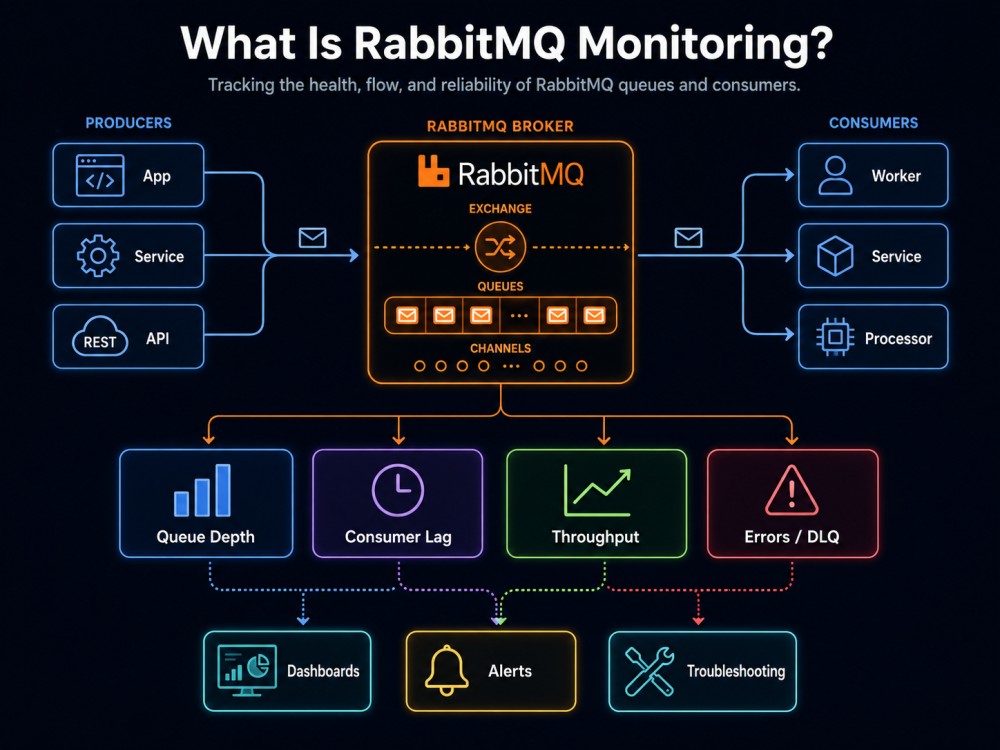
RabbitMQ monitoring is the practice of collecting, storing, and visualizing telemetry data from RabbitMQ nodes, queues, exchanges, and connections to detect anomalies, optimize resource utilization, and prevent outages. Monitoring answers three questions: is RabbitMQ healthy right now, what changed that caused an issue, and how do I prevent this problem from recurring.
RabbitMQ itself is a message broker. Applications send messages to RabbitMQ through producers, RabbitMQ routes those messages through exchanges into queues, and consumers pull messages from queues to process them. This decoupling pattern is common in microservices, event driven architectures, and distributed systems where services operate independently but need to communicate reliably.
Monitoring RabbitMQ means tracking how efficiently that entire message flow operates. If a queue grows faster than consumers can process messages, the queue depth spikes and latency increases. If memory usage crosses a threshold, RabbitMQ blocks all new connections to protect itself. If a connection fails repeatedly, message delivery stops. Monitoring surfaces all of these signals.
How RabbitMQ Monitoring Works
RabbitMQ exposes metrics through multiple interfaces. The RabbitMQ Management Plugin provides an HTTP API that returns JSON data for nodes, queues, exchanges, connections, and channels. The RabbitMQ Prometheus Plugin exports metrics in OpenMetrics format, which Prometheus compatible collectors can scrape. Command line tools like rabbitmqctl return point in time snapshots of node status and resource usage.
Each monitoring approach pulls data from these sources and stores it over time. Once stored, metrics are visualized in dashboards, evaluated against alert thresholds, and analyzed during incident response.
A typical monitoring pipeline works like this:
- RabbitMQ nodes expose metrics via HTTP API or Prometheus endpoint
- A monitoring tool scrapes or polls those metrics at regular intervals
- Metrics are stored in a time series database or indexing backend
- Dashboards visualize metric trends and thresholds
- Alerting rules fire when metrics cross defined thresholds
- Engineers investigate using correlated logs, traces, and metric context
The key difference between monitoring RabbitMQ and monitoring application code is that RabbitMQ itself is infrastructure. Issues in RabbitMQ often cascade quickly. A memory alarm blocks connections, which stops message delivery, which stalls application workflows. Monitoring needs to detect problems before they cascade.
Key RabbitMQ Metrics to Track
RabbitMQ metrics fall into five categories: queue metrics, node resource metrics, connection metrics, exchange metrics, and message rate metrics. Each category answers a different operational question.
Queue Metrics
Queues are where messages wait until consumers process them. Queue depth, also called queue length, measures how many messages are waiting. If queue depth grows faster than consumers can handle, it signals a backlog. A sustained backlog means consumers are too slow or there are not enough consumers.
Ready messages are messages waiting to be delivered to a consumer. Unacknowledged messages are messages delivered to a consumer but not yet acknowledged. If unacknowledged message count grows, consumers may be crashing before finishing their work or running slower than expected.
Message rate metrics show how fast messages are being published into a queue and consumed from a queue. If the publish rate exceeds the consume rate for an extended period, queue depth will grow indefinitely.
Track these queue metrics per queue:
- Queue depth (total messages)
- Ready message count
- Unacknowledged message count
- Publish rate (messages per second)
- Consume rate (messages per second)
- Consumer count
A production issue documented on r/devops describes a scenario where queue depth grew to 50,000 messages because consumer count dropped from 10 to 2 after a deployment. The metric that surfaced the issue was consumer count, not queue depth.
Node Resource Metrics
RabbitMQ nodes run on Erlang VMs, and resource exhaustion triggers alarms that block new connections. Memory usage is the most critical resource metric. RabbitMQ stores messages in memory by default. If memory usage crosses the configured threshold (default 40% of total system RAM), RabbitMQ triggers a memory alarm and blocks all publishers.
File descriptor usage matters because each connection, channel, and queue consumes a file descriptor. If file descriptor usage reaches the OS limit, RabbitMQ cannot accept new connections. This is a common failure mode when connection count spikes.
Disk space usage becomes critical when queues are configured as durable or when message paging to disk occurs under memory pressure. RabbitMQ triggers a disk alarm if available disk space drops below the threshold (default 50 MB).
Track these node metrics per node:
- Memory used (total and by category: connections, queues, binaries)
- Memory alarm status
- Disk space used and available
- Disk alarm status
- File descriptors used vs. limit
- Network sockets used vs. limit
- Erlang process count
A memory alarm blocks connections immediately. If monitoring does not alert on memory usage before the alarm triggers, the first sign of trouble is failed connection attempts logged by application code.
Connection and Channel Metrics
Connections are TCP connections between clients (producers and consumers) and RabbitMQ nodes. Channels are virtual connections inside a single TCP connection. Most RabbitMQ clients open one connection and multiple channels per application instance.
Connection count shows how many clients are connected. A sudden drop in connection count often indicates network issues, client crashes, or RabbitMQ node restarts.
Channel count grows when applications open more channels. A high channel count relative to connection count can indicate a leak where channels are opened but not closed.
Connection state metrics track connections in states like running, blocked, or flow controlled. If connections enter blocked state, it means the node is applying flow control because publishers are sending faster than the node can handle.
Track these metrics:
- Total connection count
- Connection count by state (running, blocked, flow)
- Total channel count
- Channel count per connection
- Connection churn rate (new connections per second)
Exchange Metrics
Exchanges route messages to queues based on routing rules. The two key exchange metrics are message publish in rate and message publish out rate.
Messages published in is the rate at which producers send messages to an exchange. Messages published out is the rate at which the exchange routes messages to queues. If messages published in exceeds messages published out, it usually means no queue is bound to the exchange or the routing key does not match any bindings. These messages become unroutable.
Unroutable message count tracks messages that could not be routed to any queue. RabbitMQ can return unroutable messages to the publisher if the mandatory flag is set. Otherwise, unroutable messages are dropped silently unless an alternate exchange is configured.
Track these exchange metrics:
- Publish in rate (messages per second)
- Publish out rate (messages per second)
- Unroutable message count
A common production issue is a misconfigured binding where messages are sent to an exchange but never reach a queue. The symptom is a high publish in rate with zero publish out rate for that exchange.
Cluster Metrics
In a RabbitMQ cluster, nodes replicate queue metadata and route messages between nodes when queues are not colocated with connections. Network partition status is the most critical cluster metric. A network partition occurs when nodes lose connectivity but remain running, leading to split brain scenarios where different nodes accept conflicting operations.
Disk nodes vs. RAM nodes determine durability. Monitor the count of each node type to ensure quorum requirements are met.
Inter node message traffic shows how much data is transferred between nodes. High inter node traffic can indicate inefficient queue placement or clients connecting to the wrong node.
Track these cluster metrics:
- Cluster size (total nodes)
- Nodes running vs. stopped
- Network partition events
- Inter node traffic volume
RabbitMQ Monitoring Tools and Approaches
RabbitMQ monitoring tools fall into three categories: built in monitoring interfaces, Prometheus and Grafana stacks, and full stack observability platforms. Each category fits different operational models.
Built In Monitoring: Management Plugin and rabbitmqctl
The RabbitMQ Management Plugin provides a web UI and HTTP API for monitoring. The UI shows real time metrics for queues, exchanges, connections, and nodes. The HTTP API returns JSON data that external tools can poll. This approach works for small deployments and development environments.
The downside is that the management plugin does not store metrics over time. You see current state, not historical trends. Alert thresholds must be implemented externally by polling the API. For production clusters, the management plugin is useful for troubleshooting but insufficient as the primary monitoring system.
rabbitmqctl is a command line tool for node health checks. Commands like rabbitmqctl status, rabbitmqctl list_queues, and rabbitmqctl report return point in time snapshots. These commands are useful in scripts or as readiness probes during deployments, but like the management plugin, they do not provide historical data.
Prometheus and Grafana

RabbitMQ’s Prometheus Plugin exposes metrics at an HTTP endpoint in OpenMetrics format. Prometheus scrapes this endpoint at regular intervals and stores metrics in a time series database. Grafana dashboards visualize the metrics. This stack is widely used in cloud native environments and integrates with infrastructure monitoring platforms that already use Prometheus.
The official RabbitMQ Grafana dashboards provide pre built visualizations for all major metrics. These dashboards follow conventions where health indicators are color coded: green for healthy, blue for under utilization, and red for values outside normal ranges.
The Prometheus and Grafana stack requires operational overhead. Teams must run and maintain Prometheus, configure scrape targets, set up Grafana, and manage alert rules. For teams already running Prometheus for other services, adding RabbitMQ is straightforward. For teams without existing Prometheus infrastructure, the setup cost is higher.
Full Stack Observability Platforms
Full stack observability platforms like Datadog, New Relic, Dynatrace, and CubeAPM provide RabbitMQ monitoring as part of a broader APM and infrastructure monitoring suite. These tools collect RabbitMQ metrics alongside application traces, logs, and infrastructure telemetry, enabling correlation across the entire stack.
Datadog’s RabbitMQ integration uses a monitoring agent installed on each RabbitMQ node. The agent scrapes metrics from the management plugin or Prometheus endpoint and sends them to Datadog’s cloud platform. Datadog provides pre built RabbitMQ dashboards and alerting templates. Pricing starts at approximately $15 per host per month for infrastructure monitoring, with additional costs for APM and log ingestion.
New Relic monitors RabbitMQ through its infrastructure agent and provides dashboards for queue depth, message rates, and node health. New Relic’s pricing model is user based, starting at $49 per user per month, which can become expensive for larger teams.
CubeAPM monitors RabbitMQ using OpenTelemetry compatible agents or Prometheus exporters. Unlike SaaS tools, CubeAPM runs inside your own cloud or on premises environment, keeping all telemetry data local. This matters for teams with data residency requirements or compliance constraints. CubeAPM correlates RabbitMQ metrics with application traces and logs in a unified view, making it easier to trace the root cause when a queue backlog causes application latency. Pricing is usage based at $0.15 per GB ingested, with no per host or per user fees. CubeAPM includes unlimited retention and native support for OpenTelemetry.
AWS CloudWatch for Amazon MQ
Amazon MQ is a managed RabbitMQ service on AWS. CloudWatch automatically collects metrics for Amazon MQ brokers, including queue depth, message count, consumer count, and memory usage. CloudWatch metrics are available at no additional cost beyond standard CloudWatch pricing. CloudWatch alarms can trigger notifications or auto scaling actions based on metric thresholds.
The limitation of CloudWatch for RabbitMQ is that metrics are coarse grained. You get broker level and queue level metrics, but detailed per connection or per channel metrics require additional instrumentation. CloudWatch also does not correlate RabbitMQ metrics with application traces unless you use AWS X-Ray or a third party APM tool.
Best Practices for RabbitMQ Monitoring in Production
Monitoring RabbitMQ effectively in production requires more than installing a tool. The following practices help detect issues early and reduce mean time to resolution.
Set Alert Thresholds Based on Workload Characteristics
Default alert thresholds rarely match real workloads. A queue depth of 1,000 messages might be normal for one queue and a critical backlog for another. Define alert thresholds based on historical behavior and SLA requirements.
For queue depth alerts, calculate the normal operating range over a week and set the alert threshold at 2x or 3x the 95th percentile. For memory usage, alert at 75% of the memory alarm threshold so there is time to investigate before RabbitMQ blocks connections.
For message rate alerts, track the ratio of publish rate to consume rate. If the ratio exceeds 1.2 for more than 5 minutes, it signals a backlog forming. This approach catches issues earlier than waiting for queue depth to grow.
Monitor Consumer Count and Lag, Not Just Queue Depth
Queue depth is a lagging indicator. By the time queue depth spikes, the problem has already started. Consumer count and consumer lag are leading indicators.
If consumer count drops suddenly, it means consumers crashed or were scaled down. If consumer lag (time between message publish and message consumption) increases, it means consumers are processing slower than usual. Both signals appear before queue depth becomes critical.
Some monitoring tools expose consumer utilization, which measures how busy consumers are. If consumer utilization stays above 90% consistently, it means consumers are at capacity and cannot handle additional load.
Track Memory Usage by Category
RabbitMQ memory usage is broken down by category: connections, channels, queues, binaries, plugins, and others. When memory usage spikes, knowing which category consumed the memory helps identify the root cause.
If memory usage spikes in the queue category, it means messages are accumulating faster than they are being consumed. If memory usage spikes in the connections category, it means connection count increased or connections are holding large amounts of unacknowledged messages.
The management plugin and Prometheus endpoint both expose memory usage by category. Grafana dashboards can visualize this as a stacked area chart.
Enable and Monitor Alarms
RabbitMQ has built in alarms for memory and disk usage. When an alarm triggers, RabbitMQ logs it and changes the alarm state exposed in metrics. Monitor the alarm state metric and alert immediately when an alarm is set.
Alarms are binary: either set or cleared. Monitoring the underlying resource usage (memory percentage, disk space available) allows for earlier warnings before the alarm triggers.
Correlate RabbitMQ Metrics with Application Traces
RabbitMQ issues often manifest as application latency. If a queue backlog causes message processing delays, the symptom seen by end users is slow API responses. Correlating RabbitMQ metrics with application traces helps identify when RabbitMQ is the bottleneck.
Full stack observability platforms like CubeAPM automatically correlate RabbitMQ queue depth metrics with distributed traces, showing which API requests are delayed due to message processing lag. This correlation reduces troubleshooting time from hours to minutes.
Test Failover and Recovery Scenarios
In production, RabbitMQ nodes can fail, network partitions can occur, and memory alarms can trigger. Test how monitoring behaves during these failure scenarios. Does the monitoring system detect a node failure within seconds? Do alerts fire when a memory alarm is set? Can you identify which queue is consuming the most memory during an incident?
Run chaos engineering experiments where you kill a node, fill up disk space, or simulate a network partition. Verify that monitoring surfaces the problem and provides enough context to resolve it.
Monitor Publisher Confirms and Consumer Acknowledgments
RabbitMQ supports publisher confirms and consumer acknowledgments to guarantee message delivery. If publisher confirm rate drops below publish rate, it means some messages are not being confirmed, indicating a potential issue with message persistence or replication.
If consumer acknowledgment rate drops below consume rate, it means consumers are not acknowledging messages, which can indicate consumer crashes or bugs in message processing logic.
These metrics are exposed via the management API and Prometheus plugin. Tracking them helps detect silent failures where messages are lost or stuck.
How to Approach RabbitMQ Health Checking
Health checks in RabbitMQ are more involved than a single rabbitmqctl command. A useful health check evaluates multiple signals and returns a clear pass or fail result.
A basic health check should verify:
- RabbitMQ node is running and responsive
- No memory or disk alarms are active
- Cluster quorum is intact (if running a cluster)
- Critical queues have consumers attached
- Message rates are within expected ranges
Kubernetes readiness probes often use rabbitmqctl status as a health check, but this only confirms the node is running. It does not detect memory alarms, consumer failures, or queue backlogs. A better readiness probe queries the management API /api/healthchecks/node endpoint, which returns a 200 status code only if the node is healthy and has no alarms.
During deployment or upgrades, use a liveness probe that checks if the node is running and a readiness probe that checks if the node is ready to accept traffic. This prevents routing traffic to a node that is starting up or recovering from a failure.
Monitoring RabbitMQ with CubeAPM
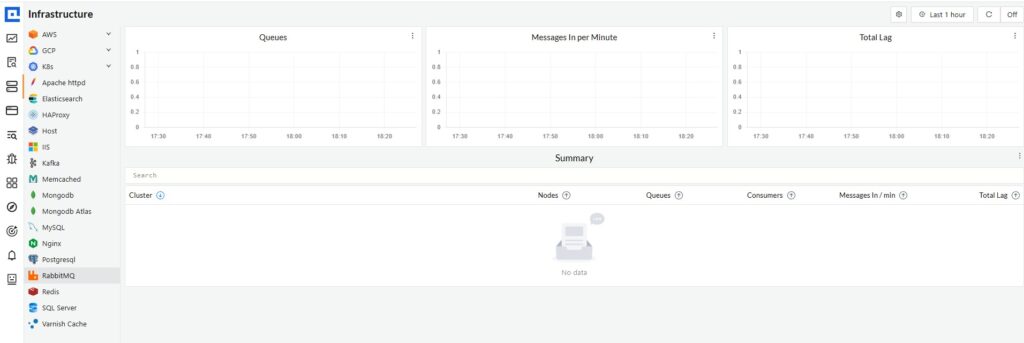
CubeAPM monitors RabbitMQ by ingesting metrics via OpenTelemetry or Prometheus exporters and correlating them with application traces, logs, and infrastructure metrics in a unified platform. Unlike SaaS tools, CubeAPM runs inside your own cloud or on premises environment, keeping all telemetry data under your control.
CubeAPM surfaces RabbitMQ queue depth, message rates, consumer count, memory usage, and connection metrics in real time dashboards. Alerts fire when metrics cross defined thresholds, and alerts include full context such as which queue triggered the alert, what the current message rate is, and which consumers are connected.
One key difference from other tools is that CubeAPM correlates RabbitMQ metrics with distributed traces. If a queue backlog causes application latency, CubeAPM shows the exact API requests affected and the delay introduced by message processing. This correlation reduces troubleshooting time because you see the full causal chain from RabbitMQ bottleneck to user impact.
CubeAPM pricing is $0.15 per GB ingested, with no per host or per user fees. All metrics are retained indefinitely at no additional cost. For a RabbitMQ cluster generating 500 GB of telemetry per month, the monthly cost is $75. This is significantly lower than SaaS tools that charge per host or per user.
CubeAPM integrates with synthetic monitoring workflows to test message flow end to end and with real user monitoring to track how RabbitMQ performance affects end user experience.
Disclaimer: The information in this article reflects the latest details available at the time of publication and may change as technologies and products evolve. Features, pricing, and plan limits can change over time. Always verify the latest information directly with the vendor before making purchasing or deployment decisions.
Frequently Asked Questions
What is the difference between RabbitMQ monitoring and observability?
Monitoring tracks known metrics like queue depth and memory usage over time. Observability is the ability to ask arbitrary questions about system behavior using high cardinality data like traces and logs. RabbitMQ monitoring is a subset of observability.
How do I monitor RabbitMQ queue depth?
Queue depth is exposed via the RabbitMQ management API at `/api/queues/{vhost}/{queue}` and via the Prometheus plugin as `rabbitmq_queue_messages`. Set alerts when queue depth exceeds a threshold based on your workload.
What happens when RabbitMQ triggers a memory alarm?
When memory usage crosses the configured threshold, RabbitMQ sets a memory alarm and blocks all publisher connections. Consumers can still process messages, but new messages cannot be published until memory usage drops below the threshold.
How do I monitor RabbitMQ in Kubernetes?
Use the Prometheus plugin to expose metrics and configure a Prometheus scrape target for each RabbitMQ pod. For readiness probes, query the management API health check endpoint. Full stack platforms like CubeAPM automate this process and correlate RabbitMQ metrics with pod and container metrics.
What are the most important RabbitMQ metrics to alert on?
The most critical metrics are memory usage (alert at 75% of alarm threshold), queue depth (alert when backlog exceeds normal range), consumer count (alert when it drops to zero), and alarm state (alert immediately when any alarm is set).
Can I use Datadog to monitor RabbitMQ?
Yes, Datadog provides a RabbitMQ integration that collects metrics via the management plugin or Prometheus endpoint. Pricing starts at approximately $15 per host per month for infrastructure monitoring, with additional costs for APM and logs.
How does CubeAPM compare to Datadog for RabbitMQ monitoring?
CubeAPM runs inside your own environment and costs $0.15 per GB ingested, while Datadog is SaaS only and charges per host plus data ingestion fees. CubeAPM correlates RabbitMQ metrics with traces and logs in a unified platform and includes unlimited retention by default.