









Apache Pulsar runs mission-critical messaging workloads at companies like Yahoo, Splunk, and Tencent: processing billions of messages daily across globally distributed clusters. Without proper monitoring, a single broker saturation event or BookKeeper disk bottleneck can cascade into message loss, replication lag, or complete topic unavailability before anyone notices.
Monitoring Apache Pulsar means tracking broker health, topic throughput, consumer lag, BookKeeper storage state, and ZooKeeper coordination: all while correlating these signals with application-level traces to understand end-to-end message flow. This guide covers what to monitor in Pulsar, how monitoring works across its architecture, the tools available, and how to build production-ready observability for Pulsar deployments.
What Is Apache Pulsar Monitoring?
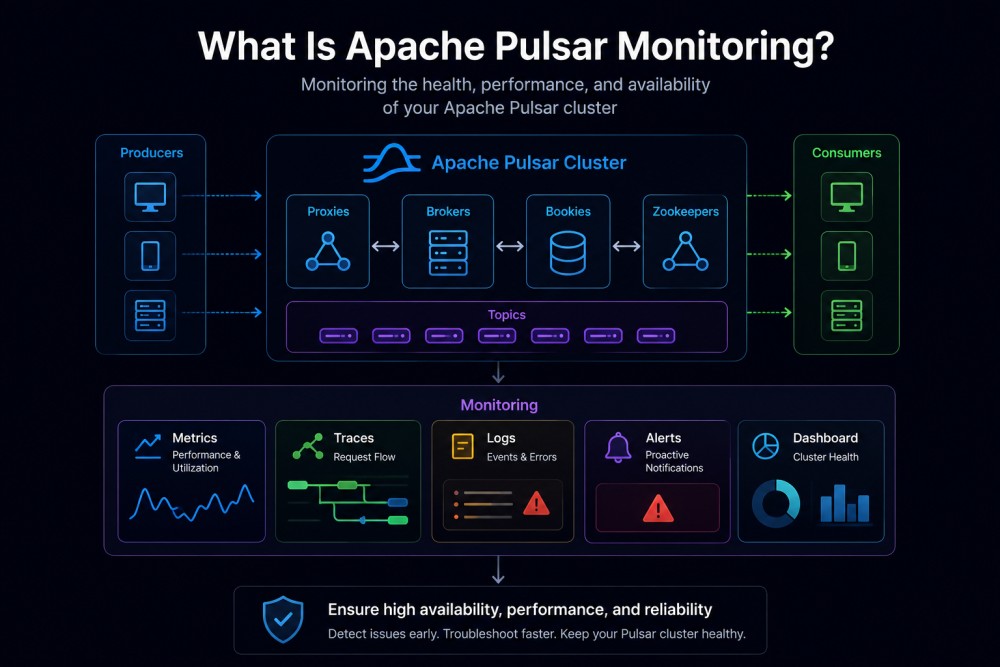
Apache Pulsar monitoring is the practice of continuously tracking the health, performance, and resource utilization of Pulsar clusters to ensure reliable message delivery, prevent data loss, and maintain service level objectives.
Pulsar is a distributed pub-sub messaging system with a unique architecture that separates compute (brokers) from storage (BookKeeper). This separation creates distinct monitoring challenges compared to Kafka or RabbitMQ. You cannot monitor Pulsar effectively by only watching broker metrics: storage layer health, replication state, and coordination layer stability are equally critical.
A production Pulsar deployment consists of multiple components: brokers handle message routing and protocol termination, BookKeeper stores message data persistently, ZooKeeper manages cluster metadata and coordination, and Pulsar Functions or connectors process streaming workloads. Each component exposes its own metrics and failure modes.
Effective Pulsar monitoring answers these questions in real time:
Are messages being published and consumed without lag?
Are brokers handling the load evenly?
Is BookKeeper replicating data correctly?
Are there network partitions or coordination failures in ZooKeeper?
What is the end-to-end latency from producer to consumer?
How Apache Pulsar Monitoring Works
Pulsar exposes metrics in Prometheus format from every component. Brokers expose topic-level metrics, BookKeeper bookies expose storage metrics, and ZooKeeper servers expose coordination metrics, all on dedicated HTTP endpoints.
Pulsar Broker Metrics
Brokers expose metrics at http://$BROKER_ADDRESS:8080/metrics. These metrics cover message rates, throughput, backlog depth, and resource consumption at both the topic level and namespace level.
Key broker signals include messages in per second, messages out per second, bytes in per second, bytes out per second, publish latency, dispatch latency, and backlog size. Broker-level metrics also track JVM memory usage, CPU utilization, and thread pool state.
The Pulsar admin CLI provides aggregated views using pulsar-admin broker-stats destinations for per-topic stats and pulsar-admin broker-stats monitoring-metrics for namespace-aggregated broker metrics. These commands output JSON that can be parsed or fed into monitoring systems.
BookKeeper Storage Metrics
BookKeeper exposes metrics at http://$BOOKIE_ADDRESS:8000/metrics by default. The port is configurable via prometheusStatsHttpPort in bookkeeper.conf.
Critical BookKeeper metrics include journal sync latency, write cache size, read cache hit rate, ledger creation latency, and disk I/O throughput. BookKeeper also tracks per-ledger replication state: monitoring bookie_ledgers_count and bookie_entries_count helps detect storage skew across bookies.
A common production issue: journal fsync latency above 50ms indicates disk saturation, which directly impacts write acknowledgment times and can cause producer timeouts. Monitoring bookie_journal_JOURNAL_SYNC histogram percentiles (p50, p95, p99) catches this early.
ZooKeeper Coordination Metrics
ZooKeeper exposes metrics at http://$ZOOKEEPER_ADDRESS:8000/metrics for local ZooKeeper and http://$GLOBAL_ZK_ADDRESS:8001/metrics for configuration store. The ports are configurable via metricsProvider.httpPort in zookeeper.conf.
ZooKeeper metrics cover request latency, outstanding requests, watch count, and connection state. The most critical signal is zookeeper_server_requests_latency_ms: Sustained latency above 100ms indicates coordination layer stress that will impact broker metadata operations.
Pulsar Functions and Connector Metrics
Functions worker exposes metrics at http://$FUNCTIONS_WORKER_ADDRESS:$WORKER_PORT/metrics. Retrieve aggregated stats using pulsar-admin functions-worker function-stats.
Function-level metrics track processed message count, processing latency, error count, and resource usage per function instance. Connector metrics cover similar signals for source and sink connectors.
Managed Cursor and Acknowledgment State
Pulsar tracks acknowledgment state persistence in two layers: ledger-based (primary) and ZooKeeper-based (fallback). Monitor these metrics to detect acknowledgment persistence failures:
pulsar_ml_cursor_persistLedgerSucceedpulsar_ml_cursor_persistLedgerErrorspulsar_ml_cursor_persistZookeeperSucceedpulsar_ml_cursor_persistZookeeperErrorspulsar_ml_cursor_nonContiguousDeletedMessagesRange
If ledger persistence fails repeatedly, acknowledgments fall back to ZooKeeper: which is slower and can cause consumer lag spikes.
What to Monitor in Apache Pulsar: Core Metrics and Signals
Monitoring Pulsar effectively requires tracking metrics across all layers. Here are the core signals to monitor in production.
Topic-Level Message Flow
Track messages published, consumed, and backlogged per topic. Rising backlog depth indicates consumers are falling behind producers, either due to slow consumer processing, insufficient consumer instances, or broker dispatch throttling.
Key metrics:
pulsar_topic_messages_in_ratepulsar_topic_messages_out_ratepulsar_topic_backlog_sizepulsar_topic_publish_rate_limit_hit(indicates producer throttling)
Alert when backlog size exceeds expected thresholds for more than 5 minutes. For real-time pipelines, backlog depth above 10,000 messages often signals a processing bottleneck.
Broker Resource Utilization
Monitor CPU, memory, and network bandwidth at the broker level. Pulsar brokers are CPU-bound under high publish rates and memory-bound when handling large backlogs with many subscriptions.
Key metrics:
pulsar_broker_cpu_usage_percentpulsar_broker_memory_heap_usagepulsar_broker_network_bytes_inpulsar_broker_network_bytes_out
Sustained CPU usage above 80% or heap usage above 85% triggers GC pressure and increases message latency. Plan horizontal scaling when the average broker CPU crosses 70% during normal traffic.
BookKeeper Storage Health
BookKeeper stores all Pulsar message data. Storage layer failures cause message loss or replication lag.
Key metrics:
bookie_journal_JOURNAL_SYNC(p99 should stay below 50ms)bookie_write_cache_size(watch for cache saturation)bookie_read_cache_hit_rate(low hit rate means disk I/O bottleneck)bookie_ledgers_count(detect storage skew across bookies)
Alert when journal sync p99 exceeds 100ms or read cache hit rate drops below 70%, both indicate disk saturation that will impact publish latency.
Consumer Lag and Dispatch Rate
Consumer lag measures how far behind a consumer is from the latest message. High lag indicates slow consumer processing or inadequate parallelism.
Key metrics:
pulsar_subscription_back_logpulsar_subscription_msg_rate_outpulsar_subscription_msg_throughput_out
If a subscription’s backlog grows while msg_rate_out staying flat, the consumer is saturated. If msg_rate_out it is low but backlog is high, check for consumer disconnections or broker dispatch throttling.
Replication and Geo-Replication State
For geo-replicated topics, monitor replication lag and throughput between clusters.
Key metrics:
pulsar_replication_backlogpulsar_replication_rate_inpulsar_replication_rate_outpulsar_replication_delay_in_seconds
Replication delay above 10 seconds in a geo-replicated setup indicates network issues, remote cluster saturation, or authentication problems between clusters.
ZooKeeper Coordination Health
ZooKeeper failures block broker metadata operations, topic creation, and subscription state updates.
Key metrics:
zookeeper_server_requests_latency_mszookeeper_server_outstanding_requestszookeeper_server_connections
Alert when ZooKeeper request latency p99 exceeds 200ms or outstanding requests exceed 100, both signal coordination layer stress.
Tools for Monitoring Apache Pulsar
Several tools support Pulsar monitoring, ranging from Prometheus-based setups to full observability platforms.
Prometheus and Grafana
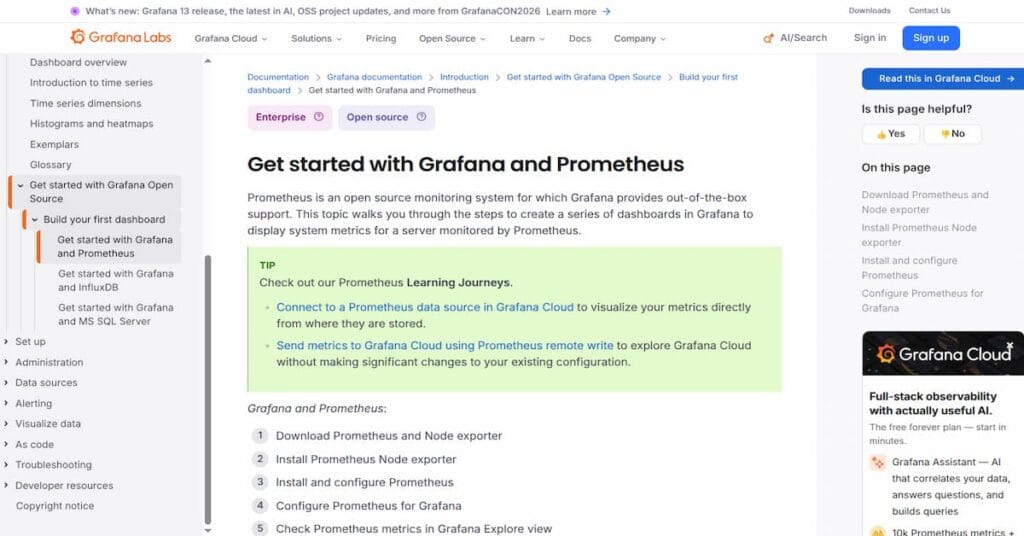
Prometheus scrapes metrics from Pulsar brokers, BookKeeper, and ZooKeeper. Grafana dashboards visualize these metrics.
Pulsar’s official Helm chart includes pre-configured Prometheus scrape configs and Grafana dashboards. The pulsar-grafana repository provides production-ready Grafana dashboards for brokers, BookKeeper, ZooKeeper, and Pulsar Functions.
This approach works well for teams already using Prometheus. The downside: Prometheus requires manual configuration of scrape targets, retention tuning, and alert rule management. High-cardinality metrics (per-topic stats in large clusters) can overwhelm Prometheus storage.
Pulsar Manager
Pulsar Manager is a web-based management and monitoring UI for Pulsar. It provides cluster-level dashboards, topic management, and basic metrics visualization.
Pulsar Manager simplifies cluster operations but lacks deep observability features like distributed tracing or log correlation. It is best used alongside Prometheus for operational tasks rather than as a primary monitoring tool.
OpenTelemetry Instrumentation

Starting in Pulsar 3.3.0, Pulsar emits OpenTelemetry metrics natively. This is experimental and complements the existing Prometheus metrics.
Configure OpenTelemetry by setting OTEL_SDK_DISABLED=false and pointing Pulsar to an OpenTelemetry Collector via OTEL_EXPORTER_OTLP_ENDPOINT. Pulsar supports both gRPC and HTTP OTLP endpoints.
OpenTelemetry enables correlation between Pulsar metrics, application traces, and logs, useful for debugging end-to-end message flow across producers, brokers, and consumers. For teams building observability on OpenTelemetry, this path reduces tool sprawl.
Datadog
Datadog provides a Pulsar integration that collects broker, BookKeeper, and ZooKeeper metrics via its agent. It supports alerting, dashboards, and log correlation.
Datadog’s per-host pricing means monitoring a 50-broker Pulsar cluster costs $750 to $1,550 per month for infrastructure monitoring alone, before adding APM, logs, or custom metrics. Costs scale linearly with cluster size.
Dynatrace
Dynatrace offers Pulsar monitoring via its ActiveGate extension. It auto-discovers Pulsar components and applies AI-based anomaly detection to broker and BookKeeper metrics.
Dynatrace pricing starts around $0.08 per host-hour ($58 per host per month) for full-stack monitoring. A 50-broker cluster costs roughly $2,900 per month. Dynatrace’s AI helps reduce alert noise but adds high cost at scale.
New Relic
New Relic supports Pulsar monitoring via its infrastructure monitoring agent. It collects metrics and correlates them with APM traces if you instrument Pulsar producers and consumers.
New Relic charges $0.30 per GB ingested beyond the free 100 GB per month. A Pulsar cluster generating 5 TB of metrics monthly costs around $1,470 per month for logs and metrics alone, before user seats or APM.
CubeAPM

CubeAPM provides full-stack observability for Pulsar with metrics, logs, and distributed traces in one platform. It runs on-premises or in your VPC, so telemetry data never leaves your infrastructure.
CubeAPM supports OpenTelemetry natively and works with Prometheus exporters. Pricing is $0.15 per GB ingested with unlimited retention and no per-host or per-user fees. For a 50-broker Pulsar deployment generating 3 TB of telemetry monthly, CubeAPM costs $450 per month, significantly lower than SaaS platforms.
CubeAPM correlates Pulsar broker metrics with application traces, making it easy to trace a slow message from producer publish through broker dispatch to consumer acknowledgment. This is useful for debugging latency spikes in streaming pipelines.
Best Practices for Apache Pulsar Monitoring
Effective Pulsar monitoring requires more than scraping metrics; it requires understanding what signals matter and how to act on them.
Monitor All Layers
Broker metrics alone do not show the full picture. A healthy broker can mask storage layer saturation or ZooKeeper coordination failures. Always monitor brokers, BookKeeper, and ZooKeeper together.
Set Alerts on End-to-End Latency
Track publish latency (producer to broker acknowledgment) and dispatch latency (broker to consumer delivery). Alert when p99 latency exceeds SLO thresholds, typically 50ms for publish and 100ms for dispatch in low-latency systems.
Track Consumer Lag by Subscription
Consumer lag is the most actionable signal for application-level health. High lag means consumers cannot keep up with producers, indicating insufficient parallelism, slow processing logic, or broker throttling.
Monitor Replication Health in Geo-Replicated Setups
Replication lag in geo-replicated Pulsar clusters indicates network issues or remote cluster saturation. Alert when replication delay exceeds 10 seconds or replication backlog grows continuously.
Use High-Cardinality Metrics Sparingly
Per-topic metrics in large Pulsar clusters (thousands of topics) create high-cardinality data that can overwhelm Prometheus or InfluxDB. Aggregate metrics at the namespace level for cluster-wide views and only drill into per-topic metrics during debugging.
Correlate Metrics with Logs and Traces
Metrics tell you what is happening — logs and traces tell you why. Correlating a broker CPU spike with application traces showing slow database queries in a Pulsar Function reveals the root cause faster than metrics alone.
Test Failure Scenarios
Simulate bookie failures, ZooKeeper partitions, and broker restarts in staging to validate that your monitoring detects these failures and alerts correctly. This also helps tune alert thresholds to avoid false positives.
How to Migrate Pulsar Monitoring to a New Platform
Migrating Pulsar monitoring from one tool to another requires planning to avoid gaps in visibility during the transition.
Step 1: Run Both Systems in Parallel
Deploy the new monitoring tool alongside your existing setup. Configure both to scrape the same Pulsar metrics endpoints. Run in parallel for at least two weeks to validate that the new tool captures all signals correctly.
Step 2: Migrate Dashboards and Alerts
Recreate critical dashboards in the new platform. Migrate alert rules and validate that they fire correctly using historical data or test scenarios. Do not disable alerts in the old system until the new system proves reliable.
Step 3: Validate Log and Trace Correlation
If moving to a platform that supports distributed tracing (like CubeAPM or Datadog), instrument Pulsar producers and consumers with OpenTelemetry to correlate metrics with traces. Verify that trace correlation works before relying on it in production.
Step 4: Decommission the Old System
Once the new platform has run successfully in parallel for at least two weeks with no missed alerts or data gaps, decommission the old monitoring stack. Archive historical metrics if needed for compliance.
Disclaimer: The information in this article reflects the latest details available at the time of publication and may change as technologies and products evolve. Features, pricing, and plan limits can change over time. Always verify the latest information directly with the vendor before making purchasing or deployment decisions.
Frequently Asked Questions
What is Apache Pulsar monitoring?
Apache Pulsar monitoring tracks broker health, topic throughput, consumer lag, BookKeeper storage state, and ZooKeeper coordination to ensure reliable message delivery and maintain SLOs.
What metrics should I monitor in Pulsar?
Monitor broker message rates, topic backlog size, publish and dispatch latency, BookKeeper journal sync latency, consumer lag, replication state, and ZooKeeper request latency.
How do I monitor Pulsar with Prometheus?
Scrape metrics from Pulsar brokers at port 8080, BookKeeper bookies at port 8000, and ZooKeeper at port 8000. Use Grafana dashboards from the pulsar-grafana repository to visualize metrics.
Does Pulsar support OpenTelemetry?
Yes, starting in Pulsar 3.3.0, Pulsar emits OpenTelemetry metrics natively. Enable it by setting OTEL_SDK_DISABLED=false and configuring the OTLP exporter endpoint.
What is the difference between broker metrics and BookKeeper metrics?
Broker metrics track message routing, throughput, and resource usage. BookKeeper metrics track storage layer health, journal sync latency, and ledger replication state. Both are required for full visibility.
How do I monitor consumer lag in Pulsar?
Track the pulsar_subscription_back_log metric per subscription. Alert when backlog size exceeds expected thresholds for more than 5 minutes to detect slow consumer processing.
What tools support Pulsar monitoring?
Prometheus with Grafana, Datadog, Dynatrace, New Relic, and CubeAPM all support Pulsar monitoring. Prometheus is open source and free. SaaS platforms like Datadog charge per host or per GB ingested.