










Synthetic monitoring and Real User Monitoring (RUM) are both used to understand how applications perform for users, but they work in fundamentally opposite ways. Synthetic monitoring runs scripted tests from controlled locations on a fixed schedule. RUM collects data passively from real users as they interact with your application on real devices and networks. Neither replaces the other.
The gap between your synthetic test results and what real users actually experience is often significant, and understanding why that gap exists is what makes both signals necessary. Let’s compare synthetic monitoring vs. real user monitoring (RUM).
Key Takeaways
- Synthetic monitoring is active and proactive: scripted tests run on a schedule from chosen locations regardless of whether any users are present
- RUM is passive and reactive: a JavaScript agent in the browser collects data from real user sessions as they happen
- Synthetic monitoring works in pre-production and low-traffic periods. RUM requires real user traffic and only works in production
- Standard synthetic tests do not capture INP because they observe page load without scripted interactions. INP can only be reliably measured from real user sessions via RUM. Lighthouse uses Total Blocking Time (TBT) as a lab proxy, but TBT is not a substitute for INP
- INP (Interaction to Next Paint) replaced FID as a Core Web Vital on March 12, 2024. The threshold for a good INP score is under 200ms
- Google Search rankings use field data from the Chrome User Experience Report (CrUX) at the 75th percentile, not lab data from synthetic tools. A page can score well in Lighthouse and still fail Core Web Vitals in real-world conditions
- Synthetic monitoring catches issues before users encounter them. RUM reveals issues that arise from real device diversity, real network conditions, and real user behavior patterns
The Fundamental Difference
| Synthetic monitoring | Real User Monitoring (RUM) | |
| How it collects data | Scripted bots run tests on a schedule | JavaScript agent in the browser collects data from real sessions |
| When data is collected | Any time, including zero-traffic periods | Only when real users are actively on your site or app |
| Environment | Controlled: fixed browser, fixed network, fixed location | Uncontrolled: real devices, real networks, real geographies |
| Consistency | Identical conditions every run | Variable: differs by device, browser, ISP, location, time of day |
| Proactive detection | Yes. Fires before users are affected | No. Requires actual user traffic to detect issues |
| Pre-production use | Yes. Can test staging before deployment | No. Only captures production traffic |
| Core Web Vitals | Lab approximations for LCP and CLS | Field measurements for LCP, INP, and CLS — the ones Google uses for ranking |
| INP measurement | Not available in standard Lighthouse audits. Scripted user flow tools can approximate it, but cannot replicate unpredictable real user interaction timing | Yes. INP is measured from real user sessions and is the only reliable source |
| Low-traffic coverage | Full. 3am, weekends, off-peak periods covered | None if no users are present |
What Synthetic Monitoring Captures
Synthetic monitoring runs a scripted test from one or more configured locations at a set interval. The test environment is reproducible: same browser version, same network conditions, same sequence of actions every time.
This reproducibility is its primary strength. When a synthetic test fails, the failure is unambiguous. A specific step in a specific user journey broke at a specific time. When a synthetic check shows a 200ms latency increase over the past 24 hours, that trend is not confounded by device variation or changing user behavior. It reflects a genuine change in your application.
What synthetic monitoring catches well:
- Availability failures: endpoints going down, returning wrong status codes, and SSL certificate issues
- Broken user flows: login failing, checkout erroring, forms not submitting
- Regression detection: a deployment that made the checkout flow 500ms slower shows up immediately in synthetic checks
- Third-party dependency failures: a payment script that fails to load in a specific region
- Performance regressions in controlled conditions: render time, TTFB, API response time
What synthetic monitoring misses:
- How users on older mobile devices on 4G networks actually experience your application
- Interaction-driven performance problems that only surface when real users click, scroll, and type at unpredictable intervals
- Long-tail device and browser compatibility issues that a single scripted browser cannot expose
- True INP values, because INP requires measuring responses to real user interactions that happen at moments no script can predict
- Performance degradation that only appears under real production load and traffic patterns
What Real User Monitoring Captures
RUM instruments the browser itself. A JavaScript agent is injected into your pages and reports back performance data from every real user session. It captures what actually happened on that specific user’s device, on their network, at that moment.
What RUM captures well:
- True Core Web Vitals field data: LCP, INP, and CLS as measured from real Chrome sessions, which is what Google uses for search ranking
- Device and browser breakdown: how users on older Android devices experience your app versus desktop Chrome users on fast connections
- Geographic performance distribution: which regions have slow LCP because your CDN lacks coverage there
- JavaScript errors that only occur in specific browser environments
- Long-tail performance: the 95th and 99th percentile users who take significantly longer than the median
- User behavior patterns that affect performance: pages loaded directly vs via client-side navigation, scroll depth, interaction sequences
What RUM misses:
- Issues that occur before any user reaches the site: DNS failures, origin server outages, SSL problems
- Performance during off-peak or zero-traffic windows when no users are present
- Pre-production validation before a release reaches users
- Consistent baselines: RUM data changes as your user mix, traffic volume, and network conditions change
The Core Web Vitals Field vs Lab Distinction
This is the most practically important difference between synthetic monitoring and RUM for teams that care about Google Search performance.
The three Core Web Vitals as of 2026 are:
| Metric | What it measures | Good threshold | Measurable in standard synthetic tests |
| LCP (Largest Contentful Paint) | How long the main content takes to render | Under 2.5 seconds | Yes (lab approximation) |
| INP (Interaction to Next Paint) | Responsiveness to user interactions across the full page visit | Under 200ms | No. Standard Lighthouse audits report TBT as a proxy. Scripted user flow tools can simulate specific interactions but cannot replicate unpredictable real user timing |
| CLS (Cumulative Layout Shift) | Visual stability during page load | Under 0.1 | Partially (lab approximation) |
INP replaced FID as the responsiveness Core Web Vital on March 12, 2024. INP measures the latency of all interactions during a page visit and reports the worst one. Standard synthetic tools observe page load without user interactions, so they cannot measure INP directly. Lighthouse reports Total Blocking Time (TBT) as a diagnostic proxy, but as web.dev confirms, TBT is not a substitute for INP. A page can have very low TBT and still fail INP in the field if JavaScript freezes the main thread when users interact after load.
Google uses field data from the Chrome User Experience Report (CrUX) at the 75th percentile to evaluate Core Web Vitals for search ranking. That means 75% of page visits must achieve the good threshold for a page to pass. Your Lighthouse score and your CrUX field performance can differ significantly. A page can score 90 in Lighthouse and still fail Core Web Vitals in the field if real users are on slower devices or poor network connections.
The practical implication: synthetic tools tell you where performance problems exist. RUM tells you whether those problems are actually affecting your users at the scale that influences Google rankings. Both signals are needed.
Where Each Signal Belongs in Your Workflow
| Scenario | Use synthetic | Use RUM | Use both |
| Detect downtime at 3am | Yes | ||
| Validate a deployment did not break the checkout flow | Yes | ||
| Gate a deployment in CI/CD before it reaches production | Yes | ||
| Measure true INP for Google ranking | Yes | ||
| Identify which device types have slow LCP | Yes | ||
| Understand which geography has high CLS | Yes | ||
| Catch a regression before and after deployment | Yes | ||
| Build an SLO for checkout flow performance | Yes | ||
| Debug a slow page: confirm the issue is real before investigating root cause | Yes | ||
| Reproduce a user-reported performance issue consistently | Yes (reproduce) | Yes (confirm scale) |
How They Work Together in Practice
The standard production pattern uses synthetic monitoring and RUM in complementary roles.
- Synthetic monitoring watches the flows that matter 24 hours a day from multiple regions. It is the first signal when something breaks, even at 3am when no users are online. It gives you a consistent, reproducible baseline to compare before and after every deployment.
- RUM runs continuously in production and tells you the true user experience distribution: what p75 LCP looks like for mobile users in Southeast Asia, how INP on your most interactive page compares across browser versions, and which JavaScript errors are reaching the most users.
When synthetic and RUM data diverge, the gap is informative. A synthetic check that shows 1.2-second LCP while RUM shows p75 LCP of 3.8 seconds for mobile users points to a specific problem: your application performs well under controlled conditions, but degrades under real-world device and network variability. That divergence is not a contradiction. It is a diagnosis.
Common Setup Problems
| Problem | Likely cause | Fix |
| RUM shows much worse performance than synthetic tests | Real users are on slower devices or networks than your synthetic test configuration | Check RUM data segmented by device type and connection speed. The gap reflects real user experience, not a measurement error |
| INP data missing in RUM for a new site or page | INP requires real user interaction events. New or low-traffic pages may not have enough CrUX data | INP data accumulates over time with traffic. Use TBT from Lighthouse as a development-time proxy, but verify against field data once traffic builds |
| Synthetic checks pass but Google Search Console shows failing Core Web Vitals | Lab data and field data measure different things. Google uses CrUX field data, not Lighthouse scores | Check Google Search Console’s Core Web Vitals report and PageSpeed Insights field data section for the actual CrUX values at p75 |
| RUM data is noisy across aggregated sessions | High traffic introduces more device and network variability | Segment RUM by device category, browser, and connection type. Aggregated p75 across all sessions masks the distributions that matter |
| Synthetic checks catch every regression but RUM shows no improvement after fixes | Synthetic and RUM environments differ enough that the fixes are not testing what real users experience | Review synthetic test configuration: device emulation, network throttling, and geographic distribution should approximate your real user mix |
Where Both Signals Lead: The CubeAPM Angle
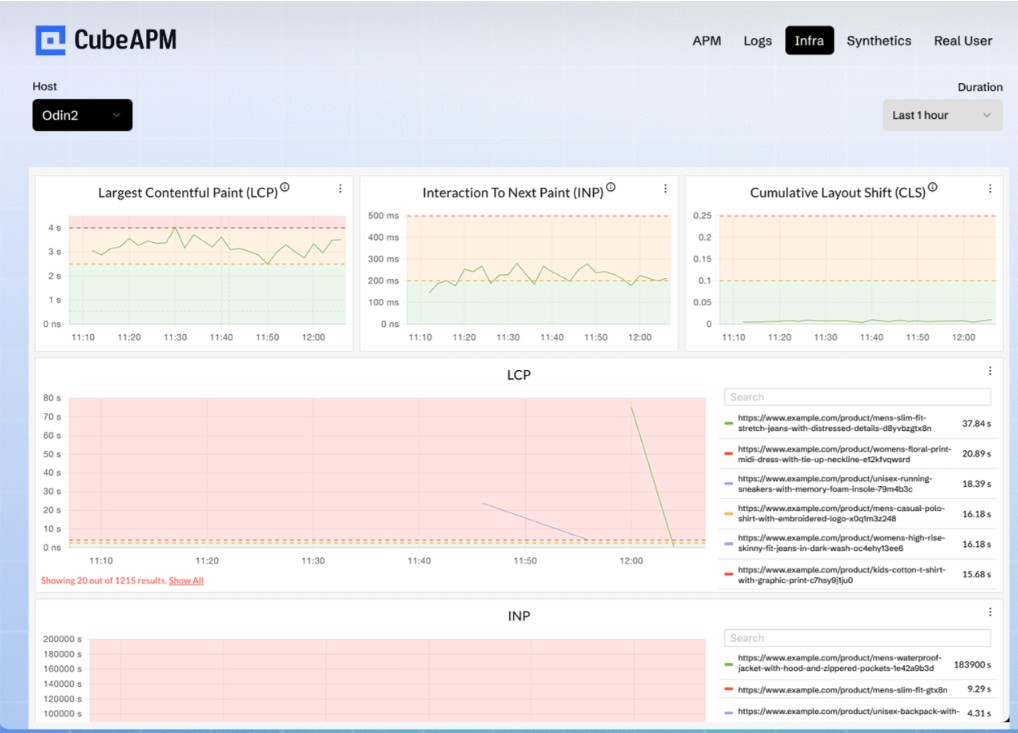
Both synthetic monitoring and RUM tell you something is wrong with the user experience. Neither tells you why at the application level. RUM shows that p75 LCP for mobile users has degraded from 2.1 seconds to 3.4 seconds. A synthetic check confirms the checkout flow is 600ms slower than last week. The next question in both cases is the same: what changed in the backend that is causing this degraded frontend experience?
CubeAPM implements RUM as part of a unified observability pipeline rather than as a bolt-on feature. The CubeAPM RUM agent treats the browser as the first span in a distributed trace, generating a trace identifier at navigation start and propagating it through outbound API calls using W3C TraceContext headers. This means a slow LCP event in RUM is directly connected to the backend trace that served that page: the specific database query that was slow, the downstream service that added latency, or the infrastructure metric that explains the degradation. CubeAPM also runs synthetic checks from multiple regions, so you see both the controlled baseline and the real-user field data in the same platform, correlated with backend traces and infrastructure metrics. It runs self-hosted inside your own infrastructure at $0.15/GB ingestion, so no data leaves your environment.
Summary
Synthetic monitoring and RUM are not alternatives. They watch different things and catch different failures. Synthetic monitoring gives you proactive, consistent, reproducible coverage across all traffic periods. RUM gives you field-truth data from real users on real devices, including INP values that standard lab tools cannot measure and the Core Web Vitals field data that Google uses for search ranking. The gap between synthetic and RUM results is not a problem to resolve. It is a signal to investigate. The most complete monitoring strategy uses both together.
| Synthetic monitoring | Real User Monitoring | |
| Primary role | Proactive reliability and regression detection | Real-world user experience measurement |
| Data source | Scripted bots | Real user browsers |
| Works without traffic | Yes | No |
| Pre-production use | Yes | No |
| True INP measurement | No (standard audits use TBT as proxy) | Yes |
| Core Web Vitals for Google ranking | Lab approximation only | Field data at p75 (what Google uses) |
| Best check interval | 1 to 15 minutes | Continuous |
| CI/CD integration | Yes | No |
Disclaimer: Core Web Vitals thresholds (LCP 2.5s, INP 200ms, CLS 0.1), INP replacement of FID (March 12, 2024), TBT as lab proxy for INP, and Google’s use of CrUX field data at p75 for ranking are verified against web.dev/articles/vitals, web.dev/articles/inp, web.dev/articles/tbt, and web.dev/articles/vitals-measurement-getting-started as of May 2026. CubeAPM RUM features verified from cubeapm.com/platform/real-user-monitoring as of May 2026.
Also read:
What Are the Best Synthetic Monitoring Tools in 2026?
What Is Synthetic Monitoring and How Does It Differ From Uptime Monitoring?