










AWS observability is how teams use logs, metrics, and traces to understand the health and performance of applications running on Amazon Web Services. As workloads spread across services like Amazon EC2, AWS Lambda, Amazon EKS, Amazon ECS, and Amazon RDS, siloed monitoring becomes less effective.
That challenge grows as AWS architectures become more distributed and event-driven. A single request may pass through containers, serverless functions, databases, queues, and load balancers, making it harder to see where latency or failures begin.
In this guide, we explain how AWS observability works, what logs, metrics, and traces each contribute, which AWS-native tools support them, and where teams often run into limits as environments scale.
What Is AWS Observability?
AWS observability is the practice of collecting, correlating, and analyzing telemetry from AWS applications and infrastructure so teams can understand system behavior and resolve issues faster. In AWS environments, that telemetry usually comes from logs, metrics, and traces produced by services such as Amazon EC2, AWS Lambda, Amazon EKS, Amazon ECS, Amazon RDS, and API Gateway.
Unlike traditional monitoring, which focuses on predefined dashboards and static thresholds, observability helps teams investigate unknown problems in distributed systems. It gives DevOps engineers, SREs, and platform teams the context needed to understand why latency increased, where failures started, and how issues moved across interconnected AWS services.
For modern AWS workloads, observability is no longer just about checking infrastructure health. It is about connecting signals across services like EC2 instances, containers, serverless functions, databases, queues, and network layers so teams can troubleshoot complex systems with less guesswork.
Monitoring vs Observability in Cloud Environments
In AWS, monitoring helps teams catch known issues through alerts and dashboards, while observability helps them understand system behavior by connecting logs, metrics, and traces across distributed services.
| Aspect | Monitoring | Observability |
| Purpose | Tracks system health using predefined checks and alerts | Understands system behavior using telemetry (logs, metrics, traces) |
| Approach | Reactive (alerts when thresholds are crossed) | Investigative (explains why issues happen) |
| Data Used | Primarily metrics and alerts | Logs, metrics, and traces combined |
| Problem Type | Known issues | Unknown or complex issues |
| Visibility | Surface-level system health | Deep insight into distributed systems behavior |
| Teams Using It | DevOps teams for infrastructure monitoring | DevOps, Site Reliability Engineering (SRE), and platform teams |
| Architecture Fit | Works well for simpler systems | Designed for distributed systems in AWS environments |
| Goal | Detect when something breaks | Understand why it broke and how it propagates |
The 3 Pillars of AWS Observability: Logs, Metrics, Traces
When people talk about observability in AWS, they’re usually talking about three core signals: logs, metrics, and traces. These aren’t new ideas, but they matter a lot more once an application starts running across multiple AWS services and dependencies.
- Logs give you the most detail. They show what happened at a particular moment, which makes them useful for investigating errors, request activity, and unexpected behavior in the application or the surrounding infrastructure.
- Metrics show how the system is behaving over time. They help teams keep an eye on things like CPU usage, latency, request volume, and error rates, so you can spot patterns early, set alerts, and catch performance issues before they get worse.
- Traces add the missing connection between services. They follow a request as it moves through the system, which is especially useful in AWS environments where a single transaction may pass through API Gateway, Lambda, EKS workloads, and a database such as RDS.
In real AWS environments, all three signals are being generated all the time. EC2 instances, Lambda functions, Kubernetes workloads, and managed databases continuously produce telemetry that teams can collect and use to troubleshoot problems faster and reduce downtime.
Why Observability Is Critical for AWS Architectures
Complexity of Distributed Cloud Systems
- Microservices: In a microservices setup, application logic is spread across many services, so the place where a problem appears is often not the place where it began.
- Containerized workloads: Kubernetes and Amazon EKS make it easier to run and scale services, but containers are short-lived and constantly changing, which makes static infrastructure views less reliable.
- Serverless workloads: AWS Lambda can spin up fast and run only when needed, which is great for scaling. But that same flexibility can make troubleshooting harder if a team is only looking at traditional host-level monitoring.
- Managed service dependencies: AWS applications often depend on services like Amazon RDS, API Gateway, and messaging tools in the background. Because of that, teams need visibility into more than just the compute layer.
Faster root cause analysis
- Metrics show that something changed: They surface signals like rising latency, higher error rates, or unusual resource usage.
- Logs show what happened: Teams get details behind the issue, whether that is rising latency, more errors, or unusual resource usage.
- Traces: They follow a request across services and help pinpoint where time was lost or a failure started.
- Correlation reduces guesswork: When logs, metrics, and traces are connected, teams can move from symptoms to root cause much faster.
Reliability and incident response
- Better SLI tracking: Observability gives teams a clearer way to measure indicators such as latency, error rate, throughput, and availability.
- Stronger SLO management: It helps teams see whether a service is actually meeting the reliability targets they set.
- Faster incident response: Engineers can investigate with shared context instead of jumping between disconnected tools and dashboards.
- More confidence at scale: As AWS systems become more distributed, observability helps teams maintain reliability without depending entirely on manual debugging.
Core AWS Observability Signals
Logs in AWS Observability
Logs are a core part of AWS observability because they capture event-level detail from applications, infrastructure, and managed services. In AWS environments, teams use them to investigate errors, inspect request flow, and understand what happened inside workloads running on Amazon EC2, AWS Lambda, and Amazon EKS.
- Application logs: Useful for debugging code-level failures, request errors, and unexpected behavior.
- System logs: Help teams inspect system activity across hosts, containers, and supporting AWS resources.
- Service and audit logs: Show API activity, access events, and configuration changes across AWS services.
- Common tools: Amazon CloudWatch Logs, Amazon OpenSearch Service, and Fluent Bit are often used to collect and analyze log data in AWS.
Metrics in AWS Observability
Metrics represent numeric measurements over time. In AWS observability, they help teams track performance, watch system health, and catch changes before they turn into larger issues.
- CPU utilization: Shows how heavily compute resources are being used.
- Memory usage: Helps teams see when workloads are running under resource pressure.
- Latency: Measures how long requests or operations take to complete.
- Error rate: Tracks how often requests, jobs, or services are failing.
- Common tools: Amazon CloudWatch Metrics and Amazon Managed Service for Prometheus are often used to collect, store, and monitor metrics in AWS.
- Time-series monitoring: Metrics help teams understand how system behavior changes over time.
- Alert thresholds: They trigger alerts when values exceed limits.
Distributed Tracing in AWS
Teams need a way to see how a request moves from one service to the next. Within AWS observability, tracing makes that journey visible, helping engineers understand the full request path and quickly identify where latency builds up or failures begin.
- AWS X-Ray: It is an AWS service for tracing requests across applications and services.
- OpenTelemetry: Helps teams collect and export trace data using an open standard.
- AWS Distro for OpenTelemetry (ADOT): An AWS-supported distribution of OpenTelemetry that helps teams collect and send trace data more easily.
- Service map: Gives teams a visual view of how services connect and depend on each other.
- Latency breakdown: You can see where time is being spent as a request moves through the system.
- Trace propagation: Allows a request to be followed across multiple services and components.
Top 5 AWS Observability Tools
1. Amazon CloudWatch
Amazon CloudWatch is the main monitoring service for AWS infrastructure and applications. Teams use it to collect and track observability data across services such as Amazon EC2, AWS Lambda, Amazon EKS, and Amazon RDS.
- Logs: CloudWatch lets teams collect, store, and search log data from applications, Lambda functions, and other AWS services.
- Metrics: It tracks service and infrastructure metrics such as CPU utilization on EC2, request latency in API Gateway, and error rates in Lambda.
- Alarms: Teams use CloudWatch alarms to get notified when metrics move outside expected thresholds.
- Dashboards: CloudWatch dashboards make it easier to visualize system health and watch multiple AWS resources from one place.
2. AWS Distro for OpenTelemetry (ADOT)
AWS Distro for OpenTelemetry (ADOT) is an AWS-supported distribution of OpenTelemetry used to collect and send telemetry data across AWS environments. It allows teams to instrument applications and route logs, metrics, and traces to AWS services or other observability backends.
- OpenTelemetry integration: ADOT works with OpenTelemetry SDKs and collectors, making it easier to instrument applications running on services like Amazon EC2, AWS Lambda, and Amazon EKS.
- Data collection and export: It is beneficial to teams by ensuring they collect telemetry data and send it to tools like Amazon CloudWatch, AWS X-Ray, and Amazon Managed Service for Prometheus.
- Standardized telemetry pipeline: ADOT helps teams use a consistent approach to collecting observability data across different services and environments.
3. Amazon Managed Service for Prometheus
Amazon Managed Service for Prometheus is AWS’s managed option for Prometheus-compatible metrics. It is mainly used by teams that want to monitor Kubernetes workloads and other cloud-native systems without running Prometheus infrastructure on their own.
- Prometheus metrics: It supports the collection of Prometheus-style metrics from applications and infrastructure.
- Kubernetes monitoring: It is often used with Amazon EKS to track containers, pods, and cluster activity.
- Managed metrics storage: Teams can store and manage metrics without maintaining Prometheus servers themselves.
- Querying and analysis: Engineers can query metrics for dashboards, troubleshooting, and alerting.
4. Amazon Managed Grafana
Amazon Managed Grafana is AWS’s managed service for visualizing observability data. It helps teams build dashboards, explore telemetry, and keep an eye on AWS environments without having to manage Grafana themselves.
- Dashboards: Teams use it to bring metrics, logs, and traces into one view across their AWS workloads.
- Data source integration: It works with services like Amazon CloudWatch, Amazon Managed Service for Prometheus, and AWS X-Ray, so teams can pull data from different parts of their stack into the same place.
- Alerting and analysis: It helps engineers notice patterns, dig into issues, and move faster when something starts going wrong.
- Managed experience: Teams get Grafana’s dashboarding features without having to run or maintain the platform themselves.
5. CubeAPM
CubeAPM is an OpenTelemetry-native observability platform that brings logs, metrics, and traces together in one place. It is designed for teams that want a more unified view across AWS workloads without relying on multiple disconnected tools.
- Unified observability: CubeAPM lets teams work across logs, metrics, and traces in a single platform.
- OpenTelemetry support: It works with OpenTelemetry SDKs and OTLP pipelines for collecting telemetry from AWS environments.
- AWS workload coverage: It can be used to monitor EC2, Kubernetes, and serverless applications from a more centralized view.
- Cost visibility: CubeAPM uses ingestion-based pricing and includes features like smart sampling to help teams manage observability costs more predictably.
Typical AWS Observability Architecture
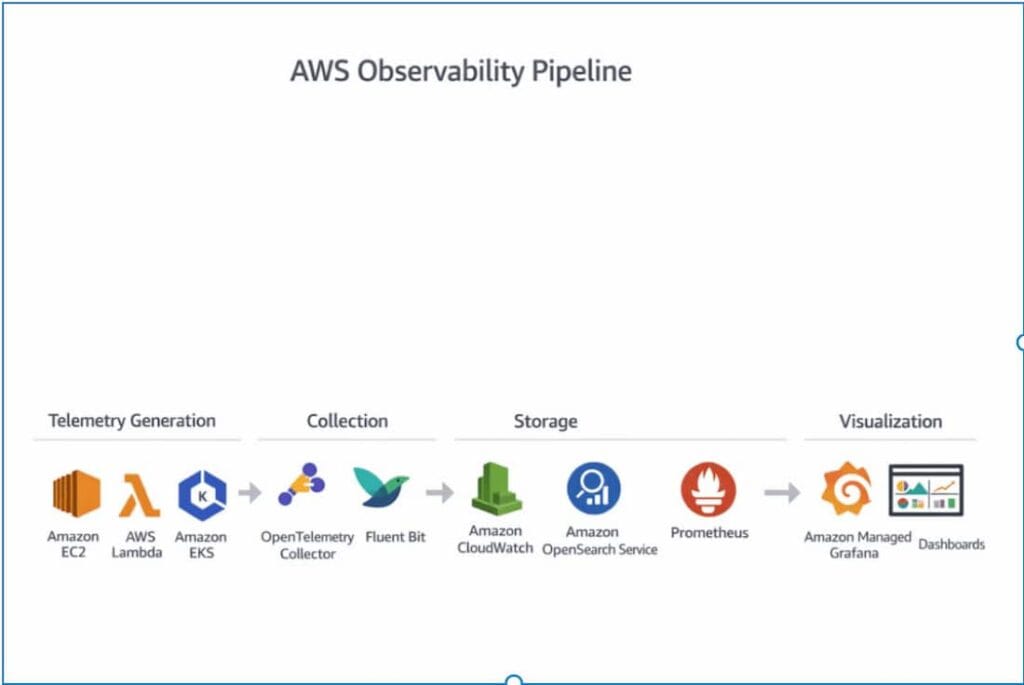
AWS observability typically follows a straightforward process. Telemetry data is created by services, collected by agents, stored in backend systems, and then visualized for monitoring and troubleshooting.
Telemetry Generation
Telemetry begins at the source. In AWS, that usually means the applications, containers, and infrastructure services that produce logs, metrics, and traces as they run.
- Applications: Application code creates telemetry during request handling, errors, background jobs, and other runtime activity.
- Containers: Containers in environments like Amazon EKS or Amazon ECS generate telemetry as services run, scale, restart, and talk to each other.
- Infrastructure services: AWS services such as Amazon EC2, AWS Lambda, load balancers, and databases produce telemetry that helps teams understand system activity and performance.
Telemetry Collection
Once telemetry is generated, it has to be collected and sent somewhere useful.
- OpenTelemetry collectors: These are commonly used to collect and route logs, metrics, and traces from AWS workloads.
- Fluent Bit: Many teams use Fluent Bit to collect and forward log data, especially in containerized environments.
- Agents and collectors: In some AWS environments, telemetry is shipped using agents or collectors that run alongside applications or infrastructure.
- Forwarding telemetry: After collection, the data is sent to backend systems for storage, querying, and analysis.
Telemetry Storage
After telemetry is collected, it needs to be stored in systems that make it easy to search, query, and analyze.
- Amazon CloudWatch: Often used to store and work with logs and metrics from AWS services and applications.
- Amazon OpenSearch Service: Commonly used for log storage, search, and analysis across larger volumes of data.
- Prometheus: Typically used for storing and querying metrics, especially in Kubernetes and cloud-native setups.
Visualization and Analysis
Once telemetry is stored, teams need a way to explore it and turn it into something useful during monitoring and troubleshooting.
- Dashboards: Help teams keep an eye on system health, performance trends, and service behavior across AWS workloads.
- Amazon Managed Grafana: It is used by teams to visualize metrics and bring different observability data sources together in one place.
- OpenSearch Dashboards: It is commonly used to search through logs, analyze them, and make the data easier to explore visually.
- Investigation workflows: These tools help engineers notice patterns, dig into issues, and figure out what changed when something starts going wrong.
Common Challenges with Native AWS Observability
Fragmented Observability Tools
AWS gives teams several observability services to work with, but they are often used as separate parts instead of one connected system. That makes it harder to get a clear, complete view of what is going on.
For example, a team might notice high latency in Amazon CloudWatch, then switch to AWS X-Ray to trace the request, and finally check logs in OpenSearch to understand the error. By the time they connect all three, the investigation takes longer than it should.
- Multiple tools: Teams often use Amazon CloudWatch, AWS X-Ray, OpenSearch, and Prometheus together, each handling a different type of telemetry.
- Data is dispersed across services: Because logs, metrics, and traces often live in different places, investigations can take longer and feel more fragmented.
- Context switching: Getting to the bottom of one issue often means moving back and forth between several dashboards and tools.
- Limited correlation: Without a unified view, it is harder to connect what happened across services and signals.
Telemetry Correlation Complexity
Having logs, metrics, and traces is one thing. Connecting them in a way that actually helps during an incident is another. In many AWS setups, each signal is collected, stored, and viewed differently, which makes it harder to follow a problem from start to finish.
- Separate signal paths: Logs, metrics, and traces often move through different tools and pipelines, so the data does not always line up in a useful way.
- Harder cross-service tracing: In distributed AWS environments, a single request can pass through several services, and without strong correlation, it takes longer to understand the full path.
- Slower investigations: Finding the symptom in one tool is only part of the problem. The logs or traces that explain it often live somewhere else, which slows the investigation down.
- Less context during incidents: When telemetry is not well connected, teams spend more time piecing things together and less time fixing the issue.
Cost Management Challenges
As the amount of data increases, the built-in AWS observability tools can become expensive. What starts as a manageable cost can become difficult to control if teams collect more logs, metrics, and traces from their production environments.
- Growing data volume: As applications scale, the amount of telemetry increases quickly, especially in containerized and microservices environments.
- Log-heavy workloads: High log volume can drive costs up fast, particularly when teams keep too much data or ingest noisy logs they rarely use.
- Multiple pricing layers: Costs can build across ingestion, storage, queries, dashboards, and related AWS services.
- Harder to forecas: Observability costs are often hard to predict because they can change with traffic spikes, incidents, and infrastructure growth.
Scaling Observability Across Multi-Account Environments
Large organizations operate multiple AWS accounts. Keeping observability consistent across all of them is not always straightforward, especially as systems grow and teams work independently.
- Multiple AWS accounts: Different teams or environments often work in separate AWS accounts, which makes it harder to see everything in one place.
- Data spread across accounts: Logs, metrics, and traces can live in different places, making cross-account troubleshooting slower.
- Access and permissions: Managing who can see what across accounts adds another layer of complexity.
- Consistency challenges: It is harder to standardize how telemetry is collected and monitored across teams and environments.
How OpenTelemetry Improves AWS Observability
As AWS environments become more distributed, many teams are moving toward open standards instead of relying only on vendor-specific telemetry pipelines. OpenTelemetry helps by giving teams a more consistent way to collect and route observability data across services and environments.
Vendor-Neutral Telemetry
OpenTelemetry gives teams a vendor-neutral way to collect logs, metrics, and traces. That makes it easier to keep telemetry portable instead of tying observability too closely to a single platform.
Unified Data Collection
OpenTelemetry helps teams collect different telemetry signals through a more consistent approach. Instead of using separate collection methods for each signal, they can standardize how data is gathered across AWS workloads.
Better Integration with Observability Platforms
OpenTelemetry also makes it easier to send telemetry to different observability platforms. Teams can integrate with tools like Prometheus, Grafana, Elastic, and Datadog without rebuilding their instrumentation every time they change or expand their stack.
How CubeAPM Simplifies AWS Observability
CubeAPM fits naturally into AWS observability for teams that want logs, metrics, and traces in one place without stitching together a large stack of separate tools.The platform is OpenTelemetry-based, supports AWS-oriented infrastructure monitoring, and uses transparent ingestion-based pricing rather than host- or user-based billing.
Unified Monitoring for Logs, Metrics, and Traces
CubeAPM brings together metrics, events, logs, and traces in a single platform, which is the core idea behind MELT observability. That unified model makes it easier to move from a symptom in one signal to the supporting context in another without bouncing between multiple AWS monitoring tools.
OpenTelemetry-Native Architecture
CubeAPM is built around OpenTelemetry and works with OpenTelemetry SDKs across multiple languages. Its docs also show OTLP ingestion endpoints for metrics, logs, and traces, so teams can send telemetry through standard OTLP pipelines instead of relying on proprietary agents alone.
Predictable Observability Costs
CubeAPM uses ingestion-based pricing, with its pricing page listing plans starting at $0.15 per GB ingested. CubeAPM also markets unlimited retention and smart sampling as part of its cost-control model, which is meant to help teams keep more historical data while reducing unnecessary telemetry volume.
Centralized Observability Across AWS Workloads
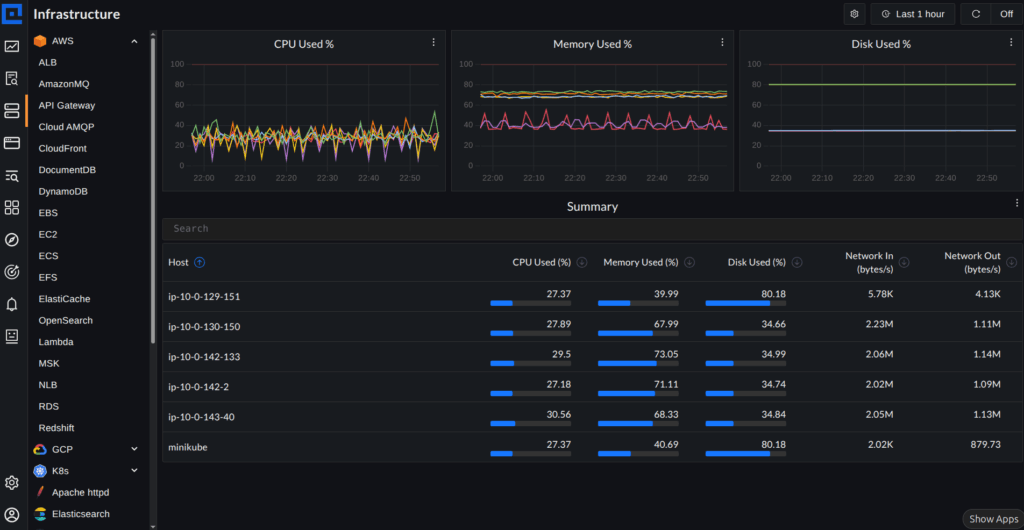
The screenshot above shows CubeAPM’s AWS view, where different services are organized in one place on the left, including API Gateway, DynamoDB, EC2, Lambda, and OpenSearch. Instead of jumping between separate tools, teams can navigate across AWS services from a single interface.
At the top, you can see metrics like message throughput and lag, while the summary section below gives a quick view of system activity. This kind of layout makes it easier to move from a high-level signal to the underlying service without switching dashboards.
In practice, this is what centralized observability looks like. Whether teams are monitoring EC2, Kubernetes workloads, or serverless services, they can follow what is happening across AWS without breaking their investigation flow.
Best Practices for Observability on AWS
Instrumenting workloads with OpenTelemetry early makes it easier to build a consistent observability setup as systems grow. It also gives teams more flexibility later if they want to change tools or send telemetry to multiple backends.
Logs, metrics, and traces are far more useful when they can be connected during an investigation. Correlation helps teams move from a high-level symptom to the specific service, request, or error behind it.
In a microservices setup, one request can move through a lot of services before it finally comes back with a response. Distributed tracing helps teams follow that journey, so it becomes much easier to see where delays, retries, or failures start creeping in.
Observability works much better when teams think about it early instead of treating it like something to add later. When telemetry is part of the architecture and deployment plan from the beginning, teams usually get clearer visibility and avoid a lot of cleanup work later on.
Conclusion
Modern AWS workloads need more than basic monitoring. Once systems start stretching across EC2, Lambda, Kubernetes, databases, and APIs, teams need a better way to understand what is happening, troubleshoot problems faster, and keep services running reliably.
That is why logs, metrics, and traces matter most when they work together. With OpenTelemetry becoming more common and unified platforms like CubeAPM reducing tool sprawl, AWS teams have a clearer path to building observability that is easier to manage and more useful in practice.
Disclaimer: The information in this article reflects details available at the time of publication. Source links are provided throughout for all claims. Verify all pricing with each vendor before making decisions.
FAQs
1. What is AWS observability?
AWS observability is the way teams keep track of logs, metrics, and traces across AWS applications and infrastructure. It gives them a clearer view of how systems are behaving, helps them troubleshoot issues faster, and makes it easier to keep distributed workloads reliable.
2. What tools are used for observability in AWS?
Teams often begin their monitoring journeys with AWS’s own tools: Amazon CloudWatch, AWS X-Ray, Amazon Managed Service for Prometheus, and Amazon Managed Grafana. OpenTelemetry, too, has become a popular choice for gathering and directing telemetry data, spanning both AWS services and other environments.
3. What is the difference between CloudWatch and observability platforms?
CloudWatch is AWS’s native monitoring service for logs, metrics, alarms, and dashboards. Observability platforms usually go further by bringing logs, metrics, and traces into a more unified experience with stronger correlation, broader integrations, and deeper investigation workflows.
4. How do logs metrics and traces work together?
Each signal gives teams a different part of the story. Logs capture what happened, metrics show how the system is behaving over time, and traces reveal how requests move across services. When teams can look at those signals together, finding the root cause gets much faster.
5. Can OpenTelemetry be used with AWS services?
Absolutely. Teams frequently integrate OpenTelemetry with AWS services to gather logs, metrics, and traces from their AWS-based workloads. It’s also a good fit with tools such as AWS X-Ray, Amazon CloudWatch, and the Amazon Managed Service for Prometheus.