









Today, many platforms focus on full observability, but logs are still a foundational signal for security monitoring, operational troubleshooting, and compliance analysis.
Graylog is a log management platform that teams use mostly in environments where centralized log intelligence and SIEM-style investigation workflows are the primary priority. It provides features, such as dashboards, alerting workflows, processing pipelines, and more, to help teams investigate incidents and monitor system behavior.
In this Graylog review, we’ll explore the platform in detail, its features, strengths, limitations, and Graylog pricing across the Open, Enterprise, and Security editions.
Disclaimer: This review is an independent editorial analysis based on publicly available Graylog documentation, pricing pages, and product materials available at the time of writing. Product packaging, edition names, feature availability, deployment options, and pricing may change over time, so readers should verify current details directly with Graylog before making purchasing or implementation decisions.
What Is Graylog?
Platform Overview

Graylog is a centralized log management and SIEM platform that allows you to ingest, process, and analyze machine data generated across modern infrastructure. In real-world environments, it converges logs from applications, containers, servers, network devices, and cloud services into a single searchable system.
- For engineering teams: Graylog processes and analyzes log data to keep logs easy to search and meaningful during incidents. It collects logs from multiple sources and transforms them through pipelines. It also indexes them in a search backend and shows them via dashboards and queries.
- For Security teams: Graylog is part of a SIEM workflow. They can look at logs from firewalls, authentication systems, and cloud infrastructure all at once to find suspicious activities or incidents.
Graylog’s Market Positioning in 2026
Graylog is unique in the world of modern logging. On one side of the market, companies use open-source stacks like Elasticsearch, Logstash, and Kibana to build logging systems. These stacks are very flexible, but they take a lot of engineering work to keep running at a large scale.
On the other hand, big commercial SIEM platforms have better security features, but they also tend to be more expensive to license and harder to use.
Graylog provides both:
- Offers a structured way to log everything in one place, with built-in ingestion, pipelines, search, and alerting workflows
- Allows companies to run the system on their own hardware (self-hosting) and decide how they store and retain logs.
Graylog focuses on operational log intelligence. It keeps logs searchable, structured, and actionable, so engineering and security teams easily find them during incidents.
Key Features of Graylog
Centralized Log Management
Centralized log collection is the foundation of the Graylog platform. It gathers logs from infrastructure, applications, and network devices and stores them in a single searchable environment. This approach allows operations and security teams to analyze system behavior without switching between multiple logging systems. This helps teams find problems, look into incidents, and keep track of what’s going on in complicated systems.
Search and Query
Graylog allows searching through and analyzing large amounts of log data once it is indexed. Engineers can use search to find out what went wrong or follow the behavior of an application.
The platform lets teams quickly find the events they need by using interactive queries and structured filtering. Some common search features are:
- Search the entire text of indexed log data
- Filtering events by structured fields
- Saving queries for later use
- Using dashboards to see search results
Processing Pipelines
A lot of logs have unstructured text that needs to be changed before they can be analyzed. Graylog uses processing pipelines to fix this. As log messages come into the platform, pipeline rules change them so that teams can get useful information from raw events. Pipelines help with:
- Finding structured fields from raw log messages
- Checking if field names are the same across all log sources
- Adding context to events
- Sending messages to certain streams
Dashboards and Alerts
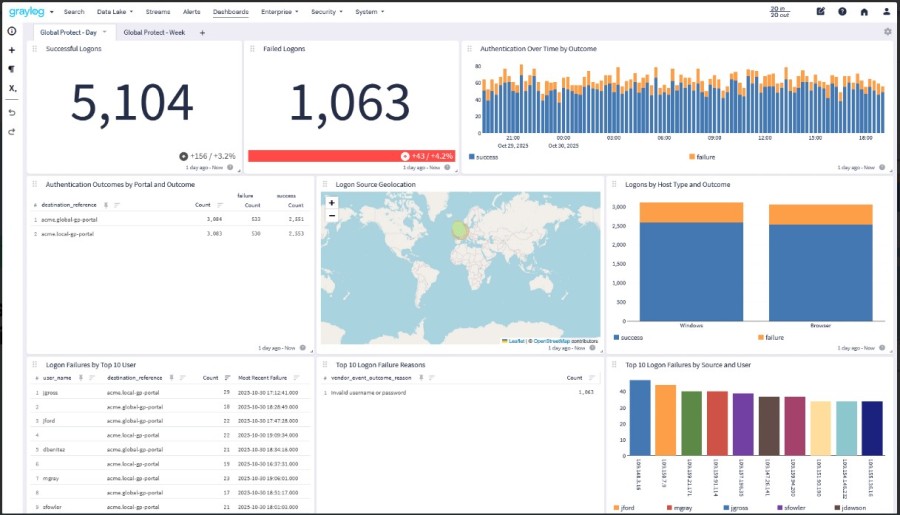
Engineers use dashboards to keep an eye on things like authentication events, error rates, or activity on the infrastructure. With alerting, teams can set up rules that send notifications when certain conditions show up in the log stream. Some common uses for alerts are:
- Finding repeated failed logins
- Keeping an eye on the number of application errors
- Finding network activity that looks suspicious
- Alerts turn log data into notifications that teams can use to quickly fix operational problems.
Integrations
Graylog provides flexible ingestion methods that allow organizations to collect logs from traditional infrastructure and cloud platforms. It integrates with:
- Kubernetes: Graylog can take in Kubernetes logs through collectors or agents that send container output to Graylog inputs.
- AWS: Organizations can centralize cloud telemetry and application logs with Graylog. The platform can take in these logs through inputs, collectors, and APIs.
- Syslog: Graylog has built-in syslog inputs that let infrastructure parts send logs straight to the platform.
- Beats agents (e.g., Filebeat and Winlogbeat): These collectors get logs from servers and send them to Graylog inputs. Sidecar can manage these agents from one place in big environments.
- APIs: Graylog has HTTP inputs and APIs that let apps send structured log data straight to the platform.
How Graylog Works: Architecture, Deployment, and Growth
Graylog is a distributed log processing system that can take in a lot of machine data and make it searchable almost instantly. The Graylog Stack is the name given to this design in the official documentation. There are three main parts to the stack:
- Graylog server nodes: to take in data, process it, and provide the web interface
- OpenSearch or Data Node: in charge of storing and indexing log data.
- MongoDB: a database that stores system metadata and configuration.
Graylog can grow horizontally as log volumes grow because these layers are separate. Depending on ingestion rates, query load, and retention needs, each component can grow on its own.
Graylog Nodes
The processing layer of the system is made up of Graylog nodes. They get log messages that come in, run pipeline rules, and show the web interface that people use to search and analyze. In production deployments, a load balancer usually runs multiple nodes at the same time. This spreads out the traffic for ingestion and queries across the cluster.
Graylog nodes do the following:
- Taking in log messages that come in
- Running pipelines and stream rules
- Handling alerts and dashboards
- Using the web interface to handle search queries
Data Node or OpenSearch Back End
The search backend keeps log data and makes it searchable. In current Graylog deployments, this layer is commonly provided by Graylog Data Node, which manages OpenSearch internally. The data layer performs several critical functions:
- Indexing incoming log messages
- Executing search queries
- Managing index lifecycle policies
- Storing retained log data
Because indexing operations are resource-intensive, the data layer usually runs on separate machines from Graylog server nodes. This separation protects ingestion performance and keeps search operations stable under heavy workloads.
MongoDB Metadata Store
MongoDB stores system metadata, not log events. Some examples are:
- Accounts and permissions for users
- Definitions of dashboards
- Settings for streams
- Rules for pipelines
- Setting up the system
Keeping metadata separate from indexed log data helps the system run better and makes it easier to manage.
Message Journal and Buffering
Graylog has a message journal that keeps incoming logs safe during spikes or problems with the backend. Incoming messages are first written to disk before processing. If indexing slows down or the data backend becomes temporarily unavailable, the journal buffers incoming messages until they can be processed. This lowers the risk of log loss during high spikes or system interruptions.
Data Ingestion Methods
Modern infrastructure produces logs from many different systems. Graylog supports multiple ingestion mechanisms so organizations can centralize logs from nearly any source.
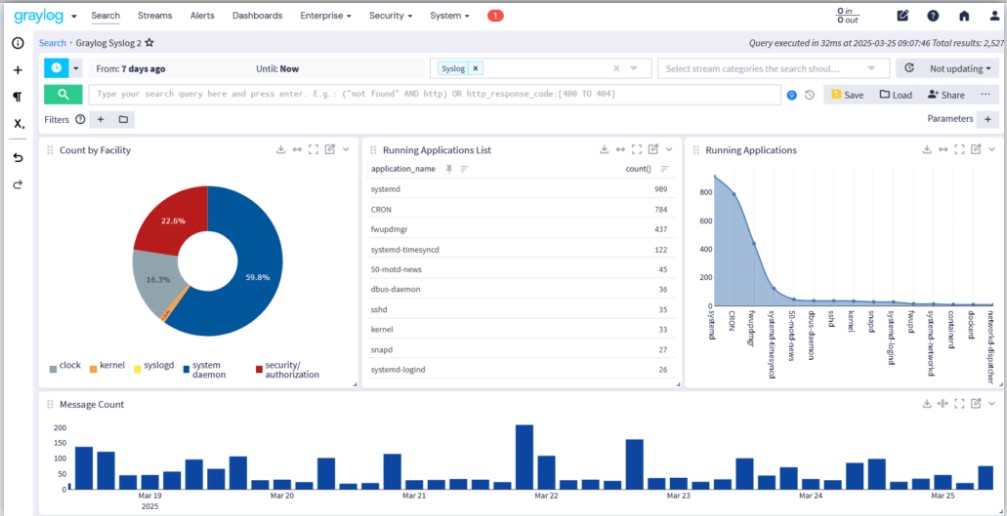
Sidecar
Graylog Sidecar acts as a configuration manager for log collectors running across servers. It helps administrators set up and run collectors like Filebeat on a lot of machines. Sidecar lets you manage logging agents from one place using the Graylog interface instead of having to set them up by hand on each server.
GELF
The Graylog Extended Log Format (GELF) is a structured logging format that was made just for Graylog. It works with:
- JSON log messages that are well-structured
- Compression of messages
- Chunking for big log events
Structured events can be sent directly to Graylog by applications that send GELF logs without having to go through a lot of parsing.
Syslog
Infrastructure devices still use syslog as one of the most common logging protocols. Graylog can take in syslog data from:
- Devices on the network
- Servers that run Linux
- Devices for security
- Services for infrastructure
This makes it easy to gather logs from traditional infrastructure settings in one place.
Beats
Graylog works with Beats agents that gather logs from servers and containers. These agents collect log data from the local area and send it to Graylog inputs for processing.
API Inputs
Graylog also lets you add your own data through APIs and HTTP inputs. This lets apps and automation pipelines send structured log data straight to the system. This flexibility lets companies combine logs from almost any place.
Pipes and Streams
Graylog processes logs through streams and pipelines once they are in the system. This step changes raw messages into events that are structured and easy to find.
Routing Messages
Streams put log messages into groups based on certain rules. For instance, logs from a certain service or environment can be sent to special streams. This separation helps teams find operational signals in different systems.
Extracting Fields
Logs often come in the form of unstructured text. Graylog takes structured fields out of these messages so that they can be searched quickly. For example, extracting fields like:
- IP address and user ID
- HTTP status code
- Name of the service
Structured fields make searches and investigations go much faster.
Enrichment Rules
Pipeline rules can add more context to events. Some examples are:
- Adding environment metadata to logs
- Putting service names with error codes
- Adding location data to IP addresses
These changes make raw log messages into operational data that can be used.
Data Processing Workflows
Pipelines can also clean up log formats, filter out noisy events, or send messages to different streams for analysis. This processing layer lets teams clean up data that comes in before it is stored for a long time.
Deployment Models
Graylog can be set up in different ways depending on what the business needs.
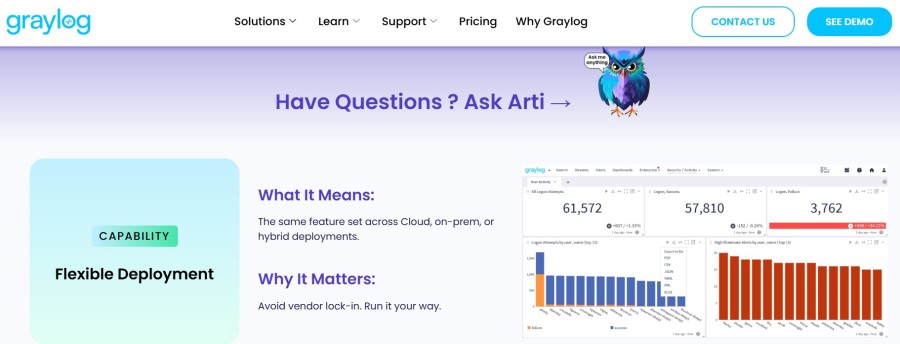
Self-Hosting
Most installations of Graylog run on infrastructure that the user manages themselves. How organizations work:
- Nodes on the Graylog server
- Clusters of Data Nodes or OpenSearch
- MongoDB instances
This model gives you complete control over system configuration, retention policies, and scaling the infrastructure.
Hybrid
Some businesses run Graylog on a mix of different types of infrastructure. For instance:
- Cloud workloads’ logs might go to a central Graylog cluster.
- You can store archived data in cloud storage systems.
This method makes it possible to see everything from one place, whether it’s on-premises or in the cloud.
Graylog Cloud
Graylog Cloud offers a managed platform as a service. In this model, the vendor takes care of the backend infrastructure, and users use the Graylog interface and analytics tools. This cuts down on the work that teams have to do if they don’t want to manage their own search clusters and storage systems.
Performance and Scalability
Graylog can grow horizontally as the number of logs grows.
Scaling Horizontally
You can add more Graylog nodes to share the work of ingesting data. You can also add more Data Nodes or OpenSearch nodes to the data layer to make it bigger. This distributed architecture helps keep ingestion performance high even when the amount of logs goes up a lot.
What to consider when sizing clusters
When planning a deployment, there are usually a few things to think about:
- Amount of daily log ingestion
- Requirements for retention
- Search workload level
Storage Performance
To keep performance stable, big environments often put Graylog nodes, Data Nodes, and MongoDB clusters in different places.
Planning for storage and keeping it
Retention policies decide how long logs can be searched in the system. Shorter retention needs less storage space, while longer retention needs bigger indexing clusters. Graylog has index lifecycle strategies that help teams find a balance between the cost of storage and the speed of queries.
Setting up for high availability
High availability is often achieved in production deployments by using multiple nodes for each component. Common setups are:
- Multiple Graylog servers
- Data Nodes in Clusters
- Replica sets in MongoDB
This protects the platform from single-node failures and makes sure that logs are always being ingested.
Realities of Operational Overhead
To run Graylog on a large scale, you need to do operational work all the time. Teams must take care of:
- Check the health of the cluster
- Policies for the lifecycle of indexes
- Planning for storage space
- Processes for backing up and restoring
Graylog documentation stresses the importance of careful deployment planning to keep performance up as log volumes grow. These tasks fit right in with existing DevOps workflows for companies that already have a distributed infrastructure.
What Are Graylog Editions?
There are different versions of Graylog that are meant for different operational needs.
Disclaimer: Some capabilities described in this article may vary by Graylog edition, deployment model, version, or add-on. Features available in Graylog Open, Graylog Enterprise, Graylog Security, and Graylog Cloud are not identical, and organizations should confirm edition-specific availability with the current Graylog product documentation and sales materials.
Open Graylog
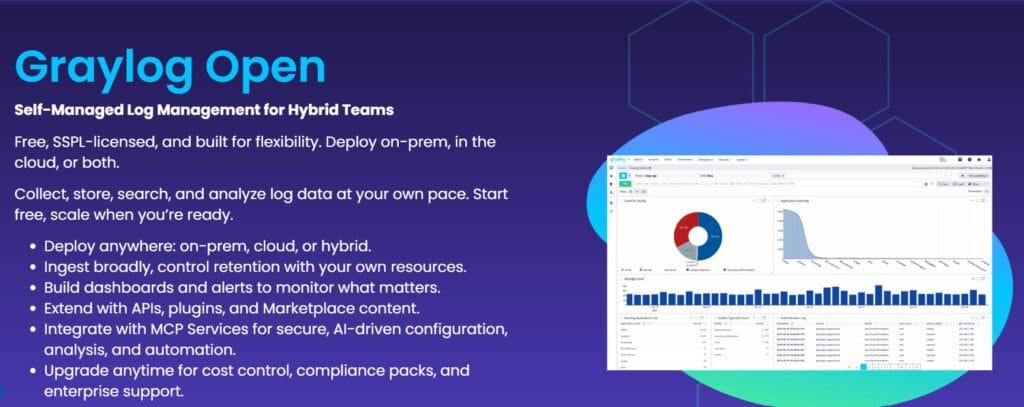
The free and open-source version of the platform is called Graylog Open. This version is good for teams that want to have full control over their logging infrastructure and are comfortable with the systems that run it. Some common features are:
- Log ingestion from sources like syslog, GELF, and Beats
- Streams and pipelines for sending and processing data
- Search and filter through log events
- Basic dashboards for keeping an eye on operations
- Can be used on-premise, in the cloud, or in a mix of both
- MCP services can be used to set up, automate, and analyze things using AI.
Graylog Enterprise

Graylog Enterprise adds features to the platform that are useful for DevOps, SecOps, and ITOps teams. The price starts at $15,000 per year. Organizations usually adopt this edition when compliance, governance, or long-term log retention becomes an operational requirement. These capabilities include everything in the Open tier plus these:
- Log archiving and extended retention options
- Advanced alerting
- Custom reports
- Audit logging
- Filtering & parameters
- Custom saved searches
- Enterprise authentication and role management
- Commercial support
- And more
Graylog Security
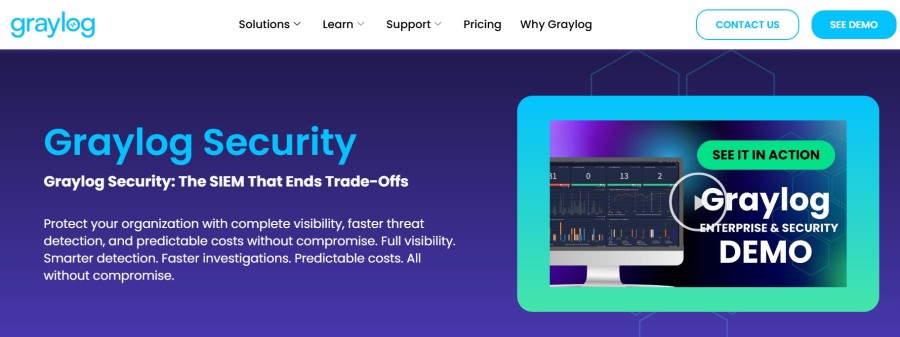
Graylog Security builds on the Enterprise platform and focuses on threat detection and security investigations. The cost starts at $18,000/yr.
Security teams use this edition to support additional workflows, such as:
- Security event correlation
- Detection rules for suspicious behavior
- Investigation dashboards
- Incident response analysis
- Asset history
- AI dashboard summary
- And more
This allows the platform to function as part of a security monitoring stack.
Graylog Cloud

Graylog Cloud provides the platform as a managed service. Teams don’t run the underlying infrastructure; instead, they use a hosted environment to access the platform.
In this deployment model, the vendor runs the backend parts, like storage and search clusters, while users use the Graylog interface. This cuts down on the extra work that comes with running big logging clusters.
Scenario: Mid-Sized SaaS Generating 500 GB Logs per Day
Disclaimer: The cost examples below are directional estimates created for editorial comparison purposes. They are not official Graylog quotes, calculator outputs, or guaranteed deployment costs. Actual costs will vary depending on ingestion patterns, compression ratios, retention periods, hardware choices, cloud pricing, staffing model, search workload, and negotiated licensing terms.
Consider a mid-sized SaaS company running a modern cloud-native stack. Most workloads run in Kubernetes clusters. API gateways handle external traffic. Application servers and microservices generate operational logs continuously.
Across these systems, the platform produces roughly 500 GB of log data per day. That volume is common for SaaS platforms that operate dozens of microservices and multiple environments. At this scale, logs come from several places:
- Kubernetes containers emitting stdout logs
- API gateways capture request and response data
- Application services write structured logs
- Infrastructure components such as load balancers and databases
Without centralized logging, these events remain scattered across clusters, instances, and cloud services. Troubleshooting becomes slow and unreliable. Teams evaluating Graylog usually arrive at this stage with a few clear priorities.
Why Teams Consider Graylog
Engineering teams typically evaluate Graylog when three concerns converge.
- Cost control: Commercial logging platforms often charge based on ingestion volume. When logs reach hundreds of gigabytes per day, pricing becomes unpredictable. Graylog allows organizations to run the platform on their own infrastructure and control how logs are stored and analyzed.
- Self-hosting flexibility: Graylog can run on-premises, in private cloud environments, or in hybrid architectures. Organizations keep control of infrastructure, storage policies, and retention strategies.
- Pipeline-driven processing: Graylog pipelines allow teams to filter, enrich, and route log events before they are indexed. This reduces noise and helps teams structure logs for investigation workflows.
For many SaaS companies, these factors make Graylog an attractive option once log volumes exceed what simple logging stacks can handle.
Infrastructure Required
Running Graylog at this scale requires several components working together. Graylog documentation describes the platform as a stack composed of the Graylog server, a data storage layer, and a metadata database. A typical production deployment includes the following.
OpenSearch or Graylog Data Node
Graylog stores and indexes log data using a search backend. In modern deployments, this layer is provided by Graylog Data Node, which manages OpenSearch internally.
This component is responsible for:
- Indexing incoming log events
- Executing search queries
- Handling data retention and indexing performance
For environments ingesting hundreds of gigabytes daily, the storage cluster typically runs multiple nodes to distribute indexing load and maintain performance.
MongoDB
MongoDB stores Graylog metadata and configuration. This includes:
- User accounts and permissions
- Pipeline definitions
- Stream configurations
- System configuration settings
Although MongoDB does not store log data itself, it remains a critical dependency for the platform.
Storage
Log storage requirements depend heavily on retention policies. For a workload producing 500 GB per day, storage consumption grows quickly:
- 7-day retention: ~3.5 TB of indexed logs
- 30-day retention: ~15 TB of indexed logs
- 90-day retention: ~45 TB of indexed logs
Most deployments separate storage tiers to control costs. Hot data remains indexed for fast search. Older logs may be archived or moved to lower-cost storage.
Compute
Compute resources typically include:
- Graylog server nodes handling ingestion and processing
- Data Node or OpenSearch cluster nodes handling indexing
- MongoDB nodes managing metadata
Large deployments often run these components on separate machines to avoid resource contention and to maintain high availability.
Retention Impact on Cost
Retention policies have a direct impact on infrastructure requirements. If the SaaS platform retains only one week of indexed logs, storage and indexing infrastructure remain manageable. Once retention expands to months, storage consumption grows significantly. Operational teams usually solve this by combining:
- Short retention for searchable logs
- Long-term archiving for compliance data
This balances investigative speed with storage cost.
Disclaimer: Self-hosted logging costs depend heavily on architecture decisions outside the Graylog license itself, including compute sizing, storage tiering, cluster topology, backup strategy, and availability requirements. Organizations should validate infrastructure assumptions against their own environment before using any modeled estimate.
Operational Overhead
Operating Graylog at scale requires engineering effort. Typical operational responsibilities include:
- Managing the search cluster
- Monitoring indexing performance
- Adjusting index lifecycle policies
- Scaling storage and compute nodes
- Maintaining backups for Graylog, MongoDB, and Data Nodes
Graylog documentation highlights the need to protect all core components when implementing backup and disaster recovery strategies. For teams already running Kubernetes and distributed systems, this operational work is familiar. For smaller teams, it can become a noticeable overhead.
What This Scenario Reveals About Graylog Pricing and Features
A deployment generating 500 GB of logs per day surfaces several practical realities about the platform.
- Pricing often aligns with ingestion or active data usage: Graylog’s subscription model can follow a consumption-based approach where organizations pay for the data actively stored or analyzed.
- Infrastructure becomes part of the total cost: Self-hosted deployments require compute, storage, and search clusters. These costs form a significant portion of total ownership.
- Retention policies strongly influence storage cost: Long retention dramatically increases storage requirements and index size.
- Enterprise licensing introduces additional cost layers: Enterprise editions add capabilities such as advanced support and operational features, with pricing starting around $15,000 per year, depending on the tier.
The scenario illustrates a broader reality. Graylog can provide strong control over logging infrastructure, but organizations must plan for the operational and infrastructure implications that come with running large log platforms.
Graylog Pricing Overview
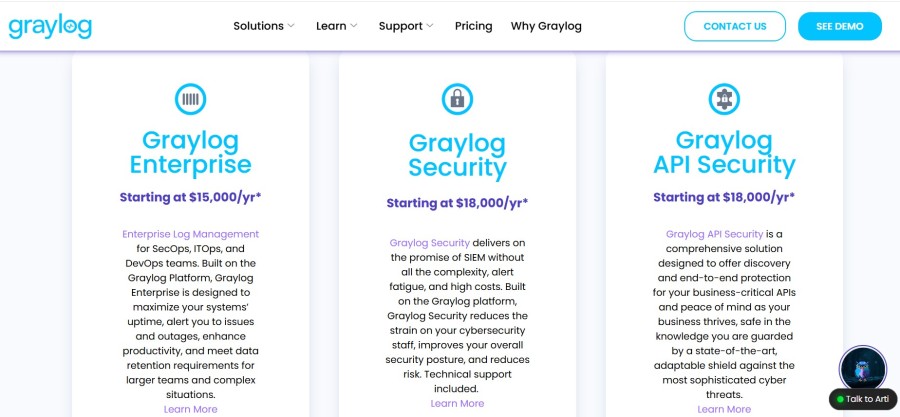
Disclaimer: Public “starting at” prices should not be treated as a full cost quote. Final Graylog cost can vary based on edition, contract terms, deployment model, active data usage, storage architecture, support scope, and any required professional services or add-ons.
Graylog pricing depends on two layers:
- The edition you choose
- The infrastructure required to run the platform
The platform offers several editions, including Graylog Open, Graylog Enterprise, Graylog Security, and Graylog Cloud. While Graylog Open is free to use, operating the platform still requires infrastructure, such as a search backend (OpenSearch or Data Node), storage for indexed logs, and compute resources for ingestion and processing.
For organizations using Enterprise or Security editions, pricing typically includes both the software license and the infrastructure required to run the logging stack. Because of this architecture, the total cost of running Graylog usually depends on several factors:
- Daily log ingestion volume
- Retention policies for indexed logs
- Storage capacity for archived data
- Compute resources used by Graylog nodes and search clusters
- Operational effort required to manage the platform
Understanding these factors helps organizations estimate the real cost of running Graylog beyond the software license itself.
What Actually Drives Graylog Costs
Understanding Graylog pricing requires looking beyond the software license. Even though Graylog Open is free, organizations must still operate the infrastructure that processes and stores log data. As log volumes increase, these operational components typically become the main part of the total cost.
Several factors influence how much a Graylog deployment ultimately costs.
- Log Ingestion Volume: The amount of log data generated each day directly affects infrastructure requirements. Higher ingestion volumes require larger indexing clusters, more storage capacity, and additional compute resources for processing and search.
- Retention Policies: How long logs remain searchable has a major impact on storage usage. Many organizations keep recent logs in high-performance storage while archiving older logs to lower-cost storage systems.
- Search Infrastructure: Graylog relies on OpenSearch or Graylog Data Node to index and query log data. As log volumes grow, organizations often scale this cluster horizontally by adding more nodes to maintain ingestion and query performance.
- Storage Architecture: Storage requirements depend on both ingestion volume and retention period. Teams typically combine fast storage for indexed logs with lower-cost storage for archived data to control infrastructure costs.
- Operational Management: Running Graylog at scale requires ongoing operational work, including monitoring cluster health, managing index lifecycle policies, scaling nodes, and maintaining backups. This operational effort becomes part of the total cost of ownership.
- Enterprise licensing extras: Graylog has a number of different editions that add features to the main platform. The open edition has a central place for logs to be collected, searched, and dashboards, and alerts. Commercial editions add advanced features like compliance reporting, advanced alerting, and workflows for detecting threats.
| Cost Component | Graylog Open | Graylog Enterprise | Graylog Security |
| License | Free | Paid subscription | Paid subscription |
| Infrastructure | Self-managed | Self-managed | Self-managed or managed deployments |
| Retention Features | Basic storage management | Tiered storage and archival options | Enterprise features plus security workflows |
| Support | Community support | Enterprise support and services | Enterprise support and security content |
How Much Does Graylog Actually Cost?
The total cost of running Graylog depends on log volume, retention policies, and the infrastructure required to process and store log data. While the Graylog Open edition is free, real deployments typically include infrastructure costs and operational management.
The following examples illustrate how costs can evolve as log volumes grow.
Example 1: Small Team Generating 50 GB of Logs per Day
A small engineering team running several services may generate around 50 GB of logs per day. In this scenario, a modest Graylog deployment might include a few ingestion nodes, a small OpenSearch cluster, and moderate storage for indexed logs.
| Cost Component | Estimated Monthly Cost |
| Infrastructure (Compute Nodes) | $300 – $500 |
| Storage for Indexed Logs | $200 – $400 |
| DevOps Operational Time | $1,000+ |
| Estimated Total | ~$1,500 – $2,000 |
Example 2: Mid-Sized SaaS Platform Generating 300-500 GB per Day
Larger SaaS platforms often generate hundreds of gigabytes of logs daily across microservices, API gateways, and infrastructure components. At this scale, deployments usually require multiple Graylog nodes, a distributed OpenSearch cluster, and larger storage volumes.
Typical infrastructure includes:
- Multiple Graylog server nodes for ingestion and processing
- A multi-node OpenSearch or Data Node cluster for indexing
- Dedicated storage for indexed and archived logs
- MongoDB cluster for metadata management
| Cost Component | Estimated Monthly Cost |
| Infrastructure (Cluster Nodes) | $2,000 – $5,000 |
| Storage for Indexed Logs | $1,500 – $4,000 |
| DevOps / Platform Management | $2,000 – $6,000 |
| Estimated Total | ~$5,000 – $15,000 |
Example 3: Large Enterprise Platform Generating 1-2 TB of Logs per Day
Large enterprises often operate hundreds of microservices, a distributed infrastructure, and multiple environments across regions. In these environments, log ingestion can exceed 1–2 terabytes per day, especially when infrastructure logs, application telemetry, and security events are centralized into a single logging platform.
Deployments at this scale typically include:
- Multiple Graylog ingestion nodes behind load balancers
- Large OpenSearch or Graylog Data Node clusters for indexing
- High-performance storage for hot-indexed data
- Separate archive storage for long-term retention
- Dedicated operations teams manage the logging infrastructure
| Cost Component | Estimated Monthly Cost |
| Infrastructure (Large Cluster Nodes) | $6,000-$12,000 |
| Storage for Indexed Logs | $5,000-$15,000 |
| Archive Storage | $2,000-$6,000 |
| Platform / DevOps Management | $5,000-$10,000 |
| Estimated Total | ~$20,000-$40,000+ |
Disclaimer: The cost examples below are directional estimates created for editorial comparison purposes. They are not official Graylog quotes, calculator outputs, or guaranteed deployment costs. Actual costs will vary depending on ingestion patterns, compression ratios, retention periods, hardware choices, cloud pricing, staffing model, search workload, and negotiated licensing terms.
Graylog Pros
Graylog has earned adoption across security teams and operations groups because it combines flexible log processing with strong search capabilities. Its design lets companies keep control over deployment and infrastructure while centralizing logs.
Pipelines for processing logs
Graylog pipelines let teams change and add to log messages as they come into the platform. Pipeline rules can take out fields, make log formats the same, and send messages to different streams for processing. This flexibility makes it easier for teams to turn raw machine data into structured operational signals.
Options for Flexible Ingestion
Graylog can take in logs from a variety of sources, such as Syslog, GELF, Beats, and HTTP. This lets businesses gather logs from applications, infrastructure, network devices, and cloud platforms all in one place.
Powerful Search Features
The backend data layer indexes logs, which lets you quickly search through a lot of events. Engineers can use the Graylog interface to filter events, create queries, and look into incidents.
Open-Core Openness
Graylog has both a free open edition and paid versions for businesses. Companies can use the platform on their own hardware and add to it with integrations or plugins.
Cost Effectiveness
Organizations can keep an eye on infrastructure and storage costs because Graylog can be hosted on its own. Many teams use Graylog when they want SIEM-like features but don’t want to pay for them based on how much data they collect, like many old SIEM platforms do.
Flexibility in customization
Organizations can customize the logging workflow to fit their infrastructure using streams, pipelines, and routing rules. Teams can sort logs by service, environment, or security workflow. Many user reviews talk about how flexible Graylog is and how well it can process logs.
Graylog Cons
Like most self-hosted logging platforms, Graylog introduces operational responsibilities that organizations must manage. These limitations usually appear when deployments grow or when teams lack infrastructure expertise.
Backend Dependency Management
Graylog relies on a search backend such as Data Node or OpenSearch to store and index logs. Like most self-hosted logging platforms, Graylog introduces operational responsibilities that organizations must manage. These limitations usually appear when deployments grow or when teams lack infrastructure expertise.
Backend Dependency Management
Graylog relies on a search backend such as Data Node or OpenSearch to store and index logs. These clusters need to be watched and adjusted to keep up with ingestion and search performance.
Infrastructure Costs at Scale
For big deployments, you need a lot of different parts, like Graylog nodes, indexing clusters, and MongoDB metadata storage. As the amount of data that is ingested grows, the infrastructure must grow as well.
Pipelines: A Learning Curve
Pipeline rules let you process logs in more advanced ways, but teams need to learn how to use Graylog’s rule syntax and processing model.
The difficulty of clustering
To keep the system stable, you need to be very careful when setting up indexing nodes, storage nodes, and processing nodes for clustered deployments.
Paid Versions Have More Advanced SIEM Features
Only the commercial editions have some advanced features, like compliance workflows and security detection features. People who use G2 often say that Graylog is powerful, but that it takes technical knowledge and experience with managing infrastructure to use it.
When Graylog Works Best
The right log management platform often depends on how teams operate their infrastructure and which telemetry signals they rely on during investigations. Graylog suits organizations that want to operate their own logging pipeline while maintaining control over storage, retention, and infrastructure architecture.
The platform is commonly adopted by engineering and security teams that already manage distributed systems and require powerful log analytics for troubleshooting and investigation.
Best Fit Environments
Graylog typically works best in environments such as:
- Security analytics and SIEM workflows: Organizations that need centralized log analysis for detecting suspicious activity and investigating incidents.
- Self-hosted log infrastructure: Teams that prefer running their logging systems on-premises or in private cloud environments rather than relying on fully managed SaaS platforms.
- Compliance-driven industries: Companies that must control log retention, data residency, and audit logging to meet regulatory requirements.
- Large-scale log environments: Mid-size to enterprise organizations generating significant volumes of infrastructure and application logs across many services.
Because Graylog can run on on-premises or private infrastructure, organizations maintain full control over how logs are stored, processed, and retained. This flexibility is particularly valuable in environments where compliance requirements or data governance policies restrict the use of fully managed observability platforms.
When It May Not Be Ideal
Graylog’s architecture assumes that organizations are comfortable operating the infrastructure required to run the platform. In environments without dedicated operational resources, this requirement can become a challenge. Graylog may be less suitable in situations such as:
- Small teams without experience managing indexing clusters or distributed infrastructure
- Engineering teams that prioritize distributed tracing and application performance monitoring over log analytics
- Organizations looking for fully managed SaaS observability platforms with minimal operational responsibility
Graylog in Context: Log Management vs. Modern Observability Platforms
To figure out how systems work in production, modern engineering teams use different telemetry signals. Logs have long been the main way to find out what’s wrong with infrastructure and look into security breaches. Recently, observability platforms have built on this model by linking logs, metrics, and distributed traces to provide deeper insight into complex systems.
To know where Graylog fits, you need to know that it was made mainly to be a platform for managing logs and analyzing security.
Log-Centric Architecture vs. Unified Telemetry Platforms
Graylog follows a log-centric architecture. It ingests logs from many sources, processes them through pipelines, and stores them in a searchable data layer such as OpenSearch. This design works particularly well in environments where logs are the primary operational signal. Common strengths of log-focused platforms include:
- Putting together logs from applications, infrastructure, and network devices
- Processing pipelines that normalize events
- Helping with security investigations and compliance workflows
Modern observability platforms take a broader approach by correlating multiple telemetry signals to understand system behavior. These platforms combine:
- Metrics that measure system performance
- Distributed traces that track requests across services
- Logs that record the full context of events
By linking these signals, engineers can diagnose latency issues, service dependencies, and failures across distributed systems.
Graylog vs Full Observability Platforms
The difference between log management and full observability becomes clearer when comparing their capabilities.
| Feature | Graylog | CubeAPM |
| Logs | Yes | Yes |
| Metrics | Limited | Yes |
| Distributed Traces | No | Yes |
| Observability Scope | Log analytics and SIEM workflows | Full-stack observability |
| Cost Model | Infrastructure-driven | Ingestion-based pricing |
Graylog excels when logs are the primary signal for operational insight. Organizations commonly deploy it for:
- Security monitoring and SIEM workflows
- Compliance and audit logging
- Centralized infrastructure log aggregation
Teams need observability platforms for deeper visibility into distributed applications, including tracing requests across microservices and diagnosing performance issues.
Disclaimer: Platform comparisons in this article are intended to highlight architectural differences at a high level. Capabilities, workflows, and pricing models can overlap or evolve across vendors, so teams should validate product fit against their own telemetry needs, deployment preferences, and operational constraints.
Graylog Alternatives
Organizations evaluating Graylog often compare it with other log management and observability platforms. The best choice usually depends on log volume, infrastructure complexity, and whether teams require log analytics alone or full observability capabilities. Some good Graylog alternatives are:
Splunk Observability Cloud

Splunk is one of the most established platforms for log analytics and SIEM deployments in enterprise environments.
Key features:
- High-performance log search and analytics
- Built-in SIEM capabilities with Splunk Enterprise Security
- Machine learning and anomaly detection tools
- Large ecosystem of integrations and apps
Datadog

Datadog is a cloud-native observability platform designed for monitoring distributed systems and Kubernetes environments.
Key features:
- Unified monitoring for logs, metrics, and traces
- Distributed tracing and application performance monitoring
- Infrastructure and container monitoring
- AI-driven anomaly detection and alerting
ELK Stack (Elasticsearch, Logstash, Kibana)

The ELK stack is a popular open-source logging architecture used to build custom log analytics pipelines.
Key features:
- Elasticsearch indexing and search engine
- Logstash ingestion and processing pipelines
- Kibana dashboards and visualization tools
- Flexible open-source architecture
Grafana Loki
Grafana Loki is a log aggregation system designed for cloud-native environments and tightly integrated with Grafana.
Key features:
- Scalable log aggregation for Kubernetes workloads
- Metadata-based indexing to reduce storage cost
- Native integration with Grafana dashboards
- Optimized for containerized infrastructure
Better Stack

Better Stack is a hosted monitoring platform combining log management, uptime monitoring, and incident management.
Key features:
- Cloud-based log ingestion and search
- Uptime monitoring and alerting
- Incident response and on-call management
- Fast deployment for smaller teams
CubeAPM

CubeAPM focuses on unified observability by combining logs, metrics, and distributed traces in a single telemetry pipeline.
Key features:
- OpenTelemetry-native observability architecture
- Unified ingestion of logs, metrics, and traces
- Distributed tracing for microservices environments
- Predictable ingestion-based pricing model
Graylog vs CubeAPM: Log Management vs Unified Observability
Graylog and CubeAPM address different layers of operational visibility. Graylog focuses on centralized log management and security analytics, while CubeAPM emphasizes multi-signal observability for application performance and distributed systems. Teams can better decide which platform fits their needs by knowing this difference.
Focus on Architecture
The main idea behind Graylog is to process logs in one place. It gathers events that machines create, processes them through pipelines, and makes them searchable and usable for research.
CubeAPM is based on an observability architecture that uses OpenTelemetry. It gathers and connects different telemetry signals, such as logs, metrics, and traces.
Telemetry and Correlation
The main thing Graylog does is look at log events. Pipelines let teams read logs, pull out fields, add information to data, and send events to streams for further investigation.

CubeAPM’s main focus is on connecting telemetry signals. Teams can see how requests move through distributed systems and find performance bottlenecks by linking traces, metrics, and logs.
Operational Model
To run Graylog, you need to take care of the infrastructure that stores and indexes log data. Graylog nodes, a search backend like Data Node or OpenSearch, and MongoDB for metadata are all common parts of deployments.
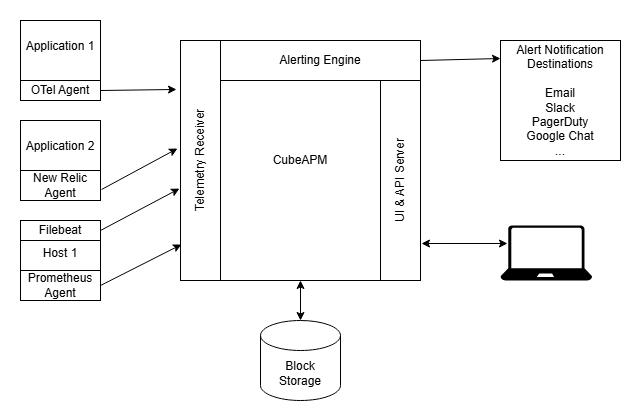
CubeAPM puts more focus on telemetry and instrumentation pipelines. Engineers use OpenTelemetry to instrument services so that signals can be gathered and compared.
Main Uses
People often use Graylog for:
- Centralized log collection
- Workflows for SIEM and security monitoring
- Logging for compliance and audits
People usually use CubeAPM for:
- Tracing that goes across microservices
- Keeping an eye on how well an app works
- Finding out what causes latency and service dependencies
Graylog is the best tool to use when logs are the main thing you’re looking for. When teams need to see how metrics, traces, and logs are related in a deep way, they look at platforms like CubeAPM.
Pricing
Graylog and CubeAPM are priced differently enough that a direct cost comparison requires context. Graylog publicly lists starting prices for paid editions, but actual spend also depends on infrastructure, retention, storage architecture, and operational overhead. CubeAPM publishes a usage-based starting price of $0.15/GB, which makes cost modeling more straightforward for teams estimating observability spend.
| Cost Factor | Graylog | CubeAPM |
| Public entry pricing | Graylog Enterprise starts at $15,000/year; Graylog Security starts at $18,000/year | Starts at $0.15/GB ingested |
| Pricing transparency | Partial public pricing; final cost depends on edition, active data usage, deployment model, and infrastructure choices | Public per-GB pricing is published on the pricing page |
| Infrastructure cost | Often separate for self-managed deployments because teams run Graylog nodes, storage/search backend, and metadata services | The CubeAPM pricing page also shows low additional infra and transfer cost assumptions alongside ingestion pricing |
| What drives spend | Edition, active data usage, retention, infrastructure sizing, storage architecture, support, and ops overhead | Ingestion volume, data transfer, and infrastructure usage |
| Cost predictability | Can vary more because software and infrastructure both affect the total cost | More predictable because pricing is presented as a direct usage model |
| Best fit from a cost perspective | Teams that want self-hosted control and accept infrastructure ownership | Teams that want simpler observability pricing across logs, metrics, and traces |
Disclaimer: This table compares publicly visible pricing posture and cost structure, not a vendor-issued side-by-side quote. Actual cost depends on deployment model, retention, ingestion profile, storage choices, support scope, and negotiated terms.
Final Verdict
Graylog remains a strong log management and SIEM platform in 2026. Its pipeline processing, flexible ingestion options, and powerful search make it well-suited for organizations that rely heavily on log data for security monitoring, troubleshooting, and compliance.
It is particularly compelling for teams comfortable managing their own infrastructure and tuning backend components such as OpenSearch or Elasticsearch. This operational control allows for flexible deployment and retention strategies, but it also introduces additional management overhead.
Graylog works best when logs are the primary signal for investigation. In environments where performance debugging depends on correlating traces, metrics, and logs together, teams may evaluate broader observability platforms alongside log management tools.
Ultimately, the right choice depends on an organization’s operational model and which telemetry signals drive incident investigation.
Disclaimer: The information in this article reflects the latest details available at the time of publication and may change as technologies and products evolve.
FAQs
1. Is Graylog truly free?
Graylog offers a free, source-available edition called Graylog Open. This version includes core capabilities such as centralized log collection, search, dashboards, and processing pipelines. However, running Graylog Open still requires infrastructure such as OpenSearch or Elasticsearch, MongoDB, storage, and compute resources. Enterprise features such as advanced security capabilities, reporting, and support are available in paid editions.
2. What is the difference between Graylog Open and Graylog Enterprise?
Graylog Open provides the core logging platform, including ingestion, pipelines, dashboards, and alerting.
Graylog Enterprise adds advanced capabilities such as enhanced archiving options, extended reporting, enterprise integrations, and commercial support. Organizations that require advanced SIEM features or enterprise-grade support typically evaluate the Enterprise or Security editions.
3. Can Graylog replace Splunk?
In many environments, Graylog can serve as an alternative to Splunk for centralized log management and SIEM workflows. Both platforms provide log ingestion, search, alerting, and security investigation capabilities. However, Splunk offers a broader ecosystem of enterprise applications and integrations, while Graylog often appeals to organizations seeking more infrastructure control and predictable deployment flexibility.
4. Does Graylog support distributed tracing?
Graylog is primarily designed for log management rather than distributed tracing. While it can ingest logs generated by tracing systems and correlate them through log data, it does not natively provide full distributed tracing capabilities. Teams that rely heavily on tracing often use dedicated observability platforms alongside log management tools.
5. Is Graylog suitable for small teams?
Graylog can work for small teams, especially those comfortable managing infrastructure and open-source tooling. However, because Graylog deployments require backend services such as OpenSearch or Elasticsearch and MongoDB, the operational overhead may be higher than fully managed SaaS logging platforms. Small teams with limited infrastructure resources may prefer simpler managed logging solutions.