









Kubernetes is difficult to monitor, even in environments with mature observability stacks. The challenge is not missing data, but misleading reassurance. Research on operator-driven systems shows that 54% of operator bugs lead to silent failures, where systems drift into unstable or undesired states without producing explicit errors. Kubernetes behaves the same way: nodes remain Ready and dashboards look calm while failure conditions quietly take shape.
This happens because Kubernetes failures are emergent rather than singular. Incidents form through the interaction of scheduling decisions, control-plane coordination, resource pressure, and delayed feedback loops. Most monitoring emphasizes resource consumption in steady state. What it rarely captures is system behavior during transitions, when retries increase, queues grow, and internal limits are crossed.
This article examines the most common Kubernetes monitoring blind spots that result from this mismatch. It explains why dashboards often look healthy right before incidents, where resource visibility diverges from behavior visibility, and why these gaps are architectural rather than the result of poor tooling choices.
Blind Spot #1: Pod-Level Metrics Hide Container-Level Failures
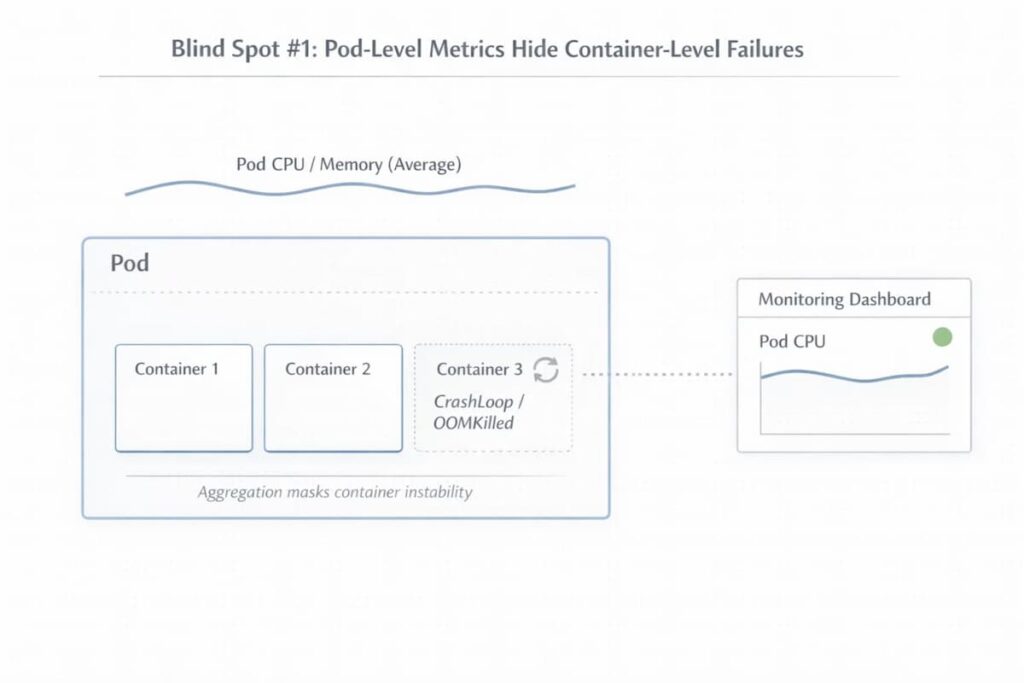
Pod-level metrics give a reassuring overview, but they can mask critical container-level failures. Aggregated CPU and memory metrics often mask instability within individual containers. Short-lived processes and init containers can complete, or fail, before scrapers are able to record their activity. That is why, failures may happen repeatedly and remain unnoticed until disruptions can be observed
Understanding this blind spot requires examining the nuances behind pod metrics:
- Aggregated pod metrics vs per-container behavior: Pod-level metrics smooth out spikes and anomalies. A container crashing repeatedly may appear stable when averaged with others.
- Short-lived containers and init containers escaping scrapes: Init containers, in particular, may fail or finish before any data is recorded.
- Why restarts and exit codes are invisible in averages: The actual effect of restarts or memory failures can be masked in pod-level averages Frequent crashes, for example OOMKilled events get lost in the numbers, only becoming noticeable when the pod’s overall performance starts to drop.
Blind Spot #2: Node Health Looks Fine While Pods Are Being Evicted
Nodes can look healthy at first glance. Under the hood, the picture is often different. Workloads may already be under stress, even though the node still reports Ready. A Ready status doesn’t always reflect what pods are actually experiencing. Pods may be struggling even when everything looks fine at a glance. In some cases, resources get tight and evictions happen before any alert has a chance to fire. The result is a misleading sense that the system is stable when it isn’t.
This is where node-level metrics start to fall short.
- “Available” vs “allocatable” vs eviction thresholds: A node can report plenty of available resources,Yet what really counts is allocatable capacity. Pods can get evicted well before the node signals a problem
- Disk, inode, and PID pressure: When disk space runs low, or inode and process ID limits are reached, things start to break quietly. Pods fail. Scheduling becomes unreliable, often without an obvious warning.
- Node pressure showing up as pod instability: Crashes and restarts tend to show up first. Unplanned pod behavior often follows once the system is under strain.
Blind Spot #3: Scheduler and Pending State Are Poorly Instrumented
The Kubernetes scheduler has a big influence on how stable a cluster feels. Still, in everyday monitoring, what it’s actually doing is mostly out of sight. When workloads stop progressing, teams usually notice only a growing number of pods stuck in Pending. That single state compresses a wide range of failure modes into a label that offers little operational insight.
To see why scheduler-related issues are so often detected late, it helps to break down what is hidden behind that Pending status:
- What “Pending” actually means internally: A Pending pod fails to schedule. The scheduler tries placement due to insufficient resources, affinity and anti-affinity rules, quota limits, or image availability problems. Each retry shows that something hasn’t met its conditions, it’s not just idle waiting.
- Scheduler decisions surface as events, not metrics: What the scheduler knows is mostly exposed through events, not metrics. Short explanations about placement failures appear and fade quickly.
- Capacity issues detected only after user impact: without any persistent signal to watch, capacity issues tend to surface late, often when pods fail to launch and services begin to lag.
Blind Spot #4: Control Plane Latency Is Invisible Until It Cascades
Control plane failures rarely announce themselves as outright outages. They surface gradually, as latency. Requests still succeed, controllers still reconcile, and APIs continue to respond. From the outside, the cluster looks functional. Inside the cluster, things can start to drag. Coordination slows down. Queues grow. Small delays pile up until they turn into real risk.
That’s why control-plane problems are so hard to catch early. The signals are there, but they’re easy to miss or read the wrong way:
- etcd latency vs apparent API health: etcd may start taking longer to handle reads and writes, even while the API keeps returning successful responses. Health checks stay green. Meanwhile, state changes move more slowly. Over time, scheduling and controller loops slow down, and keeping the cluster consistent becomes tricky.
- Retries masking saturation: Retries can hide the strain. Many Kubernetes components just keep retrying operations. Everything looks fine at first glance, but behind the scenes, the system is quietly under strain. Things still work, just more slowly, until latency and backlogs start cascading.
- Control-plane issues misdiagnosed as app bugs: Teams mistake control-plane issues for application bugs. Deployments stall, updates hang, and strange errors appear. From the team’s perspective, it seems like the app is at fault, so they dig into code paths, while the real bottleneck is actually in the control plane.
Blind Spot #5: Autoscaling Feedback Loops Are Not Observable
Horizontal Pod Autoscaling (HPA) is meant to keep systems responsive as load increases. In reality, its behavior is mostly opaque while it’s happening. Scaling takes time. There’s always a delay between rising demand and what the metrics report. In that window, stress builds unnoticed. Notably, during that window, pressure accumulates before additional capacity arrives.
- Metrics lag leads to delayed scaling: HPA reacts to aggregated metrics collected over defined intervals. By the time a spike is reflected in CPU or request metrics, workloads may already be under strain. Queues begin forming and latency increases while scaling has not yet caught up.
- Scaling decisions happen after pressure: Autoscaling is reactive by design. Thresholds must be crossed and evaluation periods must complete before scaling actions occur. Capacity therefore arrives only after demand has already exceeded current allocation.
- Why teams blame “slow apps” instead of scale latency: Inadequate visibility of the feedback loop easily results in engineers thinking the application is slow. However, the delay emanates from the infrastructure lag and not the application code.
Blind Spot #6: Metrics Stay Stable While Incidents Are Brewing
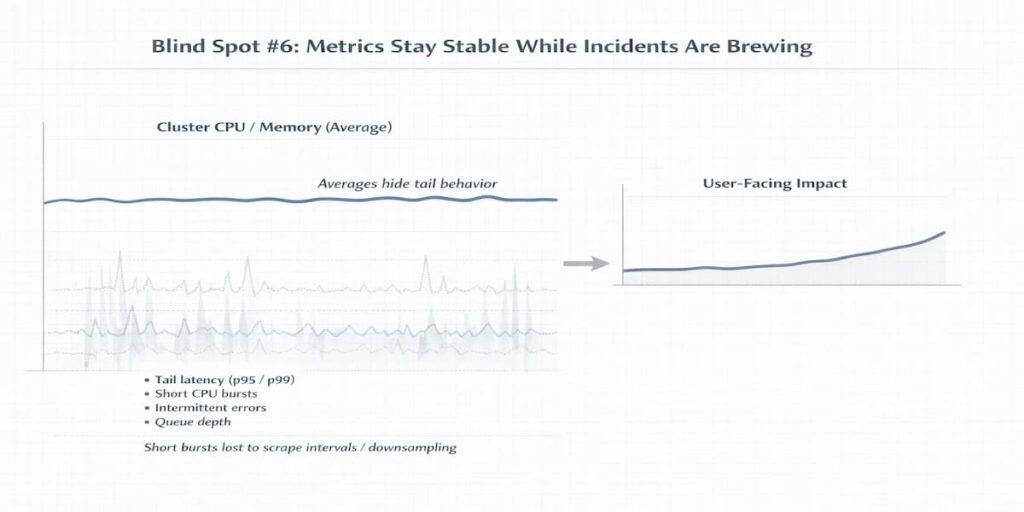
Kubernetes incidents are not sudden. Often, the warning signs were there all along. In reality, the signals were there, but subtle failures quietly accumulated while metrics looked stable. Engineers frequently end up chasing symptoms, unaware that the system has been straining for some time.
Part of the problem is how monitoring data is gathered and interpreted
- Averages hide tail behavior: Averages can hide the extremes. Brief spikes in CPU, memory, or latency may never show up if only mean or median values are recorded
- Scrape intervals and downsampling effects: Scrape intervals and downsampling make it worse: short-lived bursts or intermittent errors can slip through completely.
- Why incidents feel “sudden” in dashboards: By the time dashboards finally show a problem, the system has often been under pressure for minutes—or even hours. What feels like a sudden failure is usually the result of slow, invisible stress building up behind the scenes.
Blind Spot #7: Logs, Events, and Metrics Are Not Correlated
Kubernetes observability relies on multiple telemetry streams, but they are often stored and analyzed separately. Metrics, events, and logs each tell part of the story, yet most monitoring setups treat them separately. This separation makes it easy to miss the bigger picture when trying to understand complex failures.
The difficulty becomes clear during incidents. Metrics show how much the system is working, events hint at why things changed, and logs reveal what actually happened. Taken individually, each stream tells only part of the story.
In most setups, dashboards keep these streams apart. Engineers often have to piece timelines together by hand, switching back and forth between metrics, events, and logs. The process drags along, and small mistakes can easily slip through. Something that should be a quick fix often ends up feeling like a frustrating treasure hunt.
Blind Spot #8: Visibility Drops Exactly When Costs Increase
The moments when visibility is most needed are often the moments when it’s most expensive. During incidents, clusters suddenly produce a flood of telemetry. High-cardinality metrics, verbose debug logs, and frequent scrapes all drive resource usage and costs upward. Teams quickly run into a tough choice during incidents: they can either preserve all the detail or try to keep costs under control. Neither option is easy, and both come with trade-offs.
This blind spot is tricky because important signals can easily get lost in a sea of data.
- High-cardinality metrics from Kubernetes objects: Kubernetes objects like pods, services, and nodes generate a huge number of metrics. Tracking every single metric can quickly overwhelm storage and computing power. Teams must choose which ones are truly important, since monitoring everything is simply not feasible.
- Debug logging during incidents: Turning on debug logs only adds to the challenge. The extra I/O and network traffic can slow down monitoring, and the key signals sometimes get buried in all the noise. When engineers turn on detailed logging to figure out what went wrong, it adds extra I/O and network traffic. The monitoring system can lag behind, and the important signals can get lost in the noise. The increased load can make it surprisingly hard to spot the most important signals amidst all the noise.
- Monitoring cost spikes during outages: When telemetry suddenly rises, the pressure on operations is intense. Teams might downsample data, combine metrics, or even turn some off for a short time. This means that just when understanding system behavior is most critical, visibility is at its lowest.
How These Blind Spots Compound During Incidents
Blind spots usually don’t happen alone. A single signal, if ignored, can set off a chain reaction. Minor issues may build up quietly. Before anyone realizes it, small glitches have grown into serious failures. Watching how these failures unfold together helps make sense of cluster behavior and improve observability.
Example: A Slow Control-Plane Ripple That Turns Into a Production Incident
Let’s take the case of a production cluster during peak traffic. One of the control-plane nodes begins experiencing increased etcd latency due to disk I/O pressure. The API server continues returning successful responses, just slightly slower than usual. No alerts fire.
The scheduler now takes longer to make placement decisions. A few new pods sit in Pending because allocatable memory on eligible nodes is tighter than expected. The only visible signal is a short-lived FailedScheduling event. High-level dashboards still look calm.
Traffic keeps rising. Existing pods absorb more load while autoscaling lags behind demand. Pod-level CPU averages look acceptable, but tail latency begins to increase. Requests queue longer before being processed.
Eventually, some pods hit memory limits and restart. CrashLoopBackOff events appear. Alerts finally trigger. Engineers investigate the application, assuming a bad deployment or a code regression.
The real issue started earlier. A small control-plane delay introduced scheduling friction. That friction created resource pressure. The pressure led to restarts. By the time user-facing symptoms appeared, multiple blind spots had already compounded into a visible incident.
What Complete Kubernetes Monitoring Needs to Cover
Effective Kubernetes monitoring isn’t just about collecting more data. It’s about noticing the signals that actually matter, at the layers that matter. Miss them, and blind spots quietly grow often only showing up when things break.
A solid observability approach looks at several key areas.
- Nodes: Monitor health, allocatable capacity, and system pressure. Nodes are the foundation; unseen constraints here ripple through the cluster.
- Pods & containers: Keep an eye on pods and containers. Watch their metrics, restarts, and exit codes.
- Scheduler: The scheduler also deserves attention. Pay attention to events, pods stuck in Pending, and patterns of retries. These signals often hint at deeper issues before they become obvious.
- Control plane: Check API server latency, how etcd performs, and the speed of reconciliation loops. Delays in these areas can ripple downstream and sometimes appear like problems in the application itself.
- Autoscaling: Follow HPA metrics and scale decision timelines. Delays in scaling are easy to misattribute if not monitored properly.
- Resource pressure: Keep an eye on CPU, memory, disk, PID, and network usage. Hidden bottlenecks often cause small but impactful failures.
- Cost behavior: During incidents, telemetry and logging can surge. This can limit what you notice and sometimes increase operating costs.
Example: Catching a Capacity Constraint Before It Becomes an Outage
A team deploys a new workload with slightly higher memory requests and strict node affinity rules. At first glance, cluster dashboards look healthy. Nodes are Ready. CPU usage is moderate. Nothing appears wrong.
However, allocatable memory on the eligible nodes is nearly exhausted. The scheduler generates repeated FailedScheduling events. Pods begin accumulating in Pending.
Because monitoring includes scheduler events and allocatable capacity, not just raw CPU and memory usage, the team detects placement friction early. They adjust resource requests and rebalance workloads before traffic shifts to the new version.
Without that visibility, the deployment would stall. Existing pods would absorb extra load. Latency would rise. What appears to be an application regression would actually be a capacity constraint.
Complete monitoring exposes the constraint before it becomes an outage.
So structurally it becomes:
- Intro paragraph
- Bullet list (Nodes, Pods, Scheduler, Control plane, etc.)
- Example block
That keeps the flow logical and avoids breaking the checklist structure.
How CubeAPM Applies an Infrastructure-First Observability Model
Kubernetes problems usually don’t start with the application. More often, the first hints show up in the infrastructure nodes feeling pressure, scheduling delays, or small resource conflicts. These issues build up quietly. By the time applications start acting up, the cluster has often been under stress for a while.
Understanding why infrastructure telemetry matters requires examining a few core principles:
- Kubernetes incidents often originate at the infrastructure layer: Node pressure, PID exhaustion, and disk limits frequently precede visible application errors. They act quietly, but their effects ripple across workloads.
- Node pressure, scheduling delay, and resource contention precede app symptoms: Problems in the cluster often show up before applications start acting up. Pods might crash, or services slow down, but the early signs are usually internal long queues, retries, and small coordination delays. Spotting these issues early takes telemetry that sees changes, not just steady numbers.
- Infrastructure telemetry must remain high-fidelity, close to the source, and available during incidents: Keeping infrastructure telemetry detailed and close to the source really matters. When the cluster is under stress, granular data makes signals more reliable. If metrics are sparse or delayed, it can feel like everything is fine, even when the system is struggling.
CubeAPM illustrates an approach to these challenges in different ways:
- Infrastructure-level observability as the foundation: Observing the infrastructure closely is the foundation. Watching how nodes and control-plane components behave under load helps teams see problems coming, rather than scrambling after they happen.
- Unified view across nodes, pods, and services: It also helps to connect the dots across nodes, pods, and services. When telemetry from different parts of the cluster is looked at together, the signals start to make sense.
- Self-hosted / BYOC model keeping telemetry within known limits: Keeping observability data under organizational control preserves reliability and compliance, even during high-pressure incidents
Use Case: How CubeAPM Prevents a Silent Node-Pressure Cascade
A production cluster begins showing subtle disk growth on one worker node due to increasing log volume. CPU and memory remain stable. The node status is Ready. No immediate alerts fire.
In many environments, this would go unnoticed until pods begin getting Evicted.
With infrastructure-level observability as the foundation, CubeAPM continuously tracks allocatable capacity alongside real consumption and eviction thresholds. The narrowing gap becomes visible before the threshold is crossed.
Because telemetry is unified across nodes, pods, and services, the platform correlates:
- Rising ephemeral storage usage on a specific node
- Increasing container restart counts for pods scheduled there
- Slight increases in pod startup latency
Instead of discovering the issue after evictions cascade and services destabilize, the team sees early infrastructure drift and drains the node proactively.
The application never fails. The cascade never begins.
That is the difference between reacting to symptoms and observing infrastructure behavior before it becomes visible at the application layer.
Where Teams Usually Go Wrong
Even teams with strong tooling and good intentions still stumble here. Not because they lack dashboards or alerts, but because they focus on outputs instead of signals. The mistakes tend to repeat, quietly shaping fragile systems over time.
Adding dashboards instead of better signals
Dashboards feel productive. They look complete. But stacking more charts on top of weak or noisy metrics doesn’t improve understanding. It often does the opposite. When the underlying signals aren’t well chosen, dashboards become decorative, useful for status updates, not for diagnosing real system behavior under stress.
Over-alerting instead of understanding state transitions
Many teams alert on symptoms without modeling how the system actually moves between healthy, degraded, and failing states. The result is alert fatigue. Everything fires. Nothing feels urgent. What’s missing is context, knowing what changed, why it changed, and whether the system is recovering or continuing to slide.
Treating Kubernetes like static VMs
This is a subtle but costly mindset. Kubernetes is dynamic by design. Pods are ephemeral. Scheduling is probabilistic. Capacity shifts constantly. Teams that monitor it like fixed infrastructure miss early signals entirely, then get surprised when workloads behave unpredictably. The platform isn’t failing. The mental model is.
Conclusion
Blind spots in Kubernetes don’t just show up randomly. They build up over time. Design choices, layers of abstraction, and what teams choose to watch all play a role. In large, distributed systems, problems rarely announce themselves early, so gaps form almost without anyone noticing.
Closing those gaps isn’t about chasing outcomes after the fact. It starts earlier. You have to understand how nodes, schedulers, and workloads behave when things are calm, then pay attention when that behavior starts to drift. Without that baseline, incidents feel sudden even though the warning signs were there the whole time.
Monitoring maturity doesn’t come from collecting more metrics. It shows itself under stress. When parts of the system are slow, degraded, or partially failing, what can you still see? If visibility holds in those moments, blind spots stop being surprises and start becoming useful signals.
Disclaimer: The information in this article reflects the latest details available at the time of publication and may change as technologies and products evolve.
FAQs
1. Why is Kubernetes still hard to monitor even with modern observability tools?
Because Kubernetes changes the shape of failure. Traditional monitoring assumes stable hosts, long-lived processes, and predictable lifecycles. Kubernetes replaces those with short-lived pods, dynamic scheduling, and constant churn. Even good tools struggle when the underlying system is designed to recreate, reschedule, and restart workloads continuously.
2. Why is Kubernetes monitoring difficult even with mature observability tools?
Even mature tools struggle because Kubernetes failures often happen during transitions. Scheduling, startup, scaling, and restarts are where things break. Most observability platforms are optimized for steady-state monitoring, not for understanding why a Pod never started or why traffic stalled before an application was fully running.
3. What makes Kubernetes observability different from traditional monitoring?
Traditional monitoring focuses on host health like CPU, memory, and disk usage. Kubernetes observability requires tracking pod lifecycle states, container restarts, control plane decisions, and service-to-service interactions. Infrastructure metrics alone are no longer enough to explain application behavior in Kubernetes.
4. Why do Pods stay stuck in Pending or never reach Running?
Most of the time, it’s not the app. It’s everything around it. An init container waiting on a database. A missing secret. A node that can’t satisfy resource requests. Kubernetes won’t start the app container until those blockers are gone. So the Pod just sits there, not broken enough to crash, not healthy enough to run.
5. How does high cardinality actually make Kubernetes monitoring harder?
Kubernetes doesn’t generate a little extra metadata. It generates a lot. Pod names change. Replica IDs change. Labels pile up. During incidents, retries and new Pods multiply that data fast. Monitoring systems either struggle to keep up, start sampling aggressively, or charge more than teams expect. Visibility drops right when detail matters most.