









FluxCD is a CNCF-graduated GitOps operator that continuously reconciles the state of your Kubernetes cluster against your Git repository. When a Kustomization or HelmRelease falls out of sync, or when manual changes cause configuration drift, Flux surfaces failures as Kubernetes events and controller status conditions. The problem most teams run into is that these failures are silent by default until something breaks in production.
This guide walks you through the practical, verified commands and integrations you need for FluxCD monitoring, covering reconciliation failure detection, drift alerting, log analysis, Prometheus metrics, and external observability platforms like CubeAPM, Grafana, Datadog, and New Relic.
Key Takeaways
- FluxCD continuously reconciles Kubernetes cluster state with Git. Failures appear as status conditions on
Source,Kustomization, andHelmReleaseobjects. - Use
flux get allorkubectl get kustomizations,helmreleases -Ato quickly find stuck or failed reconciliations. - Flux exposes Prometheus metrics on port 8080 of each controller pod. Use
gotk_reconcile_error_totalto track failure counts. - The Flux Notification Controller supports alert providers including Slack, PagerDuty, MS Teams, and generic webhooks.
- Drift detection is built into the reconciliation loop. Use
spec.force: trueor increasespec.intervalfor faster drift correction. - External APM tools like CubeAPM, Grafana, Datadog, and New Relic can ingest Flux metrics and logs for centralized visibility.
Understanding the FluxCD Reconciliation Loop
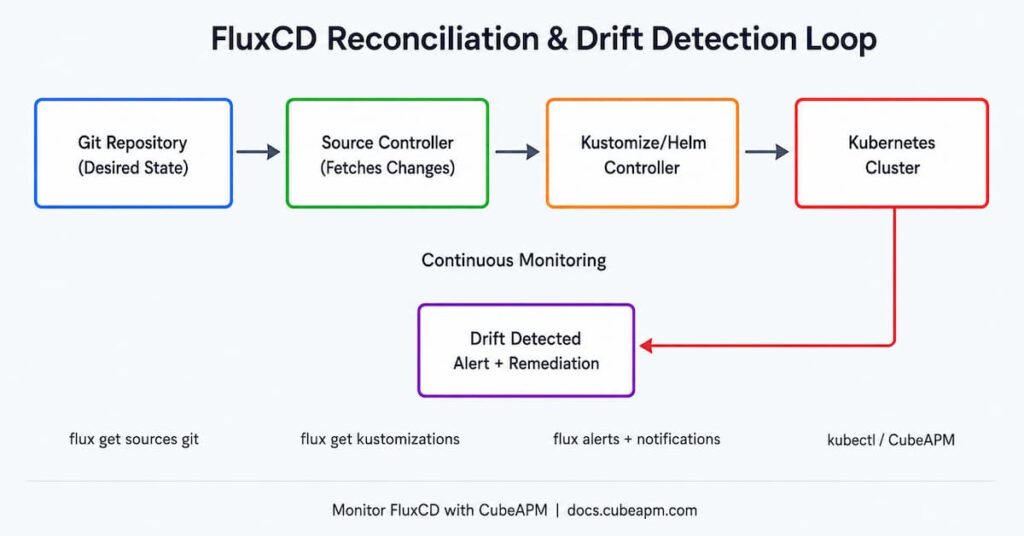
Before you can monitor failures, you need to understand what Flux is doing. At its core, FluxCD runs four main controllers inside your cluster:
- Source Controller: watches Git repos, Helm repos, S3 buckets, and OCI registries for changes
- Kustomize Controller: applies Kustomization manifests from source artifacts to the cluster
- Helm Controller: manages HelmRelease objects and reconciles Helm chart releases
- Notification Controller: handles event routing, alerts, and webhooks
Each controller reconciles on a configurable spec.interval (default 10 minutes). It compares the desired state in Git with the live cluster state. If they differ, Flux attempts to bring the cluster back in line. If reconciliation fails, the object’s status condition transitions to Ready=False and an event is emitted.
Checking Reconciliation Status with the Flux CLI
The fastest way to see whether your Flux objects are reconciling successfully is the flux CLI. Install it using the official script and then run these commands against your cluster.
List All Flux Objects and Their Status
flux get all --all-namespacesThis returns all Source, Kustomization, and HelmRelease objects across every namespace with their READY status, message, and last-applied revision. Look for READY=False rows as your primary indicator.
Filter Failed Reconciliations Only
flux get kustomizations --all-namespaces | grep -v 'True'

flux get helmreleases --all-namespaces | grep -v 'True'Describe a Specific Object for Detailed Status
flux get kustomization <name> -n <namespace>

kubectl describe kustomization <name> -n <namespace>The describe output shows you the full status conditions block, including the last transition time and the error message that caused failure. This is your first stop for debugging.
Reading FluxCD Controller Logs
When a reconciliation fails, the flux CLI provides a shortcut to stream controller logs without needing to know which pod is running:
flux logs --all-namespaces --level=error

flux logs --kind=Kustomization --name=<name> --namespace=<ns> --followYou can also stream logs directly from the controller pod:
kubectl logs -n flux-system deploy/kustomize-controller -f

kubectl logs -n flux-system deploy/helm-controller -f

kubectl logs -n flux-system deploy/source-controller -fCommon log patterns to watch for:
- “reconciliation failed” followed by an error string: indicates the apply step failed
- “dependency not ready”: a HelmRelease or Kustomization is blocked waiting for another object
- “install retries exhausted”: Helm install failed too many times and Flux has stopped retrying
- “artifact not found”: source controller could not fetch the artifact from Git or OCI
FluxCD Prometheus Metrics for Monitoring Reconciliation
Each FluxCD controller exposes Prometheus metrics on port 8080 of its pod. These metrics are the backbone of production-grade FluxCD monitoring. If you have Prometheus running in your cluster, add a ServiceMonitor targeting the flux-system namespace.
Key Metrics to Track
Prometheus Alert Rule: Reconciliation Failure
groups:

  - name: fluxcd

    rules:

      - alert: FluxReconciliationFailure

        expr: gotk_reconcile_error_total > 0

        for: 5m

        labels:

          severity: critical

        annotations:

summary: 'FluxCD reconciliation failure detected'Configuring FluxCD Alerts and Notifications
The Flux Notification Controller lets you route reconciliation events to external systems. You define two custom resources: a Provider (the destination, such as Slack or PagerDuty) and an Alert (what events to route and from which sources).
Step 1: Create a Provider
apiVersion: notification.toolkit.fluxcd.io/v1beta3

kind: Provider

metadata:

  name: slack-alert

  namespace: flux-system

spec:

  type: slack

  channel: '#k8s-alerts'

  secretRef:

name: slack-webhook-urlStep 2: Create an Alert
apiVersion: notification.toolkit.fluxcd.io/v1beta3

kind: Alert

metadata:

  name: flux-system-alert

  namespace: flux-system

spec:

  providerRef:

    name: slack-alert

  eventSeverity: error

  eventSources:

    - kind: Kustomization

      name: '*'

    - kind: HelmRelease

name: '*'Supported event severities are info and error. Setting eventSeverity to error means you only receive alerts on failures and not on every successful reconciliation. You can also filter by namespace or specific resource names.
Supported provider types include Slack, Microsoft Teams, PagerDuty, OpsGenie, generic webhooks, GitHub commit status, and more.
Monitoring FluxCD Drift Detection
Configuration drift in a GitOps context means the live cluster state no longer matches what is declared in Git. This happens when someone uses kubectl apply directly, a Kubernetes controller mutates a resource, or a Helm chart upgrade partially fails.
Flux detects drift automatically on each reconciliation cycle. When drift is found, Flux corrects it by re-applying the desired state from Git. However, if correction fails repeatedly, the object enters a failed state that persists until resolved.
Enabling Drift Detection on a Kustomization
By default, drift detection is enabled for resources managed by a Kustomization. You can verify this by checking that spec.prune: true is set. With prune enabled, Flux removes resources from the cluster that no longer exist in Git.
apiVersion: kustomize.toolkit.fluxcd.io/v1

kind: Kustomization

metadata:

  name: apps

  namespace: flux-system

spec:

  interval: 10m

  prune: true

  sourceRef:

    kind: GitRepository

name: flux-systemForcing Immediate Drift Correction
To trigger an immediate reconciliation outside the normal interval:
flux reconcile kustomization <name> --with-sourceIntegrating FluxCD with External Monitoring Tools
For teams that want centralized observability across their Kubernetes workloads and GitOps layer, integrating FluxCD metrics and logs into external APM platforms gives you correlated visibility in a single place.
CubeAPM
CubeAPM is a self-hosted, open-source APM and monitoring platform that ingests OpenTelemetry metrics and logs. Because Flux controllers expose Prometheus-format metrics, you can use the OpenTelemetry Collector with a Prometheus receiver to scrape Flux metrics and forward them to CubeAPM. This gives you reconciliation error tracking, duration analysis, and log correlation in a single lightweight platform without sending data to third-party SaaS.
- Use the otel-collector Prometheus receiver targeting :8080 on flux-system pods
- Forward traces and logs from your workloads alongside FluxCD metrics for full context
- CubeAPM supports alert rules on any ingested metric, so you can replicate the Prometheus alert rule shown above
Grafana and Prometheus
The FluxCD project ships a set of pre-built Grafana dashboards. Import them from the Flux GitHub repository into your Grafana instance. The dashboards display reconciliation error rates, duration histograms, and per-namespace resource status. Grafana Cloud and self-hosted Grafana both work here.
- Dashboard ID for Flux Cluster Stats: available in the fluxcd/flux2 GitHub repository under manifests/monitoring
- Scrape the flux-system namespace for all controller pods on port 8080
Datadog
Use the Datadog Kubernetes integration to scrape Flux controller metrics via pod annotations. Add the following annotations to the controller deployment (or use the Datadog Operator’s autodiscovery):
ad.datadoghq.com/manager.checks: |

  {

    "openmetrics": {

      "instances": [{

        "openmetrics_endpoint": "http://%%host%%:8080/metrics"

      }]

    }

}New Relic
The New Relic Prometheus integration supports scraping FluxCD metrics via the Prometheus remote write endpoint or the New Relic Kubernetes integration. Once metrics are flowing, build dashboards on gotk_reconcile_error_total and set NRQL-based alerts for failure spikes.
Step-by-Step Debugging Workflow for Reconciliation Failures
When a Flux object is stuck in a failed state, follow this sequence to diagnose and resolve it.
- Identify the failed object:
flux get all --all-namespaces | grep 'False'- Get the failure message:
flux get kustomization <name> -n <ns>
kubectl describe kustomization <name> -n <ns>- Stream controller logs:
flux logs --kind=Kustomization --name=<name> --level=error- Check source availability:
flux get sources git --all-namespaces- Force a reconciliation after fixing the underlying issue:
flux reconcile kustomization <name> --with-source -n <ns>- For HelmRelease install retry exhaustion, reset the retry state:
flux suspend helmrelease <name> -n <ns>

flux resume helmrelease <name> -n <ns>Monitor FluxCD Reconciliation with CubeAPM
Struggling to get clear visibility into Flux reconciliation failures and configuration drift? CubeAPM is a lightweight, open-source APM and monitoring platform that integrates seamlessly with your Kubernetes environment. Ingest Flux controller logs and metrics, build custom dashboards for reconciliation status, and get alerted the moment drift is detected.
Conclusion
Monitoring FluxCD reconciliation failures and drift requires a layered approach. Start with the flux CLI and kubectl for immediate triage. Add Prometheus scraping of controller metrics and the Flux Notification Controller for proactive alerting. For teams running production workloads at scale, integrate Flux metrics and logs into a centralized observability platform such as CubeAPM, Grafana, Datadog, or New Relic to get correlated visibility across your entire stack.
The combination of Flux’s built-in observability primitives and external monitoring gives you the confidence to trust that your GitOps pipeline is working as intended and that any drift from the desired state is caught and corrected before it causes an outage.
Disclaimer: The commands and configurations in this article are based on FluxCD v2 (Flux 2.x, CNCF GA) and Kubernetes 1.27+. FluxCD APIs may evolve over time. Always consult the official Flux documentation for the most current API versions and field names. Third-party integrations (Datadog, New Relic, Grafana) are subject to their own licensing and configuration requirements.
FAQs
1. How do I check if FluxCD is healthy and reconciling correctly?
Run flux check to verify all Flux controllers are running, and flux get all –all-namespaces to see whether every managed object shows READY=True. Any object showing False needs immediate investigation via its status conditions.
2. What causes the ‘install retries exhausted’ error in FluxCD?
This error occurs when the Helm Controller has attempted to install or upgrade a HelmRelease a set number of times and all attempts failed. It is typically caused by an invalid Helm chart configuration, a missing dependency, or a Kubernetes admission webhook rejecting the manifests. To recover, fix the root cause, then suspend and resume the HelmRelease to reset the retry counter.
3. How does FluxCD detect and handle configuration drift?
On every reconciliation cycle (default every 10 minutes), Flux compares the live cluster state with the desired state from Git. If it detects a difference, it re-applies the Git state. You can accelerate this by lowering spec.interval or by running flux reconcile kustomization <name> –with-source on demand.
4. Which Prometheus metrics should I alert on for FluxCD monitoring?
The two most critical are gotk_reconcile_error_total (any non-zero value over 5 minutes indicates a persistent failure) and gotk_resource_info{ready=”False”} (a gauge that goes to 1 when any resource is not ready). Both are labels-aware, so you can alert per namespace or resource kind.
5. Can I use FluxCD with Grafana for drift monitoring without running Datadog?
Yes. FluxCD has official Grafana dashboard JSON files in its GitHub repository. Pair a Prometheus scrape config targeting flux-system controller pods on port 8080 with the official dashboards to get full drift and reconciliation visibility without any commercial tooling. CubeAPM is another self-hosted alternative that accepts the same Prometheus metrics via OpenTelemetry Collector.