










PostgreSQL monitoring is essential for ensuring performance, reliability, and scalability in modern data environments. Currently, PostgreSQL holds 16.85% of the global relational database market, known for handling production workloads.
Effective PostgreSQL monitoring provides real-time visibility into queries, replication lag, and resource utilization, helping teams maintain uptime and optimize costs. But monitoring PostgreSQL at scale remains challenging due to latency spikes, replication delays, and deadlocks going undetected.
CubeAPM is the best solution for PostgreSQL monitoring. It offers unified metrics, logs, and error tracing, built on OpenTelemetry-native pipelines with smart sampling and full MELT coverage. Engineers can correlate database metrics with application traces and infrastructure logs, simplifying root-cause analysis and cutting monitoring costs by over 60%.
In this article, we’ll explore what PostgreSQL monitoring is, why it matters, key metrics to track, and how CubeAPM delivers end-to-end observability for PostgreSQL environments.
What is PostgreSQL Monitoring?
PostgreSQL monitoring refers to the continuous collection and analysis of telemetry data—including metrics, logs, traces, and events—to ensure the health, performance, and reliability of PostgreSQL databases. PostgreSQL itself is an advanced, open-source relational database known for ACID compliance, extensibility, and high concurrency, widely adopted by organizations from SaaS startups to global enterprises. Effective monitoring spans four key telemetry layers:
- System layer: Tracks CPU, memory, disk I/O, and network usage on database hosts.
- Database layer: Observes connections, transactions, buffer cache ratios, and lock activity.
- Query layer: Captures query latency, execution plans, and wait events.
- Replication layer: Monitors WAL writes, replica lag, and failover synchronization.
By integrating these layers into a unified observability workflow, PostgreSQL monitoring provides a complete picture of database performance, allowing teams to detect issues before they affect end users. For modern businesses, this means:
- Improved reliability: Identify slow queries, deadlocks, and blocking sessions early.
- Faster troubleshooting: Correlate logs, metrics, and traces for accurate root-cause analysis.
- Scalable operations: Track workload growth and plan for future capacity needs.
- Cost optimization: Prevent over-provisioning and reduce performance-related downtime.
Example: Monitoring a Multi-Tenant PostgreSQL Instance on AWS RDS
An e-commerce company hosts multiple client databases on AWS RDS PostgreSQL. During holiday sales, customer checkout latency suddenly spikes. With PostgreSQL monitoring in place, engineers can instantly visualize CPU usage, connection saturation, and query latency trends—discovering a missing index on the orders table. Using correlated traces and logs in CubeAPM, they identify the bottleneck, fix the query, and restore performance without scaling up the infrastructure unnecessarily.
Why is PostgreSQL Monitoring Important?
PostgreSQL powers core data systems today—monitoring ensures it delivers performance, scalability, and reliability exactly when you need it.
Performance: expose slow queries, locks & I/O bottlenecks
PostgreSQL’s native stats, especially via pg_stat_statements and the cumulative stats system, can reveal which queries dominate latency, which are blocked by locks, or which plans cause excessive I/O. With that insight, you can refactor queries, add indexes, or rewrite joins—turning reactive firefighting into proactive optimization.
Scalability: track connections, growth, and bloat
As usage grows, connection spikes may choke out your pooler, while table or index bloat silently degrades performance by increasing disk I/O and reducing cache efficiency. Monitoring dead tuples, bloat-to-live ratios, and autovacuum effectiveness helps you reclaim space and keep planner estimates accurate.
Reliability: detect replication lag and WAL issues before failover pain
For high availability setups, replication lag or delays in WAL flushes are early danger signs. In a 2025 enterprise survey, 91% of PostgreSQL users demand 99.99% uptime (≤ 4 minutes downtime/month), and 82% report concerns about region outages. Monitoring replication delay, applying lag, and WAL metrics helps you maintain readiness for failover and keep SLAs safe.
Cost efficiency: prevent overprovisioning and rampant storage growth
Blind scaling is expensive. With visibility, you can allocate just the right amount of compute or I/O resources, identify misused indexes, and detect bloated tables or temp file spikes. Over time, that adds up to real savings—especially in cloud environments.
Because PostgreSQL maintains an internal statistics architecture (via pg_stat_* views) that supports visibility of table access, I/O, and vacuuming events, your monitoring isn’t bolted on—it leverages built-in telemetry.
Key Metrics & Signals You Must Monitor in PostgreSQL
Below are the core categories and critical metrics you absolutely need to track in PostgreSQL. Each category helps you see different layers of behavior, and each metric is more than just a number—it tells you something about whether your system is healthy or under strain.
System / Host Metrics
Resource consumption metrics monitor the underlying infrastructure—if the host is struggling, the database will suffer too.
- CPU Usage: Percentage of CPU consumed by database and system processes; sustained high usage often flags inefficient queries, resource contention, or missing indexes. Suggested threshold: alert at ~ 80–85% sustained use.
- Memory Usage / Swap Activity: How much RAM is used vs. swap reads/writes; heavy swap activity means your working set exceeds physical memory, hurting latency. Threshold: swap > 5% sustained or frequent swap in/out.
- Disk I/O / Disk Latency: Read/write throughput and latency on storage devices; high latency or saturating IOPS causes queries to stall on I/O. Threshold: Latency above ~10–20 ms or IOPS at 80% saturation.
- Network Throughput / Errors: Bytes/sec and packet errors between DB host and clients or replicas; network hitches can cause replication lag or slow query responses. Threshold: sudden spikes or error rates > 0.1%.
Database-Level Metrics
These metrics are internal to PostgreSQL and reflect its state and health.
- Connections (active/idle): Number of open client connections, and ratio of active vs idle; too many connections can exhaust resources or cause thrashing. Threshold: > 90% of
max_connectionsor > 10% more than baseline. - Transaction Rate (commits / rollbacks): How many transactions per second; abnormal dips or spikes can indicate app issues or bulk jobs. Threshold: large sudden drops or rollback rate > 5%.
- Buffer Cache Hit Ratio: Ratio of reads served from memory vs disk; a low hit rate means too much disk I/O. Threshold: aim for > 99% (or minimum > 95%) for OLTP.
- Autovacuum / Dead Tuples: Count of dead rows and autovacuum cycles; buildup leads to bloat and degraded query performance. Threshold: dead tuples > 20% of live tuple count or vacuum lag > 2× baseline.
- Checkpoints / WAL Activity: Number and duration of checkpoints, WAL write/flush rates; slow WAL flushes or long checkpoint durations stall writes. Threshold: checkpoint duration > 5 s or WAL flush lag rising.
- Index Usage / Sequential vs Index Scans: Proportion of scans using indexes vs full scans; too many sequential scans imply missing or ineffective indexes. Threshold: index scan ratio below 90% for read-heavy tables.
- Lock Waits / Deadlocks: Count and duration of lock waits or deadlocks; indicates contention issues in high-concurrency workloads. Threshold: > 5 waits/sec sustained or deadlock events > 1 per hour.
Query / SQL-Level Metrics
These metrics dig deep into individual SQLs and performance patterns.
- Query Latency / Execution Time: Average, max, and percentile durations for queries (via
pg_stat_statements); captures slow statements. Threshold: tail latency (95th/99th percentile) > 2s. - Query Call Volume / Throughput: Number of executions per query, calls per second; helps identify hot queries or abnormal shifts. Threshold: unexpected jump > 2× baseline.
- Block I/O per Query: Number of block reads/writes per query; reveals queries causing heavy disk load. Threshold: block I/O > 1,000 per query (depending on workload).
- Planner vs Actual Rows (Row Estimate Accuracy): Comparison of estimated row counts vs actual; wide mismatch implies stale stats or bad plans. Threshold: deviation > 3×.
- Waiting / Blocked Queries: Time queries are waiting on locks or other resources; high wait time signals contention. Threshold: > 1 s wait sustained.
Replication / High Availability Metrics
If you use replicas or streaming replication, these are mission-critical.
- Replication Lag (bytes/seconds): Delay between primary writes and replica apply; if too high, your replicas serve stale data. Threshold: > 1 s or > 1 MB bytes.
- WAL Generation & Flush Rate: Rate at which WAL is produced and flushed; insufficient flush or backlog causes replication or commit delays. Threshold: WAL flush lag rising or > 50% backlog.
- Standby Replay / Apply Delay: Time between WAL received and applied; reveals bottlenecks in the replay side. Threshold: > 500 ms sustained.
- Replication Worker States / Slots: Number of active replication slots, missing slots, slot lag; indicates dropped or stalled replication. Threshold: slots inactive > 1 or lag exceeding slot limits.
Observability Architecture: How CubeAPM Fits In
PostgreSQL monitoring works best when integrated into a unified observability stack—one that correlates metrics, logs, and traces in real time. CubeAPM achieves this through an OpenTelemetry-native architecture, offering full MELT (Metrics, Events, Logs, Traces) visibility across your PostgreSQL databases and infrastructure.
The data flow in CubeAPM’s PostgreSQL monitoring setup follows a clean, extensible pipeline:
- PostgreSQL: Generates telemetry from internal statistics views such as
pg_stat_activity,pg_stat_statements, andpg_locks, as well as system-level data (CPU, memory, I/O). - OpenTelemetry Collector: Acts as a bridge between PostgreSQL and CubeAPM. It scrapes metrics via a PostgreSQL receiver or exporter, batches them with logs and traces, and forwards them to CubeAPM using the OTLP (OpenTelemetry Protocol). This setup standardizes telemetry ingestion without vendor lock-in.
- CubeAPM Backend: Performs correlation, storage, and processing. It uses smart sampling to retain contextually rich traces—those with latency spikes, errors, or anomalies—while filtering redundant data. This approach helps teams cut ingestion volume and cost by up to 70%, maintaining precision without sacrificing visibility.
- Dashboards & Alerts: CubeAPM’s PostgreSQL dashboards visualize query latency, connection trends, replication lag, cache efficiency, and autovacuum activity in real time. Users can also set intelligent alert rules for thresholds (e.g., replication lag > 1s or cache hit ratio < 95%) and get notified via Slack, email, or PagerDuty.
Key Benefits of CubeAPM’s PostgreSQL Monitoring Architecture
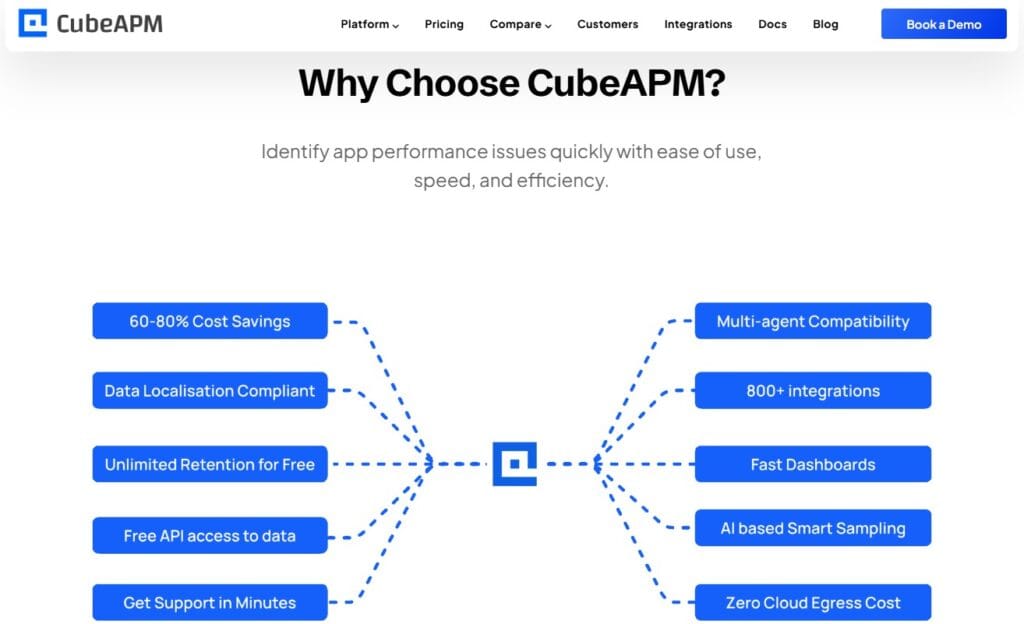
- Unified MELT Visibility: Metrics, logs, and traces unified for PostgreSQL and application workloads.
- OpenTelemetry-Native: Works seamlessly with OTEL collectors, agents, and SDKs.
- Smart Sampling: Retains only context-rich traces to reduce ingestion cost and noise.
- Affordable $0.15/GB Pricing: Transparent billing—no host, user, or license fees.
- Flexible Deployment: On-prem or Bring-Your-Own-Cloud, with HIPAA/GDPR readiness.
In essence, CubeAPM turns PostgreSQL observability into a single cohesive pipeline—offering granular query visibility, reduced telemetry cost, and faster root-cause analysis.
How to Set Up PostgreSQL Monitoring with CubeAPM Step-by-Step
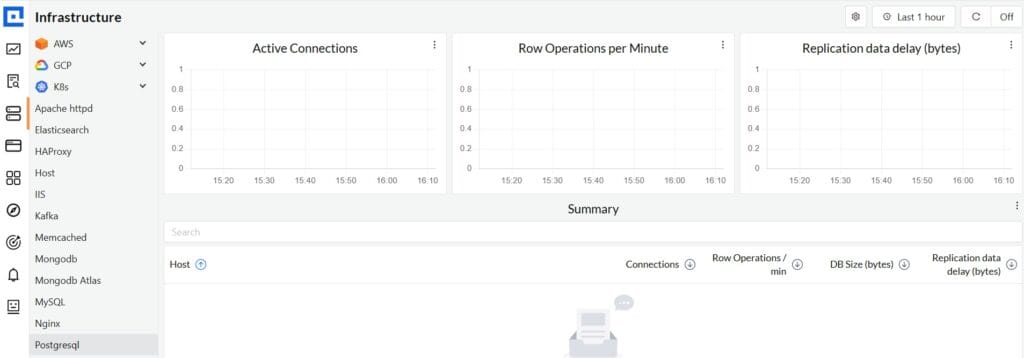
Setting up PostgreSQL monitoring in CubeAPM involves connecting your database telemetry—metrics, logs, and traces—through the OpenTelemetry (OTEL) pipeline. This ensures you get full visibility into query performance, connection health, replication lag, and host-level metrics within one dashboard. The steps below are PostgreSQL-specific and follow CubeAPM’s official documentation.
Step 1: Install CubeAPM
Before collecting PostgreSQL metrics, ensure the CubeAPM backend and collector are up and running. You can deploy CubeAPM on a virtual machine, Docker, or Kubernetes cluster, depending on your environment:
- Linux / VM: Use the instructions from the Install CubeAPM guide to install the backend and expose the OTLP endpoint.
- Docker: Run the CubeAPM container and mount your configuration files to send data from the collector.
- Kubernetes (Helm): Use the official Kubernetes installation guide to deploy via Helm and automatically expose the ingestion endpoint.
Once deployed, make sure CubeAPM’s backend URL (e.g., https://apm.yourdomain.com) and API token are accessible for the collector.
Step 2: Configure CubeAPM for PostgreSQL Telemetry
Open the main configuration file (config.properties or environment variables) and set up your CubeAPM connection parameters as described in the Configuration guide.
Key values include:
token: authentication token used by OTEL Collectors.base-url: CubeAPM API endpoint.auth.sys-admins and time-zone: for access and timestamp consistency.
Ensure these settings align with your database scraping agent so the PostgreSQL receiver can send data securely.
Step 3: Enable the PostgreSQL Extension and Exporter
Before configuring the OpenTelemetry Collector, enable PostgreSQL’s built-in monitoring extension by editing your postgresql.conf:
shared_preload_libraries = 'pg_stat_statements'Then restart PostgreSQL and create the extension:
CREATE EXTENSION pg_stat_statements;This allows the collector to scrape query-level data such as execution times, latency, and plan statistics. You can also expose pg_stat_activity, pg_locks, and replication stats for deeper observability.
Step 4: Instrument PostgreSQL Using the OpenTelemetry Collector
Set up the OpenTelemetry Collector as the bridge between PostgreSQL and CubeAPM.
- In your config.yaml, add the PostgreSQL receiver that connects to your database with the right credentials and scrape interval (e.g., 15s).
- Add a metrics pipeline that exports via OTLP to CubeAPM:
exporters:
  otlp:
    endpoint: https://apm.yourdomain.com:4317
    headers:
      Authorization: <your-token>
Include resource detection and batching processors so metrics are labeled and exported efficiently.
This ensures metrics like postgresql.query.duration, postgresql.connections.active, and postgresql.replication.lag stream continuously into CubeAPM.
Step 5: Monitor Host and Infrastructure Metrics
Database performance is closely tied to system resources. Use the hostmetrics receiver in your Collector to monitor CPU, memory, and disk I/O metrics from the same server hosting PostgreSQL.
Follow the Infrastructure Monitoring guide to integrate these metrics. This helps detect hardware bottlenecks (e.g., high I/O wait) that often appear as query latency spikes.
Step 6: Collect Logs and Query Traces
Logs and traces help correlate SQL execution paths with application behavior.
- Enable log ingestion in the Collector using the Logs setup guide. Configure it to collect PostgreSQL logs, slow query logs, and error logs.
- Instrument your applications (Python, Node.js, Java, etc.) with OpenTelemetry SDKs so that PostgreSQL spans appear alongside your application traces.
- CubeAPM will automatically link query spans to their metrics, letting you trace slow queries directly to the originating service call.
Step 7: Create Dashboards and Set Up Alerts
After data begins streaming, open CubeAPM and build PostgreSQL dashboards for:
- Query latency (
postgresql.query.duration.avg) - Active connections (
postgresql.connections.active) - Buffer cache ratio (
postgresql.cache.hit) - Replication lag (
postgresql.replication.lag.bytes) - Autovacuum statistics
To stay proactive, configure alerts via CubeAPM’s alerting documentation. You can connect CubeAPM alerts to email, Slack, or PagerDuty.
A complete CubeAPM-PostgreSQL setup gives you end-to-end visibility—from host performance to query execution—enabling faster debugging, cost-efficient scaling, and reliable uptime.
Interpreting Metrics & Troubleshooting with CubeAPM
Once PostgreSQL metrics start flowing into CubeAPM, the real power lies in interpreting those signals effectively. CubeAPM’s unified dashboards let you view query latency, replication lag, and connection trends alongside logs and traces—making it easier to move from symptom to root cause in seconds. Below are common real-world troubleshooting use cases where CubeAPM helps teams resolve PostgreSQL issues faster and more accurately.
Slow Queries from Missing Indexes

One of the most frequent PostgreSQL performance problems stems from queries that scan large tables without indexes. In CubeAPM, you can detect these using the query latency and block I/O metrics (postgresql.query.duration.avg, postgresql.blocks.read). A query that consistently shows high execution time but low CPU usage often indicates sequential scans.
By correlating this metric with postgresql.index.usage, you can confirm whether the query plan is skipping available indexes. CubeAPM’s trace view allows you to open the specific SQL statement from an application span, identify the slow path, and fix it by creating or optimizing an index. Threshold hint: any query exceeding 2 seconds average latency on indexed tables should be investigated.
Lock Contention Analysis
Lock contention occurs when multiple concurrent sessions wait for the same rows, causing spikes in latency or blocked queries. CubeAPM captures this through lock wait time and blocked query count metrics (postgresql.locks.wait_time, postgresql.queries.blocked).
When a spike occurs, you can drill down to the specific table or transaction ID using CubeAPM’s logs and traces. Viewing related spans in the distributed trace helps identify the application component holding the lock. Engineers can then optimize transactions, break long-running writes, or adjust isolation levels. Threshold hint: sustained lock wait times over 1 second or more than 5 blocked sessions should trigger investigation.
Detecting Replication Lag via CubeAPM Anomaly Detection
Replication lag in PostgreSQL replicas can quietly accumulate due to disk saturation, long transactions, or network latency. CubeAPM’s replication lag metrics (postgresql.replication.lag.bytes, postgresql.replication.lag.seconds) are paired with anomaly detection models that learn normal replication behavior over time.
If lag exceeds baseline variance—say, a jump from <100 ms to >2 s—CubeAPM automatically flags it as an anomaly and sends an alert. By viewing correlated host metrics (disk I/O wait, network throughput), you can pinpoint the cause—whether it’s a storage bottleneck or a stuck replication worker.
Correlating Application Traces with Database Queries for Faster RCA
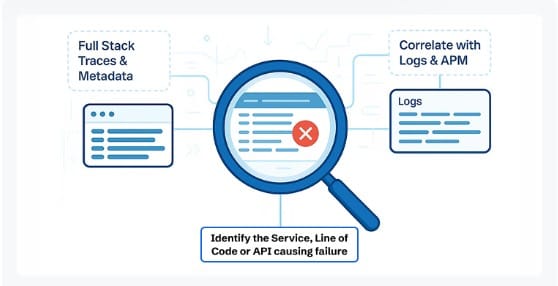
Troubleshooting is faster when application and database telemetry are unified. CubeAPM links application spans (like API requests) with PostgreSQL query spans through OpenTelemetry context propagation. For example, a user’s “checkout” request trace might show an embedded PostgreSQL span that consumed 1.8 s due to missing indexes or table bloat.
By opening that span in CubeAPM’s trace viewer, you can correlate it directly with the corresponding query metrics and logs. This eliminates the need to jump between APM and database tools—reducing mean time to resolution (MTTR) by more than 50%.
In essence, CubeAPM transforms PostgreSQL troubleshooting into a data-driven process. It lets you visualize cause and effect—whether it’s a bad query, a replication stall, or an infrastructure bottleneck—so teams can act before performance degradation reaches users.
Real-World Example: PostgreSQL Performance Optimization with CubeAPM
The Challenge
A fintech company managing a multi-tenant PostgreSQL 15 cluster on AWS RDS began noticing periodic latency spikes in its transaction processing system. During peak trading hours, API response times increased from 200 ms to nearly 3 seconds, causing failed order placements and customer complaints.
The DevOps team relied on CloudWatch metrics, but they lacked visibility into the root cause inside PostgreSQL—whether it was due to inefficient queries, connection saturation, or replication lag. Traditional monitoring tools provided surface-level metrics but failed to correlate database performance with upstream microservices.
The Solution
The team deployed CubeAPM as their unified observability platform. Using the OpenTelemetry Collector integration, they configured the PostgreSQL receiver to ingest query latency, buffer cache hit ratios, autovacuum activity, and replication metrics. Simultaneously, their Node.js-based trading APIs were instrumented using the OpenTelemetry SDK to capture distributed traces. This allowed CubeAPM to correlate every API request with the exact PostgreSQL queries it executed.
CubeAPM’s dashboards revealed that the “order_insert” query was consuming disproportionate time. The postgresql.query.duration.avg metric spiked during the slowdown periods, while postgresql.index.usage showed a decline—pointing to a missing or ineffective index. The platform’s trace view confirmed that the latency originated from full table scans on the orders table.
The Fixes Implemented
- The database team created a composite index on
customer_idandtimestampto optimize inserts and lookups. - They adjusted the autovacuum configuration to prevent table bloat that had been degrading index efficiency (
autovacuum_vacuum_scale_factorreduced from 0.2 to 0.05). - CubeAPM alert rules were added to monitor query latency above 2 seconds and replication lag exceeding 500 ms, ensuring proactive alerts before SLA violations.
- Infrastructure metrics from CubeAPM’s Infra Monitoring module were used to verify that CPU and I/O limits were not contributing factors.
The Results
Within 48 hours, average query latency dropped by 78% (from 2.9 s to 640 ms), and API response times stabilized under 300 ms even during market peaks. The overall CPU utilization on the database node fell by 25%, and replication lag decreased to under 100 ms. The company’s operations team gained full-stack visibility—from application spans to database queries—through CubeAPM’s unified dashboards.
This case demonstrates how CubeAPM helps PostgreSQL users move from reactive troubleshooting to predictive performance management, optimizing both reliability and customer experience.
Verification Checklist & Example Alert Rules for PostgreSQL Monitoring with CubeAPM
Once your PostgreSQL metrics, logs, and traces are streaming into CubeAPM, it’s important to validate the configuration and confirm that your dashboards and alerts are functioning correctly. This ensures that every metric—from query latency to replication lag—is accurately captured and triggers timely notifications during anomalies.
Verification Checklist
- Metric Visibility: Confirm that PostgreSQL metrics like
postgresql.query.duration.avg,postgresql.connections.active, andpostgresql.replication.lag.bytesare visible inside CubeAPM’s dashboard. Use the Metrics Explorer to search for these names. If metrics aren’t showing up, verify that the OpenTelemetry Collector’s PostgreSQL receiver is enabled and credentials have the right permissions. - Data Freshness: Ensure that the OpenTelemetry Collector is scraping and exporting PostgreSQL data at the desired interval (default: every 30 seconds). You can check this by inspecting timestamps in CubeAPM dashboards—data older than the configured interval may indicate an exporter issue or a connection timeout. Maintaining freshness ensures accurate anomaly detection and alert triggering.
- Dashboard Health: Verify that panels for cache hit ratio, transaction rate, and replication lag are rendering valid data points. For instance,
postgresql.cache.hitshould remain consistently above 95%, andpostgresql.transaction.commit.rateshould reflect steady throughput during peak load. Invalid or empty panels might signal a misconfigured metric name or a missing collector pipeline component. - Notification Test: Send a test alert to validate your Slack, PagerDuty, or email integration from the CubeAPM console. Navigate to the Alerting section in your workspace and trigger a manual notification event. Confirm that alert messages include the metric name, threshold breached, and source host.
Example Alert Rules for PostgreSQL Monitoring
Below are two practical alert examples that help you stay proactive against performance degradations. CubeAPM supports PromQL-like syntax and OTEL metric references to build flexible, threshold-based, or time-window alerts.
1. High Query Latency
This rule alerts you when the average PostgreSQL query duration exceeds 5 seconds within a 5-minute window—indicating potential missing indexes, query regressions, or overloaded connections.
Alert Name: “Query Latency Spike”
Description: Triggers when the average query duration surpasses 5 seconds for 5 consecutive minutes.
Recommended Action: Inspect pg_stat_statements in CubeAPM traces to identify slow queries, then evaluate index usage or missing indexes.
alert: HighQueryLatency
expr: avg_over_time(postgresql.query.duration.avg[5m]) > 5
for: 5m
labels:
  severity: warning
annotations:
  summary: "PostgreSQL Query Latency Spike"
  description: "Average query duration has exceeded 5 seconds for over 5 minutes. Investigate slow queries via pg_stat_statements and CubeAPM trace analysis."
2. Replication Lag
This rule notifies you when replication lag exceeds 1 MB between the primary and replica databases—helping prevent data inconsistency during failovers.
Alert Name: “Replication Delay”
Description: Fires when replication lag grows beyond 1 MB, signaling delayed WAL apply on standby nodes.
Recommended Action: Check disk I/O latency on the replica node, ensure sufficient bandwidth, and verify that no long-running transactions are blocking WAL replay.
alert: ReplicationDelay
expr: max(postgresql.replication.lag.bytes) > 1000000
for: 2m
labels:
  severity: critical
annotations:
  summary: "PostgreSQL Replication Delay"
  description: "Replication lag exceeds 1MB. Check replica I/O latency, WAL replay status, and ensure no long-running transactions are blocking replication."
By verifying these metrics and implementing proactive alert rules, your PostgreSQL monitoring setup in CubeAPM becomes truly production-ready—ensuring that critical database performance issues are detected early, diagnosed faster, and resolved before they impact end users.
Conclusion
Monitoring PostgreSQL isn’t just about tracking queries—it’s about ensuring reliability, scalability, and business continuity. As modern workloads grow more complex, even small inefficiencies in query execution or replication can cascade into downtime, data loss, or poor user experience.
CubeAPM makes PostgreSQL monitoring effortless by unifying metrics, logs, and traces in one place. Its OpenTelemetry-native design, $0.15/GB pricing, and intelligent dashboards help teams detect anomalies early, optimize query performance, and maintain high availability without overspending on tools or infrastructure.
Start gaining end-to-end PostgreSQL visibility today with CubeAPM—detect, analyze, and resolve performance issues before they reach production. Try CubeAPM now!
Disclaimer: The information in this article reflects the latest details available at the time of publication and may change as technologies and products evolve.
FAQs
1. What are the most important metrics to monitor in PostgreSQL?
Focus on query latency, cache hit ratio, active connections, replication lag, and dead tuples. These metrics reflect both database health and query performance, allowing you to prevent slowdowns and bottlenecks.
2. How often should PostgreSQL metrics be collected?
For production systems, metrics should be scraped every 15–30 seconds. CubeAPM’s OpenTelemetry Collector can be configured to adjust this interval based on workload size or criticality.
3. Can CubeAPM monitor self-hosted PostgreSQL databases?
Yes. CubeAPM supports both cloud-hosted and on-prem PostgreSQL instances. You can deploy its OpenTelemetry Collector locally to securely transmit metrics to the CubeAPM backend.
4. How can I detect replication lag in PostgreSQL?
Monitor postgresql.replication.lag.bytes and postgresql.replication.lag.seconds in CubeAPM. You can configure alerts to trigger when lag exceeds 1 MB or 1 second for early detection of replica synchronization issues.
5. Why use CubeAPM instead of standalone PostgreSQL tools?
Unlike single-purpose database tools, CubeAPM correlates PostgreSQL metrics with infrastructure logs and application traces. This unified visibility helps you identify whether an issue originates in SQL, the host system, or upstream services—cutting troubleshooting time in half.