










HyperDX is a full-stack observability platform built for teams that want logs, traces, metrics, session replays, and errors in one debugging workflow. It is powered by ClickHouse and OpenTelemetry, which makes it especially relevant for engineering teams that want fast telemetry search without depending fully on older host-based APM pricing models. HyperDX describes itself as an open-source platform that unifies session replays, logs, metrics, traces, and errors.
Its pricing is mainly based on telemetry usage, not hosts or seats. The official HyperDX pricing page lists a Free plan, a $20/month Starter plan with 50 GB/month included, and an Enterprise plan with custom pricing. Extra data on the Starter plan is priced at $0.40 per additional GB, while metrics are priced separately at $0.40 per 100 metrics at 1 DPM.
This review verifies HyperDX pricing, billing rules, real cost scenarios, key features, user feedback, cost drivers, and where HyperDX fits for different engineering teams.
What Is HyperDX?
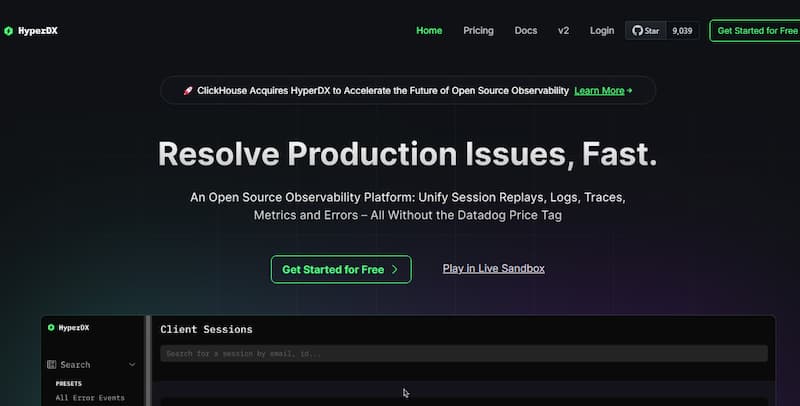
HyperDX is a developer-focused observability and production debugging platform. It helps engineering teams connect frontend session replays with backend logs, traces, metrics, and errors.
The main idea is simple: instead of checking one tool for logs, another for traces, and another for frontend replay, HyperDX brings those signals into one interface.
HyperDX is also closely connected with ClickStack. ClickHouse describes HyperDX in ClickHouse Cloud as a way to get a more turnkey ClickStack experience, with HyperDX connected to observability data inside ClickHouse Cloud.
Supported Telemetry Signals
HyperDX supports the core observability signals most engineering teams need:
| Signal | HyperDX support |
| Logs | Supported |
| Traces | Supported |
| Metrics | Supported |
| Errors | Supported |
| Session replay | Supported |
| OpenTelemetry | Supported |
| ClickHouse-backed storage | Supported |
This makes HyperDX more than a basic log tool. It is closer to a full-stack debugging workspace for teams using OpenTelemetry and ClickHouse.
Key Features of HyperDX
HyperDX helps teams search and analyze logs across services. This is useful for debugging errors, slow requests, failed jobs, and production incidents.
The ClickStack GitHub page says the stack can correlate and search logs, metrics, session replays, and traces in one place. It also supports full-text search, property search syntax, alerts, dashboards, and JSON querying.
HyperDX supports traces, which help developers follow a request across services, APIs, queues, and databases.
This is useful for teams running microservices or distributed systems where one user action may touch many backend services.
HyperDX supports metrics, but buyers should note that metrics are priced separately on the official pricing page. HyperDX lists metrics at $0.40 per 100 metrics at 1 DPM.
That means teams with high metric cardinality should estimate metrics separately from log and trace volume.
HyperDX includes session replay, which helps teams see what users experienced before an error or slow request happened.
This is useful for frontend-heavy applications where user behavior, browser errors, backend traces, and logs need to be connected.
HyperDX supports error investigation as part of its broader debugging workflow. Teams can connect errors with related logs, traces, and user sessions.
This helps reduce the manual work of moving between separate error tracking, logging, and APM tools.
HyperDX is built around OpenTelemetry support. Its GitHub page describes the platform as powered by ClickHouse and OpenTelemetry.
This matters because OpenTelemetry gives teams more control over instrumentation and makes it easier to avoid proprietary agent lock-in.
HyperDX is powered by ClickHouse, which is a major part of its performance and cost story.
ClickStack is described by ClickHouse as a high-performance open-source observability solution built on ClickHouse, with logs, metrics, traces, and session replay.
For teams that already use ClickHouse, HyperDX can be especially attractive because it can fit into a ClickHouse-centered observability strategy.
HyperDX Pricing in 2026
HyperDX uses usage-based pricing. The official pricing page says users pay based on data usage only, with no per-seat or per-host billing.
HyperDX Free Plan
| Feature | Free plan details |
| Monthly price | $0/month |
| Data included | Up to 3 GB/month |
| Retention | 3 days |
| Users | Up to 1 user |
| Trial | Includes 14-day Starter trial |
The Free plan is best for testing HyperDX, learning the interface, and evaluating whether its debugging workflow fits your application.
HyperDX Starter Plan
| Feature | Starter plan details |
| Monthly price | $20/month |
| Data included | 50 GB/month |
| Retention | 30 days |
| Users | Unlimited users |
| Extra data | $0.40 per additional GB |
| Metrics | $0.40 per 100 metrics at 1 DPM |
| Trial | 14-day trial |
The Starter plan is the main self-serve paid plan. It works well for small teams, early-stage SaaS products, internal applications, and teams that want a low-cost way to centralize logs, traces, metrics, and session replay.
HyperDX Enterprise Plan
| Feature | Enterprise plan details |
| Price | Custom |
| Included usage | Custom |
| Retention | Custom |
| Contracts | Custom contracts available |
| SSO | SAML included |
| Discounts | Volume discounts available |
The Enterprise plan is for teams with larger telemetry volume, custom retention needs, SAML requirements, and contract needs.
What Counts as Usage in HyperDX?
HyperDX pricing is based mainly on data usage. The pricing page defines data volume in GB and says additional data on the Starter plan costs $0.40 per GB. It also lists separate metrics pricing.
In practical terms, buyers should estimate:
| Usage area | Why it matters |
| Logs | Large JSON logs, debug logs, and request logs can increase GB quickly |
| Traces | High-traffic services can generate many spans |
| Session replay | Frontend replay can increase telemetry volume |
| Errors | Error spikes can increase event volume during incidents |
| Metrics | Metrics have separate pricing at $0.40 per 100 metrics at 1 DPM |
| Retention | Starter includes 30 days, while custom retention is part of Enterprise |
What Is Included in HyperDX Pricing?
| Included area | Verified note |
| Logs | Included as part of data usage |
| Traces | Included as part of data usage |
| Session replay | Included as part of the observability workflow |
| Errors | Included as part of debugging workflow |
| Users | Unlimited users on Starter |
| Retention | 3 days on Free, 30 days on Starter |
| Enterprise SSO | SAML listed under Enterprise |
| Extra data | $0.40 per additional GB on Starter |
The important pricing note is that metrics are priced separately. This means a team should not estimate only GB usage if it also sends a large number of metrics.
What Does HyperDX Really Cost?
The scenarios below are directional editorial estimates based on HyperDX’s public pricing page as checked in May 2026. They are not official HyperDX quotes. Enterprise discounts, custom retention, contract terms, and metric cardinality can change the final price.
HyperDX pricing is mainly tied to telemetry volume, not the number of hosts or users. The Starter plan costs $20/month and includes 50 GB/month. Extra data is charged at $0.40 per additional GB. Metrics are priced separately at $0.40 per 100 metrics at 1 DPM.
For these examples, we use the telemetry estimates shown in the workload profiles:
| Team size | Logs | Traces | Estimated billable data | Metrics assumption |
| Small team | 720 GB/month | 360 GB/month | 1.08 TB/month | 1,000 metrics at 1 DPM |
| Growing team | 3.6 TB/month | 1.8 TB/month | 5.4 TB/month | 5,000 metrics at 1 DPM |
| Mid-market team | 18 TB/month | 9 TB/month | 27 TB/month | 25,000 metrics at 1 DPM |
Note: The metric GB shown in the workload screenshot should not be used directly for HyperDX cost modeling because HyperDX does not price metrics by GB on its public pricing page. It prices metrics by metric count at 1 DPM.
Scenario 1: Small Team, ~1.08 TB/Month
Situation
A small engineering team sends production logs and traces from several services into HyperDX. The team wants centralized debugging across logs, traces, errors, and session replay without paying per host or per user.
Why teams at this stage consider HyperDX
Teams at this stage may consider HyperDX because its Starter plan includes 50 GB/month, 30-day retention, unlimited users, and a simple overage model. This is easier to estimate than pricing models based on hosts, seats, APM agents, indexed logs, and separate add-ons.
Estimated profile
| Configuration | Detail |
| Logs | 720 GB/month |
| Traces | 360 GB/month |
| Total billable data | 1,080 GB/month |
| Included data | 50 GB/month |
| Extra billable data | 1,030 GB/month |
| Metrics | 1,000 metrics at 1 DPM |
| Retention | 30 days |
Estimated monthly cost
Disclaimer: This is a directional editorial estimate based on HyperDX public pricing. It is not an official quote.
| Component | Calculation | Monthly cost |
| Starter base plan | Includes 50 GB/month | $20 |
| Extra data | 1,030 GB × $0.40/GB | $412 |
| Metrics | 1,000 ÷ 100 × $0.40 | $4 |
| Total estimated cost | $20 + $412 + $4 | ~$436/month |
What this scenario shows
At small-team scale, HyperDX can remain affordable, but telemetry volume already matters. Even though there is no per-host or per-user billing, logs and traces create most of the estimated monthly cost.
Scenario 2: Growing Team, ~5.4 TB/Month
Situation
A growing SaaS team sends logs and traces from more services, APIs, background workers, and frontend flows. The team needs faster debugging across production issues and wants a pricing model tied to telemetry volume instead of infrastructure size.
Why teams at this stage consider HyperDX
Teams at this stage may consider HyperDX because it keeps pricing focused on usage. As more engineers join the team, the bill does not rise directly because of seats. As infrastructure grows, the bill does not rise directly because of hosts. The real pricing driver is telemetry volume.
Estimated profile
| Configuration | Detail |
| Logs | 3,600 GB/month |
| Traces | 1,800 GB/month |
| Total billable data | 5,400 GB/month |
| Included data | 50 GB/month |
| Extra billable data | 5,350 GB/month |
| Metrics | 5,000 metrics at 1 DPM |
| Retention | 30 days |
Estimated monthly cost
Disclaimer: This estimate uses the public Starter plan rates and does not include Enterprise discounts.
| Component | Calculation | Monthly cost |
| Starter base plan | Includes 50 GB/month | $20 |
| Extra data | 5,350 GB × $0.40/GB | $2,140 |
| Metrics | 5,000 ÷ 100 × $0.40 | $20 |
| Total estimated cost | $20 + $2,140 + $20 | ~$2,180/month |
What this scenario shows
At growing-team scale, HyperDX pricing is mostly shaped by logs and traces. This is where teams should start reviewing noisy log sources, trace sampling, replay capture, and metric cardinality before the monthly bill becomes harder to control.
Scenario 3: Mid-Market Team, ~27 TB/Month
Situation
A mid-market engineering team runs a larger distributed system with many services, APIs, queues, workers, and customer-facing applications. The team sends high-volume logs and traces into HyperDX for production debugging and incident investigation.
Why teams at this stage consider HyperDX
Teams at this stage may consider HyperDX because ClickHouse-backed observability can be attractive for high-volume telemetry. However, this is also the point where the Enterprise plan may be more realistic than public Starter pricing, especially if the team needs custom retention, SAML, volume discounts, and contract terms.
Estimated profile
| Configuration | Detail |
| Logs | 18,000 GB/month |
| Traces | 9,000 GB/month |
| Total billable data | 27,000 GB/month |
| Included data | 50 GB/month |
| Extra billable data | 26,950 GB/month |
| Metrics | 25,000 metrics at 1 DPM |
| Retention | 30 days |
| Enterprise discounts | Not included |
Estimated monthly cost
Disclaimer: This estimate uses public Starter rates only. At this telemetry volume, buyers should ask HyperDX about Enterprise pricing and volume discounts.
| Component | Calculation | Monthly cost |
| Starter base plan | Includes 50 GB/month | $20 |
| Extra data | 26,950 GB × $0.40/GB | $10,780 |
| Metrics | 25,000 ÷ 100 × $0.40 | $100 |
| Total estimated cost | $20 + $10,780 + $100 | ~$10,900/month |
What this scenario shows
At mid-market scale, HyperDX’s public Starter pricing gives a useful benchmark, but Enterprise pricing should be confirmed. The biggest cost driver is telemetry volume, especially logs and traces. Teams at this stage should also check custom retention, SAML, volume discounts, support terms, and whether a ClickStack deployment model would change the total cost.
What Drives HyperDX Costs?
Telemetry volume is the biggest driver of HyperDX cost. Logs, traces, session replays, and error events all contribute to data usage.
Verbose logs, large JSON payloads, and high trace volume can increase the bill quickly.
Metrics are priced separately at $0.40 per 100 metrics at 1 DPM.
This means teams should monitor:
- Metric cardinality
- Label count
- Service count
- Scrape frequency
- Custom business metrics
- Kubernetes and infrastructure metrics
Session replay is useful, but it can become a cost driver if replay capture is enabled broadly across high-traffic frontend applications.
Teams should decide whether to capture all sessions or only selected sessions.
High-traffic services can generate a large number of spans. Without sampling or filtering, trace volume can become a major cost driver.
The Starter plan includes 30-day retention. Custom retention is listed under Enterprise.
Teams needing longer retention should confirm Enterprise pricing directly.
If a team uses HyperDX as part of a self-managed ClickStack setup, it may need to pay for ClickHouse infrastructure, storage, compute, backups, upgrades, and operational maintenance.
ClickHouse also documents a HyperDX-only deployment option for teams that already have a ClickHouse instance populated with observability or event data.
Additional Costs Buyers Should Plan For
| Cost area | Why it matters |
| Extra telemetry data | Starter includes 50 GB/month, then overage applies |
| Metrics | Metrics are priced separately |
| Custom retention | Listed under Enterprise |
| SAML SSO | Listed under Enterprise |
| ClickHouse operations | Relevant for self-managed ClickStack or BYOC setups |
| Support and contracts | Enterprise terms may vary |
| Telemetry cleanup | Teams may need sampling, filtering, or pipeline work |
A related industry stat shows why this matters. Sawmills’ 2025 Telemetry and Observability Report found that only 13% of collected telemetry is actively used for monitoring, alerting, or troubleshooting. It also found that 84% of companies use less than a quarter of the telemetry they collect.
For HyperDX buyers, the lesson is direct: usage-based pricing works best when teams control noisy logs, unnecessary spans, unused metrics, and broad replay capture.
HyperDX User Reviews
HyperDX has a smaller public review base than larger observability vendors, so reviews should be read carefully.
G2 lists HyperDX with limited review data. The available G2 review feedback highlights ease of use, support, OpenTelemetry-native ingestion, and the ability to ingest logs, metrics, and traces. G2 also shows the review base is very small, with one small-business reviewer visible in the filtered data.
What Users Like
The available G2 feedback praises HyperDX for being easy to use. This matches its positioning as a developer-friendly debugging platform
Users mention OpenTelemetry-native ingestion as a benefit. This is important for teams that do not want to rely only on proprietary agents.
The available G2 feedback highlights the ability to ingest logs, metrics, and traces together.
The visible G2 feedback also mentions strong support. Since the review base is small, this should be treated as useful but not enough for broad market judgment.
What Users May Dislike
HyperDX does not yet have the same public review depth as Datadog, New Relic, Dynatrace, or Grafana.
That does not mean the product is weak. It means buyers should run a real proof of concept before making a long-term decision.
Some teams may focus on the $0.40/GB data price and forget that metrics have separate pricing.
This matters for Kubernetes-heavy environments or applications with high-cardinality metrics.
SAML, custom contracts, custom retention, and volume discounts are listed under Enterprise. Buyers need to contact HyperDX for exact terms.
HyperDX Review Summary
| Review area | Summary |
| Pricing clarity | Strong for self-serve plans |
| Cost predictability | Good if telemetry volume is controlled |
| Review volume | Limited public review base |
| Best technical fit | OpenTelemetry and ClickHouse users |
| Main caution | Data volume, metrics pricing, and Enterprise terms |
HyperDX Alternatives
HyperDX competes with open-source observability stacks, SaaS observability platforms, log management tools, and developer-first debugging tools.
HyperDX vs. CubeAPM
HyperDX is a strong fit for teams that want a ClickHouse-backed observability workflow with logs, traces, metrics, session replay, and errors. It is especially attractive for teams that like OpenTelemetry and want usage-based pricing without per-user or per-host fees.
CubeAPM is a self-hosted, OpenTelemetry-native observability platform built for teams that want telemetry to stay inside their own infrastructure. It is better suited for teams that care about data ownership, compliance, predictable ingest pricing, and full-stack observability across metrics, events, logs, traces, RUM, synthetics, and error tracking.
| Category | HyperDX | CubeAPM |
| Pricing model | Usage-based, $20/month Starter, $0.40/GB overage | Per-GB ingestion pricing |
| Deployment | Hosted plans, open-source options, ClickStack ecosystem | Self-hosted inside customer infrastructure |
| Core strength | ClickHouse-backed debugging with session replay, logs, traces, metrics, and errors | Full-stack observability with data control and predictable pricing |
| OpenTelemetry | Supported | OpenTelemetry-native |
| Best for | Teams wanting ClickHouse-backed debugging and low self-serve entry cost | Teams needing self-hosted observability, compliance, and cost control |
CubeAPM should be evaluated when data residency, telemetry control, and predictable observability cost are more important than using a hosted ClickHouse-centered debugging workflow.
HyperDX vs. Better Stack
Better Stack focuses strongly on logs, uptime monitoring, incident management, on-call workflows, and status pages. HyperDX is more focused on observability debugging across logs, traces, metrics, errors, and session replay.
| Category | HyperDX | Better Stack |
| Core focus | Observability and production debugging | Logs, uptime, incident response, and status pages |
| Session replay | Supported | Not the main focus |
| Traces | Supported | Less central |
| Incident workflows | Available through alerts, but not the main product identity | Core strength |
| Best for | Developers debugging frontend and backend issues | Teams needing logs, uptime, and incident workflows |
Choose HyperDX if debugging across traces, logs, errors, and replay matters most. Choose Better Stack if uptime monitoring, incident response, and status pages are the main need.
HyperDX vs. Datadog
Datadog is a broad enterprise observability platform with infrastructure monitoring, APM, logs, RUM, synthetics, security products, and a large integration ecosystem.
HyperDX is simpler, more focused, and more cost-transparent for smaller teams, but Datadog has a much broader enterprise product footprint.
| Category | HyperDX | Datadog |
| Pricing model | Usage-based, no per-seat or per-host billing on HyperDX pricing page | Modular pricing across products |
| Logs | Supported | Strong log management |
| APM | Supported through traces and OpenTelemetry workflows | Mature enterprise APM |
| Integrations | More focused | Very broad ecosystem |
| Best for | Teams wanting ClickHouse and OpenTelemetry-based debugging | Enterprises needing broad platform coverage |
Choose HyperDX if you want a leaner OpenTelemetry-first workflow. Choose Datadog if you need enterprise coverage across many cloud, infrastructure, security, and business systems.
HyperDX vs. New Relic
New Relic is a full-stack SaaS observability platform with APM, logs, infrastructure monitoring, errors, browser monitoring, mobile monitoring, synthetics, and dashboards.
HyperDX is more focused on ClickHouse-backed debugging and OpenTelemetry-native workflows.
| Category | HyperDX | New Relic |
| Pricing model | Usage-based by data, metrics priced separately | Data ingest plus user-based pricing |
| OpenTelemetry | Strong fit | Supported |
| Session replay | Supported | Available through New Relic product set |
| Review maturity | Smaller public review base | Larger enterprise review base |
| Best for | Teams wanting a focused observability debugging platform | Teams wanting a mature SaaS observability suite |
Choose HyperDX for a simpler ClickHouse-backed debugging workflow. Choose New Relic if you want a broader SaaS observability platform with a mature ecosystem.
HyperDX vs. ClickStack
This comparison needs careful wording because HyperDX is part of the ClickStack ecosystem.
ClickStack is the broader open-source observability stack built on ClickHouse. HyperDX is the UI layer used to search, visualize, and debug observability data. ClickHouse says ClickStack unifies logs, metrics, traces, and session replays through the HyperDX UI.
| Category | HyperDX | ClickStack |
| Product role | Observability UI and debugging workflow | Broader open-source observability stack |
| Storage layer | ClickHouse-backed | ClickHouse-backed |
| Best for | Teams evaluating the HyperDX product experience | Teams building an open-source ClickHouse observability stack |
| Buyer question | Do we want HyperDX hosted or Enterprise? | Do we want to manage ClickStack ourselves? |
Choose HyperDX if you want the product-level observability experience. Choose ClickStack if you want to build and operate the broader open-source stack around ClickHouse.
Is HyperDX the Right Choice?
When HyperDX Is the Right Fit
HyperDX is a strong fit for teams already using OpenTelemetry or planning to standardize on it. This makes instrumentation more portable and reduces vendor lock-in.
The Starter plan is easy to understand: $20/month, 50 GB included, 30-day retention, unlimited users, and $0.40 per additional GB.
Teams already using ClickHouse may find HyperDX especially relevant because it is designed around ClickHouse-backed observability.
HyperDX is useful when developers want to move quickly from session replay to backend traces, logs, and errors.
When HyperDX May Not Be the Right Fit
HyperDX can still become expensive if logs, traces, metrics, and replay data are sent without control.
Usage-based pricing rewards clean telemetry pipelines.
HyperDX has a smaller public review base than older observability vendors. Buyers should run a real proof of concept before relying on it for critical production systems.
Datadog, New Relic, and Dynatrace have broader ecosystems and more mature enterprise integrations.
If telemetry must stay inside the customer’s own infrastructure and the team wants vendor-managed self-hosting, CubeAPM may be a stronger fit.
SAML and custom retention are listed under Enterprise, so buyers need to confirm exact pricing and contract terms.
Conclusion
HyperDX is a strong option for teams that want OpenTelemetry-friendly observability with logs, traces, metrics, errors, and session replay in one debugging workflow. Its biggest pricing advantage is clarity. The Free plan supports up to 3 GB/month, the Starter plan costs $20/month with 50 GB/month included, and extra data costs $0.40 per GB. There is also no per-seat or per-host billing on the official pricing page.
The main trade-off is that real-world cost depends on telemetry discipline. Logs, traces, metrics, and session replay can grow quickly if teams do not filter noisy signals. Metrics also need separate modeling because they are priced independently from data volume.
HyperDX is best for developer-led teams that want a modern ClickHouse and OpenTelemetry-based debugging platform. Teams that need broader enterprise integrations may compare it with Datadog or New Relic. Teams that need self-hosted, OpenTelemetry-native observability with stronger data ownership and predictable per-GB pricing should also evaluate CubeAPM alongside HyperDX.
FAQs
1. What is HyperDX?
HyperDX is an open-source observability platform that combines logs, traces, metrics, errors, and session replay in one debugging workflow. It is powered by ClickHouse and OpenTelemetry.
2. How much does HyperDX cost?
HyperDX has a Free plan at $0/month and a Starter plan at $20/month. The Starter plan includes 50 GB/month, 30-day retention, and unlimited users. Extra data costs $0.40 per GB.
3. Does HyperDX charge per host?
No. The official HyperDX pricing page says users pay based on data usage only, with no per-seat or per-host billing.
4. Does HyperDX charge per user?
The Starter plan includes unlimited users. The Free plan supports up to 1 user.
5. How does HyperDX metrics pricing work?
HyperDX lists metrics pricing at $0.40 per 100 metrics at 1 DPM. Teams with high metric cardinality should estimate this separately from GB-based telemetry pricing.