










OpenResty bundles NGINX with LuaJIT and a library of Lua modules to build web applications, APIs, and dynamic gateways directly inside the web server. That architecture means traditional NGINX metrics cover only part of the story. OpenResty monitoring must track NGINX worker health, Lua script execution time, shared dictionary usage, upstream backend latency, and resource contention inside the event loop.
Without visibility into these layers, a slow Lua script can stall request processing for an entire worker, a full shared dictionary can silently drop cache entries, or backend health checks can fail without triggering alerts. This guide covers what OpenResty monitoring measures, how to instrument it, and which tools provide the depth needed to debug production issues in OpenResty environments.
What Is OpenResty and Why It Needs Specialized Monitoring?
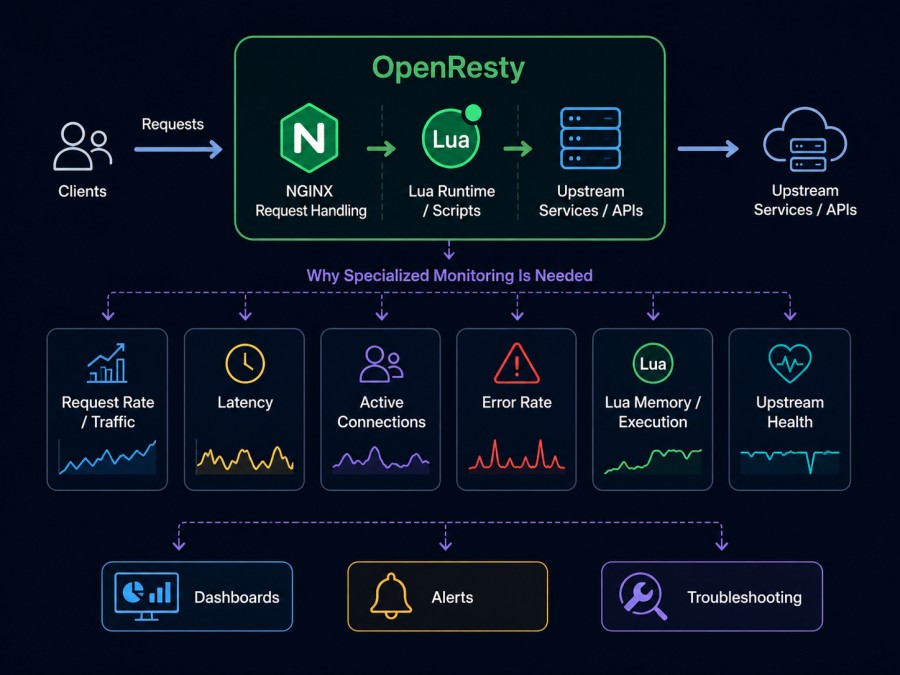
OpenResty is an NGINX distribution extended with LuaJIT, a just-in-time compiler for Lua, and a suite of Lua modules for database access, HTTP clients, caching, and WebSocket support. It allows developers to build complete web applications inside NGINX using Lua scripts executed during NGINX request processing phases.
This architecture collapses the traditional separation between web server and application server. Request routing, authentication, rate limiting, API composition, and dynamic content generation all happen inside the same NGINX worker process. That consolidation delivers performance but creates monitoring complexity. You need visibility into NGINX itself, the Lua runtime, upstream backends, and how they interact under load.
Traditional NGINX metrics like connections, requests per second, and upstream response times remain important. But they miss Lua execution time, memory allocations inside LuaJIT, coroutine scheduling delays, shared dictionary contention, and errors thrown by Lua scripts. A spike in response time could be a slow database query, a stalled Lua coroutine, or a full shared dictionary forcing cache misses. Standard NGINX logs do not surface these distinctions.
Teams running OpenResty at scale need instrumentation that tracks both NGINX and Lua layers together, correlates them with upstream performance, and surfaces bottlenecks before they cascade into user-facing failures.
How OpenResty Monitoring Works
OpenResty monitoring combines NGINX metrics collection with Lua runtime instrumentation and backend health tracking. The data flows from three sources: NGINX status endpoints, Lua libraries that expose runtime metrics, and external probes that test upstream availability.
NGINX status module
NGINX provides the ngx_http_stub_status_module which exposes basic counters: active connections, accepted connections, handled connections, total requests, reading/writing/waiting states. This module is enabled in most OpenResty builds and provides a /nginx_status endpoint that returns text-formatted metrics.
These metrics show connection lifecycle health but do not reveal request latency distribution, error rates per location block, or per upstream response times. For deeper NGINX visibility, teams use the ngx_http_api_module available in NGINX Plus or third-party modules that export Prometheus-compatible metrics.
Lua runtime metrics
OpenResty provides ngx.shared.DICT for inter-worker shared memory, ngx.timer for asynchronous tasks, and ngx.socket for non-blocking I/O. Monitoring these requires instrumentation inside Lua code.
The lua-resty-stats and nginx-lua-prometheus libraries provide Prometheus exporters that track request counts, response times, and error rates per route. They use Lua hooks to measure time spent in Lua phases, count coroutine yields, and track shared dictionary capacity and eviction rates.
These libraries require adding Prometheus metric definitions in the init_worker_by_lua_block phase and incrementing counters in log_by_lua_block or wrapping handler functions. The metrics endpoint is typically exposed on a separate port accessible only to monitoring agents.
Backend and upstream monitoring
OpenResty applications often aggregate data from multiple backends: databases, microservices, caching layers, external APIs. Each backend introduces latency, failure modes, and dependencies that affect overall request latency.
Health checks in OpenResty use lua-resty-upstream-healthcheck or passive failure detection configured in upstream blocks. Active checks send HTTP or TCP probes to backend endpoints and mark them down if checks fail. Passive checks monitor real request traffic and disable upstreams after a threshold of errors.
Monitoring backend health requires tracking success rates, response times, and timeout counts per upstream. If an upstream pool is degraded, even if some backends remain healthy, request latency increases as retries and failover add delay.
Key Metrics to Track in OpenResty Monitoring
OpenResty monitoring spans NGINX worker health, Lua execution performance, upstream availability, and resource saturation. Each metric answers a specific production question.
NGINX worker metrics
NGINX operates as a master process managing worker processes. Each worker handles requests in a non-blocking event loop. If one worker stalls, degrades, or crashes, request handling capacity drops and latency increases.
Active connections: The number of connections currently being processed. A spike indicates a traffic surge or slow request processing. If active connections stay high even after traffic drops, requests are stalling inside Lua handlers or waiting on slow backends.
Requests per second: Total requests handled per second across all workers. Compare this against expected traffic to detect anomalies. If requests per second drop during high traffic, workers may be saturated or blocking on I/O.
Connection states: NGINX reports connections in reading (reading request), writing (sending response), and waiting (keepalive) states. High reading or writing counts relative to requests per second indicate slow clients or large request/response bodies.
Lua script execution metrics
Lua code runs inside NGINX workers during request processing. Slow Lua execution directly adds latency to every request handled by that worker.
Lua handler execution time: Time spent in each Lua phase (access_by_lua, content_by_lua, log_by_lua). If content generation takes 200ms and upstream calls take 50ms, Lua processing is the bottleneck, not backends.
LuaJIT memory usage: LuaJIT allocates memory per request and per worker. High memory usage triggers garbage collection pauses that stall request processing. Monitor collectgarbage("count") in periodic timer tasks to track memory growth.
Shared dictionary usage: ngx.shared.DICT provides shared memory across workers for caching, rate limiting, and session storage. If usage exceeds capacity, entries are evicted. Monitor dict:free_space() and dict:capacity() to detect when caches thrash due to insufficient allocation.
Upstream and backend metrics
Backends determine overall latency if Lua handlers are fast but upstream calls are slow.
Upstream response time: Time from sending request to receiving response from each upstream backend. High response times indicate database query slowness, service overload, or network latency.
Upstream error rate: Failed requests per upstream backend. A rising error rate indicates backend degradation, misconfiguration, or dependency failure. Distinguish between connection failures, timeouts, and HTTP errors returned by the backend.
Backend health check status: Track which backends are marked down by active or passive health checks. A flapping backend cycles between up and down states, indicating intermittent failures or misconfigured health check thresholds.
Resource saturation metrics
OpenResty runs inside a single process per worker. If CPU, memory, or file descriptors are exhausted, request handling stalls.
CPU usage per worker: High CPU indicates expensive Lua computation, regex matching, or JSON parsing inside hot paths. Profile Lua code with SystemTap or OpenResty XRay to identify CPU hotspots.
Memory usage per worker: Steady memory growth indicates a memory leak in Lua code, unclosed file handles, or unbounded data structures. Restart workers periodically if leaks cannot be fixed immediately.
File descriptor usage: Each open connection, upstream socket, and log file consumes a file descriptor. If the limit is reached, new connections are rejected. Monitor /proc/[pid]/fd count against ulimit -n to prevent descriptor exhaustion.
Best Practices for OpenResty Monitoring in Production
Effective OpenResty monitoring requires instrumenting Lua code, collecting metrics without adding latency, and correlating signals across layers.
Use Prometheus exporters native to OpenResty
The nginx-lua-prometheus library provides a Prometheus exporter built specifically for OpenResty. It tracks request counts, response times, and error rates per route with low overhead. Define metrics in init_worker_by_lua_block and increment counters in log_by_lua_block after request processing completes.
Expose the /metrics endpoint on a separate internal port. Never expose it publicly. Allow access only from monitoring agents or Prometheus scrapers inside your VPC. This prevents metrics exposure from becoming a security risk or a DDoS vector.
Instrument Lua handlers with timing and error tracking
Wrap Lua handlers with timing logic to measure execution time per phase. Use ngx.now() to capture timestamps at entry and exit points. Log slow requests above a threshold to surface performance regressions.
Track Lua errors separately from NGINX errors. A pcall() wrapped function that catches Lua errors and increments an error counter gives visibility into application-level failures that NGINX logs as HTTP 500 without detail.
Monitor shared dictionary capacity before it fills
Shared dictionaries evict entries when full. If your rate limiter or session store relies on ngx.shared.DICT, a full dictionary silently breaks functionality. Monitor dict:free_space() and alert when free space drops below 20% of capacity. Increase allocation or reduce retention time before evictions start.
Set up active health checks with realistic thresholds
Passive health checks disable upstreams after consecutive failures. Active checks probe backends even during low traffic. Configure both to detect degraded backends early. Set health check intervals short enough to catch failures quickly but long enough to avoid overwhelming backends with probe traffic.
Test health check endpoints under load. If a health check endpoint returns success but the service is actually overloaded, checks will not detect degradation. Use a realistic probe that exercises core service logic, not just a static /health page.
Correlate OpenResty metrics with upstream and infrastructure data
A spike in OpenResty response time could originate from Lua code, upstream backends, or infrastructure. Infrastructure monitoring tools that track CPU, memory, disk I/O, and network usage across hosts help distinguish between application-level slowness and resource saturation.
Link OpenResty request traces with backend database query times, cache hit rates, and external API latencies. Without correlation, you know requests are slow but not why. With correlation, you trace a slow request to a specific database query or third-party API timeout.
Tools for OpenResty Monitoring
OpenResty monitoring tools range from open source exporters to full observability platforms that unify metrics, logs, and traces.
CubeAPM

CubeAPM provides full-stack observability for OpenResty deployments with native support for OpenTelemetry and Prometheus metrics. It tracks NGINX worker health, Lua execution time, upstream response times, and infrastructure metrics in a single platform.
CubeAPM deploys on-premises or inside your VPC, keeping telemetry data local. It correlates OpenResty metrics with application traces, database query performance, and infrastructure resource usage. Alerts fire when response times spike, error rates rise, or shared dictionaries approach capacity.
Teams running OpenResty at scale use CubeAPM to reduce monitoring cost compared to per-host SaaS pricing. Pricing is $0.15/GB ingested with unlimited retention. No per-seat fees. Deployment takes under an hour using Helm charts for Kubernetes, or Docker Compose for standalone hosts.
OpenResty XRay
OpenResty XRay is a commercial profiling and diagnostics tool built by the OpenResty team. It uses SystemTap to profile Lua code, NGINX internals, and kernel level behavior without code changes. XRay identifies CPU hotspots, memory leaks, blocking calls, and coroutine scheduling delays.
XRay is designed for root cause analysis, not continuous monitoring. Use it to investigate specific performance issues after alerts fire. It requires SystemTap kernel support and runs on Linux only. Pricing is per server license with annual contracts.
Prometheus with nginx-lua-prometheus
The nginx-lua-prometheus library exports metrics in Prometheus format directly from OpenResty. It tracks request counts, response times, and custom metrics defined in Lua code. Prometheus scrapes the /metrics endpoint and stores time series data for querying and alerting.
This setup is open source and runs entirely self hosted. You control data retention and query performance by configuring Prometheus storage. Combine Prometheus with Grafana for dashboards and Alertmanager for notifications.
The downside is operational overhead. You manage Prometheus instances, handle storage scaling, and build dashboards from scratch. For teams already running Prometheus, adding OpenResty metrics is straightforward. For teams starting fresh, managed platforms reduce setup time.
Datadog
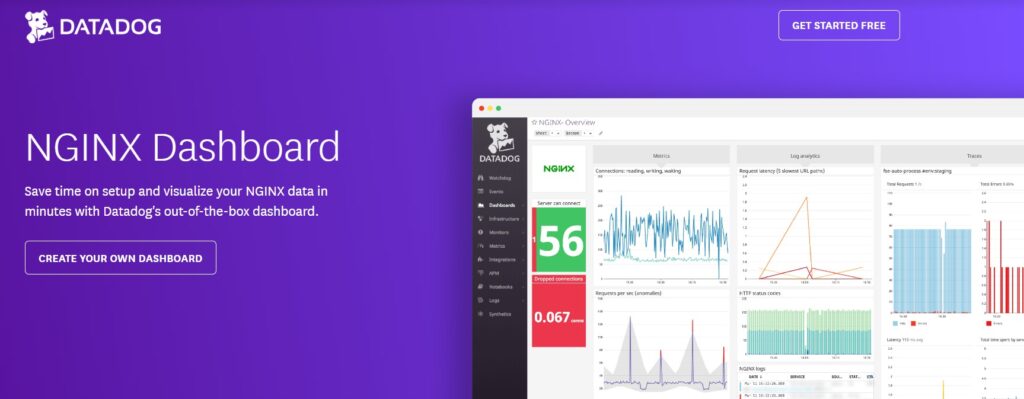
Datadog provides a managed observability platform with an OpenResty integration that collects NGINX metrics via the status module and custom Lua metrics via DogStatsD. It correlates OpenResty performance with infrastructure, database, and application traces.
Datadog pricing is per host per month starting at $15 for infrastructure monitoring. APM adds $31 per host per month. Log ingestion is $0.10 per GB ingested plus $1.70 per million log events indexed. Total cost for a 50 host OpenResty cluster with APM and log indexing can exceed $3,000 per month before custom metrics or synthetic monitoring are enabled.
Datadog is a strong choice for teams that need broad integration coverage and are already using Datadog for other infrastructure. Its OpenResty support is functional but not as deep as tools built specifically for NGINX and Lua profiling.
New Relic
New Relic provides infrastructure monitoring, APM, and log aggregation with an NGINX integration that collects status module metrics. Lua-level instrumentation requires custom telemetry sent via New Relic’s agent SDK.
Pricing is consumption-based. New Relic charges $0.40 per GB ingested for logs and $0.25 per GB for metrics and events. A 30 TB per month OpenResty deployment ingesting logs, metrics, and traces costs approximately $9,000 per month. User seat fees add $99 per full platform user per month.
New Relic fits teams already standardized on New Relic for application monitoring. Its OpenResty support is generic NGINX monitoring plus custom instrumentation. It lacks the Lua runtime depth of OpenResty XRay or the cost predictability of CubeAPM.
Elastic APM
Elastic APM collects traces, metrics, and logs into Elasticsearch. The NGINX module captures request metrics, and the OpenTelemetry collector can ingest custom Lua metrics. Elastic APM is open source and self-hosted or available as a managed Elastic Cloud service.
Self hosting Elastic requires managing Elasticsearch clusters, Kibana instances, and APM server deployments. Storage and query performance depend on cluster sizing and index management. For teams already running the ELK stack, adding OpenResty metrics is an incremental step. For teams starting fresh, the operational burden is significant.
Elastic Cloud pricing starts at $95 per month for the standard tier with limited retention. Enterprise tier pricing is custom and scales with data volume. Elasticsearch can become expensive at scale due to indexing and storage costs.
Challenges in OpenResty Monitoring
OpenResty monitoring introduces specific challenges that differ from traditional web server or application monitoring.
Lua errors do not always surface in NGINX logs
A Lua script that throws an error inside a pcall() block returns HTTP 500 but logs minimal detail to the NGINX error log. If the error is caught and handled, it may not log at all. Without explicit error tracking in Lua code, these failures are invisible.
Instrument Lua handlers to catch errors, log them with context, and increment error counters. Use structured logging to include request ID, endpoint, and error message. Send logs to a centralized log management platform for aggregation and alerting.
Shared dictionary contention is not exposed by default
ngx.shared.DICT provides inter-worker shared memory but does not expose lock contention or eviction rates by default. If multiple workers compete for dictionary access, request processing stalls. If the dictionary fills, entries are evicted silently.
Monitor dict:free_space() and dict:capacity() in periodic timer tasks. Track eviction rates by comparing keys set against keys retrieved. Alert when free space drops below a threshold or eviction rate exceeds baseline.
Profiling Lua code requires external tools
LuaJIT does not include a built-in profiler. Identifying CPU hotspots, memory allocation patterns, or blocking calls requires external profiling tools like SystemTap, OpenResty XRay, or ljprof. These tools add setup complexity and are not always available in production environments.
For continuous monitoring, instrument critical Lua functions with timing wrappers. Measure time spent in database queries, external API calls, and JSON parsing. Log slow operations above a threshold. This approach does not replace profiling but surfaces high-level performance issues without external tools.
Upstream health checks can miss degraded backends
Active health checks probe backend availability but do not detect performance degradation. A backend that passes health checks but responds slowly increases overall request latency without triggering alerts.
Monitor upstream response time percentiles, not just health check status. Alert when p95 or p99 latency exceeds thresholds. Use passive health checks to disable backends after consecutive slow responses, not just failed responses.
Migrating to Better OpenResty Monitoring
Teams currently running OpenResty without structured monitoring can improve visibility incrementally without rewriting applications.
Step 1: Enable NGINX status module and collect basic metrics
Add the stub_status module to your NGINX configuration and expose a /nginx_status endpoint. Configure Prometheus or your monitoring agent to scrape it every 15 seconds. This provides connection counts, requests per second, and worker states with zero code changes.
Step 2: Add Lua instrumentation for request timing and errors
Install nginx-lua-prometheus and define counters for requests, errors, and latency per route. Increment counters in log_by_lua_block after each request completes. Expose the /metrics endpoint on an internal port.
Start with high-level metrics: total requests, HTTP status code counts, response time histograms. Refine over time to track specific Lua functions, shared dictionary usage, or custom application events.
Step 3: Configure active health checks and monitor upstream backends
Use lua-resty-upstream-healthcheck to probe backend health every few seconds. Configure thresholds for consecutive failures and recovery. Monitor health check results and upstream response times in your observability platform.
Correlate upstream latency with overall request latency. If upstream response time is 80% of total request time, optimize backend queries or add caching. If Lua execution time dominates, profile and optimize Lua code.
Step 4: Centralize logs and correlate with metrics
Send NGINX access logs and error logs to a centralized log aggregation platform. Parse logs to extract request IDs, status codes, response times, and upstream addresses. Correlate log entries with metrics to trace slow requests or errors back to specific code paths.
Use structured logging in Lua code with JSON-formatted log lines. Include request context: user ID, session ID, API endpoint, upstream called. This makes logs searchable and correlatable with traces.
Step 5: Set up alerts for critical thresholds
Define alerts for response time spikes, error rate increases, shared dictionary capacity, and upstream health check failures. Start with broad thresholds and refine based on baseline behavior. Avoid alert fatigue by grouping related alerts and setting appropriate cooldown periods.
Route alerts to incident response channels: Slack, PagerDuty, email. Include links to dashboards showing related metrics and logs. This reduces time to triage and speeds up root cause identification.
OpenResty monitoring requires visibility across NGINX workers, Lua runtime, upstream backends, and infrastructure resources. Instrumentation must track both NGINX and Lua layers together, correlate performance across services, and surface bottlenecks before they cascade into failures. Tools like CubeAPM, Prometheus with nginx-lua-prometheus, and OpenResty XRay provide the depth needed to debug production issues in OpenResty environments at scale.
Disclaimer: The information in this article reflects the latest details available at the time of publication and may change as technologies and products evolve. Features, pricing, and plan limits can change over time. Always verify the latest information directly with the vendor before making purchasing or deployment decisions.
Frequently Asked Questions
What is the difference between monitoring OpenResty and monitoring NGINX?
OpenResty extends NGINX with LuaJIT and Lua modules, so monitoring must track both NGINX worker health and Lua runtime performance, including script execution time, shared dictionary usage, and LuaJIT memory allocation.
Which metrics are most important for OpenResty monitoring?
Track NGINX worker connections, requests per second, Lua handler execution time, upstream response times, shared dictionary capacity, and error rates per route to surface bottlenecks and failures.
How do I monitor Lua script performance in OpenResty?
Use timing wrappers around Lua functions to measure execution time, track LuaJIT memory usage with `collectgarbage(“count”)`, and instrument error handling to count failures per endpoint.
What tools can I use to monitor OpenResty in production?
CubeAPM provides unified observability for OpenResty with metrics, logs, and traces. Prometheus with nginx-lua-prometheus exports metrics in Prometheus format. OpenResty XRay profiles Lua code and NGINX internals for root cause analysis.
How do I detect when shared dictionaries are full?
Monitor `dict:free_space()` and `dict:capacity()` in periodic timer tasks and alert when free space drops below 20 percent to prevent silent eviction of cache entries or rate limit counters.
What is OpenResty XRay used for?
OpenResty XRay is a commercial profiling tool that uses SystemTap to identify CPU hotspots, memory leaks, and blocking calls in Lua code and NGINX internals without requiring code changes.
How do I monitor upstream backend health in OpenResty?
Configure active health checks with `lua-resty-upstream-healthcheck` and track upstream response times, error rates, and health check status to detect degraded backends before they affect request latency.