










A single slow page load during Black Friday can cost an online retailer millions in lost conversions. According to Google research, 53% of mobile site visits are abandoned if pages take longer than 3 seconds to load, and ecommerce sites bear the most direct revenue impact from these delays. Without observability, engineering teams discover checkout failures, API timeouts, and inventory sync issues only after customers complain or abandon their carts.
This guide explains what observability means for ecommerce platforms, how it differs from basic monitoring, and how to implement it across your stack to protect revenue, reduce downtime, and maintain performance during traffic spikes. It covers the specific signals that matter in retail, the tools that capture them, and the practices that prevent small issues from becoming revenue-impacting outages.
What Is Observability for Ecommerce?
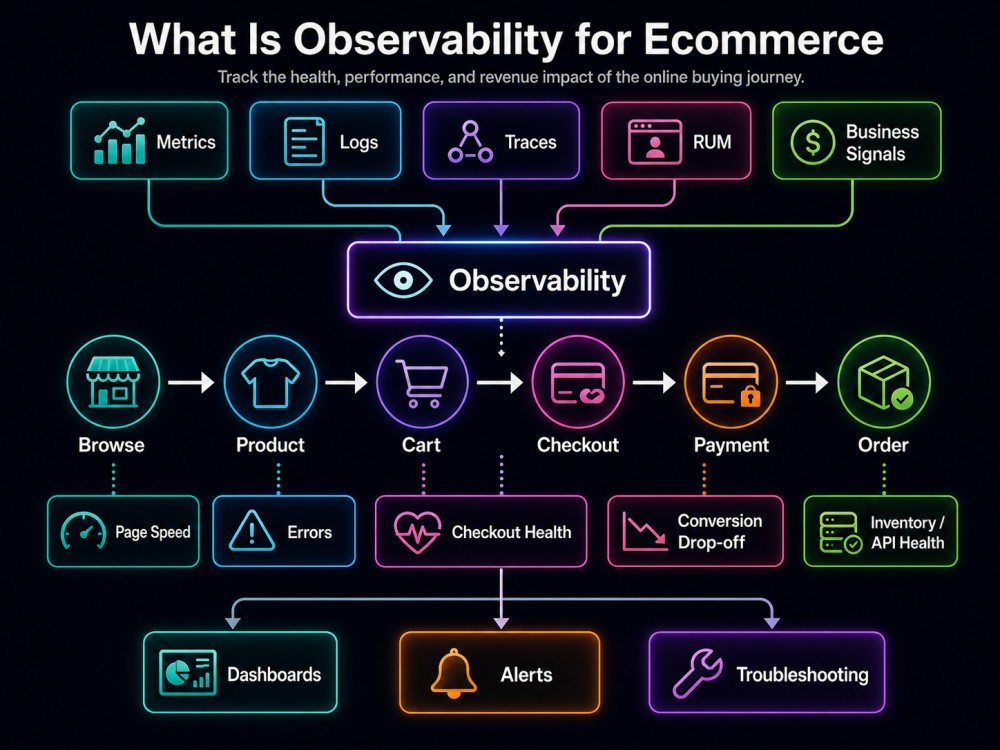
Observability for ecommerce is the practice of instrumenting online retail systems to collect, correlate, and analyze telemetry data across frontend experiences, backend services, payment gateways, inventory systems, and third party integrations. It answers three questions continuously: Is the site working? Are customers experiencing problems? Where exactly is the issue occurring?
Traditional monitoring tells you that checkout completion rate dropped by 15%. Observability tells you that the drop started at 14:32 UTC, correlates with a payment gateway timeout spike in the EU region, affects only users on mobile Safari, and traces back to a configuration change deployed 8 minutes earlier.
Ecommerce platforms operate across distributed architectures with multiple failure points. A product page request might touch a CDN, load balancer, API gateway, catalog service, pricing engine, inventory database, recommendation service, and analytics tracker before rendering. Any latency or failure in this chain affects the customer experience. Observability makes every component in that chain visible and traceable.
The difference between monitoring and observability in ecommerce comes down to specificity. Monitoring tracks known metrics like error rate and response time. Observability lets you ask new questions about unknown problems: Why did checkout fail for this specific user session? Which microservice caused the cart total to calculate incorrectly? What changed between 2:00 PM and 2:15 PM that made search results slow down?
Observability matters more in ecommerce than in most other domains because every performance issue directly impacts revenue. A B2B SaaS platform might tolerate occasional slow dashboards. An ecommerce site loses customers to competitors with every added second of latency.
How Observability Works in Ecommerce Platforms
Observability relies on three signal types working together: metrics, logs, and traces. Each captures a different dimension of system behavior, and their correlation is what makes observability effective.
- Metrics provide time series data about system performance. In ecommerce, critical metrics include page load time, API response latency, checkout completion rate, cart abandonment rate, search result latency, inventory sync delay, payment gateway response time, and error rates by endpoint. These metrics answer “what is happening” but not “why it is happening.”
- Logs capture discrete events and state changes across services. In ecommerce, logs record user actions like add to cart and checkout initiation, service events like inventory updates and order confirmations, error messages from failed API calls, and third party integration responses from payment processors and shipping providers. Logs provide context but lack the structure to trace a request across services.
- Traces follow individual requests through distributed systems. In ecommerce, a trace might start when a user clicks “buy now” and follow that request through authentication, cart validation, inventory check, pricing calculation, payment processing, order creation, and confirmation email trigger. Traces show exactly where latency occurs and which service caused a failure.
How this works
The correlation of these three signal types is what makes observability work. When checkout completion rate drops, metrics show the drop, logs reveal specific error messages from the payment service, and traces identify the exact API call that timed out and which upstream dependency caused it.
- Instrumentation determines what data your systems emit. Modern ecommerce platforms use OpenTelemetry to instrument code and capture telemetry automatically. OpenTelemetry provides language-specific libraries that wrap common frameworks like Express, Django, Spring Boot, and Rails to capture HTTP requests, database queries, cache operations, and external API calls without manual logging.
- Data collection happens through agents or collectors that receive telemetry from instrumented services and forward it to an observability platform. In ecommerce, collectors typically run as sidecars in Kubernetes pods or as daemon sets on each node to capture data from all services on that host.
- Storage and query systems must handle high cardinality data at scale. During peak traffic, a large ecommerce platform might generate millions of traces and billions of metric data points per hour. The storage system must retain this data long enough for analysis while keeping query performance fast enough for real time debugging.
- Visualization and alerting turn raw telemetry into actionable insights. Teams need dashboards that show business metrics like conversion rate alongside technical metrics like API latency, alerts that fire when user-facing issues occur rather than when infrastructure thresholds are crossed, and root cause analysis tools that trace failures back to specific code paths or infrastructure changes.
Key Observability Signals for Ecommerce Systems
Frontend Performance and Real User Monitoring
Frontend performance directly affects conversion rates. Real User Monitoring captures actual user experience data from browsers and mobile apps, measuring page load time from DNS lookup through full render, time to interactive when the page becomes usable, Core Web Vitals including Largest Contentful Paint, First Input Delay, and Cumulative Layout Shift, and resource load times for images, scripts, and stylesheets.
Ecommerce teams need to track these metrics by device type, geography, and user segment. A product page that loads in 1.2 seconds on desktop might take 4.8 seconds on mobile 3G, and that difference translates directly to lost mobile conversions.
Session replay tools capture user interactions to reproduce bugs that only occur under specific conditions. When a customer reports that checkout failed, session replay shows exactly what they clicked, what forms they filled, and where the interface broke.
Backend Service Performance and Distributed Tracing
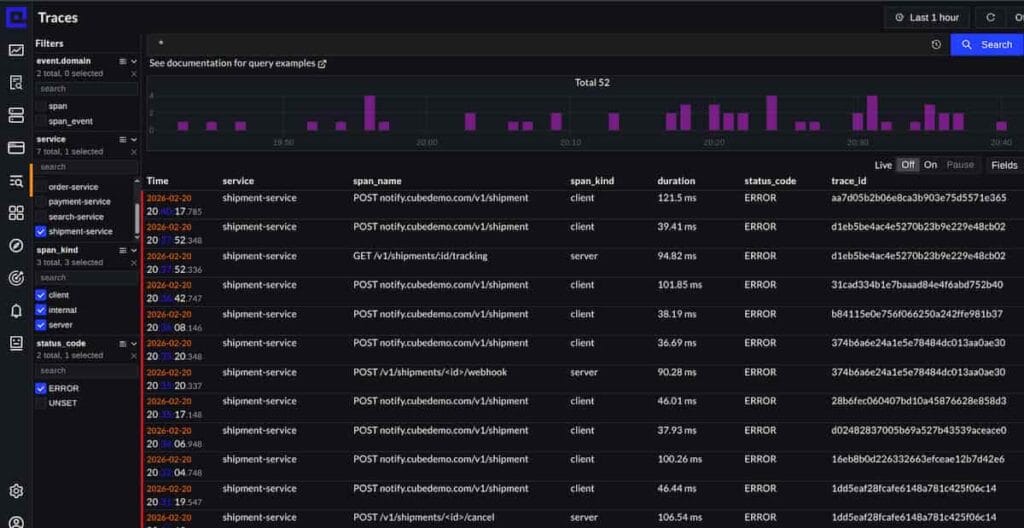
Backend services handle business logic, data access, and integrations. Distributed tracing captures request flow across microservices, showing service dependencies and call graphs, latency contribution from each service in the chain, database query performance and slow query identification, cache hit rates and cache warming effectiveness, and external API call duration for payment gateways, shipping providers, and marketing platforms.
Ecommerce architectures often include 20 to 50 microservices. When checkout slows down, distributed tracing identifies whether the bottleneck is in the payment service, inventory service, pricing engine, or a downstream dependency.
Database and Data Store Monitoring
Databases power ecommerce platforms and often become the bottleneck during traffic spikes. Database observability includes query performance metrics showing execution time and frequency, connection pool usage and wait times, replication lag for read replicas, deadlock detection and resolution, and index effectiveness and missing index identification.
Inventory databases face especially high write loads during flash sales when thousands of users attempt to purchase limited stock simultaneously. Observability helps teams detect when database connections are exhausted or when queries slow down due to lock contention.
Infrastructure and Resource Utilization
Infrastructure metrics show whether systems have sufficient capacity. Critical infrastructure signals include CPU and memory utilization per pod or instance, network throughput and saturation, disk I/O and queue depth, container restart rates, and Kubernetes pod eviction events.
Ecommerce platforms often auto-scale based on these metrics. Observability helps teams tune scaling thresholds to avoid both over-provisioning that wastes budget and under-provisioning that causes outages.
Payment Gateway and Third Party Integration Health
Payment gateways and shipping providers are external dependencies that ecommerce platforms cannot control but must monitor closely. Integration observability tracks API response times and timeout rates, error rates by error code and failure type, retry success rates, webhook delivery success and delay, and rate limit proximity and throttling events.
When payment processing slows down, teams need to know immediately whether the issue is in their integration code or with the payment provider itself. Observability makes this distinction clear through correlated traces and logs.
Best Practices for Ecommerce Observability
Instrument the Full Customer Journey
Observability must cover every step from landing page to order confirmation. Instrument page views and navigation paths, search queries and result relevance, product detail page interactions, cart operations including add, update, and remove, checkout steps and form completions, payment processing and authorization, and order confirmation and email delivery.
Each step should emit structured events that can be correlated across services. Use consistent identifiers like session ID, user ID, and order ID in all telemetry to enable tracing across the full journey.
Define and Track Business Metrics
Technical metrics like latency and error rate matter only because they affect business outcomes. Define business metrics that reflect revenue impact: conversion rate by traffic source and device type, average order value and its trend over time, cart abandonment rate at each checkout step, search to purchase conversion rate, and revenue per minute during promotional events.
Correlate these business metrics with technical telemetry. When conversion rate drops, teams should see alongside it which technical metrics changed, which services experienced errors, and which infrastructure resources were constrained.
Set Alert Thresholds Based on Impact
Alert fatigue kills observability programs. Set alerts based on user impact rather than arbitrary thresholds. Alert when checkout completion rate drops below historical baseline, when page load time exceeds the threshold known to affect conversion, when payment authorization failure rate rises above normal, or when inventory sync delay risks overselling out of stock items.
Avoid alerting on infrastructure metrics in isolation. A 90% CPU spike matters only if it causes user-facing latency or errors. Use composite alerts that require both a technical anomaly and a business impact signal before firing.
Prepare for Peak Traffic Events
Black Friday, Cyber Monday, and flash sales compress massive transaction volume into short windows. Prepare by load testing at 3x expected peak traffic, pre-warming caches and connection pools, validating that auto-scaling triggers work at high load, testing observability systems themselves under high telemetry volume, and establishing runbooks that use observability data to diagnose common failure modes.
During peak events, monitor rate of change metrics like transactions per second trending and error rate acceleration rather than absolute thresholds. A gradual rise in errors might be acceptable during a planned sale, but a sudden spike indicates a new problem requiring immediate attention.
Retain Telemetry Long Enough for Analysis
Ecommerce problems often require analysis across multiple days or weeks. A checkout bug might only affect users who added items to their cart 3 days ago and then returned to complete the purchase. Retain high resolution traces and logs for at least 30 days to enable this kind of historical analysis.
Storage costs matter at scale. Use intelligent sampling that retains all error traces and slow requests while sampling successful fast requests at lower rates. Retain full detail for recent data and downsample older data to summaries.
Enable Fast Root Cause Analysis
When incidents occur during peak traffic, every minute of downtime costs thousands of dollars. Observability tooling must support fast root cause analysis through automatic correlation of related errors across services, comparison of current behavior to historical baselines, filtering by high-cardinality dimensions like user ID or product SKU, and linking from alerts directly to relevant traces and logs.
Teams should be able to go from alert to root cause in under 5 minutes during critical outages. This requires pre-built dashboards, saved queries for common failure modes, and deep linking from alerts to diagnostic views.
Tools and Implementation for Ecommerce Observability
Full Stack Observability Platforms
Full stack platforms provide integrated metrics, logs, and traces in a single system. These platforms simplify correlation and reduce tool sprawl. CubeAPM runs inside your own cloud infrastructure with data ingestion priced at $0.15/GB and unlimited retention, making it cost effective for ecommerce platforms processing terabytes of telemetry monthly. It supports OpenTelemetry natively and provides APM, log management, infrastructure monitoring, real user monitoring, and synthetic monitoring in one platform.
Datadog offers extensive ecommerce integrations and provides real user monitoring connected to backend traces, but its per-host pricing combined with per-GB log ingestion and per-million indexed event fees make it expensive at scale. A 100-host ecommerce platform typically pays $4,000 to $8,000 monthly before adding RUM, synthetics, or custom metrics. Datadog pricing details are available at their pricing page.
New Relic provides full stack observability with a compute capacity unit model that can be difficult to forecast. Its pricing starts at $0.35/GB for data ingest beyond the 100 GB free tier, with additional per-user charges for full platform access. New Relic documentation provides current pricing information.
Dynatrace offers AI-assisted root cause analysis and full stack coverage but carries enterprise pricing starting around $0.20/GiB for logs and metrics combined with per-host fees. It works well for large retailers with complex environments but may be cost prohibitive for mid-market ecommerce platforms.
Specialized Real User Monitoring Tools
Dedicated RUM tools focus specifically on frontend performance and user experience. These integrate with full stack platforms or serve as standalone solutions when teams want deeper frontend insight than general APM tools provide.
Open Source Alternatives
Open source observability tools give teams full control over their stack and avoid vendor lock-in. Grafana stack combines Prometheus for metrics, Loki for logs, and Tempo for traces, using Grafana for unified visualization. The open source version is free, but running it at ecommerce scale requires significant infrastructure and engineering effort. Grafana Cloud provides a managed option with usage-based pricing.
OpenTelemetry provides vendor-neutral instrumentation and should be the foundation of any modern ecommerce observability strategy. It ensures that telemetry data can be sent to any backend without rewriting instrumentation code.
Implementation Strategy
- Start with automatic instrumentation using OpenTelemetry libraries for your application frameworks. This captures HTTP requests, database queries, and cache operations without manual code changes. Add custom instrumentation for business-specific events like cart operations, checkout steps, and order confirmations. These require explicit code to emit structured events with relevant attributes.
- Deploy collectors as sidecars or daemon sets to receive telemetry from all services and forward it to your observability backend. Use consistent naming conventions and semantic attributes across all telemetry to enable correlation. Implement sampling strategies that retain all errors and slow requests while sampling normal traffic at rates that keep storage costs manageable.
- Build dashboards for both technical teams and business stakeholders. Engineering dashboards show service health, error rates, and latency distributions. Business dashboards show conversion funnels, revenue per minute, and cart abandonment rates. Configure alerts that fire on business impact, not just technical anomalies, and establish incident response runbooks that use observability data to guide diagnosis and resolution.
When considering observability tools, teams should evaluate whether their telemetry data needs to remain within their own infrastructure for compliance or data sovereignty reasons. Platforms that run entirely within your cloud environment eliminate concerns about customer data leaving your control.
Disclaimer: The information in this article reflects the latest details available at the time of publication and may change as technologies and products evolve. Features, pricing, and plan limits can change over time. Always verify the latest information directly with the vendor before making purchasing or deployment decisions.
Frequently Asked Questions
What are the 4 golden signals for observability?
The four golden signals are latency, traffic, errors, and saturation. For ecommerce, latency measures request duration for pages and APIs, traffic tracks requests per second and revenue per minute, errors capture failed transactions and API failures, and saturation monitors resource utilization like CPU, memory, and database connections that predict capacity constraints before they cause outages.
How does observability differ from monitoring for ecommerce platforms?
Monitoring tracks predefined metrics and alerts when thresholds are crossed. Observability provides the ability to ask arbitrary questions about system behavior using high-cardinality data. When checkout fails for a specific customer, monitoring shows overall error rate increased, while observability traces that exact session through every service to identify the specific failure point and cause.
What telemetry retention period do ecommerce platforms need?
Retain high-resolution traces and logs for at least 30 days to diagnose issues that span multiple user sessions. Many ecommerce problems only appear when analyzing user behavior over weeks, such as cart abandonment patterns or checkout failures that only affect returning customers. Longer retention enables trend analysis and compliance requirements but increases storage costs.
What is the 80 20 rule in ecommerce?
The 80 20 rule states that 80% of revenue comes from 20% of customers, or that 80% of sales come from 20% of products. In observability terms, this means prioritizing monitoring and optimization for the highest-value customer segments and best-selling products, as issues affecting these areas have disproportionate revenue impact compared to long-tail products or infrequent shoppers.
How much does ecommerce observability cost at scale?
Cost depends on data volume and tool choice. A mid-sized ecommerce platform processing 30 TB of telemetry monthly pays approximately $4,500 with CubeAPM at $0.15/GB, around $10,500 with New Relic at $0.35/GB, or $15,000 to $25,000 with Datadog when including host fees, RUM, synthetics, and indexed log costs. Open source tools like Grafana eliminate licensing costs but require infrastructure and engineering time to operate.
Can observability prevent revenue loss during traffic spikes?
Observability detects issues early and accelerates incident response, but prevention requires proactive capacity planning and load testing. During Black Friday traffic spikes, observability identifies which services are saturating, which database queries are slowing down, and which third party integrations are timing out, enabling teams to scale resources, optimize queries, or fail over to backup systems before full outages occur.
Should ecommerce platforms use synthetic monitoring?
Yes. Synthetic monitoring runs automated tests that simulate customer journeys like search, add to cart, and checkout from multiple geographic locations. These tests detect outages and performance degradation before real customers are affected. Run synthetics every 1 to 5 minutes during peak traffic periods and every 10 to 15 minutes during off-peak times, with tests originating from regions where your customers are located.