










Linkerd is a lightweight service mesh that adds reliability, security, and observability to Kubernetes applications without code changes. But once Linkerd is deployed, how do you actually monitor it? According to the CNCF’s 2024 Annual Survey, 56% of organizations now run service mesh in production, making service mesh observability a critical capability for teams at scale.
This guide covers what Linkerd monitoring is, how Linkerd’s telemetry pipeline works, what metrics you should track, and how to set up full-stack observability that connects service mesh data with application traces, logs, and infrastructure health. We’ll also compare native Linkerd tooling with third-party platforms and show what production teams actually monitor to catch issues before they reach users.
What Is Linkerd Monitoring?
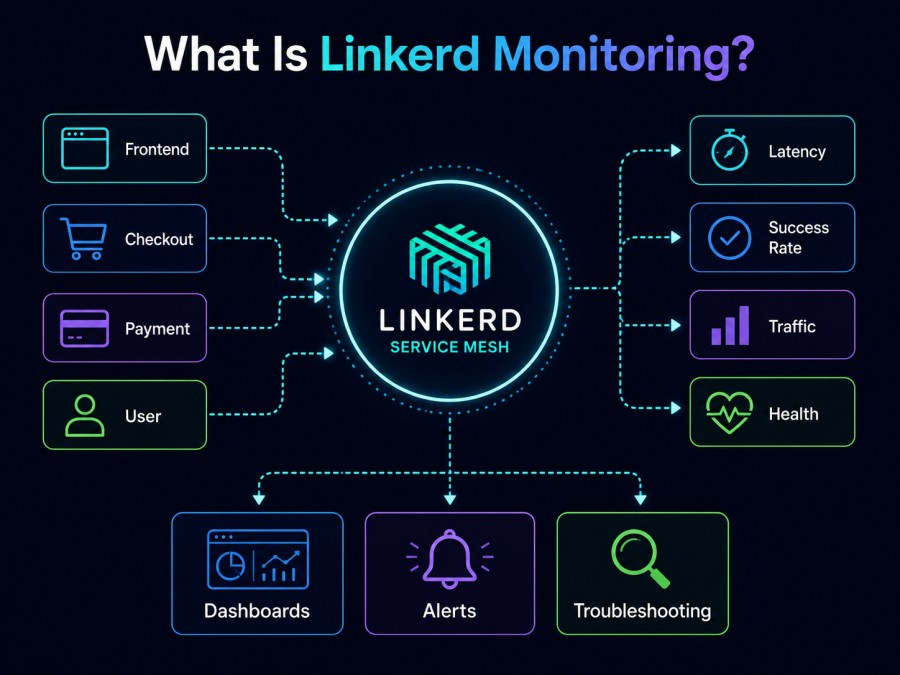
Linkerd monitoring is the practice of tracking the runtime behavior of a Linkerd service mesh, including proxy health, traffic success rates, latencies, request volumes, and control plane stability, to detect performance degradation, misconfigurations, or security violations before they impact end users.
Unlike traditional application monitoring that observes what happens inside your code, Linkerd monitoring observes what happens between your services. Every HTTP, HTTP/2, gRPC, and TCP connection that flows through Linkerd’s data plane proxy generates telemetry automatically. You get visibility into service-to-service communication patterns without instrumenting a single line of application code.
Linkerd provides this telemetry through its built-in Prometheus instance, which scrapes metrics from every sidecar proxy deployed alongside your pods. These metrics cover request success rates, latencies, traffic volumes, and connection states at the service, route, and backend level. For most teams, this is the starting point for monitoring a service mesh in production.
How Linkerd Monitoring Works
Linkerd’s monitoring system is built into its architecture and works in three layers: the data plane, the control plane, and the observability extension called Viz.
When you deploy Linkerd, every pod that gets meshed receives a lightweight proxy sidecar. This proxy intercepts all inbound and outbound traffic for that pod. As traffic flows through the proxy, it emits real-time metrics about latency, success rate, request count, and connection state. These metrics are exposed in Prometheus format at each proxy’s metrics endpoint.
The Linkerd control plane runs services like the destination service, identity service, and proxy injector in the linkerd namespace. These components also expose metrics about their own health and operation.
To access Linkerd’s full monitoring stack, you install the Viz extension using linkerd viz install | kubectl apply -f -. This extension deploys four components into the linkerd-viz namespace: a Prometheus instance to scrape and store metrics, a metrics-api service to query those metrics, a tap service for live traffic inspection, and a web dashboard for visualization.
Prometheus scrapes metrics from all proxies and control plane components every few seconds. The metrics-api service queries Prometheus and exposes the data through Linkerd’s CLI and dashboard. The tap service streams live request data for real time debugging. The web component renders this data in the Linkerd dashboard UI.
This stack works out of the box and requires no configuration. Golden metrics are available immediately after installation. But the built-in Prometheus instance stores only 6 hours of metrics and does not persist data across pod restarts. For production use, teams typically export Linkerd metrics to a long term observability platform.
What Linkerd Monitoring Measures
Linkerd tracks three categories of telemetry: golden metrics that measure the health of meshed traffic, TCP level metrics for non-HTTP protocols, and control plane health metrics that track the stability of Linkerd itself.
Golden Metrics
Golden metrics are the core observability signals for any service. Linkerd generates these automatically for all HTTP, HTTP/2, and gRPC traffic.
Success rate is the percentage of requests that returned a non-5xx response code over a rolling time window, typically one minute. Linkerd calculates success rate both before retries at the backend level and after retries at the route level. This distinction matters because a route configured with retries can mask backend instability. If your route shows 99.9% success but the backend shows 95% success, you know retries are absorbing failures that could indicate a deeper issue.
Request rate measures how much traffic each service receives, broken down by route and backend. This helps identify traffic patterns, detect unexpected spikes, and correlate load changes with performance degradation. If a service suddenly starts receiving 10x more requests than normal, you see it immediately in the request rate metric.
Latency percentiles show how long requests take to complete. Linkerd tracks the 50th, 95th, and 99th percentiles. The 50th percentile represents typical performance. The 95th and 99th percentiles surface tail latency, which often correlates with customer complaints even if average latency looks fine. A service with a 50ms p50 latency but a 2 second p99 latency is delivering a bad experience to 1% of users.
TCP Level Metrics
For non-HTTP traffic like database connections, message queues, or custom TCP protocols, Linkerd tracks bytes sent and received, open connections, and connection state changes. These metrics help you monitor services that don’t use HTTP but still flow through the mesh.
Control Plane Health
Linkerd’s control plane components also emit metrics. You can monitor the destination service’s routing decisions, the identity service’s certificate issuance rate, and the proxy injector’s webhook success rate. If any control plane component starts failing, your entire mesh can degrade. Monitoring these components is critical for production stability.
Viewing Linkerd Metrics
Linkerd provides three ways to access monitoring data: the CLI, the dashboard, and direct Prometheus queries.
Using the Linkerd CLI
The simplest way to view metrics is through the Linkerd CLI. After installing the Viz extension, you can run commands like linkerd viz stat deploy to see success rate, request rate, and latency for all deployments in the current namespace. The output looks like this:
NAME           MESHED   SUCCESS      RPS   LATENCY_P50   LATENCY_P95   LATENCY_P99
web              1/1   100.00%   2.5rps           5ms          12ms          18ms
emoji            1/1    98.50%   8.2rps          12ms          45ms         120ms
voting 1/1 100.00% 1.1rps 3ms 8ms 15msThis gives an immediate snapshot of how each service is performing. If a service shows a dropping success rate or spiking latency, you see it in seconds.
You can also use linkerd viz top deploy to see which routes are receiving the most traffic. This helps identify hot paths in your application. And linkerd viz tap deploy/web streams live requests in real time, showing the source, destination, status code, and latency of each request as it happens.
Using the Linkerd Dashboard
The web dashboard provides a visual interface for the same data. Run linkerd viz dashboard to open it in your browser. The dashboard shows service graphs, deployment health, route level metrics, and live tap streams. It’s useful for quick investigations but less practical for long term monitoring or alerting.
Querying Prometheus Directly
For teams that want to build custom dashboards or alerts, you can query the built-in Prometheus instance directly. Linkerd’s Prometheus exposes metrics at http://prometheus.linkerd-viz.svc.cluster.local:9090. Key metrics include:
request_total: total request count by route and status coderesponse_latency_ms_bucket: histogram of response latenciesresponse_total: total responses by status codetcp_open_connections: current open TCP connectionstcp_write_bytes_total: bytes written over TCP
These metrics are tagged with labels like deployment, namespace, dst_deployment, dst_namespace, route, and status_code, enabling high-cardinality queries.
Monitoring Linkerd in Production
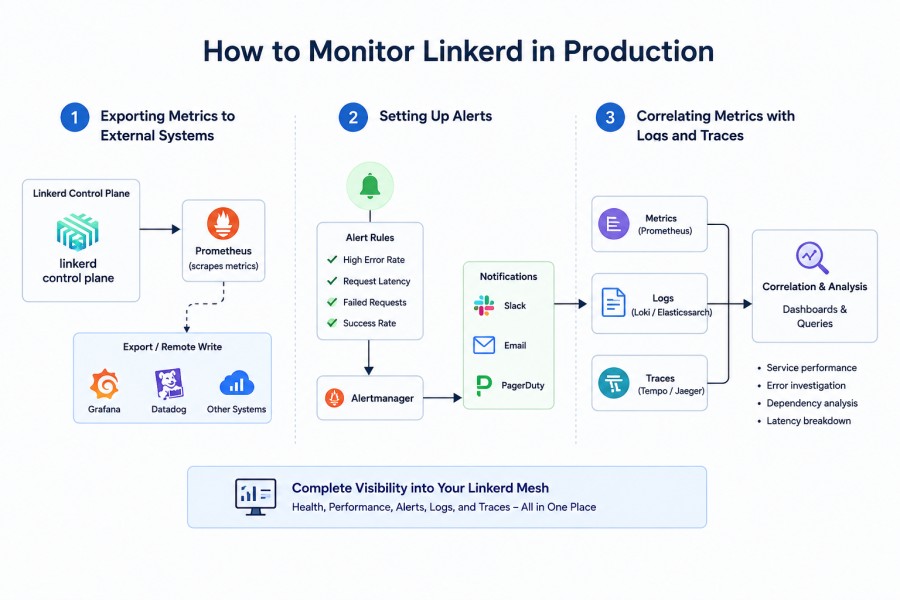
The built-in Viz extension works well for development and short-term investigations. But in production, its 6-hour retention window and lack of persistence make it insufficient. Most teams export Linkerd metrics to a long-term observability platform.
Exporting Metrics to External Systems
Linkerd’s Prometheus instance can be scraped by an external Prometheus server using federation. You configure your external Prometheus to scrape the /federate endpoint of Linkerd’s Prometheus. This pulls all Linkerd metrics into your centralized monitoring system.
Alternatively, you can configure Linkerd to send metrics directly to a remote write endpoint. This is common for teams using managed Prometheus services like Grafana Cloud, AWS Managed Service for Prometheus, or platforms that support remote write like CubeAPM.
Setting Up Alerts
Production Linkerd monitoring requires alerting on key failure modes. Common alerts include:
- Success rate drops below 99% for any service
- P99 latency exceeds a defined threshold
- Request rate spikes beyond expected traffic patterns
- Control plane component becomes unhealthy
- Proxy sidecar fails to start or crashes repeatedly
You configure these alerts in your observability platform’s alert manager. Each alert should include context about which service, route, or deployment triggered it so on-call engineers can investigate without guessing.
Correlating Metrics with Logs and Traces
Metrics tell you that something is wrong. Logs and traces tell you why. The most effective Linkerd monitoring setups correlate service mesh metrics with application traces and logs. When a service’s success rate drops, you want to immediately see the error logs from that service and the distributed traces for failed requests.
Infrastructure monitoring tools that support OpenTelemetry can ingest Linkerd metrics alongside APM traces and logs, giving you a unified view of what’s happening across your entire stack. This eliminates the need to context switch between multiple dashboards during an incident.
Linkerd Service Profiles and Per-Route Metrics
By default, Linkerd aggregates metrics at the service level. But in production, you often need route-level visibility. A service might handle 50 different API endpoints, and a single slow route can cause customer complaints even if the service level metrics look fine.
Linkerd Service Profiles enable per-route metrics. A Service Profile is a Kubernetes custom resource that defines the routes for a service. Once configured, Linkerd tracks success rate, latency, and request rate for each route individually.
For example, if your API service has routes like /api/users, /api/orders, and /api/payments, you can see which specific route is slow or failing. This dramatically reduces time to root cause during incidents.
Service Profiles also enable retries, timeouts, and traffic splitting at the route level. Combined with per-route metrics, this gives you fine-grained control over how traffic behaves and how it’s monitored.
Best Practices for Linkerd Monitoring
Start with Golden Metrics
Focus first on success rate, request rate, and latency percentiles for every service. These three metrics catch most production issues. If a service’s success rate drops or latency spikes, you know something is wrong even if you don’t yet know the cause.
Monitor the Control Plane
Linkerd’s data plane proxies are stateless and self-healing. But the control plane is critical infrastructure. If the identity service stops issuing certificates, new pods can’t join the mesh. If the destination service fails, proxies lose routing information. Always monitor control plane health with alerts.
Use Service Profiles for Critical Paths
Not every service needs per-route metrics. But your most critical user-facing services do. Define Service Profiles for high-value paths like checkout flows, payment processing, and authentication. Route-level metrics make debugging these paths significantly faster.
Export Metrics to Long-Term Storage
The built-in Prometheus instance is sufficient for quick checks and development. For production, export metrics to a platform with unlimited retention. You’ll need historical data to establish baselines, detect trends, and investigate incidents that happened hours or days ago.
Correlate Service Mesh Metrics with Application Data
Linkerd tells you what’s happening between services. Application tracing tells you what’s happening inside services. The combination is far more powerful than either alone. Use an observability platform that can correlate service mesh metrics with APM traces and logs in a single view.
Tools for Linkerd Monitoring
Linkerd’s built-in stack provides everything you need for basic monitoring. But for production-scale environments, most teams integrate with third-party platforms to gain long-term retention, advanced alerting, and unified observability.
Grafana
Linkerd publishes official Grafana dashboards that visualize golden metrics, TCP metrics, and control plane health. These dashboards work with any Prometheus data source. Teams already using Grafana often import these dashboards and customize them for their environment.
Grafana is free and open source, but requires you to run your own Prometheus, configure federation, manage storage, and maintain dashboards. For teams with existing Grafana expertise, this works well. For teams without that expertise, it adds operational overhead.
Datadog

Datadog’s Linkerd integration collects metrics from Linkerd’s Prometheus endpoints and surfaces them in Datadog’s APM and infrastructure views. Datadog automatically tags metrics with Kubernetes labels, making it easy to correlate service mesh data with pod logs, node health, and application traces.
Datadog’s pricing is host-based and adds up quickly. A 50-node Kubernetes cluster running Linkerd costs $900 per month for infrastructure monitoring alone before logs, APM, or synthetics. For large environments, this can reach $5,000 to $10,000 per month.
CubeAPM

CubeAPM provides full-stack observability for Linkerd environments with native support for Prometheus metrics, OpenTelemetry traces, and logs in a single platform. It runs on-prem or in your VPC, so all telemetry stays within your infrastructure. This eliminates data egress costs and ensures compliance with data residency requirements.
CubeAPM’s pricing is $0.15 per GB ingested with unlimited retention and no per-host or per-user fees. For a 50-node Kubernetes cluster generating 10 TB of telemetry per month, CubeAPM costs $1,500 per month compared to $4,800 per month with Datadog. The platform includes pre-built dashboards for Linkerd, Kubernetes, and application-level metrics, with correlation between service mesh traffic and distributed traces built in.
CubeAPM is compatible with Prometheus exporters, OpenTelemetry collectors, and Linkerd’s metrics API, so you can ingest Linkerd data without changing your existing instrumentation.
New Relic

New Relic can ingest Linkerd metrics through its Prometheus integration. You configure the New Relic Prometheus agent to scrape Linkerd’s metrics endpoints, and the data flows into New Relic’s observability platform. New Relic’s UI provides service maps, golden metric dashboards, and alerting.
New Relic’s pricing is based on data ingestion and user seats. Data ingestion costs $0.30 to $0.50 per GB depending on your plan. User seats cost $99 to $549 per user per month depending on role and access level. For teams already on New Relic, adding Linkerd metrics is straightforward. For teams evaluating platforms, New Relic’s cost structure makes it expensive at scale.
Dynatrace

Dynatrace offers automated service mesh monitoring with its Kubernetes integration. It automatically discovers Linkerd proxies, collects golden metrics, and applies AI-based anomaly detection to surface issues before they escalate. Dynatrace’s strength is its automation, but its pricing is among the highest in the market. Host-based pricing starts around $73 per host per month, making it suitable primarily for large enterprises with significant budgets.
Disclaimer: Pricing based on publicly available information as of June 2026. Enterprise discounts, custom contracts, and negotiated rates are not reflected here.
How to Set Up Linkerd Monitoring
Setting up basic Linkerd monitoring takes less than 10 minutes. Here’s the step-by-step process.
Step 1: Install Linkerd
If you haven’t already, install Linkerd on your Kubernetes cluster using the official CLI:
curl -sL https://run.linkerd.io/install | sh
linkerd install | kubectl apply -f -
linkerd checkThis installs the Linkerd control plane and validates that everything is running correctly.
Step 2: Inject Linkerd Proxies
Mesh the namespaces or deployments you want to monitor by adding the linkerd.io/inject: enabled annotation:
kubectl annotate namespace your-namespace linkerd.io/inject=enabled
kubectl rollout restart deployment -n your-namespaceEvery pod in the annotated namespace now runs with a Linkerd sidecar proxy. Traffic flowing through these pods is automatically instrumented.
Step 3: Install the Viz Extension
Install the Viz extension to access the dashboard, CLI tools, and built-in Prometheus:
linkerd viz install | kubectl apply -f -
linkerd viz checkThis deploys the metrics stack to the linkerd-viz namespace.
Step 4: View Metrics
Open the dashboard with linkerd viz dashboard or query metrics using the CLI:
linkerd viz stat deploy -n your-namespace
linkerd viz top deploy -n your-namespace
linkerd viz tap deploy/your-deployment -n your-namespaceYou now have full visibility into golden metrics for all meshed services.
Step 5: Export to Long-Term Storage
To send metrics to an external platform, configure Prometheus federation or use an OpenTelemetry Collector to scrape Linkerd’s metrics endpoints and forward them to your observability backend. Most platforms provide documentation for this setup.
Migrating from Other Service Meshes to Linkerd
Teams moving from Istio or other service meshes to Linkerd often ask how monitoring changes. Linkerd’s monitoring model is simpler than Istio’s. There’s no EnvoyFilter complexity, no multi-component telemetry pipeline, and no need to choose between Mixer v1 and v2. Linkerd generates golden metrics by default with zero configuration.
If you’re already using Prometheus and Grafana, your existing dashboards can be adapted to query Linkerd metrics. The metric names are different from Istio’s Envoy metrics, but the concepts are the same. Linkerd’s documentation includes a migration guide that maps Istio concepts to Linkerd equivalents.
For teams using managed observability platforms like Datadog or New Relic, you simply point the integration at Linkerd’s Prometheus endpoint instead of Istio’s. The integration handles the rest.
Conclusion
Linkerd monitoring provides automatic visibility into service-to-service communication without requiring code changes or manual instrumentation. The built-in Viz extension gives you golden metrics, CLI tools, and a dashboard in minutes. For production use, exporting metrics to a long-term platform and setting up alerts on success rate, latency, and control plane health ensures you catch issues before they reach users.
The key is to start simple: install Viz, monitor golden metrics, and add per-route visibility with Service Profiles as needed. Then integrate with your broader observability stack to correlate service mesh metrics with application traces, logs, and infrastructure health.
Disclaimer: The information in this article reflects the latest details available at the time of publication and may change as technologies and products evolve. Features, pricing, and plan limits can change over time. Always verify the latest information directly with the vendor before making purchasing or deployment decisions.
Frequently Asked Questions
What is the difference between Linkerd and Linkerd2?
Linkerd2 is the current version of Linkerd, rewritten in Rust and Go for Kubernetes-native environments. The original Linkerd (now called Linkerd1) was designed for non-Kubernetes systems and is no longer actively developed. When people refer to Linkerd today, they mean Linkerd2.
Does Linkerd monitoring require code changes?
No. Linkerd generates telemetry automatically by intercepting traffic at the proxy layer. You don’t need to instrument your application code or add libraries. Just inject the Linkerd sidecar and metrics start flowing immediately.
How long does Linkerd store metrics?
The built-in Prometheus instance stores metrics for 6 hours. For production use, export metrics to a long-term observability platform that supports unlimited retention.
Can I use Linkerd without the Viz extension?
Yes. The Viz extension provides the dashboard, CLI tools, and built-in Prometheus. But you can run Linkerd without it and export metrics directly to an external monitoring system using federation or an OpenTelemetry Collector.
What is the best tool for monitoring Linkerd in production?
The best tool depends on your environment. For teams that want self-hosted observability with predictable pricing, CubeAPM provides full-stack visibility at $0.15 per GB. For teams already using Grafana, the official Linkerd dashboards work well. For enterprises with large budgets, Datadog and Dynatrace offer managed solutions with broad integrations.
How do I monitor Linkerd’s control plane health?
Query the control plane metrics exposed by Linkerd’s Prometheus instance. Key metrics include `control_plane_alive` for component health, `destination_service_requests_total` for routing decisions, and `identity_cert_expiration_timestamp_seconds` to track certificate renewal. Set up alerts on these metrics to detect control plane failures early.
Does Linkerd support OpenTelemetry?
Linkerd exposes metrics in Prometheus format, which OpenTelemetry Collectors can scrape and export to any OpenTelemetry-compatible backend. Linkerd does not natively emit traces or logs through OpenTelemetry, but you can combine Linkerd metrics with application-level OpenTelemetry instrumentation for full-stack observability.