









A Kubernetes Pod Pending state is a common but disruptive issue. It occurs when the Pod has been accepted by the cluster but the scheduler cannot place it on any node. With Kubernetes powering over 66% of production container deployments, even a few stuck Pods can delay deployments, stall rolling updates, and trigger cascading failures across services.
CubeAPM helps teams go beyond reactive troubleshooting by monitoring Pending Pods in real time. With OpenTelemetry-native collectors, it captures scheduling events, resource conditions, and PVC bindings, allowing you to see the root cause before it escalates.
In this guide, we’ll explain what the Pending state means, why it happens, how to fix it step by step, and how CubeAPM makes monitoring and prevention simple.
What is Pod Pending State in Kubernetes?
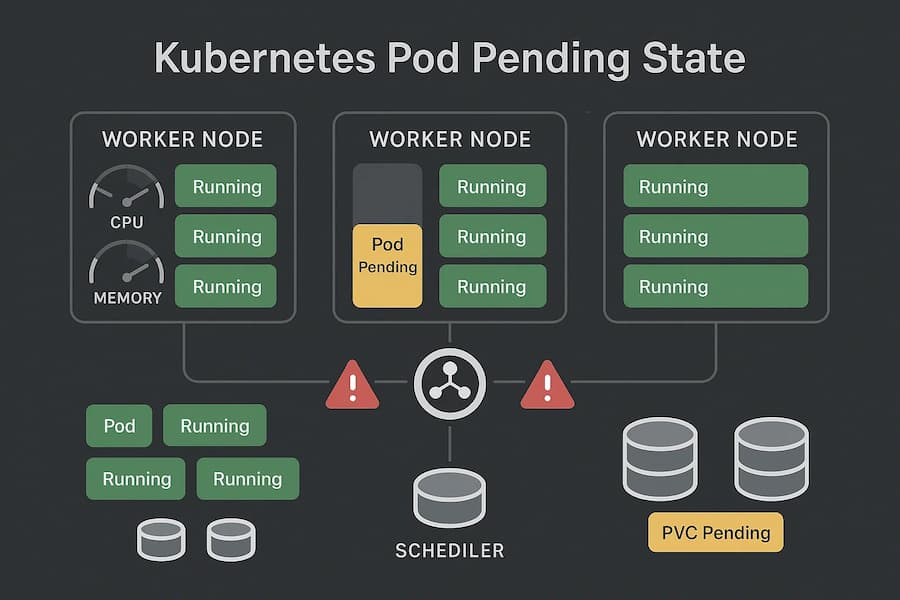
A Pod enters the Pending state when it has been successfully submitted to the Kubernetes API server but cannot be scheduled onto any node. Unlike errors where containers start and then fail, here the containers never even launch because the Pod hasn’t left the scheduling phase.
Pending happens during the scheduling stage. After the Pod object is created, the Kubernetes scheduler evaluates whether it can fit onto an available node. If no node matches the requirements, the Pod remains Pending indefinitely If none of the nodes satisfy those conditions, the Pod stays stuck in Pending until the problem is resolved.
Pending is more than just a waiting state — it can block rolling deployments, delay autoscaling, and prevent dependent services from coming online. In large clusters, a few stuck Pods may create a ripple effect where workloads can’t be updated or scaled properly, leading to outages or degraded performance.
When you investigate a Pending Pod with:
kubectl describe pod <pod-name>You’ll often see signals like:
- 0/X nodes are available: insufficient memory/cpu → cluster resource shortage
- node(s) didn’t match node selector → scheduling rules too restrictive
- persistentvolumeclaim is not bound → storage not ready
- node(s) were unschedulable → taints or node conditions blocking placement
In short, the Pending phase is Kubernetes’ way of saying: “I’ve accepted your Pod, but I can’t run it anywhere yet.”
Why Kubernetes Pod Pending State Happens
1. Insufficient Cluster Resources
When no node has enough CPU or memory to accommodate the Pod’s requests, scheduling fails. This usually happens in resource-constrained clusters or when Pods request more than necessary.
Check with:
kubectl describe pod <pod-name>Look for messages like 0/5 nodes are available: insufficient memory.
2. Unschedulable Node Selectors or Affinity Rules
If a Pod requires specific labels, taints, or affinity conditions that no node satisfies, it will stay Pending. This often happens when developers set strict affinity without ensuring matching nodes exist.
Check with:
kubectl describe pod <pod-name>Look for node(s) didn’t match node selector.
3. PersistentVolume Claims (PVC) Not Bound
When a Pod references a PVC and no corresponding PersistentVolume is available, it cannot proceed. The Pod remains Pending until storage is provisioned or a matching class is found.
Check with:
kubectl get pvcUnbound claims will be stuck in Pending.
4. Missing or Invalid Image Pull Secrets
Sometimes Pending is linked to delayed image pulls, especially when required registry credentials are missing. Although this often transitions into ErrImagePull, it can appear first as Pending.
Check with:
kubectl describe pod <pod-name>Look for authentication errors related to the container image.
5. Network or CNI Plugin Issues
If the networking layer is misconfigured or CNI pods are failing, the scheduler may delay Pod assignment. This results in Pending Pods even though resources appear sufficient.
How to Fix Pod Pending State in Kubernetes
1. Add More Cluster Resources
If your cluster doesn’t have enough CPU or memory, Pods will never leave Pending.
Check:
kubectl describe pod <pod-name>Look for messages like 0/5 nodes are available: insufficient memory.
Fix: Scale out your node pool or resize existing nodes so the scheduler has room to place the Pod.
kubectl scale nodepool <pool-name> --replicas=52. Adjust Resource Requests and Limits
Sometimes Pods request more than any node can provide, leaving them unschedulable.
Check:
kubectl get pod <pod-name> -o yaml | grep resources -A5Look at the requests section for excessive CPU or memory values.
Fix:
Reduce requests in your Pod spec to realistic levels, for example:
resources:

  requests:

    cpu: "500m"

    memory: "256Mi"
3. Fix Node Selector and Affinity Mismatches
Strict selectors can block scheduling if no node matches.
Check:
kubectl describe pod <pod-name>If the event says node(s) didn’t match node selector, your rules are too restrictive.
Fix: Either relax the affinity in the Pod spec or label nodes to match:
kubectl label nodes <node-name> disktype=ssd4. Resolve PersistentVolume Issues
Pods referencing unbound PVCs will stay Pending until storage is ready.
Check:
kubectl get pvcIf the claim shows Pending, it’s not bound to a volume.
Fix: Provision a compatible PV or update the PVC to use an available StorageClass.
5. Validate Image Pull Secrets
If registry credentials are missing, Pods may sit Pending before failing with ErrImagePull.
Check:
kubectl describe pod <pod-name>Look for authentication failures under “Events.”
Fix: Create the correct secret and attach it to the Pod:
kubectl create secret docker-registry regcred \

  --docker-username=user --docker-password=pass
Monitoring Pod Pending State in Kubernetes with CubeAPM
Fixing Pending Pods reactively works once, but preventing them requires monitoring. CubeAPM ingests Kubernetes events, Prometheus/KSM metrics, and pod/node logs through the OpenTelemetry Collector, so you can see why Pods are stuck and act before outages occur.
1. Install the OpenTelemetry Collectors
Add the repo and install both collectors:
helm repo add open-telemetry https://open-telemetry.github.io/opentelemetry-helm-charts
helm repo update open-telemetry
DaemonSet for node/pod metrics + logs:
helm install otel-collector-daemonset open-telemetry/opentelemetry-collector -f otel-collector-daemonset.yamlDeployment for cluster-level metrics + events:
helm install otel-collector-deployment open-telemetry/opentelemetry-collector -f otel-collector-deployment.yaml2. Example Values for Pod Pending Monitoring
Here’s a minimal config that ensures Pending Pods and scheduling events are collected:
receivers:
  prometheus:
    config:
      scrape_configs:
        - job_name: 'kube-state-metrics'
          static_configs:
            - targets: ['kube-state-metrics.kube-system.svc.cluster.local:8080']

processors:
  batch:

exporters:
  otlp:
    endpoint: cubeapm-otlp.cubeapm.com:4317
    headers:
      authorization: "Bearer <API_KEY>"

service:
  pipelines:
    metrics:
      receivers: [prometheus]
      processors: [batch]
      exporters: [otlp]
This setup scrapes kube_pod_status_phase metrics and pushes them directly into CubeAPM
3. Example Values for Cluster Metrics & Events (Deployment)
This setup pulls cluster-wide events such as scheduling failures, PVC delays, and node taints.
receivers:
  prometheus:
    config:
      scrape_configs:
        - job_name: 'kube-state-metrics'
          static_configs:
            - targets: ['kube-state-metrics.kube-system.svc.cluster.local:8080']

processors:
  batch:

exporters:
  otlp:
    endpoint: cubeapm-otlp.cubeapm.com:4317
    headers:
      authorization: "Bearer <API_KEY>"

service:
  pipelines:
    metrics:
      receivers: [prometheus]
      processors: [batch]
      exporters: [otlp]
4. Verify Metrics in CubeAPM Dashboards
Once installed, CubeAPM dashboards will show:
- Number of Pods in Pending state per namespace.
- Node pressure (CPU/memory) correlated with Pending Pods.
- PVC binding delays that block Pod scheduling.
Engineers can filter by namespace or workload to isolate the problem.
5. Add Pending Pod Alerts
Catching Pending early is key to avoiding blocked rollouts. Add this alert to your Prometheus rules file:
- alert: PodPending
  expr: kube_pod_status_phase{phase="Pending"} > 0
  for: 5m
  labels:
    severity: warning
  annotations:
    summary: "Pod stuck in Pending"
    description: "Pod {{ $labels.pod }} in namespace {{ $labels.namespace }} has been Pending for more than 5 minutes."
Reload Prometheus/Alertmanager, and CubeAPM will forward alerts with full context.
Example Alert Rules
1. Alert for Pending Pods
Pending Pods often signal blocked deployments or scaling operations. Detecting them early ensures teams can act before they cause cascading failures.
- alert: PodPending
  expr: kube_pod_status_phase{phase="Pending"} > 0
  for: 5m
  labels:
    severity: warning
  annotations:
    summary: "Pod stuck in Pending"
    description: "Pod {{ $labels.pod }} in namespace {{ $labels.namespace }} has been Pending for more than 5 minutes."
2. Alert for Insufficient Cluster Resources
One of the most common reasons Pods remain Pending is that nodes don’t have enough CPU
memory, or disk space. This alert ties Pending directly to cluster capacity problems.
- alert: InsufficientClusterResources
  expr: kube_node_status_condition{condition="OutOfDisk"} == 1
  for: 2m
  labels:
    severity: critical
  annotations:
    summary: "Cluster running out of resources"
    description: "Cluster nodes are out of resources, which may be causing Pods to remain in Pending state."
3. Alert for Unbound PersistentVolumeClaims
If a PVC is not bound, Pods depending on it will remain Pending. This alert helps teams catch storage delays before they block workloads.
- alert: PVCUnbound
  expr: kube_persistentvolumeclaim_status_phase{phase="Pending"} > 0
  for: 10m
  labels:
    severity: critical
  annotations:
    summary: "Unbound PVC detected"
    description: "PVC {{ $labels.persistentvolumeclaim }} in namespace {{ $labels.namespace }} has been unbound for over 10 minutes, leaving Pods in Pending state."
4. Alert for Scheduling Failures Due to Node Selectors
Sometimes Pods can’t be scheduled because no node matches the required labels or tolerations. This alert highlights when scheduling rules are too restrictive.
- alert: PodSchedulingFailure
  expr: kube_pod_status_scheduled{condition="false"} > 0
  for: 5m
  labels:
    severity: warning
  annotations:
    summary: "Pod scheduling failure"
    description: "Pod {{ $labels.pod }} in namespace {{ $labels.namespace }} cannot be scheduled due to node selector or affinity mismatches."
Conclusion
The Pod Pending state is one of the most common scheduling issues in Kubernetes. While it might look harmless at first, it can delay deployments, stall autoscaling, and block dependent services from starting. Left unchecked, Pending Pods can snowball into larger outages and wasted resources.
Most Pending problems come down to a few root causes — cluster resource shortages, restrictive scheduling rules, unbound PVCs, or node conditions. With the right checks (kubectl describe pod, reviewing PVCs, and monitoring node health), engineers can fix them quickly and keep workloads running smoothly.
But reactive fixes aren’t enough in production. With CubeAPM, teams gain proactive visibility into scheduling delays, node pressure, and PVC bindings. By monitoring these signals in real time and setting alerts for Pending Pods, you can reduce MTTR, prevent cascading failures, and keep your Kubernetes environment reliable at scale.