









Kubernetes Pod Evicted due to Node Pressure occurs when nodes run out of CPU, memory, or disk resources. According to the CNCF Annual Survey 2023, 66% of organizations now run Kubernetes in production, making eviction a real challenge for most teams. These disruptions can delay rollouts, cause downtime, and directly impact customer experience.
Repeated evictions create noise and slow down recovery. Engineers often struggle to pinpoint whether the pressure comes from memory spikes, disk fill-ups, or CPU contention—wasting hours of debugging time.
CubeAPM helps detect and troubleshoot node-pressure evictions in real time. It ingests Kubernetes Events to capture eviction signals, correlates them with node metrics like CPU/memory/disk pressure, and links them to pod logs and traces. This lets teams quickly see which pods were evicted, why the node was under pressure, and which workloads triggered.
In this guide, we’ll explore what pod eviction under node pressure means, the common causes behind it, step-by-step fixes, and how CubeAPM can help you monitor and prevent these errors at scale.
What is Pod Evicted due to Node Pressure in Kubernetes
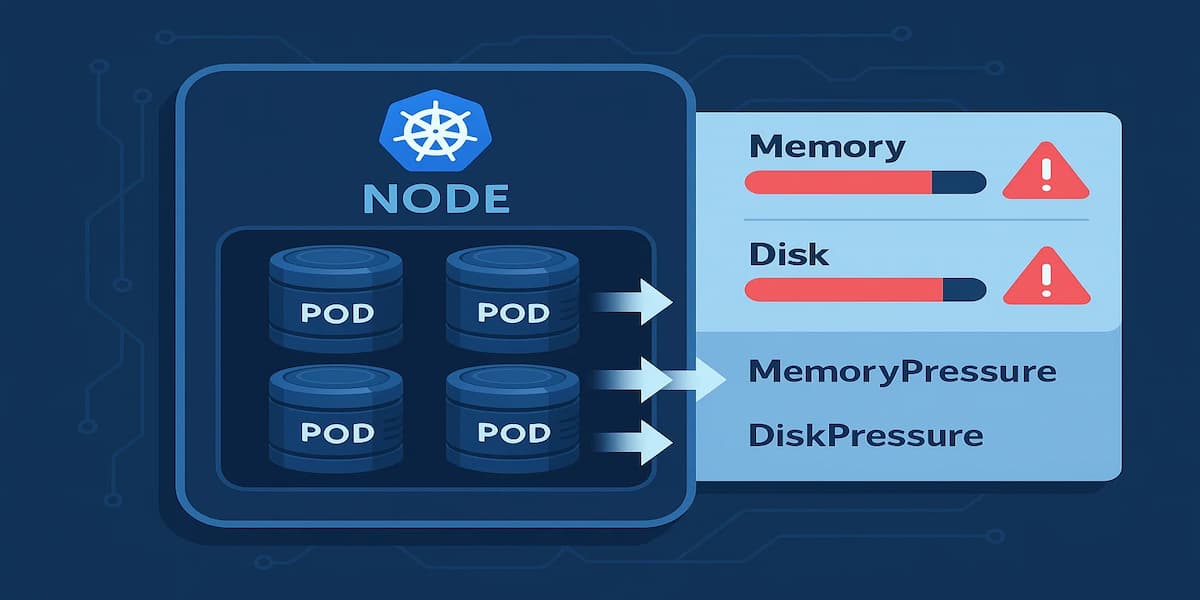
When Kubernetes detects that a node is running out of critical resources like CPU, memory, or disk, it starts evicting pods to keep the node stable. Eviction is not a crash—it’s Kubernetes intentionally removing pods to free up resources. These pods are terminated, and the scheduler may try to reschedule them on healthier nodes.
Below are the main conditions that trigger node-pressure eviction:
Memory Pressure
If a node’s memory usage crosses safe thresholds, the kubelet begins evicting pods to prevent the node from becoming unresponsive. Pods using the most memory, or those without resource requests/limits, are more likely to be evicted first.
Disk Pressure
Kubernetes monitors node disk capacity. When free disk space or inodes drop below defined thresholds, eviction kicks in. This prevents issues like logs or images filling the disk and breaking node operations.
CPU Pressure
While CPU over-commitment usually results in throttling, extreme CPU contention can also contribute to eviction decisions. Pods without proper requests/limits may face eviction if the scheduler cannot guarantee fairness across workloads.
Node Condition Signals
Evictions aren’t random—they’re driven by kubelet signals such as MemoryPressure, DiskPressure, or PIDPressure. These signals are surfaced as Kubernetes Events, which can be queried using:
kubectl describe node <node-name>This helps engineers confirm whether a pod eviction was caused by a node resource shortage rather than an application error.
Why Pod Evicted due to Node Pressure in Kubernetes Happens
Pod evictions under node pressure occur because the cluster tries to protect the node’s stability. When resources are exhausted, the kubelet signals the scheduler to reclaim space, and pods become the first to go. Here are the common reasons:
1. Memory Spikes from Applications
Applications with unbounded memory usage or memory leaks can quickly exhaust node capacity. When this happens, Kubernetes evicts pods to keep the node responsive.
Quick check:
kubectl top pod --sort-by=memoryIf you see a few pods consuming far more memory than others, those pods are likely eviction candidates. It usually indicates memory leaks or missing limits.
2. Disk Usage Overflow
Large container images, excessive log files, or leftover temporary data can fill node disks. Once disk usage passes eviction thresholds, pods are removed to free space.
Quick check:
kubectl describe node <node-name> | grep DiskPressureIf the node reports DiskPressure=True, it means the kubelet is already under storage stress and eviction is imminent.
3. CPU Overcommitment
Although CPU is compressible (pods get throttled instead of evicted), if too many workloads compete without limits, the node may fail to schedule pods and trigger evictions for fairness.
Quick check:
kubectl describe node <node-name> | grep allocatableIf allocatable CPU is fully consumed and workloads still queue up, you’ll often see scheduling failures and occasional evictions.
4. Poorly Defined Resource Requests and Limits
Pods without proper resource requests/limits are easy eviction targets. Kubernetes favors pods with clear resource guarantees and will terminate “best-effort” pods first when pressure builds.
If your pods are marked as QoS: BestEffort in kubectl describe pod, they’re at the highest risk of eviction.
5. Node Condition or Hardware Constraints
Older nodes, small VM instances, or nodes with restricted disk/memory often hit pressure faster. Eviction becomes more frequent when infrastructure is undersized compared to workload demand.
If you see frequent evictions only on smaller nodes, it suggests that scaling node sizes—or tuning requests—may be required.
How to Fix Pod Evicted due to Node Pressure in Kubernetes
Below are targeted fixes specific to node-pressure evictions. Each step includes a short explanation, a command you can run, and what a good outcome looks like.
1) Confirm the eviction reason first
Check events and node conditions to see if the eviction was caused by memory, disk, or PID pressure.
kubectl get events --sort-by=.lastTimestamp --field-selector=reason=Evicted,type=Warning -A

kubectl describe node <node-name> | egrep 'MemoryPressure|DiskPressure|PIDPressure|Allocatable'
Good sign: You can identify the exact cause, e.g., MemoryPressure=True.
2) Protect critical pods with proper requests/limits (QoS)
Pods with defined requests/limits are less likely to be evicted. Setting requests equal to limits moves a pod into the Guaranteed QoS class.
resources:

  requests:

    cpu: "200m"

    memory: "256Mi"

  limits:

    cpu: "200m"

    memory: "256Mi"
Good sign: kubectl describe pod <pod> shows QoS Class: Guaranteed.
3) Cap memory spikes and fix leaks
Identify pods using too much memory and set sane limits. Memory leaks show up as steadily climbing usage.
kubectl top pod -A --sort-by=memory

kubectl top node --sort-by=memory
Good sign: No single pod dominates; usage stabilizes instead of climbing indefinitely.
4) Clear DiskPressure by freeing space
Remove unused images, containers, and large log/temp files.
sudo crictl images

sudo crictl rmi --prune

sudo df -h

sudo du -xh /var/lib | sort -h | tail
Good sign: kubectl describe node shows DiskPressure=False.
5) Tune kubelet eviction thresholds and garbage collection
Set soft thresholds to act before hard limits are hit, and configure image GC.
evictionSoft:

  memory.available: "300Mi"

  nodefs.available: "15%"

evictionSoftGracePeriod:

  memory.available: "1m"

  nodefs.available: "1m"

evictionHard:

  memory.available: "100Mi"

  nodefs.available: "10%"

imageGCLowThresholdPercent: 75

imageGCHighThresholdPercent: 85
Good sign: Proactive GC runs before pressure builds; fewer evictions occur.
6) Rotate and cap container logs
Prevent runaway logs from filling disk space by enforcing log rotation.
{

  "log-driver": "json-file",

  "log-opts": { "max-size": "10m", "max-file": "3" }

}
Good sign: Log directories remain small; no sudden disk usage spikes.
7) Reduce image size and ephemeral junk
Use slimmer images and clean up temporary data to lower disk footprint.
sudo du -sh /var/lib/containerd/io.containerd.snapshotter.v1.overlayfs/* | sort -h | tailGood sign: Smaller image layers and fewer leftovers in container storage.
8) Spread workloads across nodes
Prevent one node from taking all the load with topology spread or anti-affinity.
topologySpreadConstraints:

- maxSkew: 1

  topologyKey: kubernetes.io/hostname

  whenUnsatisfiable: ScheduleAnyway

  labelSelector:

    matchLabels:

      app: my-svc
Good sign: Evictions no longer cluster on a single node.
9) Autoscale capacity (Cluster Autoscaler + VPA/HPA)
Scale nodes and pod sizes automatically when workloads outgrow resources.
kubectl get events --field-selector=reason=FailedScheduling -AGood sign: Pending pods trigger new nodes; eviction rate drops.
10) Prioritize critical workloads
Use PriorityClasses so critical pods are preserved during node pressure events.
apiVersion: scheduling.k8s.io/v1

kind: PriorityClass

metadata:

  name: critical-priority

value: 100000

globalDefault: false
Good sign: Core services remain available during pressure events.
11) Enforce fair-share with LimitRanges and ResourceQuotas
Stop a single namespace from hogging resources by setting defaults and quotas.
kind: LimitRange

spec:

  limits:

  - type: Container

    defaultRequest:

      cpu: "100m"

      memory: "128Mi"

    default:

      cpu: "500m"

      memory: "512Mi"

---

kind: ResourceQuota

spec:

  hard:

    requests.cpu: "8"

    requests.memory: "16Gi"

    limits.cpu: "12"

    limits.memory: "24Gi"
Good sign: Spikes in one namespace don’t trigger evictions for others.
12) Remember: PDBs don’t stop node-pressure evictions
PodDisruptionBudgets protect against voluntary disruptions but are ignored under node pressure. Build redundancy with replicas and spread constraints.
Good sign: Service availability remains even when pods are forcibly evicted.
Monitoring Pod Evicted due to Node Pressure in Kubernetes with CubeAPM
Fixing an eviction once helps, but preventing repeats is what protects uptime. CubeAPM brings eviction events, node conditions, and resource trends into one place so you can see pressure building and act before pods are removed. Follow these steps to capture exactly what’s needed for node-pressure analysis.
1) Install CubeAPM (Helm)
helm repo add cubeapm https://charts.cubeapm.com

helm repo update cubeapm

helm show values cubeapm/cubeapm > values.yaml

# edit values.yaml as needed (ingestion URL/auth), then:

helm install cubeapm cubeapm/cubeapm -f values.yaml
2) Deploy OpenTelemetry Collector in dual mode
Use DaemonSet (per-node signals) + Deployment (cluster events + KSM). Point both to CubeAPM via OTLP.
otel-collector-daemonset.yaml — node pressure signals, kubelet stats, and container logs:
receivers:

  kubeletstats:

    collection_interval: 30s

    auth_type: serviceAccount

    endpoint: https://${NODE_NAME}:10250

    insecure_skip_verify: true

    metric_groups: [node, pod, container]

  filelog:

    include:

      - /var/log/containers/*.log

    start_at: end

processors:

  batch: {}

exporters:

  otlphttp:

    endpoint: "https://<CUBE_HOST>:4318"

    headers:

      Authorization: "Bearer <TOKEN>"

service:

  pipelines:

    metrics:

      receivers: [kubeletstats]

      processors: [batch]

      exporters: [otlphttp]

    logs:

      receivers: [filelog]

      processors: [batch]

      exporters: [otlphttp]
otel-collector-deployment.yaml — Kubernetes Events (Evicted) and kube-state-metrics:
receivers:

  k8s_events:

    auth_type: serviceAccount

  prometheus:

    config:

      scrape_configs:

        - job_name: kube-state-metrics

          scrape_interval: 60s

          static_configs:

            - targets:

                - kube-state-metrics.kube-system.svc.cluster.local:8080

processors:

  batch: {}

exporters:

  otlphttp:

    endpoint: "https://<CUBE_HOST>:4318"

    headers:

      Authorization: "Bearer <TOKEN>"

service:

  pipelines:

    logs:

      receivers: [k8s_events]

      processors: [batch]

      exporters: [otlphttp]

    metrics:

      receivers: [prometheus]

      processors: [batch]

      exporters: [otlphttp]
Install both collectors (using the OpenTelemetry Helm chart):
helm repo add open-telemetry https://open-telemetry.github.io/opentelemetry-helm-charts

helm repo update open-telemetry

helm install otel-collector-daemonset

  open-telemetry/opentelemetry-collector

  -f otel-collector-daemonset.yaml

helm install otel-collector-deployment \  open-telemetry/opentelemetry-collector \

  -f otel-collector-deployment.yaml
3) What CubeAPM ingests (and why it matters)
- Kubernetes Events (logs pipeline): captures reason=”Evicted” with details like MemoryPressure, DiskPressure, or PIDPressure. You can filter by namespace, node, or owner workload.
- Kubelet/Node metrics (metrics pipeline): CPU, memory, filesystem usage, and allocatable values to see when thresholds are breached.
- kube-state-metrics (metrics pipeline): stable counters and gauges for pods/nodes/namespaces to chart eviction spikes and correlate with node conditions.
- Container logs (logs pipeline): application-side context around the time of eviction (e.g., memory bursts, noisy logging that filled nodefs).
4) Verify in CubeAPM (quick checks)
- Logs → Kubernetes Events: search reason=”Evicted” and review message fields for the exact pressure cause and the node name.
- Infrastructure → Kubernetes (Nodes): sort by memory/disk utilization; confirm nodes showing MemoryPressure or DiskPressure align with eviction timestamps.
- Dashboards: plot eviction counts by namespace and overlay node memory/disk usage to identify hot spots and noisy neighbors.
5) Suggested views and pivots
- Top evicted workloads (last 24h): group events by involvedObject.namespace and owner, sort by count.
- Node hot list: nodes with highest memory usage and lowest nodefs.available around eviction windows.
- QoS risk view: list pods with QoS: BestEffort or missing limits in namespaces that show frequent evictions.
6) Common pitfalls to avoid
- Only Deployment or only DaemonSet: you’ll miss either node signals or cluster events; keep both.
- No auth/header to CubeAPM: metrics/events won’t show up; verify OTLP endpoint and token.
- Forgetting kube-state-metrics: you’ll lack easy eviction counters and correlations; enable Prometheus scraping as shown.
Example Alert Rules (Node-Pressure Evictions)
Here are practical alerts you can set up to detect node pressure early and respond before pods are evicted. Each rule starts with a short explanation, followed by a ready-to-use snippet.
1) Node under MemoryPressure
Kubelet sets the MemoryPressure condition when available memory on a node falls below safe thresholds. This is often the first warning before pods start being evicted.
- alert: NodeMemoryPressure

  expr: kube_node_status_condition{condition="MemoryPressure",status="true"} == 1

  for: 5m

  labels:

    severity: warning

  annotations:

    summary: "Node {{ $labels.node }} reports MemoryPressure"

    description: "Kubelet flagged low available memory; pods may be evicted soon."
2) Low memory available (<10%)
Monitoring raw memory availability helps catch issues even if the node condition hasn’t flipped yet. This gives you a chance to act before pressure triggers evictions.
- alert: NodeLowMemoryAvailable

  expr: (node_memory_MemAvailable_bytes / node_memory_MemTotal_bytes) < 0.10

  for: 10m

  labels:

    severity: critical

  annotations:

    summary: "Low memory on {{ $labels.instance }}"

    description: "Available memory <10% for 10m; pods are at high risk of eviction."
3) Node under DiskPressure
DiskPressure occurs when the kubelet detects insufficient disk space or inodes. This alert ensures you act quickly before pods are removed to free space.
- alert: NodeDiskPressure

  expr: kube_node_status_condition{condition="DiskPressure",status="true"} == 1

  for: 5m

  labels:

    severity: warning

  annotations:

    summary: "Node {{ $labels.node }} reports DiskPressure"

    description: "Node filesystem is constrained; clean up images/logs or add capacity."
4) Low node filesystem space (<10%)
Even if DiskPressure hasn’t triggered yet, watching for low free space lets you resolve the issue proactively.
- alert: NodeFilesystemLowSpace

  expr: (node_filesystem_avail_bytes{fstype!~"tmpfs|overlay"} / node_filesystem_size_bytes{fstype!~"tmpfs|overlay"}) < 0.10

  for: 10m

  labels:

    severity: critical

  annotations:

    summary: "Low filesystem space on {{ $labels.instance }}"

    description: "Free space <10% on {{ $labels.mountpoint }}; eviction is likely."
5) Low inodes (<10%)
Running out of inodes (too many small files) can cause evictions even if there’s free disk space. This alert tracks inode availability.
- alert: NodeFilesystemLowInodes

  expr: (node_filesystem_files_free{fstype!~"tmpfs|overlay"} / node_filesystem_files{fstype!~"tmpfs|overlay"}) < 0.10

  for: 10m

  labels:

    severity: critical

  annotations:

    summary: "Low inodes on {{ $labels.instance }}"

    description: "Free inodes <10% on {{ $labels.mountpoint }}; log bursts or temp files may be consuming them."
6) Pod evictions detected (events as metrics)
By converting Kubernetes Events into metrics, you can alert whenever any pod eviction is logged. This gives immediate visibility into active removals.
- alert: PodEvictionsDetected

  expr: increase(kubernetes_events_total{reason="Evicted",type="Warning"}[5m]) > 0

  labels:

    severity: warning

  annotations:

    summary: "Pod evictions detected"

    description: "Pods were evicted in the last 5 minutes; check node pressure signals."
7) Rising evictions in a namespace
If evictions are happening repeatedly in a specific namespace, it usually points to noisy neighbors or misconfigured limits. This alert catches that trend.
- alert: NamespaceEvictionsRising

  expr: sum by (namespace) (increase(kubernetes_events_total{reason="Evicted"}[15m])) > 3

  labels:

    severity: warning

  annotations:

    summary: "Evictions rising in {{ $labels.namespace }}"

    description: "More than 3 evictions in 15m; review quotas, requests, and limits."
Conclusion
Pod evictions due to node pressure are one of the more disruptive issues in Kubernetes. They don’t just restart a container — they remove entire pods when resources like memory, disk, or inodes are exhausted. Left unchecked, frequent evictions can delay deployments, impact service availability, and create noisy, hard-to-debug clusters.
The good news is that most evictions can be prevented with the right practices: setting resource requests/limits, cleaning up disk usage, tuning kubelet thresholds, and distributing workloads evenly across nodes. By combining these fixes with proactive scaling, teams can keep clusters stable even during heavy load.
Finally, monitoring is key. With CubeAPM, you gain real-time visibility into eviction events, node pressure signals, and workload resource usage, all in one place. That means faster root-cause analysis, fewer surprises, and more resilient Kubernetes workloads.