









Kubernetes pod unknown state occurs when Kubernetes cannot determine the Pod’s condition, usually because of lost node communication, API server issues, or cluster state mismatches. Recent studies found that over 50% of cluster-wide failures stem from errors in cluster-state dependencies, making issues like “Unknown” pods a common operational risk. For businesses, these failures can cause stalled deployments, blocked CI/CD pipelines, and partial outages.
CubeAPM helps teams address this error by correlating Pod Unknown events with node heartbeats, API server logs, and scheduler metrics. Instead of manually chasing logs and kubectl describe outputs, CubeAPM surfaces real-time insights that reveal whether the problem is due to node unreachability, control-plane instability, or scheduling errors—so workloads recover before customers feel the impact.
In this guide, we’ll unpack what “Pod Unknown” really means, why it happens, how to fix it step by step, and how to stay ahead of it with CubeAPM.
What is Pod Stuck in Unknown State in Kubernetes
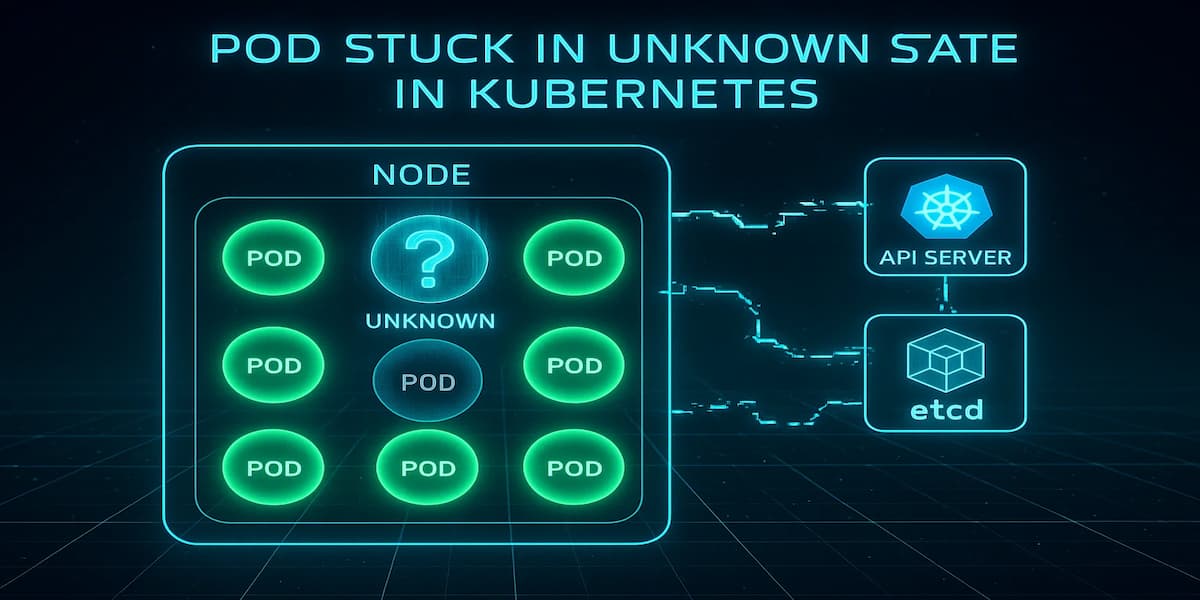
When a Pod is reported as “Unknown,” it means the Kubernetes control plane cannot accurately determine its current condition. Unlike normal states like Running, Pending, or Failed, “Unknown” signals a communication gap between the API server and the node hosting the Pod. This creates uncertainty — the Pod may still be running, may have crashed, or may have been evicted, but Kubernetes doesn’t have enough data to say for sure.
This state is more than just a status mismatch. It disrupts scheduling logic, blocks deployments, and can cascade into service unavailability if left unresolved. In production, it often confuses on-call engineers, since workloads appear stuck without clear logs or events. “Unknown” usually points to deeper cluster-level issues such as:
1. Node communication lost
When the kubelet stops reporting to the API server due to crash loops, node overload, or network partitions, the control plane can no longer verify Pod health. The Pod may still run, but Kubernetes assumes it’s “Unknown.”
2. API server unreachable
If the API server itself is down or overloaded, it fails to update Pod statuses even from healthy nodes. This can make many Pods flip to “Unknown” at once, creating a false sense of widespread failures.
3. Cluster state corruption
Problems in etcd or control-plane components—like corruption, slow storage, or misconfiguration—can desynchronize cluster state. Since the scheduler and controllers rely on this data, they may mark Pods as “Unknown” despite being active.
4. Node eviction in progress
During node failures, upgrades, or autoscaling events, Pods may temporarily transition to “Unknown.” While Kubernetes normally reschedules them, insufficient resources or stalled eviction can prolong the state.
Why Pod Stuck in Unknown State in Kubernetes Happens
While “Unknown” is a single Pod state, it can be triggered by different underlying failures. Understanding these causes is critical for narrowing down where to investigate first.
1. Lost node connectivity
If the kubelet stops reporting back to the API server because of a crash, node overload, or broken network link, the control plane cannot confirm the Pod’s health. In this case, the Pod may still be alive, but Kubernetes has no visibility and reports it as “Unknown.”
Quick check:
kubectl get nodesLook for nodes in NotReady state, which indicates connectivity or kubelet reporting issues.
2. API server overload or downtime
When the API server becomes unresponsive, even healthy nodes cannot send Pod status updates. This can make many Pods across the cluster simultaneously appear “Unknown,” even if they’re still running in the background.
Quick check:
kubectl get componentstatusesIf the API server shows as unhealthy, that’s the likely root cause.
3. etcd or control plane issues
Since Kubernetes relies on etcd as its source of truth, any corruption, misconfigured storage, or slow I/O can break consistency. This prevents controllers and schedulers from resolving a Pod’s actual state, forcing it into “Unknown.”
Quick check:
kubectl get --raw '/healthz/etcd'A failing or slow response here means etcd health is the culprit.
Node eviction or rescheduling delays
During autoscaling, rolling upgrades, or node failures, Pods may temporarily fall into “Unknown” as the scheduler decides whether to reschedule them. Usually this clears automatically, but if capacity is low or the process stalls, the Pod remains stuck.
Quick check:
kubectl describe pod <pod-name>Look for events mentioning eviction or rescheduling attempts.
How to Fix Pod Stuck in Unknown State in Kubernetes
When a Pod is “Unknown,” your goal is to re-establish truth between the node, kubelet, API server, and etcd—then force a clean reschedule if needed. Use the targeted fixes below; each has a quick check and an action you can run immediately.
1) Restore node → control-plane communication
If the kubelet can’t reach the API server (crash, overload, network partition), the Pod state becomes ambiguous. First confirm node health, then restart kubelet if the node is reachable.
Check:
kubectl get nodes -o wideFix (SSH into node):
sudo systemctl restart kubelet2) Cordon + drain the bad node and reschedule the Pod
If the node is flapping or overloaded, evacuate workloads so the scheduler can place the Pod elsewhere. This often clears lingering “Unknown” states.
Check:
kubectl get pod <pod> -n <ns> -o wideFix:
kubectl cordon <node> && kubectl drain <node> --ignore-daemonsets --delete-emptydir-data --force3) Force a clean recreate of the Pod
Sometimes the fastest path is to recreate the Pod so status is rebuilt from scratch (safe when there’s a controller like Deployment/ReplicaSet).
Check:
kubectl get pod <pod> -n <ns> -o jsonpath='{.metadata.ownerReferences[0].kind}{" "}{.metadata.ownerReferences[0].name}{"\n"}'Fix (managed by Deployment/RS):
kubectl delete pod <pod> -n <ns>4) Verify API server health and responsiveness
If the API server is down or slow, many Pods flip to “Unknown” at once. Check livez and request saturation.
Check:
kubectl get --raw /livezFix (increase CPU/memory requests for apiserver on self-managed control plane):
kubectl -n kube-system set resources deploy/kube-apiserver --requests=cpu=1000m,memory=1Gi --limits=cpu=2000m,memory=2Gi5) Check etcd health and latency
Inconsistent or slow etcd breaks cluster state resolution, leaving Pods “Unknown.” Confirm health and look for slow disk I/O symptoms.
Check:
kubectl get --raw /healthz/etcdFix (self-managed etcd; example compaction):
ETCDCTL_API=3 etcdctl --endpoints=<endpoint> compact $(ETCDCTL_API=3 etcdctl --endpoints=<endpoint> endpoint status --write-out=json | jq -r '.[0].Status.header.revision')6) Fix network path: CNI, SecurityGroups, or firewalls
Broken CNI or blocked control-plane ports stop heartbeats/status updates. Validate node → API connectivity from the node.
Check (from node):
nc -zv <apiserver-hostname> 6443Fix (restart CNI on node; example for containerd + CNI plugins):
sudo systemctl restart containerd7) Resolve taints/tolerations mismatches causing stuck reschedules
If Pods can’t be scheduled after node issues, “Unknown” can linger on old instances while new ones never come up. Verify taints vs tolerations.
Check:
kubectl describe node <node> | grep -i taints -A1Fix (remove mistaken taint):
kubectl taint nodes <node> node-role.kubernetes.io/custom-taint:NoSchedule-8) Clear Disk/Memory/ PID pressure on the node
Nodes under pressure stop reporting reliably and throttle kubelet. Confirm and relieve pressure.
Check:
kubectl describe node <node> | grep -i 'MemoryPressure\|DiskPressure\|PIDPressure'Fix (evict workloads then clean disk; example):
kubectl drain <node> --ignore-daemonsets --delete-emptydir-data --force9) Repair kubelet certificate or time skew
Expired kubelet certs or large clock skew break TLS with the API server—status goes dark.
Check (on node):
sudo kubelet --version && timedatectl status | grep 'System clock synchronized'Fix (renew certs on node):
sudo systemctl restart kubelet10) Validate CoreDNS and service discovery (for controllers relying on API DNS)
If controllers or kubelet rely on cluster DNS and it’s broken, updates can stall.
Check:
kubectl -n kube-system get pods -l k8s-app=kube-dns -o wideFix (roll CoreDNS):
kubectl -n kube-system rollout restart deploy/coredns11) Audit recent changes that correlate with the incident
Most production incidents tie back to recent changes; revert or patch quickly.
Check:
kubectl get events -A --sort-by=.lastTimestamp | tail -n 50Fix (rollback a deployment):
kubectl -n <ns> rollout undo deploy/<name>12) Final validation: confirm Pod leaves “Unknown”
After applying a fix, verify the status reconciles and that a fresh Pod is healthy.
Check:
kubectl -n <ns> get pod <pod> -o wide && kubectl -n <ns> get pod -l app=<label> --watch=falseMonitoring Pod Stuck in Unknown State in Kubernetes with CubeAPM
When a Pod flips to Unknown, the fastest path to root cause is correlating four signal streams in one place: Kubernetes Events (e.g., node not ready, eviction), kubelet/cluster metrics (readiness, heartbeats, pressure), API server/etcd health, and deployment rollouts. CubeAPM ingests these via the OpenTelemetry Collector and stitches them into timelines so you can see what broke first—node, control plane, or scheduling—and how it cascaded.
Step 1 — Install CubeAPM (Helm)
Install (or upgrade) CubeAPM with your values file (endpoint, auth, retention, etc.).
helm install cubeapm cubeapm/cubeapm -f values.yaml(Upgrade if already installed: helm upgrade cubeapm cubeapm/cubeapm -f values.yaml.)
Step 2 — Deploy the OpenTelemetry Collector (DaemonSet + Deployment)
Use the official OTel Helm chart to run both a DaemonSet (for node/kubelet scraping and events) and a Deployment (central pipeline, exporting to CubeAPM).
helm install otel-collector-daemonset open-telemetry/opentelemetry-collector -f otel-collector-daemonset.yamlhelm install otel-collector-deployment open-telemetry/opentelemetry-collector -f otel-collector-deployment.yamlStep 3 — Collector configs focused on “Pod Unknown”
Below are minimal, focused snippets. Keep them in separate files for the DS and the central Deployment.
3a) DaemonSet config (otel-collector-daemonset.yaml)
Key idea: collect kubelet stats, k8s events, and kube-state-metrics (if present) close to the node.
receivers:

  k8s_events: {}

  kubeletstats:

    collection_interval: 30s

    auth_type: serviceAccount

    endpoint: https://${NODE_NAME}:10250

    insecure_skip_verify: true

  prometheus:

    config:

      scrape_configs:

        - job_name: "kube-state-metrics"

          scrape_interval: 30s

          static_configs:

            - targets: ["kube-state-metrics.kube-system.svc.cluster.local:8080"]


processors:

  batch: {}


exporters:

  otlp:

    endpoint: ${CUBEAPM_OTLP_ENDPOINT}

    headers:

      x-api-key: ${CUBEAPM_API_KEY}

    tls:

      insecure: false


service:

  pipelines:

    metrics:

      receivers: [kubeletstats, prometheus]

      processors: [batch]

      exporters: [otlp]

    logs:

      receivers: [k8s_events]

      processors: [batch]

exporters: [otlp]- k8s_events captures NodeNotReady, Eviction, FailedAttachVolume, etc., which often precede “Unknown”.
- kubeletstats surfaces node pressure and heartbeat issues that cause status gaps.
- prometheus here pulls from kube-state-metrics for Pod conditions and node readiness. (CubeAPM docs show Prometheus scraping via Collector; you can add more targets later.
3b) Central Deployment config (otel-collector-deployment.yaml)
Key idea: receive OTLP from agents, enrich, and export to CubeAPM.
receivers:
  otlp:
    protocols:
      grpc:
      http:

processors:
  resource:
    attributes:
      - key: cube.env
        value: production
        action: upsert
  batch: {}

exporters:
  otlp:
    endpoint: ${CUBEAPM_OTLP_ENDPOINT}
    headers:
      x-api-key: ${CUBEAPM_API_KEY}
    tls:
      insecure: false

service:
  pipelines:
    metrics:
      receivers: [otlp]
      processors: [resource, batch]
      exporters: [otlp]
    logs:
      receivers: [otlp]
      processors: [resource, batch]
      exporters: [otlp]
    traces:
      receivers: [otlp]
      processors: [resource, batch]
      exporters: [otlp]
Environment variables like CUBEAPM_OTLP_ENDPOINT and CUBEAPM_API_KEY should be set via your Helm values or k8s Secrets. (See CubeAPM config reference for environment-based configuration.)
Step 4 — One-line Helm installs for kube-state-metrics (if you don’t have it)
helm repo add prometheus-community https://prometheus-community.github.io/helm-charts && helm repo update && helm install kube-state-metrics prometheus-community/kube-state-metrics -n kube-system --create-namespaceStep 5 — Verification (what you should see in CubeAPM)
After a few minutes of ingestion, you should be able to validate Unknown-focused signals:
- Events timeline: A burst of NodeNotReady, NodeHasSufficientMemory/Disk flips, or Evicted preceding the Unknown Pod.
- Node health: Kubelet stats showing PID/Disk/MemoryPressure correlating with the same window.
- Pod condition series: From kube-state-metrics, the affected Pod shows transitions (Ready=false, ContainersReady=false, Status=Unknown).
- Control plane health: If the issue is cluster-wide, spikes in API server latency and any etcd health warnings align with the Unknown window.
- Rollout context: If a Deployment owned the Pod, you’ll see its ReplicaSet changes and any failed reschedules in the same view.
Step 6 — Ops playbook inside CubeAPM
- Drill from Pod → Node to confirm if Unknown aligns with node pressure or network partitions.
- Pivot to Events around T-0 to spot the first failing signal (e.g., NodeNotReady before Pod Unknown).
- Compare rollouts: If a change just shipped, use the Deployments view to see replicas, reschedules, and failures during the same window.
Copy-paste commands (single line recap)
- Install CubeAPM:
helm install cubeapm cubeapm/cubeapm -f values.yaml- Install OTel DS:
helm install otel-collector-daemonset open-telemetry/opentelemetry-collector -f otel-collector-daemonset.yaml- Install OTel Deployment:
helm install otel-collector-deployment open-telemetry/opentelemetry-collector -f otel-collector-deployment.yaml- Install kube-state-metrics (if needed):
helm repo add prometheus-community https://prometheus-community.github.io/helm-charts && helm repo update && helm install kube-state-metrics prometheus-community/kube-state-metrics -n kube-system --create-namespaceExample Alert Rules
1. Pod entered “Unknown” (point-in-time detector)
Triggers as soon as any Pod reports the Unknown phase—fastest early signal.
max by (namespace,pod) (kube_pod_status_phase{phase="Unknown"}) > 02. Sustained Unknown for 5 minutes (noise-reduced)
Fires only if a Pod stays Unknown, filtering out brief flaps.
max_over_time(kube_pod_status_phase{phase="Unknown"}[5m]) > 03. Spike in Unknown Pods cluster-wide
Catches incidents where multiple Pods flip Unknown at once (API or etcd trouble likely).
sum(kube_pod_status_phase{phase="Unknown"}) > 34. Unknown + NodeNotReady correlation (root-cause hint)
Alerts when a Pod is Unknown and its node is NotReady—high confidence it’s node/kubelet.
sum by (node) (kube_pod_status_phase{phase="Unknown"}) * on (node) group_left() max by (node) (kube_node_status_condition{condition="Ready",status="false"}) > 05. Unknown following eviction burst (capacity pressure)
Flags when Unknowns coincide with evictions—often disk/memory pressure or disruption.
sum(increase(kube_event_count{reason="Evicted"}[10m])) > 0 and sum(kube_pod_status_phase{phase="Unknown"}) > 06. Node pressure preceding Unknown (predictive)
Warns when nodes show Memory/Disk/PID pressure, which commonly precedes Unknown states.
sum by (node) (max_over_time(kube_node_status_condition{condition=~"MemoryPressure|DiskPressure|PIDPressure",status="true"}[5m])) > 07. API server saturation likely (cluster-wide Unknowns)
If many Pods are Unknown, suspect API server load or unavailability—page the platform team.
sum(kube_pod_status_phase{phase="Unknown"}) > 108. etcd health risk (consistency issues)
Long-tail read/write latency on etcd often manifests as stale Pod status; watch 95th percentile.
histogram_quantile(0.95, sum by (le) (rate(etcd_request_duration_seconds_bucket[5m]))) > 0.39. Pod recovery SLO (Unknown should clear quickly)
Ensures Pods don’t remain Unknown beyond your SLO window (e.g., 10 minutes).
sum by (namespace,pod) (min_over_time(kube_pod_status_phase{phase="Unknown"}[10m])) > 010. Percentage of Unknown Pods per namespace (blast radius)
Highlights which namespaces are impacted the most by Unknown state.
(sum by (namespace) (kube_pod_status_phase{phase="Unknown"}) / clamp_min(sum by (namespace) (kube_pod_status_phase), 1)) * 100 > 511. Restarted after Unknown (verification signal)
Confirms workloads are rescheduling (you’ll want this to spike after remediation).
sum(increase(kube_pod_container_status_restarts_total[15m])) > 0 and sum(kube_pod_status_phase{phase="Unknown"}) == 0Conclusion
A Pod stuck in the “Unknown” state is more than an odd status—it’s a symptom of deeper cluster health problems. Lost node heartbeats, API server outages, or etcd inconsistencies can all cause workloads to stall and leave engineers scrambling for answers.
If left unchecked, “Unknown” Pods can block deployments, delay rollouts, and trigger partial outages that directly affect end users and revenue. The longer a Pod stays in this state, the harder it becomes to isolate root cause quickly.
CubeAPM makes this easier by correlating events, node metrics, and control-plane health into one view. With proactive alerts and real-time context, teams can spot issues early, resolve incidents faster, and keep Kubernetes environments reliable. Try CubeAPM today to cut troubleshooting time and restore confidence in your workloads.