










Kubernetes gives every pod a place to write logs, but it leaves the actual logging pipeline up to you. Once you try to ship those logs somewhere useful, aggregating across nodes, retaining past pod restarts, or correlating with traces during an incident, the default setup breaks down fast. Without centralized Kubernetes logging, debugging a pod that crashed 10 minutes ago means SSH-ing into nodes and hoping the logs haven’t already rotated out.
This guide covers how Kubernetes logging works at the container runtime and kubelet level, where logs live on nodes, how to implement centralized log collection with agents like Fluentd or Fluent Bit, and what logging architecture fits teams running 10 pods vs. 1,000. We also compare cost models across major logging tools, since ingesting 30TB of Kubernetes logs monthly can cost anywhere from $4,500 to $52,000, depending on the pricing structure.
What Is Kubernetes Logging?
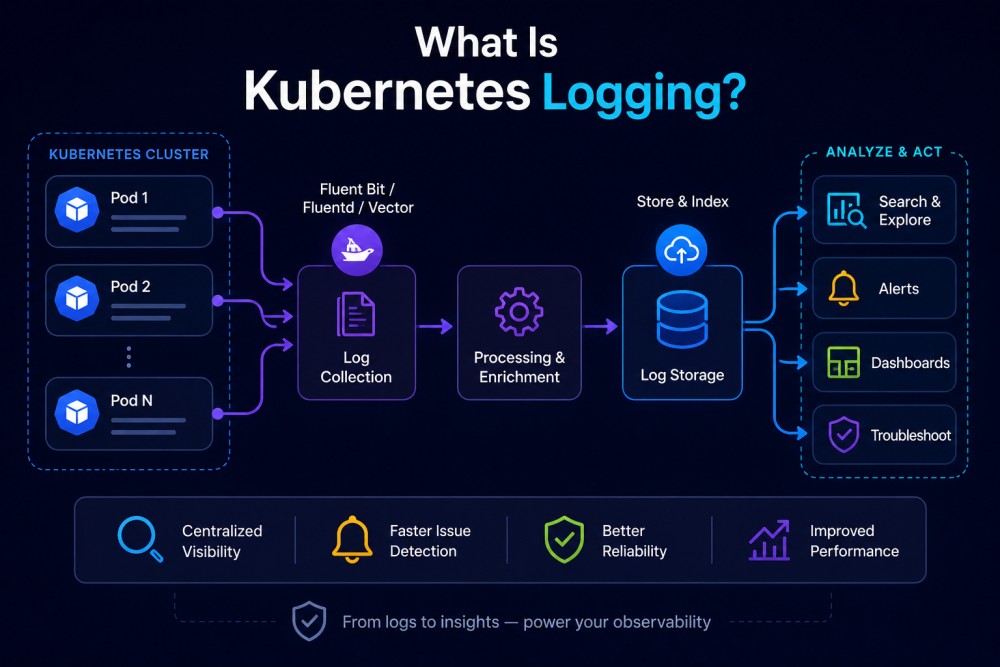
Kubernetes logging refers to the process of capturing and managing log data generated by applications and system components running inside Kubernetes clusters. This includes logs from containers, pods, Kubernetes control plane components (API server, scheduler, controller manager), and worker node services (kubelet, container runtime).
Logs in Kubernetes are critical for understanding application behavior, debugging failures, auditing access, and meeting compliance requirements. Unlike traditional server-based logging where logs accumulate on a single machine, Kubernetes logs are distributed across ephemeral containers that can start, stop, or move between nodes at any time. This makes centralized log collection and retention essential for any production Kubernetes setup.
At the most basic level, containerized applications write logs to stdout and stderr streams. The container runtime (like containerd or CRI-O) captures these streams and writes them to files on the node’s filesystem. The kubelet then manages log rotation for these files. However, this native mechanism only keeps logs locally and only retains logs from the most recent container restarts. If a pod crashes or gets evicted, its logs are lost unless you have a separate system collecting and storing them centrally.
Kubernetes does not provide a built-in solution for aggregating, searching, or retaining logs beyond what lives on individual nodes. Teams need to implement their own logging architecture — typically using a DaemonSet-based log collector that runs on every node, ships logs to a central backend, and handles indexing and retention.
How Kubernetes Logging Works
Kubernetes logging happens at multiple layers: container runtime, kubelet, and optional centralized agents. Understanding each layer is essential for designing a logging architecture that works in production.
Container runtime logging
When a containerized application writes to stdout or stderr, the container runtime intercepts these streams and writes them to log files on the node. The exact log location depends on the runtime:
- containerd: logs are written in JSON format to /var/log/pods/<namespace>_<pod-name>_<pod-uid>/<container-name>/*.log
- CRI-O: logs follow a similar pattern under /var/log/pods/
- Docker (deprecated in Kubernetes 1.24+): previously wrote to /var/lib/docker/containers/<container-id>/<container-id>-json.log
Each log line includes a timestamp and stream identifier (stdout or stderr). The container runtime does not aggregate logs across multiple containers or pods; every container gets its own log file.
Kubelet log rotation
The kubelet is responsible for rotating container logs on the node to prevent disk space from filling up. Two kubelet configuration settings control this behavior:
- containerLogMaxSize (default: 10Mi): maximum size of a single log file before rotation
- containerLogMaxFiles (default: 5): number of rotated log files to retain per container
When a log file reaches 10Mi, the kubelet triggers a rotation. The container runtime renames the current log file and starts a new one. Only the 5 most recent log files are kept — older files are deleted. This means a container generating heavy logs can fill 50Mi of space before older logs start getting purged.
For high-throughput workloads, tuning these values is critical. A pod logging 100MB per hour will rotate every 6 minutes with default settings and lose logs older than 30 minutes unless a centralized collector is running.
The kubelet also provides two additional settings for log rotation efficiency:
- containerLogMaxWorkers: controls how many log rotation operations can run concurrently
- containerLogMonitorInterval: defines how frequently the kubelet checks if logs need rotation
These settings matter when running hundreds of pods per node, where simultaneous log rotations can create CPU or I/O spikes.
How kubectl logs works
When you run kubectl logs <pod-name>, the kubelet on the node hosting that pod reads the log file directly and streams its contents back to you. The kubelet only returns the contents of the most recent log file — if the container restarted and its previous logs rotated out, you cannot access them via kubectl logs.
To view logs from a previous container instance (for example, after a crash), use kubectl logs <pod-name> –previous. This only works if the previous container’s log file still exists on the node. Once the pod is evicted or the node is terminated, those logs are permanently lost.
For multi-container pods, specify which container’s logs to view with kubectl logs <pod-name> -c <container-name>.
Limitations of node-level logging
Kubernetes node-level logging, where logs are stored only on the node running the pod, breaks down in production for several reasons:
- Logs are lost when pods are evicted or nodes are terminated. If a pod crashes or gets rescheduled to another node, its logs on the original node are deleted.
- No log aggregation across pods or services. Debugging a distributed transaction that touches 10 microservices means manually pulling logs from 10 different pods.
- No long-term retention. After a few log rotations (typically 30-50 minutes for high-throughput pods), older logs are purged.
- Node disk space constraints. High-volume logging can fill node disks, causing pod evictions or kubelet instability.
This is why production Kubernetes clusters require centralized logging — a separate system that collects logs from all pods, stores them in a durable backend, and makes them searchable across the entire cluster.
Kubernetes Logging Architecture Patterns
Kubernetes supports three main logging patterns: node-level logging (default), sidecar containers, and cluster-level logging with agents. Each has different trade-offs for cost, complexity, and operational overhead.
Node-level logging (basic, not production-ready)
This is the default behavior described above. Logs are written to the node’s filesystem and accessed via kubectl logs. No additional infrastructure is required, but logs are ephemeral and not searchable across the cluster.
Use case: local development, proof of concept environments, single-node clusters.
Sidecar container pattern
A sidecar container runs alongside the main application container in the same pod. The sidecar’s job is to read logs from a shared volume or stream them from the application container and forward them to a centralized logging backend.
Example use case: an application writes logs to a file instead of stdout. A sidecar container tails that file and sends it to a log aggregator like Elasticsearch or Loki.
Pros:
- Application-specific log processing (parsing, filtering, enriching) happens before logs leave the pod
- Works when the application cannot log to stdout
Cons:
- Adds resource overhead (CPU, memory) to every pod
- Each pod requires its own sidecar instance, increasing operational complexity
- Duplicates log collection logic across every pod instead of centralizing it at the node level
Sidecar logging is rarely used in modern Kubernetes clusters. Cluster-level logging with DaemonSets is simpler and more resource-efficient.
Cluster-level logging with DaemonSet agents
This is the standard production pattern. A log collection agent (Fluentd, Fluent Bit, Logstash, or Vector) runs as a DaemonSet — one instance per node. Each agent instance:
- Watches /var/log/pods/ for new log files
- Reads and parses log entries
- Enriches logs with Kubernetes metadata (pod name, namespace, labels, node name)
- Forwards logs to a central backend (Elasticsearch, Loki, Splunk, Datadog, CubeAPM, etc.)
The agent runs outside the application pods, so it does not consume resources from the application workloads. It also survives pod restarts and evictions, ensuring logs are captured even when pods crash.
Pros:
- Centralized log collection across all pods and nodes
- Low per-pod overhead; one agent serves all pods on the node
- Logs are stored durably in a searchable backend
- Supports long term retention and compliance requirements
Cons:
- Requires deploying and maintaining a log aggregation backend
- Agent resource usage scales with log volume
- Misconfigured agents can drop logs or overwhelm the backend
This pattern is used by most production Kubernetes clusters. The choice of agent (Fluentd vs. Fluent Bit vs. Vector) depends on resource constraints and processing requirements, while the backend choice depends on cost, deployment model, and feature needs.
Key Kubernetes Logging Signals and Metadata
Effective Kubernetes logging requires more than just capturing application log messages. Logs need to be enriched with Kubernetes-specific metadata so you can filter, search, and correlate logs across pods, namespaces, and services during incident response.
Container logs
These are the logs your application writes to stdout and stderr. They contain the actual log message content: error messages, request logs, debug output, stack traces.
When collected by a logging agent, each log line should be tagged with:
- pod name and namespace
- container name (if the pod has multiple containers)
- node name where the pod is running
- pod labels (often used to identify the service, environment, version)
- pod UID (unique identifier that survives restarts)
Without this metadata, a log message like Error: connection timeout is nearly useless. With metadata, you can filter to namespace=production AND service=checkout and instantly see all timeout errors from your production checkout service.
Kubelet logs
The kubelet is the agent running on each node that manages pods and containers. Its logs are critical for diagnosing node-level issues: pod scheduling failures, image pull errors, volume mount problems, node resource exhaustion.
On Linux nodes using systemd, kubelet logs are written to journald. Access them with:
journalctl -u kubeletOn nodes without systemd, kubelet logs are written to /var/log/kubelet.log.
Common kubelet log events to alert on:
- FailedCreatePodSandbox: container runtime cannot create the pod sandbox
- FailedMount: persistent volume mount failures
- NodeNotReady: node status transitions to NotReady
- OOMKilling: node is evicting pods due to memory pressure
Control plane component logs
Kubernetes control plane components generate logs that are essential for cluster-level troubleshooting:
- kube-apiserver: all API requests, authentication failures, admission webhook rejections
- kube-scheduler: pod scheduling decisions, node affinity failures
- kube-controller-manager: reconciliation loops, deployment rollouts, replica scaling
- etcd: cluster state changes, snapshot operations
On managed Kubernetes services (EKS, GKE, AKS), control plane logs are often shipped to the cloud provider’s log service (CloudWatch, Cloud Logging, Azure Monitor) and are not accessible via kubectl logs. You must configure log export from the control plane to your centralized logging backend.
On self-managed clusters, control plane components typically run as static pods or systemd services. Access their logs via:
kubectl logs -n kube-system kube-apiserver-<node-name>or:
journalctl -u kube-apiserverKubernetes events
Kubernetes events are cluster-generated messages about state changes: pod starts, crashes, evictions, scaling events, failed health checks. Events are stored in etcd and expire after 1 hour by default.
Events are not logs, but they provide critical context during incidents. A spike in application errors often correlates with a Kubernetes event like OOMKilled or EvictionThresholdMet.
To view events for a specific pod:
kubectl describe pod <pod-name>To view all cluster events:
kubectl get events --all-namespaces --sort-by='.lastTimestamp'Many logging tools (including CubeAPM, Datadog, and Grafana Loki) ingest Kubernetes events alongside logs, allowing you to correlate application log spikes with pod restarts or node pressure in a single query.
Kubernetes Logging Best Practices
Implementing Kubernetes logging correctly in production requires more than just deploying a DaemonSet. These best practices reduce log loss, improve incident response speed, and prevent runaway log costs.
Use structured logging
Applications should emit logs in a structured format (JSON or logfmt) rather than unstructured plain text. Structured logs are easier to parse, search, and filter.
Bad (unstructured):
2026-01-15 14:32:11 ERROR: Failed to connect to database
Good (structured JSON):
{"timestamp":"2026-01-15T14:32:11Z","level":"error","message":"Failed to connect to database","service":"checkout","db_host":"postgres-primary.prod.svc.cluster.local"}Structured logs allow you to query by specific fields: level=error AND service=checkout AND db_host=postgres-primary.
Log to stdout and stderr, not to files inside containers
Kubernetes expects containerized applications to log to stdout (for informational logs) and stderr (for errors). This allows the container runtime and kubelet to capture logs automatically.
If your application writes logs to a file inside the container (e.g., /var/log/app.log), those logs are not visible to kubectl logs and will be lost when the container stops unless you mount a persistent volume or use a sidecar to tail the file.
Include contextual metadata in log messages
Beyond structured logging, include request IDs, user IDs, transaction IDs, or trace IDs in log messages. This makes it possible to correlate logs from different services handling the same request.
Example log entry with trace context:
{"timestamp":"2026-01-15T14:32:11Z","level":"error","message":"Payment processing failed","trace_id":"7f8a3b2c-9e1d-4c6a-b5f8-2d9e6c3a1b7f","user_id":"user_12345","amount":99.99}When integrated with distributed tracing (OpenTelemetry, Jaeger, Zipkin), this trace ID links the log entry directly to the full trace timeline, showing which service the error originated in and what happened upstream.
Use log levels appropriately
Define and enforce consistent log levels across services:
- DEBUG: detailed diagnostic information, disabled in production
- INFO: routine operational messages (request started, job completed)
- WARN: something unexpected happened, but the application recovered
- ERROR: an error occurred that requires attention
- FATAL/CRITICAL: the application cannot continue and is shutting down
Overusing ERROR or INFO levels makes it harder to filter during incidents. A service that logs every HTTP request at ERROR level creates noise that buries real errors.
Centralize logs with a DaemonSet agent
Do not rely on kubectl logs or node-level logs in production. Deploy a log collection agent (Fluentd, Fluent Bit, Vector) as a DaemonSet to forward logs to a durable backend.
Popular agent choices:
- Fluent Bit: lightweight, low memory footprint, good for resource-constrained nodes
- Fluentd: more features and plugins, higher resource usage
- Vector: Rust-based, very fast, growing ecosystem
- Logstash: part of the Elastic stack, heavier resource footprint
The agent should:
- Parse logs into structured fields
- Enrich logs with Kubernetes metadata (pod name, namespace, labels)
- Buffer logs locally during backend outages to prevent loss
- Forward logs to your chosen backend (Elasticsearch, Loki, Splunk, CubeAPM, etc.)
Implement log retention policies
Storing every log message forever is expensive and often unnecessary. Define retention periods based on compliance requirements and operational needs:
- Application logs: 30-90 days for most use cases
- Audit logs: 1-7 years, depending on industry regulations
- Debug logs: 7-14 days (or disabled in production)
Logging backends like CubeAPM, Elasticsearch, and Loki support automatic log deletion or archival after a defined period. Configure retention at the index or namespace level to match your requirements.
Monitor log volume and agent resource usage
High log volume can overwhelm your logging backend or exhaust node disk space. Monitor:
- Log ingestion rate (MB/s or events/s) per namespace and pod
- Log agent CPU and memory usage on each node
- Backend ingestion lag – how far behind is the backend in processing logs
Set alerts for abnormal log volume spikes. A sudden 10x increase in log volume often indicates a bug (infinite loop, verbose error logging) rather than legitimate traffic growth.
Avoid logging sensitive data
Never log personally identifiable information (PII), passwords, API keys, credit card numbers, or other sensitive data. If a log message must include sensitive context, redact or mask it before emission.
Example:
Bad:
{"level":"info","message":"User login","email":"[email protected]","password":"plaintextpassword123"}Good:
{"level":"info","message":"User login","email":"[email protected]","auth_method":"password"}Many logging tools support automatic PII redaction, but it is better to prevent sensitive data from being logged in the first place.
Correlate logs with metrics and traces
Logs are one signal in a full observability stack. Correlating logs with metrics and distributed traces speeds up root cause analysis during incidents.
For example, when a spike in HTTP 500 errors appears in your metrics dashboard, clicking into the metric should surface related error logs and traces for the same time window. Tools like CubeAPM, Datadog, and Grafana support this correlation natively.
Kubernetes Logging Tools and Implementation
Choosing the right Kubernetes logging tool depends on your deployment model (SaaS vs. self-hosted), data residency requirements, log volume, and budget. This section compares centralized logging backends commonly used with Kubernetes.
CubeAPM

CubeAPM is a self-hosted observability platform that combines logs, traces, metrics, and Kubernetes monitoring in one unified backend. It runs inside your VPC or on-prem, so logs never leave your infrastructure.
Pricing: $0.15/GB ingested, unlimited retention, no per-user fees
Deployment: Self-hosted (managed by CubeAPM), runs on your infra
OpenTelemetry: Native support
Best for: Teams that need centralized logs + APM + Kubernetes monitoring in one platform with full data control
CubeAPM uses a DaemonSet-based log collector (compatible with Fluent Bit and OpenTelemetry Collector) to ship logs from every node. Logs are automatically enriched with Kubernetes metadata (pod name, namespace, labels) and indexed for fast search. Because it runs on your infrastructure, there are no cloud egress fees when shipping logs from AWS, GCP, or Azure clusters.
Unlike SaaS logging tools, CubeAPM does not charge separately for log ingestion, indexing, and retention. The $0.15/GB rate includes all three. A 50-node AKS cluster generating 10TB of logs monthly costs $1,500/month with CubeAPM vs. $8,000–$12,000/month with Datadog or Splunk when factoring in ingest, index, and egress fees.
Elasticsearch and Kibana (ELK stack)
Elasticsearch is a search and analytics engine commonly used as a log storage backend. Kibana provides the visualization and query UI. Logs are shipped to Elasticsearch using Logstash, Fluentd, or Fluent Bit.
Pricing: Free (self-hosted open source) or Elastic Cloud starting at $95/month
Deployment: Self-hosted or SaaS
OpenTelemetry: Partial support
Best for: Teams already using the Elastic stack or who need advanced full-text search
The ELK stack is powerful but requires significant operational overhead. You must manage Elasticsearch cluster sizing, index lifecycle policies, and shard allocation. Running Elasticsearch at scale (multiple terabytes of logs) requires dedicated infrastructure and expertise.
Elasticsearch’s per-index storage model can become expensive. A 50-node cluster generating 500GB of logs daily requires provisioning enough disk (SSD recommended) to retain logs for your chosen period, plus overhead for indexing and replication. Many teams underestimate storage costs when self-hosting ELK.
Grafana Loki
Loki is a log aggregation system designed to be cost-effective and easy to operate. Unlike Elasticsearch, Loki does not index the full content of log messages; it only indexes metadata labels (pod name, namespace, service). This reduces storage costs but makes full-text search slower.
Pricing: Free (self-hosted) or Grafana Cloud starting at $0.50/GB
Deployment: Self-hosted or SaaS
OpenTelemetry: Native support
Best for: Teams already using Grafana and Prometheus who want lightweight log storage
Loki works best when logs are structured and you can query using labels rather than full-text search. For example, querying {namespace=”production”, service=”checkout”} is fast. Searching for a specific error message substring across all logs is slower.
Loki’s cost model is appealing: storing 10TB of logs in object storage (S3, GCS) costs $200–$300/month in storage fees alone, vs. $2,000–$5,000/month for the same volume in Elasticsearch with SSDs. However, Loki’s query performance degrades on high-cardinality labels (labels with many unique values), which can become a problem for large clusters.
Datadog Logs
Datadog is a fully managed SaaS observability platform. Logs are ingested, indexed, and retained in Datadog’s backend.
Pricing: $0.10/GB ingested + $1.70/million events indexed Deployment: SaaS only OpenTelemetry: Strong support Best for: Teams that want fully managed logging with minimal operational overhead
Datadog’s two-part pricing model (ingest + index) catches many teams by surprise. A 50-node Kubernetes cluster generating 10TB of logs monthly pays $1,000 for ingestion + $17,000 for indexing (assuming 10 billion log events), totaling $18,000/month before egress fees. Datadog recommends excluding low-value logs from indexing to control costs, but this requires upfront filtering that many teams only implement after the first bill arrives.
Datadog also charges $0.09/GB for AWS/GCP egress when logs are shipped out of your cloud. For 10TB/month, that adds $900 in hidden egress costs.
Splunk Observability Cloud
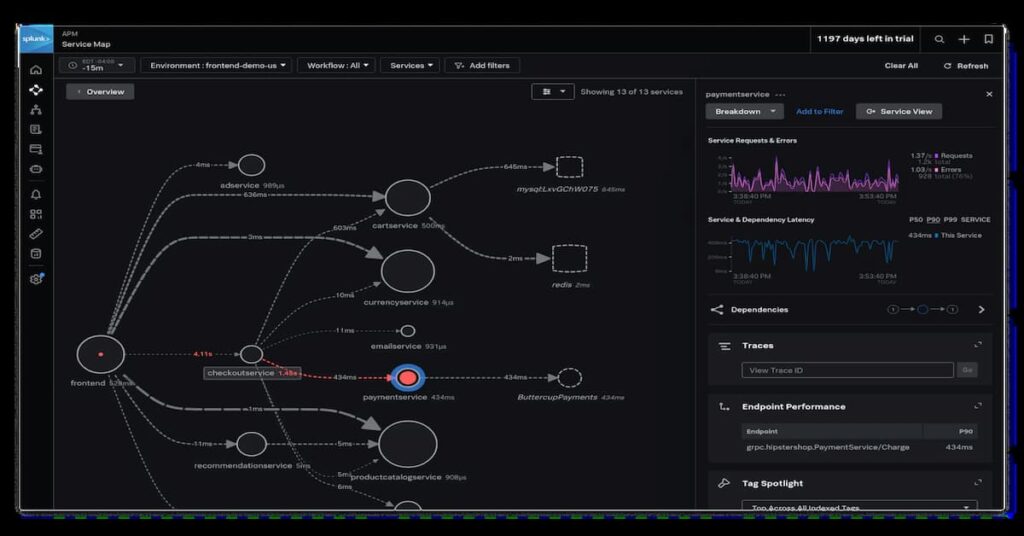
Splunk is an enterprise log analytics and SIEM platform widely used in regulated industries. It supports both SaaS (Splunk Cloud) and self-hosted deployments.
Pricing: Starts at $150/GB ingested for Splunk Cloud
Deployment: SaaS or self-hosted
OpenTelemetry: Native support
Best for: Enterprise teams with security and compliance requirements
Splunk’s pricing is the highest among major logging tools. A 50-node cluster generating 10TB of logs monthly costs $150,000/month on Splunk Cloud’s standard pricing. Enterprise contracts with volume discounts bring this down, but Splunk remains expensive compared to alternatives.
Splunk’s strength is advanced search, alerting, and security analytics. It is the default choice for teams with SOC (Security Operations Center) requirements or who need built-in threat detection.
New Relic Logs
New Relic includes log management as part of its broader observability platform. Logs are ingested and stored alongside APM traces and infrastructure metrics.
Pricing: $0.30/GB beyond 100GB free per month
Deployment: SaaS only
OpenTelemetry: Strong support
Best for: Teams already using New Relic for APM who want unified logs
New Relic’s log pricing is mid-range but compounds when combined with APM and infrastructure costs. A 50-node cluster generating 10TB of logs monthly pays $3,000/month for logs alone, plus $5,000–$8,000 for APM and infra, depending on user seats and ingestion volume.
Coralogix
Coralogix is a SaaS log analytics platform that uses in-stream processing to reduce storage costs. Logs are analyzed in real time, and only a subset is indexed for long-term storage.
Pricing: $0.42/GB for high-priority logs, $0.14/GB for medium priority
Deployment: SaaS only
OpenTelemetry: Native support
Best for: Teams with high log volume who can tier logs by priority
Coralogix’s pricing model rewards teams that can categorize logs upfront. Debug logs or verbose application logs can be sent to the medium-priority tier, while error logs and audit logs go to high priority. This reduces costs but requires planning and filtering logic in your log collector.
Pricing based on publicly available information as of April 2026. Enterprise discounts, custom contracts, and negotiated rates are not reflected here.
Common Kubernetes Logging Challenges and How to Solve Them
Even with centralized logging in place, teams encounter recurring problems when running Kubernetes at scale. These are the most common issues and their solutions.
Lost logs after pod restarts or evictions
Problem: A pod crashes, and you cannot access its logs because they were only stored on the node, which has already rotated them out.
Solution: Deploy a DaemonSet log collector that ships logs to a durable backend before the pod terminates. The collector should buffer logs locally during backend outages to prevent loss.
High log volume overwhelming the backend
Problem: A misconfigured service starts logging at DEBUG level in production, generating 100GB/hour and causing the logging backend to fall behind or reject new logs.
Solution: Implement log sampling or filtering at the agent level. For example, configure Fluent Bit to drop logs matching specific patterns (health check logs, verbose debug messages). Set alerts for abnormal log volume spikes per namespace.
Cannot correlate logs across microservices
Problem: A user reports an error, but you cannot trace the request across the 8 services it touched because logs are not connected.
Solution: Use distributed tracing (OpenTelemetry, Jaeger) and include trace IDs in log messages. Logging tools like CubeAPM, Datadog, and Grafana support trace-to-log correlation, allowing you to click a trace span and see all related logs.
Logs contain sensitive data
Problem: Application logs include user emails, API keys, or credit card numbers, creating compliance risks.
Solution: Configure your logging agent to redact or mask sensitive fields before forwarding logs. Many agents support regex-based redaction. Better: fix the application to stop logging sensitive data in the first place.
Slow log queries during incidents
Problem: Querying logs for a specific error message across 1TB of logs takes 30 seconds, slowing down incident response.
Solution: Use structured logging and index important fields (service name, namespace, log level) to speed up queries. Avoid full-text search when possible. Tools like Loki are optimized for label-based queries, while Elasticsearch is better for full-text search.
Log retention policies not enforced
Problem: Logs from 3 years ago are still stored, costing $5,000/month in storage fees, even though the team only needs 90 days of retention.
Solution: Configure automatic log deletion or archival in your logging backend. Elasticsearch supports Index Lifecycle Management (ILM), Loki supports retention policies, and CubeAPM allows per-namespace retention settings.
Conclusion
Kubernetes logging is essential for debugging, monitoring, and meeting compliance requirements in production clusters. The default node-level logging that Kubernetes provides is not sufficient; logs are ephemeral, not aggregated, and lost when pods restart or nodes terminate. Production clusters require centralized logging with a DaemonSet-based agent that ships logs to a durable backend.
Choosing the right logging tool depends on deployment model, data residency requirements, log volume, and budget. SaaS tools like Datadog and Splunk offer fully managed logging but charge high ingestion and indexing fees. Self-hosted tools like Elasticsearch and Loki reduce variable costs but require operational overhead. CubeAPM combines centralized logs, APM, and Kubernetes monitoring in one self-hosted platform with predictable $0.15/GB pricing and no egress fees.
Effective Kubernetes logging requires structured log formats, appropriate log levels, Kubernetes metadata enrichment, and correlation with metrics and traces. Implementing these best practices reduces log loss, improves incident response speed, and prevents runaway costs.
Disclaimer: The information in this article reflects the latest details available at the time of publication and may change as technologies and products evolve. Features, pricing, and plan limits can change over time. Always verify the latest information directly with the vendor before making purchasing or deployment decisions.
Frequently Asked Questions
What is Kubernetes logging?
Kubernetes logging is the process of capturing and managing log data from applications and system components running in Kubernetes clusters, including container logs, kubelet logs, and control plane logs.
Where are Kubernetes logs stored?
Container logs are stored on the node filesystem under /var/log/pods/ by default. Without centralized logging, logs are lost when pods restart or nodes terminate.
How do I view logs in Kubernetes?
Use kubectl logs <pod-name> to view logs from a running pod. For multi-container pods, specify the container with kubectl logs <pod-name> -c <container-name>.
What is the best tool for Kubernetes logging?
The best tool depends on your deployment model and requirements. CubeAPM is best for self-hosted centralized logging with unified observability. Datadog is best for managed SaaS. Grafana Loki is best for teams already using Prometheus and Grafana.
How long does Kubernetes keep logs?
By default, Kubernetes keeps the 5 most recent rotated log files per container, which typically covers 30–50 minutes of logs for high-throughput pods. Centralized logging is required for longer retention.
How do I centralize Kubernetes logs?
Deploy a log collection agent like Fluent Bit, Fluentd, or Vector as a DaemonSet to forward logs from all nodes to a central backend like Elasticsearch, Loki, or CubeAPM.
What is the difference between kubectl logs and centralized logging?
kubectl logs only shows logs from the most recent container on the node. Centralized logging aggregates logs from all pods and nodes, retains them durably, and makes them searchable across the cluster.