










Kafka monitoring is essential for any team running real-time systems at scale. In 2025, 86% of IT leaders are prioritizing investments in data streaming platforms, and many report 5× or greater ROI. But streaming systems operate under immense stress: spikes in throughput, JVM memory leaks, broker outages, and consumer lag can cascade into service-level failures.
CubeAPM is the best solution for Kafka monitoring because it unifies metrics, logs, and error tracing from producers through brokers to consumers. Its OpenTelemetry-native architecture enables zero-instrumentation transitions, and its smart sampling and context correlation minimize noise while catching real issues. You’ll get rich dashboards for broker health, topic throughput, consumer lag, and automatic alerting.
In this article, we’re going to cover how Kafka monitoring works, why monitoring Kafka is crucial, the key metrics you should track, and how CubeAPM delivers Kafka monitoring.
What is Kafka Monitoring?
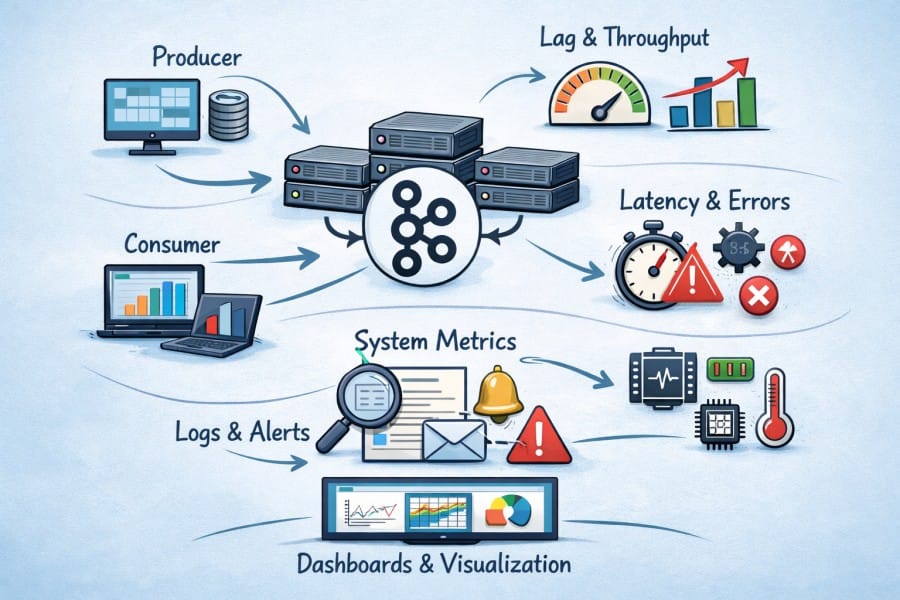
Apache Kafka is a distributed event-streaming platform built to handle high-throughput, real-time data pipelines. It acts as a central nervous system for modern applications — streaming billions of events between microservices, analytics systems, and databases with sub-second latency. Organizations use Kafka for everything from IoT telemetry and fraud detection to log aggregation and financial transaction tracking. More than 90% of large enterprises use Kafka or a compatible streaming platform to support their data-driven architectures.
Kafka monitoring is the process of tracking the health, performance, and reliability of your Kafka clusters. It involves observing key metrics such as broker uptime, topic throughput, partition distribution, and consumer lag — ensuring that your streaming pipelines stay fast, balanced, and error-free. By continuously analyzing logs, metrics, and traces, Kafka monitoring helps teams:
- Detect and resolve bottlenecks before they cause service degradation
- Prevent data loss due to unreplicated or failed brokers
- Identify latency spikes in producers or consumers
- Optimize partition and replication strategies for performance
- Maintain uptime and compliance across distributed clusters
In short, Kafka monitoring ensures that every event flowing through your system — from sensor data to payment transactions — is processed reliably and efficiently. For businesses, this translates into higher application availability, faster insights, and reduced operational costs.
Example: Using Kafka for Real-Time Fraud Detection in FinTech
Imagine a financial platform processing millions of transactions per minute. Each event passes through Kafka topics for fraud analysis, scoring, and alerting. Without proper Kafka monitoring, consumer lag or broker downtime could delay fraud alerts by several seconds — enough for a fraudulent transaction to succeed.
With observability in place, engineers can instantly detect lag spikes, track processing time per partition, and correlate anomalies with system logs. Tools like CubeAPM provide this visibility out of the box, helping FinTech teams maintain both speed and trust in mission-critical pipelines.
Why Kafka Monitoring Is Crucial for Modern Data Pipelines
Kafka’s distributed architecture and constant scaling introduce vulnerabilities: a lagging consumer, resource bottleneck, or failing broker can silently stall data delivery across services. Without Kafka monitoring, teams are flying blind, unable to detect these issues before they impact downstream systems.
Detect Replication Gaps Before They Become Catastrophic
Replication ensures Kafka’s durability. If follower replicas fall behind, the cluster’s fault tolerance weakens. Monitoring under-replicated partitions and fetcher lag helps teams detect replicas drifting out of sync. Acting early allows load rebalancing or broker tuning before the in-sync replica (ISR) set shrinks and risks data loss.
Track Consumer Lag to Uphold Real-Time Guarantees
Consumer lag is the direct measure of how “real-time” your pipeline is. When consumers fall behind producers, downstream systems may receive stale data or miss critical events. Monitoring lag in both message count and time delay, and alerting when thresholds are breached, ensures teams can respond before business SLAs are violated.
Expose Rebalance Disruptions and Partition Skew Early
Consumer group rebalances happen—especially during deployments or scaling—but excessive or ill-timed rebalances can pause consumption and impact throughput. Monitoring rebalance events, join/leave rates, and partition traffic helps detect instability before it ripples through the system. Similarly, partition skew, where one broker or partition carries far more load, can degrade throughput. Observing per-partition message rates and replica distribution enables proactive redistribution.
Correlate Broker Health (JVM, I/O) with Latency and Failures
Kafka brokers run on the JVM and depend heavily on disk and network performance. GC pauses, heap pressure, and I/O saturation are frequent causes of latency spikes or broker stalls. A mature Kafka monitoring setup ties broker request latency, heap usage, GC metrics, and disk/IO throughput together so that root causes surface quickly — not just symptoms.
Core Kafka Monitoring Metrics to Track
Monitoring Kafka effectively means tracking metrics across four key areas — brokers, topics, producers, and consumers. Each layer of the Kafka ecosystem generates its own critical signals that, when monitored together, give a complete picture of cluster health and data flow. Below are the core Kafka monitoring metrics every engineering team should watch, along with their meaning, impact, and thresholds to help you act before issues escalate.
Broker-Level Metrics
Brokers form the backbone of every Kafka cluster. Monitoring broker metrics ensures that your data replication, disk usage, and request processing remain stable and performant.
- Under-Replicated Partitions: Tracks partitions where the number of in-sync replicas (ISR) is lower than expected. A growing count indicates network latency or broker strain and raises the risk of data loss during a node failure.
Threshold: Should remain at 0 at all times; any sustained non-zero value requires investigation. - Offline Partitions Count: Measures the number of partitions with no active leader. When partitions go offline, data becomes unavailable for reads or writes, impacting producers and consumers.
Threshold: Should stay 0; immediate remediation if any partitions appear offline. - Active Controller Count: Represents the number of brokers acting as controllers. Kafka requires exactly one active controller; multiple controllers signal instability or ZooKeeper/KRaft issues.
Threshold: Must be 1 in healthy clusters. - Request Handler Avg Idle Percent: Shows how much idle time the request-handling threads have. Low values indicate saturation or slow I/O.
Threshold: Should remain above 20% under normal load to avoid queuing delays. - Broker Network Request Rate: Monitors incoming network requests per second. Spikes here, without corresponding throughput increases, may indicate client retries or network congestion.
Threshold: Depends on hardware, but sudden 2–3× spikes are red flags for retry storms.
Topic-Level Metrics
Topics represent logical channels of data flow within Kafka. Observing topic metrics helps teams detect partition imbalance, throughput bottlenecks, and message retention issues early.
- Messages In Per Second: Measures how many messages are published to a topic per second. A sudden drop often points to producer failures or upstream service issues.
Threshold: Should remain consistent with application load; sharp drops of >20% warrant checks. - Bytes In/Out Per Second: Tracks total data throughput into and out of topics. This helps detect bandwidth limitations or underperforming brokers.
Threshold: Monitor for unexpected spikes or drops beyond 15–20% from the baseline. - Partition Count and Skew: Evaluates how evenly data is distributed across partitions. High skew indicates unbalanced loads and can cause hotspots.
Threshold: Ideal variance in partition load should stay below 10% across brokers. - Log End Offset (LEO): Indicates the latest committed offset for a partition. Comparing LEOs across replicas shows replication delays.
Threshold: Lag between leader and follower LEOs should stay below 1000 messages under steady traffic. - Log Retention Lag: Reflects how long messages remain before deletion based on retention policy. This ensures old messages are retained long enough for consumers.
Threshold: Should align with business SLAs; typical retention periods range from 7 to 30 days.
Producer-Level Metrics
Producers push data into Kafka topics. Monitoring their metrics ensures messages are sent efficiently, with minimal latency or retries.
- Record Send Rate: Indicates how many records are successfully sent per second. Drops may mean producer throttling, network latency, or server-side backpressure.
Threshold: Should align with baseline load; declines of >15% suggest upstream issues. - Request Latency: Measures how long it takes for a producer to get acknowledgment from brokers. Increased latency means network congestion or overloaded brokers.
Threshold: Keep average latency below 10 ms for local clusters and below 30 ms for remote ones. - Retry Rate: Reflects how often producers must retry sending records. Frequent retries indicate instability or broker unavailability.
Threshold: Should stay under 1% of total requests; higher rates imply broker-side queuing or timeouts. - Batch Size: Represents how many records are sent per batch. Too small batches reduce throughput; too large batches risk increased latency.
Threshold: Optimal range is 16–64 KB per batch for balanced efficiency.
Consumer-Level Metrics
Consumers are the final link in the Kafka chain. Monitoring them ensures that message processing keeps pace with production and that downstream systems receive fresh data.
- Consumer Lag: The difference between the last produced offset and the consumer’s committed offset. Lag is the most direct signal of delayed processing or slow consumers.
Threshold: Should stay below 1000 messages under normal load; persistent growth indicates bottlenecks. - Commit Latency: Measures how long it takes a consumer to commit offsets. Slow commits may point to inefficient processing or downstream blocking calls.
Threshold: Should stay under 200 ms for real-time workloads. - Rebalance Rate: Tracks how often consumer groups reassign partitions. Frequent rebalances cause downtime in message consumption.
Threshold: No more than 1–2 rebalances per hour during stable operation. - Fetch Rate: Indicates how often consumers poll Kafka for new messages. Sudden decreases may mean consumers are idling or have crashed.
Threshold: Should remain stable; a drop of >25% is cause for inspection. - Fetch Latency: Shows how long it takes a consumer to receive a batch after polling. High latency often points to broker overload or large batch sizes.
Threshold: Should remain below 50 ms for low-latency pipelines.
These metrics, when tracked together, give a complete view of Kafka’s health — from message ingestion to delivery. In CubeAPM, these metrics are automatically visualized through OpenTelemetry-based dashboards, giving engineers an integrated view of broker stability, message flow, and latency trends — all in real time.
How to Perform Kafka Monitoring with CubeAPM

Let’s exlore the step-by-step process to perform Kafka monitoring with CubeAPM:
Step 1: Install CubeAPM (control plane)
Deploy CubeAPM where it can receive Kafka telemetry (metrics, logs, traces). Choose your target (Bare Metal/VM, Docker, or Kubernetes/Helm), complete the install, and confirm the UI is reachable. See the install overview and Helm flow.
Step 2: Configure CubeAPM for your cluster
Set core parameters (token, base URL, auth, SMTP, alert integrations) using CLI flags, env vars (with CUBE_ prefix), or config.properties. Follow the precedence (CLI > env vars > file) and fill the required keys before proceeding.
Step 3: Deploy an OpenTelemetry Collector close to Kafka
Run the OTel Collector (Kubernetes or VM) to funnel Kafka metrics/logs/traces into CubeAPM via OTLP. In Kubernetes, install the Collector alongside brokers; on VMs, run otelcol-contrib as a service. You’ll add Prometheus/JMX scraping and log pipelines next.
Step 4: Scrape Kafka broker metrics (JMX/Prometheus) into CubeAPM
Expose broker metrics with a JMX/Prometheus exporter and have the Collector scrape /metrics. This surfaces Kafka-native signals (ISR, under-replication, request latency, bytes/messages in/out). Then export to CubeAPM over OTLP.
# OTel Collector (metrics pipeline): scrape Kafka JMX exporters and ship to CubeAPM
receivers:
  prometheus:
    config:
      scrape_configs:
        - job_name: 'kafka-brokers'
          static_configs:
            - targets: ['kafka-0.kafka:7071','kafka-1.kafka:7071','kafka-2.kafka:7071']  # JMX exporter endpoints
exporters:
  otlp:
    endpoint: http://cubeapm.default.svc.cluster.local:4317
service:
  pipelines:
    metrics:
      receivers: [prometheus]
exporters: [otlp]Use CubeAPM’s Prometheus ingestion pattern and verify panels populate (e.g., UnderReplicatedPartitions, ActiveControllerCount, produce/fetch latency).
Step 5: Ingest Kafka logs for root-cause and rebalance visibility
Forward broker logs and (optionally) producer/consumer app logs to CubeAPM via Fluent Bit/Fluentd/Vector or OTel logs receivers. Logs let you correlate controller elections, rebalances, and authentication errors with metric spikes and lag events. See the ingest options and formats.
Step 6: Instrument producers and consumers with OpenTelemetry (traces + app metrics)
Enable OTel in the services that publish to and consume from Kafka so you can trace message flow across microservices and quantify end-to-end latency (producer → processing stages → consumer). Start with the instrumentation guides and the OpenTelemetry overview, then export traces/metrics/logs to CubeAPM via OTLP.
Step 7: Add host/infra telemetry for Kafka nodes
Kafka performance hinges on CPU, memory, disk, and network. Enable infrastructure monitoring so CubeAPM can correlate JVM/heap, disk I/O, and broker request latency with node pressure. Deploy the standard infra scrapers (Kubernetes or VM) and verify node/volume charts alongside Kafka metrics.
Step 8: (Kubernetes) Install/operate via Helm and plan storage growth
For clusters on K8s, use the Helm repo (charts.cubeapm.com), generate values.yaml, and install/upgrade the release. When data grows, follow the StatefulSet volume expansion procedure to safely resize PVCs in production.
Verification Checklist for Kafka Monitoring with CubeAPM
Before deploying Kafka monitoring in production, it’s important to verify that all data pipelines, collectors, and alert rules are working correctly. The following checklist ensures your CubeAPM setup captures Kafka’s critical metrics, traces, and logs with full observability coverage.
- Kafka Metrics Ingestion: Confirm that Kafka metrics like
kafka_server_brokertopicmetrics_messagesinpersec,kafka_server_replicamanager_underreplicatedpartitions, andkafka_network_requestmetrics_requestqueuetimes_avgare visible in CubeAPM dashboards. These confirm that your OpenTelemetry Collector and JMX/Prometheus exporters are scraping correctly. - Lag and Throughput Validation: Check that CubeAPM panels show real-time updates for consumer lag (
records_lag_max) and producer throughput. Run a short produce/consume load test to confirm accurate data refresh rates and lag calculations. - Trace Collection from Producers and Consumers: Validate that producer and consumer spans appear in CubeAPM’s Traces dashboard. Each trace should display message propagation between services (producer → broker → consumer) with latency details.
- Log Correlation: Ensure broker and application logs are being ingested through CubeAPM’s log pipelines (Fluent Bit or OTel logs). Try simulating a broker restart and verify the log entry correlates with a short-term dip in metrics.
- Alert Trigger Testing: Simulate lag or replication delay by throttling a consumer group or stopping a broker node. Confirm CubeAPM fires alerts within your configured threshold window (e.g., under 60 seconds).
- Email/Webhook Notifications: Validate that alerts route properly to your preferred notification channels. Test both email and webhook delivery using CubeAPM’s alerting configuration page.
Example Alert Rules for Kafka Monitoring with CubeAPM
Below are sample alert rules to help you detect the most common Kafka issues—consumer lag, under-replication, and request latency. You can configure these directly in CubeAPM’s alerting UI or as YAML rules within the OpenTelemetry Collector pipeline.
1. Kafka Consumer Lag Alert
Trigger this alert when consumer lag exceeds 1,500 messages for over 5 minutes.
- alert: KafkaConsumerLagHigh
  expr: kafka_consumergroup_lag > 1500
  for: 5m
  labels:
    severity: critical
  annotations:
    summary: "High Kafka Consumer Lag Detected"
description: "Consumer lag has exceeded 1,500 messages for 5 minutes. Check consumer throughput or partition assignment."2. Under-Replicated Partitions Alert
This rule alerts when one or more Kafka partitions fall out of the in-sync replica (ISR) set.
- alert: KafkaUnderReplicatedPartitions
  expr: kafka_server_underreplicatedpartitions > 0
  for: 2m
  labels:
    severity: high
  annotations:
    summary: "Under-Replicated Partitions in Kafka"
description: "Detected under-replicated partitions in the cluster. Check broker connectivity and replica synchronization."3. Broker Request Latency (P99) Alert
This rule helps detect increasing broker latency before it affects end users or data pipelines.
- alert: KafkaRequestLatencyP99
  expr: histogram_quantile(0.99, sum(rate(kafka_network_requesttime_ms_bucket[5m])) by (le, request)) > 200
  for: 10m
  labels:
    severity: warning
  annotations:
    summary: "High Kafka Request Latency (P99)"
description: "Broker request latency has exceeded 200 ms for more than 10 minutes. Investigate JVM GC and disk I/O performance."These alert rules, combined with the verification checklist above, ensure that your Kafka monitoring setup with CubeAPM is reliable, responsive, and ready for production workloads.
Common Kafka Monitoring Challenges (and How CubeAPM Solves Them)
As message throughput grows into billions per day, teams face persistent challenges such as replication lag, partition skew, JVM bottlenecks, and costly, fragmented observability stacks.
CubeAPM, a full-stack OpenTelemetry observability suite, resolves these bottlenecks with unified MELT visibility, smart sampling, and predictable pricing.
1. Hidden Consumer Lag and Delayed Processing
The challenge: Lag often builds silently due to slow consumers, rebalances, or network throttling, and most tools detect it only after user-visible delays.
How CubeAPM solves it: By collecting consumer-group metrics like kafka_consumergroup_lag and records_lag_max through OpenTelemetry, CubeAPM overlays lag data with traces and logs to pinpoint the cause instantly. Its context-aware sampling preserves key traces linked to latency or errors, giving teams full fidelity where it matters most.
2. Under-Replicated and Offline Partitions
The challenge: Unhealthy replicas threaten Kafka’s fault tolerance. Teams often notice under-replication only after ISR shrinkage or broker crashes.
How CubeAPM solves it: CubeAPM continuously tracks UnderReplicatedPartitions and controller state metrics while ingesting correlated broker logs in real time. Low-latency ingestion ensures replication problems trigger alerts immediately, complete with broker IDs and topic impact.
3. Rebalance Storms and Consumer Group Instability
The challenge: Frequent rebalances stall message consumption and destabilize clusters, especially during deployments or scaling.
How CubeAPM solves it: CubeAPM maps GroupCoordinator and ConsumerCoordinator events against lag and throughput trends to reveal rebalance frequency and root causes. Teams can then tune session timeouts or consumer concurrency using evidence instead of guesswork.
4. Partition Skew and Broker Hotspots
The challenge: Uneven partition traffic creates “hot” brokers that saturate disk and CPU, reducing cluster efficiency.
How CubeAPM solves it: By combining Prometheus metrics (BytesInPerSec, MessagesInPerSec) with node-level telemetry, CubeAPM visually exposes skew and resource hotspots. Dashboards correlate partition load with host utilization so teams can rebalance topics before performance dips.
5. JVM, GC, and Disk I/O Bottlenecks
The challenge: Kafka’s JVM-based brokers suffer from GC pauses and disk contention that subtly increase request latency.
How CubeAPM solves it: CubeAPM correlates JVM metrics (heap, GC duration, thread pools) with Kafka request-latency histograms. Engineers can see precisely when GC or I/O pressure begins affecting produce/fetch latency, ensuring predictive remediation rather than reactive scaling.
6. Alert Fatigue and Slow Incident Response
The challenge: Multi-tool setups delay alert delivery and create redundant noise during outages.
How CubeAPM solves it: Its unified alerting engine evaluates Kafka rules in real time and sends context-rich notifications via email, Slack, or webhook — including metric snapshots and trace context. This single timeline view reduces alert latency and false positives significantly.
7. Fragmented Monitoring Across Tools
The challenge: Many teams rely on separate systems for metrics, logs, and traces, making root-cause analysis painfully slow.
How CubeAPM solves it: CubeAPM merges all MELT signals into a single correlated workspace. Users can pivot from a lag metric directly to the related broker log or producer trace within seconds, cutting MTTR by more than half in production environments.
8. Rising Observability Costs at Scale
The challenge: Host-based or per-seat APM pricing explodes with Kafka’s telemetry volume.
How CubeAPM solves it: With predictable, ingestion-based pricing at $0.15 per GB (covering metrics, logs, and traces), CubeAPM eliminates surprise overages. Customers typically achieve 60–80% cost reductions compared to Datadog or New Relic — without losing data fidelity..
Real-World Example: Kafka Monitoring with CubeAPM
The Challenge: Detecting Lag and Broker Failures in Real Time
A global ride-hailing company was processing nearly 2 billion Kafka messages per day across 40 microservices handling trip data, pricing, and driver availability. Despite Kafka’s robustness, they faced persistent issues:
- Consumer lag spikes during traffic surges (especially in surge pricing pipelines).
- Under-replicated partitions when brokers became CPU-bound.
- Unseen broker downtime due to missing correlation between metrics and logs.
Traditional monitoring tools couldn’t correlate Kafka metrics with traces or log context, forcing engineers to manually cross-check dashboards — delaying incident detection by 10–15 minutes.
The Solution: Centralized Kafka Monitoring with CubeAPM
The engineering team implemented CubeAPM as their observability layer, connecting Kafka’s JMX metrics, logs, and traces through an OpenTelemetry Collector.
They deployed Prometheus JMX exporters on all Kafka brokers to expose metrics such as kafka_server_underreplicatedpartitions, kafka_network_requestmetrics, and kafka_controller_kafkacontroller_activecontrollercount. These were scraped and sent to CubeAPM’s ingestion endpoint (:4317) using OTLP.
At the same time, Fluent Bit shipped Kafka broker logs into CubeAPM’s Logs pipeline, where they were automatically correlated with latency and lag spikes. Traces from producer and consumer applications were instrumented with OpenTelemetry SDKs, providing end-to-end visibility from producer to consumer.
The Fixes: Smart Alerts and End-to-End Dashboards
The team created Kafka-specific dashboards in CubeAPM showing:
- Broker health and replication lag in real time
- Topic throughput, consumer lag, and rebalance frequency
- JVM and disk I/O performance per broker
They also configured alert rules:
- alert: KafkaConsumerLagHigh
  expr: kafka_consumergroup_lag > 1500
  for: 5m
  labels: {severity: critical}
  annotations:
    summary: "Consumer lag exceeded 1500 messages"
description: "Triggered when lag remains above threshold for 5 minutes."Alerts were integrated via CubeAPM’s email and webhook connectors, instantly notifying SREs on Slack within 30 seconds of detection.
The Result: 60% Faster Detection and Zero Data Loss
After the deployment, the company reduced mean time to detect Kafka issues by over 60%.
- Under-replicated partition alerts dropped to near-zero after tuning broker load based on CubeAPM dashboards.
- Consumer lag alerts now triggered in under a minute, allowing recovery before SLAs were affected.
- By correlating traces and logs, root-cause analysis time was cut from hours to minutes.
Ultimately, CubeAPM transformed Kafka monitoring from reactive triage into proactive reliability — ensuring that the company’s real-time trip data pipeline stayed resilient even during peak loads.
Conclusion
Monitoring Kafka is essential to maintaining reliable, low-latency data pipelines and preventing costly outages. Without proactive monitoring, issues like consumer lag, partition imbalance, or broker failures can quickly cascade into major data delays.
CubeAPM provides a unified observability solution purpose-built for Kafka, combining metrics, logs, traces, and alerts in one OpenTelemetry-native platform. With real-time dashboards, context-aware alerts, and cost-efficient ingestion, CubeAPM empowers engineering teams to detect, diagnose, and fix Kafka issues before they impact performance.
Start transforming your Kafka observability with CubeAPM and experience complete visibility, faster troubleshooting, and predictable monitoring costs.
Disclaimer: The information in this article reflects the latest details available at the time of publication and may change as technologies and products evolve.
FAQs
1. What is Kafka monitoring, and why is it important?
Kafka monitoring tracks the health and performance of brokers, topics, producers, and consumers to ensure data pipelines run smoothly. It helps detect lag, replication issues, and broker failures early, ensuring consistent message delivery and uptime.
2. Which metrics are most critical for Kafka monitoring?
The key metrics include consumer lag, under-replicated partitions, message throughput, broker request latency, and JVM health indicators. Monitoring these ensures Kafka clusters remain stable and performant.
3. Can CubeAPM monitor both self-hosted and cloud-managed Kafka clusters?
Yes. CubeAPM supports self-hosted, Kubernetes-based, and managed Kafka services such as AWS MSK or Confluent Cloud through OpenTelemetry receivers and Prometheus exporters.
4. How can I reduce alert noise while monitoring Kafka?
Use CubeAPM’s context-aware alerting to set meaningful thresholds and correlate metrics with logs and traces. This helps prioritize actionable alerts and avoid fatigue from redundant notifications.
5. How does CubeAPM ensure low monitoring overhead for Kafka?
CubeAPM’s smart sampling and ingestion-based pricing allow teams to capture high-value telemetry without scaling costs. It processes metrics efficiently, ensuring observability without burdening Kafka brokers or infrastructure.