









Most small startups begin with monitoring. Teams set up dashboards, define alert thresholds, and rely on alerts when something breaks. That works for simpler systems, but it becomes less effective as Azure environments grow across multiple services, containers, and serverless components, where a single alert rarely explains the root cause.
This is where monitoring and observability start to diverge. Monitoring tells you something is wrong. Observability helps you understand why by connecting logs, metrics, and traces across the system. In distributed Azure workloads, where one request can pass through multiple services, that deeper visibility is essential for troubleshooting.
In this guide, we’ll break down how Azure observability works, how telemetry flows through the platform, and how teams can manage visibility and cost as systems scale.
Azure Observability Basics
To understand observability in Azure, it helps to first understand how Azure workloads actually run. Most systems no longer sit on a single server or service. Instead, they operate across containers, APIs, managed services, and event-driven components. When something breaks, the problem is rarely obvious. An alert may show the symptom but not the cause.
What Observability in Azure Really Means
Observability is about understanding why a system behaves the way it does. In distributed Azure environments, failures often happen between services, which makes traditional monitoring less effective on its own. By combining metrics, logs, events, and traces, teams can investigate issues with more context and get to the root cause faster.
Monitoring vs Observability in Azure
Monitoring focuses on detection. Dashboards show metrics and trigger alerts; observability lets engineers dig into the details. In Azure environments, both approaches matter. Monitoring flags the issue; observability helps explain it.
The MELT Signals in Azure Environments
Azure systems produce four main telemetry signals: MELT. Metrics show numerical performance data such as CPU usage or request latency. Deployments or scaling actions appear as events in the platform. Logs keep a record of application and infrastructure behavior. When a request moves between services, traces map the path and make it easier to see where delays or failures start.
Why Cloud‑Native Azure Changes Telemetry Behavior
Cloud‑native systems change how telemetry behaves. Infrastructure can be short-lived, especially with containers and serverless workloads. Autoscaling adds sudden bursts of new instances, each producing its own signals. Event-driven services also generate large streams of operational events. This results in fluctuating telemetry volume. Observability tools must handle these shifts without losing visibility.
What You Need to Monitor in Azure
Monitoring in Azure goes beyond watching servers or dashboards. Workloads often span infrastructure, managed services, containers, and the application layer, so the real cause of an issue may sit in a different part of the stack. In practice, teams need signals from multiple layers to understand what is happening.
Infrastructure Telemetry
At the base layer are the resources everything else depends on. Virtual machines should be monitored for CPU, memory, and disk pressure, since rising usage often leads to performance issues. Network latency, packet loss, and load balancer behavior can reveal communication problems, while storage metrics often expose growing latency or I/O pressure.
Platform Services
If queries begin to slow down in Azure SQL Database or Azure Cosmos DB, latency rises quickly. Throughput limits and occasional throttling are also worth watching. Now look at compute. With Azure Functions, execution time tells you how long work actually runs. Finally, check the messaging layer, which exists in Azure Service Bus and Azure Event Hubs.
Application Layer
Application telemetry shows how services behave once there is a spike in real traffic. Request latency is often the first clue that something is wrong. Dependency failures, whether databases, APIs, or queues, also matter because they ripple through the system. Over time, unusual service-to-service communication patterns can reveal hidden bottlenecks.
Kubernetes Workloads (AKS)
Container environments add another layer of signals. In Azure Kubernetes Service, engineers typically watch container lifecycle events such as restarts or crashes. At the same time, pod health and scheduling are worth checking as well. If pods stay in a pending state, the cluster may simply be out of capacity. Looking at node resource usage can then show whether the cluster still has room to scale.
User Experience Signals
Eventually, system health shows up in the user experience. Frontend performance metrics, like page load time or rendering delay, often surface problems before backend alerts do. API response time tells a similar story. And when request failure rates begin to rise, even slightly, it usually signals that something deeper in the stack needs attention.
The Core Azure Observability Stack
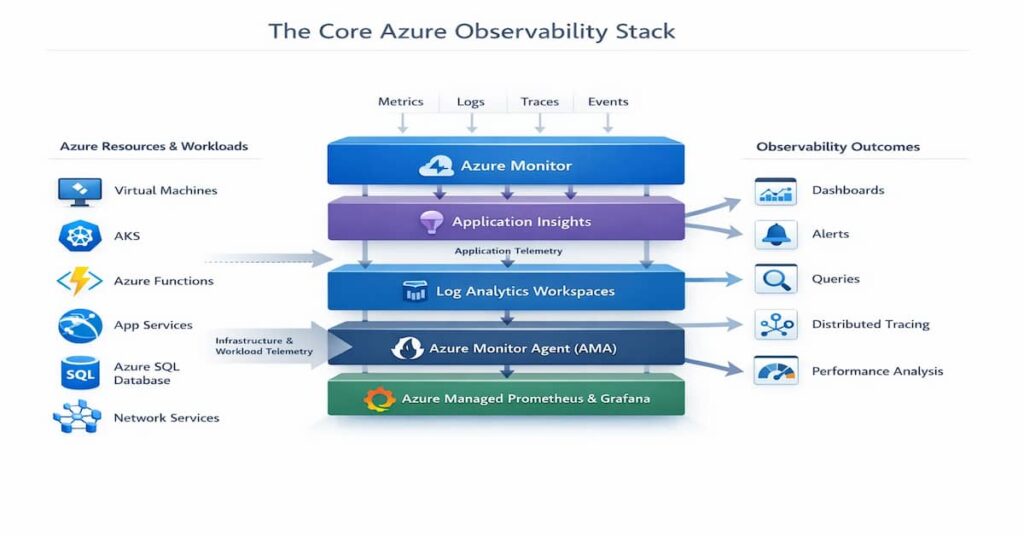
Azure provides a set of native tools that help teams work with data. Each tool serves a different purpose. Some collect telemetry. Others store it, query it, or turn it into something engineers can interpret quickly. Over time, these pieces begin to operate less like separate utilities and more like a connected system. That shift matters because observability rarely depends on a single tool.
One of the easiest ways to understand this is to examine the main components of Azure’s observability stack.
Azure Monitor
Azure Monitor sits at the center of Azure’s monitoring model. It gathers metrics and logs from many Azure services, virtual machines, networking resources, storage systems, and more. In practice, most telemetry flows through this service first. Engineers rely on it to create alerts, examine performance trends, and understand whether infrastructure is behaving normally.
Application Insights
Application Insights focuses on what happens inside the application itself. This tool keeps track of request latency, dependency calls, failure rates, and exceptions. If performance begins to drop, it’s usually one of the first places engineers check. It also shows how requests move between services, which is important in distributed environments.
Log Analytics Workspaces
Log Analytics Workspaces store large volumes of operational logs. When it comes to functional operation, these logs become extremely valuable during troubleshooting. Engineers query the data using Kusto Query Language, usually to investigate incidents or identify unusual patterns across services.
Azure Monitor Agent (AMA)
Azure relies on the Azure Monitor Agent to collect telemetry from machines and compute environments. When this happens, it forwards logs and metrics into Azure Monitor or Log Analytics. Compared with older agents, AMA gives teams more control over how data is collected and routed.
Azure Managed Prometheus and Grafana
For Kubernetes environments, Azure provides managed Prometheus and Grafana. Together, they make it easier to observe container workloads and cluster behavior.
How These Components Connect
These tools form a pipeline rather than isolated products. Agents collect telemetry first. The data moves into Azure Monitor and Log Analytics for storage and analysis.
Key Limitations of Microsoft Azure Observability Tools
Azure provides a solid set of monitoring and observability tools. For many workloads, they work well enough to surface metrics, logs, and traces. Still, once environments grow larger or more distributed, certain limits begin to show. Engineers often notice this during incident investigations or when trying to standardize monitoring across teams.
Looking at a few practical constraints helps explain where these tools tend to fall short.
No Multi‑Cloud Support
Azure’s monitoring stack is designed mainly for Azure resources. That works fine in single-cloud environments. However, many organizations run workloads across multiple clouds or mix cloud with on-prem infrastructure. When this happens, Azure’s native tools struggle to provide a unified operational view.
Lack of Customization
When it comes to observability, it is important to note that dashboards, queries, and alerts are some of the critical tools that provide a quick way to set up monitoring. For simple environments, that’s often enough. Larger systems are harder to track, though. When services interact in complex ways, teams usually need more flexibility than the default tools offer.
Diverse Metrics
Across the platform, services produce many different metrics, but the level of detail is not always the same. Some expose rich telemetry, while others surface only a small set of signals. In practice, that uneven visibility can make system-wide analysis more difficult, especially in distributed applications.
Cost
Observability data grows fast. Logs, metrics, and traces pile up over time, and costs tend to grow with them. In practice, keeping large volumes of telemetry in Azure Monitor or Log Analytics often requires careful cost control.
Azure Observability Architecture at Scale
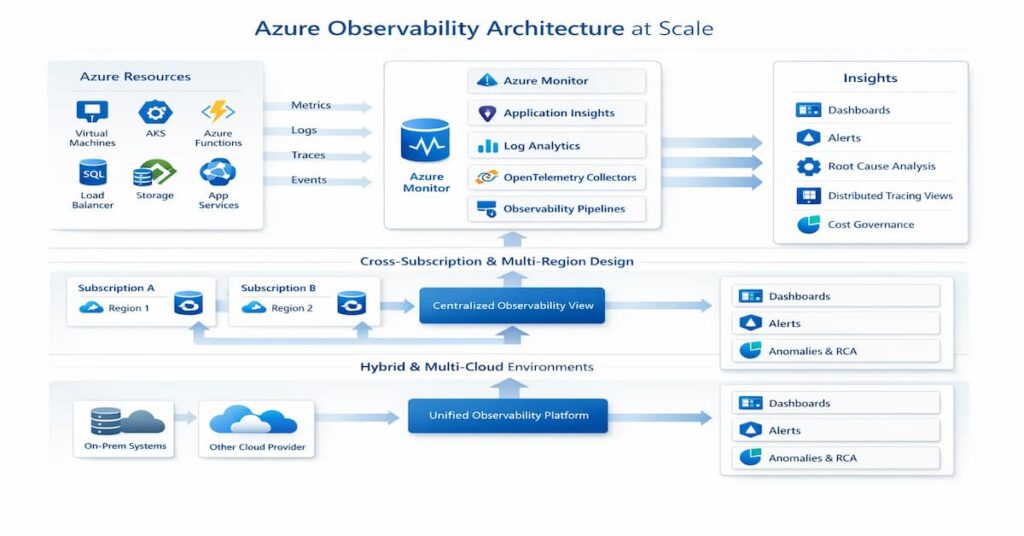
Telemetry Flow from Resource to Insight
Telemetry begins where the workload runs virtual machines, containers, databases, or application services. From there, engineers rely on dashboards, alerts, and queries to interpret the data and understand what is happening in the system.
Cross‑Subscription and Multi‑Region Design
Many organizations operate across multiple subscriptions and regions. Observability pipelines need to bring that data together in a consistent way so teams are not forced to investigate issues in separate silos.
Observability for Hybrid and Multi‑Cloud Azure Environments
Not every workload runs entirely in Azure. Some systems remain on‑premises or operate in other cloud platforms. For example, when telemetry is integrated into the same observability pipeline, engineers gain a broader picture of system behavior and can trace problems across infrastructure boundaries.
Observability for Azure Kubernetes Service (AKS)
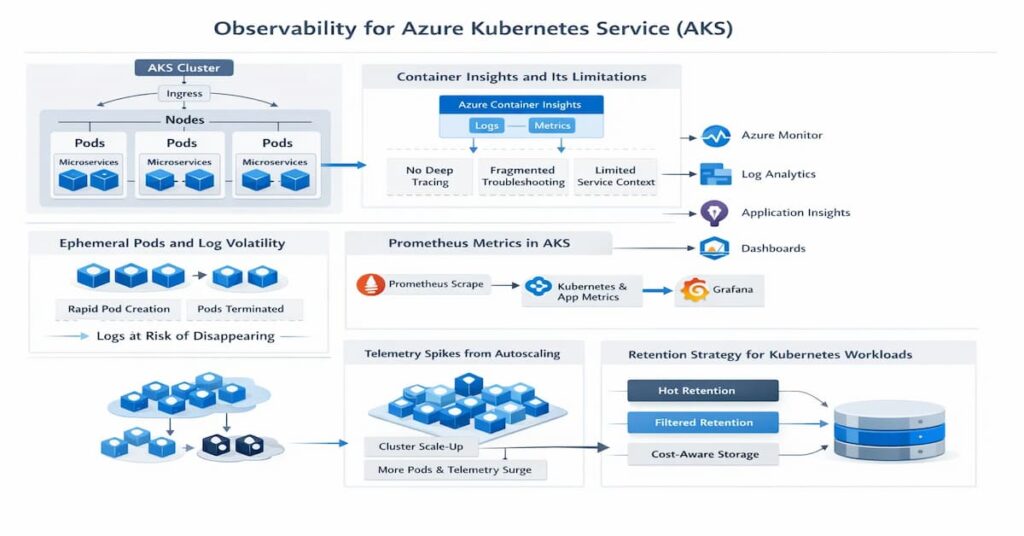
Running Kubernetes in Azure changes how telemetry behaves. Pods start and disappear quickly, containers move between nodes, and autoscaling constantly shifts workload patterns. Traditional monitoring assumptions often break down in this environment because the infrastructure itself is highly dynamic.
Container Insights and Its Limitations
Azure provides Container Insights for AKS monitoring. For engineers working with the teams, they collect metrics and logs from nodes and pods.
Ephemeral Pods and Log Volatility
Pods are temporary by design. When a pod terminates, its logs often disappear unless they are shipped to external storage. When it comes to large systems, this makes centralized log collection essential for reliable troubleshooting.
Prometheus Metrics in AKS
Kubernetes ecosystems commonly rely on Prometheus for metrics. In Azure, managed Prometheus services collect cluster and application signals, giving engineers detailed performance data across services.
Telemetry Spikes from Autoscaling
Autoscaling events can suddenly multiply the number of running pods. In most environments, telemetry volume can spike quickly, sometimes overwhelming poorly designed pipelines.
Retention Strategy for Kubernetes Workloads
Kubernetes generates large volumes of logs and metrics. The catch is that in real deployments, a thoughtful retention strategy helps balance cost, compliance needs, and long-term debugging capabilities.
Real-world scenario: a growing Azure team
A growing SaaS team runs:
- AKS for core services
- Azure Functions for async jobs
- Azure SQL Database for transactional data
- Azure Service Bus / Event Hubs for event workflows
At first, Azure-native monitoring works well:
- Azure Monitor tracks resource health
- Application Insights captures app telemetry
- Log Analytics stores logs for investigation
As the system grows, issues become harder to debug:
- Latency spikes are no longer tied to one resource
- Pod rescheduling in AKS affects performance
- Dependency failures appear across services
- Alerts fire, but root cause analysis is slow
What changes at this stage:
- Monitoring is no longer enough on its own
- Tracing and dependency mapping become more important
- Telemetry needs to be standardized across workloads
- Retention, sampling, and cost governance start to matter
The Cost Model of Observability in Azure
Observability in Azure delivers deep visibility, but it also introduces a cost layer many teams underestimate at first. Every metric, log entry, or trace stored in the platform contributes to usage-based pricing. At a small scale the cost is manageable. As systems grow, however, telemetry volume expands quickly, and spending can rise just as fast.
- Log Ingestion Pricing: Logs are typically the largest cost driver. Services sending data to Log Analytics are billed based on the volume of data ingested, measured in gigabytes. What this means is that when applications produce verbose logs, ingestion costs can increase quickly.
- Metrics and Time-Series Costs: Metrics are generally cheaper than logs, but they still accumulate over time. High-cardinality metrics, frequent sampling, or large numbers of monitored resources can steadily increase time-series storage costs.
- Retention Tiers and Archive Storage: Azure allows different retention periods for telemetry. Short-term data remains in active storage for fast queries, while older data can move to archive tiers. Longer retention improves historical analysis but increases overall storage spending.
- Cross-Region Data Transfer Costs: Telemetry sometimes travels between regions, especially in distributed systems. When logs or metrics move across regions for centralized analysis, data transfer charges may apply.
- How Telemetry Growth Multiplies Spend: As systems scale, telemetry grows with them. Think of a scenario where more services, containers, and requests mean more signals. In such a case, one thing to keep in mind is that over time, without careful governance, observability costs can multiply alongside infrastructure growth.
OpenTelemetry and Azure
Modern observability increasingly relies on open standards. In Azure environments, OpenTelemetry has become an important way to instrument applications without locking teams into a single vendor. Instead of relying only on platform-specific agents, engineers can generate telemetry using a common framework and send it to different backends.
The following areas explain how OpenTelemetry fits into Azure observability architectures.
- Native OpenTelemetry Support in Azure: As services scale, Azure has increasingly supported OpenTelemetry instrumentation. Applications can generate traces, metrics, and logs using OpenTelemetry SDKs and forward them to Azure monitoring services. This approach gives engineers more flexibility than relying solely on built-in agents.
- Exporters and Ingestion Endpoints: It’s common to see that OpenTelemetry relies on exporters to send telemetry data to observability platforms. In Azure environments, exporters typically push data to Application Insights or other ingestion endpoints. This layer determines where telemetry ultimately lands for storage and analysis.
- Context Propagation Challenges in Distributed Systems: In distributed architectures, requests travel across many services. Context propagation ensures trace identifiers move with each request. When this breaks, tracing a request across systems becomes difficult.
- Semantic Conventions and Standardization: OpenTelemetry defines semantic conventions for naming telemetry attributes. This becomes more noticeable when standards are used in systems to maintain consistency across services to enhance query reliability.
Sampling, Retention, and Governance Strategy
Observability generates enormous amounts of telemetry. Without some control, logs, metrics, and traces grow faster than most teams expect. Over time it affects both performance and cost. This starts to matter, and, therefore, a thoughtful strategy can help teams balance visibility with operational efficiency.
The following practices shape a sustainable telemetry strategy.
- Head-Based vs Tail-Based Sampling: Sampling determines how many traces are kept for analysis. Head-based sampling decides at the start of a request whether to record it. Tail-based sampling waits until the request finishes, allowing systems to retain traces that show errors or unusual latency.
- Filtering Before Ingestion: Not all telemetry needs to reach the observability backend. Filtering logs or metrics before ingestion removes unnecessary noise. To put it another way, this significantly reduces storage and ingestion costs.
- Designing Retention by Signal Type: Different signals have different life cycles. Metrics may need longer retention for trend analysis, while logs are often kept for shorter periods. Designing retention policies by signal type helps balance cost and operational value.
- Budget Controls and FinOps Alignment: Observability spending should align with broader cloud cost governance. What most teams forget is that in order to control costs more effectively, they must set ingestion limits, alert thresholds, or budget caps to prevent unexpected cost spikes.
Azure-native vs unified observability platforms
Azure-native tools work well when:
- The environment is mostly Azure-only
- The architecture is still manageable
- The team mainly needs metrics, logs, alerts, and dashboards
- Troubleshooting is still fairly simple
Unified observability platforms make more sense when:
- The team runs AKS or microservices
- Services are distributed across multiple components
- Logs, metrics, and traces need to be correlated faster
- The environment spans subscriptions, regions, or clouds
- Troubleshooting workflows are fragmented
The practical difference:
- Azure-native tools are strong for resource-level visibility
- Unified platforms are stronger for investigation across systems
Teams that need unified logs, metrics, traces, OpenTelemetry support, and deployment flexibility may also evaluate platforms such as CubeAPM alongside Azure-native tooling.
Where Azure-native observability tools fall short
As systems grow, Azure-native tools can become harder to manage at scale.
Common gaps:
- Telemetry is spread across different interfaces
- Troubleshooting workflows become fragmented
- Instrumentation quality becomes inconsistent
- Multi-subscription setups create silos
- Telemetry cost rises as log and trace volume grows
What this means in practice:
- Teams still have the data
- But reaching root cause takes longer than it should
How to choose the right Azure observability approach
If your environment is Azure-only and simple:
- Start with Azure Monitor, Application Insights, and Log Analytics
- Improve instrumentation and alert quality first
- Avoid adding complexity too early
If you run AKS or microservices:
- Prioritize distributed tracing
- Improve dependency visibility
- Standardize instrumentation across services
- Use OpenTelemetry where possible
If telemetry cost is becoming a problem:
- Review noisy logs and high-volume signals
- Apply smarter sampling
- Define retention by signal type
- Separate high-value telemetry from low-value data
If you run across subscriptions, regions, or clouds:
- Centralize investigation workflows
- Reduce telemetry silos
- Standardize naming and query patterns
- Design observability as shared platform architecture
Practical decision framework for Azure teams
Start by identifying the main operational bottleneck.
If the problem is infrastructure visibility:
- Improve Azure Monitor coverage
- Review dashboards, alerts, and service health metrics
If the problem is slow troubleshooting:
- Improve tracing and dependency mapping
- Standardize telemetry across services
- Strengthen context propagation
If the problem is cost:
- Reduce noisy ingestion
- Tune retention
- Use sampling more deliberately
If the problem is scale or complexity:
- Design a centralized observability model
- Avoid per-team or per-service silos
- Standardize telemetry architecture early
When CubeAPM makes sense in Azure environments
- CubeAPM becomes relevant when teams need more than basic Azure monitoring
- It is a strong fit for environments with AKS, distributed services, OpenTelemetry pipelines, and rising telemetry volume
- It is especially useful when teams want unified observability and more control over deployment and cost
- The best use case is not replacing every Azure-native tool, but extending observability where native tooling alone is no longer enough
Best Practices for Observability in Azure
The following best practices help engineers build a scalable and manageable observability strategy in Azure.
- Standardize Instrumentation Early
- Separate Environments and Workspaces
- Monitor Ingestion Volume Proactively
- Align Telemetry with SLOs
Conclusion
Observability in Azure goes beyond basic monitoring. As systems expand across microservices, containers, and managed services, engineers need visibility across logs, metrics, and traces to understand how requests move through the system and where failures originate.
Azure provides strong native capabilities through tools such as Azure Monitor, Application Insights, and Log Analytics. However, as telemetry volume grows and architectures become more distributed, teams must also manage sampling, retention, and cost governance carefully.
A well-designed observability strategy in Azure combines consistent instrumentation, OpenTelemetry standards, and thoughtful telemetry management so teams can maintain deep visibility without allowing operational complexity or costs to grow unchecked.
Disclaimer: The information in this article reflects the latest details available at the time of publication and may change as technologies and products evolve.
FAQs
1. Is Azure Monitor the same as observability?
Not exactly. Azure Monitor gathers metrics, logs, and traces from Azure resources. Observability, however, goes a step further. It combines those signals with context and investigation tools so engineers can understand why a system behaves the way it does.
2. How does Azure charge for logs and metrics?
Pricing mainly depends on how much telemetry you send into the platform and how long you keep it. Logs tend to drive most of the cost because of their volume. Metrics are usually cheaper, though heavy sampling or high-cardinality data can increase usage. Retention settings and moving data across regions may also affect the final bill.
3. Can OpenTelemetry be used with Azure Monitor?
In many environments, applications are instrumented with OpenTelemetry, and the telemetry is exported to Azure Monitor or Log Analytics. For that case, yes.
4. What is the difference between Application Insights and Log Analytics?
On the one hand, Application Insights focuses on how an application behaves in production, while on the other hand, Log Analytics plays a broader role in storing telemetry from multiple Azure resources.
5. How do you reduce observability costs in Azure?
One of the most effective ways that teams can use to minimize observability budgets is to utilize sampling, filter telemetry before ingestion, and adjust retention policies.