










A 400% traffic spike during Black Friday could be good news or a DDoS attack. A 50% drop in database writes at 3 AM could signal a failing payment processor or a quiet night. Static threshold alerts cannot tell the difference. They fire when a number crosses a line, regardless of context. Anomaly detection alerts use historical patterns, statistical models, and machine learning to flag deviations that matter while ignoring expected fluctuations.
According to the CNCF’s 2024 observability survey, 63% of organizations report alert fatigue as a primary barrier to effective incident response. Teams drown in threshold-based alerts that trigger on every auto-scaling event, weekly batch job, or timezone shift. Anomaly detection replaces fixed rules with adaptive baselines that account for daily patterns, seasonality, and normal variance reducing noise while catching real incidents faster.
This guide explains what anomaly detection alerts are, how the underlying algorithms work, practical use cases across infrastructure and application monitoring, tools that implement anomaly detection natively, and how to evaluate whether your current alerting setup needs it.
What Are Anomaly Detection Alerts?
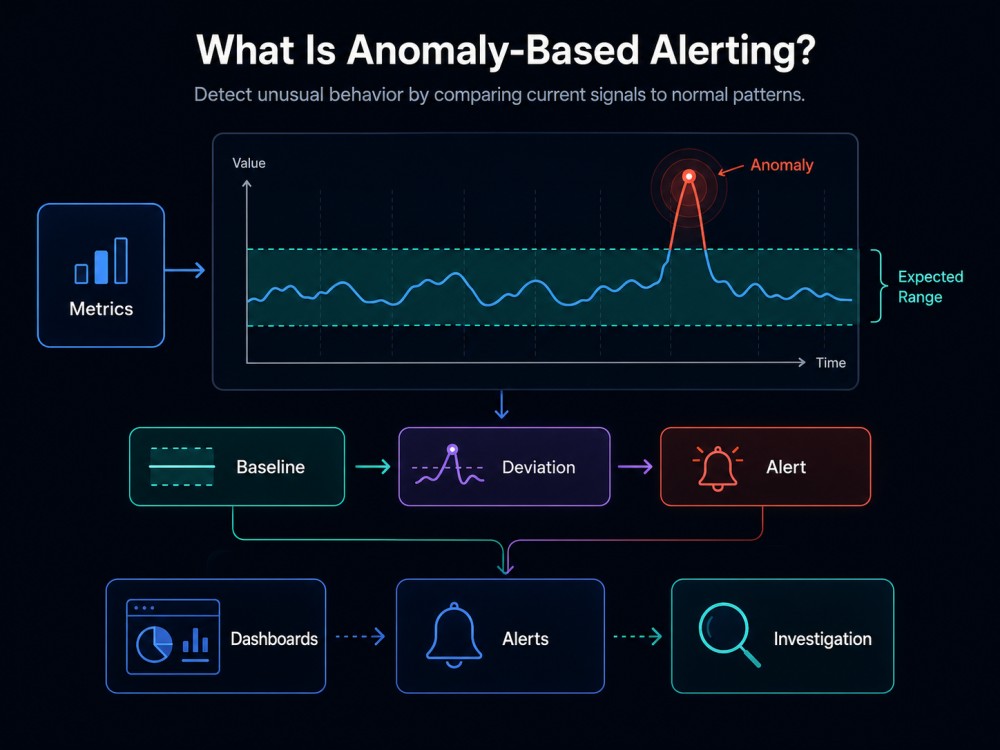
Anomaly detection alerts automatically notify teams when a metric, log pattern, or trace behavior deviates significantly from its expected baseline. Instead of triggering when a value crosses a static threshold like “CPU > 80%” or “error rate > 5%”, anomaly alerts compare current behavior against historical patterns and fire when the deviation is statistically significant.
The core difference from traditional alerting: anomaly detection accounts for context. A 200% increase in API calls at 9 AM Monday might be normal user behavior. The same increase at 2 AM Sunday is an anomaly worth investigating. A fixed threshold treats both identically. An anomaly detector learns that Monday mornings are high-traffic periods and only alerts on the Sunday spike.
Anomaly detection answers a fundamentally different question than threshold alerts. Threshold alerts ask “is this number too high?” Anomaly alerts ask “is this number behaving unusually given what we know about how this metric normally behaves?”
This shift from absolute values to relative behavior makes anomaly detection especially valuable for dynamic environments where normal operating ranges change throughout the day, week, or quarter. Auto-scaling infrastructure, variable traffic patterns, and seasonal business cycles all create scenarios where static thresholds either fire constantly or miss real problems.
The tradeoff: anomaly detection requires a training period to learn what normal looks like. Most systems need at least 7 to 14 days of historical data before they can reliably distinguish anomalies from routine fluctuations. During this learning phase, teams still rely on threshold-based alerts for critical failures.
How Anomaly Detection Works
Anomaly detection systems operate in three stages: data collection and normalization, baseline calculation, and deviation scoring. Each stage introduces statistical or machine learning techniques that determine what counts as unusual.
Data Collection and Normalization
The system ingests time series data from metrics, logs, or traces and normalizes it to account for sampling intervals, missing data points, and outliers. If a metric reports every 60 seconds but occasionally skips an interval, the detection algorithm interpolates or ignores the gap depending on its configuration.
Normalization also handles unit conversions and scaling. CPU utilization measured in percentage points behaves differently from request latency measured in milliseconds. The algorithm applies transformations so that deviations are comparable across different metric types.
Baseline Calculation
The baseline represents the expected value range for a given time window. Simple anomaly detectors use rolling averages and standard deviations. More sophisticated systems use seasonal decomposition, forecasting models, or machine learning.
Rolling averages calculate the mean and standard deviation over the past N data points, typically the last 7 to 30 days. If today’s value falls outside 2 or 3 standard deviations from the rolling mean, it triggers an alert. This works well for metrics with stable behavior, but fails on metrics with weekly or daily patterns.
Seasonal decomposition separates a time series into trend, seasonal, and residual components. It identifies weekly patterns like “Mondays are 30% higher than Fridays” and daily patterns like “traffic drops 80% between 2 AM and 6 AM”. The anomaly detector compares current values to the expected seasonal baseline, not the global average.
Forecasting models like exponential smoothing, ARIMA, or Prophet predict the next N data points based on historical trends. If the observed value diverges significantly from the forecast, an anomaly is flagged. AWS CloudWatch anomaly detection uses a similar approach, building a confidence interval around the forecast and alerting when actual values fall outside that band.
Machine learning models, typically recurrent neural networks or isolation forests learn complex patterns that statistical methods miss. They handle multivariate anomalies where the issue is not one metric spiking but an unusual combination of metrics behaving oddly together. For example, high CPU with low memory usage might be normal, but high CPU with high disk I/O and zero network traffic could signal a stuck process.
Deviation Scoring and Alert Triggering
Once the baseline is established, the system calculates a deviation score for each new data point. This score quantifies how far the current value is from expected behavior. If the score exceeds a preconfigured threshold, often expressed as a confidence level like 95% or 99%, an alert fires.
Most systems allow tuning the sensitivity. Higher sensitivity catches subtle anomalies but increases false positives. Lower sensitivity reduces noise but may miss real incidents. Teams often start with lower sensitivity and tighten it as they gain confidence in the baseline accuracy.
Alert suppression logic prevents notification storms. If an anomaly persists for multiple intervals, the system groups them into a single incident instead of firing a new alert every 60 seconds. Some platforms also suppress alerts during known maintenance windows or deployment periods when unusual behavior is expected.
Key Use Cases for Anomaly Detection Alerts
Anomaly detection solves specific monitoring problems that static thresholds cannot handle effectively. These use cases span infrastructure, application performance, security, and cost management.
Auto-Scaling Infrastructure
Cloud environments scale up and down in response to traffic. A Kubernetes cluster that runs 20 nodes at midnight and 80 nodes at noon would trigger constant threshold alerts if you set CPU thresholds at 50%. Anomaly detection learns the scaling pattern and only alerts when node count or resource usage deviates from the expected auto-scaling curve.
Traffic and Request Rate Monitoring
API request rates, page views, and database queries follow daily and weekly patterns. An e-commerce site sees higher traffic on weekends. A B2B SaaS platform sees lower usage during holidays. Anomaly detection accounts for these patterns and flags unexpected drops in traffic that could indicate a frontend outage or bot attacks that create artificial spikes.
Error Rate Detection
Error rates fluctuate naturally — deployments introduce transient errors, third-party APIs fail occasionally, and user behavior changes. A 5% error rate might be catastrophic for a payment API but normal for a recommendations engine. Anomaly detection compares current error rates to historical error behavior for that specific service, alerting only when the deviation is significant relative to past performance.
Database Query Performance
Database query latency varies with load, indexing changes, and schema migrations. A query that takes 50 ms at 3 AM might take 200 ms at peak traffic — both are normal. Anomaly detection alerts when query latency spikes beyond what is typical for that time of day, catching performance regressions that threshold alerts would miss during low-traffic periods.
Security and Intrusion Detection
Anomaly detection flags unusual login patterns, API access from unexpected geolocations, or privilege escalation attempts. A user who normally logs in from New York between 9 AM and 6 PM suddenly authenticating from Singapore at 2 AM is an anomaly. Static rules cannot capture these contextual signals without creating unmanageable complexity.
Cloud Cost Anomalies
Cloud bills fluctuate with usage, but unexpected spikes often indicate misconfigured resources or runaway processes. AWS Cost Anomaly Detection and similar tools alert when spending deviates from forecasted budgets, catching issues like a developer leaving a GPU instance running over the weekend or a Lambda function stuck in a retry loop.
Anomaly Detection in Observability Tools
Modern observability platforms implement anomaly detection with varying levels of sophistication. Some rely on simple statistical models. Others use machine learning trained on billions of time series data points across their customer base.
Datadog Anomaly Monitors

Datadog’s anomaly detection uses historical data and seasonal decomposition to predict expected metric ranges. You configure an anomaly monitor by selecting a metric, choosing a detection algorithm (basic, agile, or robust), and setting a sensitivity threshold. The monitor displays a gray band representing the expected range. When the metric moves outside the band, an alert fires.
Datadog supports anomaly detection on metrics, logs, and APM traces. The agile algorithm reacts quickly to sudden changes, making it useful for fast-moving metrics like request rates. The robust algorithm ignores transient spikes and focuses on sustained deviations, better suited for infrastructure metrics like CPU or memory.
One limitation: Datadog’s anomaly detection requires at least two weeks of historical data to build a reliable baseline. Teams migrating to Datadog or monitoring new services must rely on threshold alerts initially.
Dynatrace Davis AI
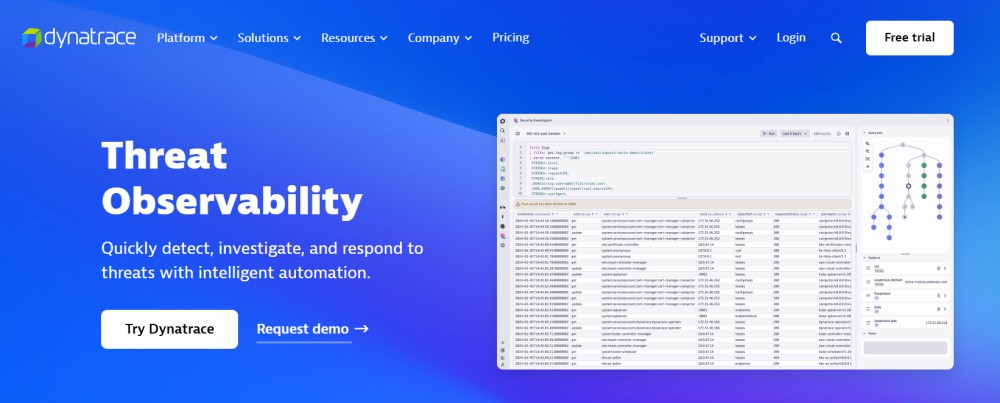
Dynatrace uses an AI engine called Davis that applies machine learning across all telemetry data: metrics, traces, logs, and user sessions. Davis automatically baselines every metric without manual configuration. It detects anomalies by correlating deviations across multiple signals and identifying root causes using dependency graphs.
Davis goes beyond single-metric anomaly detection. It flags situations where multiple services exhibit unusual behavior simultaneously, prioritizing alerts based on business impact. For example, if both frontend latency and database CPU spike together, Davis identifies the database as the root cause and suppresses downstream alerts.
The tradeoff: Davis requires Dynatrace’s full-stack agent deployment and works best in environments where Dynatrace monitors the entire application stack. Teams using Dynatrace for infrastructure only or alongside other APM tools see less value from Davis.
AWS CloudWatch Anomaly Detection

AWS CloudWatch anomaly detection builds a model of expected metric behavior using up to two weeks of historical data. You enable anomaly detection on any CloudWatch metric and it creates a confidence band around forecasted values. Alarms trigger when the actual metric falls outside the band for a specified number of evaluation periods.
CloudWatch anomaly detection integrates directly with CloudWatch Alarms, making it easy to retrofit existing threshold-based alerts. The main drawback: it only works on CloudWatch metrics. Third-party data from Datadog, Prometheus, or custom exporters requires exporting to CloudWatch first, adding latency and cost.
New Relic Anomaly Detection
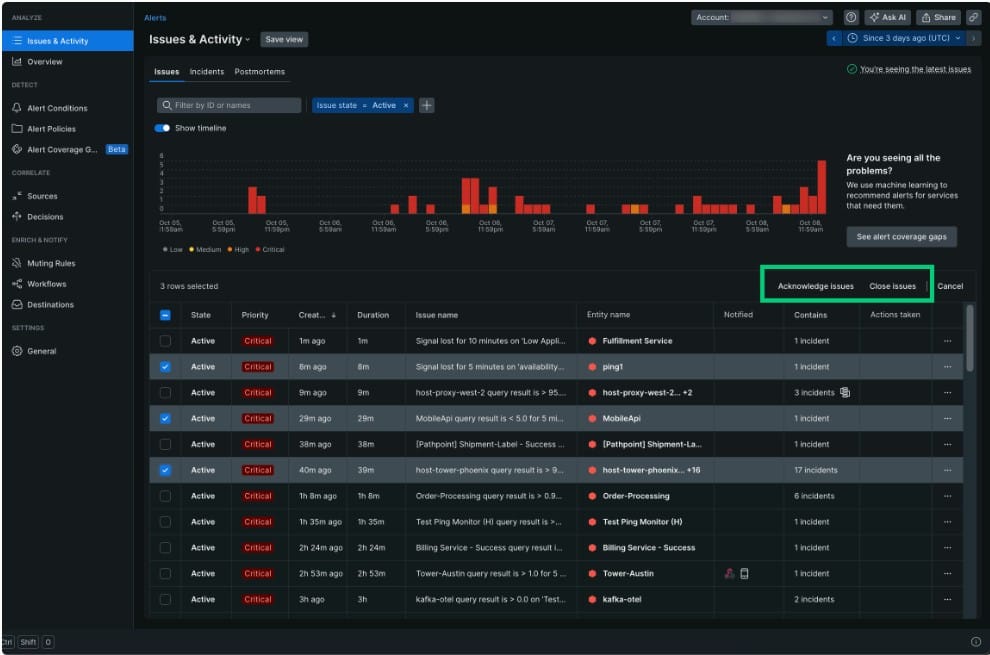
New Relic introduced anomaly detection alerts in 2024, allowing teams to create alerts based on dynamic baselines instead of static thresholds. The system uses historical performance data to establish expected ranges and alerts when deviations exceed configurable sensitivity levels.
New Relic’s anomaly detection applies to metrics, logs, and APM entities. You can adjust sensitivity thresholds and evaluation windows to balance noise reduction with early detection. One notable limitation: New Relic’s anomaly detection is only available in certain subscription tiers, making it inaccessible to teams on lower-cost plans.
CubeAPM Anomaly Detection
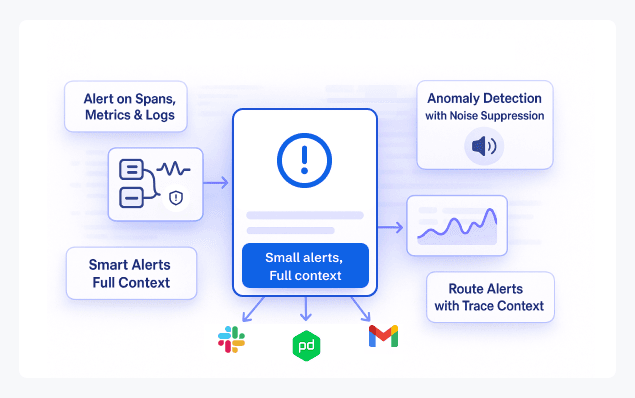
CubeAPM includes built-in anomaly detection across metrics, traces, and logs with noise suppression designed to reduce alert fatigue. You create anomaly-based alerts by selecting a metric or trace attribute and configuring the baseline period and sensitivity threshold. CubeAPM runs the detection model on your infrastructure, keeping all telemetry data and anomaly calculations inside your VPC.
CubeAPM’s anomaly detection integrates with its correlation engine, linking anomalies in metrics to related traces and logs. When an alert fires, the notification includes context from adjacent signals, making root cause analysis faster. Alerts route to Slack, PagerDuty, email, or webhooks with full trace context attached.
Because CubeAPM deploys on premises or inside your cloud environment, anomaly detection runs without sending telemetry data to external SaaS platforms. This matters for teams with data residency requirements or those trying to avoid egress fees from cloud providers.
Choosing Between Threshold Alerts and Anomaly Detection
Anomaly detection does not replace threshold alerts — the two complement each other. The decision of which to use depends on the metric being monitored, the expected behavior of that metric, and the consequences of a false positive versus a missed alert.
When to Use Threshold Alerts
Threshold alerts work best for binary states and known failure conditions. Disk space approaching 100% is always a problem regardless of historical patterns. Memory leaks that push heap usage past 90% require immediate action. Service health checks that return HTTP 500 errors are always failures.
For critical infrastructure metrics where acceptable ranges are well understood and static, thresholds remain the simplest and most reliable alerting mechanism. They fire instantly without waiting for statistical models to confirm a deviation.
When to Use Anomaly Detection
Anomaly detection suits metrics with natural variability, cyclical patterns, or unknown normal ranges. Request rates that fluctuate hourly, API latencies that vary with load, and error rates that spike during deployments all benefit from anomaly-based alerting.
Use anomaly detection when you want to catch unexpected changes without manually tuning thresholds for every service, endpoint, or time window. It reduces the operational burden of maintaining hundreds of threshold-based alerts across dynamic environments.
Hybrid Approach
Most production environments use both. Critical alerts — out of memory, disk full, service down — use thresholds. Performance and capacity alerts — slow queries, increased error rates, elevated latency — use anomaly detection. This hybrid model balances immediate detection of known failures with adaptive alerting for gradual degradation and unusual patterns.
Common Pitfalls and How to Avoid Them
Anomaly detection introduces complexity that can backfire if not configured carefully. These are the most common failure modes and how to prevent them.
Insufficient Training Data
Anomaly detection models need enough historical data to distinguish normal variance from real anomalies. Enabling anomaly alerts on a new service or metric with only two days of data will produce unreliable baselines. Most platforms require at least 7 days; 14 to 30 days is better for metrics with weekly patterns.
Over-Sensitivity
Setting sensitivity too high causes alert storms. Every minor fluctuation triggers a notification. Teams ignore the alerts, defeating the purpose. Start with lower sensitivity and tighten it gradually as you gain confidence in the baseline accuracy.
Ignoring Seasonality
Metrics with strong weekly or daily patterns confuse simple anomaly detectors. A spike every Monday morning is not an anomaly — it is normal business behavior. Use platforms that support seasonal decomposition or explicitly configure the algorithm to account for known patterns.
Deployment and Maintenance Windows
Deployments, schema migrations, and maintenance windows often cause temporary anomalies that are expected and benign. Configure alert suppression or maintenance modes to prevent false positives during these periods.
Correlated Alerts
Anomaly detection on every metric in a dependency chain creates alert storms. If a database slows down, every service that queries it will also show anomalous latency. Use root cause correlation or alert grouping to consolidate related anomalies into a single incident.
Best Practices for Implementing Anomaly Detection Alerts
These guidelines help teams adopt anomaly detection without creating new operational problems.
Start with High-Impact, High-Variance Metrics
Apply anomaly detection to metrics that suffer most from threshold alert fatigue — request rates, latencies, and error rates on high-traffic services. Do not enable it everywhere at once. Prove value on a few critical metrics before expanding coverage.
Combine with Contextual Metadata
Tag anomaly alerts with service, environment, region, and deployment version. This context helps on-call engineers triage incidents faster. CubeAPM automatically attaches trace and log context to anomaly alerts, reducing the need to pivot across multiple dashboards during investigations.
Tune Sensitivity Based on Alert Routing
High-priority alerts routed to PagerDuty should use lower sensitivity to avoid waking engineers for false positives. Lower-priority alerts sent to Slack can use higher sensitivity since the cost of a false positive is just a Slack notification, not a page.
Review and Adjust Baselines Regularly
Application behavior changes over time. A new feature launch, infrastructure migration, or traffic pattern shift can invalidate existing baselines. Schedule quarterly reviews of anomaly alert configurations and retrain baselines when major changes occur.
Use Multi-Signal Correlation
Single-metric anomaly detection catches obvious problems. Multi-signal correlation catches complex issues. If database latency spikes and API error rates rise simultaneously, the underlying cause is likely database-related. Platforms that correlate anomalies across signals reduce mean time to resolution.
Anomaly Detection Alerts in CubeAPM
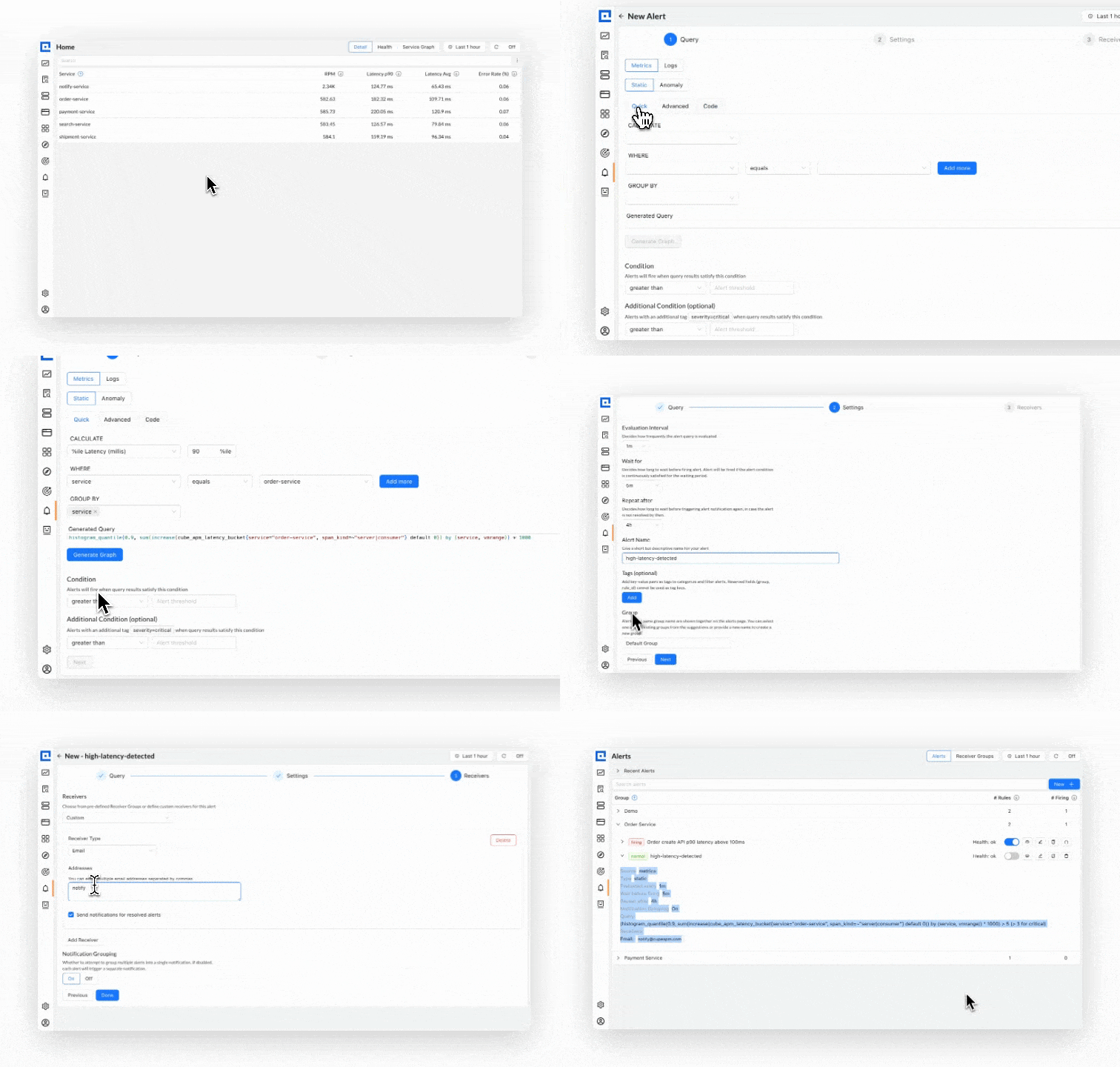
CubeAPM provides anomaly detection across metrics, traces, and logs with built-in noise suppression and correlation. You create anomaly alerts by selecting a metric or trace attribute, defining the baseline window, and setting the deviation threshold.
Anomaly alerts in CubeAPM route to Slack, PagerDuty, email, or custom webhooks. Every alert includes links to relevant traces and logs, eliminating the need to manually search for correlated events during incident response.
Because CubeAPM deploys on premises or inside your cloud VPC, all anomaly detection calculations run on your infrastructure. No telemetry data is sent externally, keeping sensitive metrics and logs under your control. This architecture also avoids cloud egress fees that SaaS platforms incur when sending telemetry out of your cloud provider’s network.
CubeAPM’s anomaly detection integrates with its existing alerting system, so you can combine threshold-based and anomaly-based alerts in a single notification workflow. Teams often start with threshold alerts on critical infrastructure metrics and add anomaly alerts for application performance metrics where normal behavior varies throughout the day.
Disclaimer: The information in this article reflects the latest details available at the time of publication and may change as technologies and products evolve. Features, pricing, and plan limits can change over time. Always verify the latest information directly with the vendor before making purchasing or deployment decisions.
Frequently Asked Questions
What does anomaly alert mean?
An anomaly alert notifies you when a metric, log pattern, or trace behavior deviates significantly from its learned baseline. Unlike static threshold alerts that trigger when a value crosses a fixed number, anomaly alerts compare current behavior against historical patterns and flag statistically significant deviations.
What are anomaly based alerts?
Anomaly based alerts use statistical models or machine learning to establish expected ranges for metrics and other telemetry signals. They fire when observed values fall outside those ranges, accounting for daily patterns, weekly cycles, and seasonal trends. This reduces alert noise in dynamic environments where normal operating ranges change throughout the day.
How rare are anomaly detectors?
Anomaly detection is common in modern observability platforms. Datadog, Dynatrace, New Relic, AWS CloudWatch, and CubeAPM all offer native anomaly detection. The sophistication of the underlying algorithms varies, but the basic capability is widely available across both SaaS and self-hosted monitoring tools.
What is the difference between threshold alerts and anomaly detection?
Threshold alerts fire when a metric crosses a static value, like CPU exceeding 80%. Anomaly detection alerts fire when a metric behaves unusually relative to its historical baseline, like CPU jumping from a normal 40% to 70% at a time when it typically runs at 35%. Thresholds ignore context; anomaly detection adapts to patterns.
How long does it take to train an anomaly detection model?
Most anomaly detection systems require at least 7 to 14 days of historical data to build a reliable baseline. Metrics with strong weekly patterns benefit from 30 days of training data. During the training period, teams should rely on threshold-based alerts for critical failures.
Can anomaly detection replace all threshold alerts?
No. Threshold alerts remain essential for binary failure states like out of memory errors, disk full conditions, and service health check failures. Anomaly detection complements thresholds by handling metrics with variable normal ranges, reducing alert fatigue while catching performance degradation that static thresholds miss.
Do anomaly detection alerts work for logs and traces?
Yes. Platforms like Datadog, Dynatrace, and CubeAPM apply anomaly detection to log volumes, error rates extracted from logs, and trace attributes like latency and error counts. This helps detect unusual log patterns or trace behaviors that indicate application issues before they escalate into outages.